
Business Bluetooth headset | Tanzania buyer guide
HP Poly Focus 620 Headset with Wireless Charging Stand
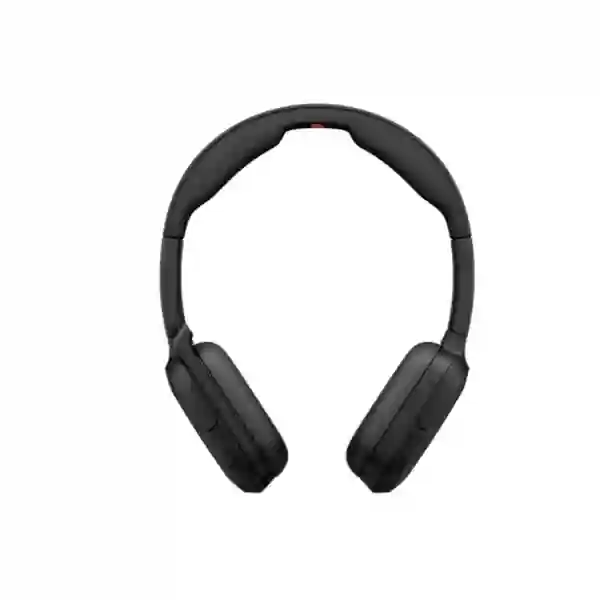
Clearer business conversations, more control over distractions and a consistent place to recharge between meetings. The HP Poly Focus 620 headset with wireless charging stand is designed for call-heavy days, mixed workspaces and practical desk organization.
Compare the verified functions and ordering considerations below, then request confirmation of the exact Tanzania quotation, bundle and support terms.
At a glance
Built for call-heavy work
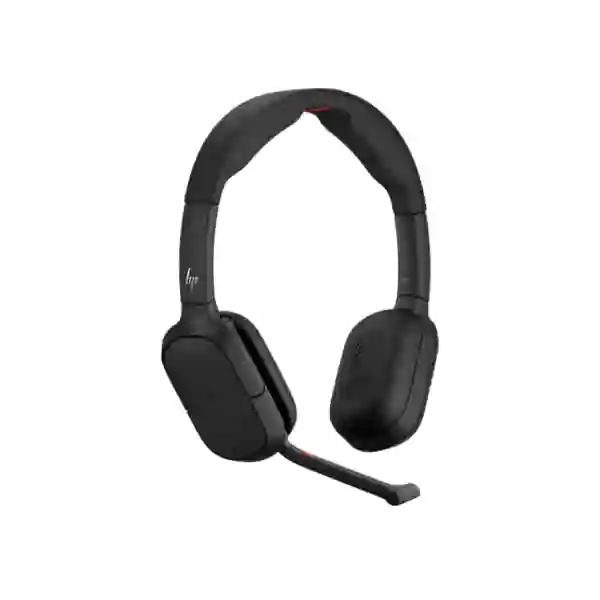
Stereo on-ear Bluetooth design with a hideaway boom, ergonomic headband and replaceable-style cushioning options noted by HP.
Hear less distraction
Hybrid active noise cancellation works on the sound you hear; Transparency mode helps you remain aware of nearby activity when needed.
Let your voice lead
Six onboard microphones in HP’s specification, including four used for outgoing voice noise control with Acoustic Fence 2.0.
Power with less desk clutter
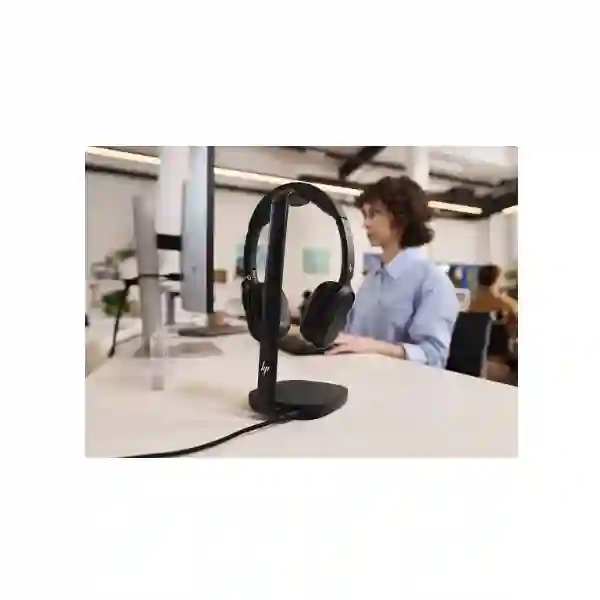
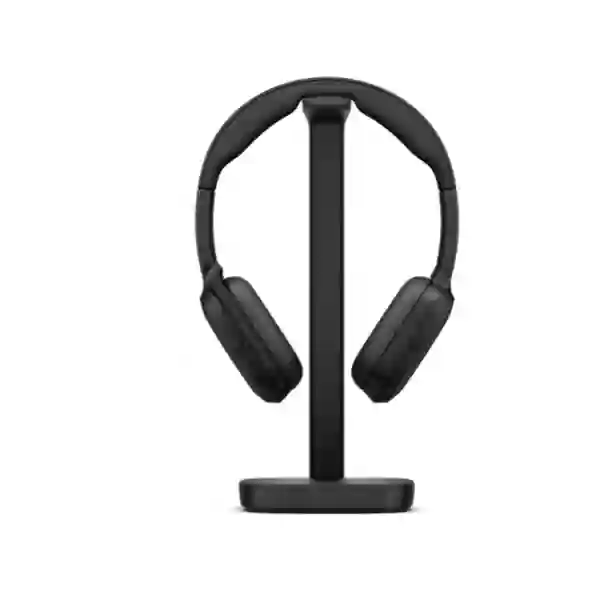
A purpose-designed wireless stand holds the headset ready between calls. This standard stand is for the headset, not a phone-charging pad.
Plan for long meetings
Manufacturer-rated battery life reaches up to 25 hours of talk with ANC and the online indicator on, subject to settings and conditions.
Connect with flexibility
BT700 USB-C adapter, USB-A adapter and Bluetooth support give IT teams options to assess across computers, tablets and phones.
Verified specifications at a glance
Based on HP’s published specifications for the standard headset-and-stand bundle. Platform behavior, supplied regional variants and real-world operating conditions may differ.
| Manufacturer-listed bundle code | D2TP6AA; a manufacturer product identifier, not a verified FourTeck Tanzania SKU |
|---|---|
| Headset style | Stereo, on-ear, non-folding |
| Noise control | Hybrid active noise cancellation; Transparency mode; Acoustic Fence 2.0 voice noise reduction |
| Microphones | Six total, including four configured for voice noise control according to HP |
| Speaker drivers | 32 mm |
| Wireless technology | Bluetooth; HP specification says qualified against Bluetooth Core 6.0 |
| Remembered Bluetooth devices | Up to 10 paired devices |
| Talk-time rating | Up to 25 hours with ANC and online indicator on; up to 30 hours with both off |
| Listening-time rating | Up to 42 hours with ANC on; up to 52 hours with ANC off, online indicator off |
| Charging | Approximately 1 hour wired USB-C or 3 hours on wireless stand |
| Quick-charge reference | Around 10 minutes wired for up to 4 hours talk or 6 hours listening with ANC and indicator off |
| Headset / stand weight | 208 g / 368 g |
| Headset / stand footprint | Approximately 180 × 150 × 53.5 mm / 116 × 106 × 253 mm |
| Operating systems listed by HP | Windows 10/11, macOS, ChromeOS, iPadOS, Android and iOS; features vary by host/application |
| Included computer accessory | BT700 Bluetooth USB-C adapter with USB-C-to-USB-A adapter |
| Other listed bundle items | Travel pouch, spare over-ear cushions, USB-C charging cable, USB-C-to-3.5 mm audio cable, quick-start guide and warranty card |
Who should choose this headset-and-stand bundle?
Choose this configuration when your job involves extended voice meetings and you also want a dependable place to leave your headset between sessions. It is particularly relevant to employees who share a workspace, work partly from home, lead online training, provide remote support, or regularly join cross-company calls. The stand reduces the everyday friction of looking for a charging cable, while the stowable boom is useful when you switch from a formal call to listening to a recording or working quietly.
The bundle is not designed to replace every type of office audio equipment. A dedicated desk phone installation may need additional interoperability checks, and a person who wears a headset only occasionally may find a simpler wired model sufficient. For travel-first users, the non-folding design is worth considering: it is portable with the supplied pouch, but it is not the folding variant sold elsewhere in the Focus range.
For buyers in Tanzania, the central decision is not the advertised maximum feature count; it is whether the user can take calls clearly on the devices and apps used every day. Ask which laptop connections, meeting platforms and mobile workflows need to work, whether an office charging station is valuable, and how many staff require the same setup. A short pilot with representative users provides better purchase evidence than choosing from a feature list alone.
What the wireless charging stand changes on a real desk
A desk stand matters most when a headset is used repeatedly, rather than once a week. After a meeting, the user can return the headset to a dedicated place and make charging part of an ordinary work habit. The standard HP Poly Focus Wireless Charging Stand holds the headset on an upright support and uses magnetic alignment for positioning. HP says the headset can be docked facing forward or backward. This is especially helpful on crowded desks where a cable connector can be difficult to locate.
The no-slip base helps provide a stable location, though users still need a suitable clear area and a powered USB-C connection. Wireless charging is a convenience feature, not the fastest method: HP specifies approximately three hours for a full wireless recharge versus roughly one hour using a direct wired connection. Someone facing a long call soon after arriving should consider the wired method if time is limited.
A key distinction for procurement is that the bundled standard stand is not the same as the separate premium multi-device charging stand. Do not assume the base can also wirelessly charge a smartphone. Teams wanting a phone-charging pad should confirm the different stand model and quote separately. Likewise, an existing stand from an older headset generation should not be presumed compatible with the new charging arrangement without checking the exact accessory.
Microphones, speech clarity and the limits of noise suppression
On a business headset, the person on the other end of a call needs to hear intelligible speech. HP’s Focus 620 specifications list six microphones in total, while its voice-control description highlights four noise-cancelling microphones with Acoustic Fence 2.0. These numbers answer different questions: the total describes the microphone system, while the four-microphone statement concerns speech capture and reduction of nearby background sound. Buyers should not interpret the six-microphone count as six identical boom microphones.
The retractable-style boom puts a microphone closer to the mouth during calls and can be tucked away when it is not needed. In routine use, correct boom placement is important. The manufacturer’s user guidance instructs the wearer to lower the boom and align it with the mouth, rather than leaving it folded up while expecting the same speech pickup. Good technique also means checking the microphone selected inside the meeting application and making a brief test recording before an important presentation.
Noise reduction improves the chance of a clear conversation, but it does not make every background sound disappear. Very loud conversations nearby, wind outdoors, reverberant rooms and unstable internet connections may still degrade the experience. If a role involves confidential conversations, acoustic privacy requires appropriate space and workplace practices as well as a headset. A headset can help communication; it cannot promise that other people nearby will not hear the speaker’s own voice.
Hybrid ANC versus microphone noise reduction
Two noise features are often confused during purchasing. Active noise cancellation, or ANC, is primarily for the person wearing the headset. It uses microphones and signal processing to reduce unwanted sound reaching the ears. This can make a busy office or a home workspace feel less distracting while reviewing documents, listening to a colleague, or taking part in a meeting. The Focus 620 uses hybrid ANC, which HP describes as microphones located both inside and outside the ear cups.
Microphone noise reduction serves a different audience: the colleague who receives your voice. It attempts to distinguish speech from surrounding sounds before audio leaves the headset. Both features can be valuable at the same time, but neither replaces strong network quality, sensible microphone placement or a quiet environment for especially sensitive calls. A good evaluation includes both a listening test and a remote listener’s assessment of transmitted speech.
Transparency mode is useful when the user needs some awareness of colleagues or announcements without removing the headset entirely. It should be selected deliberately based on the task and environment. No ANC mode is a substitute for certified protective hearing equipment in hazardous industrial noise. For office procurement, test the modes in the real workplace rather than relying on a single demonstration in a silent room. Staff who need to hear nearby colleagues frequently may prioritize Transparency access and comfort over maximum isolation.
Comfort during long meetings and focused sessions
The Focus 620 is a stereo on-ear headset, which means its normal ear cushions rest on the ears rather than fully enclosing them. Some users appreciate this design because it feels less enclosing during desk work; others prefer over-ear coverage. Fit is personal, and the best headset is the one a user can wear comfortably through an ordinary workday. HP lists a 208 g headset weight, a slim design, foam-padded artificial-leather cushions and an ergonomic headband with attention to pressure distribution.
When assessing comfort, try the headset for more than a few minutes. Check that the headband is adjusted so the cushions sit centrally, there is no persistent pressure at the top of the head, and eyewear does not create uncomfortable contact points. Test speaking, turning toward a second monitor, and returning to a neutral posture. The ear pads and the position of the boom can change comfort as much as the total weight.
HP’s bundle contents include spare over-ear cushions, but the headset itself is categorized as an on-ear stereo product in its specifications. This distinction matters: a listed spare cushion is not proof that every user will achieve the same ear seal or feel. Workplaces buying multiple headsets should allow a small group with different head sizes and eyewear to test first. A comfortable fit contributes to consistent use; an uncomfortable device may be left on a desk regardless of how strong its technical specification appears.
Understand the battery ratings before planning the day
HP quotes up to 25 hours of talk time when active noise cancellation and the online indicator are enabled. Turning both off raises the stated maximum to up to 30 hours. For listening, HP quotes up to 42 hours with ANC enabled and the online indicator off, or up to 52 hours with ANC and the indicator off. These are manufacturer-rated upper bounds under specified conditions. They are not a promise of identical runtime with every microphone, volume setting, call platform, wireless environment or battery age.
A practical schedule is to place the headset back on the stand whenever a work session ends. That way, the employee does not need to calculate battery percentages before each morning call. For urgent use, a wired USB-C charge is faster than wireless charging. HP states that approximately ten minutes of wired charging can provide up to four hours of talk or six hours of listening with ANC and the online indicator disabled. Actual results still depend on the user’s settings and conditions.
IT buyers should distinguish between single-charge endurance and everyday charging habits. The stand may be worth more than a theoretical extra hour of battery life if it prevents devices being left uncharged. For staff who work away from a fixed desk, plan for portable USB-C power and the correct cable. A weekly reminder to check battery status can help new users establish habits until returning the headset to its dock becomes automatic.
Bluetooth connections: computer, phone and tablet decisions
The HP Poly Focus 620 supports Bluetooth connections and ships in the referenced bundle with HP’s BT700 USB-C Bluetooth adapter plus a USB-C-to-USB-A adapter. This gives a practical choice for supported computers with different port layouts. HP’s specifications also name Windows 10 and 11, macOS, ChromeOS, iPadOS, Android and iOS in its operating-system compatibility list. Being listed does not mean every headset button or app-specific feature behaves identically on each platform.
For a managed office laptop, start by testing the supplied adapter and the meeting application’s device selection. Confirm that the operating system uses the Focus 620 for both input and output and that employees can mute and unmute reliably. For a mobile phone or tablet, use the supported Bluetooth pairing workflow and make a test call. HP says the headset can remember up to ten paired devices, but that figure should not be confused with ten simultaneous active calls or guaranteed seamless switching across all apps.
The user experience depends on the software stack too. Meeting platforms can manage microphone permissions, default devices, audio processing and call-control functions differently. A procurement request should therefore list the important applications rather than simply saying ‘Bluetooth compatible’. Where staff use desktop calling, mobile calling and browser meetings, test each combination, including what happens when a second device rings while one is active. If staff use corporate endpoint security policies, the IT team should also check whether USB Bluetooth adapters are permitted.
Meeting apps, softphones and call-control expectations
Business buyers often ask whether a wireless headset will work with their video-conferencing platform. The right approach is to verify the exact user workflow, not just a logo or an operating-system label. This model includes controls that HP lists for muting, changing volume, answering or ending calls, managing media and accessing Microsoft Teams-related functions. Availability of some call-control features may depend on the installed app, its version, the connection method and policy settings.
A good pilot begins with the most frequent tasks: joining a meeting, selecting the right microphone and speaker, receiving a call, using the mute button, and ending or transferring audio without accidentally changing applications. Browser meetings deserve their own test because the browser may ask for microphone permission independently of the desktop operating system. For softphones, confirm supported integrations with the software vendor or IT administrator if functions such as remote answer or hold are business-critical.
Avoid assuming that listing a Teams control proves every deployment is certified for every Teams feature, or that a USB dongle by itself guarantees advanced calling functions. Before a high-volume purchase, identify any desired certification or device-management capability and check documentation for the exact region, software release and product bundle. This cautious approach gives procurement a usable acceptance checklist and avoids frustration when a headset works for basic sound but not a specific call-control shortcut.
From first pairing to the first successful call
Begin by opening the package and confirming the actual accessories against the ordered bundle. Assemble the stand on a level desk with enough room for the headset to hang without touching other equipment. Connect the stand using the supplied appropriate charging cable and a suitable USB-C power source. Check the status indicator according to the user guide, place the headset securely on the charging support, and allow time for the initial charge. The standard stand’s light indicates charging activity and completion.
For a work computer, connect the BT700 USB-C adapter to an available compatible port, or use the included USB-A adapter if necessary. Pair or connect the headset using the approved workflow, then open the calling application and deliberately choose the headset as both microphone and speaker. Perform an outgoing call to a colleague. Ask the colleague whether they can hear you clearly and check whether the mute indicator and call controls match expectations.
Next, test ANC and Transparency settings in the workspace, confirm the boom is positioned properly for speech, and make a short recording if available. Finally, dock the headset and ensure charging begins as expected. Record any application permissions or device settings that a larger team will need. If an issue occurs, isolate whether it is pairing, application selection, permissions, battery, or connectivity rather than assuming the headset hardware is faulty. This sequence takes the product from ‘powered on’ to a verified working configuration.
Use cases across a typical office day
A customer-support colleague may spend the morning on repeated conversations, with short note-taking breaks. The stand provides a consistent place for the headset between calls, and the boom supports a repeatable microphone position. In a quieter back-office role, a user may switch ANC on while reading an analysis report and then choose Transparency mode when collaboration nearby becomes important. The same physical device supports both patterns without requiring a separate music headset.
An online trainer may need clear voice capture while presenting slides and monitoring participants. Here the key checks are microphone intelligibility, comfortable wear through a long session, reliable mute behavior and adequate network connection. A manager attending meetings on a laptop and receiving a mobile call may value Bluetooth flexibility, but should test switching behavior with the exact applications in use. A hybrid employee moving between home and office should evaluate whether leaving the supplied charging stand at the primary desk fits the travel routine.
These scenarios are examples of possible workflows, not guarantees of compatibility with an unspecified platform or telephone system. They also illustrate why different staff may need different purchasing criteria. A team issuing many devices should define a short test for each role. Buying only by one specification can overlook practical differences between a contact-centre operator, a mobile supervisor, a financial analyst and a person who attends one meeting per day.
A practical Tanzania purchasing checklist
When sourcing a headset for a business in Tanzania, specify the item more precisely than ‘Poly 620 wireless headset’. The required configuration is the Focus 620 non-folding stereo headset bundled with its wireless charging stand. Include the manufacturer-listed bundle identifier D2TP6AA in internal comparison notes if the supplier recognizes it, but ask the supplier to confirm the exact local configuration rather than treating a global identifier as proof of local inventory or a site SKU.
Request a written quotation confirming the headset variant, stand model, included accessories, available keyboard or adapter connections, the quoted currency, tax handling where relevant, delivery terms, and the warranty conditions applicable to the actual supply channel. None of those commercial terms should be inferred from an overseas manufacturer’s product page. If the product is for a team, ask whether replacement cushions, chargers and support arrangements can be sourced when needed, without assuming that any particular accessory is locally stocked.
Before committing, document the operational environment: laptop operating systems, conference applications, desktop phone or softphone requirements, user comfort expectations, charging access and IT security rules. Ask whether a demonstration unit can be evaluated where practical. If users work on unstable internet connections or power-constrained sites, plan separately for network and charging resilience; the headset cannot correct a poor connection. FourTeck Tanzania buyers can use this checklist when requesting a product-specific quote, with commercial and service details confirmed at that stage.
Comparing Focus 620, Fold models and alternative stand choices
Product names in the Focus 6 family are similar enough to create ordering errors. The standard Focus 620 described here is non-folding and comes as a headset-plus-stand bundle in the referenced manufacturer configuration. A Focus 620 Fold is a separate design choice and should not be substituted merely because it shares the 620 number. Likewise, a headset-only package is not equivalent to one containing a stand, even if the audio hardware appears similar.
The normal wireless charging stand is focused on holding and charging the headset. A separate multi-device premium stand is offered within the broader Focus family for buyers interested in charging compatible additional devices. It should not be assumed included with this bundle. Buyers comparing quotes should look for both the words ‘headset’ and ‘wireless charge stand’ and request a clear box-content confirmation. This simple step avoids a false price comparison between different packages.
Comparisons should also account for workplace fit. A folding model may be attractive when compact travel storage is essential. A standard headset with desk stand may suit someone with a fixed office position and frequent calls. A low-cost wired headset may meet the needs of occasional users without Bluetooth administration or charging. Rather than claiming one model is universally best, choose on frequency of use, physical comfort, supported platforms, portability, power habits, audio quality and the complete supplied accessory set.
How to evaluate audio quality fairly
A meaningful headset test includes at least three environments. First, call a colleague from a quiet room to establish a baseline for microphone sound and listening comfort. Second, repeat the call with normal office conversation nearby and ask the listener to compare voice clarity and background noise. Third, test the headset during the kind of long meeting or training session users actually attend, including screen sharing, muting and movement around the workstation where appropriate.
Keep the comparison fair. Use similar microphone positioning and speaking volume, and do not judge solely by what the wearer hears when ANC is on. The person receiving a call is evaluating microphone processing, while the wearer is evaluating isolation, speaker reproduction and comfort. When evaluating Bluetooth reliability, note whether the headset is connected through the supplied computer adapter or through another Bluetooth interface. Different routes may behave differently depending on device configuration and policies.
Evaluate music or media separately from calling. HP lists 32 mm speakers and spatial audio support, but pleasant music playback is not a guarantee of optimum performance for every music preference or professional editing requirement. The product is principally a business communication device. If users need audio monitoring with exact latency or a particular wired protocol, verify those requirements independently. The best result is a short, repeatable acceptance test whose outcomes are documented before ordering a larger quantity.
IT rollout and support considerations for teams
A single headset can be configured by its user; a deployment across an organization benefits from a basic standard. Record the supported operating systems, the preferred connection method, the calling application, the expected microphone and speaker names, and the steps for pairing and re-pairing. Document which USB ports and adapters are permitted by IT security policy. Keep a short troubleshooting guide that begins with battery, connection, app device selection and mute settings.
Design a fair onboarding process. Help each employee adjust the headband, position the boom and understand the difference between ANC and Transparency. Show where the headset should be placed when it is not in use and how to tell whether charging has begun. Make it clear that the wireless stand is a charging accessory, not automatically a Bluetooth base station or a universal phone dock. Support requests often become easier when these expectations are set before the first workday.
For procurement records, maintain the exact approved quote, supplied configuration and any asset labels assigned internally. Do not confuse an internal asset number, an HP product code and a retailer’s SKU. Keep documents describing service coverage and warranty terms for the actual purchase channel. If central fleet-management, firmware administration or certification is required, verify those capabilities for the precise model and current software environment. A scalable rollout is built on validated workflows, not untested marketing assumptions.
Daily handling, cleaning and long-term care
Wireless headsets experience daily movement, skin contact, charging cycles and exposure to ordinary office dust. Encourage staff to return the headset gently to its stand instead of pulling on the boom or placing heavy objects on it. Keep the charging area clear and use a stable, dry surface. The stand needs an appropriate power connection and should not be forced into a position that bends its cable or risks a fall.
Clean the ear cushions and surfaces according to current manufacturer guidance and the materials used. Avoid soaking electronic openings, using harsh chemicals without approval, or putting moisture near a charging connector. Shared-use headsets deserve particular attention to hygiene, fit and any organizational policy on personal versus shared accessories. Replace worn cushions with compatible approved parts rather than assuming all similarly shaped pads are interchangeable.
Battery runtime naturally varies with use and battery aging, so assess deterioration against the user’s actual work pattern rather than the maximum number advertised on a specification sheet. If a headset stops charging, check the power source, cable connection, stand alignment and indicator behavior before escalating for service. Keep the purchase documentation and applicable warranty information available. For a fleet, small handling habits and clear support ownership can prolong practical usability even when individual staff have different levels of experience with Bluetooth devices.
What this bundle does not automatically include or guarantee
Clarity about limitations helps buyers avoid unexpected costs. The standard wireless charging stand is not represented as a phone-charging Qi pad, the Focus 620 in this configuration is not the folding model, and the bundle name by itself is not evidence of a local unit price or stock. Bluetooth support is not a promise that every proprietary telephone system, browser or conferencing feature will work without additional checking. The manufacturer battery figures are maximum ratings under stated conditions rather than guaranteed operating hours for all users.
The USB-C-to-3.5 mm cable appears in HP’s listed box contents, but buyers should verify the supported audio modes for the device to which they intend to connect it. The listed Windows, Mac, mobile and other platforms are broad compatibility guidance; specialized application integrations and control actions may require validation. Even strong microphone processing cannot repair a failing internet connection or ensure privacy in a shared room.
This product also does not replace industrial hearing protection. ANC is intended to reduce ordinary distractions, not certify a user safe in hazardous noise. Finally, international manufacturer’s warranty statements should not be copied as local seller promises without confirmation of the actual supply arrangement. These boundaries are not reasons to avoid a good headset; they are the details that make a purchase decision informed, realistic and easier to support.
Decision guide: when to buy, pilot or choose differently
Buy the standard Focus 620 bundle when the user is on frequent calls, wants the convenience of returning a headset to a dedicated charging station, and has a supported computer or mobile workflow that has been checked. Its combination of speech-focused microphone processing, hybrid ANC and practical stand charging is especially coherent for a fixed or hybrid workstation. The stand is a meaningful part of the purchase, not an incidental accessory.
Pilot before buying a team quantity when employees use a mix of softphones, mobile devices, restricted corporate laptops or shared desks. Ask users to rate call clarity, comfort after extended wear, charging behavior and ease of switching audio sources. A small test can reveal whether the stand’s physical dimensions suit the available desks and whether specific applications deliver the expected mute and call-control experience.
Choose a different package if the stand will rarely be used, compact folding storage matters more than desk convenience, or a wired headset better fits the organization’s security and power needs. If phone charging in the stand base is a requirement, compare the separately identified premium stand rather than assuming it belongs to this bundle. Keeping those choices explicit makes budgets easier to evaluate and gives end users equipment that matches how they actually work.
Questions to send with your product enquiry
To obtain a useful quote, say how many headsets you require, whether they are for individual or shared users, which desktop and mobile platforms are in scope, and which meeting or calling applications are essential. Include any requirement for a headset with the stand in the same box, a spare charging solution, or specific replacement cushions. If your organization issues standard laptops, identify the ports and any restrictions on USB adapters.
Ask the supplier to confirm the exact ordered variant and product contents in writing. Request a separate statement of pricing, currency, delivery arrangements, any local taxes relevant to the order, and the applicable warranty and support process. For larger orders, a practical evaluation of sound quality and fit can be more valuable than a generic compatibility promise.
It is reasonable to discuss the headset as an option for a Tanzanian office or hybrid-work team, but location-specific stock, lead times, maintenance coverage and commercial terms must come from the current quotation. The goal is a purchase that meets a defined user need, with clear acceptance criteria and no assumptions about the differences between similarly named Poly Focus models.
Frequently asked questions before buying
Is the Focus 620 headset wireless?
Yes. HP lists Bluetooth connectivity and supplies a BT700 USB-C Bluetooth adapter with this headset-and-stand bundle, as well as a USB-C-to-USB-A adapter. Mobile pairing is possible on compatible devices. Basic audio and advanced buttons can behave differently across operating systems and apps, so a test call remains worthwhile.
Does the bundle contain a charging stand?
The referenced HP product is specifically the Focus 620 headset plus Wireless Charge Stand bundle. The name matters: other Focus 620 packages may be sold without a stand. Confirm the exact variant and accessories in the written quote rather than relying on a generic product-family image.
Can I charge a phone on the included stand?
The standard wireless stand bundled here is described for headset charging. It should not be treated as a smartphone Qi charging station. HP sells a separate premium multi-device stand in the product family. If phone charging is important, specify the desired stand separately and verify the quoted bundle.
How long does wireless charging take?
HP specifies approximately three hours for wireless charging on the stand, compared with approximately one hour for wired charging. Charging results can depend on the power connection and operating conditions. If a long meeting is imminent, wired USB-C charging is the faster manufacturer-rated method.
What is the battery life with noise cancellation enabled?
HP lists up to 25 hours of talk time with ANC and the online indicator enabled. For listening with ANC on and the indicator off, it lists up to 42 hours. These figures are maximum manufacturer ratings. Volume, usage, connection conditions and battery age affect real results.
What is the difference between ANC and the microphone’s noise control?
ANC reduces some of the background sound heard by the person wearing the headset. Microphone noise control is intended to reduce unwanted sound sent to other call participants. HP describes hybrid ANC and four microphones involved in voice noise reduction. Both functions are helpful, but neither guarantees silence.
How many microphones does the Focus 620 have?
HP’s technical table lists six microphones in the headset, including microphones used for transmission and active noise cancellation. The product overview separately highlights four noise-cancelling microphones with Acoustic Fence 2.0 for call voice processing. The two figures refer to different aspects of the same system.
Is the headset foldable?
No. HP identifies this standard Focus 620 headset as non-foldable. Models labeled Focus 620 Fold belong to a separate configuration. If compact storage for frequent travel is the priority, verify the folding variant rather than assuming all Focus 620 headsets have hinges.
Will it work with Windows, Mac and a mobile phone?
HP lists Windows 10/11, macOS, ChromeOS, Android, iOS and iPadOS. This is broad platform compatibility, not proof that every application and shortcut has the same functionality on all systems. Test pairing, microphone choice, mute behavior and any specific softphone or Teams workflow.
What exactly comes in the box?
HP lists the headset, wireless charging stand, spare over-ear cushions, travel pouch, BT700 USB-C adapter, USB-C-to-USB-A adapter, USB-C charging cable, USB-C-to-3.5 mm audio cable, quick-start guide and warranty card. Ask the seller to confirm contents for the exact supplied regional package.
Can it replace a dedicated contact-centre or desk-phone headset?
It may be appropriate for many voice-intensive software workflows, but the answer depends on the telephone platform, call-control requirements, connection method, shift pattern and IT policies. Dedicated desk-phone compatibility and specialized features should be checked before ordering. A user pilot is the safest procurement step.
How do I request the correct model in Tanzania?
Ask specifically for the non-folding HP Poly Focus 620 headset plus wireless charging stand, and request confirmation of the local package details. HP lists D2TP6AA for the referenced manufacturer bundle. Confirm pricing, availability, warranty, accessories and delivery terms from the actual Tanzanian quotation; no local terms are assumed here.
Is an HP product code the same as a FourTeck Tanzania SKU?
No. A manufacturer’s product identifier helps distinguish one configuration from another, whereas an individual seller’s SKU identifies that seller’s listing. The target site’s SKU was not provided, so this content does not invent or transfer one from another retailer.
Should I pick this model just because it lists a long battery life?
Battery life is only one part of usability. Compare microphone clarity, wearing comfort, application support, desk space and recharge habits. For someone who works at a dedicated desk, the included stand may matter more than the difference between two theoretical battery estimates.
Does the headset eliminate background voices completely?
No. The hybrid ANC and microphone-processing features can reduce distractions and improve call intelligibility, but results depend on the surrounding noise, microphone position and connection quality. For important confidential conversations, use an appropriately private setting and verify audio quality with a remote participant.
Request a configuration-specific quote
Ask FourTeck Tanzania about the non-folding HP Poly Focus 620 headset with wireless charging stand, and specify the number of users, target conferencing apps and any required platform checks. Request confirmation of the exact regional bundle, pricing, availability, delivery and warranty conditions before ordering.
Next step: request product and compatibility confirmation from FourTeck Tanzania.




Reviews
There are no reviews yet.