
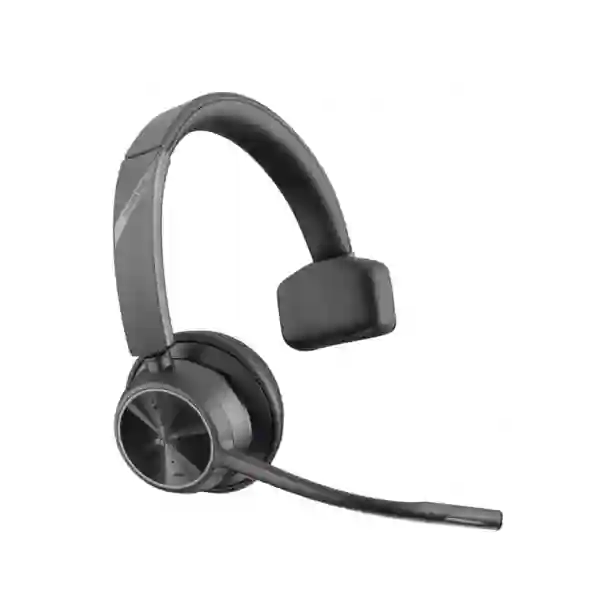
Business communication • Mono wireless headset
HP Poly Voyager 4310 Office Bluetooth Headset
Handle work calls with one ear on the conversation and the other aware of the office. The Voyager 4310 combines a lightweight mono design, a microphone boom with Poly Acoustic Fence technology and versatile computer and smartphone connection options.
Choose the correct USB connector, UC or Teams model, and accessory package for your workplace. A compatible Voyager Office Base is required for supported desk-phone connections and is distinct from a basic charging stand.
For Tanzania purchase enquiries, request a model-specific quotation and confirm the complete configuration before ordering.
At a glance
Single-ear fit
Stay aware of the office while listening to calls
Acoustic Fence microphones
Designed to reduce background sound reaching callers
Bluetooth + BT700 choices
Choose a suitable adapter for your computer
Office Base option
Requires separate, compatible interface for desk phones
Who this headset is designed for
An office headset should make it easy to hear a customer, explain a problem and move between tasks without forcing the user to hold a phone. The HP Poly Voyager 4310 Office Bluetooth Headset addresses that practical need for people who spend a substantial part of the workday on voice calls. Its mono design covers one ear while leaving the other ear open to the surrounding office. That is useful for reception teams, account managers, administrative staff, hybrid workers and supervisors who must remain responsive to colleagues.
This is not a general-purpose noise-isolating entertainment headset. It is primarily a work communications tool with a microphone boom, accessible call controls and options for computer and smartphone connectivity. Buyers considering it for Tanzania should start with the calling devices already in use and the work environment rather than simply comparing advertised Bluetooth versions. The correct version and accessories have a greater effect on daily usability than an unfamiliar part number on its own.
The immediate buying answer
Choose the Voyager 4310 when a single-ear headset, clear outgoing speech and wireless movement around a desk are more important than blocking the room from the wearer. It fits work patterns where employees alternate between speaking to clients, listening to nearby colleagues and entering information into a computer. The headset can help remove a cable from the everyday calling position, while a compatible wired USB mode can offer a useful fallback when an appropriate cable and setup are available.
Before committing, confirm three things: whether calls originate on a computer, smartphone or traditional desk phone; whether the computer needs a USB-A or USB-C adapter; and whether the organisation specifically requires a Microsoft Teams variant. Also check whether a charging stand is wanted. A desk-phone deployment adds a separate question about the compatible Voyager Office Base. Asking these questions early prevents a headset that is mechanically comfortable but unable to connect to the intended telephone.
Mono headset design and room awareness
The Voyager 4310 is a monaural, on-ear headset. One earcup carries the call audio while the other ear remains uncovered. This is a deliberate advantage for staff at a front desk or a shared office who need to acknowledge a colleague, hear a visitor arrive or monitor activity around the workstation. An adjustable headband and light single-ear design are intended for working conversations rather than complete acoustic isolation. HP lists a headset weight of approximately 122 grams for a documented Voyager 4310 configuration.
Room awareness can also be a compromise. In a consistently loud environment, an open ear may mean the wearer hears more nearby conversation, air conditioning and general activity. Someone editing recordings, working in a very noisy room or needing greater personal concentration might prefer a stereo headset with different acoustic characteristics. Choosing mono should therefore be an intentional response to the job, not an assumption that one headset style is best for everyone.
How Poly Acoustic Fence helps calls
The flexible microphone boom is designed to capture the speaker’s voice while reducing distracting environmental sound sent to the other party. Poly describes its dual-microphone Acoustic Fence technology as a way to focus outgoing call audio on the person’s speech. In customer conversations, that means the person listening remotely may experience less interference from neighbouring desks than with an unsuitable laptop microphone. It is particularly relevant to busy reception areas and shared workstations where many short calls happen each day.
There is an important technical distinction: microphone noise reduction is not the same thing as active noise cancellation for the person wearing the headset. The Voyager 4310’s noise-control emphasis is on outgoing voice. Its single earcup does not seal both ears against the room. Voice quality still depends on microphone position, the remote calling application, network conditions and the actual acoustic environment. A practical evaluation should include test calls from the intended workstation during normal office activity.
Call clarity depends on the whole system
A headset can improve the capture and delivery of speech, but it cannot correct every problem in a calling chain. Distorted audio can also result from weak internet connectivity, a congested local network, unsuitable application audio settings, an incorrectly selected microphone or a mobile network problem. For softphone and meeting use, make sure the application recognises the Voyager 4310 as the preferred input and output device. A short test with a colleague confirms far more than seeing a Bluetooth connected icon.
For business deployment, test three ordinary scenarios: a quiet one-to-one discussion, a call while others are speaking nearby and a longer conversation when the user turns or moves. Ask the remote listener about volume, speech intelligibility and distracting sounds. Confirm that mute behaves predictably. Repeat the test on the actual calling software, because a successful mobile phone call does not establish that every computer softphone control will behave in exactly the same way.
Wireless freedom with the BT700 adapter
HP quotes up to 50 metres of wireless range for the Voyager 4300 UC family with the BT700 USB Bluetooth adapter under favourable conditions. That headline figure is useful for understanding the category of headset but should not be treated as a guaranteed distance through walls, doors and occupied office floors. Building materials, radio interference and workstation layout all influence the usable range. In a typical office, the practical benefit is being able to stand, reach a filing area or move around a nearby workspace during a call.
The supplied BT700 connector varies with the package: some Voyager 4310 configurations include USB-A and others USB-C. Those are physical connector formats, not different sound-quality levels. A modern laptop may use USB-C, while a desktop tower or established office docking station may offer USB-A. Check the free ports on the real machine and consider whether a dock or adapter will remain attached. An accurate quote should specify the connector, because a vague instruction to buy a Bluetooth headset can leave the wrong USB device on a desk.
Computer calling and softphones
For computer-based calls, a suitable Voyager 4310 package uses the included BT700 Bluetooth USB adapter to provide the headset connection. HP also describes a corded mode for the series using a compatible USB connection. This combination makes the headset attractive for users working with laptop meetings and softphone applications. Instead of reaching for a handset each time a call arrives, users can answer, speak, mute and adjust listening volume through controls designed for business calling.
Application integration should be verified before large orders. Being able to hear audio through a computer is different from every software feature, hardware button or call-control command being certified. Organisations may use Microsoft Teams, Zoom, a browser-based contact-centre solution or a proprietary telephone client. Check the exact Voyager 4310 variant, current operating-system support, the intended application and any required device-management setup. A brief pilot across the actual software image is especially valuable where many headsets will be distributed.
Smartphone connectivity and mixed-device work
HP describes smartphone connections over Bluetooth for Voyager 4310 models. That allows a worker to use the headset for mobile calling rather than always holding a handset. It can be useful for field coordinators returning to the office, managers who alternate between mobile calls and laptop meetings, and staff who need to keep their hands free for notes. Pairing procedures and connection limits depend on the exact model and firmware, so consult the supplied product guide before assuming a particular number of stored devices.
Mixed-device use deserves a workflow test. A laptop meeting notification and an incoming smartphone call can arrive close together, but the way audio is prioritised may depend on the devices and applications involved. Confirm how the user answers a call, switches sources, ends a call and returns to the earlier conversation. If an office relies on formal call routing, recording or queue management, those functions live in the telephony platform and should not be attributed to the headset merely because it offers Bluetooth connectivity.
Desk-phone calls need the correct Office Base
The phrase office headset can easily be misunderstood. The Voyager 4310 can be part of a desk-phone setup, but HP identifies the compatible Voyager Office Base as the accessory that provides the connection between the supported headset and certain desk phones. A normal charging stand is a convenient cradle for powering a headset; it is not equivalent to that interface base. A package advertised simply as a Voyager 4310 headset with charge stand should therefore not be assumed to include desk-phone functionality.
A compatible base generally connects to the computer and desk phone using the appropriate supplied interfaces, while the headset can also serve mobile calling. Nevertheless, the specific desk-phone model, port arrangement, answer-and-end behaviour and any extra cabling or electronic hook-switch accessories must be checked. The correct base variant also matters. Buyers should share the telephone make and model with the quotation request and ask the supplier to confirm the required components before purchasing a fleet.
Charging stand versus Office Base
There are two accessories to distinguish. A charging stand provides a tidy, accessible place to charge and store a suitable headset at a workstation. It can reduce the everyday problem of a headset being left unplugged between calls. An Office Base is a different device intended to support computer and desk-phone connection scenarios for compatible Poly headsets. It also serves as a headset base and charger. Neither name should be substituted for the other in a purchasing schedule or inventory record.
The distinction matters when staff move between home and office. A worker who mainly joins laptop meetings may be satisfied with a BT700 adapter and charging cable, perhaps with an optional stand for the desk. A receptionist with a physical desk telephone may need the compatible Office Base and phone-specific wiring. For accurate budgeting, separate the headset, USB adapter, charging solution and telephone interface into distinct line items, then confirm what is included in the offered bundle.
Understanding the battery figures
HP’s published specifications for documented Voyager 4310 packages include up to 24 hours of talk time with the online indicator disabled and up to 18 hours when that indicator is enabled. HP also lists up to 47 hours of music listening and an approximate full charging time below 1.6 hours for certain configurations. These are manufacturer-rated figures obtained under specified conditions, not promises that every call-heavy user will experience the same results. Volume, connection state, age of battery and actual usage change real runtime.
For a customer-service workstation, the useful question is whether the headset can cover the longest normal shift with margin for unexpected calls. Even when the battery rating appears generous, a practical charging routine matters. Staff can check battery prompts, put the headset on its intended charger between work periods and prepare a backup for critical communications. Where users rotate across shifts, plan shared-headset hygiene and charging arrangements separately rather than treating the battery figure as a complete operational policy.
Practical charging habits
A headset only delivers the expected mobility when it is ready at the start of the workday. If a package has a charging stand, place it where the user can dock the headset without moving cables behind monitors. Where the package supplies a charging cable instead, choose a consistent, accessible charging position. Staff should know the meaning of low-battery voice alerts and avoid leaving the headset discharged through extended periods. These habits are simple but make a significant difference to everyday availability.
For teams sharing a limited number of devices, label the assigned headsets and confirm which charging equipment belongs with each. Do not assume every USB cable, dock or stand supports the same model. Follow the supplied HP Poly user guide for the permitted charging connection. If the organisation routinely hosts long calls without breaks, evaluate the supported corded USB mode and test the exact cable, computer port and application configuration before relying on it as the only fallback.
Call controls that reduce interruptions
The Voyager 4310 family provides controls for answering and ending calls, mute, volume adjustment, power and pairing. Having these functions close to the wearer is useful when speaking to a customer while using another application or reading a document. The boom-mounted mute control can provide a quick way to prevent a side conversation from reaching the caller, while voice prompts help communicate operating state. HP also describes dynamic mute alerts in the series, although exact behaviours should be checked against the purchased version.
A good deployment teaches these controls explicitly. New users should practise answering, muting, unmuting and hanging up inside the office’s main calling application. Someone accustomed to a telephone handset may expect lifting a headset or pressing any button to answer every incoming call, which is not assured across all applications. A five-minute orientation can prevent accidental muting and missed calls. Device-control integration should be part of acceptance testing, particularly for teams using a specialised contact-centre client.
SoundGuard and sensible listening
HP lists SoundGuard Digital acoustic-protection technology in Voyager 4310 product specifications. Its purpose is to address aspects of potentially uncomfortable listening exposure through supported headset audio processing. It should not be interpreted as a substitute for reasonable volume settings, workplace hearing guidance or a professional assessment of exceptionally noisy environments. Sound protection features also do not establish that the headset provides isolation against outside noise, because the Voyager 4310 is a mono on-ear design.
Users can support comfortable listening by starting calls at a moderate volume and adjusting only as needed. If people repeatedly increase volume to overcome room noise, the organisation may need to review the workspace, telephone audio settings or headset style. Background noise and high playback volume are separate concerns. A remote caller hearing less office noise through Acoustic Fence does not automatically mean the headset wearer hears less of the room. That difference should be clear in any purchasing decision.
Comfort through a normal working day
A headset worn for several calls each day must be comfortable during ordinary movement. The Voyager 4310’s single-ear structure and adjustable headband make it a candidate for office workers who want less coverage than a stereo headset. An on-ear cushion rests against one ear, which may feel lighter or more open to some users but less isolating to others. Comfort remains individual; ear shape, glasses, hairstyle and headband adjustment can change the experience in ways that technical specifications cannot fully predict.
Before standardising on one design, let a representative group wear the headset during actual work for a reasonable evaluation period. Include people who use glasses, spend long periods on calls and alternate between sitting and standing. Ask about pressure, secure fit and where the microphone boom sits. A headset that sounds excellent in a short demonstration may still need adjustment for someone working an extended shift. Replaceable consumables and maintenance policies should be verified for the exact variant and supplier arrangement.
Hybrid work and carrying the headset
Hybrid working introduces a different kind of requirement: the headset must travel between locations and reconnect without interrupting the first call of the day. HP lists a travel pouch with several documented Voyager 4310 packages, although the contents of the exact offered configuration should be confirmed. A lightweight mono headset can be convenient to carry with a laptop, USB Bluetooth adapter and charging cable. It is particularly practical for employees whose home and office calling setup uses the same approved applications.
Keep accessories together during travel. The BT700 adapter is small enough to misplace, and a replacement is not automatically included with an unrelated headset or laptop. Staff should know how to check the active microphone and speakers after docking or undocking their computer. A stable headset does not remove the need for dependable internet, quiet-enough space and power at the working location. Hybrid deployment succeeds when the device, calling software and user routine are planned together.
Reception and front-desk use
Reception staff often need to speak to a caller while noticing a visitor or responding to a colleague. The Voyager 4310 mono design is useful when that awareness is genuinely part of the job. A flexible microphone boom can help the person on the line hear a more consistent voice than they might hear from a laptop positioned off to one side. Users can keep both hands available for calendars, visitor registers or customer records while the call remains active.
But reception is also where desk-phone assumptions can cause trouble. If incoming calls come through a physical telephone, ask about the compatible Voyager Office Base and desk-phone model. If calls arrive only through a computer softphone, verify the BT700 variant and application controls instead. For busy front desks, validate ring indication, call pickup, transfers and hold behaviour within the telephone system. These features are influenced by the calling platform and its integration rather than the headset alone.
Customer support and service desks
For a service desk, headset selection is less about appearance and more about predictable daily calls. A mono Voyager 4310 can suit agents who need to hear their team leader while explaining issues to customers. Background-noise reduction on the boom microphone helps support clearer speech capture when coworkers are nearby. Wireless operation can allow a user to reach a reference document or walk briefly around a workstation without deliberately removing the headset each time.
The purchase decision should nevertheless reflect call volume and process requirements. Teams using recording, quality monitoring, advanced call queues or supervised calls must verify those functions in their telephony application. A headset cannot add these services by itself. Evaluate integration, microphone intelligibility, battery routine, availability of spare cushions and device-management practices. For dense seating where many employees use wireless headsets, test wireless performance and consider whether the environment is appropriate for the intended Bluetooth deployment.
Sales teams and account managers
Salespeople and account managers often alternate between mobile calls, video meetings and checking information on a laptop. The Voyager 4310 offers a way to use a familiar headset across supported computer and smartphone workflows. The mono earcup is appropriate when people want to remain aware of colleagues or office announcements. The noise-reducing boom is valuable when a person needs to explain a quotation or answer a detailed customer question while others nearby are working.
The best buying test is not simply whether the headset pairs to two devices. Ask a representative user to complete a normal sequence: a laptop call, a mobile call, a change of microphone in a meeting and a return to laptop audio. Check whether the organisation’s approved application supports the required call controls. If a sales role involves travel, compare the convenience of the travel pouch and USB connector with the setup of that user’s actual laptop. Match the package to workflow.
Managers who move between meetings
Managers often join shorter meetings from different rooms and need quick access to mute and call volume. A wireless mono headset can reduce dependence on the computer’s built-in microphone, particularly when the screen is at some distance from the user’s mouth. The Voyager 4310’s boom and accessible controls make it a plausible option for scheduled online discussions, spontaneous calls and mobile conversations. Its value comes from a repeatable setup rather than the claim that it can replace every meeting-room audio system.
In a shared meeting room, a personal headset is generally intended for one participant, not for collecting voices around a conference table. If several people must speak from the same room, assess a suitable speakerphone or room-audio solution instead. For an individual participant, confirm the correct software microphone, listening level and selected connection before starting. The mono design also means the wearer may hear the surroundings more clearly than with a headset that covers both ears.
Microsoft Teams variant decisions
HP offers Microsoft Teams certified Voyager 4310 configurations as well as UC-labelled configurations. The distinction matters to organisations that standardise on Microsoft Teams for calling and meetings. A Teams-certified product is the more relevant choice when a purchase specification explicitly requests that certification. Other compatible communications platforms may still provide audio, but a formal certification claim should only be made for the exact published variant. The product-family name alone does not establish the certification attached to a particular boxed unit.
When requesting a quote, specify whether the organisation needs Teams certification and whether the BT700 adapter must be USB-A or USB-C. Clarify the intended operating system and whether a charging stand is required. Do not rely on a retailer’s shortened title to identify the correct variant. If the headset will be used with a non-Teams contact-centre application, test its normal audio operation and call-control integration before rollout. A successful connection does not guarantee every software-specific command will be available.
USB-A or USB-C: choose by equipment
USB-A is the familiar rectangular connector on many desktops and older docking stations. USB-C is the smaller reversible connector common on newer notebooks and docks. Both connector options appear in Voyager 4310 family packages, but the supplied BT700 adapter must match the ordered configuration. This choice does not change the fact that the headset itself is wireless for normal use. It determines how the computer communicates with the supplied adapter and how convenient the setup will be.
Before placing an order for multiple staff, inspect the device fleet rather than guessing based on a single laptop. Some computers may have occupied USB ports, while others rely on docks or limited adapters. Decide whether the adapter will stay in the computer, a dock or a secured workstation. Consider accidental removal and the replacement process. A clear purchase specification can say, for example, Voyager 4310 mono headset with the required BT700 connector and platform variant, then separately state any stand or Office Base requirement.
UC variant and application compatibility
A UC version of the Voyager 4310 can be considered when the organisation uses general unified-communications tools or a mix of approved calling applications rather than specifying Microsoft Teams certification. The essential procurement question is what the exact UC model has been tested or certified to do. Bluetooth audio support alone is not a substitute for checking computer operating systems, phone software, application versions and administrative restrictions. Even with a recognised audio device, a softphone may handle call answer and mute status differently.
Where a business runs a custom contact-centre application, involve the telephony administrator in the evaluation. They can check supported headset controls, audio-routing policy and any device-specific integration. Where staff join meetings from a web browser, verify browser microphone permissions and correct system-default devices. The headset should be tested on the standard corporate computer build rather than on a personal test machine with different software. This is the best way to avoid surprises after wider distribution.
Managing multiple headsets
When an office acquires several headsets, a little preparation creates a more reliable setup. Keep a record of assigned users, the exact model variant, adapter type and included accessories. Identify which units are configured with Microsoft Teams and which are intended for other applications. A device-management process can help administrators review settings and updates where supported by HP Poly’s software. The specific tools and permissions available should be checked against the organisation’s operating systems and security policies.
The practical benefits of an inventory are simple. A missing USB adapter can be traced to a workstation. A replacement charging solution can be matched to the correct unit. An employee moving departments can retain an appropriate configuration or exchange it for a different one. Businesses can also plan spare headsets for critical roles rather than relying on every individual battery and accessory remaining available at all times. These operational details often matter more than a minor headline specification.
Initial setup for a computer
Start by confirming the delivered unit’s exact package and adapter connector. Charge the headset using the approved equipment, plug the BT700 adapter into the intended computer port and follow the included HP Poly instructions for pairing and power. On the computer, choose the headset as the microphone and speaker in the communication application. If an organisation uses a managed workstation, its IT settings may control Bluetooth, USB accessories or application permissions, so a headset test should occur under the employee’s normal account.
Next, place a real test call. Check that the person at the other end hears clear speech, that the wearer hears the caller at a comfortable volume and that mute responds as expected. Move a short distance from the workstation and observe whether the connection remains stable. Record the configuration that works so employees can repeat it after an operating-system update or laptop replacement. If call controls behave differently from expectation, consult the official setup guide and the calling-software administrator.
Initial setup with a smartphone
A compatible smartphone can connect to the Voyager 4310 over Bluetooth using the pairing procedure in the headset guide. Users should confirm that the phone routes call audio to the headset and that the microphone is active. It is worth testing an incoming call, an outgoing call and a return to the handset’s own audio. Some mobile applications use their own device selection or permissions, so a telephone call and an app call may not behave identically.
For employees who keep the headset associated with both a computer and phone, teach them how to recognise which device owns the current audio session. A missed call may be a routing or notification issue rather than a fault in the headset’s speaker. Verify the specific model’s multi-device behaviour, firmware and current software configuration before documenting internal instructions. Avoid telling staff to unpair and re-pair continuously if a more suitable supported configuration or update can resolve the underlying problem.
Checking desk-phone compatibility properly
A business with desk telephones should begin with the telephone make, model and available headset port, not with the headset’s Bluetooth badge. HP identifies the Voyager Office Base as the accessory for supported Voyager 4310 desk-phone scenarios. The base, telephone interface cable and any additional call-control component must be compatible with the actual system. A telephone that provides an audio connection may still need a separate solution for remote answer, end or hook-switch control.
A useful compatibility check asks five questions. Which telephone model is in use? Is there a headset port? How will call audio connect? How will the user answer and end a call? Does the intended office base support the required functions? Check the most recent HP Poly instructions and telephone documentation before proceeding. For a larger site, install one representative workstation first. If that sample works through a normal inbound and outbound call, the organisation has stronger evidence for scaling the same configuration.
Where the advertised range may not apply
Wireless-range figures are measured under favourable conditions and should be used for comparison, not as a floorplan guarantee. HP’s Voyager 4310 specifications show up to 50 metres with the BT700 adapter and quote a higher figure for certain Office Base configurations. Real working distance depends on walls, partitions, nearby radio devices, office geometry and the path between headset and adapter or base. A long corridor may perform differently from a meeting area separated by concrete walls.
For an employee who must walk to another room while remaining on a call, test that exact route rather than assuming the published number applies. If several users occupy the same workspace, evaluate representative concurrent use. Do not position the adapter where a metal desk cabinet or fixed computer housing obstructs the radio path when a better approved position is available. If reliable communication across a large building is mission-critical, assess the overall telephony and wireless design instead of relying solely on a headset distance claim.
Battery care for shared operations
A shared headset may spend more hours in use than an individually assigned unit. Create a clear charging and handover routine, and make sure users know where the correct stand or cable is stored. Confirm that a headset starts the shift at an acceptable charge level. For roles where missed calls have serious consequences, keep a tested backup available. Battery ratings are a planning input, but the operational process determines whether the headset is ready when needed.
Headsets are also personal contact items. Shared use calls for suitable cleaning, dry storage and ear-cushion hygiene in line with the manufacturer instructions. Never immerse the device or use an unapproved chemical simply because a workstation requires cleaning. Physical labels can identify ownership without covering indicators or microphone openings. Periodic inspection for worn cushions, damaged charging contacts and loose cables helps keep the equipment dependable. Any replacement consumable or accessory should match the exact model.
Choosing between Voyager 4310 and 4320
Within the Voyager 4300 UC family, the principal wearing-style distinction is that the Voyager 4310 is mono while the Voyager 4320 is stereo. The 4310 is sensible when the employee needs to hear the surrounding workspace and participate in conversations without repeatedly removing the headset. The stereo 4320 is more suitable to evaluate when the user prefers both ears covered and wants a more immersive listening experience. Neither style guarantees better performance for every role.
For purchasing, do not compare only the series numbers. Check the relevant adapter, certification and accessory version in each offer. Ask staff whether room awareness or two-ear listening matters more, and pilot the candidate in the real working environment. A receptionist may prefer the 4310, while a person who handles long video meetings in a busy location may prefer a stereo option. The decision should reflect task, fit and software requirements rather than an assumption that a higher number is always an upgrade.
When another headset type is a better fit
The Voyager 4310 may not be the ideal answer when users want substantial isolation from room sound, two-ear listening or a specifically designed heavy-duty contact-centre solution. It is also not the safest default for a legacy desk-phone fleet unless the correct Office Base arrangement has been verified. A wired USB headset can be attractive where wireless movement is unnecessary and simple workstation administration is a priority. A different telephone-focused system may fit environments built around dedicated desk-phone functions.
Customers should describe the job before asking for a particular device. Do employees need to roam? Is the source a laptop, smartphone or desk phone? Are they in open-plan seating? Is uninterrupted all-day calling critical? Does the user need a single ear free? Once these questions are answered, the Voyager 4310 can be compared fairly with a stereo Voyager model, a wired business headset or a telephone-specific alternative. Appropriate selection is more valuable than a long feature list.
Tanzania office purchasing considerations
For offices procuring communication accessories in Tanzania, the practical requirements are the same ones that determine reliable use anywhere: the right connection, verified application fit and accurate bundle contents. A procurement team may have employees using laptops with different USB ports, a mixture of softphones and physical telephones, or both office-based and remote calling workflows. A simple equipment survey can prevent buying one configuration for roles that actually need several distinct configurations.
Do not assume a given part number is available locally, that stock is held at a particular city or that a quoted package includes accessories not listed in writing. Price, taxes, delivery, warranty handling and supply timing should be confirmed for the exact offered unit. Ask for a written description identifying USB adapter type, UC or Teams version, charging stand, Office Base requirements and relevant telephone compatibility. This is especially important for bulk orders, where a small specification mismatch multiplies across many workstations.
Building a useful quote request
An effective quote request begins with the product name and ends with the actual deployment requirement. State the number of users and whether each uses a computer softphone, smartphone, desk phone or combination. For computer users, provide the USB port type and main operating system. For Teams users, request the exact Microsoft Teams certified variant. For desk-phone users, include the telephone make and model and ask for the compatible Office Base configuration. Say whether charging stands are required.
Request confirmation of included items, the applicable model or manufacturer part number, unit and total pricing in the seller’s stated currency, the terms of any warranty offer and the estimated supply arrangements. These are questions to verify, not claims that a particular seller can meet them. If multiple departments need different configurations, separate their quantities on the quote. A clear schedule makes proposals easier to compare and reduces disputes over what was expected to arrive.
Pilot testing before a team-wide order
A pilot is worthwhile whenever the headset will serve a team rather than one individual. Select typical users from the roles being equipped: a frequent caller, a person working among coworkers, someone using a mobile phone and an employee relying on a desk telephone if that is part of the project. Give each participant a realistic task list. Observe whether audio stays clear, how comfortable the mono earcup feels and whether the expected call controls work consistently.
Record the exact headset variant, BT700 connector, computer model, operating system, application version and accessories during the test. Include at least one busy-period call and one longer conversation. Ask users whether the headset remained comfortable and whether they could hear the environment as intended. If the desk-phone path is involved, test a complete call with the proposed Office Base. These findings provide a much stronger basis for procurement than a demonstration on a different device or an unverified compatibility statement.
Installation and user onboarding checklist
Once the correct units arrive, verify package contents against the purchase schedule before assigning equipment. Charge and identify each headset, connect the supplied adapter or approved Office Base, and select the correct audio devices in the calling application. Test both directions of speech, volume and mute, then confirm call-answer behaviour. Where employees move between laptop and mobile calling, include a simple switching exercise. Share the documented configuration so a replacement computer can be set up consistently.
Brief users on charging, storage and basic troubleshooting. They should know what low-battery and mute notifications mean, where to get help when the application selects a different microphone and how to avoid leaving the USB adapter behind. For desk-phone users, include any special base selection or telephone call-control steps. The onboarding process need not be complicated; consistency and verification are what matter. A short internal guide based on the installed setup prevents repeated support calls.
Everyday troubleshooting approach
If nobody can hear the user, first check whether the headset is muted and whether the calling application selected the intended microphone. If the wearer hears nothing, check the application output device, volume and connection. If the connection breaks as the user moves away, return closer to the computer or base and check whether the BT700 adapter or required interface is connected. Avoid immediately blaming the headset when a computer update, application permission or weak network connection may be involved.
For pairing and power concerns, consult the official HP Poly instructions for the exact unit. Confirm that charging equipment and ports are appropriate, then test with a known-working application or device where permitted by company policy. A symptom that appears only in one softphone may indicate a software setting or integration issue. If several headsets fail simultaneously after an IT change, investigate the common workstation or application environment before replacing individual hardware. Document repeatable faults for support and warranty discussions.
Ongoing care and updates
Business headsets remain useful when they are physically maintained and their software environment is managed. Keep microphone and earcup surfaces clean in accordance with the supplied instructions, store headsets away from excessive heat and protect the small USB adapter from damage. Check wear on ear cushions and inspect charging contacts periodically. For managed devices, review manufacturer guidance about firmware, setup utilities and supported operating systems before rolling out changes to a large fleet.
Apply updates through the organisation’s approved IT process rather than assuming every user should make changes independently. A firmware update may require a restart, new pairing or validation of settings. Test critical call controls after changes to the headset, operating system or communications client. Keep a record of the variant and accessories in case a replacement is needed. This simple maintenance approach supports predictable daily calling without promising that any electronic device will be free of faults.
Specifications that matter most
The documented Voyager 4310 family includes a single-ear on-ear design, noise-reducing microphone boom with Acoustic Fence, user call controls, Bluetooth connections and BT700 USB-adapter options. HP specifies a 32 mm speaker in the referenced Voyager 4310 configuration and lists SoundGuard Digital as an audio-protection feature. Manufacturer battery information includes up to 24 hours of talk time under stated conditions and up to 50 metres of wireless range using the BT700 adapter in favourable conditions.
Exact package specifications vary by model and region. The BT700 adapter may be USB-A or USB-C; the unit may be a UC or Microsoft Teams configuration; and a charging stand may or may not be included. The separate Voyager Office Base is needed for supported desk-phone use. Quotation documents should resolve these details instead of allowing the product-family description to stand in for a bill of materials. Always match the specification to the part number and official documentation for the offered unit.
A purchase decision with fewer surprises
The strongest reason to choose the Voyager 4310 is its combination of mono room awareness, a work-focused boom microphone and flexible connection paths. It suits employees who want their hands free for computer tasks while remaining available for short conversations around them. It is less well suited to users who require two-ear isolation or who expect a generic Bluetooth package to connect directly to every physical office telephone. Recognising those boundaries is part of a good product recommendation.
For a Tanzania procurement request, the next step is straightforward: identify the user’s call source and computer port, choose the exact UC or Teams version, and confirm whether a stand or compatible Office Base is needed. Request a model-specific quotation that lists every included component and validates desk-phone requirements. With those details settled, the headset can be evaluated against the actual working environment rather than a vague promise of wireless freedom.
Key specification and buying checklist
| Wearing style | Mono, on-ear, over-the-head |
|---|---|
| Microphone | Noise-reducing boom with Poly Acoustic Fence |
| Computer connection | BT700 USB Bluetooth adapter; connector depends on the package |
| Mobile connection | Bluetooth to compatible smartphone |
| Published range | Up to 50 m with BT700 under favourable conditions |
| Published talk-time rating | Up to 24 h, online indicator off; up to 18 h, indicator on |
| Published listening rating | Up to 47 h for documented configurations |
| Desk-phone support | Compatible Voyager Office Base required |
| Charging stand | Included only in selected packages |
| Model options | UC and Microsoft Teams variants; USB-A or USB-C |
| Specific listing SKU | Not supplied; must be confirmed |
Manufacturer ratings vary by configuration and test conditions. The actual package, compatibility, price and local commercial terms require confirmation for the offered item.
Frequently asked questions
Is the HP Poly Voyager 4310 a single-ear headset?
Yes. The Voyager 4310 is the mono model in the Voyager 4300 family. It has an on-ear cup on one side and leaves the other ear uncovered. This is useful for work that requires awareness of coworkers or visitors. It is not intended to block both ears from surrounding office sound. If two-ear listening is essential, compare the stereo Voyager 4320 and test it in the intended environment.
Can the Voyager 4310 connect to a desk phone?
It can be used in supported desk-phone arrangements through a compatible Poly Voyager Office Base and the appropriate connection to the telephone. Do not assume that the headset or its basic charging stand includes the Office Base. Desk-phone ports and remote call controls differ, so the exact phone make, model and accessories must be verified before ordering. Test a representative call path if the unit will replace an existing telephone headset.
Does the charging stand connect to a desk telephone?
A standard charging stand is for keeping a compatible headset charged and conveniently stored. It is not the same product as the Voyager Office Base used for supported desk-phone connectivity. Retail listings sometimes shorten both terms to base, which can create confusion. Ask for the precise accessory name and manufacturer part number on the quotation, and confirm whether a desk-phone cable or other control accessory is included.
How long can I talk before charging?
HP lists up to 24 hours of talk time with the online indicator disabled for documented Voyager 4310 configurations and up to 18 hours with that indicator enabled. The actual time varies by settings, connection conditions, battery condition and use. Treat these as manufacturer maximum ratings, not fixed shift durations. A sensible work routine includes checking battery prompts and charging between calls or at the end of the day.
What is the wireless range?
HP states up to 50 metres using the BT700 USB Bluetooth adapter under suitable conditions. Its product specifications also identify a higher rated range for certain setups with the separate Voyager Office Base. Neither figure guarantees performance through multiple walls or in areas with substantial interference. If a user needs to carry a call to another room, test the intended route with the real computer, base and office layout.
Does it have active noise cancellation?
The important noise-reduction feature of the Voyager 4310 is Poly Acoustic Fence on the microphone boom, designed to reduce unwanted sound sent to the caller. That is not the same as active noise cancellation isolating the wearer from surrounding noise. Because the headset covers one ear, it deliberately permits awareness of the room. A user needing substantial personal isolation should evaluate a different headset style.
Can I use it with Microsoft Teams?
HP publishes Microsoft Teams certified Voyager 4310 variants. If certification is a requirement in your organisation’s device policy, specify a Teams model rather than assuming every Voyager 4310 box has the same status. Verify the offered part number, adapter type and software requirements. For any calling platform, perform an actual call and test the functions your team needs, including mute, answer and end controls.
Will it work with Zoom or another softphone?
The Voyager 4310 family is intended for computer communications, but exact application certification and button behaviour depend on the model and software setup. Basic speaker and microphone operation does not guarantee every advanced softphone function. Confirm the application in use and ask the IT or telephony administrator to validate it. A short pilot is preferable before relying on the headset for a large contact-centre or customer-service deployment.
Does it connect to a smartphone?
Yes. HP describes Bluetooth connectivity to compatible smartphones for the Voyager 4310 family. Pairing and audio switching should follow the official guide for the purchased model. Test both incoming and outgoing calls and confirm that a messaging or conferencing app selects the right audio device. If a user also connects a computer, check the actual multi-device behaviour rather than assuming every application handles simultaneous call notifications identically.
What is the difference between USB-A and USB-C packages?
The distinction mainly concerns the connector on the bundled BT700 USB Bluetooth adapter. USB-A fits standard rectangular ports; USB-C fits the smaller reversible port used by many newer computers. Verify which connection your employee’s workstation offers and whether a docking station is involved. The product title Voyager 4310 does not on its own identify which adapter comes in the box. A quote should state the connector explicitly.
Can it be used while connected with a USB cable?
HP describes a supported corded USB mode for the Voyager 4300 UC series. That can be useful when a user wants to continue working with an appropriate cable and compatible computer. Exact behaviour should be confirmed for the purchased headset and software environment. Test this mode before depending on it during long, critical calls; a cable suitable for charging does not by itself prove every workplace application and control will work as expected.
Is the Voyager 4310 suitable for reception staff?
It can be a good fit when a receptionist needs one ear free to remain aware of people at the desk and hands free for scheduling or records. However, the appropriate connection depends on where calls arrive. For a computer softphone, assess the BT700 and application integration. For a physical desk phone, confirm the correct Voyager Office Base and telephone compatibility. Test actual call pickup and end behaviour before rollout.
Should I choose Voyager 4310 or Voyager 4320?
The main wearing-style difference is mono versus stereo. The Voyager 4310 leaves one ear open and can suit people who interact with colleagues while calling. The Voyager 4320 covers both ears and may suit people who prefer a more enclosed listening experience. Neither is automatically better for every job. Compare comfort, room noise, the particular UC or Teams variant and the included adapter or stand.
Is a charging stand always included?
No. HP offers Voyager 4310 configurations with and without a desktop charging stand. Some packages include the headset, BT700 adapter, charging cable, travel pouch and guide without a separate stand. Always ask for the exact manufacturer package details and do not infer contents from a short reseller title. Also remember that a charging stand is not equivalent to the separate Voyager Office Base for desk-phone use.
What should I provide when requesting a Tanzania quote?
Provide the approximate quantity, whether employees use computer calling, smartphones or physical desk phones, the main communication application, the available USB port type and any requirement for Microsoft Teams certification. Mention whether you need a desktop charging stand or a Voyager Office Base. For desk phones include make and model. Request the exact package contents, model identifier, commercial terms and availability to be confirmed in writing.
Is a supplier SKU available for this listing?
No SKU has been supplied for this particular FourTeck Tanzania listing. A manufacturer part number shown on a different seller’s page is not necessarily the internal stock-keeping unit used by another business. The product can be evaluated from its family specifications, but the final listing SKU and offered configuration must come from the exact target listing or confirmed sales data. They should not be guessed from the product name.
Request a model-specific Voyager 4310 quote
Tell FourTeck Tanzania how your team handles calls, which USB connectors and platforms you use, and whether you need charging stands or compatible desk-phone Office Bases. Ask for the exact model, included accessories, availability and commercial terms to be confirmed in the written quotation.
Include the model of any desk telephone so its compatibility can be assessed before ordering.




Reviews
There are no reviews yet.