
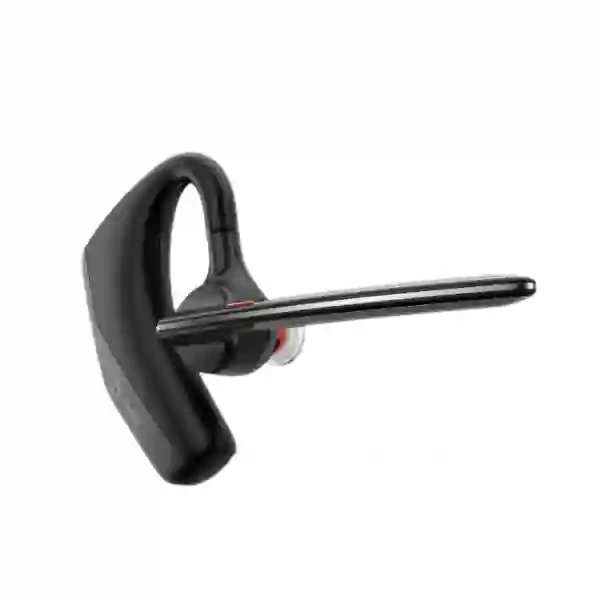
HP Poly Voyager Legend 50-M UC Microsoft Teams Headset
A compact, one-ear professional headset for conversations that follow you from the desk to the next meeting. The Poly Voyager Legend 50-M UC headset combines a four-microphone boom, AI-assisted microphone noise reduction, Bluetooth connectivity and a portable charge case in one business-ready bundle.
If your working day includes Microsoft Teams meetings, phone calls and frequent switching between devices, this model deserves a close look. Review its real-world fit, connection requirements and buying checklist below, then request current product details and a Tanzania quotation without assuming availability or pricing.
At a glance: what you are choosing
Mono in-ear headset with ear loop and boom microphone; one ear remains free.
Four noise-cancelling microphones, NoiseBlockAI and WindSmart voice technologies.
Bluetooth 5.4; up to eight paired devices, with two simultaneous connections.
Up to ten hours of headset talk time, plus up to twenty additional hours from the case.
Who should consider this professional Bluetooth headset?
This model is aimed at someone who spends more time speaking and listening than watching videos or enjoying music. A manager who joins scheduled Teams meetings, a field coordinator who takes calls between appointments, or a service professional who alternates between smartphone and laptop may value a lightweight single-ear solution. The design prioritises convenient voice communication rather than a fully immersive stereo listening experience. Its small microphone boom and tactile controls are useful when a meeting begins unexpectedly or a quick response matters.
It can also make sense for a business that wants a consistent headset format for selected staff rather than a mix of consumer earbuds. Users receive a dedicated call-oriented microphone arrangement, a wireless PC adapter and a carry-and-charge case. The procurement decision should still account for each person’s comfort, work environment, operating system and meeting software. A headset that fits the working pattern is more useful than one selected on technical numbers alone.
Before ordering, consider whether users need to hear colleagues in the room while on calls. A mono headset leaves one ear open; that can be an advantage for awareness but may be a disadvantage where two-ear listening or isolation is essential.
How NoiseBlockAI makes microphone audio more practical
The central reason to consider the Poly Voyager Legend 50-M UC headset is its focus on spoken communication. HP Poly combines four noise-cancelling microphones with NoiseBlockAI, a machine-learning-based approach intended to identify and reduce unwanted background sound in the audio transmitted to other participants. This helps the person at the far end concentrate on speech rather than the full soundtrack of the environment. It is particularly relevant when calls happen near keyboard activity, conversations or other routine office noise.
NoiseBlockAI does not make a workplace physically silent. Performance depends on the character and loudness of surrounding sound, how the microphone sits relative to the mouth, the call application and the quality of the connection. It should therefore be understood as microphone noise reduction, not a promise that every sound will disappear. A practical assessment uses a short call in the location where the headset will actually be worn.
If audio clarity is a major buying requirement, have a colleague listen to a sample call from both a quiet room and a representative busy space. Evaluate how clear consonants remain, whether normal speech sounds natural and how well nearby voices are suppressed. These simple observations reveal more than broad marketing language.
WindSmart: an important distinction for people on the move
Calls made near open windows, building entrances or outdoor walkways can be interrupted by bursts of wind hitting a microphone. HP Poly specifies WindSmart technology for this headset, with six layers of wind-noise management in its series description. The purpose is to reduce wind interference in the captured voice signal. Together with the boom placement and NoiseBlockAI, it gives mobile professionals another tool for maintaining intelligible speech when their location changes.
The benefit should be described realistically. WindSmart is not weatherproofing, an outdoor safety certification or a guarantee that a call will remain clear in strong wind. Microphone orientation, direct gusts, traffic noise and network conditions still matter. A sheltered position can improve intelligibility, and a short test call before a client discussion can avoid preventable disruption.
This matters when an employee moves between a reception desk, parking area and office or when work involves conversations away from a fixed desk. People who make every call inside a quiet room may place greater value on comfort or connection options, while mobile users may appreciate the extra attention to wind-related microphone noise.
A mono headset is an intentional design decision
The Voyager Legend 50-M UC uses a single-ear, in-ear wearing style with an ear loop. Unlike a stereo headset that covers both ears, it lets the user stay more aware of voices and activity around them. That can be valuable in a shared office where someone may need to acknowledge a colleague, hear an announcement or remain attentive to the surrounding environment. It also avoids the bulky headband used by many traditional office headsets.
HP Poly describes a redesigned ergonomic fit and three earbud sizes in the series. Trying the available tips is worthwhile because a snug, comfortable fit supports consistent listening and keeps the microphone in a useful position. The headset itself weighs approximately 20.5 grams, which is relevant to users who keep an earpiece on through several calls. Comfort, however, is personal; the advertised weight cannot predict whether every ear shape will tolerate prolonged wear.
A mono design is not the best answer for everyone. Staff who need stereo separation for media editing, strong isolation from office conversations or the experience of two-ear headphones should consider a different wearing style. Choose awareness when awareness helps work, rather than treating one-ear audio as an all-purpose replacement for every headset.
Microsoft Teams certification: what it means for buyers
This is the Microsoft Teams-certified M variant of the Voyager Legend 50 UC family. Teams certification identifies a product configuration tested for use within Microsoft’s collaboration ecosystem according to the applicable certification programme. For teams that spend much of the day in Teams calls, it is a meaningful procurement distinction from a generic Bluetooth earpiece. The package is designed to support a business workflow with PC connectivity rather than just a phone pairing.
Certification should not be confused with a promise that any computer, meeting deployment or software version will behave identically. Users must select the correct headset microphone and speaker in Teams and may need to confirm the preferred device in their operating system. USB ports, permissions, firmware and management settings can affect the experience. The correct purchase evaluation includes the exact UC bundle and the devices staff actually use.
If Teams is not your primary calling application, the headset may still provide Bluetooth audio where the application and operating system support it. However, certification for Teams is not proof of every integration or a commitment about button behaviour in unrelated software. A short pilot is sensible where several collaboration platforms coexist.
Connecting to a computer with the BT700 adapter
The UC bundle includes a BT700 Bluetooth USB Type-C adapter and a USB-C-to-USB-A adapter. This gives a laptop or desktop a defined accessory path for connecting to the headset, useful where built-in Bluetooth performance or IT configuration varies between workstations. The BT700 is a Bluetooth adapter; it should not be mistaken for a proprietary 2.4 GHz radio system unrelated to Bluetooth. The included USB-A adapter helps when a computer lacks a convenient USB-C port.
For a deployment, check the physical port, available clearance and the organisation’s policy for removable USB devices. A user may have several audio endpoints connected, including laptop speakers, a webcam microphone and a desk speakerphone. The headset needs to be selected for both incoming and outgoing call audio; simply plugging in an adapter does not guarantee that the conferencing application will change its audio settings automatically.
Where laptops are shared or heavily managed, ask the IT administrator whether the USB adapter is permitted and whether driver, operating-system or device-management requirements apply. Evaluate the experience after sleep, docking and undocking, and reconnecting after a break. These transition moments are often more informative than a single successful test call.
Bluetooth 5.4, pairing memory and multipoint use
HP specifies Bluetooth Core 5.4, memory for up to eight paired devices and multipoint operation for two simultaneous connections. These figures describe distinct capabilities. Eight paired devices means the headset can remember several device associations, while two concurrent connections means the user can maintain links with two compatible devices at the same time. It does not mean eight active calls or unrestricted mixing of audio from every device.
For example, a professional can configure a smartphone and a work laptop, then use the headset according to how incoming audio and calling applications behave. Call routing between devices can depend on the software and the state of each connection, so it is worth practising a normal workday sequence. Test an incoming mobile call while Teams is open, then check whether the intended audio endpoint remains selected when the call ends.
Bluetooth performance also changes with the environment. HP lists a wireless range of up to 30 metres, but walls, equipment, interference and device placement can shorten practical coverage. Treat the number as a maximum under favourable conditions rather than a guarantee of roaming across an entire office floor.
Smart sensors and controls designed around calling
The headset includes smart sensor technology, user controls for call answer, ignore and end, a mute function, volume adjustment, pairing and voice-assistant access. HP Poly’s series materials describe sensor behaviour that can answer a call when the headset is worn and mute when it is removed. These conveniences are intended to reduce the number of small actions between receiving a call and being ready to speak.
Useful controls also require habits. Before joining a sensitive meeting, check the actual microphone status in the calling app rather than relying entirely on a physical gesture or alert. A headset mute state and an application’s mute state may not always be perceived identically by every user, especially when multiple applications or devices are involved. The device’s voice alerts for muted status, incoming calls and battery status can help make that state more visible.
During onboarding, show employees where the controls sit and let them practise without looking at the headset. The objective is a predictable interaction: knowing which press answers a call, how to mute intentionally and how to confirm an ended call.
Talk time, charging and the role of the case
HP lists up to ten hours of talk time for the headset itself. For this UC package, the charging case can supply an additional twenty hours, bringing the published combined maximum to up to thirty hours of talk time. The figures should be understood as manufacturer specifications under defined conditions. Actual duration will vary with call activity, connection behaviour, battery age, charging habits and other operating factors.
The case helps during travel or when a person rotates between short meetings rather than remaining near a wall socket. It is also a practical storage location for the small headset. HP lists Qi wireless charging capability for the case and includes a USB Type-C charging cable. Confirm the charging surface or power accessories available to users; a USB connection and a compatible Qi charging arrangement are separate practical options.
HP quotes a headset charge time of less than ninety minutes in its published information. Charging time should not be read as a guarantee for every charger or temperature. For work continuity, staff should develop a routine of returning the headset to the case, checking the battery alert and keeping the charging contacts clean.
Why the charging case changes the buying comparison
A common mistake is to compare this Teams UC bundle with the headset-only Voyager Legend 50 without accounting for included accessories. In the Voyager Legend 50 family, the UC configurations are positioned with a charging case and the BT700 computer adapter, while the standard non-UC headset may be offered without those items. The buyer should compare the complete package, not only the appearance of the earpiece or an isolated headline price.
The case matters for users who spend time away from their desk. Instead of managing loose cables after every call, they can return the headset to a dedicated compartment and top up power between appointments. The adapter matters for computer-first staff who depend on a predictable headset connection. Those accessories may be unnecessary for someone who only makes occasional smartphone calls at a fixed location.
Always confirm the exact part number, regional package and contents on the quotation. Different market identifiers and suffixes can exist, and a product family name on its own may not establish exactly which items will be delivered. Avoid choosing purely by a search-result headline.
Included items in the published UC package
HP’s published package contents for the Poly Voyager Legend 50-M UC include the headset, portable charging case, BT700 Bluetooth USB-C adapter, USB-C-to-USB-A adapter, USB-C charging cable and a quick-start guide. These items serve distinct purposes: the headset provides call audio; the case stores and charges it; the BT700 connects to a compatible computer; and the port adapter supports a USB-A connection where needed.
Before purchase, compare this manufacturer bundle description against the specific offer in Tanzania. A product photographed with a case may not automatically mean every reseller configuration has identical contents. The requested quote should describe the package explicitly so there is no uncertainty about a dongle, cable or case. If the intended users have USB-C-only laptops, check whether the included connection arrangement suits their deployment without additional accessories.
For teams buying several units, use a simple receiving checklist to count the accessories supplied with each box. This supports consistent onboarding and helps identify missing pieces before the equipment reaches an employee. Keep the quick-start instructions available for future pairing or troubleshooting questions.
First-use setup: a practical sequence
Start by charging the headset and case according to the supplied instructions. Choose an ear tip that feels secure without needing excessive pressure, then position the boom as designed. If the primary device is a computer, connect the BT700 USB-C adapter directly or use the supplied USB-A adapter where appropriate. Complete any pairing or device setup prompted by the operating system. If the primary device is a smartphone, follow the Bluetooth pairing instructions for that device.
Next, open Microsoft Teams and verify both the selected speaker and microphone. Make a short test call. Speak at normal volume, mute and unmute, adjust playback volume and end the call from the headset where supported. Ask the other participant whether speech is understandable and whether any background audio is intrusive. This is also the time to confirm that incoming-call notifications are audible at a comfortable level.
Finally, return the headset to the charging case and repeat the process after a break. Confirm that reconnection works as expected and that the chosen sound devices remain correct. Users planning two-device operation should separately test calls from the laptop and phone. Record any company-specific pairing steps for employees rather than expecting every user to discover them independently.
Tune the audio path before judging call quality
Microphone performance can be misjudged when a computer is sending voice through its built-in microphone instead of the headset boom. The quickest diagnostic step is to inspect the audio device selected in the meeting application and in the operating system. Make sure input points to the intended Poly endpoint, then verify output separately. A successful Bluetooth connection and the correct audio routing are related but different states.
Test microphone quality with someone listening on another device; speaking into your own headset is not an equivalent check. Use a normal speaking distance and a representative work environment. If audio sounds unexpectedly compressed or intermittent, consider whether a second connected device or another calling application is taking control. The interaction among device profiles, conferencing software and operating-system policy may differ from one workstation to another.
A standard headset deployment guide should include screenshots or simple steps from the actual software used by the organisation. If IT policies prevent changes, involve the administrator rather than repeatedly pairing and unpairing devices. Quality testing should isolate the real cause before a headset is judged unsuitable.
Windows, macOS and mobile platform considerations
HP lists Windows 11, macOS, Android and iOS among compatible operating systems for this model. That broad compatibility is useful for mixed-device organisations, but buyers should look beyond an operating-system name. The available USB port, Bluetooth support, app permissions, firmware version and audio-device behaviour can all affect the experience. Some devices may use a direct Bluetooth pairing while others benefit from the supplied computer adapter.
A Microsoft Teams-certified configuration is a strong reason to test it in Teams, but any other app should be evaluated in its own right. A calling application may present different options for mute synchronisation, device selection or answering calls. Browser meetings can also behave differently from installed desktop applications. These are application-level considerations rather than contradictions of the headset’s advertised hardware specifications.
For a mixed fleet, build a small compatibility matrix before a bulk purchase: one Windows computer, one macOS computer where relevant and the mobile systems used by staff. Capture only the features the organisation truly depends on. That saves time later and creates a realistic expectation for the users who will receive the equipment.
Poly Lens and device management for IT teams
HP identifies Poly Lens as management software for this headset family. The associated management ecosystem can help administrators and end users with device-related settings, support workflows and software maintenance, depending on the components deployed and their eligibility. The relevant buying point is that this is a business-oriented device with a published management path, not merely an anonymous audio accessory.
Do not assume that every feature, report or policy can be used immediately without configuration. Device-management capabilities, operating-system support and available software versions should be checked against the organisation’s IT environment. Admins should establish a controlled process for firmware updates, especially when an adapter and headset are both involved. The deployment plan should explain who updates devices and how users obtain help when an update changes behaviour.
For a small team, a basic setup note and assigned technical contact may be enough. Larger fleets may want standard device naming, asset records and a repeatable troubleshooting guide. The headset should support a manageable calling workflow rather than introducing additional uncertainty for users.
The value of a lightweight design in repeated meetings
Many buyers focus on microphones and batteries while overlooking the experience of wearing a headset several times per day. A published headset weight of about 20.5 grams means this is a comparatively compact device, with an ergonomic ear-loop form rather than a full over-head band. That can be appealing to employees who put the headset on for a quick call, remove it between sessions and carry it in a bag or pocket-sized case.
A lightweight build does not remove the need to evaluate fit. The right ear tip, correct ear-loop placement and suitable listening volume matter more than the number alone. A trial should include realistic tasks: a brief call, a longer meeting, walking between desks and putting the device back in the case. Ask users whether the headset remains secure and whether the controls are easy to operate.
Where employees depend on accessibility features, hearing protection or specialised audio needs, involve them directly in the selection process. A mono earpiece will not replace a solution designed for a specific accommodation. Good procurement starts with users’ needs instead of expecting one form factor to fit every employee.
Understanding microphone noise reduction versus listening isolation
Noise reduction is often described as a single feature, but two different experiences matter on a call. One is how much background sound your microphone sends to the person listening. The other is how much sound you hear from your own surroundings. The Voyager Legend 50-M UC is notable for the first: four microphones and algorithms intended to improve outgoing speech intelligibility. The open, single-ear design intentionally preserves awareness on the other side.
A buyer who requires an active noise-cancelling stereo headset to block room noise for the wearer should not assume this mono model provides the same result. Conversely, a receptionist or manager who needs to hear nearby activity may specifically prefer a design that leaves an ear free. Those use cases represent different needs rather than one headset being categorically better.
During a trial, ask two separate questions: can other participants understand the wearer, and can the wearer comfortably understand them? Check both with typical background activity. This distinction reduces disappointment and leads to a more defensible purchase decision.
Typical business scenarios in Tanzania
For a professional working from a laptop and mobile phone, the strongest case for this headset is simplifying voice calls across devices. A consultant could participate in a Teams discussion from the computer and later handle a smartphone call without switching to an unrelated earpiece. An account manager who spends time between meetings may appreciate the charge case and light carrying format. These are potential applications, not claims about the product’s local availability.
In an office with frequent interruptions, the mono design can help a staff member remain attentive to colleagues while taking short calls. A field-facing employee who occasionally speaks near an open doorway or outside could benefit from WindSmart, although strong environmental noise and wireless conditions still require realistic expectations. A supervisor working in a quieter room might prioritise comfort and multipoint capability over maximum microphone noise suppression.
For businesses buying equipment in Tanzania, define the users’ actual devices, call software and work locations before selecting a quantity. Do not rely on assumptions about network coverage, local service or stock. Request an exact configuration and commercial quotation, then confirm all relevant terms for the intended deployment.
Compare the M UC bundle with alternative wearing styles
The decision is not simply between an expensive and a cheap Bluetooth headset. Compare the specific job to the wearing style. The Legend 50-M UC is well aligned with spoken calls, a compact single-ear form factor, Teams certification and the bundled computer adapter. A stereo over-ear model may be preferable when users need stronger isolation or spend considerable time listening to media. Wired USB headsets may be simpler where wireless connectivity is restricted or devices are always used at one desk.
Within the Voyager Legend 50 family, ask whether the UC case and BT700 adapter are needed and whether the Microsoft Teams-certified M variant is relevant. Do not assume that a standard Legend 50, a non-M UC version and the M UC bundle provide identical included accessories or certification labels. The subtle naming differences matter at quotation and receiving stages.
The right selection is the one that avoids unnecessary compromises for the intended workflow. A mobile manager and a contact-centre agent may make equally important calls but need very different headset characteristics. Include a short usability test rather than choosing on specification sheets alone.
A buying checklist for organisations and procurement teams
Start by writing down the configuration required: HP Poly Voyager Legend 50-M UC, Microsoft Teams-certified, with the BT700 USB-C adapter and portable charging case. Ask the supplier to confirm exactly which accessories and regional part-number variant are included. That small step is important because similar product names can refer to different bundles. Where a quote uses an internal seller SKU, ask for a plain-language description rather than treating the code as sufficient proof.
Then check the laptops and smartphones in use, USB-C or USB-A availability, Bluetooth restrictions, Teams deployment and any other calling software. Decide whether the workforce needs mono awareness or a different listening format. Confirm the commercial matters separately: price, availability, delivery arrangement, tax treatment, manufacturer support terms and return conditions should be verified for the actual Tanzania transaction before purchase.
For multiple units, request a sample or pilot where commercially practical. Gather feedback on comfort, intelligibility, mute controls and charging habits. Agree on the process for receiving, assigning and maintaining devices. A structured checklist reduces surprises after equipment has been distributed to employees.
Planning a pilot before a wider rollout
A good headset pilot does not have to be complicated. Choose a small group that represents the real working patterns the product is supposed to support: someone who mainly joins Teams calls, someone who changes between phone and laptop, and someone who occasionally calls from a noisier location. Give them the same instructions for pairing, audio settings and charging. Run the trial during normal work rather than in a demonstration environment only.
Ask users to rate several specific experiences: voice clarity as heard by their colleagues, ability to hear the caller, headset comfort, reliability after laptop sleep, ease of muting, and whether the charging case fits their routine. Note any connection issues and the exact conditions when they occur. This helps distinguish a product limitation from a workstation configuration or an incomplete first-time setup.
Before committing to a larger order, decide which observations are deal breakers and which can be addressed through user instructions or IT configuration. A documented trial gives procurement and technical teams shared evidence while keeping expectations tied to actual tasks.
Keeping voice calls dependable day to day
Even a capable headset benefits from consistent operating habits. Keep the case and headset charging contacts clean and dry, store the device securely when it is not in use, and use the charging accessories as instructed. A device left loose in a bag is easier to misplace and may be less ready for the next call than one returned to its case. Periodically review audio settings after major software or operating-system changes.
If a meeting sounds wrong, check the simplest causes first: mute state, selected microphone, selected speaker, battery charge and the currently connected device. If the problem occurs only in one application, test another permitted calling application or a standard device audio check. When issues appear after firmware updates or docking changes, IT can compare the configuration with a known working unit.
Keep expectations sensible: a published maximum wireless range is not a guaranteed distance in every building, and noise reduction cannot remove all environmental disruption. Users who know these limitations can still make effective use of the headset in the situations it was designed for.
Audio safety, privacy and responsible workplace use
A single-ear design leaves the other ear open, but that is not a substitute for attentive behaviour. Do not assume a headset makes phone calls safe during driving, machinery operation or any task where attention must remain on the surroundings. Follow the organisation’s safety rules and applicable local requirements. Set listening volume at a comfortable level and take breaks when needed; louder is not always clearer.
The NoiseBlockAI name refers to microphone signal processing rather than an assurance about confidentiality, recording or data protection. The security of a conversation also depends on the calling platform, device settings, organisational controls and the physical location of the user. For private discussions, choose an appropriate setting and be aware that nearby people may hear the wearer’s voice even if the far-end microphone signal is noise reduced.
When a headset is shared or reassigned, review pairing history and organisation-specific device procedures. Do not let convenience replace basic controls for information handling and equipment custody. These practical safeguards complement the device’s calling features without inventing security capabilities that the hardware specification does not establish.
What the technical numbers actually tell you
Bluetooth 5.4 identifies the radio generation; it does not guarantee the same connection quality in every environment. Up to eight paired devices indicates stored pairings, not eight active channels. Multipoint for two devices can simplify a laptop-plus-phone workflow, but it still requires sensible call handling. The specified up-to-30-metre wireless range is a best-case figure influenced by obstacles and radio conditions. These differences are important when translating specifications into procurement requirements.
The 13.6-millimetre speaker and the stated 100 Hz to 20 kHz speaker bandwidth describe audio hardware and frequency characteristics, not a guarantee of perceived quality for every listener. Likewise, the microphone bandwidth of 100 Hz to 8 kHz reflects a voice-oriented audio path. A four-microphone arrangement and digital processing address voice pickup in real situations, while fit and application settings remain relevant.
The published battery capacity is 130 mAh, and the manufacturer’s up-to-ten-hour headset talk time is the more practical figure for scheduling calls. With the case, the UC package is rated for up to thirty hours in total. Treat all published maxima as specifications, not guaranteed everyday outcomes.
Verified technical specifications
These are HP Poly published specifications for the Legend 50-M UC family and referenced UC configuration. Confirm the precise regional offer and any later specification changes before ordering.
| Feature | Manufacturer specification |
|---|---|
| Headset design | In-ear, monoaural; ear loop and boom microphone |
| Certified collaboration software | Microsoft Teams |
| Bluetooth | Core 5.4 |
| Wireless range | Up to 30 m in suitable conditions |
| Pairing and multipoint | Up to 8 paired devices; 2 simultaneous connections |
| Microphones and processing | Four noise-cancelling microphones; NoiseBlockAI; WindSmart |
| Controls and sensors | Mute, volume, answer/end, pairing, smart sensor technology |
| Talk time | Up to 10 hours headset; up to 30 hours with charge case |
| Charging | USB Type-C charging; Qi-capable charge case |
| Published headset charge time | Less than 90 minutes |
| Headset weight | 20.5 g |
| Case weight | 100 g |
| Speaker diameter | 13.6 mm |
| Speaker bandwidth | 100 Hz–20 kHz |
| Microphone bandwidth | 100 Hz–8 kHz |
| Management software | Poly Lens |
| Operating systems listed | Windows 11, macOS, Android, iOS |
| UC package | Headset, case, BT700 USB-C adapter, USB-C-to-A adapter, USB-C cable, quick-start guide |
Manufacturer figures and feature availability are subject to configuration and use conditions. No local price, stock or delivery claim is made here.
Questions to ask when requesting a Tanzania quotation
A useful quotation identifies the product in plain language and states that it is the Microsoft Teams-certified 50-M UC configuration. It should confirm the charge case and the BT700 USB-C adapter, along with any regional part-number variation. Ask whether the offer covers a single unit or an agreed quantity, and whether accessories are supplied in the standard manufacturer package. This is especially important where procurement documents are circulated among technical and purchasing colleagues.
Request confirmation of the commercial terms that matter to your organisation, including current price, any applicable taxes, availability, delivery arrangement and the relevant regional warranty or support provisions. These details cannot be inferred from a manufacturer specification sheet, and a foreign-market retail listing does not establish Tanzania pricing or supply. Do not treat a model number as evidence of local stock.
If the headset will be deployed to multiple users, share the required operating systems, Teams setup and any restrictions on removable USB adapters. That context makes the quote discussion more useful and may reveal a configuration issue before orders are approved.
Frequently asked questions
1. Is the Poly Voyager Legend 50-M UC certified for Microsoft Teams?
Yes. HP identifies the 50-M UC configuration as Microsoft Teams certified. This is relevant to organisations using Teams as a primary collaboration platform. Users should still select the correct microphone and speaker in the Teams application and verify compatibility with their computers. Certification does not remove the need for normal setup, nor does it prove the behaviour of every third-party calling program.
2. Does it include a Bluetooth USB adapter?
The manufacturer lists a BT700 Bluetooth USB Type-C adapter in the published 50-M UC package, together with a USB-C-to-USB-A adapter. This arrangement is intended to support computer connectivity where appropriate. Before purchase, confirm that the quoted regional package includes both items and check whether employee laptops or desktops have permitted, available USB ports.
3. How long does the battery last?
HP specifies up to ten hours of headset talk time. With the UC charging case, the published combined figure is up to thirty hours, including up to twenty additional hours supplied by the case. These are maximum manufacturer figures rather than a guaranteed result for every user. Volume, call patterns, battery condition and other real-world factors can change operating time.
4. Is this headset suitable for a noisy workplace?
It is designed with four noise-cancelling microphones, Poly NoiseBlockAI and WindSmart processing to help improve the outgoing voice signal. That can help in workplaces with everyday distractions. However, a mono headset does not provide the same wearer isolation as a sealed stereo active-noise-cancelling model. Test both microphone clarity and listening comfort in the actual environment before deciding.
5. Can it connect to my phone and laptop at the same time?
HP lists multipoint operation with two simultaneous device connections and memory for up to eight paired devices. This makes phone-and-laptop use a realistic intended scenario. How incoming calls take priority and how audio switches can depend on operating systems and applications. Run a short test involving both devices before relying on the workflow for important calls.
6. What is the wireless range?
The published maximum is up to thirty metres. Actual range can be shorter because of walls, furniture, interference, placement and the connected device. It should not be used as a promise that the signal will cover multiple rooms or a whole building. Test the distance and roaming route that matters in your own office or working location.
7. Does the headset block all background sound for the wearer?
No. Its principal noise-management features focus on microphone pickup and the voice transmitted to other participants. The single-ear design deliberately leaves one ear free so the wearer can remain aware of their environment. If the requirement is to reduce the sound the wearer hears from the room, compare closed-back stereo or active-noise-cancelling headset options.
8. Can the charging case be charged wirelessly?
HP lists Qi wireless charging capability for the UC charging case, along with USB Type-C charging. A compatible charging surface and appropriate power supply are still needed. Do not assume a wireless charger is included in the headset box. Verify charging accessories in the precise offer and follow the supplied charging and care instructions.
9. Will it work on Windows, macOS, Android and iPhone?
HP lists Windows 11, macOS, Android and iOS as compatible operating systems. Practical use depends on the device’s Bluetooth capabilities, ports, application behaviour and any managed IT restrictions. For a larger purchase, test representative devices first. A broad OS compatibility statement does not necessarily mean all headset buttons behave identically in every app.
10. What is the difference between the 50-M UC and a regular Legend 50?
The M UC configuration is aimed at business and Microsoft Teams workflows and is listed with the BT700 adapter and charging case. Other Legend 50 configurations may be sold with different accessories and certification labels. Compare the exact package description and regional product number on the quotation, rather than relying only on the similar design and family name.
11. Is the headset a good choice for a contact centre?
It may suit some call-focused employees, particularly those wanting a compact one-ear design. However, contact-centre roles differ in required wearing time, software controls, acoustic isolation and device policies. A standardised multi-user deployment should be tested for comfort, voice intelligibility and application integration. A two-ear wired or wireless office headset may be more suitable for some desks.
12. Can I obtain a confirmed price and availability in Tanzania?
Manufacturer technical information does not establish a local selling price or current stock. Ask FourTeck Tanzania for a quotation covering the exact 50-M UC configuration, bundle contents and any applicable commercial terms. Confirm price, currency, taxes, delivery arrangements and support conditions in that specific quote before placing an order. This page intentionally does not invent those details.
Request HP Poly Voyager Legend 50-M UC details for Tanzania
Choose this headset when a Microsoft Teams-certified UC bundle, compact mono wearing style, voice-focused microphones and flexible computer-and-phone calling match the way your people work. Confirm a genuine 50-M UC configuration with its BT700 adapter and charge case, then verify fit and application behaviour before a larger deployment.
Contact FourTeck Tanzania to request current product information and a quotation for the exact headset package. Include the quantity, primary calling software, laptop operating systems, available USB ports and whether the devices will be issued to individual staff or managed as part of an organisational rollout. Ask for confirmation of local commercial and support terms before purchase.




Reviews
There are no reviews yet.