
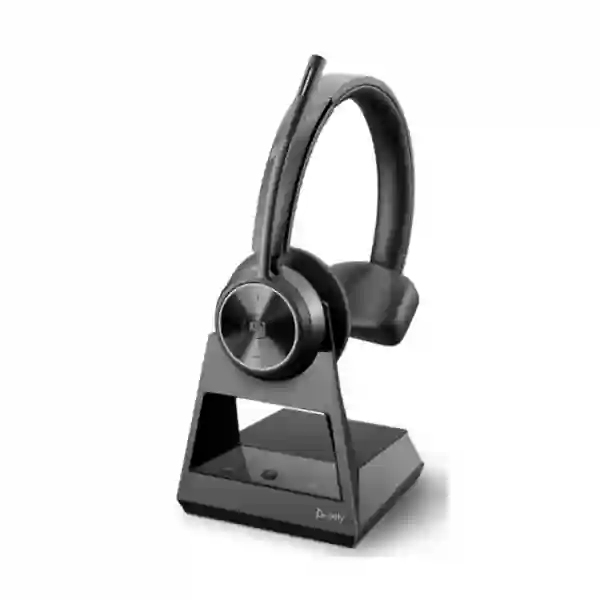
HP Poly Savi 7310 UC Microsoft Teams DECT Headset
A reliable headset matters most when calls are part of the job, not an occasional activity. The HP Poly Savi 7310 UC Microsoft Teams DECT Headset combines one-ear listening, a business-oriented microphone and a dedicated DECT connection for compatible computers. It is particularly relevant to organisations assessing Teams-enabled communication, front-desk coordination and support work where staff need to speak clearly while staying aware of their surroundings. Ask for the exact regional part number and compatibility details before placing an order.
Key specifications and buying facts
The details below describe the referenced HP Savi 7310 UC Teams configurations. Frequency-specific specifications require confirmation against the actual product number in the quotation.
| Type | Wireless, on-ear, monaural UC headset |
|---|---|
| PC connection | DECT via D400 USB Type-A adapter; USB-C conversion accessory referenced in HP package |
| Primary use | Computer calling and Teams-oriented workflows |
| Microphone | Noise-cancelling boom with Poly Acoustic Fence |
| Controls | Call answer/end, mute, volume and power |
| Battery | Up to 13 hours talk; up to 52 hours standby |
| Charging time | Under two hours in referenced HP specification |
| Example reference range | Up to 137 m open area; up to 40 m typical office (1880–1900 MHz variant) |
| Operating systems | Windows 10, Windows 11 and macOS listed by HP |
| Audio safety | SoundGuard Digital; feature configuration should be confirmed |
| Wireless security | DECT security with AES encryption/authentication listed for referenced HP variant |
| Colour and wearing style | Black, single-ear on-ear design |
| Regional version | Exact manufacturer part number and DECT band must be confirmed |
| Tanzania price / stock | Confirm through the quotation; not independently verified |
A PC-first headset for busy calling roles
The HP Poly Savi 7310 UC Microsoft Teams DECT Headset is designed for people who make and receive calls on a computer throughout the working day. Its single-ear, on-ear design leaves one ear uncovered, while its adjustable headband and boom microphone keep the conversation interface close at hand. A DECT radio connection to the supplied D400 USB adapter provides wireless movement around a work area without relying on a conventional Bluetooth pairing workflow. For a buyer, the central question is whether calls mainly happen through a PC and whether mobility, microphone performance and predictable administration matter more than immersive stereo listening.
This makes the headset worth considering for an office receptionist using a softphone, a customer support employee joining frequent Teams calls, or an administrator who needs to hear colleagues nearby. It is not automatically the best purchase for every desk. Someone who switches constantly between a physical desk phone and a computer should investigate the separate Savi Office models; someone seeking stereo listening should compare the 7320. Start with the actual calling environment and connection requirements, then select the exact regional product version.
What UC and Teams mean for a purchasing decision
UC stands for unified communications and indicates a headset intended to work with computer-based communications workflows rather than only a conventional telephone handset. For this Savi 7310 UC configuration, HP identifies the connection path as the D400 DECT USB adapter used with a compatible PC. Buyers should not confuse a UC designation with an assurance that every calling application or every computer policy has already been tested. Application behavior, call controls and endpoint restrictions still need confirmation with the software environment that the organisation operates.
The Microsoft Teams designation matters for organisations standardising on Teams calling and meetings. HP describes the Teams-certified Savi 7310 UC family as offering a Teams-focused button experience, and Microsoft’s published device listing names the Savi 7310 UC series with a specific dongle version. Confirm that the purchased configuration is the Teams version, that the adapter and firmware meet the current certification conditions, and that the target Teams desktop client is supported. A compatible headset can deliver useful Teams controls without replacing the need for a configured Teams account, appropriate licensing and a working computer audio setup.
Why DECT is a meaningful part of this model
DECT is the wireless system used between this headset and its supplied USB adapter. It is distinct from pairing a general-purpose Bluetooth headset directly to a laptop or mobile phone. In daily use, the distinction can simplify the user experience: the dedicated adapter serves as the computer endpoint and the headset communicates over its own supported DECT link. It also changes how IT should inventory the devices, manage available USB ports and plan for use on shared desks. The D400 should be treated as an essential component, not as a disposable accessory.
Choosing DECT does not mean that any room will receive an unrestricted wireless signal. Building partitions, reinforced surfaces, distance and nearby devices can influence the practical experience. It also does not mean the headset can automatically connect directly to a smartphone over Bluetooth. If calls frequently move between a phone and a PC, discuss that workflow before buying. The principal advantage here is a purpose-built wireless path for PC communications, with workplace mobility and business-oriented management considerations rather than general consumer multi-device convenience.
Clearer speaking in an occupied office
People sitting close together create a difficult environment for callers. Even when the person using a headset speaks clearly, nearby conversations can be captured by an ordinary microphone and distract the listener at the other end. HP specifies a noise-cancelling microphone enhanced by Poly Acoustic Fence technology for the Savi 7310 UC. The design is intended to help isolate the wearer’s voice from surrounding speech and is relevant in teams where multiple colleagues speak at nearby workstations.
Acoustic Fence is not a soundproof wall, a promise that confidential content will never be heard or a reason to disregard office privacy practices. It addresses what the microphone sends into a call; it does not erase sound in the physical room or guarantee perfect clarity under every condition. Desk spacing, speaking volume, microphone placement and the acoustics of the workspace remain important. The right assessment is a real-world trial using a quiet room, a typical busy period and the loudest expected work period, with remote listeners evaluating whether the voice remains sufficiently intelligible.
Microsoft Teams Open Office audio considerations
HP associates the Savi 7310 UC with Microsoft Teams Open Office audio requirements. That is useful context for an enterprise buyer because an open-plan workplace challenges headsets in ways a quiet home desk does not. Rather than relying solely on a technical label, assess how the microphone performs with colleagues talking, phones ringing and fans or other office background sounds operating nearby. Ask participants on the other end of Teams meetings to give structured feedback about intelligibility, distracting speech pickup and changes in volume during natural head movement.
The headset’s Teams-focused credentials are especially relevant when the organisation has standardised meetings, internal calls and support escalation in Microsoft Teams. Certification should nevertheless be matched to the actual product and dongle release, not inferred from a similar-looking headset or a generic accessory listing. IT teams should verify the current device information in their environment before a large rollout. This modest check prevents confusion between the certified Teams variant, a non-Teams UC variant and a Savi Office configuration that may have a different base and connection method.
One ear open: the monaural advantage
The Savi 7310 is monaural, meaning it covers one ear rather than both. That can be an excellent arrangement for people who need to listen to a remote customer while still remaining aware of coworkers or activity around the desk. An administrator can respond to a nearby colleague without removing the headset completely; a service desk operator may notice a local conversation or visual cue that requires attention. The advantage is situational awareness and a lighter-feeling listening arrangement compared with some dual-ear designs.
This is also a practical distinction for purchasing teams. A mono headset should be chosen deliberately because the task genuinely benefits from hearing the room. It does not provide the same separation from nearby sound as a two-ear headset, and a busy office may make incoming speech harder to follow if the open ear receives substantial noise. Evaluate comfort, dominant-ear preference and the user’s ability to concentrate before approving one design for everyone. A mixed workforce may reasonably need both single-ear and dual-ear options.
When a dual-ear headset may be a better fit
Workers doing extended transcription, language-sensitive calls or concentration-intensive meetings may prefer hearing both channels through a stereo headset. The open-ear format of the 7310 can be helpful for awareness, but its advantage becomes a limitation when the surroundings are loud or the listener needs stronger physical isolation from office activity. That trade-off should be discussed without assuming either layout is universally more comfortable. Wearing preference, hearing needs and job responsibilities differ widely across a team.
Consider a side-by-side trial if the office has both customer-facing operators and back-office staff. Test remote speech clarity at the actual desk, not just in a quiet demonstration area. Ask users whether they can comfortably hear participants at normal volume and whether they frequently remove the headset to speak with someone beside them. Those observations are more informative than choosing by appearance alone. The Savi 7310 UC is well aligned to mono use cases; the Savi 7320 family is a more relevant starting point when the purchase specification expressly requires two-ear audio.
The controls users interact with every day
HP lists controls for answering and ending calls, muting the microphone, adjusting listening volume and powering the headset on or off. Voice alerts cover states such as mute, connection and low battery. These are small features with operational importance: they let a caller handle routine events without repeatedly returning to application menus. In a service environment, convenient mute and call-answer controls can support orderly conversations, provided employees know how each control interacts with their softphone.
During onboarding, demonstrate the physical buttons rather than assuming the markings are self-explanatory. Confirm which actions work in Teams and which may depend on the current call application. Employees should know how to identify a muted microphone, when an incoming call is actually answered and whether the headset is connected to the intended computer. A short, documented demonstration during setup reduces false fault reports caused by a wrong default audio device or an unfamiliar button. A dependable headset deployment combines hardware capabilities with clear user guidance.
Teams interaction is an end-to-end workflow
A Teams-certified headset is one part of a larger communications workflow. The endpoint still needs a supported operating system, a functioning USB interface, access to the Teams desktop application and permission for that application to use the microphone and speakers. Workplace security settings may restrict external USB devices, installed desktop management software or application updates. A headset arriving on a desk cannot bypass those requirements. For centralised buying, coordinate with the person responsible for endpoint policy before issuing a purchase order.
A sound acceptance test begins with the computer detecting the USB adapter. It continues with selecting the correct microphone and speaker in Teams, placing an internal test call, confirming incoming call behavior and checking mute and volume feedback. If the employer uses Teams phone capabilities, test the actual production call route separately from a meeting-only scenario. This ensures that a good audio device is not wrongly blamed for a licensing, network or application problem. Record any workflow that behaves differently from the organisation’s existing headsets.
The D400 adapter and practical USB connectivity
The Savi 7310 UC product information identifies the D400 USB Type-A DECT adapter, with a USB Type-A to Type-C adapter included in the referenced HP package. The physical port arrangement should be checked against the exact package offered. On a laptop with USB-A, the supplied D400 can occupy a direct port. On a laptop with only USB-C, the correct adapter arrangement may be necessary. Availability of a port is especially important where a docking station, keyboard, external display and security peripherals already use multiple connections.
Do not assume that every USB hub, docking station or virtual desktop arrangement behaves identically. Test the planned setup using the same laptop and desk equipment that employees will receive. In shared workplaces, label the headset and its corresponding adapter so they remain together. A misplaced adapter can interrupt work even when the headset itself is fully charged. Procurement should also decide whether spare approved adapters and replacement charging accessories are required, without assuming interchangeability between unrelated DECT systems.
Battery life for a workday of calls
HP specifies up to 13 hours of talk time and up to 52 hours of standby time for the referenced Savi 7310 UC configuration. These figures are useful planning indicators, not a promise that every user will achieve the maximum in every situation. Actual operating time can vary with use, audio activity, distance from the adapter, battery condition and other environmental or operational factors. For teams spending much of the day on consecutive calls, the important requirement is an agreed charging routine and awareness of battery warnings.
Create a simple daily habit: place the headset on its charging stand when it is not being worn, and confirm it is ready before the first scheduled call. A user who frequently moves between workstations should know where the charging stand belongs. Managers planning back-to-back customer shifts should investigate whether a charging break is practical for their pattern of use, rather than budgeting exactly 13 uninterrupted hours. A short pilot can reveal whether a particular calling schedule needs backup headsets or another staffing arrangement.
Charging stand and setup expectations
The referenced HP package includes a charging stand and a USB Type-A charging cable. HP reports a charging time of under two hours for the specified model, a useful figure when organising desks and shift changes. However, the best deployment approach is not to leave charging to chance. Each employee should know how the stand receives power, where the headset sits securely and how to recognise that the battery needs attention. For shared desks, the layout should prevent power cables from obstructing other equipment.
Charging accessories deserve the same inventory discipline as the headset itself. A missing stand is not merely a cosmetic inconvenience; it can result in a headset being unavailable when the next user begins work. Before issuing the equipment, confirm that the relevant cables, adapter and headset are present and that the stand operates in the intended workspace. Instructions for safe cleaning and storage should accompany any shared-use policy. The box contents and accessory compatibility should always be confirmed against the exact regional product number supplied.
Wireless range: understand the numbers
For the 1880–1900 MHz Teams-certified variant listed by HP Africa, the manufacturer specifies up to 137 metres in an open area and up to 40 metres in a typical office environment. The distinction is important. An open-area figure is not a guarantee that a user can move that far through corridors, walls, lifts and closed office rooms without changes in audio quality. Different regional variants may have different published conditions, so only quote a range alongside the specific product and test assumptions.
For a deployment, map the places where staff actually need to remain on a call: a nearby printer, filing area or adjacent work point may matter more than a long unobstructed corridor. Test with the door closed, the usual workstation layout in place and the expected number of staff present. Identify whether the employee must hear colleagues while walking and whether the organisation permits conversations containing sensitive information outside the workstation area. Range should be evaluated as an operational convenience subject to boundaries, not as an invitation to take confidential calls anywhere.
DECT security and enterprise policies
HP identifies DECT security certification, AES 256-bit encryption and AES 128-bit authentication for the 1880–1900 MHz Savi 7310 UC Teams variant. These are relevant technical capabilities for organisations that maintain rules about workplace wireless devices. They should not be translated into a blanket claim that every deployment is compliant with an industry’s laws, protected against every threat or approved under Tanzanian telecommunications regulations. A secure design helps, but the organisation must still follow its own information-security and procurement processes.
An IT evaluation should cover radio equipment policy, USB-device restrictions, responsibility for firmware maintenance, custody of adapters and who can change device settings. Security teams may also require the exact model number and regional radio variant to review equipment compatibility. For sensitive work, combine hardware selection with appropriate meeting access controls, call-handling procedures and physical privacy measures. The most defensible procurement record documents what the headset can do and which separate organisational controls remain necessary. Avoid treating encryption as a substitute for those controls.
Protecting hearing and managing volume
HP lists SoundGuard Digital acoustic protection technology for the Savi 7310 UC. This feature family is relevant for staff spending long periods listening to spoken calls, especially where volume levels can change unexpectedly. The existence of a protective feature should not be mistaken for permission to operate the headset at excessive volume. Correct listening levels, appropriate breaks and an individual’s comfort remain part of good workplace practice. Some SoundGuard Digital functionality may require supported Poly software and configuration, so confirm the actual enabled state.
The simplest practical instruction is to begin each shift at a comfortable volume and increase it only as needed for intelligibility. If a colleague reports sudden loud sounds, distorted audio or discomfort, investigate the application, endpoint and device settings rather than repeatedly turning the volume higher. Training can include how to recognise headset volume controls versus the computer’s output level. An occupational health policy, where applicable, remains a separate employer responsibility and should be reviewed independently of product marketing claims.
Comfort is a deployment criterion, not an afterthought
HP identifies an on-ear monaural design, adjustable headband and artificial-leather-surfaced ear cushion for the referenced variant. Its listed headset weight is approximately 120 grams. Those details help describe what users will wear, but perceived comfort depends on head shape, how the headband is positioned, skin sensitivity and how long the headset is worn continuously. A device that fits comfortably in a short demonstration may feel different during repeated customer calls over several hours.
Invite representative employees to try the headset in the actual workplace before purchasing a fleet. Check whether the microphone can be positioned correctly without touching the face, whether the ear cushion rests comfortably and whether the user can adjust the headband without assistance. A workstation with glasses or other head-worn equipment may require extra attention. Record both positive feedback and recurring discomfort. Comfort assessments are especially important for a shared purchasing decision because an otherwise capable communications headset may be underused if employees avoid wearing it.
Microphone positioning for consistent results
A headset microphone works best when it is positioned according to the manufacturer’s fitting instructions, not casually left at a random angle. For the Savi 7310 UC, the adjustable boom should be placed so the wearer’s speech is captured consistently while the hardware remains comfortable. A poorly positioned microphone can make a sophisticated noise-processing system seem ineffective. The same employee may sound clear on one call and distant on the next if the boom moves significantly during work.
During orientation, ask the user to place the headset on, adjust the headband and speak a normal sentence during a test call. The remote listener can confirm whether words are clear and the voice is at a suitable level. Repeat the check after the user turns or stands briefly, since movement is one reason for purchasing a wireless device. Do not rely on shouting to compensate for wrong positioning. For recurring problems, inspect fit and input selection before assuming the microphone is defective.
Managing a small support or service team
A small service team may have several staff members using Teams or other supported PC calling software at adjacent desks. In that setting, the value of a headset is a combination of clear conversation, convenient controls, mobility and repeatable support. Standardising a compatible model can simplify user instruction and troubleshooting, but it does not remove the need to verify each computer and software environment. A single trial workstation can reveal important issues before the entire department changes equipment.
For a practical pilot, assign a headset to people who handle different call patterns: short incoming calls, longer meetings and mixed support work. Ask them to report microphone performance, battery experience, comfort and how often they need to walk away from the desk while speaking. Include callers who work at quiet desks and those seated near colleagues. Use the findings to decide whether the mono design meets the team’s needs or whether another form factor should remain available for certain roles.
For reception, coordination and administration
Administrative and reception roles often require awareness of people physically present as well as callers on the screen. A monaural headset can support this balance by leaving one ear uncovered while delivering the remote caller’s audio through the other ear. The worker can continue dealing with document handling, internal coordination and ordinary desk tasks without holding a phone against the ear. Wireless movement may also be useful when retrieving an item nearby, provided the user stays within reliable range and follows appropriate privacy rules.
The headset’s PC-first nature should shape how the role is assessed. If the receptionist’s principal telephone is a standalone desk handset that must be controlled directly, a Savi Office option or another headset system may be more suitable. If the organisation has moved reception calling into a supported computer application, the UC model becomes more relevant. Verify the actual application, audio route and phone-number workflow; a product name alone cannot establish compatibility with a particular PBX, browser softphone or hosted calling service.
For customer support and internal help desks
Customer support and IT help-desk staff rely heavily on intelligibility and fast transitions between calls. A dedicated DECT link and built-in call controls may simplify their desk routine, while the Acoustic Fence microphone design addresses the challenge of nearby colleagues talking. The mono layout can also help staff consult a supervisor sitting nearby. These are helpful potential benefits rather than measured improvements in response time or customer satisfaction; outcomes depend on processes, software and the people using the device.
A good evaluation should include an actual support scenario: answer a call, mute briefly to seek advice, return to the caller, then end the call using the normal workflow. If the team uses ticketing software alongside Teams, confirm that the headset remains the intended audio endpoint when users switch applications. Supervisors may also want to evaluate the HP-described ability to conference additional headsets on the D400 adapter for a supported training scenario. Do not assume a particular coaching or monitoring platform integrates without a separate check.
For hybrid staff and shared workplaces
Staff who split time between workstations often value a device that travels with their laptop. The Savi 7310 UC uses a compact DECT adapter, and the referenced package includes a travel case. This may be useful for movement between designated desks or for a home-and-office arrangement. Nevertheless, a travel case does not make every deployment fully portable: the charging stand, adapter, USB port and workplace security policies still need consideration. A business should define what staff are permitted to move and what accessories stay at each location.
For hot-desking, clear ownership matters. The headset, adapter and charging equipment should be assigned to a person or a managed desk kit. Users should know how to select the correct audio endpoint after connecting the adapter to another compatible PC. IT should decide whether devices are enrolled and maintained centrally, and whether shared equipment must be cleaned between users. These simple governance questions determine whether wireless convenience translates into a dependable everyday experience.
Training and assisted calls
HP describes the ability to conference up to four headsets using the D400 adapter in an appropriate supported configuration. This can be valuable for supervised learning when a trainee needs to hear a real call or an instructor needs to coach a new employee. The feature should be treated as a supported headset conferencing capability, not a substitute for the organisation’s recording, consent, privacy or call-supervision policies. Confirm exactly how the conference procedure works on the purchased configuration before building a formal training programme around it.
A supervisor can pilot the technique with a non-sensitive internal call, checking audio levels and whether both users can follow the conversation clearly. Written instructions should explain which headset is primary and how additional headsets join or leave. If customer calls are involved, review applicable permission and confidentiality requirements first. The procurement value is the opportunity for structured coaching with compatible equipment; the ability to hear a call does not automatically grant the right to monitor it or record it.
Managing headsets as IT assets
For organisations with dozens of endpoints, a headset becomes part of the managed workplace technology estate. HP describes remote management capabilities for device settings, firmware and security updates in the Savi 7310 UC product family. The specific management functions, supported platforms and required software should be verified for the chosen regional model and organisational environment. A purchasing manager should not assume that merely plugging the device into a computer enables every central management function automatically.
An asset record can include the model name, manufacturer part number, serial number, assignment, compatible adapter and date issued. IT may also record the tested operating system and application versions. This makes future troubleshooting much easier when a user reports a device that does not appear in the audio list or behaves differently after a software update. For fleet deployments, ask who will approve firmware updates and how a replacement adapter or headset will be associated with the correct user. These operational decisions deserve attention before a widespread rollout.
Pilot testing before wider procurement
A pilot should reproduce the circumstances under which the headset will be used, not just test whether it produces sound. Select representative workstations, users and calling situations. Include a noisy hour in an open office, a typical Teams meeting, several incoming calls and movement around the immediate work area. Record whether the headset stays connected, whether the remote person hears speech clearly and whether the wearer can recognise mute and battery states. A simple checklist helps teams compare results consistently.
For a Tanzania-based organisation, the pilot should also confirm that the exact supplied radio-frequency variant is appropriate for deployment under applicable local rules. Radio-band compatibility must be handled as a procurement and regulatory verification question rather than guessed from the model family’s name. Check software policy and USB ports alongside performance. Once the pilot has been documented, the buyer can choose a quantity based on real use, not on a marketing feature list alone. Keep a record of unresolved questions for the supplier before acceptance.
A realistic first-day setup process
Begin by checking the delivered product number, headset, D400 adapter and charging components against the purchase specification. Charge the headset using the supplied equipment, then attach the adapter to a compatible computer. Make sure the computer recognises the audio device. Open the intended calling application and choose the headset for input and output where necessary. Place an internal test call and verify that the caller hears normal speech at a comfortable volume. Test mute, volume and answering behavior.
Next, walk a short distance within the expected working area and confirm the call remains intelligible. Return to the desk and check the charging location, power connection and storage routine. Show the user how to tell whether the microphone is muted and how to recognise a low-battery alert. If a functionality differs from the expected Teams experience, record the adapter and software versions for further investigation. The aim is a repeatable procedure for the organisation, not an assumption that every workplace environment is configured in the same way.
Troubleshooting missing audio or a muted caller
When a user cannot hear a meeting or others cannot hear the user, begin with the simplest possible checks. Confirm that the headset is powered on and charged, that its D400 adapter is connected, and that the computer has selected the intended speaker and microphone. Check the headset’s physical mute state, the application mute indicator and the operating system’s microphone permissions. A conference application might switch to another audio device after a laptop is docked or after an unrelated accessory is connected.
If basic settings look correct, try an internal test call using the supported desktop environment and observe whether the headset controls respond normally. Check whether the issue affects all applications or only one. Consult the current HP support material for the exact model before changing firmware or factory settings. For a fleet, log the failure pattern so IT can distinguish isolated hardware faults from a common application update or endpoint configuration. These steps reduce unnecessary replacement of functioning equipment.
Troubleshooting weak range and intermittent sound
Wireless audio interruptions can have several causes and should not immediately be attributed to a defective headset. The user may have moved beyond reliable DECT coverage, crossed a boundary with substantial building materials or placed the adapter in an awkward position. Nearby devices and workstation layout can also influence practical results. Begin by repeating the call close to the computer, then move gradually through the area where the user normally works. Note the point at which quality changes.
If the issue happens only at certain desks, examine what differs about their layout or USB arrangement. Test with the same PC and adapter configuration where possible, and check whether the symptoms appear during heavy use or consistently at one location. Ensure that equipment is operating under the organisation’s approved settings rather than experimenting with unsupported radio configurations. A reliable purchasing decision should be based on observed range in the actual premises, not a maximum open-area measurement quoted without context.
Choosing between UC and Office variants
The word Savi alone is not enough to identify the correct product. The Savi 7310 UC is presented here as a PC-oriented wireless headset using a D400 USB DECT adapter. The Savi 7310 Office family is associated with a different base and desk-phone connection options. These products may look similar and share some audio technologies, but they should not be treated as identical kits. The purchase order must distinguish the intended connection system, not merely list a familiar series number.
Ask whether employees need to answer calls from a physical desk phone, a computer softphone or both. Determine whether existing desk-phone ports and electronic hook-switch arrangements need to be supported. If desk-phone integration is a requirement, verify a suitable Office model and its compatibility rather than assuming the UC package will provide it. For a purely PC-based Teams environment, the UC design is easier to evaluate against the task. This comparison often prevents a more expensive mistake than any headset specification detail.
Choosing between the 7310 and the 7320
The 7310 and 7320 names in the Savi family commonly indicate a single-ear versus two-ear listening arrangement. For this listing, the Savi 7310 UC is explicitly monaural. A buyer comparing it with a Savi 7320 should focus first on how much surrounding room awareness the user needs and how distracting nearby noise is. A support desk where colleagues speak directly to each other may favor one open ear; a role requiring concentration in a noisy room may favor two-ear coverage.
Do not assume that every 7320 package has the same radio band, adapter, exact certifications or bundled components as the 7310 being evaluated. Check the complete manufacturer part number and product specification for each candidate. The comparison should consider user comfort, microphone performance, software compatibility and operating environment, not simply whether one product has one more speaker. A short user trial is often the most effective way to resolve the choice between single-ear and dual-ear designs.
Regional DECT variants need exact identification
HP publishes more than one Savi 7310 UC Teams-certified DECT frequency variant. For example, its Africa-facing product information identifies an 1880–1900 MHz model, while another published product configuration uses a 1920–1930 MHz band. These descriptions refer to different manufacturer product numbers. The title HP Poly Savi 7310 UC Microsoft Teams DECT Headset by itself is therefore insufficient to determine the exact radio variant being offered. A responsible product listing should not silently select one.
For Tanzania procurement, request the precise manufacturer product number and stated radio operating band from the supplier before confirming suitability. Verify applicable local technical or regulatory requirements through the appropriate official process; do not infer authorisation from regional branding or the fact that the product is sold elsewhere. This is particularly important when a business purchases in bulk or imports equipment independently. The right model identification protects the buyer from ordering an unsuitable frequency variant and from attaching the wrong accessories or technical claims to an otherwise recognisable product name.
What the manufacturer part number tells you
A manufacturer’s part number identifies a particular commercial configuration, which can include the radio variant and package selection. It is not automatically the same as a FourTeck stock-keeping unit. HP publishes identifiers such as 8L575AA for an 1880–1900 MHz Teams-certified version and 8L585AA for a 1920–1930 MHz Teams-certified version. These examples help show why a product-family label should not be used as the only specification on a purchase order. The exact target listing’s identifier must be obtained from its own verified information.
When asking for a quotation, provide the name and intended user requirements, then request the exact HP part number, regional frequency, Teams configuration and package contents in writing. Match the quotation to the delivered equipment at receipt. Do not guess a retailer-specific SKU from HP’s identifier, and do not use a product number associated with a different market simply because its specification looks similar. Clear identification is the foundation for correct compatibility checks, spares planning and future support.
What is included in a referenced HP package
HP lists a wireless headset, charging stand, USB Type-A charging cable, USB Type-A D400 DECT adapter, USB Type-A to USB Type-C adapter, travel case and quick start guide for its referenced Teams-certified 1880–1900 MHz product configuration. This can help a buyer understand the kind of kit associated with the UC design. However, the exact bundle delivered in Tanzania should be checked against the supplier’s quoted manufacturer product number. A package list from one region should not be presented as a universal guarantee for every version.
Before the order is accepted, confirm whether the supplied equipment includes everything needed for the intended laptops and desk layouts. Check that the correct USB conversion accessory is present for modern USB-C-only devices. For larger deployments, agree how a damaged charging stand or misplaced adapter will be replaced and who will own spare equipment. An unambiguous bill of materials prevents a department from receiving operational headsets but missing the accessories required to connect or charge them efficiently.
A procurement checklist for Tanzania organisations
A useful quotation request should explain how the headset will actually be used. State whether the intended environment is Microsoft Teams on Windows or macOS, whether the device must connect to a standalone desk phone, how many headsets are required and whether users need one-ear or two-ear listening. Provide the laptop USB port type and whether staff operate from fixed desks, shared desks or a mixture. Ask for confirmation of the exact manufacturer part number, radio variant, accessory kit and compatibility with the supported client environment.
Price, stock, delivery timing, warranty handling and tax treatment need confirmation through the actual Tanzania quotation process. They should not be invented in a general product description. Where local radio equipment requirements apply, confirm them before purchase. A buyer comparing several options can request a short demonstration on a real workstation, then document results for call quality, comfort, range and user controls. These checks are especially important when the same selection will be issued to multiple staff members over time.
Choosing quantity and replacement coverage
A fleet order should begin with the number of active users rather than the number of desks alone. Some organisations have rotating shifts, shared work points and mobile teams, while others assign one headset permanently to each employee. The correct quantity depends on hygiene policy, charging arrangements and whether users need personal equipment. Spare stock is a planning decision tied to how urgently an interrupted caller must be equipped with a working replacement. It should not be set by a universal percentage without reference to business operations.
When estimating quantities, consider the number of headsets, D400 adapters, charging stands and any accessories separately. If shared equipment is planned, define a cleaning and handover procedure. If personal issue is preferred, document who is responsible for returning accessories when someone changes roles. An asset register and a simple replacement process are particularly useful for branches or distributed teams. These practices ensure that the purchase remains manageable after the initial deployment is complete.
Support, maintenance and lifecycle questions
Headsets can remain in service through many changes to computer software, so support planning matters. Before purchase, ask how the supplier will identify the exact model during a support request and what documentation accompanies the delivered kit. HP publishes product support and device information for the Savi 7310 UC, including configuration and user guidance. The employer should also define which internal team handles first-level problems such as wrong audio selection, a missing adapter or a charging issue.
Software changes can affect call-control behavior, especially in a managed Teams environment. Assign responsibility for checking the organisation’s supported application versions and any appropriate firmware updates. Keep warranty terms and return procedures tied to the actual regional offer; manufacturer documentation alone does not establish a specific local service arrangement. A clear process for faults, replacement parts and device reissue is more useful than an unsupported promise that equipment will never fail. Protecting continuity is part of the total cost of ownership.
How to evaluate a demonstration responsibly
A demonstration should use the intended application, not just a sample audio recording. Ask a colleague to join from another location and listen for clear natural speech, moderate background pickup and consistent level when the headset wearer turns their head. Repeat the call with other office conversations present. Test the physical buttons, inspect the Teams client behavior and move to nearby locations the user is likely to visit. Record both successful behavior and anything that needs investigation.
Include the people who will actually wear the headsets, because perceived fit and sound preference vary. Note whether the open-ear format helps them collaborate locally or makes it harder to concentrate. Test the headset with the same laptop ports and docking equipment that the organisation uses. If several part-number variants are being quoted, verify which exact version was demonstrated. The result should be a short evidence-based recommendation for the role, not an impression based solely on appearance, published maximum range or microphone branding.
Understanding what this headset does not replace
The Savi 7310 UC is an audio peripheral, not a phone system, internet connection or substitute for communication software. It does not provide a Microsoft Teams subscription, telephone numbers, calling plans, contact-centre routing or guaranteed integration with a third-party PBX. It also should not be represented as a direct mobile-phone Bluetooth headset on the strength of the DECT name. These boundaries help procurement and IT communicate clearly about what the purchase will accomplish.
If a business is changing its telephony platform, verify the communications solution first and then test the headset as one endpoint. If employees work on unsupported or tightly controlled devices, review USB and software rules before buying. If physical desk phones must remain in use, assess an appropriate desk-phone-compatible solution. Clear scope prevents an otherwise suitable headset from being judged against requirements it was not designed to fulfil. It also makes comparisons between suppliers and models more transparent.
A practical rollout plan for managers
For a departmental rollout, start by documenting the intended tasks and the exact model configuration. Run a small pilot, confirm application and laptop compatibility, then approve the accessory bundle and support process. Prepare a short user guide that shows how to wear the headset, position the microphone, answer a call, mute, charge and report a problem. Identify the internal contact responsible for support, and decide how employees will obtain help if a headset or its adapter is missing.
Once deployed, revisit the experience after users have completed several normal workdays. Look for patterns such as missed charging, confusion between microphone and speaker selections, discomfort in one role or problems with range in a particular room. Resolve those through configuration, training or a different form factor where justified. A successful rollout is not defined only by the number of devices issued. It is defined by whether employees can make their expected calls reliably and comfortably with the equipment they have received.
What to request when you are ready for a quote
A productive request identifies the headset as the HP Poly Savi 7310 UC Microsoft Teams DECT Headset and explains the intended number of users and computer environment. Ask the supplier to identify the exact Teams-certified manufacturer product number, radio frequency, delivered D400 adapter, charging accessories and supported connectivity. If your team uses USB-C-only laptops, state that clearly. If a standalone desk phone is part of the workflow, disclose it so a different Savi configuration can be considered where necessary.
Request confirmation of the actual quotation terms for Tanzania, including price, stock position, delivery arrangements and applicable support coverage. These commercial details are not asserted here because they depend on the exact offer. For a larger order, ask whether a demonstration or limited pilot can be arranged before standardising the fleet. The aim is to purchase the right device for a defined workplace need, with transparent specifications and no surprises when staff begin using it.
Frequently asked questions
Is the HP Poly Savi 7310 UC wireless?
Yes. It uses a DECT wireless link between the headset and its compatible D400 USB adapter. The adapter provides the PC connection. Wireless performance depends on the environment and should be tested where employees actually work.
Does this headset connect directly to a Bluetooth phone?
Do not assume so. The UC system described here is built around a DECT USB adapter for computer calling. If direct smartphone pairing is mandatory, seek a product explicitly specified for that connection and verify the exact requirements.
Is the Savi 7310 UC certified for Microsoft Teams?
HP sells Teams-certified variants, and Microsoft lists the Savi 7310 UC series with dongle-version conditions. Confirm the exact Teams product configuration and the current adapter and firmware requirements instead of relying solely on the family name.
Can I use it with a Windows or Mac computer?
HP lists compatibility with Windows 10, Windows 11 and macOS for its referenced Savi 7310 UC specifications. The target computer also needs the correct USB connection, permissions and a supported calling application. Test managed devices before scaling deployment.
How long can it operate on one charge?
HP lists up to 13 hours of talk time and up to 52 hours of standby time for the referenced variant, with charging specified at under two hours. Actual results vary. A charging routine is still important for long calling shifts.
How far can I walk from my computer?
HP lists up to 137 metres in an open area and up to 40 metres in a typical office for the referenced 1880–1900 MHz variant. Walls and workplace conditions can reduce range, and another regional product version may differ. Test before depending on a particular distance.
Does it have a noise-cancelling microphone?
Yes. HP specifies a noise-cancelling boom microphone with Poly Acoustic Fence technology. It is intended to reduce distracting background pickup, not to make a busy physical room silent or guarantee that confidential conversations cannot be overheard.
Does it cover one ear or both?
The 7310 UC model described here is monaural and covers one ear. That is useful when awareness of nearby colleagues is important. For workers who need two-ear listening, compare an appropriate Savi 7320 configuration.
Can it connect to a traditional desk phone?
Do not assume the UC package supports a desk phone directly. This product is focused on PC connection through the D400 adapter. The separate Savi Office family should be considered where desk-phone connectivity is required, subject to exact compatibility checks.
What accessories are normally associated with this version?
The referenced HP configuration lists the headset, D400 USB adapter, charging stand, USB charging cable, USB-A to USB-C adapter, travel case and quick start guide. Confirm the exact contents against the product number and supplier quotation.
Does Teams certification include Teams licensing?
No. A certified audio device does not supply a Microsoft Teams account, Teams Phone service, calling plan or business connectivity. Those elements depend on the organisation’s software environment and subscriptions.
Is there more than one DECT radio-band version?
Yes. HP publishes Savi 7310 UC Teams configurations in different frequency bands, including 1880–1900 MHz and 1920–1930 MHz variants. The exact manufacturer part number must be confirmed, along with appropriateness for the intended country of deployment.
Is it suitable for a large shared office?
It is designed with enterprise use in mind, including an Acoustic Fence microphone and DECT capabilities, but a real workplace trial remains important. Consider desk spacing, radio performance, comfort, asset handling, Teams configuration and support arrangements.
What information should I send for a quotation?
Specify the number of users, calling applications, operating systems, available USB ports, required wearing style and whether desk-phone connection is needed. Request the exact manufacturer part number, radio band, accessory contents and Tanzania-specific commercial terms.
Request a model-matched headset quotation
Tell FourTeck Tanzania how many users need the headset, which calling applications and computers they use, and whether the team requires monaural listening. Ask for the precise HP manufacturer part number, appropriate regional DECT band, included D400 adapter and accessories, and verified Tanzania-specific terms. This helps ensure the supplied equipment matches the workplace instead of relying on an ambiguous model-family name.
Contact FourTeck Tanzania to request specification confirmation and a quotation.




Reviews
There are no reviews yet.