
Wireless office calling · Microsoft Teams certified · Monoaural
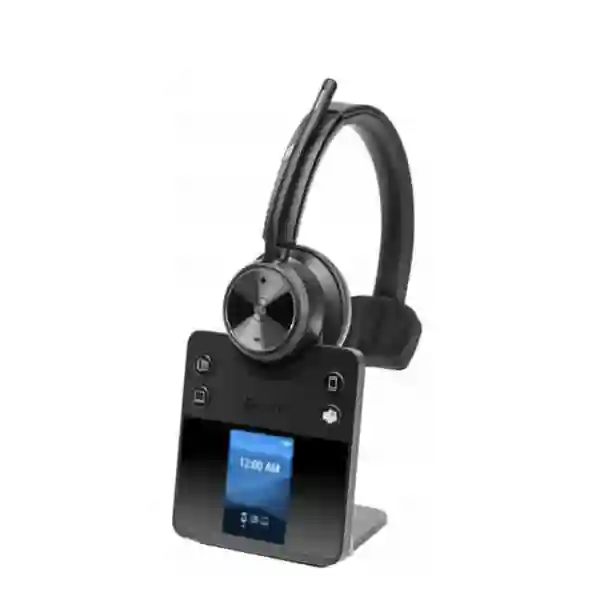
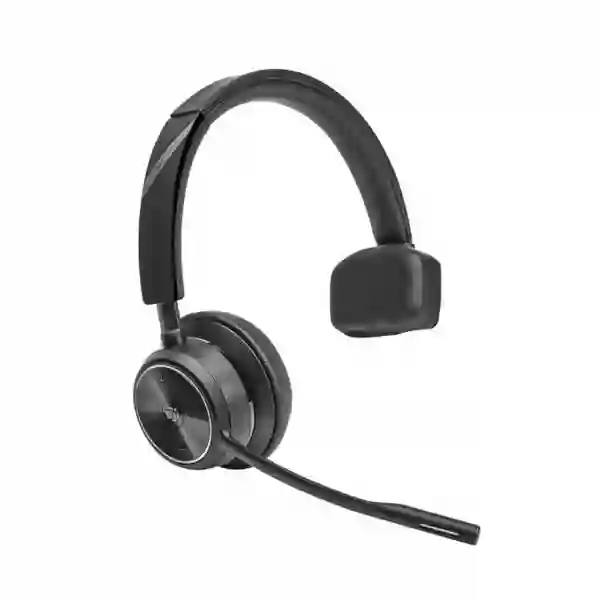
HP Poly Savi 7410 Office Microsoft Teams DECT Headset
Keep conversations clear while switching between a computer, compatible desk phone and mobile phone. The HP Poly Savi 7410 Office Microsoft Teams DECT Headset combines a single-ear wireless headset with a multi-source office base, a noise-cancelling boom microphone and Teams-focused controls. It is intended for people whose workday includes more than one calling system.
For a Tanzania business quotation, confirm the exact Teams variant, local radio-frequency model, desk-phone interface and accessories before ordering.
At a glance: what it solves
Microsoft Teams workflow
This is the Teams-certified Savi 7410 Office version, with Teams controls on the headset and base for supported Microsoft Teams desktop use. The dedicated shortcut helps people move between calls and collaboration without searching across several windows.
Three communication sources
A single office base serves computer-based calling, a compatible desk phone and a mobile phone. DECT carries the wireless audio between headset and base; the mobile phone pairs through Bluetooth at the base, rather than directly to the headset.
Focused microphone audio
The noise-cancelling boom microphone uses Poly Acoustic Fence technology to reduce distracting surrounding speech reaching listeners. It is particularly relevant where nearby colleagues are speaking, although acoustic conditions still matter.
Single-ear situational awareness
A monaural on-ear design lets the wearer listen to a call while keeping one ear available for nearby colleagues and office activity. That is useful at reception desks, service counters and hybrid communication roles.
Working-day battery planning
The manufacturer specifies up to 13 hours of talk time, up to 52 hours of standby and charging in under two hours. Actual endurance depends on settings, call activity, battery condition and the operating environment.
Movement away from the desk
The published range reaches up to 180 metres in open space and up to 55 metres in a typical office. These are best-case and representative figures, not a promise of reception through every wall or across every floor.
Verified technical overview
| Product format | Single-ear (monaural), on-ear wireless office headset with desk base |
|---|---|
| Meeting platform | Microsoft Teams-certified version; Teams button functions require supported Teams desktop application |
| Call sources | Computer via USB, compatible desk phone via telephone interface, mobile phone through base Bluetooth |
| Wireless system | DECT link from base to headset; Bluetooth Core 5.2 supported through base |
| Noise reduction | Noise-cancelling boom microphone with Poly Acoustic Fence |
| Acoustic protection | Poly SoundGuard Digital; some features require compatible desktop software |
| Talk time / standby | Up to 13 hours talk / up to 52 hours standby |
| Charging | Under 2 hours, according to HP product specifications |
| Published operating range | Up to 180 m unobstructed / up to 55 m in a typical office |
| Main audio controls | Answer/end, mute, power and volume on headset; source selection on base |
| Supported platform context | Windows, macOS and supported Android/iOS mobile connections; application and feature support vary |
| Regional frequency | DECT frequencies vary by region; verify the exact Tanzania-market variant before procurement |
Manufacturer figures describe specified configurations and test conditions. The supplied product title does not identify a Tanzania-market SKU or regional DECT band; therefore those identifiers, commercial terms and local approvals are intentionally not asserted.
Who is this headset actually for?
The Savi 7410 Office is for a professional whose job combines live conversation, computer collaboration and a desk-phone or mobile calling requirement. A receptionist may receive traditional incoming calls while monitoring Teams messages. A customer-support supervisor may move between a PC softphone and a mobile discussion. An operations coordinator may want a consistent microphone and call-control experience while staying aware of people nearby. These are practical applications of the base’s documented connection choices, not guarantees that any particular enterprise phone platform will integrate without additional accessories.
Choose the monaural format when hearing the immediate surroundings is part of the role. One uncovered ear makes it easier to notice a visitor, hear a colleague ask a question or respond to a nearby service counter. Users who need more separation from surrounding noise may prefer a two-ear model instead. A well-selected headset should match the work pattern, the room and the calling equipment; it should not be selected only because a product specification says it supports several devices.
The biggest procurement question is whether the person will genuinely use two or three call sources. If the work is exclusively laptop-based and rarely involves an office phone or mobile call, a simpler USB or dedicated computer headset may be sufficient. If the role uses a PBX desk phone, computer collaboration and smartphone communication in the same day, the Savi 7410 Office base becomes much more relevant. Map the everyday calling routes before choosing quantity, accessories or configuration.
Microsoft Teams: what certification changes
The specified Microsoft Teams edition includes integration designed for the Teams desktop application. HP documents a Teams button on the base and the headset call button functioning as a Teams control. Depending on Teams state, the base indicator can draw attention to a meeting or notification, and the button can help open the desktop app or respond to a supported meeting prompt. This is a workflow convenience for frequent Teams users, rather than a replacement for a valid Microsoft account, organizational access or the Teams application itself.
An important limitation is that the dedicated Teams button interaction described in the HP guide requires the Teams model and Teams desktop application. It is not the same as guaranteed Teams button behavior in the mobile Teams application. Desktop device settings, account permissions, firmware, softphone selection and installed utility software may influence what users experience. An organization deploying multiple headsets should validate a representative Windows or macOS workstation before assuming every feature will be available to every employee.
Microsoft Teams certification also does not mean other softphones are unusable. The documentation describes softphone selection and computer call control, subject to supported software. What may change when another communication application is chosen is the dedicated Teams shortcut behavior. Buyers should distinguish audio playback, microphone operation, call answer/end control and Teams-specific notifications; these are separate functions. Confirm each needed function in the exact company calling application, especially when the organization operates several collaboration platforms.
Three-way calling explained without the jargon
The base is the centre of the Savi 7410 Office system. It offers a source for a computer, a source for a traditional desk phone and a source for a mobile phone. The wearer selects the desired source with the base controls, while the headset supplies the wireless listening and microphone link. That arrangement is useful when a business wants one headset rather than switching between a wired desk-phone handset, a separate laptop headset and a smartphone held to the ear.
The connections use different technologies. The headset communicates with its base over DECT. The computer uses the appropriate USB cable, the compatible desk phone uses the provided telephone interface connection, and the phone pairs over Bluetooth with the base. A common misunderstanding is that the headset itself behaves like a generic Bluetooth earpiece that can travel outside with a mobile phone. The documented mobile-phone path depends on the office base, so the equipment is primarily intended as a desk-based system with wireless movement around that base.
Three-way connectivity should not be confused with a guarantee that every incoming call is automatically merged or routed according to every company preference. The user guide provides source selection, source mixing and related call workflows, but the real experience depends on the phone, applications and configuration. A buyer should first identify which line handles external customers, which line handles internal collaboration and which one receives mobile calls. Set the most commonly used outbound line as the default after installation and test the handoff between sources.
DECT versus Bluetooth: why both matter
DECT is used for the wireless headset-to-base connection and is well suited to the fixed-office deployment for which this product is designed. It allows staff to move a useful distance from a desk while remaining connected to the base. Bluetooth is a separate component of the same system, providing the mobile-phone connection at the office base. These technologies are complementary, not interchangeable: changing a Bluetooth setting does not convert the headset into a stand-alone mobile headset.
For a business comparing wireless headsets, the practical distinction is where the connection starts and ends. The Savi 7410 Office headset belongs to its office base; the base connects onward to different calling devices. A direct Bluetooth headset may be more portable for people who travel continuously between buildings, while a DECT office system can make more sense for reception teams, dispatch roles and workstations where several phone sources remain on a desk. Consider the entire working day rather than focusing on a single wireless label.
Wireless performance is also shaped by building layout, radio conditions and the number of users in the same area. An organization should assess floors, partition walls, metal shelving, network equipment and nearby wireless systems during a pilot. Choosing a correct regional DECT variant is particularly important for Tanzania procurement, because HP offers frequency variants for different markets. No specific Tanzania frequency assignment or approval is claimed here; request the appropriate local-market documentation for the exact supplied unit.
How Acoustic Fence helps in busy offices
A colleague’s side conversation can make a headset microphone less intelligible to the person on the other end of a call. The Savi 7410 Office addresses this problem with a noise-cancelling boom microphone that HP describes as using Acoustic Fence technology. Its purpose is to help focus transmitted speech and suppress unwanted nearby noise. That can be valuable in open-plan workplaces, reception desks and support operations, where the buyer’s concern is not merely the volume heard by the wearer but what a customer hears.
Microphone noise cancellation is not the same thing as active noise cancellation inside the earcup. This model is monaural, so one ear remains open to the surrounding room. It does not turn an open office into a silent space for the wearer. For best intelligibility, adjust the boom position as recommended in the manufacturer’s instructions, check software microphone gain and make a real test call from a representative workspace. Better microphone placement can be as important as the headline technology.
Organizations handling confidential discussions should combine device choice with suitable workplace behavior. Noise reduction may lessen background speech, but it does not provide a legal or operational guarantee that surrounding conversations are private. Place sensitive calls away from other conversations when possible, set reasonable speaker volume and use the company’s normal information-security policies. The practical aim is a clearer conversation with fewer interruptions, alongside responsible handling of sensitive customer and staff information.
Single-ear comfort and real-world awareness
The 7410 is the single-ear model within the wider Savi Office family. A monaural headset can suit people who need to speak with visitors or colleagues while remaining available on a remote call. In a shared office, a customer-service employee may need to hear the front desk while discussing a case on Teams. A team leader may need to notice a question from across the room without completely removing the headset. These use cases explain why a one-ear design is a deliberate workplace choice rather than an inferior substitute for two earcups.
Comfort is personal. Head shape, daily call duration, the way glasses fit and preferred listening volume all affect a headset wearer’s experience. HP specifies an on-ear design and artificial-leather ear-cushion surface for the referenced configurations. For larger teams, testing with a few staff members can expose fit and wear preferences before a fleet purchase. Ask users whether they can adjust the headset easily, reach mute without searching and return it to the cradle comfortably.
The open ear also creates a tradeoff. Anyone working beside machinery, strong ventilation noise or constant overlapping conversations might prefer a two-ear headset with greater passive isolation. Conversely, people who cannot safely block environmental sounds may value monaural awareness. Discuss work environment and policies with the buyer. The Savi 7410 Office is not protective hearing equipment and should not be presented as such; use appropriate equipment wherever occupational hearing protection is required.
Battery and charging: plan for the whole shift
HP lists up to 13 hours of talk time and up to 52 hours of standby for the Savi 7410 Office, with a charging time of under two hours under its published conditions. These figures suggest suitability for many standard office shifts, but maximum stated endurance is not a guaranteed duration for every user. Continuous meetings, mixed calling, settings, environmental factors and battery age can change the outcome. A business with especially long shifts should compare expected daily call minutes with the published talk-time figure.
The office base includes a charging cradle, making a predictable return-to-desk routine important. Encourage users to dock the headset whenever they finish a long calling block or leave for a break. This approach is simple, and it reduces the chance of starting an important customer call with a depleted headset. For shared desks, check whether employees each need assigned equipment and whether a spare device plan makes sense instead of assuming that one charging station will automatically serve every shift.
Charging infrastructure should be included in deployment planning. The base requires power and a practical location close to the computer and phone. If an office experiences power interruptions, consider how business calls are handled during an outage; a charged headset does not keep an unpowered base, PBX, router or computer online. Confirm power continuity as part of the calling environment rather than attributing uninterrupted operation to the headset alone.
Wireless range: understand the two numbers
The published range is up to 180 metres in an open area and up to 55 metres in a typical office environment. Both numbers refer to stated test conditions and should be treated as guidance for planning, not a coverage map. Open-area distance is particularly easy to overinterpret. A person may be able to walk a substantial distance in clear line of sight yet experience a shorter usable range through reinforced concrete, partition walls, lift shafts or dense equipment.
A practical pilot should include the real routes an employee takes while on a call. Test the reception counter, nearby meeting room, store area and corridor only where walking with a live call is part of the role. Note whether audio breaks up, whether the user returns to the original desk promptly and whether the base location can be improved. A headset can be described as wireless freedom without claiming it will function everywhere in an office building.
Base placement matters. The HP user guide recommends some separation from the computer and desk telephone to help reduce interference. Keep the base away from large metal obstructions and check nearby electronics if users report noise or dropouts. In a multi-floor building, choose a realistic operating area per base. The correct success measure is whether staff can move through the work zones they actually use, rather than whether a brochure’s maximum open-air distance can be reproduced indoors.
Desk-phone compatibility: check before purchasing
The office base provides a telephone interface path for compatible desk phones, but desk-phone compatibility is not a one-size-fits-all promise. The connection can use a dedicated headset port or, for certain models, the handset port and a different setup method. HP’s guide also describes electronic hookswitch accessories and a handset lifter for particular remote-answer arrangements. These accessories are not universally interchangeable, and the correct option depends on the exact phone brand, model and configuration.
Start by recording the desk-phone manufacturer, model number, physical ports and whether employees need to answer calls while away from their workstation. Then determine whether the supplied telephone interface cable is enough, or whether the phone requires a supported electronic hookswitch cable or lifter purchased separately. Without those additional controls, users may have to press the desk phone’s headset button or lift its handset to handle a desk-phone call even though audio is heard through the wireless headset.
For a PBX or hosted-telephony installation, distinguish the handset connection from the telephone service behind it. The headset normally interfaces with the desk phone or computer; it does not independently supply SIP registration, an extension number or a telephone line. A deployment can fail if the wrong physical integration is selected despite the headset having the right wireless features. Ask for a phone compatibility check and a short end-to-end test before approving a bulk purchase.
Computer setup and softphone behavior
The base’s computer connection uses USB, and HP’s product documentation lists USB Type-A and Type-C cables among supplied items for the referenced package. A computer operating system may detect an audio device, but advanced call functions depend on application compatibility and the appropriate management software. Confirm the operating system, company software image, USB access policies and selected calling app. A headset should be tested on the managed employee workstation, not only on an unrestricted demonstration laptop.
Once the computer is connected, select the Savi audio device for both microphone and speaker in the chosen softphone. Make a test call, check whether the far end hears the employee clearly and adjust input or output levels if necessary. Test mute, answer, end and Teams shortcut behavior independently. A user who hears media playback but cannot answer a software call from the headset may need a softphone integration setting rather than a replacement headset.
Where IT administers several collaboration applications, confirm which one should handle the headset’s default call action. HP documentation includes guidance for selecting the default phone line and configuring softphone behavior. Software branding and support utilities can evolve; use the currently supported HP Poly utility identified for the exact device and company environment. Keep the installation instructions specific to the tested workstation image and avoid treating every audio application as automatically capable of full remote call control.
Mobile phone pairing through the base
The mobile call option is valuable for staff who have a company phone alongside a desk phone and computer. HP specifies Bluetooth Core 5.2 and supported headset audio profiles for the office base connection. Pair the mobile phone to the base using the documented Bluetooth procedure, then select the mobile audio source when appropriate. The mobile phone can remain within its practical Bluetooth connection range of the base while the headset is linked to the base through DECT.
This distinction is important when employees expect to take the headset on the road. The Savi 7410 Office is an office system, not a direct-pair travel headset. If the employee moves away from the base and beyond its DECT operating area, the office headset cannot be assumed to keep working as a stand-alone Bluetooth accessory. For field personnel, a device built for direct phone pairing may be a more natural primary choice; the Savi is better assessed against work at a desk with several live communication sources.
During setup, test incoming and outgoing mobile calls separately from computer calls. Staff should understand how to return to the computer source, how to mute and how to switch without unintentionally talking on the wrong line. If mobile integration is restricted by company policy, IT should approve pairing before deployment. Pairing and call routing are usability and security decisions, not merely a checkbox on a specification sheet.
Conferencing and coaching with additional headsets
The manufacturer’s guide documents a conference capability that can add up to three guest headsets to the primary Savi headset, for a total of four participating headsets on one base when the supported procedure and equipment are used. This can support an observer or coach during a live service interaction or enable an additional colleague to listen and assist. It is a base-level headset conference feature, not a statement about unlimited attendees in a Teams meeting.
Guest-headset participation must be established through the documented pairing or conference workflow. The primary user accepts guest requests, and the exact process depends on the equipment. Verify the compatible guest models before procuring extra headsets. Businesses should also decide who is allowed to monitor calls and whether recorded or observed conversations require consent under their internal policies and applicable rules. The ability to attach a guest does not by itself grant permission to listen to a customer conversation.
The guide also discusses combining audio from two of the base’s calling sources for a small cross-source conference. That may help a supervisor bridge a desk-phone caller and a computer or mobile contact in a specific situation. It should be tested before use with customers, because audio-routing behavior differs from a fully administered PBX conference and may not preserve all platform features. Explain the button sequence to staff and keep a fallback method for important multi-party conversations.
Security, privacy and responsible audio use
HP describes enhanced DECT security measures and documents related DECT Forum security approaches. Those measures are relevant to businesses seeking a managed office wireless system, but buyers should avoid translating a product-family security description into a blanket assurance of confidentiality. Overall security also depends on account access, computer management, the desk-phone system, mobile device policy, and the organization’s chosen calling service. No headset can independently compensate for weak administration elsewhere.
A procurement review should ask for the exact regional model, current firmware support, device management method and supplier documentation. Where an organization operates in finance, healthcare, government or another sensitive setting, align its purchasing review with the relevant internal controls. Assess whether users should be allowed to pair personal mobile phones to the base, whether device settings are centrally controlled and how hardware is reassigned when employees change roles.
Privacy also has a physical dimension. A monaural headset allows the wearer to hear nearby activity, but others nearby may still hear the wearer’s side of the conversation. Use suitable rooms for sensitive calls and coach staff on microphone positioning and volume. The purpose of this product page is to explain verified headset capabilities; it does not claim a particular Tanzania certification, data-protection status or guaranteed security outcome without evidence for the exact locally supplied unit.
SoundGuard Digital and listening practices
SoundGuard Digital is among the acoustic protection technologies identified in HP specifications for the Savi 7410 Office. HP notes that certain SoundGuard Digital features require compatible desktop application support. This is a meaningful procurement detail: a feature named in a manufacturer specification may need the correct software configuration before it delivers the documented function. IT teams should check the current configuration guide rather than assuming that installation of a headset alone enables every available protection setting.
People who spend much of the day on calls should still use moderate listening levels and take appropriate breaks under their workplace guidance. Loudness varies between a softphone, a desk phone and a mobile call, so consistent volume tuning is useful when shifting sources. Start low and raise the volume only enough to understand the conversation. If a user experiences sudden loud audio, persistent discomfort or unusual sound distortion, review the settings and the calling path promptly.
Do not interpret an acoustic technology name as a claim that the device meets every workplace hearing-protection requirement. Depending on the job, an occupational assessment may call for dedicated protective equipment or different operating practices. For regular voice work, the practical benefits are controlled audio settings, a well-positioned microphone and a headset that staff can wear comfortably. This page does not give medical advice or imply that any listening system eliminates hearing risk.
Planning a small Tanzania office deployment
For a Tanzania office or service team, begin with the communication environment rather than the headset count. Identify whether workstations use Microsoft Teams, SIP or other desk phones, mobile telephony, or a mix. Decide which calls need hands-free movement, how far employees typically roam and whether staff must hear colleagues while wearing the headset. Those answers show whether this single-ear office model is a sensible fit and whether each position needs a dedicated base.
Next, request confirmation of the exact regional model and technical documents for the units being quoted. HP lists multiple DECT-frequency variants in different markets, and this product title alone does not establish which variant is appropriate for the Tanzanian radio environment. Verify local regulatory suitability and power accessories through the appropriate supplier or responsible authority before committing to a large order. Do not assume that a frequency shown on a North American or European retailer page defines the Tanzania version.
Plan for practical conditions that can affect call quality: building materials, desktop computer permissions, handset compatibility and power continuity. If desk phones depend on a network, the underlying telephony network and power supplies also need to function. Have a responsible employee test the sample unit on the actual desk phone and Teams workstation. A small pilot gives purchasing teams clearer evidence than optimistic estimates about radio range, battery life or universal interoperability.
A practical eight-stage installation checklist
Stage one is inventory. Record the operating system, collaboration application, desk-phone model, intended mobile device and employee role. Stage two is placement. Position the base where it can reach the computer, phone and power point, with sensible separation from interference sources. Stage three is cabling. Connect the supplied power, computer cable and compatible phone interface according to the manufacturer’s guide. Identify any additional electronic hookswitch or lifter accessory required for the specific desk phone.
Stage four is charging. Seat the headset in its cradle and follow the recommended charging process before evaluating battery performance. Stage five is audio routing. Configure the computer’s output and input devices, confirm the correct default phone line and check mobile pairing if that source is needed. Stage six is application behavior. Verify Teams desktop controls using the certified version, plus each specific softphone function required by the role. Do not confuse successful audio playback with complete call-control integration.
Stage seven is live validation. Place a short test call on every intended source; check the receiving party’s understanding, mute behavior, volume, switching and realistic walking routes. Stage eight is handover. Show users how to return the headset to its charging cradle, change sources, select mute and report trouble. Document the equipment and software versions that passed the test. A clear handover helps avoid repeated support requests caused by forgotten button sequences or the wrong default line.
What should be checked before a bulk quote?
First confirm that the requested item is the Microsoft Teams edition of the Savi 7410 Office, not a standard UC configuration or the two-ear Savi 7420. The model-family names are similar and can be misread on purchase requests. Second, ask for the exact manufacturer part number and the approved regional radio-frequency variant. These details matter to technical and commercial acceptance; they cannot be recovered reliably from the descriptive product name alone.
Third, list the source connections that every employee needs. A business that uses only computer-based calling may not need all the office base functions, whereas a receptionist connected to a traditional desk phone may require a specific lifter or electronic hookswitch accessory. Fourth, verify the accessories in the exact offered package. HP’s documentation for certain configurations lists a headset, base, charging cradle, power adapter, USB-A and USB-C cables, and telephone interface cable, but package contents should be checked against the actual quotation.
Fifth, compare the proposed model with the organization’s supported computer image and communication software. Sixth, decide what test will establish successful noise handling and movement range. Seventh, review software-management responsibilities and the process for firmware updates. Eighth, request written confirmation of local commercial details such as price, lead time, warranty terms and service process. None of those seller-specific items are stated on this page without a verified Tanzania listing.
Comparing the Savi 7410 with common alternatives
Compare it first with the Savi 7420 Office, the related two-ear model. The 7410 uses a single-ear format for people who need to remain aware of colleagues or visitors; a binaural design can better suit a worker who values two-ear listening and more separation from room activity. Do not assume both headsets have identical package contents or weight merely because they belong to the same family. Confirm the exact model and version when requesting specifications.
Next compare a multi-source DECT office headset with a simpler USB wired headset. A wired model may be cost-effective for a stationary computer user who never touches a desk phone or mobile line, while the Savi 7410 provides wireless movement and a dedicated base designed for several sources. That extra capability is relevant when it solves a real operational problem. If not, it may introduce cabling, configuration and accessory decisions that the team does not need.
Finally compare it with a travel-focused direct-Bluetooth headset. Staff who primarily move between home, vehicles and client sites may prefer the portability of direct phone and laptop pairing. The Savi 7410 is designed around its office base and the connected work environment. The right comparison is therefore not simply one wireless technology versus another; it is whether the user needs a fixed multi-line workstation, one-ear awareness, Teams desktop controls and regular calls in an office.
Operational examples for different teams
Reception and front desk: a staff member can monitor the physical counter while taking a desk-phone call through the headset, then choose the computer audio source for a Teams conversation. This scenario works best after compatibility testing with the installed phone. Staff should understand whether a remote answer accessory is fitted and whether they must still operate a button on the desk phone. The single-ear design helps the wearer stay aware of visitors but does not eliminate the need to manage interruptions.
Customer service supervision: a supervisor may move among a company computer, phone and mobile number during the day. The ability to change audio sources can help reduce the number of headsets at the desk. For coaching, the documented guest-headset conference feature may be useful when appropriate equipment and permissions are available. Teams-specific controls should be checked against the organization’s software policy before making them part of an official training process.
Administration and operations: an employee who coordinates deliveries or field teams may receive mobile calls while also handling internal Teams conversations. A single office base supports a consistent audio setup for those channels. The system may be less suitable for someone whose work is mostly away from the desk, because the headset operates through its office base. Build the purchasing decision around time spent at the workstation, not the employee’s job title alone.
Troubleshooting the issues that matter most
If the far end cannot hear the wearer clearly, check microphone mute, boom position, the correct microphone selected in the application and gain levels at the active call source. If audio plays but headset call-control buttons do not operate the softphone, verify supported integration software and the application configuration. Treat these as different faults: an audio-path problem may be solved in the operating system, while a button-control problem may require softphone compatibility settings.
If there is no dial tone on the desk phone, check the interface cable, desk-phone configuration setting and whether the phone expects its handset or headset button to be used. A supported electronic hookswitch or lifter may be needed for answering away from the desk. If users hear an echo, distortion or inconsistent volume, reduce excessive levels and revisit the base-to-computer and base-to-phone placement guidance. Do not purchase a replacement headset until the correct routing and setup have been tested.
If Teams controls do not work, confirm that the item is the Teams model and that the supported Teams desktop app is in use; mobile Teams button support must not be assumed. If walking away causes dropouts, repeat the test near the base and evaluate barriers, radio conditions and deployment layout. If a phone will not pair, review Bluetooth settings at the base rather than trying to pair directly to the DECT headset. Record the fault and the active source to make support more efficient.
Sustainability of the deployment over time
A headset purchase creates ongoing responsibilities for user training, hygiene, configuration and future compatibility. In a team environment, decide who owns the base at each desk and how the headset is stored at the end of the day. Ask users to avoid pulling on cables when moving the base and to keep the microphone and ear cushion in reasonable condition. For shared equipment, create a cleaning process that follows the equipment maker’s guidance and the organization’s workplace policy.
Plan periodic checks after workstation software changes. A new Teams desktop version, company security policy or softphone configuration may affect advanced controls even if the headset still functions as an audio device. Keep a record of approved firmware and management software. Where a large fleet is deployed, designate an internal support owner to coordinate change management, user onboarding and troubleshooting rather than asking individual staff to improvise settings.
Finally, review the business case after a trial. Did employees actually use computer, desk-phone and mobile sources? Did the microphone help remote participants hear speech? Were the relevant walking routes covered reliably? Did workers prefer the one-ear format? These are stronger reasons to extend a purchase than untested assumptions about maximum range or universal compatibility. Hardware that matches everyday tasks is more valuable than a long feature list left unused.
Frequently asked questions
Is the HP Poly Savi 7410 Office a Bluetooth headset?
The headset-to-base link is DECT. Bluetooth is used at the office base to connect a mobile phone. It should not be treated as a direct-pair Bluetooth travel headset. Computer and desk-phone connections also pass through the base, each using its relevant physical interface.
Can it connect to Microsoft Teams and a desk phone?
Yes, the product is built with a Teams-certified version and three-way base connectivity that includes a computer and compatible desk phone. Exact Teams control functions require the supported desktop application, while the desk-phone integration must be checked against the phone model and any required accessory.
Does the dedicated Teams button work in the Teams mobile app?
HP’s user guide states that the Teams button workflow requires the Teams model and Teams desktop application, not the Teams mobile application. Mobile-phone audio can still connect through the base where supported, but that is a separate function from the Teams desktop shortcut.
What is the range indoors?
HP publishes up to 55 metres in a typical office and up to 180 metres in an open area. Actual reception is affected by wall materials, building layout and interference. Test the intended walking routes on site before assuming an advertised maximum distance is achievable.
How long can someone talk before charging?
The published talk-time figure is up to 13 hours and standby is up to 52 hours. HP lists under two hours for charging. Actual usage may vary with configuration and operating conditions. A regular docking routine is advisable for long calling days.
Can I use it with a Cisco or other desk phone?
The manufacturer’s guide documents setup options for desk phones, including Cisco-related configuration guidance, but the correct physical connection depends on the precise phone model. Ask for a compatibility check and identify whether an electronic hookswitch cable or handset lifter will be required for remote control.
Is it suitable for a noisy open-plan office?
Its noise-cancelling microphone and Acoustic Fence feature are intended to reduce background sound transmitted to other participants, and HP identifies Microsoft Teams Open Office certification. It is still a single-ear headset, so the wearer can hear the surrounding room. Run a sample call in the actual workspace.
Can multiple people listen using one base?
HP documents adding up to three guest headsets to the primary headset for an appropriately configured conference, giving up to four headsets on one base. Supported headset models, conference procedure and company monitoring policy need to be checked before using this for coaching or shared calls.
Which DECT frequency version should be ordered in Tanzania?
Regional DECT radio specifications are not interchangeable. The product family appears in different frequency variants internationally. The exact Tanzania-suitable version and any necessary approval documentation should be confirmed for the specific offered unit; this page intentionally does not guess a frequency or approval.
Does the product include the base and connection cables?
HP’s published package details for referenced Savi 7410 Office configurations include the headset, office base, charging cradle, power adapter, USB cables and telephone interface cable. Regional packages and offers may vary. The buyer should verify the offered box contents and separately needed desk-phone accessories.
Is this better than the Savi 7420?
The models address different wearing preferences. The Savi 7410 is monaural and keeps one ear open; the related 7420 is a two-ear alternative. Select by awareness needs, call environment and wearer preference, while confirming the exact variant and technical offer rather than assuming one design is universally better.
Can this replace the company’s PBX or internet phone service?
No. It provides a headset and an interface to compatible calling devices. The desk phone, computer application, telephony subscription and network remain separate parts of the communication system. The headset itself does not register a phone number or supply a call service.
What should be provided to request a quote?
Share the number of users, exact Teams edition requirement, operating system, desk-phone brand and model, required mobile pairing, intended working environment and any remote answering requirement. Ask for confirmation of the correct regional model, included items, lead time, local commercial terms and a compatibility check.
Request a configuration-checked Tanzania quotation
Ask for the HP Poly Savi 7410 Office Microsoft Teams DECT Headset with the exact regional model, Teams variant and desk-phone compatibility confirmed against your workstation environment. Share your user count, phone models and calling sources so the quotation can identify any necessary accessories.
Request pricing, stock, lead time, warranty terms and regulatory documentation for the actual offered unit. These commercial and local-market details are intentionally not assumed here.




Reviews
There are no reviews yet.