
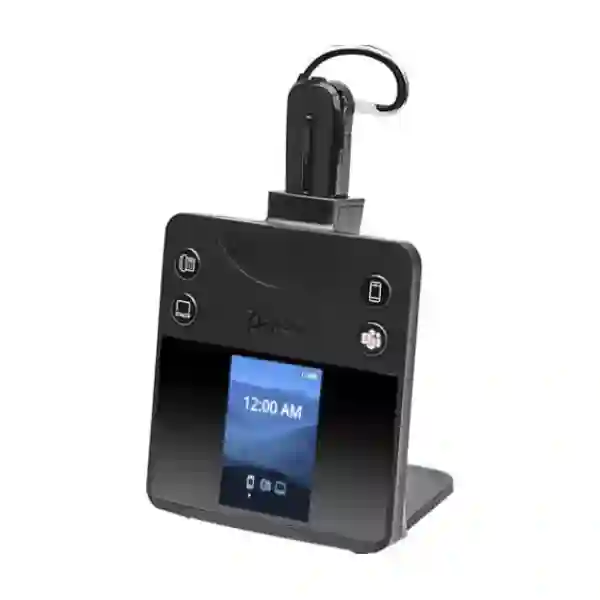
HP Poly Savi 8445 Office Convertible DECT Headset
One comfortable office calling workflow across a compatible desk telephone, computer and mobile device. Choose your wearing style, select the source at the base, and stay connected while moving around the workplace. For Tanzania orders, confirm the exact regional configuration and device compatibility before purchase.
The key buying facts at a glance
- Phone sources: desk phone, computer and mobile through the office base, subject to compatibility.
- Wireless link: DECT between headset and base; Bluetooth for a compatible mobile device at the base.
- Published range: up to 180 m open area; up to 55 m typical office, depending on conditions.
- Wearing options: over-ear, over-head and behind-head with the convertible fit kit.
- Operation: base line-selection controls, headset mute/volume/call controls, spare-battery charging workflow.
- Before buying: confirm full regional model, DECT band, desk-phone connection, softphone functions and supplied accessories.
Who this headset is designed for
The HP Poly Savi 8445 Office Convertible DECT Headset is designed for people whose working day moves between telephone calls, computer-based meetings and mobile conversations. A receptionist might answer desk-phone calls, an account manager might use a computer softphone, and a supervisor might take a mobile call between tasks. Rather than keeping separate headsets beside every device, a compatible Savi 8445 Office base brings these sources into one working position. The headset is a compact single-ear design, intended for speaking clearly while retaining awareness of colleagues and activity around the desk.
It is particularly worth assessing for customer service, administrative teams, appointment desks, sales operations, executive assistants and small contact-centre teams. Its strengths are flexible wearing options, DECT roaming through the office base, line-selection controls and a spare-battery workflow. It may not be the best choice for someone who wants two covered ears, a travel-first Bluetooth headset without a desk base, or guaranteed operation with every telephone system. The correct decision starts with identifying the actual calling devices and checking their compatibility.
The practical benefit of one base for three calling sources
Many business users have a desk phone for a published office number, a computer for collaboration or cloud calling, and a smartphone for direct contact. The Savi 8445 Office system is built around these three categories. The office base serves as the connection hub, while the DECT headset remains the device worn by the user. On a compatible desk, this reduces the repeated task of unplugging a headset, changing audio devices or wearing two headsets to answer different calls.
Three-way connectivity does not mean every call from all three devices is automatically combined into one conversation. Users choose the relevant source with the base controls, and more advanced conferencing or mixing functions depend on supported scenarios and configuration. A good installation labels each source clearly, confirms which source is the default, and trains staff on switching when a second call arrives. That small preparation has more value than a long feature list because it prevents missed conversations in a busy reception or customer-facing office.
How DECT and Bluetooth work together
DECT is the wireless link between the Savi headset and its office base. It is useful when a worker wants to leave the immediate desk area while continuing a call. Bluetooth is used at the base for mobile-device connectivity; the smartphone is not the same thing as a direct standalone DECT headset pairing. The computer and desk-phone connections are also managed through the base and the appropriate cables. Understanding that architecture helps purchasers avoid a common mistake: assuming the headset can simply pair directly to any Bluetooth laptop or phone in the way a travel headset would.
The manufacturer lists Bluetooth Core 5.2 and common Bluetooth audio and hands-free profiles for the relevant published Savi 8445 Office configuration. Those capabilities describe the base’s mobile connection, not universal support for every app or call-control function. During evaluation, test the exact phone operating system, computer software and desk telephone together. A headset that sounds fine during an ordinary call can still need configuration before it reliably answers, ends, transfers or switches calls through a particular business application.
Three convertible wearing styles for different roles
The 8445 Office is called convertible because its included fit kit supports over-the-ear, over-the-head and behind-the-head wearing arrangements. That flexibility matters in teams where users have different preferences about headbands, eyeglasses, hair, movement and pressure around the ear. An employee who spends long periods answering calls may prefer a different arrangement from someone who joins occasional meetings. A flexible headset makes the fitting conversation more practical than expecting every colleague to tolerate one fixed shape.
A good fit is not only about comfort. The microphone boom should be positioned towards the corner of the mouth so that the voice is picked up consistently. Staff should try each supported wearing arrangement and check that the headset remains stable while they turn towards a screen, reach for a document or walk around the workstation. The system remains a single-ear calling headset rather than a stereo listening device. If a buyer’s main need is deep listening immersion or two-ear coverage, that requirement should be evaluated separately instead of assuming the convertible kit changes the headset into a stereo product.
Noise-cancelling microphone and conversation clarity
Shared offices contain nearby voices, keyboard activity, ventilation noise and movement. The Savi 8445 Office includes a noise-cancelling microphone with close conversation limiting, a feature intended to help reduce distracting sound around the speaker. In practical terms, the aim is to make the user’s own voice easier for the caller to understand without requiring a completely silent room. Its microphone is the most relevant noise-management feature to consider when assessing this specific convertible model.
Noise cancellation is not a promise that every nearby voice will disappear or that the listener will never hear office activity. Placement of the boom, microphone gain, the calling platform, background conditions and network quality all affect results. When trialling the device, make test calls from the real workstation during normal activity. Ask the person at the other end whether speech remains intelligible when colleagues speak nearby. Also distinguish microphone noise reduction from active noise cancellation for the wearer’s ears, which should not be assumed from stereo-series marketing or a generic description of the broader Savi family.
Range figures and real office expectations
HP lists wireless range of up to 180 metres in an open area and up to 55 metres in a typical office environment for the published Savi 8445 Office configuration. These figures describe possible radio performance under stated conditions, not a guarantee that any particular building will provide the same distance. Walls, floors, metal storage, partitions, equipment placement and radio congestion can reduce practical coverage. A long corridor or open-plan area usually behaves differently from a reinforced-concrete building with several rooms.
For a Tanzania office deployment, map the areas where users need to answer calls: reception, adjacent administrative rooms, nearby storage areas or shared service counters. Test actual speech quality and the point at which the connection becomes unreliable. Avoid positioning the base behind large electrical equipment or inside closed metal furniture where possible. The ability to walk away from the desk is useful, but it should not replace a walk test. If the requirement involves multiple floors, distant warehouses or outdoor roaming, verify the layout before treating the published maximum as a design specification.
Battery changes without planning calls around a charger
The Savi 8445 Office package specified by HP includes a rechargeable headset battery, a spare battery and a deluxe charger for that spare. The design supports changing batteries to extend working availability instead of waiting for a single battery to recharge before taking the next call. This is especially useful in long customer-service shifts or a shared front office where a caller may need help at any point during opening hours. The battery is still a consumable component that needs charging and sensible handling.
Manufacturer pages and model-specific support material do not describe single-charge talk time consistently, so this listing does not promise a precise number of hours per battery. The phrase unlimited talk time should be understood as a hot-swap operating approach with a charged replacement available, not as a battery that lasts forever. Verify the exact regional package and battery performance for the proposed unit, and train staff to keep the spare charged. A brief battery-change procedure is a better safeguard for an incoming call than assuming the base automatically removes every possibility of interruption.
A base designed for daily call control
The office base is more than a stand for charging the headset. It includes line buttons for computer softphone audio, mobile Bluetooth audio and the telephone interface, together with a navigation wheel and back control. These give users a practical way to select the source they intend to use and reach configuration options. Keeping the controls visible and accessible is helpful when a receptionist must answer a ringing line while working in another application.
A successful installation should agree a default line and a simple process for switching sources. Staff should practice selecting the desk-phone line, answering a computer call and returning to a mobile call without guessing which button is active. Settings should be changed deliberately, with a record of any unusual desk-phone configuration. Even well-designed hardware requires familiarity at the workstation. For a small team, five minutes of supervised practice with the actual telephone and collaboration software often prevents more disruption than detailed instructions no one reads.
Desk-phone compatibility must be checked before ordering
The package includes a telephone interface cable, but that does not establish compatibility with every desk telephone. Different IP phones, traditional business telephones and PBX handsets may expose different headset ports, handset ports, call-control capabilities and connector arrangements. Some configurations need an electronic hookswitch cable or a handset lifter to support convenient remote answer and end functions. Those accessories and their compatibility must be verified for the exact phone model rather than assumed to be supplied.
Before purchasing, record the desk-phone manufacturer, exact model, firmware when relevant, physical port type and any existing headset adapters. Ask whether the user only needs audio or also wants to answer a call while away from the desk. Test both incoming and outgoing calls, check dial tone, ensure microphone volume is appropriate and verify that calls end correctly. A cable that fits is not always a sign that electronic call control is supported. This compatibility check is especially important when upgrading headsets but keeping an older phone fleet.
Computer calling and supported operating systems
The published HP configuration lists Windows 10, Windows 11 and macOS among supported operating systems. The headset can connect through the office base using the relevant USB connection to a compatible computer and be selected for communication software. HP documentation also directs users to Poly Lens Desktop for settings, device updates and supported softphone call control. A headset can pass audio in an application without necessarily supporting every answer, end, mute-status or presence function from that application’s interface.
IT buyers should therefore verify the actual softphone and meeting applications deployed by their organisation. Decide whether the requirement is only to hear and speak, or whether users need integrated buttons, call status, remote call control and centrally managed settings. Test a sample PC with the organisation’s security policies and software before purchasing a larger quantity. Where managed desktops restrict application installation, discuss the software dependency early. Avoid promising universal support for an unnamed cloud PBX, collaboration suite or operating-system build.
Mobile-phone integration through the base
Business calls increasingly reach staff through a mobile number as well as a desk or computer. The Savi 8445 Office base includes Bluetooth connectivity for a compatible mobile device, allowing that source to be part of the user’s desk-based calling routine. This can be valuable when an employee needs to answer a supplier, field colleague or manager without changing headsets. Pairing and normal call operation should be tested with the intended mobile handset, rather than relying only on a Bluetooth version number.
The main distinction is that mobile connectivity is handled by the office base. If a person plans to travel away from the base or use the headset on the road, they should not assume it behaves as a conventional portable Bluetooth earpiece. Check how the user intends to move through the workday. For a desk-based employee with occasional mobile calls, this model can consolidate communication; for someone moving between sites with only a smartphone, a different headset category may fit the task better.
Standard Office and Microsoft Teams variants
HP describes both Savi 8445 Office configurations and separate Microsoft Teams-certified variants in the wider product family. A Microsoft Teams-specific product listing may include a dedicated Teams-related control on the base, whereas the standard Office version uses a configurable button arrangement. The buyer should not infer certification, a Teams button or a particular regional part number merely from the words Savi 8445 Office in a short catalogue title.
Identify the precise manufacturer configuration on the quotation and compare its controls with the organisation’s collaboration platform. For Teams-heavy desks, confirm whether the Teams-certified version is required. For environments using several communication applications, confirm the required interoperability and call-control features for each. Application certification and real deployment compatibility are related but not interchangeable: computer policies, installed software and phone integration can still affect the outcome. This distinction should be settled before a purchase order is issued, particularly when different departments use different calling systems.
What DECT security certification does and does not mean
HP identifies DECT security certification for the published Savi 8445 Office configuration. That is relevant to organisations selecting business headsets for sensitive customer conversations, internal discussions or shared workspace use. It describes a characteristic of the headset’s radio system, not a promise that every connected telephone service, computer, mobile application or office network is secure by default. Complete communication security includes user accounts, device management, call platforms, endpoint configuration and employee procedures.
Organisations handling personal or confidential information should still apply their established privacy and information-security requirements. Users need to know when a microphone is muted, how to avoid leaving a call active in a shared area and how to store the headset when a shift ends. IT teams should review firmware updates, supported management features and access permissions for the calling applications. A security-aware headset choice is useful, but it is one part of an overall operational control process rather than a substitute for it.
Using headset conferencing for coaching and training
HP describes the ability to conference up to four compatible headsets on a single Savi 8400 Office base. For a customer-service operation, this can support supervised call handling, practical training and collaboration without requiring everyone to gather around a loudspeaker. A supervisor can listen to a real work scenario with an appropriate approved setup, while a newer colleague learns how to respond, follow a process and use the organisation’s telephone tools.
Before adopting that workflow, verify the exact compatibility of participating Savi headsets and how conferencing is initiated and ended on the base. Not every older headset is supported; HP specifically notes an incompatibility with Savi 7200 headset tops. Apply the organisation’s notice and consent procedures where calls are monitored or multiple people participate. The feature is best treated as a controlled training option, not evidence that all employees can join any call automatically. A short documented process makes the feature more useful and less confusing.
A day at reception: a realistic workflow
Consider an office administrator whose morning includes receiving the main business number, answering internal questions and joining a computer meeting. A compatible desk phone sits alongside a PC, with a mobile phone used for occasional direct contact. The administrator starts by selecting the main desk-phone source at the base. A caller rings, the headset is worn in the preferred arrangement, and the staff member can refer to records while speaking without holding a handset.
Later, a scheduled computer meeting requires a change of audio source. The employee selects the relevant computer line, checks the application’s chosen microphone and speaker, and joins with the headset. A mobile call may be handled through the paired base when appropriate. None of these steps should be taken as proof that every simultaneous-call scenario is supported; the actual system controls how calls are queued, held or combined. The value here is predictable handling of several common sources at one desk with a single familiar headset.
Sales, accounts and service-desk scenarios
Sales and account-management teams often move between outbound computer calls, inbound desk extensions and mobile follow-up. For them, a single-ear wireless headset can make it easier to speak while checking a quote, reviewing a customer record or consulting a nearby colleague. The Savi 8445 Office is worth evaluating when those conversations happen primarily from an assigned workstation and the organisation wants a consistent approach to call hardware.
An IT help desk may value the base’s source selection, while a booking or appointments desk may place greater importance on wearing comfort and reliable desk-phone answer functions. A small support team may be interested in conferencing for coaching. Those are use-case possibilities rather than promises that a particular telephone or CRM system is supported. For every team, write down the main call source, typical call duration, movement required, number of users and special software controls. Matching those details to a verified configuration yields a better purchase decision than ordering by headline range alone.
What is included in the published package
The HP Africa specification for a published Savi 8445 Office configuration lists a wireless headset, office base, charging cradle, AC power adapter, USB Type-A and USB Type-C cables, telephone interface cable, spare battery, USB deluxe charger for the spare battery and convertible fit kit. This is a useful starting point for assessing what the user will need at the workstation. The fit kit and spare-battery equipment are particularly important because they support two major reasons for choosing the convertible model.
Packaging can differ by exact manufacturer part number, region and bundle. Ask for a written packing list on the actual quotation, especially when headset accessories are supplied separately or when an installation needs an electronic hookswitch cable or handset lifter. The published package does not establish that those optional phone-specific accessories are included. On delivery, compare the contents against the approved configuration before disposing of packaging. A quick receiving check prevents an avoidable installation delay caused by a missing connector or fit component.
Published technical specification highlights
According to HP’s Africa specifications for a documented regional Savi 8445 Office configuration, the headset weighs approximately 21 grams, has a 32 mm speaker and uses a noise-cancelling microphone. Bluetooth Core 5.2 is listed for the base’s mobile connectivity. The headset uses a rechargeable lithium-ion polymer battery, and the published charging time is under three hours. The system supports a convertible wearing arrangement, with the black colour shown for that configuration.
HP also lists up to 180 metres of wireless range in open space and up to 55 metres in a typical office environment. The exact regional radio-frequency version matters: HP offers different DECT-band variants for different markets, and the selected part must be checked for local suitability. Treat these specifications as model-family purchasing guidance and validate the exact supplied regional product before treating them as an acceptance specification. Dimensions, box contents and platform behaviour are best confirmed on the final order documentation.
Choosing the correct regional radio variant
DECT headsets are not necessarily interchangeable across every region. HP markets Savi 8445 Office part-number variations for different DECT frequency ranges and collaboration variants. A regional HP Africa product entry describes a DECT 1880–1900 MHz version, but that listing is not evidence that every Savi 8445 Office item has the same band. It is also not evidence of approval to operate a particular imported unit in Tanzania.
Before ordering for a Tanzania deployment, obtain the complete manufacturer part number and the specified radio band for the proposed stock. Ask the seller or responsible technical team to confirm the applicable local regulatory requirements and documentation for that exact variant. Do not assume that a headset intended for another region should be imported or deployed without checks. The same due diligence should cover the supplied power adapter and local electrical setup. These steps are especially relevant for multi-office procurement and cross-border equipment transfers.
Deployment planning for a Tanzania business office
An office in Tanzania may use a traditional PBX, a hosted calling platform, a mix of IP phones and computers, or mobile-first communication. The Savi 8445 Office should be matched to the actual architecture. Begin by recording the calling applications, handset models, number of employees, type of desk layout and level of mobility expected. Where a computer is involved, confirm the available USB connection, permitted software and audio-device settings. Where a physical telephone is involved, verify headset-port and remote-answer requirements.
Wireless performance should be trialled in the actual building, not inferred from a diagram alone. Make test calls in the areas where staff need to move and identify places where thick walls or equipment affect reception. Plan a location for the charging base with accessible power and a clear place to return the headset. There is no assumption here about local stock, shipping speed, installation coverage, pricing, business location or regulatory approval. Those details should be verified against the final Tanzania quotation.
Planning a multi-user rollout
For several workstations, standardisation helps reduce support effort. Start with one pilot installation that matches the most common desk-phone and PC combination. Record the source connections, operating-system version, softphone name, chosen default line, hardware accessories and expected call-control functions. Ask one frequent caller to test incoming, outgoing, held and transferred calls, including a mobile call where that source is used. Collect feedback about comfort, microphone position and range before expanding the deployment.
Next, separate users into groups that genuinely need the same configuration. Receptionists may depend on remote desk-phone answering; administrators may prioritise computer meetings; supervisors may want compatible headset conferencing. Document any differences in accessories rather than sending every person an identical kit and hoping it works. Provide brief instructions beside each shared desk, maintain a responsible contact for firmware and software changes, and keep spare batteries and removable fit components organised. The aim is a repeatable installation rather than an overly complicated technology project.
A useful acceptance test before go-live
A new headset should be tested against a written list of real tasks. On the desk phone, check dial tone, the user’s outgoing voice, the caller’s volume and the ability to answer or end a call using the supported controls. On the computer, test the actual meeting or softphone application, including its selected microphone and speaker, mute behaviour and any supported headset-button integration. On the mobile device, test pairing and switching through the base. Also ask the user to walk to the furthest area in which calls need to work.
Finally, test what happens when a second call arrives, when a battery becomes low, and when a colleague needs to use a conferencing function. These are the situations most likely to reveal a configuration gap before daily use begins. Note what passed and what requires a separate accessory or settings change. If a feature is unsupported, document the limitation clearly rather than claiming that a hardware purchase can solve any calling-system problem. This reduces confusion for both users and the IT support team.
How the 8445 differs from a stereo office headset
The central attraction of the Savi 8445 Office is the convertible, single-ear format. That suits many people who want to hear a caller while remaining aware of colleagues at a customer counter, reception area or shared office desk. It does not provide two-ear listening coverage. Colleagues who work in very noisy rooms or prefer both ears covered may find that a different headset style better meets their comfort and concentration requirements.
Other Savi 8400 Office-family models have different wearing forms, so purchasing staff should not assume all models share the same user experience or accessory set. Similarly, stereo-oriented features in broad series material should not be transferred automatically to this convertible model. A comparison should focus on work habits: one ear or two, fixed desk or travel, call length, need for mobility, compatible phone lines and wearing comfort. Testing the intended device with actual users is often the quickest way to resolve the choice.
How the 8445 differs from a travel Bluetooth headset
Travel-focused Bluetooth headsets are attractive when a person connects directly to a laptop or smartphone while moving between buildings. The Savi 8445 Office addresses a different problem: several office calling sources at a workstation connected through a dedicated base. The DECT radio link allows movement around that base, while base controls help the user select desk phone, computer or mobile audio. This structure can be valuable for a fixed workplace even where staff occasionally step away from their desk.
If an employee spends much of the week visiting customers, driving between locations or attending meetings away from an installed base, the office-bound architecture may be inconvenient. A headset should be selected around the majority of calls, not around the most impressive range number. For mixed working patterns, consider whether the organisation actually needs a fixed office headset plus a separate mobile accessory rather than asking one system to behave like both. That practical distinction avoids poor fit after procurement.
Comfort, hygiene and shared workstations
Headsets are personal contact devices even when a team uses shared desks. The convertible design makes it possible to choose a preferred wearing arrangement, but organisations should still define who owns each headset and how fit components are managed. In a hot-desk environment, removable personal accessories and a clear procedure for storing or disinfecting shared contact surfaces can help staff feel comfortable using the equipment. Cleaning should follow the manufacturer guidance and local workplace policy.
For long calls, comfort should be assessed across more than a quick demonstration. Have a user wear the headset through a realistic period of work, check that the boom remains in place and confirm that volume adjustments are easy to reach. Eyeglasses, hearing preferences and individual fit can affect the outcome. The light published weight is helpful context, but it cannot prove that every person will find the headset comfortable. Allow staff to evaluate the three fit arrangements before finalising a fleet standard.
Software updates and ongoing IT ownership
Poly Lens Desktop is identified in the product guidance for settings, device updates and supported softphone call control. If the organisation plans to manage multiple headsets, it should decide who is responsible for checking software compatibility and arranging approved updates. The priority is predictable operation, not changing settings without a reason. Updates and reconfiguration should be tested against the real telephone and collaboration environment, particularly where staff depend on calls throughout the day.
A simple support record can include the manufacturer’s exact part number, workstation, desk-phone model, connected computer type, relevant accessories and a note of tested features. When an employee reports a problem, that information helps distinguish a loose cable, a wrong line selection, a softphone setting and a headset fault. Keep users informed about where to report problems and where spare charging parts are stored. Consistent ownership reduces repeated troubleshooting and makes the system more dependable over its service life.
Routine care, charging and battery management
Return the headset to its charging cradle when it is not in use, and keep the spare battery charged according to HP Poly instructions. If a headset is used through several shifts, agree who checks the battery and who replaces it when performance falls. Batteries age, and individual operating time can vary with use and conditions. The system’s hot-swap design is helpful only when a suitable charged spare is available and staff know how to fit it correctly.
Keep the base and charger in a dry, stable position away from unnecessary liquid exposure and physical strain on cables. Inspect frequently handled connectors and fit components during normal office maintenance. Do not treat replacement parts from a different model as automatically compatible, even if they appear similar. For any charging, fitting or firmware issue, use documentation for the exact Savi 8445 Office variant. These basic habits support more reliable calling than treating the device as a completely maintenance-free accessory.
Troubleshooting when a caller cannot hear the user
Start with the simplest checks: confirm that the headset is powered on, the correct line is selected on the base, the microphone is not muted and the boom is positioned near the mouth. On a computer, verify that the intended application is using the correct microphone rather than a built-in laptop microphone or another USB device. On a desk phone, check the telephone connection and its headset or handset mode. These quick checks can isolate a user-setting problem before equipment is replaced.
If audio is distorted or unusually quiet, compare results across the available sources. A problem on one application only suggests a different cause from a problem on every connected device. For desk-phone issues, the appropriate interface configuration and any EHS or lifter accessory may need review. For intermittent wireless audio, examine the base location and the area where the headset is being used. Follow the manufacturer’s troubleshooting procedure rather than repeatedly changing unrelated settings, and document any resolved configuration so colleagues can reproduce it.
Questions to settle on a quotation
Ask for the exact HP Poly Savi 8445 Office regional part number and confirm whether the offer is the standard Office configuration or a Microsoft Teams-certified variant. Confirm the frequency band, actual box contents and any required optional desk-phone accessories. Request compatibility confirmation for the identified desk-phone models and computer calling applications. For a multiple-unit purchase, ask how the sample configuration will be validated before the remaining units are installed.
Commercial terms should be just as specific: have the seller state the proposed price and currency, local availability, tax treatment, delivery arrangements, return conditions and applicable warranty handling for the exact unit. HP’s general product specification describes a standard manufacturer limited warranty, but the rights and service process applicable to a particular Tanzania sale need confirmation. Avoid relying on assumed stock or unnamed service commitments. A clear written quotation makes it easier for procurement, finance and IT to assess the same offer.
Technical reference table
| Product family | Poly Savi 8400 Office series; Savi 8445 Office convertible configuration |
|---|---|
| Wearing form | Single-ear convertible; over-ear, over-head or behind-head fit |
| Primary connection | DECT headset-to-base; desk phone and PC connect through compatible base interfaces |
| Mobile connection | Bluetooth Core 5.2 listed for the office base in HP Africa documentation |
| Range | Up to 180 m open area or 55 m typical office; installation conditions vary |
| Microphone | Noise cancelling with close conversation limiting |
| Headset weight | Approximately 21 g in HP’s documented regional configuration |
| Speaker | 32 mm in the referenced HP configuration |
| Battery and charging | Rechargeable Li-ion polymer; spare battery and deluxe charger in published bundle; charge time under 3 hours |
| Conference function | Up to four compatible headsets on one base, subject to configuration |
| Published regional example | DECT 1880–1900 MHz, but verify exact ordered part and Tanzania suitability |
| Important distinction | Standard Office and Microsoft Teams-certified variants are not identical |
This table summarises a documented HP regional configuration and practical buying requirements. It does not establish the SKU, exact contents, stock or regulatory approval of an unverified Tanzania listing. Use the complete manufacturer part number when confirming a quotation.
Frequently asked questions for business buyers
Can the Poly Savi 8445 Office connect to a desk phone, computer and mobile phone?
The system is designed for three-way connectivity through its office base: a compatible desk phone, a computer and a mobile device. The base provides controls to select the source. Exact desk-phone compatibility and remote call-control functions need checking against the telephone model and any required accessory. Computer features can depend on the installed softphone and Poly software. Test the three sources on the intended desk before ordering in volume.
Does the headset pair directly to a smartphone over Bluetooth?
The Savi 8445 Office architecture uses Bluetooth at the office base for mobile connectivity, while the headset communicates with the base over DECT. The practical mobile experience therefore depends on the base being part of the setup. It should not be bought under the assumption that it is a standalone travel earpiece suitable for direct pairing wherever the user goes. A field-based employee may require a different form of headset.
What wearing styles are available?
The Savi 8445 Office is a convertible, single-ear headset. HP Poly guidance describes over-the-ear, over-the-head and behind-the-head styles using the fit kit. Users should test the arrangements for stability, comfort and microphone position. The design is not converted into a stereo headset by using a different fitting accessory. Check the quoted package for the complete fit kit and obtain the exact part number.
What range can buyers expect in a real office?
HP publishes up to 180 metres in open space and up to 55 metres in a typical office for the documented configuration. Those are upper reference figures, not guaranteed distances in a specific building. Walls, equipment and layout can reduce coverage. The best method is to install a pilot unit and walk the routes used by staff while a call is active. Test the actual areas that matter for the job.
Does the Savi 8445 Office offer unlimited battery life?
No rechargeable battery literally operates forever. The model’s unlimited talk-time messaging refers to a workflow supported by a hot-swappable rechargeable battery and a charged spare. The user still needs to manage charging and battery changes. Because published materials give differing figures for single-charge talk time, a precise per-battery promise is not made here. Confirm the exact configuration and battery specification before purchasing.
Is the headset compatible with Microsoft Teams?
HP markets distinct Savi 8445 Office variants, including Microsoft Teams-certified configurations. The short model-family name alone is not enough to confirm that the exact offered unit has Teams certification or a dedicated Teams button. Ask for the full manufacturer part number, then check the variant and installed software with your organisation’s Teams setup. Other softphone applications should be assessed independently.
Does noise cancellation remove all nearby conversations?
The headset includes a noise-cancelling microphone with close conversation limiting. Its purpose is to reduce distracting background sound reaching the person on the call, not to create absolute silence. Results depend on conditions, microphone position, user voice, applications and audio settings. Buyers should perform a trial call in the actual shared office and ask the distant participant to judge speech clarity. Do not confuse microphone noise reduction with stereo earcup active noise cancellation.
Can the system support supervisor coaching?
HP describes conferencing multiple compatible headsets, up to four on a single base, in the Savi 8400 Office family. This may help with guided training and supervised conversations. Confirm the supported participating headset models, the conferencing process and any consent or privacy requirements used by your organisation. Not every Savi-series headset connects to every base; HP notes that Savi 7200 headset tops are not compatible with this base.
Do we need a handset lifter or an electronic hookswitch cable?
Possibly. The answer depends on the desk-phone model and whether the user needs remote answer and end controls as well as audio. The published package includes a telephone interface cable, but phone-specific electronic hookswitch accessories or a handset lifter may be separate. Check the telephone’s ports and compatibility documentation before purchasing. A call-control demonstration with the actual desk phone is the safest way to confirm the required setup.
What operating systems and software should we check?
The referenced HP product specification lists Windows 10, Windows 11 and macOS among supported operating systems. Poly Lens Desktop is identified in setup guidance for settings, updates and supported computer softphone control. Organisations should also check the exact meeting or calling applications, computer USB connection and installation permissions. Audio working on one PC does not prove that all call-control functions will work across different applications.
Can several staff share the headset at a hot desk?
Shared workstation use can be considered, but the team needs clear procedures for pairing, fit accessories, hygiene, charging and responsibility for the headset. The exact base and headset pairing process should be checked in HP Poly guidance. Users may prefer individually assigned wearing parts or complete headsets. For high-use shared desks, pilot the workflow first; avoid assuming that every headset interchange or charging arrangement is universally supported.
How do we confirm the right unit for Tanzania?
Request the complete HP manufacturer part number, its DECT frequency band, the exact product bundle and suitable power accessories. The referenced HP Africa listing describes an 1880–1900 MHz version, but variants exist for other regions. Have the responsible supplier or technical team confirm requirements relevant to the proposed Tanzania deployment, including any applicable local radio rules. No regulatory approval is claimed here for an unspecified imported unit.
What is the price and is it in stock in Tanzania?
This product description does not state a price, stock level, delivery time or local fulfilment commitment because those facts have not been verified for the target listing. Ask for a current written quotation identifying the regional variant, included accessories, commercial terms and applicable taxes. For multi-desk purchases, include the phone models and software in the enquiry so the offer can be checked for suitability before money is committed.
What should we provide when requesting a quote?
Share the required quantity, desk-phone brand and model, main calling software, operating system, and whether each user needs mobile-device connectivity. Also mention any Microsoft Teams certification requirement, preferred wearing arrangement, expected movement around the office and interest in supervisor coaching. Ask the supplier to confirm the exact regional part number, accessories and terms. Do not send passwords, personal account credentials or other sensitive data as part of a basic headset enquiry.
Request a Savi 8445 Office configuration and quote
Tell the FourTeck Tanzania team which desk telephones, computers and calling applications your organisation uses, along with the number of headsets required. Request confirmation of the exact HP Poly regional part number, the appropriate DECT radio variant, the included wearing and charging accessories, and any desk-phone-specific call-control components. Ask for written commercial terms and the applicable warranty arrangements for the proposed units.
A short compatibility review before procurement helps establish whether the convertible single-ear Savi 8445 Office is the correct option for your users, or whether another wearing form or headset category would be more suitable. Request a quotation for the verified configuration; no price, stock level, delivery promise or local certification is claimed in this description.




Reviews
There are no reviews yet.