
Professional office communication
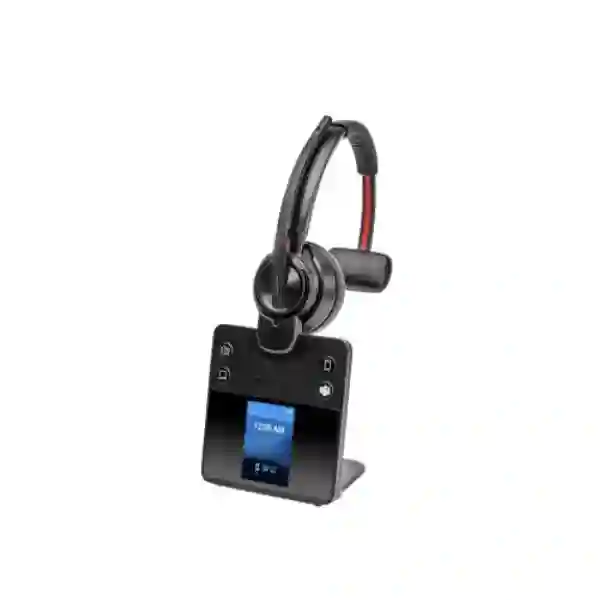
HP Poly Savi 8420 Office Microsoft Teams DECT Headset
Move between Microsoft Teams, compatible desk-phone calls and business mobile conversations through a versatile DECT office system. Explore how its stereo audio, noise-control features and multi-device base fit real work before choosing the exact regional version.
Microsoft Teams-certified variant · Stereo listening · DECT wireless · Office base with multiple call sources
Quick specification overview
| Type | Stereo on-ear DECT wireless office headset with a multi-device base |
|---|---|
| Teams integration | Microsoft Teams-certified variant with dedicated Teams controls |
| Audio | Hybrid ANC for wearer; noise-cancelling boom microphone |
| Computer and phones | Computer via office base; compatible desk phone; mobile via Bluetooth to base |
| Wireless range | Up to 55 m typical office; up to 180 m open space, per HP |
| Talk / standby | Up to 13 hours talk time; up to 50 hours standby |
| Charge | Less than 3 hours under stated specification |
| Bluetooth | Core 5.2 at base; profiles include A2DP, HFP, HSP |
| Controls | Headset call, mute, volume, power; office base source buttons and display |
| Important note | Verify regional DECT band, telephone interface and package contents |
Figures describe the referenced HP configuration and do not establish a particular Tanzania commercial offer. The exact regional variant and attached phone equipment should be checked before purchase.
One headset for the calls that move across your working day
A professional office call rarely stays in a single application. A customer may call the desk telephone while a colleague is waiting on a Microsoft Teams meeting and a supplier is returning a call to a mobile. The Savi 8420 Office is built around that reality. Its office base acts as the connection point for a compatible computer, desk phone and mobile phone, while the stereo wireless headset lets the wearer move away from the desk without immediately abandoning the conversation. This is a practical fit for people who regularly switch between different business communication channels rather than using only one computer application.
The HP Poly Savi 8420 Office Microsoft Teams DECT Headset combines a Microsoft Teams-certified configuration, stereo on-ear listening, a noise-cancelling boom microphone, active noise cancellation for the wearer and DECT wireless connectivity between headset and base. HP describes up to 13 hours of talk time under its stated test conditions. Instead of treating those figures as universal guarantees, buyers should consider the environment: office walls, other radio devices, charging habits, desk-phone hardware and software settings can change the actual experience. The most important first question is whether the office base can connect correctly to each phone system the user needs.
For a Tanzania-based organization comparing office headsets, the sensible next step is to confirm the exact regional product variant, the desk-phone model, the computer connection and the intended calling applications before requesting a quotation. Those checks matter more than a feature list alone, because the best outcome is reliable call handling across the systems already in use.
What the Savi 8420 Office actually connects to
The headset uses DECT radio communication to work with its office base. The base, rather than the wearable headset itself, is the hub for the connected communication devices. A computer can be connected using the supported USB interface and an appropriate supplied cable; a compatible office telephone can use a telephone interface connection; and a mobile phone can pair with the office base over Bluetooth. This distinction is useful when planning desks, hot-seat arrangements or shared environments: the headset is not simply a generic Bluetooth headset paired directly with every computer and telephone.
At the desk, staff choose the audio source they want using the base controls. For example, an administrator can finish a desk-phone conversation, then select the computer line for a softphone or Teams meeting. Mobile pairing provides a third source when the organization depends on business mobile calls. Call behavior and remote answer functions are not identical for every device. A desk phone might require extra electronic-hook-switch hardware or a handset lifter for full remote pickup, while a computer softphone might need Poly software and a compatible application.
The three-way design makes the product particularly interesting for workplaces in transition. A team can continue using traditional desk phones during a move toward software calling, provided the individual devices are compatible. Buyers should inventory the actual devices and identify which calling workflows need to be tested, rather than assume that the phrase three-way connectivity means every feature will function identically on all three lines.
Computer calling and the USB connection
For computer-led work, the office base provides the connection to Windows or macOS systems and routes audio to the wireless headset. HP lists USB Type-A and USB Type-C cables among the usual box contents for the corresponding regional specification. The presence of both cables is useful where a department has older desktop computers and newer laptops, but buyers should still check the actual supplied regional package and available computer ports. The USB connection belongs to the base; the user can speak through the headset without being tethered to the computer by a cable.
Computer calling is also a software compatibility question. Audio may work when the operating system recognizes the device, but call control such as answer, end or mute integration can depend on the softphone and its configuration. Poly Lens Desktop can help configure supported calling software and update device firmware. Microsoft Teams users should select the exact Teams-certified SKU rather than an otherwise similar standard variant if dedicated Teams interactions are important to the role.
Before a bulk purchase, test one headset on the organization’s current computer image, security policies, Teams desktop client and any additional softphone. Confirm that the correct microphone and speaker are chosen, that users can hear their own test calls, that notifications behave as expected and that application updates do not create an unexpected source-selection problem. This small pilot is especially valuable for a mixed fleet of desktops and laptops.
Desk-phone compatibility is a buying decision, not an assumption
Many offices still use desk phones for reception, front-desk service, finance approvals or external telephone lines. The Savi 8420 Office includes a telephone interface option on its base, but compatibility should be checked against the exact telephone brand and model. A phone with a dedicated headset port may need a different base setting from a phone that requires use of the handset port. Depending on the telephone, a remote-answer accessory such as an electronic hook switch or handset lifter may be required and can be sold separately.
It is important to separate hearing a call through the headset from controlling the call entirely away from the telephone. In some configurations, staff must still press the phone’s headset key or manually lift the handset when answering. That may be acceptable at a fixed reception desk, but it could disappoint someone expecting to answer every incoming desk-phone call while walking around. The right accessory and configuration should be identified before the headset is deployed.
Ask the IT or telephony team to record each desk-phone model, any available headset interface, whether remote call answer is essential, and the expected call volume. Then make a practical test call with the user standing near the desk and at the furthest normal work point. The result will show whether the proposed setup solves the intended problem, rather than merely confirming that a cable fits into a socket.
Mobile-phone calls through the office base
A manager or customer-service representative may receive business calls on a mobile phone even while sitting at an office workstation. The Savi 8420 Office accommodates this by pairing a compatible mobile phone to the Bluetooth-enabled office base. Once paired, the mobile line can be selected from the base so that mobile calls can be heard through the same headset used for computer and desk-phone conversations. HP specifies Bluetooth Core 5.2 for the relevant product configuration, with supported audio profiles including A2DP, HFP and HSP.
The connection path is worth understanding: the mobile phone communicates with the base, and the headset communicates with the base over DECT. This is not the same experience as taking a direct Bluetooth headset out of the office and pairing it while travelling. The Savi 8420 Office is designed primarily for work around its office base. Staff who spend most of their day away from the workplace may be better served by a portable Bluetooth or mobile-first headset, depending on their communication priorities.
For successful adoption, show employees how to switch between mobile and computer lines, what happens when they answer a call on the handset rather than the headset, and how to disconnect a paired phone when a workstation changes hands. Users should also know that phone operating-system versions and notification behavior can vary, making a test with the actual company phone advisable.
Microsoft Teams certification and practical use
This is the Teams-oriented version of the Savi 8420 Office, a family that appears in Microsoft’s published list of certified Teams headsets. HP identifies dedicated Teams controls on the matching base and describes convenient access to the desktop application. That is relevant to staff who join scheduled meetings, answer Teams calls or move between a telephone line and a collaboration call throughout the day. Certification is evidence of a defined device-and-platform relationship, but it should not be read as a promise of identical functionality on every operating system, client version or tenant configuration.
The user guide explains that the Teams controls are designed around the Teams desktop application. The dedicated control can bring attention to the app or supported meeting notifications, but the guide does not extend the same interaction to the Teams mobile application. Buyers should confirm that their preferred workstations actually run the desktop client and check whether endpoint management policies allow the required device software and firmware updates.
For IT buyers, the useful evaluation is simple: can staff join the Teams meeting they were invited to, use mute reliably, adjust volume, and return to the expected calling line afterwards? An employee should never have to guess whether the microphone is live or which device is carrying a call. A short user orientation on these interactions is more valuable than assuming a certified label eliminates every configuration step.
Clearer speech with a directional boom microphone
The Savi 8420 Office uses a noise-cancelling microphone, and HP also describes close-conversation limiting as part of its office audio approach. The purpose is to help the remote participant hear the intended speaker rather than every nearby conversation. This is especially useful at shared desks where colleagues are speaking at the same time, but it cannot remove all noise from every room or substitute for sensible workplace acoustics. Background sound, microphone positioning and software audio processing still affect the result.
The physical microphone boom should be positioned appropriately near the side of the mouth. The user guide recommends a placement about two finger widths from the corner of the mouth for good performance. That is a small practical detail with a major effect on communication: a boom pushed far away can lead to low voice pickup, while one angled poorly can expose a caller to breath noise. Before making many calls, employees should complete a brief recording or test meeting and adjust the boom position and microphone volume as needed.
Close-conversation limiting settings can be managed through supported Poly software. Organizations should select settings based on real conversations, not just the most aggressive noise setting. A quiet executive office and an active customer-support floor may need different tradeoffs between natural speech and rejection of surrounding voices. The headset should help the listener follow the discussion without making the user’s voice sound unnecessarily distant or processed.
Active noise cancellation and stereo listening
Stereo earcups and active noise cancellation help the person wearing the headset concentrate on a call. This is different from microphone noise cancellation, which addresses what other participants hear. In the Savi 8420 Office, active noise cancellation reduces some external noise reaching the wearer, while the boom microphone addresses the outgoing voice path. These are complementary features, but neither creates complete acoustic isolation. Nearby alarms, colleagues and other environmental sounds may remain audible and users should remain aware of safety signals.
A stereo headset can be comfortable for employees whose work involves long periods of listening to meetings, training sessions or recorded material. It can also offer a more focused listening environment than a single-ear design. On the other hand, a receptionist who must constantly hear visitors or colleagues in the room may prefer a mono configuration or may need to keep the cancellation setting off for particular tasks. Wearing style should therefore reflect the job rather than a general assumption that two earcups are always better.
The ear cushions use an artificial-leather surface in HP’s published specification, and the headset has an adjustable headband. Comfort is personal: glasses, hairstyle, head size and how frequently an employee removes the headset can influence a full-day experience. If possible, let representative staff try the stereo fit during a pilot, check that the controls are easy to find, and choose reasonable listening volume for repeated use.
DECT mobility: useful range with realistic expectations
HP lists a wireless range of up to 180 metres in an open area and up to 55 metres in a typical office environment for the cited regional version. These are manufacturer figures, not guaranteed coverage distances for every premises. Thick concrete walls, metal shelving, lift shafts, floor layouts, interference and the position of the office base can reduce usable range. A figure measured in open space should not be used as a promise that the headset will work across several floors or through every corridor.
The value of DECT wireless operation is that employees can move within an appropriate coverage area without remaining cabled to a workstation. During a long meeting, someone might retrieve a file from a cabinet or walk to a nearby office while continuing to listen. A service desk operator might briefly access a printer without leaving the caller in silence. These examples are realistic only if the premises have been surveyed and the distance stays inside the practical range of the configured system.
For Tanzania workplaces, particularly those with thick partition walls or multiple adjoining offices, a walk test should be part of the purchase evaluation. Place the base where the person normally works, make a live test call, and visit each required work point. Test audio quality and connection continuity, not merely the signal indicator. If a call drops or deteriorates, try a better base position or a more modest range expectation before planning to expand the deployment.
Talk time, charging and the working day
HP specifies up to 13 hours of talk time and up to 50 hours of standby time for the Savi 8420 Office, together with a charging time of less than three hours under the referenced conditions. These figures help a buyer estimate whether the headset can support a normal shift, but battery life depends on usage patterns, device age, temperature, settings and how often the user is in active audio. A long meeting-heavy day may not resemble a standby-heavy day, so a pilot should cover a typical busy shift rather than only the first hour of operation.
The supplied base and charging cradle are central to the daily routine. Encourage users to return the headset to the cradle during breaks and after work rather than leaving it on a desk or inside a drawer. This keeps the equipment easy to locate and supports predictable charging. Employees should also recognize the battery-status information on the office base or in supported device software so that an unexpectedly low battery does not interrupt a customer conversation.
A supervisor planning long shifts should think about charging access, shared-device hygiene and what happens if the primary headset is unavailable. Battery specifications are useful purchasing data, but operational readiness also depends on spare equipment and sensible charging habits. Avoid promising that every unit will deliver exactly the maximum rated talk time throughout its life.
Understand the office base and its controls
The Savi 8420 Office includes a base with a display and controls for handling connected call sources and settings. HP lists source-selection controls for a USB softphone line, a Bluetooth mobile line and a telephone interface line, as well as a scroll wheel, back key and Microsoft Teams button on the Teams version. The display gives the user a place to review relevant settings and status information rather than relying only on an audio prompt.
When an organization introduces the product, the base should be placed where the user can easily see it without obstructing the keyboard or telephone. Instructors can demonstrate which button selects which source, how to check battery condition, how to distinguish an incoming mobile call from a computer call and how to return to the normal default line. These steps are straightforward once learned, but they are not always intuitive for an employee who has previously used a basic wired headset.
The manufacturer also supports headset conferencing with additional compatible Savi headsets on a single base. That can help with supervised calls and training when the proper models and configuration are available. It is not a substitute for a full multi-party audio conference platform, and the number of participants and the connection method should be confirmed before designing a training process around this feature.
Security, privacy and what certification does not mean
HP identifies the relevant Savi 8420 Office configuration as DECT security certified. For an organization handling commercial conversations, a purpose-built wireless link with documented security characteristics can be an important procurement consideration. However, headset security is only one part of end-to-end communication protection. Call-recording systems, meeting permissions, user accounts, network controls and the desk phone or computer all matter to confidentiality.
Employees should understand that the headset’s mute function and visual indicators help them control what they transmit, but the microphone should still be checked before sensitive conversations begin. A shared workstation also needs practical controls over paired mobile devices and device access. When an employee changes desk or leaves the organization, the relevant pairing and application permissions should be reviewed as part of the normal offboarding process. Do not treat ownership of the headset as proof that the user’s business accounts are secure.
There is also a distinction between a manufacturer’s DECT security designation and approval to operate a particular radio-frequency variant in a country. The product family has regional frequency versions. A buyer in Tanzania should request the exact part number and verify its local radio suitability through the appropriate procurement and regulatory channels. Neither Microsoft Teams certification nor a general international product sheet establishes local frequency authorization by itself.
What Poly Lens can contribute to administration
Poly Lens Desktop is the manufacturer’s management software associated with the headset family. It can be used for supported configuration tasks such as audio preferences, default line behavior, device firmware and compatible software call control. This is useful for IT teams that want repeatable device settings instead of relying entirely on every employee’s personal choices. The specific controls available can depend on the device, software release and organizational permissions, so management capabilities should be checked against the installed environment.
For everyday users, the application can help explain why a call routes through one source rather than another, and it may simplify adjustments when the headset is used with a supported softphone. IT administrators should plan how the software will be installed on managed computers, who can update firmware, and whether support teams have permission to troubleshoot endpoint audio settings. Changes should ideally be trialled on a small number of units before they are applied throughout a department.
Keeping device software current can improve compatibility, but an update is still a change to the working setup. Where staff depend on continuous phone access, schedule configuration work at appropriate times and keep a known-good procedure for troubleshooting. Teams client updates, operating-system changes and desk-phone replacements can affect the user experience even when the headset hardware remains unchanged.
Check the exact regional variant before ordering
The product family is sold in different market configurations. HP’s Africa-oriented page identifies a Microsoft Teams-certified stereo Savi 8420 Office version with an 1880–1900 MHz DECT band, while HP’s North American material describes a 1920–1930 MHz variant. Those regional differences are too significant to ignore when importing or specifying equipment. The product name alone does not establish which radio band, plug arrangement, packaging or part number a particular Tanzania quotation would supply.
A clear purchase request should identify the required Teams configuration, stereo wearing style, intended market and exact manufacturer part number. Ask the supplier to document the radio variant being supplied and whether the proposed equipment is appropriate for the intended local use. The buyer’s IT or procurement representative should also confirm any local radio and electrical requirements that apply; no Tanzania-specific approval or certification is asserted here without exact-model evidence.
This content deliberately avoids assigning an unverified SKU, a local price or a stock status. Those details belong to the exact commercial listing and approved quotation, not a general model description. When comparing offers, use the manufacturer part number to confirm that every vendor is pricing the same variant and accessory bundle rather than assuming similar product titles always describe identical packages.
Technical specifications that matter during evaluation
The relevant HP regional specification describes a stereo, on-ear headset with 32 mm speakers, a noise-cancelling boom microphone and Bluetooth Core 5.2 support through the base. The published speaker bandwidth is 100 Hz to 6.8 kHz in wideband mode and 20 Hz to 20 kHz in multimedia mode; the stated microphone bandwidth is 100 Hz to 10 kHz. These figures indicate the product’s stated audio modes, not a guarantee of the quality of every internet call, which also depends on the application and connection.
HP lists the headset weight at 160 grams for the referenced configuration, although the practical wearing impression depends on balance, ear cushions and the individual user. The battery is specified as rechargeable lithium-ion polymer. Standard headset controls cover power, call answer and end, mute and volume. The base provides the multiple-source functions that distinguish the Office version from a simple single-device headset. The published box contents include a headset, office base, charging cradle, power adapter, telephone interface cable and USB Type-A and Type-C cables; verify the actual shipment before committing to a deployment plan.
Use these technical details to ask focused questions. Is stereo listening suitable for the employee’s role? Is the expected range realistic inside the building? Is the current desk phone compatible with the interface cable? Does the computer support the expected USB connection? These questions are more productive than comparing speaker specifications without considering the actual communication workflow.
A practical rollout plan for IT and procurement teams
Start with a brief needs review. Identify which users place most calls on Teams, which use a desk telephone, which regularly answer business mobile calls, and whether any role genuinely needs all three sources. Record how far staff expect to move while speaking and whether the work area contains dense partitions or multiple levels. This helps determine whether the Savi 8420 Office is suitable for each role rather than simply buying the same device for everyone.
Next, perform a technical compatibility check. Capture computer operating systems and ports, Teams desktop availability, softphone names and versions, desk-phone models, handset or headset interfaces and any remote-answer requirement. Confirm the exact regional model and accessories from the quotation. For a pilot, choose people with typical work patterns, including at least one person who uses a desk phone and one who relies heavily on the computer.
During the pilot, test an incoming call on each intended source, switching lines, mute, volume, meeting participation, walking range and charging. Let users wear the headset across a realistic shift and report comfort as well as audio quality. Write down any accessory requirement or software setting that must be standardized. A successful test should answer both technical and human questions: does it connect, and can people operate it confidently?
Finally, deploy with concise user guidance and a named internal support contact. Show users how to choose the correct source and charge the device, and give the helpdesk a checklist for the common problems of missing audio, the wrong default device or an incompatible hook-switch configuration. Review feedback after adoption. This approach is especially helpful in organizations replacing mixed wired headsets where old habits can cause avoidable support requests.
Reception, customer service and contact handling
For a front-desk team, every missed call can interrupt a customer interaction. A Savi 8420 Office configuration may be helpful when a receptionist operates a desk phone, occasionally joins Teams and needs hands-free movement within the tested office range. The base makes the sources visible and manageable. Yet a receptionist also needs awareness of visitors and colleagues, so stereo listening and ANC should be assessed carefully. Depending on the role, keeping awareness of the surroundings may be more important than blocking office noise.
For customer-support staff, the boom microphone and close-conversation limiting can support clearer speech in a room where many colleagues are taking calls. Here, the strongest business case is not a claim that noise disappears; it is the opportunity to test a headset that helps prioritize the employee’s voice while supporting professional calling workflows. Training supervisors may also value the ability to add compatible guest headsets for monitored learning sessions under supported conditions.
A purchasing decision should include a test with the actual call-handling application, typical background sound and the organization’s call quality standards. Ask whether headset control works with the chosen softphone, whether agents need remote call answer and whether local desks have enough room for a powered base. These details determine whether a premium multi-device office headset solves a genuine operational requirement.
Managers, finance teams and hybrid collaboration roles
A manager who alternates between Teams meetings, computer audio and mobile calls may benefit from a single office headset and a visible base for choosing sources. The stereo design makes listening to longer calls and presentations more focused, while the microphone helps reduce nearby conversation entering the call. The headset is particularly relevant when the manager spends substantial time at an office desk and moves periodically to nearby shelves, printers or meeting areas within tested range.
Finance, purchasing and administrative staff may have a different pattern: desk-phone calls with suppliers, a Microsoft Teams meeting with colleagues and occasional mobile contact during urgent tasks. In such settings, three-way connectivity could reduce the friction of repeatedly removing one headset and putting on another. However, the system still requires active understanding of which line is selected. Staff should receive clear guidance on muting and switching before handling confidential conversations.
The same model is not necessarily ideal for someone who works mainly on the road. Because mobile connectivity is mediated through the office base, a travel-heavy employee may value a portable mobile-first headset more highly. The Savi 8420 Office should be chosen for a base-centred work pattern. Matching the product to that daily routine helps avoid buying a feature-rich device that remains underused.
Useful deployment considerations for organizations in Tanzania
For Tanzanian organizations, the most helpful localization is practical rather than speculative. A procurement team should confirm the exact version proposed for local use, the base power arrangement, the existing phone environment and any applicable radio requirements. Workplace buildings may differ considerably in layout and construction, so wireless range should be checked on the actual premises rather than inferred from a brochure. Good results at one site do not guarantee identical performance at another site.
Where internet access is essential to Teams or softphone calls, a headset alone cannot improve weak connectivity. Network stability, jitter, latency and the configuration of the calling platform remain important. A clear microphone can make local speech pickup more consistent, but it cannot repair an unstable call service. Organizations should include the network and computer audio chain when troubleshooting customer reports of poor sound.
Electricity continuity also matters for an office base and the equipment to which it connects. The headset may have battery capacity, but its base and the connected telephone or computer need power during normal operation. A continuity plan should therefore cover the relevant communications equipment, rather than assume a charged wireless headset keeps a disconnected system available. No specific local service coverage, delivery promise, stock availability, warranty administration or regulatory authorization is implied by this general buyer guidance.
How to choose between stereo, mono and simpler headsets
A stereo headset provides sound to both ears and may suit staff who spend long periods focused on a call or meeting. A mono headset allows one ear to remain more available to surrounding sound and can be preferable for employees who must actively communicate with people standing nearby. The choice is not a measure of professional skill or product quality; it is a question of the work environment. If an organization is considering alternatives, test actual roles with both styles wherever possible.
There is also a difference between a multi-line office headset and a simpler single-source USB headset. If a team makes all calls from one computer application and never uses a desk phone or mobile line at the workstation, the Savi 8420 Office base may provide more capability than is required. Conversely, a basic USB headset cannot automatically replace the source-switching workflow of a compatible three-way office system. Compare solutions according to connections needed, user movement and total configuration effort.
A portable Bluetooth headset is another potential alternative for employees who travel frequently. It may be more convenient away from the desk, but that does not make it a direct replacement for the Savi’s base-centred DECT workflow. Keep the distinction clear when evaluating bids: connection method, desk-phone support, local frequency version and Teams certification can matter more than whether all options happen to be wireless.
Setup checklist before the first real call
Unpack the components and compare them against the confirmed product variant and supplier packing list. Place the office base on a stable desk with access to suitable power. Connect the computer with the relevant USB cable and set the audio device in the operating system and calling application. If a desk phone is required, consult the phone manufacturer’s interface guidance and connect the telephone cable to the correct port or approved accessory. Avoid assuming every phone uses the same base setting.
Seat the headset in its charging cradle and let it charge before sustained use. Adjust the headband and position the microphone boom close to the corner of the mouth. Check the listening level at a comfortable volume, verify that mute works, and make a test call. If a mobile phone is required, pair it with the office base and check the mobile audio source. Label or explain the base buttons for any staff member who is unfamiliar with multi-line headsets.
Complete the setup by testing the Teams desktop application, a normal incoming call, a second communication source and the furthest required walking point. If remote desk-phone answer is essential, verify it explicitly. Record the base settings and any required Poly Lens configuration so that a replacement unit can be set up consistently. A fifteen-minute checklist can prevent many interruptions later when the headset is in constant daily use.
Daily care, shared use and sensible support
A business headset is handled repeatedly and is worn close to the skin. Staff should keep the ear cushions and microphone surfaces clean using methods approved for the device materials and avoid exposing the base to liquids. A shared-unit policy should cover hygiene and identify who is responsible for returning equipment to the charging cradle. If the headset is assigned to one employee, discourage casual swapping that can confuse pairing and support records.
A support process can remain simple. First ask which audio source the user intended to use. Check whether the computer, telephone and base are powered and connected, then confirm that the correct source is selected. Next check headset power, battery level, mute state and the operating system’s selected microphone and speaker. If the problem involves only one calling application, investigate its device settings and compatibility rather than replacing the headset immediately.
For ongoing use, keep a record of the exact manufacturer variant, any approved desk-phone accessory, firmware or software baseline and the department using the unit. If hardware service becomes necessary, refer to the relevant purchase documents and manufacturer terms for the actual market; do not infer local warranty service from a product sheet for another country. Good records help the organization replace or troubleshoot equipment consistently.
Troubleshooting common calling problems
If a remote person cannot hear the user, check the microphone’s physical position, mute state and the selected input device in the active calling application. A boom that sits too far from the mouth can make the speaker sound faint, while the wrong software input device may result in silence even if the headset is charged. Test the microphone in one application before changing multiple settings at once. If the voice sounds clipped, compare close-conversation limiting settings with a normal office-noise profile.
If the employee cannot hear the caller, check the selected base line, listening volume and output device. It is possible to have the computer connected correctly but be listening to a different active source. For desk-phone calls, confirm that the telephone line has been selected and that any headset-port or handset-port procedure has been followed. For mobile calls, confirm that the phone remains paired to the base and that the connection has not been transferred back to the handset.
If a Teams control does not behave as expected, confirm that the purchased headset is the Teams version and that the supported desktop application is running. Review software settings and application compatibility. For wireless dropouts, walk back toward the base and note the point where sound becomes stable; barriers and distance may explain the interruption. These checks help determine whether the issue concerns routing, configuration, compatibility or physical coverage before escalating to equipment replacement.
Questions procurement should send with a quote request
A good quotation request identifies the exact product family and asks for the Microsoft Teams-certified stereo office variant suitable for the intended market. Include the desk-phone makes and models, computer operating systems, preferred USB connection, business mobile operating systems, and any requirement for a remote-answer accessory. Indicate whether the purchase is for one executive desk, a service department or a larger phased deployment. This gives the supplier enough context to propose the correct configuration.
Ask for the full manufacturer part number, contents of the offered package, any separately required accessories and the applicable commercial terms. Confirm price and availability from the actual seller rather than relying on generic global product information. For local deployment, request evidence relevant to the chosen frequency variant and any applicable equipment requirements. When several suppliers quote, compare complete systems rather than headline prices that may omit the remote-answer accessory a user actually needs.
A well-scoped quote should also say whether the buyer expects support for setting up Teams, Poly Lens, desk-phone control and mobile pairing. These are distinct tasks. A seller may offer a boxed product only, or a separate configuration service, so nothing should be assumed. This page provides product selection guidance; it does not promise a particular installation, service level or after-sales arrangement.
Frequently asked buyer questions
Is the Savi 8420 Office certified for Microsoft Teams?
The Microsoft Teams version of the Savi 8420 Office belongs to a headset family listed in Microsoft’s certified-device information. Confirm that the specific item quoted is the Teams-certified model rather than a similar standard model. Dedicated Teams interactions are primarily associated with the supported desktop application, so check the organization’s actual client before purchase.
Can I use one headset for a PC, desk phone and mobile phone?
Yes, the office base is designed to connect these three classes of device when each is compatible. The computer uses the appropriate connection through the base, the desk phone uses a supported telephone interface, and a mobile phone pairs with the base over Bluetooth. The exact control experience varies by attached device and software.
Does the headset connect straight to my mobile without the base?
The office workflow described for this system uses Bluetooth between the mobile phone and the office base, while the headset communicates with that base over DECT. If direct travel-oriented Bluetooth operation is essential, consider a mobile-first headset instead of assuming this office system behaves like a portable Bluetooth headset.
What is the expected wireless range?
HP states up to 180 metres in open space and up to 55 metres in a typical office for the cited regional specification. These are upper figures, not a guarantee inside every building. Walls, floors, equipment and base placement affect real-world coverage. Test the actual route that employees need to walk.
How long does the battery last?
HP specifies up to 13 hours of talk time, up to 50 hours of standby and charging in less than three hours for the relevant version. Actual experience depends on usage, settings, battery condition and operating circumstances. Returning the headset to its charging cradle between sessions supports a more predictable routine.
Will it answer calls remotely on every desk phone?
Not necessarily. The base can connect to many desk-phone environments, but electronic hook-switch support, an optional handset lifter or manual phone operation may be needed depending on the model. Validate the exact desk phone and the desired remote-answer feature before ordering accessories.
What is the difference between ANC and microphone noise cancellation?
Active noise cancellation helps reduce external sound reaching the headset wearer. Microphone noise cancellation and close-conversation limiting focus on reducing unwanted sound transmitted to the remote participant. Both can help in a busy workplace, but neither guarantees total elimination of noise.
Can colleagues listen to a call for coaching?
HP describes supported conferencing with additional compatible Savi headsets on an office base, making supervised listening and training possible in appropriate configurations. Check the compatible guest headsets and setup instructions before designing a training practice around the feature. It is not the same as adding a remote participant through a meeting service.
Does the Teams button work with the Teams mobile app?
The manufacturer’s user guidance links the special Teams control behavior to the Teams desktop application and notes that the Teams mobile application is not supported for that particular control interaction. Ordinary mobile-phone audio use through the office base is a separate function. Test the required workflow on the actual devices.
Which DECT frequency version should a Tanzanian buyer choose?
Regional variants exist, and the product name by itself is insufficient to determine local suitability. Request the exact manufacturer’s part number and frequency band from the supplier and verify applicability for the intended Tanzania deployment through the appropriate channels. No local radio approval is claimed here.
Are price, warranty, stock and shipping confirmed?
No. This content does not present an unverified Tanzania selling price, a live stock position, a delivery commitment or a locally administered warranty. Ask for a formal quote that specifies the exact regional model, included accessories and the terms applying to the offered unit.
What should I test before buying several units?
Run a pilot with the real Teams desktop client, any third-party softphone, representative desk phone, business mobile and normal office environment. Check calling, mute, line switching, acoustic quality, battery use, charging, working range and comfort over a typical shift. Document any extra accessories or software settings discovered.
Request a configuration-matched quotation
Ask for the HP Poly Savi 8420 Office Microsoft Teams DECT Headset with the exact Microsoft Teams-certified regional part number appropriate to your intended use. Share your desk-phone model, computer connection, calling applications and any remote-answer requirement so the correct base configuration and accessories can be reviewed.
Confirm the radio-frequency variant, quoted package contents, applicable terms and local suitability before placing an order. A written quotation should supply any pricing, availability, delivery and warranty information relevant to the exact offered listing. No specific selling price, stock status, installation service or local regulatory approval is claimed by this description.
Next step: Contact FourTeck Tanzania to request product and compatibility details.




Reviews
There are no reviews yet.