
WIRED USB-C • STEREO • PROFESSIONAL CALL AUDIO
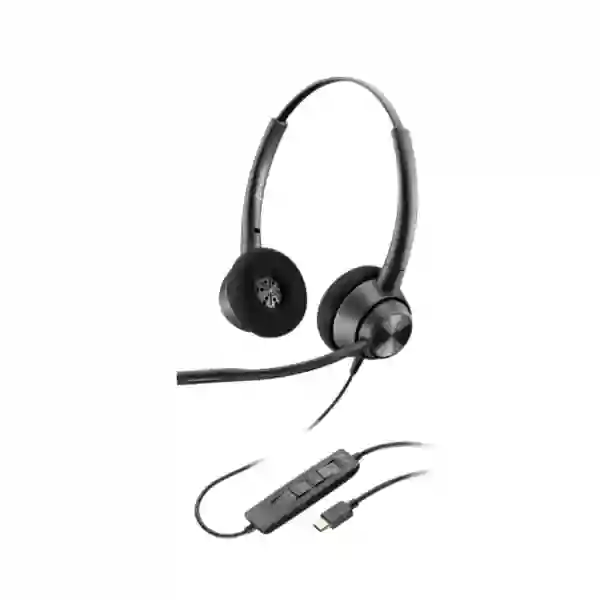
HP Poly EncorePro 320 Stereo USB-C Headset
The HP Poly EncorePro 320 Stereo USB-C Headset is built for people who spend working hours speaking with customers, colleagues and service users from a computer. It offers a direct wired USB-C connection, stereo on-ear listening, a flexible noise-cancelling microphone and controls on the cable. For a customer-service desk, the relevant question is not simply whether a headset can play sound: it is whether employees can hear speech, position the microphone correctly, mute when necessary and remain comfortable through repeated conversations. This model brings those essentials into one lightweight design. Teams in Tanzania considering wired contact-centre headsets can use the guidance below to verify device fit, understand the specification, compare alternatives and prepare an informed purchase request.
Match the headset to the role
A strong candidate when
- Employees make calls through a PC
- A usable USB-C audio port is available
- Two-ear speech listening is preferred
- Wired operation suits the desk
Verify alternatives when
- Calls require roaming around the office
- The user must keep one ear free
- A traditional desk phone is the endpoint
- Only USB-A ports are provided
What this headset is designed to solve
Customer-facing teams need reliable speech communication in workplaces where nearby conversations, computer notifications and ordinary office activity compete for attention. The EncorePro 320 approaches that need as a professional wired headset rather than a general-purpose entertainment accessory. Two on-ear speakers direct incoming speech to both ears, while the microphone can be moved towards the user’s mouth. The cable connects to a compatible computer without relying on Bluetooth pairing or battery charging. These design decisions support a predictable workstation setup when several staff members use similar computers and calling applications.
A good call-centre headset also needs to be manageable during real work, not just during an initial demonstration. Agents may need to mute briefly, adjust volume to a comfortable level, consult information on a screen and continue speaking without holding a phone. Inline controls keep common audio actions within reach. The result is a focused option for organizations standardizing PC-based calls. It does not replace a dependable internet connection, a correctly configured softphone, training or an appropriate working environment; those remain important parts of call quality.
Who should consider the EncorePro 320 USB-C
The strongest match is an employee who works at a computer and handles frequent voice interactions: customer-service representatives, contact-centre agents, IT support technicians, reservations teams, remote advisers, internal service desks and administrative staff. The headset is especially relevant when the existing laptop or desktop already offers a usable USB-C port and the calling system can select an external USB audio device. Its stereo layout can help the wearer attend to speech without depending on a room loudspeaker.
Managers buying for a whole department should look beyond a single employee’s preference. Check whether the team has hot-desking practices, whether workstations use docks, and whether calls happen alongside in-person conversations. Some people prefer one ear free, and a monaural model may be more appropriate for that role. Others need untethered movement and should investigate wireless options. The EncorePro 320 is a sensible wired, two-ear candidate when clear voice interaction and straightforward PC connection take priority over mobility or entertainment features.
Stereo listening and what it means in practice
Stereo, also described as binaural, means the headset has speakers for both ears. During a work call, that arrangement presents the other person’s voice without forcing one ear to follow the room’s noise. It can be useful on a busy support floor or for an employee who must listen closely to account numbers, names, troubleshooting instructions and unfamiliar terminology. However, two-ear coverage is not the same as active noise cancellation. HP specifies a noise-cancelling microphone, not an active noise-cancelling listening system for this particular product.
The on-ear design rests on the ears instead of surrounding them in large sealed cups. This keeps the form compact, but the amount of background noise a wearer hears can still depend on fit, room acoustics and sound level. Employees who must constantly hear nearby colleagues, announcements or customers standing at a counter may prefer a single-ear model. Teams can make this choice more objectively by allowing representative users to try both wearing styles during typical duties, rather than assuming that stereo is automatically superior for every desk.
Noise-cancelling boom microphone
The microphone matters because callers judge a service conversation largely by how clearly they can understand the agent. HP describes one noise-cancelling microphone with a flexible boom, intended to reduce the background activity picked up during speech. That is particularly relevant where several people speak at neighboring desks. The benefit should be understood realistically: microphone noise cancellation helps the far-end listener, but it cannot guarantee that every shout, keyboard sound or echo disappears. Room setup, mouth position and software settings still influence the result.
The boom is approximately 135 mm long and HP lists a 290-degree rotation range. This flexibility helps the user place the microphone sensibly and adjust its position for a preferred wearing side. For a practical test, record short speech samples in the real workplace, including normal conversation around the agent, and listen from the customer’s perspective. If the voice is weak, distant or distorted, correct the position and input level before blaming the headset. Consistent microphone placement across a team often improves intelligibility more than excessive software processing.
Voice-oriented audio rather than exaggerated bass
Many consumer headphones are marketed for music, gaming or travel. The EncorePro 320 is instead presented by HP as voice-optimized equipment for contact-centre conversations. Speech clarity is valuable when an operator must distinguish similar words, confirm information and follow instructions without repeatedly asking a customer to repeat them. HP publishes a speaker bandwidth of 20 Hz to 10 kHz and uses 30 mm drivers. These figures help identify the hardware, although numerical frequency limits alone do not prove how a call will sound in every application.
Actual perceived voice quality depends on the complete call path: the microphone at the other end, network performance, compression, audio settings, room noise and hearing preferences. For procurement, create a short listening test with typical call scenarios and compare the voice quality at comfortable volume. A headset can be fully functional yet still need operating-system or softphone adjustments. Avoid pushing volume high to compensate for weak call audio; first investigate the software level, call quality and listening environment.
Simple USB Type-C connection
This is the USB-C version of the EncorePro 320, designed to connect to compatible PCs through a USB Type-C cable. That makes it attractive for modern laptops and desktops where USB-C ports are readily available. The wired connection removes the need to manage headset batteries, charging cradles or Bluetooth pairing during normal operation. For a department deploying many headsets, it can also make workstation setup easier to explain to employees and support teams.
USB-C describes the connector, not a promise that every USB-C socket or dock has identical behavior. Confirm the computer can recognize a USB audio accessory, especially when connecting through a monitor, hub or shared docking station. Check whether the chosen calling application can select the headset for both microphone and speaker output. If the computer has only USB-A sockets, choose an appropriately specified USB-A variant or confirm a suitable adapter through your IT team. This product should not be described as a conventional analog phone headset or a USB-A model.
Inline mute, volume and call controls
The cable includes inline controls that HP lists for mute, volume up, volume down and call answer/end. These can reduce the number of times an agent must switch windows just to handle basic audio actions. Mute is useful during internal consultations or when unexpected room noise occurs; volume adjustment helps users find a sensible listening level; and answer/end controls may provide convenient call handling in compatible environments. A physical control does not eliminate the need to understand the application’s own mute status.
Test the complete control behavior with your chosen softphone before making a large purchase. Call answer/end integration can depend on the application’s support for headset controls, permissions and device selection. Staff should know how to verify whether they are muted in both the application and on the headset. During training, demonstrate what happens if the application is muted first and the headset button is then used. This avoids confusing situations in which the operator believes a conversation has resumed but the customer still cannot hear them.
Lightweight construction and daily comfort
HP lists the headset at approximately 0.07 kg, or 70 grams, with foam ear cushions and a fold-flat earpiece design. These are relevant details for an operator wearing a headset for extended periods: excessive weight, awkward pressure and inconvenient storage can become frustrating even when speech quality is good. A light, on-ear headset can be more practical than a bulky accessory for employees who alternate calls with keyboard work and brief breaks.
Comfort remains personal. Head shape, glasses, hairstyle, ear sensitivity, workstation posture and the number of hours worn all affect the experience. The sensible buying process is to test the exact model over representative working sessions with a few users, not to promise fatigue-free all-day wear to everyone. Encourage employees to adjust the headband and microphone carefully rather than bending parts forcefully. The fold-flat design is useful for positioning the headset around the neck between calls, but it should still be stored where the cable and boom are not crushed.
SoundGuard and sensible listening practices
HP identifies SoundGuard acoustic protection for the EncorePro 320 USB-C configuration, and its EncorePro series guidance discusses additional SoundGuard Digital features for USB models. Such features are intended to help manage acoustic exposure, but they should not be treated as a medical guarantee or a substitute for workplace hearing policies. Exact software-dependent functions and any configuration requirements should be confirmed against the relevant HP documentation for the devices in use.
Employers can reinforce acoustic safety through everyday habits: begin calls at a moderate volume, avoid raising the headset to compensate for poor connections, schedule reasonable breaks and offer a way to report sudden loud sound or discomfort. IT teams should investigate unstable audio levels instead of telling staff simply to turn up the volume. Acoustic-protection technology is a useful purchasing factor, yet employee education, suitable equipment settings and sensible workplace practices remain essential. When an organization has a formal occupational hearing standard, its responsible team should evaluate the headset as one part of that broader program.
Manufacturer-listed specifications at a glance
The following figures relate to the HP-published stereo USB-C configuration. Ask for the exact manufacturer configuration when requesting a quotation.
| Type | Professional wired on-ear stereo headset |
|---|---|
| Connector | USB Type-C for compatible PCs |
| Microphone | One noise-cancelling microphone; flexible boom |
| Boom | 135 mm length; 290° rotation |
| Speakers | 30 mm; 20 Hz to 10 kHz bandwidth |
| Microphone bandwidth | 35 Hz to 21 kHz |
| Microphone sensitivity | −38 ± 3 dB |
| Signal-to-noise ratio | >53 dB |
| Impedance | 32 ohms |
| Cable | 2,190 mm (2.19 m) |
| Headset weight | Approx. 0.07 kg (70 g) |
| Ear cushions | Foam; fold-flat earpieces |
| Controls | Answer/end; mute; volume +/− |
| Acoustic protection | SoundGuard |
| Listed operating systems | Windows 11; Windows 10; macOS |
| Headset dimensions | 11.1 × 14.9 × 6.7 cm |
| Manufacturer-listed box | Headset and user guide |
Detailed technical specification
For the manufacturer-listed stereo USB-C configuration, HP records an on-ear stereo design, black finish, one noise-cancelling microphone, 30 mm speakers, a 2,190 mm cable and an approximate headset weight of 70 g. Speaker impedance is listed as 32 ohms, microphone sensitivity as minus 38 dB plus or minus 3 dB, and microphone signal-to-noise ratio as greater than 53 dB. The published boom length is 135 mm with rotation up to 290 degrees. These details are useful when preparing a specification-based procurement request.
HP also lists microphone bandwidth of 35 Hz to 21 kHz, speaker bandwidth of 20 Hz to 10 kHz, foam ear cushions and physical dimensions of 11.1 by 14.9 by 6.7 cm. The listed box contents are the headset and a user guide. These specifications describe the identified manufacturer configuration and are not a promise of a particular regional package or service arrangement. Buyers should confirm the exact manufacturer part number on the quotation and packaging, because similarly named EncorePro variants can have different connectors and wearing styles.
Windows and macOS compatibility
HP lists Windows 11, Windows 10 and macOS as compatible operating systems for this USB-C configuration. In practice, connecting a supported USB audio headset is only the beginning of the setup process. The operating system must choose the appropriate input and output devices, and the business calling application must use those devices for its audio session. Some organizations enforce security or peripheral policies that affect how newly connected devices behave.
Before rolling out the headset, test it with the versions of Windows or macOS actually installed on your equipment. Check microphone permission settings where applicable, verify recording and playback levels, and place a trial call. Repeat the test after connecting through the dock used by employees, as a direct laptop connection may work while a particular dock configuration requires adjustment. If staff switch between laptop speakers and headsets, provide concise instructions for selecting the correct device. Compatibility with the operating system should never be interpreted as a guarantee of every feature in every third-party calling application.
Softphones and collaboration applications
A headset used for customer calls is part of a larger software workflow. Teams may use a contact-centre desktop, browser-based dialer, a unified communications platform or another approved calling application. The important check is whether the software can receive audio from the EncorePro 320 microphone and send call audio to the speakers. The presence of a USB-C connector and general PC compatibility is encouraging, but application-level features need separate validation.
Set up a short test using the actual platform and a real or test account. Confirm two-way speech, microphone mute, volume adjustment, ringing behavior and the expected call controls. Check whether browser permissions or virtual desktop sessions alter device selection. Test both an incoming call and an outgoing call, and note any difference between the headset button and the software interface. If an organization requires specific meeting or softphone certification, request evidence for the exact model and current application version rather than assuming a whole product family shares every approval or native integration.
Choosing stereo versus monaural
The EncorePro 320 stereo design is often relevant for concentrated desk-based listening, while the EncorePro 310 family offers single-ear alternatives. The choice should reflect work behavior, not only a preference for more speakers. A worker troubleshooting a customer problem through a long conversation may appreciate sound presented to both ears. A receptionist who simultaneously answers in-person questions may need to keep one ear completely free. A shared contact-centre space can include both types of roles.
A useful trial is to ask employees to perform their regular tasks for several sessions with each wearing style. Compare the ability to understand callers, notice essential room announcements and remain comfortable. Record feedback about physical fit and whether colleagues have to interrupt the wearer more often. For buyers, the key is to specify stereo clearly on the purchase request; accidentally selecting a visually similar monaural model can change the working experience. The 320 is not automatically the best choice for every operator simply because it is binaural.
USB-C versus USB-A headset versions
Poly offers different connector versions within the EncorePro 300 family. The version described here uses USB Type-C, while other variants use USB Type-A. The distinction matters at order time because staff laptops, desktops and docking stations may not expose the same sockets. An office can easily end up with unnecessary adapters or unusable accessories when purchasing only by the family name rather than the complete connector description.
Inventory the workstation fleet before ordering. For each role, note whether the main device is a laptop or desktop, whether staff plug in through a dock, and which ports are available after keyboards, cameras and other peripherals are connected. A mixed fleet may justify separate model selections or a verified standard adapter policy. Do not assume a USB-A model automatically includes a USB-C adapter or that the USB-C variant is bundled with a USB-A plug. The invoice and purchase order should explicitly say stereo USB-C so the delivered configuration matches the planned workstation setup.
USB headset versus Quick Disconnect
A Quick Disconnect headset belongs to a different connection workflow. Some contact centres use a desk phone, a phone adapter or an established QD cable system instead of connecting a headset directly to a computer. The EncorePro 320 USB-C version is primarily a PC-connected accessory. Its plug is not the same as a traditional desk-phone headset connector and should not be expected to attach directly to a telephone’s headset port.
If the workplace uses physical desk phones, first identify their manufacturers, exact models and supported headset connections. A QD model plus a verified compatible interface may be the more appropriate path. If employees take calls through a PC softphone, direct USB-C may reduce the number of required accessories. Workplaces moving from desk phones to software calling should avoid ordering large quantities based on the old cabling method without mapping the new environment. A simple connector diagram attached to procurement paperwork can prevent costly ordering errors.
Cable length and workspace planning
The manufacturer-published cable length is 2,190 mm, approximately 2.19 metres. This gives buyers a concrete figure for planning where the laptop, docking station or desktop is placed relative to the employee’s chair. A cable that reaches comfortably is useful; an unnecessarily stretched cable can create tension on the headset and connector, while excess cable in a walkway can become a trip or snag hazard.
Walk through a typical workstation layout before placing a department-wide order. Measure the route from the USB-C port to the operator’s normal seating position, allowing for ordinary head movement and modest adjustments. Check whether the connection would be at the far side of a desk, behind a monitor or on a front-panel port. Route the cable away from chair wheels and frequently moved objects. This headset is wired, so it is not suitable when an employee needs to walk around while continuing a call. If roaming is essential, evaluate a supported wireless alternative rather than relying on cable length alone.
Setup guide for a new workstation
Start with the intended PC powered on and the normal calling application available. Connect the headset to a suitable USB-C port, then open the operating system’s sound settings. Select the Poly headset as the microphone input and audio output if it is not selected automatically. Speak at a normal level and observe the input indicator. Listen to a sample of recorded speech or use the application’s audio test, then adjust the output to a comfortable level.
Next, place an internal test call. Ask the recipient to evaluate speech clarity, not merely confirm that sound exists. Try the mute and volume controls, verify call routing, and confirm the microphone returns correctly after unmuting. Repeat with the regular dock or virtual desktop environment if that is how staff work. A short workstation setup sheet can record the chosen device name, audio preferences and any application-specific button behavior. This makes onboarding easier, gives IT a reproducible procedure and reduces the time spent diagnosing simple wrong-device selections.
Helping a team use the microphone well
Even a purpose-built microphone can sound poor if it points away from the user’s mouth or is placed too far from the speaker. Employees should adjust the headband first, then position the flexible boom so speech is picked up naturally without rubbing against clothing or being struck by hand movements. A microphone that is too close to the mouth may pick up breath noises; one that is too distant may invite the software to amplify room sound.
Training can include a brief before-and-after demonstration with sample recordings. Explain how to mute during an internal discussion and how to verify that the application has actually unmuted before speaking to a customer. Show the difference between the operating system’s microphone volume and the loudness of the speakers. Good habits become more important on shared floors where users may handle many calls each day. Clear speech generally comes from the combination of sensible microphone placement, quiet surrounding behavior and properly configured software.
Common business scenarios
In a customer-support department, agents may use the headset to verify orders, explain processes, log complaints and guide customers through questions while both hands remain available for typing. In a help desk, technicians can listen to detailed descriptions of a problem while checking a ticket or device record. For remote administrative work, an employee can participate in routine voice meetings without using the laptop’s open speakers. These scenarios share a need for practical wired audio, not a requirement for mobility across a large space.
A training or quality-assurance desk may use the headset during a scheduled coaching call, while reception staff may find stereo useful during dedicated phone-handling periods. For open counters, however, the need to hear nearby visitors may make a single-ear model safer operationally. The correct headset is determined by the role and environment. Buyers can use a small pilot with people from different departments, because a device that works well in a quiet back office might be less suited to a noisy shared desk or a role involving frequent face-to-face interaction.
Contact-centre rollout and standardization
Organizations procuring headsets in quantity should turn one successful demonstration into a repeatable deployment procedure. Identify the exact model and connector, record which computer profiles have been tested, and decide which settings belong in the employee quick-start guide. Standardization simplifies help-desk support because technicians can ask the same questions when a user’s microphone is not detected or the wrong playback device is selected.
A pilot should include typical shifts and a representative range of users. Monitor issues such as microphone placement, discomfort, accidental muting, cable snagging and application control behavior. Distinguish a device fault from a dock, permission or network problem before changing procurement plans. Once the setup is understood, maintain a record of allocation, user feedback and the tested calling software. For shared headsets, establish hygiene procedures and a way to inspect pads and cables. Standardization works best when the chosen configuration is proven against real workflows rather than selected from a specification sheet alone.
Shared desks, hygiene and equipment care
In shared workspaces, headset cleanliness and physical condition can affect both comfort and service continuity. Establish an appropriate cleaning routine consistent with the current manufacturer’s care guidance and organizational hygiene policy. Users should avoid soaking ear cushions or introducing cleaning fluid into the microphone, speaker openings or USB connector. The headset should be disconnected if the approved cleaning procedure requires it and allowed to dry as directed before reuse.
Regularly inspect the cable for tight bends, crushed sections and damage near the connector. Check that the boom moves without unusual resistance and that the ear cushions remain usable. Provide a designated storage place so the headset is not left beneath documents, keyboards or chairs. A simple handover checklist is especially helpful when staff share desks across shifts. Consumable-part availability and any approved replacement accessories should be confirmed for the exact configuration, rather than assuming every EncorePro family component is interchangeable. Preventive attention costs less operational effort than diagnosing a headset that fails during a customer call.
Troubleshooting no sound or missing microphone
If the headset appears connected but produces no audio, check the physical USB-C connection and the selected output device in the operating system. An application may still be using the laptop speakers or another audio device even when the headset has been recognized. Try a known working port if your IT policy permits it, and test playback outside the calling application to distinguish a general device issue from a softphone setting.
If the caller cannot hear the employee, examine microphone permissions, the application’s selected input, input level and both possible mute states. Confirm that the microphone is positioned near the mouth, then make a short recording. If the headset works directly on the laptop but not through a docking station, involve the IT team in checking that station’s firmware, ports and configuration. For intermittent sound, inspect the cable route and connector without forcing or twisting them. Documenting these checks in order helps employees solve routine problems while giving IT meaningful information when escalation is required.
Understanding the limits of noise reduction
The EncorePro 320 includes a noise-cancelling microphone, which is a different capability from fully isolating the wearer’s ears. The far-end listener may benefit from reduced pickup of surrounding sound, but an agent can still hear colleagues, printers, traffic or other office activity. At the same time, a headset cannot repair severe echo, clipping, overloaded software effects or congestion in the wider calling system.
If audio quality matters greatly, combine headset testing with a review of microphone levels, computer performance, acoustics and the voice platform’s network requirements. During a trial, compare speech in the actual workplace instead of relying on ideal quiet-room recordings. Make calls at both busy and quiet times, using the same scripted sentences and listening conditions. This identifies whether the headset solves the user’s real problem. It also prevents an unrealistic expectation that a noise-cancelling microphone can substitute for good call-centre design, respectful room behavior and a reliable communications platform.
What the published numbers do and do not tell you
Technical specifications make purchasing more precise but should be interpreted in context. Thirty-millimetre drivers describe speaker size, not a guaranteed loudness or sound quality ranking. A 32-ohm impedance figure helps identify an electrical characteristic, but the USB audio implementation determines much of the practical computer connection. Microphone sensitivity and published frequency range are useful comparisons when measured consistently; they are not substitutes for listening to real speech.
Similarly, an approximate 70-gram weight gives a helpful clue about how light the headset is, but it cannot establish whether the headband pressure suits every employee. A 2.19-metre cable gives real planning information yet will be more or less convenient according to the desk layout. Buyers should treat the HP specification as a verified baseline and then test human factors, application behavior and placement. This approach leads to a clearer purchase decision than relying on one eye-catching number or promotional adjective.
What to confirm on a purchasing quotation
Ask for the full product name and a clear manufacturer configuration reference, not just the words ‘Poly headset’. Include the required USB-C connection, two-ear stereo wearing style and wired design in the purchase description. Where a procurement process requires traceability, ask the seller to identify the manufacturer part number associated with the offered box and to confirm that the model aligns with the current HP specification. A seller’s internal SKU is not automatically the manufacturer number or the same identifier used by another retailer.
Next, request confirmation of the current local price, currency, quoted validity period, quantity, fulfillment arrangements and any applicable taxes or extra charges. These are commercial details that can vary and are not established by the technical datasheet. If the order is for multiple sites or departments, agree on packaging, serial-number handling where available and the procedure for reporting an incorrect connector variant. A detailed quotation allows procurement, finance and IT to check the same facts before an order is approved.
Tanzania-specific buying considerations
For buyers in Tanzania, practical purchasing preparation begins with accurate compatibility and an itemized quotation rather than assumptions about national stock or delivery. Organizations sourcing headsets for an office, outsourced customer-service operation, education support team or administrative department should identify the deployment quantity, computer connector types and preferred buying schedule. Those details help a supplier evaluate an enquiry without promising a price, lead time or warehouse position in advance.
If the purchasing organization has policies on import documentation, supplier registration, tax invoices, warranty claims or equipment acceptance, communicate these before confirmation. Ask how returns, damaged-on-arrival units and technical support requests would be handled for the specific quoted product. Do not infer that an international manufacturer’s standard warranty statement automatically defines the service process available through every Tanzania supplier. For multi-workstation orders, request any sample or evaluation arrangement explicitly rather than assuming it is included. FourTeck Tanzania can be asked to confirm the offer’s current commercial conditions for the exact headset configuration.
Warranty and support verification
HP’s international product specification for the referenced configuration lists a Poly standard two-year limited manufacturer warranty. This is a useful manufacturer fact, but coverage, exclusions, proof-of-purchase requirements and access to local service can depend on regional terms and the actual product supplied. The buyer should obtain the applicable warranty conditions in writing before depending on any particular remedy or service timeframe.
An IT team should also decide who will handle first-line diagnosis. A failed call does not always mean the headset itself is faulty: muted software, disconnected docks, call-platform outages and bad audio settings can look similar. A support procedure that begins with basic checks and then records the product identifier, purchase document and fault symptoms can speed escalation. Do not promise on-site replacement, same-day resolution or local authorization unless the seller has confirmed it. For a fleet purchase, the support process can be just as important as the initial unit cost.
Comparing total deployment cost
A fair evaluation of a wired headset includes more than the unit price. Consider whether adapters will be required, whether current docks are appropriate, how many employees will share devices, what setup instructions must be created and how faults will be handled. A model with familiar controls and a straightforward cable can be attractive to teams that value repeatable IT support, but a poorly matched connector can erase that advantage through extra accessories and help-desk effort.
Estimate the quantity required for active agents, supervisors, training desks and any planned spares, using actual staffing and equipment policies. Include time for pilot testing and internal approvals. If choosing between wired and wireless equipment, compare the real need for mobility, battery handling and the spaces where calls take place. The lowest quoted hardware cost is not necessarily the lowest operating cost, and the most expensive headset is not automatically the best fit. Make the decision using the role, user feedback, verified features and complete quotation details.
Situations where a different headset may be better
Not every communication task calls for the EncorePro 320 USB-C. An employee who must walk between rooms during calls needs mobility that a wired headset does not provide. A desk-phone user may need a model with an appropriate Quick Disconnect interface rather than direct USB-C. Someone who must hear nearby visitors or safety announcements may prefer a monaural design. A computer with no usable USB-C socket may be easier to equip with a correctly specified USB-A version.
The headset also should not be represented as offering listener-side active noise cancellation, wireless communication, charging capability or universal call-control certification. Those are different requirements and must be checked against other products or specific supported platforms. An audio professional who needs a studio-monitoring device, a gamer seeking spatial effects or a frequent traveler prioritizing isolation may have very different needs from a contact-centre agent. Describing the limits clearly helps the right buyer choose confidently and prevents dissatisfaction caused by unrealistic expectations.
Evaluation checklist for IT and operations
Before adopting the model, the IT team can verify USB-C availability, operating-system version, docking behavior, headset recognition, softphone microphone and speaker routing, button behavior, and any managed-device restrictions. Operations staff can evaluate audible speech quality, interruptions, room awareness, comfort and cable placement. Procurement can separately verify the exact part number, quoted quantity, terms of supply and warranty process. Each group should record findings on the same model name to avoid confusion with related EncorePro variants.
Run the pilot with ordinary working conditions and a small range of users. Use a structured assessment instead of asking only whether people ‘like’ the headset. Record whether agents can hear details accurately, whether customers report distracting sound, whether mute mistakes occur and whether the microphone stays in a comfortable position. Where there is a problem, determine whether a configuration change resolves it. A successful pilot offers stronger purchase evidence than untested assumptions about certification, comfort, performance or business value.
Preparing a useful quote request
A good enquiry starts with the exact product description: HP Poly EncorePro 320, stereo, wired, USB-C. State how many units are needed and whether the purchase is for new workstations or replacements. Mention the operating systems and calling application in use, especially if button control or a managed desktop environment is important. If the computers have USB-A only, identify that issue immediately so an unsuitable connector is not offered by mistake.
Ask the supplier to confirm the exact manufacturer configuration, price, quotation terms, available quantity and expected fulfillment details. Request the applicable warranty and support information for the quoted units, without assuming it matches another country’s offering. Where company purchasing rules require special documentation, include that requirement. For a phased rollout, explain the pilot and full-deployment quantities separately. This helps the buyer receive a more relevant response and provides an auditable basis for approval. The next step is to ask FourTeck Tanzania for a product-specific quotation, not to assume stock or a published local price.
Frequently asked questions: connection and usage
Is the EncorePro 320 USB-C wired or wireless? It is wired, with a USB Type-C connection intended for compatible computers. It does not require Bluetooth pairing as part of this connection method. Can it plug directly into a standard desk-phone headset socket? Not as a universal direct connection; confirm a suitable phone headset model and interface separately. Does stereo mean active noise cancellation? No. Stereo describes two listening earpieces, while HP’s listed noise-cancelling microphone is intended to improve what the caller hears.
Will the headset work with a USB-C dock? It may work when the dock and computer properly support USB audio, but that specific setup should be tested. Are inline answer and end controls guaranteed for every calling application? No; full behavior depends on application support and configuration. Can the headset be used for everyday computer audio? It is a PC audio device, but its design emphasis is professional voice calling rather than specialized music or studio monitoring.
Frequently asked questions: fit and specifications
How heavy is the headset? HP publishes approximately 70 grams for the referenced USB-C configuration. What cushions does it use? The manufacturer’s listed material is foam. How long is the cable? Approximately 2.19 metres, which should be checked against the actual workstation layout. Does it include a microphone? Yes, HP lists one noise-cancelling microphone mounted on a flexible boom. Which operating systems are listed? Windows 11, Windows 10 and macOS appear in the manufacturer compatibility table.
What is the difference between the 310 and 320? The relevant family distinction is the single-ear versus two-ear wearing arrangement, but each model’s connector must still be checked. Is the USB-C model the same as USB-A? They are different connector versions, so confirm the requested one on the quotation. Does the product include a charging cable or charger? Charging is not a normal requirement for this wired headset, and the HP-listed box contents are a headset and user guide.
Frequently asked questions: ordering and service
Can the price be stated in Tanzanian shillings now? Only when a current quotation or verified local listing supplies that amount. Do not treat converted international prices as a local selling price. Is the headset currently in stock in Tanzania? That has not been verified; request confirmation for the desired quantity and delivery location. Does every seller use the same SKU? No. Internal seller stock codes can differ, and the correct listing identifier must come from the seller or the target product record.
Is there a warranty? HP lists a standard two-year limited manufacturer warranty for its published configuration, but buyers should confirm applicable local terms and claim arrangements for the exact unit supplied. Is every headset app feature certified? General PC compatibility is not the same as certification for each application or integration. Can the headset replace a phone-system upgrade? No. A headset provides the employee’s audio interface; calling software, account configuration, connectivity and support remain separate requirements.
Request the right headset configuration
For a quotation through FourTeck Tanzania, specify the HP Poly EncorePro 320 Stereo USB-C Headset, the quantity required, the computers and calling application in use, and any procurement documentation your organization needs. Request written confirmation of the exact manufacturer configuration, current price, supply conditions, warranty terms and support process. This is a quotation enquiry, not a statement that local stock, delivery or a particular service level is currently available.
Ask FourTeck Tanzania for a product-specific quote.




Reviews
There are no reviews yet.