
Business calling | Convertible mono | Poly Quick Disconnect
HP Poly EncorePro 540 Convertible QD Headset
Give customer-facing teams a practical wired headset with three wearing styles, a noise-cancelling boom microphone and a lightweight single-ear design. Check the correct Poly QD connection accessory for your telephone or computer before you order.
The essentials at a glance
3 wearing configurations
Over-the-head, over-the-ear or behind-the-neck
Single-ear design
Stay aware of people and activity nearby
Noise-cancelling microphone
Flexible boom designed for clearer outgoing voice
Poly Quick Disconnect
A compatible QD cable or adapter is required
SoundGuard
Manufacturer-described acoustic limiting technology
Approximately 32 g
Lightweight headset design for regular calls
Buying note: QD is an interface, not a complete connection to every phone or computer. Request the correct cable or audio adapter alongside the headset.
Product specifications and purchase checks
| Characteristic | Practical detail |
|---|---|
| Product type | Wired, convertible, single-ear business communications headset |
| Connection | Poly QD (Quick Disconnect); matching connection accessory required |
| Microphone | Flexible noise-cancelling boom |
| Wearing options | Over-the-head, over-the-ear, behind-the-neck |
| Acoustic limiting | Poly SoundGuard |
| Headset weight | Approximately 32 g |
| Colour | Black |
| Manufacturer reference | 783P1AA for the standard HP-listed variant; confirm actual quoted variant |
| PC support context | HP lists Windows 10, Windows 11 and macOS; requires compatible QD-to-computer connection |
| Supplied components | HP standard product information lists headset; verify regional bundle and extra accessories |
| FourTeck Tanzania SKU | Not provided or verified |
| Price, stock and local warranty | Confirm in a current quotation |
Selected manufacturer details are for the HP-listed EncorePro 540 QD family. Variant-specific accessories and local commercial terms must be checked against the actual quotation.
Match the headset to your equipment
| Use case | Connection to check | Buying caution |
|---|---|---|
| PC or laptop softphone | Compatible Poly QD-to-USB audio adapter; verify USB port and application | Do not treat QD as a direct USB plug |
| Desk phone | Model-matched QD connection cable and any necessary interface hardware | Check full phone model and headset port |
| Multiple desk-phone models | Potentially different connection accessories by phone group | Pilot every distinct configuration |
| Shared call-centre seat | Standardised compatible seat-side connection and personal headset policy | Confirm cleaning, cable arrangement and handling |
A professional headset for clear, repeatable business conversations
The HP Poly EncorePro 540 Convertible QD Headset is intended for roles in which voice communication is an everyday working tool rather than an occasional extra. It combines a single-ear listening arrangement with a boom microphone and a wired Quick Disconnect connection. That combination is especially relevant when a team handles calls at desks, needs repeatable microphone positioning and prefers a headset that can be disconnected conveniently without removing the entire workstation cable arrangement. The practical purchase decision is not simply whether the headset sounds good; it is whether its connection system matches the telephone or computer each employee actually uses.
For organisations planning a small refresh or a larger contact-centre deployment, this model addresses three recurring requirements: keeping the headset light, giving staff a choice in how it sits on the head, and limiting unnecessary background noise that reaches callers through the microphone. It is important to distinguish those features from unrelated claims. The headset is not a wireless device, its QD plug is not a direct USB connector, and a noise-cancelling microphone does not mean active noise cancellation for the listener. Buyers can use this guide to establish the right setup before requesting a quote.
Who should consider the EncorePro 540
A customer-service agent who answers repeated enquiries, a receptionist managing incoming calls and an IT support analyst talking a user through a problem all benefit from keeping both hands available. The single-ear format can also help an employee remain aware of colleagues or activity in the room. A wired headset is appropriate where the user’s workstation is relatively fixed and battery charging is not a requirement. The EncorePro 540 is therefore worth evaluating for structured office telephone duties, help desks, administrative teams and agent workstations using compatible phone or PC connections.
It may be a less suitable first choice for a person who must walk around a large workplace while remaining connected to a call, who needs a fully wireless solution, or who prefers sound from both ears in a very distracting environment. The convertible arrangement also does not remove the need for fit testing; personal comfort depends on the wearing style chosen and how the headset is adjusted. If staff switch between many different devices, the connection architecture may matter more than the headset model itself. Identify the real work pattern before selecting the device.
Three wearing styles, one headset family
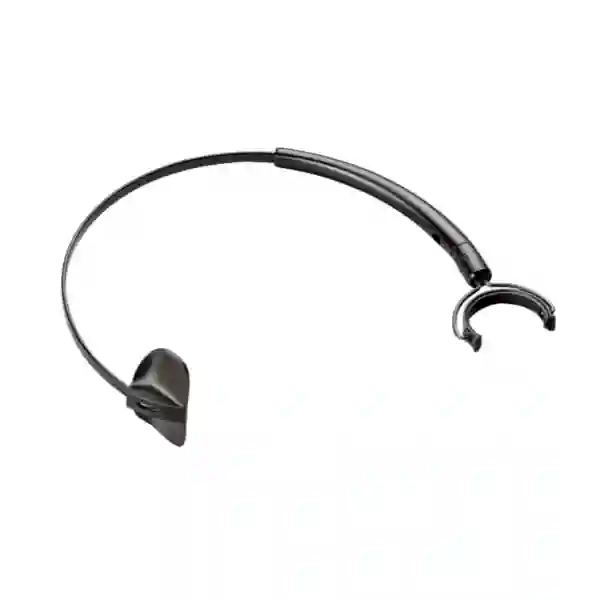
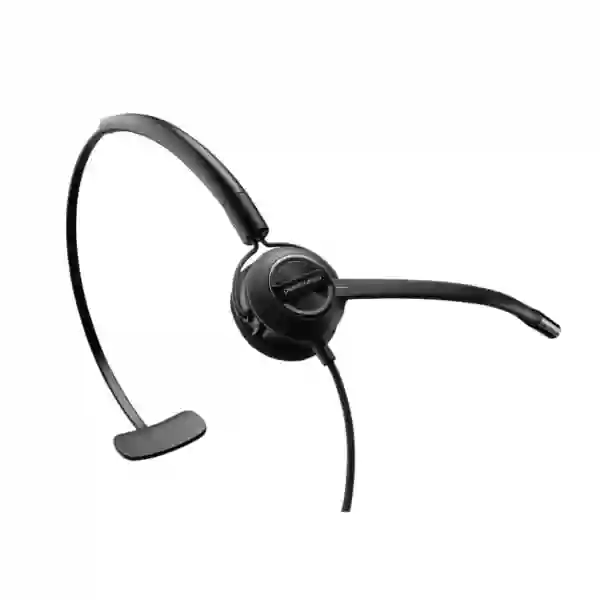
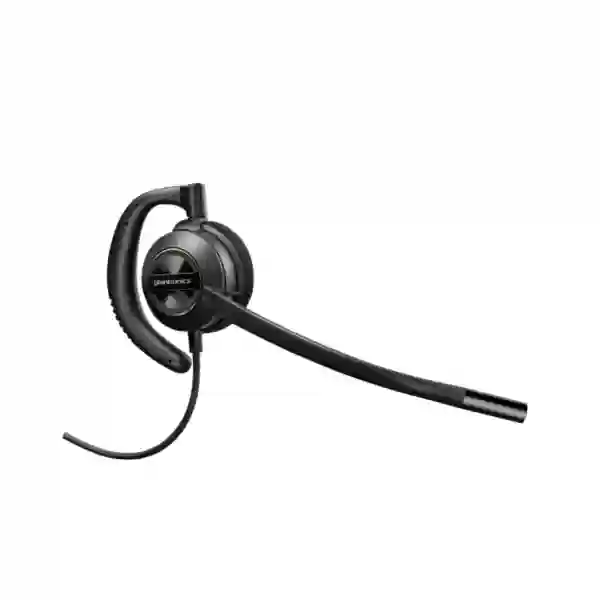
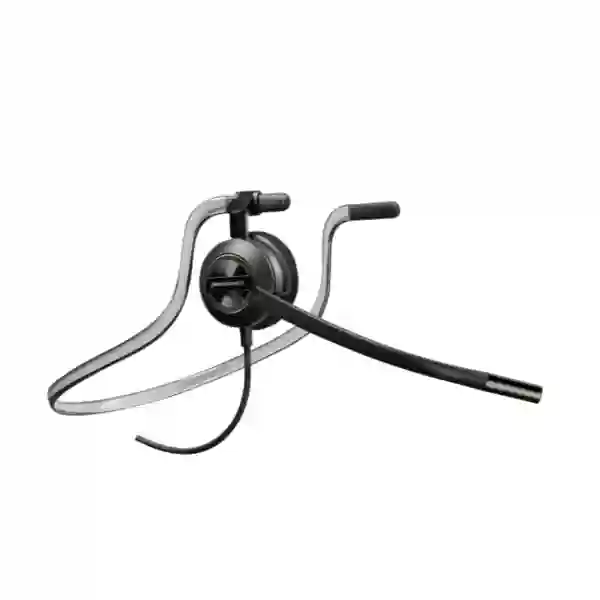
The defining practical feature of the EncorePro 540 is its convertible wearing arrangement. The product family supports over-the-head, over-the-ear and behind-the-neck configurations. Over-the-head wearing places a band across the top of the head and can provide a familiar headset feel. Over-the-ear wearing uses an earloop arrangement that avoids an overhead band. Behind-the-neck wearing moves the support around the back of the head. These alternatives serve different preferences, hairstyles, clothing and working environments without requiring a different core communications headset for every employee.
Teams should allow employees to test the available wearing configurations rather than allocate one style to everyone. A person who finds an overhead band comfortable for long calls may dislike an earloop, while another person may prefer to keep the top of the head clear. A brief comfort trial can be more informative than a specification sheet. Check which wearing accessories are included in the exact package being quoted and whether additional or replacement components are required. Do not assume every regional package or bundle has identical contents merely because the model name is familiar.
Fit is also part of audio performance. The earpiece should sit consistently, the support should feel secure rather than tight, and the boom should return easily to the intended position after the headset is put on. If a user repeatedly adjusts the headset during calls, ask whether another wearing configuration would solve the problem. Proper selection is especially useful for shared procurement projects, where one apparently small comfort issue can affect many workstations. The objective is a stable, practical fit over a normal shift, not an unrealistic guarantee of comfort for every person.
Why a single-ear design can be useful
The EncorePro 540 is a monaural headset: one ear receives the call audio while the other remains uncovered. This can be helpful at a front desk where a colleague may need to speak to the operator or where awareness of the room is part of the job. It also offers a straightforward alternative to a two-ear headset for users who dislike feeling isolated. The single-ear approach is a functional design choice, not an inherent advantage for every acoustic environment. The quality of the workstation and the character of surrounding noise still matter.
In a busy open-plan contact centre, a user may instead prefer a binaural or stereo-style headset with coverage over both ears. Compare the user’s need for environmental awareness against the concentration demands of their role. Trial the intended model while ordinary conversations, fans and office equipment are operating nearby. Ask test users whether instructions remain intelligible and whether listening volume stays at a reasonable level. Choose based on the actual task rather than assuming all customer-facing teams have the same audio needs.
Noise-cancelling microphone: what the feature really means
HP describes the EncorePro 540 as having a flexible noise-cancelling boom microphone with positioning guidance. Its purpose is to make the speaker’s voice easier for the distant caller to understand when other sounds are present. Correct placement remains important: a microphone positioned too far from the mouth can make speech seem weak, while a misplaced boom may pick up breathing or rubbing noise. Introduce a simple microphone-positioning check during onboarding and repeat it when a headset is reassigned to another employee.
Noise-cancelling refers to microphone-side handling of unwanted sound; it should not be confused with active noise cancellation delivered to the headset wearer’s ear. The EncorePro 540 is a communications headset, not a promise of silence in the surrounding room. Call quality also depends on the connection cable, adapter, desk phone, PC audio settings, network path and the software used for the call. A realistic test includes an ordinary customer conversation or internal call, not only a silent-room demonstration. Listen for intelligibility, consistent volume and the absence of distracting handling noise.
Understanding Poly Quick Disconnect before buying
Quick Disconnect, usually abbreviated QD, is the connector system at the end of the headset cable. It is designed to let a user separate the headset from the connected cable or adapter conveniently. That arrangement is useful when an employee leaves the desk between calls or when a workplace uses compatible connection hardware across a group of seats. The QD connector is part of the headset interface, not a complete computer audio interface on its own. The intended destination determines what additional equipment is needed.
For a PC-based calling platform, the system ordinarily needs a compatible Poly QD-to-USB audio adapter between the headset and computer. For a desk telephone, the required QD connection cable depends on the exact handset or headset port and the telephone model. The fact that two desk phones have similar-looking sockets does not prove that one cable will work for both. Request the make and full model of the telephone and, where relevant, the existing cable or adapter reference. Compatibility should be verified for the full chain rather than assumed from the headset connector alone.
A QD headset can be a practical choice for organisations that already use Poly QD connection accessories or that want to standardise their seat-side hardware. However, the purchasing list must account for any missing cables or adapters, especially during a new installation. Avoid a situation in which headsets arrive but cannot connect to the available workstations. Ask the supplier to identify the exact headset variant, the adapter or cable required for each phone type, and which items are included in the quotation. These straightforward checks reduce surprises during deployment.
Check the connection path for desk phones
A conventional office desk phone is not defined only by its brand. Different model ranges and firmware configurations may use different ports, signalling arrangements and headset options. When purchasing this QD headset for a desk phone, record the phone’s complete model name, the port being used, and any interface accessories already installed. If a base, amplifier or electronic hookswitch accessory is part of the desk setup, list it as well. The objective is to confirm the appropriate audio connection, not to assume that the QD headset automatically provides all call-control functionality.
Some offices use analogue desk phones; others use IP desk phones connected to a PBX or hosted calling service. The headset itself does not determine whether the phone service is analogue, SIP-based or cloud-hosted. It transmits call audio through the connection accessory selected for that telephone. Before ordering a batch, test at least one representative workstation. Place and receive calls, check the microphone and receive volume, and ensure that the call-control process is clear to staff. A verified sample configuration gives procurement a more reliable starting point than a generic compatibility claim.
If an organisation operates several telephone generations at once, the same headset model may be usable with different connection accessories, but those accessories should be specified individually. This distinction helps the team plan a phased replacement without incorrectly treating every desk as identical. Record any exceptions before a purchase order is approved. Where compatibility cannot be established from the available model information, ask for a matched connection recommendation rather than improvising with an unverified cable. Correct matching is essential to getting useful value from a wired QD headset.
Using the headset with a PC and calling software
A PC or laptop normally presents a USB audio connection rather than a Poly QD headset socket. Therefore a Poly QD-to-USB adapter or compatible audio processor is the usual bridge between the EncorePro 540 and a computer calling application. The adapter creates the computer-side audio connection, while the QD interface joins it to the headset. Compatibility must be checked for the specific adapter, operating system and calling application. The manufacturer lists Windows 10, Windows 11 and macOS in product specifications, but the total user experience still depends on the selected accessory and software.
Before rolling out to a team, connect a sample unit to the intended workstation and select the correct audio input and output devices in the operating system and calling application. Make a test call and ask the distant party to assess microphone clarity. Confirm the correct incoming audio level without pushing volume unnecessarily high. If a call application provides mute, answer or hold functions, establish whether those controls are operated through the software, the adapter or some other connected component. Do not infer integrated button behaviour from the presence of QD alone.
The EncorePro 540 should not be advertised as a native Bluetooth, USB-A or USB-C headset. A compatible adapter can provide a USB path to the computer, but the headset’s own connector remains QD. This matters when purchasing for staff who work from laptops with only USB-C ports, for example: a USB-compatible configuration must be specified rather than assuming the headset itself will fit. Clarify the physical port available and check the full compatibility of the chosen adapter. That single detail can prevent otherwise avoidable procurement and setup problems.
Suitable for structured, shared and fixed workstations
Contact centres often need a repeatable setup that staff can learn quickly. A fixed workstation with the same phone or PC interface throughout a department can make a QD arrangement appealing. An employee can be trained on microphone position, connection, call volume and disconnection in a consistent sequence. If seats are shared, a workplace may choose a policy for personal headsets and shared connection accessories, provided the chosen hardware and hygiene practices support that approach. The practical advantage comes from a planned standard, not from a claim that the model automatically fits every device.
For a reception desk or service counter, the single-ear configuration may support awareness of nearby visitors while the user handles telephone enquiries. On a dedicated support desk, the microphone and wired design can be useful for repeated troubleshooting conversations. In either context, plan cable routing carefully so the cord does not catch against a chair, drawer or desk edge. Staff should know where the QD coupling is and how to reconnect it without tugging the cable. Small setup details help a headset remain convenient during ordinary use.
Poly SoundGuard acoustic protection explained
HP identifies SoundGuard as the EncorePro 540’s acoustic limiting technology and describes limiting sounds to below 118 dBA to help protect against acoustic shock. This is a specific manufacturer feature, not a blanket guarantee that every employee’s exposure is safe under every working condition. Actual listening exposure is influenced by call volume, duration, the audio source, device settings and workplace habits. Employers should still establish sensible listening levels and follow their own occupational health and safety procedures.
During evaluation, let users test the intended headset with everyday call material at a comfortable setting rather than turning the level up to compensate for poor fit or noisy surroundings. Investigate unusual spikes, distorted audio or a need for excessive volume. For environments with formal hearing-conservation requirements, consult the relevant occupational-safety policy rather than using a headset feature name as the entire control measure. SoundGuard is a useful consideration when comparing business headsets, but it complements correct setup, training and exposure management.
Lightweight construction and personal comfort
HP lists the EncorePro 540 at approximately 32 grams, reflecting its lightweight approach to a headset intended for regular communications work. Weight is relevant because a user may keep the headset on through many short calls across the day. Even so, overall comfort cannot be inferred from grams alone. Pressure at the ear, stability of the chosen support, the position of the boom and the user’s individual preferences all make a difference. A comfort check should include normal head movement, short breaks and the use of glasses or other everyday workwear where applicable.
A good fit should keep the earpiece positioned without requiring constant adjustment and should let the microphone remain close enough for consistent speech pickup. Invite test users to switch among the supported styles and note which configuration they prefer. Record feedback in terms of specific issues, such as pressure at one point, a slipping earloop or interference with eyewear. This approach leads to more actionable decisions than a single rating of comfortable or uncomfortable. It also helps buyers decide whether a convertible model is preferable to a fixed-style alternative.
Because this is a single-ear headset, there is no matching second earcup to adjust. Users should focus on seating the earpiece reliably and setting the microphone correctly. Avoid bending or forcing parts beyond their intended movement. When changing wearing accessories, follow the appropriate manufacturer instructions for the specific version. A little initial attention to fit and handling can be worthwhile when equipment will be used by a broad group of agents with different preferences.
What makes clear calls more likely in practice
A good call begins with the right microphone placement and a suitable connection path. Ask a test caller to speak at a natural volume, then listen from the distant endpoint. Check whether words remain clear when normal office noise is present and whether the microphone brushes clothing or hair during movement. Repeat the test using the actual phone system or calling application that the team will use. A result obtained on one computer and adapter does not automatically establish the same performance with every other workstation combination.
Network quality and software processing can also affect conversations. If callers report broken speech or delay, inspect the complete calling system rather than immediately blaming the headset. Distinguish between background noise, poor microphone level, packet loss, muted devices and the wrong audio input selection. The EncorePro 540 can address aspects of microphone capture and user fit, but it does not fix a congested network or poorly configured softphone. Practical troubleshooting is easier when a known-good headset, cable and call destination are available for comparison.
A straightforward installation and fitting sequence
Begin by identifying the destination device and the matching Poly QD connection accessory. With the correct accessory available, connect the headset’s QD interface as directed and connect the other side to the compatible desk phone or computer. Fit the preferred wearing arrangement, adjust the earpiece and position the flexible microphone boom. Follow the manufacturer’s placement instructions rather than treating the boom as a decorative arm. Then check the audio device selected by the telephone or calling application before beginning a live customer conversation.
Next, place a controlled test call. Have the colleague on the other end verify whether the agent’s voice is clear, whether background sounds are distracting and whether the receive volume is appropriate. Test both incoming and outgoing call paths, because one-directional audio can indicate an accessory or configuration issue. If the workstation offers a hardware or software mute option, verify its behaviour separately. Document which controls staff actually need and where those controls are found. The exact method depends on the connected telephone, software and adapter, not solely on the headset.
Finally, show the user how to separate and reconnect the QD joint without yanking the cord. Confirm that the cable route leaves adequate movement at the desk and does not create a snagging hazard. Save the confirmed device model, connection accessory and any audio setting that mattered during testing. For a larger rollout, this becomes the template for other seats with the same equipment. Different phone models or USB connection setups should receive their own short validation, even where the EncorePro 540 headset remains the chosen standard.
Planning a small pilot before a full department rollout
A pilot is valuable because it tests the procurement assumptions against everyday work. Choose users representing the main roles in the organisation, such as customer service, reception and internal support. Include the actual calling platforms and desk phones planned for deployment rather than evaluating with an unrelated demonstration laptop. Give participants enough time to try the wearing configurations, make ordinary calls, disconnect and reconnect correctly, and report any fit concerns. Record the model of each adapter or cable used, not just the headset name.
Review the pilot against practical criteria: audible speech, comfortable fit, ease of training, connection consistency, cable handling and the likelihood of needing extra accessories. Separate technical faults from preferences. A user who prefers two-ear listening may be indicating a requirement for a different headset category, while a user who cannot hear calls may have a connection or device-selection problem. A short decision record can prevent a whole department from inheriting an unresolved setup issue.
Once the pilot is accepted, write a concise workstation specification. It should identify the EncorePro 540 variant, approved connection accessories for each device group, basic fitting instructions and the support contact or procedure for faults. Include a plan for checking new telephone models before they are added to the standard. This approach keeps procurement, IT and operational teams aligned. It also makes it easier to train replacement staff, introduce an extra workstation or compare costs without overlooking the interface hardware.
Considerations for buyers in Tanzania
For a Tanzanian office or customer-support operation, the central questions are the same as in any other market: what calls employees handle, what equipment they connect to and how reliably they can use the headset throughout the workday. A business using desk phones should provide the exact phone model; a team using computer-based calls should provide the computer port type and calling application. These details matter more than a broad claim that a headset works with all business telephones. If different departments use different systems, they may need different QD connection accessories.
Before making a purchasing decision, request confirmation of the quoted product variant, compatible cabling, quantity, local availability, delivery arrangements and applicable warranty terms. Do not infer any of these from an international product specification. An imported bundle can differ from another market’s offer, and the presence of a manufacturer model on a global website does not prove local stock. The aim is to prepare a complete requirement so the resulting quote covers a working headset system rather than an incomplete collection of components.
How the EncorePro 540 compares with other headset types
A fixed-style monaural headset may meet a team’s needs when all users are comfortable with the same overhead or over-ear arrangement. The convertible EncorePro 540 offers more wearing choice, which can be an advantage where a department has diverse preferences. A binaural headset covers both ears and may appeal to agents who want to concentrate more fully on call audio. A wireless headset offers movement away from a fixed workstation but introduces its own connectivity, charging and mobility considerations. No single design is automatically best for every group.
The interface deserves separate comparison. A native USB headset is designed to connect directly to a compatible computer port, whereas the EncorePro 540 uses QD and requires the appropriate computer-side adapter for that use. That QD architecture can be useful in established phone environments, but it adds a connection accessory to the purchasing decision. When comparing quotations, put the complete usable configuration side by side rather than comparing only headset-unit prices. Include any required cable, adapter or workstation accessory and check the fit and microphone performance of the alternatives.
Choosing between the EncorePro 530 and 540 families
Organisations evaluating the EncorePro range may encounter the EncorePro 530 and EncorePro 540. The key buying distinction for this page is the 540’s convertible arrangement. A fixed wearing format can be simpler when it already matches employee preferences, while a convertible headset provides flexibility for employees who prefer different head support configurations. Exact features and accessories must be compared on the particular versions quoted, because a product-family name alone does not verify a complete package.
Ask the buyer’s team to specify whether the priority is wearing-style flexibility, a particular desk-phone connection, a computer interface or a shared seat arrangement. Then compare the exact manufacturer references and included items. Avoid substituting a USB version of a related model without reviewing what that change means for existing connection cables. Conversely, do not select a QD variant for a computer-only team without ensuring the necessary adapter is part of the solution. Model selection works best when role, physical interface and user preference are evaluated together.
What to confirm is included in the purchase
HP’s standard product information identifies the headset as the box content for the EncorePro 540. That does not establish that every accessory needed at a particular workstation is included. For a complete business purchase, ask the supplier to state the exact manufacturer reference and list the supplied wearing attachments, QD connection cable or USB audio adapter, if any. The difference between included and separately quoted items should be clear on the purchase document. This is particularly important when the same headset will be installed against several different phone models.
Do not treat the headset’s 783P1AA manufacturer product reference, where applicable to the quoted version, as the retailer’s or FourTeck Tanzania’s stock-keeping unit. The two serve different purposes. Confirm the actual product variant rather than relying on a similar-looking label or an unrelated regional bundle. If the business needs replacement ear cushions or other wearing components, ask about the compatible parts and how they are supplied. A clear bill of materials helps the team evaluate readiness to install and the eventual upkeep of the headsets.
Managing cable routing and desk ergonomics
Even a light wired headset can become inconvenient if the cable is not routed sensibly. Keep the cord away from rolling chair wheels, sharp corners and places where drawers or moving desk hardware may pinch it. Leave enough slack for natural head movement while avoiding long loops across a work surface. Where a cable is connected to an adapter, position the adapter so the user can reach the intended connection without putting weight on the headset lead. A tidy connection is part of a practical installation, not merely a cosmetic preference.
Users should know the location of the QD coupling and how it is intended to be operated. Do not disconnect by pulling on the thin cable, and do not use the microphone boom as a handle. At shared desks, check that the cable arrangement remains consistent after different employees have used the seat. These simple habits help prevent avoidable wear and make troubleshooting easier. If a cord repeatedly snags or strains, adjust the desk layout rather than expecting the headset to tolerate poor routing indefinitely.
Cleaning and day-to-day headset care
A headset used regularly should be included in the workplace’s equipment-cleaning routine. Follow the manufacturer’s material and care guidance for the exact headset and its accessories, especially where foam ear cushions and microphone components are involved. Cleaning should not saturate electrical parts or the QD connection. Employees should handle the device gently, store it where the boom and cable will not be crushed, and report damage rather than compensating by pulling or twisting parts. A predictable routine is more useful than occasional intensive cleaning.
When staff share an office seat, hygiene practices should match the organisation’s policy and the available wearing accessories. The ability to detach a headset can support a personal-headset workflow, but the business should still decide how individual units are identified, stored and cleaned. Keep a record of any replacement consumables that may be needed and confirm compatibility before ordering parts. If a microphone or cable stops working reliably, identify the affected component through a structured check rather than assuming the entire headset always needs replacement.
Reducing avoidable IT support tickets
Many apparent headset faults begin with incorrect connection assumptions. A QD headset not attached to a compatible audio adapter will not suddenly appear as a USB microphone in the computer’s settings. Similarly, a desk phone may require a specific cable that another model does not use. Create a short internal support note that begins with the actual connected phone or PC, follows the cable from headset to endpoint and checks the selected audio source. That flow addresses common causes before a replacement is requested.
A useful support checklist includes connector seating, cable condition, the selected microphone, mute state, input level, output level and one known-good test call. If the issue affects only one application, inspect its audio settings. If it affects only one desk phone, compare the phone-side connection with a confirmed working seat. If swapping a known-good connection accessory changes the result, record that observation for IT. Consistent fault isolation avoids attributing every problem to the headset body and helps preserve a reliable working standard.
Train staff to report symptoms in plain language: the caller cannot hear me, my earpiece is silent, my voice is faint or the connection cuts out when I move. These descriptions allow support personnel to test the relevant audio path. Keep fault reports separate from comfort feedback, since the remedies are different. A lightweight headset that is well matched to its connection hardware should be evaluated against actual performance, not against general assumptions about business audio equipment.
Working from home and hybrid calling arrangements
The same headset can be considered for employees who use a compatible PC-based communications system at home or in a hybrid arrangement. However, a working office configuration cannot be copied blindly when the employee’s laptop has different ports, permissions or calling software. Specify the appropriate Poly QD-to-USB adapter for the actual computer and verify that its use is supported in the required application. Confirm whether the employee is allowed to change audio-device settings and whether the organisation manages the calling software centrally.
Home-working environments also vary in background noise, desk space and internet connectivity. The noise-cancelling microphone may help reduce unwanted sound sent to the far end, but it is not a substitute for a stable call connection or a suitable work area. Include the same basic test used in the office: connect the approved adapter, select the correct device, check the microphone boom and place a test call. A documented setup can make remote support easier without promising identical results in every home.
Training employees to use the headset consistently
A short practical demonstration is often more effective than a long generic manual. Show the wearer how to select a support style, position the earpiece, move the boom to the recommended location and connect the QD joint correctly. Explain how to change listening level through the actual phone or computer arrangement. If the organisation relies on software-based mute or call controls, demonstrate those rather than implying a headset-only button provides the function. Repeat the demonstration when an employee changes to a different workstation.
Training should also explain what this headset cannot do. It is not Bluetooth wireless equipment, QD does not equal a universal USB connector, and microphone noise cancellation does not eliminate all room noise. Staff should know when to request an alternative wearing style, a replacement cushion or an IT check. These details make expectations realistic and support more consistent conversations. Good onboarding can prevent minor configuration and fit questions from becoming repeated disruptions during a busy service shift.
Budgeting for a complete working configuration
When evaluating cost, price the usable workstation solution rather than the headset in isolation. Record the number of headsets, matching QD-to-USB adapters or desk-phone cables, any accessories required for the chosen wearing styles, and replacement supplies the organisation expects to keep. A department with several kinds of telephones may need more than one accessory line. The procurement plan should also account for testing and basic orientation. None of these details establishes a particular Tanzania price; the values must come from an actual local quote.
A lower headline headset price may not mean a lower overall deployment cost if required connection hardware is omitted. Conversely, an office that already owns compatible Poly QD adapters may be able to use existing infrastructure, subject to validation. Compare quotations on an equal basis with clear included items, variant references and stated terms. Ask about availability, delivery, applicable manufacturer warranty processes and support routes as separate questions. This avoids treating a global specification as evidence of local commercial commitments.
A practical evaluation checklist for purchasing teams
Before approving the HP Poly EncorePro 540 Convertible QD Headset for a team, start with the work being done. Identify whether each user handles desk-phone calls, softphone calls or both. Decide whether single-ear listening is appropriate and whether convertible wearing options solve a genuine user need. Check the full model of every supported device, the required cable or adapter and the port it must use. Where possible, validate at least one sample against each distinct workstation setup rather than assuming one successful test represents the whole office.
Next, confirm the exact quoted headset variant, accessories included, intended quantity and practical training plan. Ask users to assess microphone clarity and personal fit during normal calls. Clarify which component provides mute, volume and call handling, and do not promise functionality that has not been tested. Finally, obtain a written quotation that deals with local availability, fulfilment, applicable warranty conditions and any recurring replacement components. This checklist keeps the conversation focused on a complete, usable solution and makes it easier to compare offers fairly.
Questions to ask before requesting a quotation
A useful quote request identifies the telephone or computer model, operating system where relevant, calling software, current adapter or cable if one exists, number of user seats and preferred connection approach. If a team has shared desks, explain how individual headsets and seat-side adapters will be managed. If the business is replacing an older headset, note the brand and connector of the existing unit but do not assume that the old cable is compatible with the new one. The clearer the equipment description, the easier it is to avoid a mismatch.
Explain any constraints that could affect selection: staff who wear glasses, employees who need to hear surrounding activity, noisy shared rooms, laptops with limited USB ports or phone systems being replaced in stages. A supplier can then assess the suitability of a convertible QD solution and identify missing information. Do not send confidential account details or passwords as part of a product enquiry. A practical procurement brief is about device identity, workplace requirements and quantities rather than sensitive operational information.
Final suitability decision
The EncorePro 540 is a sensible candidate when an organisation wants a lightweight, single-ear wired headset with a flexible microphone and several wearing configurations. It is particularly interesting where a compatible Poly QD setup already exists or can be specified correctly. Its strengths are best judged in the context of business calls and routine desk use. The purchasing decision should remain conditional on fit, the phone or PC interface and the quality of a real test call, rather than on a single feature label.
If the team needs mobility, two-ear listening or native direct-USB connection without a separate adapter, compare an alternative headset category before ordering. If a QD solution meets the operational need, request a configuration-specific quote and identify all required accessories. FourTeck Tanzania can review a stated requirement for the HP Poly EncorePro 540 convertible headset, but exact pricing, stock, delivery, service coverage and local warranty arrangements should be confirmed through the quotation process rather than assumed from this informational description.
Frequently asked questions
1. Does the EncorePro 540 connect directly to a laptop?
No. This model uses a Poly Quick Disconnect connector. A compatible Poly QD-to-USB adapter or audio processor is generally required for a laptop or computer. Confirm the adapter and the computer’s physical port before buying. A QD connector is not the same thing as a USB-A or USB-C plug, even if a suitable adapter lets the headset work with PC calling software.
2. Can I use it with my office desk phone?
Potentially, if the correct connection cable and any necessary interface equipment are selected for that exact telephone. Desk-phone ports and connection requirements differ. Provide the full phone model, existing connection hardware and intended call-control arrangement so the required accessories can be checked. Do not assume compatibility merely because the phone has a socket that appears to fit a headset cable.
3. Is the HP Poly EncorePro 540 wireless?
No. The EncorePro 540 QD is a wired business headset. Quick Disconnect allows the headset to be separated from the connected cable arrangement, but does not provide a Bluetooth, DECT or other wireless link. If a person must roam around the office while staying on calls, a suitable wireless headset should be compared instead of treating QD as a wireless feature.
4. What does convertible mean on this model?
Convertible refers to the choice of wearing configurations: over-the-head, over-the-ear and behind-the-neck. The idea is to help different users choose a comfortable arrangement while using the same core headset family. Check the exact quoted package for the included wearing components and try the preferred format in a real work session before placing a large order.
5. Does the microphone cancel all background noise?
No microphone can be expected to erase every noise in every room. HP describes a noise-cancelling boom microphone that helps reduce unwanted sound reaching the caller. It works best when positioned correctly and used with a suitable connection and calling setup. If the room is unusually noisy, conduct a realistic test and consider workplace changes or other headset designs as necessary.
6. Is this a two-ear or one-ear headset?
It is a single-ear, or monaural, communications headset. The open ear may be useful where the wearer needs awareness of people nearby. For users who prefer listening through both ears, compare a binaural alternative. Consider the amount of ambient sound, the nature of calls and user preference rather than assuming that one style is best across all departments.
7. What is Poly SoundGuard?
SoundGuard is HP Poly’s acoustic limiting feature. HP’s manufacturer information describes protection against acoustic shock by limiting sounds to below 118 dBA. It is not a substitute for appropriate listening levels, workplace controls or occupational hearing-safety procedures. Treat it as one useful feature within a properly configured business calling environment.
8. Will it work with Microsoft Teams or another softphone?
A compatible computer-side QD audio adapter is needed, and software behaviour depends on the specific adapter, operating system and calling application. Do not assume that every mute, answer or hold control is automatically integrated. Verify the complete setup with the organisation’s actual softphone. Historic communication-platform certification statements should not be treated as a guarantee of current functionality for every software release.
9. Are a QD cable and a USB adapter included?
The manufacturer’s standard product listing identifies the headset as the box content, but that does not verify which extra connection accessories are included in a local quotation. Ask the supplier to list the provided headset, wearing components and any QD cable or adapter separately. A complete working configuration may require an additional purchase depending on the phone or PC.
10. How much does the EncorePro 540 cost in Tanzania?
A verified FourTeck Tanzania price has not been established in this product information. Cost depends on the specific product variant, the required connection accessories and the quotation terms. Request pricing for the complete usable configuration and ask for local availability, delivery and warranty terms in writing. Do not rely on prices shown for another market or on international currency conversion.
11. Can different team members share the same headset?
A workplace may have shared workstations, but should set its own policy for personal-use headsets, cleaning and replaceable wearing components. A QD connection can be convenient in a planned shared-seat arrangement. Check the accessories and hygiene approach, and ensure staff understand how to disconnect safely. Personal fit and proper microphone adjustment remain important even where the seat-side connection is standardised.
12. What information is needed for a business quote?
Provide the required quantity, phone or computer make and model, computer port type if applicable, calling software, any existing Poly QD accessory and whether the team wants over-the-head, over-the-ear or behind-the-neck wearing. Ask for the exact quoted manufacturer reference and an itemised list of required cables and adapters. A clear request helps identify compatibility questions before purchase.
Request a compatible headset quotation
Ask FourTeck Tanzania to review your HP Poly EncorePro 540 requirement together with the exact desk-phone or computer models, calling software, preferred connection and quantity. Request confirmation of matching QD accessories, the quoted product variant and current local commercial terms. No unverified delivery, stock or price claims are made on this page.
Request a quote for the complete compatible configuration.




Reviews
There are no reviews yet.