
Business voice communication | Tanzania
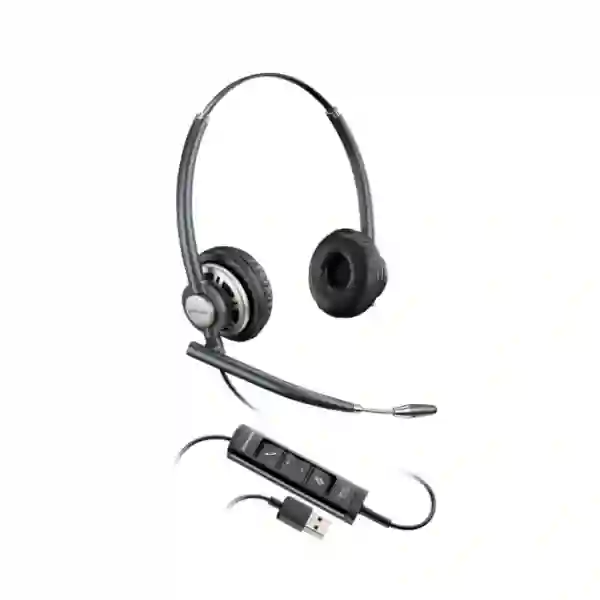
HP Poly EncorePro 725 Stereo USB Headset
The HP Poly EncorePro 725 Stereo USB Headset is a two-ear, wired business headset for computer-based conversations. Its noise-cancelling boom microphone and on-ear stereo wearing style are particularly relevant to customer support, help desks and other roles involving repeated calls. Use this guide to evaluate fit, technical requirements and purchasing questions for your workplace in Tanzania.
Variant check: HP documents a USB-A model. Confirm the physical connector, model identifier and any adapter included with the actual item offered.
Manufacturer-published USB-A specifications
The following figures are taken from HP’s published specifications for the identified EncorePro 725 USB-A version. The provided product brief does not verify the exact target-listing variant, so match each technical detail to the supplier quotation before treating it as a confirmed listing attribute.
| Feature | Documented value |
|---|---|
| Wearing style | On-ear stereo |
| Connection | Wired USB Type-A |
| Microphone | Noise-cancelling adjustable boom |
| Microphone bandwidth | 100 Hz–6.8 kHz |
| Speaker bandwidth | 150 Hz–6.8 kHz |
| Speaker diameter | 28 mm |
| Microphone boom length | 120–145 mm |
| Microphone boom rotation | 290 degrees |
| Headset weight | 78 g |
| Published cable length | 890 mm |
| Ear cushion surface | Artificial leather |
| Listed operating systems | Windows 10, Windows 11, macOS |
| Acoustic technology | SoundGuard Digital |
| Box contents | Headset |
Built for desk-based customer conversations
The headset is aimed at staff who conduct frequent voice calls through a computer rather than casually listening to music. A dedicated boom microphone places the pickup closer to the speaker than a laptop microphone, while two on-ear speakers help the employee attend to a caller. These are practical characteristics in customer support, telesales and other jobs where spoken information must be captured accurately.
Start with the person’s typical workday: how many calls are handled, whether another person shares the workspace, and whether the employee needs to move away from the desk. A wired stereo headset can suit sustained seated conversations but is not a universal answer for mobile workers, physical desk-phone users or people who need one ear free for visitors.
Why two-ear stereo listening matters
Stereo means that sound reaches both ears through separate earpieces. During a busy shift, an agent may find it easier to focus on a customer when the conversation is not competing directly with every nearby exchange. The on-ear design sits against the ears rather than surrounding them in large earcups. The listening experience therefore differs from that of an over-ear entertainment headset.
Do not describe this arrangement as total noise isolation. Room activity remains audible to varying degrees, and each employee’s tolerance for wearing two cushions is different. A receptionist who frequently interacts with people in front of the desk may prefer a mono model. Match wearing style to the role instead of assuming that every user benefits equally from covering both ears.
Microphone noise cancellation explained
HP documents a noise-cancelling microphone for its EncorePro 725 USB-A variant. This feature is intended to favour the speaker’s voice over surrounding sound during calls. It can be useful when several employees speak at nearby stations, particularly compared with a distant laptop microphone. The exact effect still depends on office acoustics, the position of the boom and the software carrying the conversation.
Noise cancellation at the microphone is not the same as active noise cancellation for the person listening. It would be misleading to promise that the earcups remove all office noise or that the far-end customer will hear nothing else. Workstation layout, reasonable speaking distance and careful audio configuration remain important. Run sample calls in the intended room to establish what callers actually hear.
Adjusting the extendable microphone arm
The documented USB-A model uses an adjustable microphone boom. HP lists a length range of 120 to 145 millimetres and a rotation range of 290 degrees for that identified part. The adjustment gives different users a way to position the microphone without changing posture or holding the headset. In a shared environment, this is more useful than relying on a single fixed microphone position.
Teach staff to place the microphone near, but not directly in front of, the mouth according to manufacturer guidance. A microphone placed too far away may sound weak; one directly in the airflow may capture distracting breath sounds. Move the boom gently and avoid forcing it beyond its intended travel. An initial fit demonstration can help staff maintain more consistent speech quality throughout their working day.
Comfort during a long calling shift
HP lists a 78 gram weight for the identified USB-A variant, along with artificial-leather ear-cushion surfaces and an on-ear headband arrangement. These specifications describe a relatively light corded business headset. They do not guarantee comfort for everyone, especially when workers wear spectacles or spend extended periods on calls. Head shape, cushion contact and individual sensitivity all change the experience.
Evaluate comfort during real calls rather than a brief unboxing exercise. Ask users whether the headband remains stable, whether the earcups create pressure, and whether the boom stays correctly positioned. Encourage conservative listening volume and appropriate breaks within workplace policy. If the fit is unsuitable for a particular employee, consider a different wearing style rather than assuming the published weight settles the question.
The USB connector must match the workstation
The current HP specification identifies a USB Type-A version of this headset, while its compatibility description also mentions connection through a suitable USB-A-to-USB-C adapter. Because the provided product title does not contain a verified listing reference, the exact termination of the unit being sold needs confirmation. A general phrase such as stereo USB is not enough to establish that the buyer will receive a native USB-C plug.
Check each computer’s available ports, including those on docking stations or managed hubs. Ask whether any adapter is physically supplied; compatibility should not be mistaken for an accessory included in the box. Where USB-C-only laptops are common, test a supported connection arrangement before purchasing in quantity. A wrong connector can make an otherwise appropriate headset difficult to deploy without extra equipment.
Wired use and the trade-off with mobility
A wired headset does not need charging or wireless pairing in order to function as an audio accessory on an appropriate computer. That simplicity can suit fixed customer-support desks, where employees remain near a keyboard and screen while taking calls. The trade-off is physical reach: the cord must remain connected, and the employee cannot wander around the room while continuing a conversation as a wireless user might.
Consider the tasks that occur during live calls. If staff frequently retrieve files, consult a counter or walk to a supervisor, a cordless business headset may be a more practical choice. If most work is performed seated, a wired model can be a straightforward option. Judge the selection by actual working patterns and do not treat the absence of a battery as proof that corded equipment is always preferable.
Cable reach and desk layout
HP publishes a cable length of 890 millimetres for the identified USB-A variant. That figure should be matched to the physical item and tested on the intended desk, especially if the computer is mounted below the work surface or connected through a dock behind the monitor. Even a small cable-routing issue can become frustrating over many calls when people turn between screens or adjust their chairs.
Measure the usable route from the port to the employee rather than estimating only the straight-line distance. Look for drawers, rolling chairs and edges that may catch the cable. Do not assume an arbitrary extension lead will preserve every audio or control function. Let IT approve any adapter or extension used in a managed environment, and make sure the final arrangement does not create unnecessary strain on the connection.
Windows and macOS compatibility
For the manufacturer-documented USB-A version, HP names Windows 10, Windows 11 and macOS. This supports consideration for mixed desktop fleets but does not establish that all voice applications and endpoint policies behave identically. Security permissions, audio-device preferences and virtual desktop layers may influence what happens after connection. The system must recognise both the speaker and the microphone as the intended devices.
Test a representative workstation from each computer build used by employees. Check the input device, output device, incoming call, outgoing call and any required buttons. Repeat the test after the user signs out or the computer restarts. If the team uses thin clients or restricted operating-system images, request explicit confirmation rather than relying only on a broad compatible-operating-systems label.
Using a headset with softphones and meetings
Computer-based calling may occur through a desktop softphone, a browser contact-centre portal or a meeting application. The headset must work with the organisation’s chosen software and any managed audio settings. Basic USB microphone and speaker functions should be tested separately from advanced call-answer, hang-up or mute integration. A headset can be recognised for sound even when a particular application does not respond to its physical buttons.
For services such as Microsoft Teams or Zoom, choose the exact product configuration according to the platform requirement rather than guessing from the series name. If a procurement document demands specific certification, obtain evidence for the precise model being quoted. Place actual calls, change between applications and check device selection. This process is more dependable than assuming all communications software provides identical headset-control behaviour.
Inline volume, mute and call controls
Information about the EncorePro 700 USB family describes inline functions for volume, muting and call handling. These controls can reduce the need to search for on-screen buttons when an employee is answering several calls. Their usefulness depends on how the connected softphone interprets them. A button being physically present does not itself prove that every application will answer or end a call when pressed.
During testing, ask the employee to mute and unmute, adjust listening volume and answer or end a test call where supported. Confirm that the softphone and headset states remain consistent. Provide clear guidance for what to do if software and hardware mute status disagree. If integrated controls are essential to an agent’s workflow, treat successful application testing as a purchase requirement instead of relying on a generic feature list.
SoundGuard Digital acoustic protection
HP lists SoundGuard Digital as acoustic-protection technology for the identified USB-A model. It is intended to help manage potentially uncomfortable audio exposure and forms part of the headset’s business communication design. Manufacturer notes indicate that certain SoundGuard Digital capabilities require the appropriate Poly desktop software. It is therefore sensible to check which features are enabled under the organisation’s installed software and security policy.
Acoustic-protection features should complement healthy listening practices rather than replace them. Employees should set a comfortable volume, report unusually loud or uncomfortable calls, and follow workplace safety guidance. IT should check whether any relevant desktop application is supported and approved before promising advanced functions to staff. Do not claim that a particular hearing outcome or medical benefit is guaranteed for an individual wearer.
Speech-oriented audio specifications
For the documented USB-A part, HP lists a microphone range of 100 hertz to 6.8 kilohertz and a speaker bandwidth of 150 hertz to 6.8 kilohertz. It also specifies 28 millimetre drivers. These figures help identify the version and illustrate its speech-focused design. They do not describe every condition of an actual call, where network quality, application audio processing and the remote participant’s equipment also matter.
Assess voice intelligibility using realistic names, account references and instructions. Listen for whether callers ask for repeated information and whether the agent can understand quietly spoken words at sensible volumes. Compare a test call with the actual business application rather than judging only music playback. Frequency ranges are worth recording in a technical specification but should not be the sole basis for headset selection.
Customer service and contact-centre teams
Contact-centre agents often need both hands for typing while discussing details with a caller. A head-worn microphone supports that way of working, and the dual-ear format may help an agent concentrate on the conversation. In an open calling room, the dedicated microphone is particularly relevant because nearby conversations can otherwise enter a laptop microphone. Proper headset configuration also reduces the need to handle a phone during each interaction.
Equipment is only one part of a reliable support operation. Calling software, internet or internal network conditions, workforce training and workspace acoustics also influence the experience. Include those factors in an evaluation. For a Tanzania-based contact centre, confirm compatibility with the actual calling platform and desk equipment before assuming that this headset alone will eliminate repeat calls or communication errors.
Help-desk and technical-support roles
Technical-support employees may read instructions aloud while examining applications, checking a ticket or entering diagnostic notes. A USB headset lets the user remain at the computer and can keep the microphone in a consistent position. The two-ear listening style may be helpful when a complex problem requires careful concentration. The headset does not itself supply remote-support software, a ticketing system or any call-recording capability.
When piloting the headset for a help desk, include difficult conversations, such as spelling a long username or explaining several configuration steps. Check whether the microphone remains clear when the employee turns toward a second monitor. If colleagues frequently consult one another during calls, practise muting properly. These scenarios reveal practical suitability more clearly than a product demonstration focused only on appearance.
Sales and outbound-calling desks
Sales representatives who work through phone lists or customer records benefit from leaving their hands available for notes and business applications. A microphone boom helps position the pickup near the speaker while staff move between screen views. The stereo design may suit employees who spend long periods concentrating on calls. It is less suitable for a sales role involving regular movement away from a connected computer.
Test the full calling workflow, including selecting a contact, starting a call, using mute, finishing the conversation and moving to the next record. Check whether the sales platform uses the expected audio device after an application restart. Do not imply that the headset includes a CRM integration, automatic dialler or analytics feature. Those functions belong to separate software and must be evaluated independently.
Reception and front-counter staff
A receptionist may need to hear both a telephone customer and someone arriving in the room. Covering both ears can help with demanding calls but can also make local interaction less convenient. The correct wearing format depends on whether telephone concentration or awareness of visitors is the main requirement. A mono headset may be worth comparing before selecting stereo for a reception desk.
Run a trial that includes the employee’s normal mix of in-person questions, booking tasks and computer calls. Check whether the boom can be repositioned easily and whether the cable interferes with a visitor register, keyboard or counter equipment. The headset may be a good solution for seated booking agents yet less suitable for a person frequently leaving a reception station.
Home-office and hybrid arrangements
An employee working from home may appreciate a corded headset that does not need charging or pairing. A close-positioned boom microphone is also useful when the computer is farther from the user’s face than during a video meeting. However, the headset cannot remove every household background sound, and a person still needs a compatible USB connection and calling application to use it.
For staff moving between office and home, check the ports and docks in both locations. Make sure the headset can be stored safely when transported and that the cable is not crushed inside a bag. Provide a short setup guide covering the selected speaker, selected microphone and test call. Users should not have to discover audio settings from scratch every time they change workstations.
Training employees to use the headset
Headset onboarding is more than handing out a device. New employees should learn how to adjust the headband, place the microphone, recognise mute status and change listening volume. They should also understand the difference between muting the outgoing microphone and reducing incoming volume. A simple demonstration can prevent avoidable problems when staff are handling customer information or consulting a colleague during a call.
Ask each employee to make a short test call and speak at a natural level. Have the other participant check for breathing noise, quiet speech or inconsistent microphone distance. Show the employee how to confirm that the softphone has selected the headset rather than a webcam or laptop microphone. Repeat this check after workstation changes and encourage early reporting of fit problems.
IT planning for a fleet rollout
For an organisation purchasing several headsets, IT should document each workstation’s ports, operating system, docking station and calling software. A variant that works well on one demonstration laptop may require a different adapter or configuration on another desk. The order should identify the tested model clearly so that delivered equipment can be matched to the pilot rather than merely to the general EncorePro family name.
Define an acceptance checklist for each desk: correct connector, device recognition, incoming sound, outgoing microphone, mute, call controls where required and comfortable cable routing. Record the tested application version and any approved desktop software needed for advanced features. A repeatable rollout process helps the support team distinguish a damaged headset from a configuration issue or a misidentified replacement unit.
Managing shared headsets and hygiene
Some workspaces assign a headset to each employee, while others share desks between shifts. If headsets are shared, define cleaning and storage procedures that are consistent with manufacturer guidance and workplace policy. The documented model has artificial-leather-surface cushions, but that does not mean any cleaning fluid is safe for its materials or electronics. Avoid soaking the headset or using harsh, unapproved chemicals.
Consider individual fit preferences and the condition of the ear pads over time. If replacement cushions are needed, confirm the part fits the exact model rather than selecting by visual similarity. Explain how staff should report damage to the cable, boom or headband. These practical routines help an organisation manage accessories without making unsupported claims about lifespan or hygiene performance.
Fixing microphone selection problems
If the remote caller cannot hear the agent, first check whether the headset microphone is selected and whether mute is active. A computer may have several input devices, including its internal microphone and a camera microphone. The calling application may keep an old setting after the USB headset is connected. Also check that the boom is positioned appropriately and that the application has necessary microphone permission.
If the problem continues, try a known-working approved USB port and make a test call in the same application. Note whether the problem occurs only in a browser, only for one user or after an operating-system change. Do not immediately conclude that hardware is faulty. A clear support record helps IT decide whether settings, connectivity or an actual physical fault require attention.
Fixing poor incoming audio
Low volume, distortion or interruptions in a call may arise outside the headset. The speaker device selected by the computer, the softphone output setting, the remote caller’s microphone and network quality all affect what the agent hears. Start with sensible volume and confirm that the software routes incoming sound to the intended device. Testing several callers can identify a problem linked to one external connection.
Where audio remains unclear, compare the headset on another approved workstation and record the results. Identify the operating system, docking equipment, application and symptoms. Do not repeatedly turn volume to maximum to compensate for unexplained distortion. A structured check distinguishes cable or device faults from network and application problems, so purchases of replacement equipment are based on evidence.
Comparing stereo with a mono headset
A stereo headset covers both ears, which may appeal to employees who want to concentrate on continuous computer calls. A mono headset leaves one ear available to the surrounding room, making it potentially better for supervisors, reception roles or personnel who regularly receive face-to-face instructions. The choice is about work requirements and wearing preferences, not a universal ranking of audio quality.
Include representatives of both job types in a practical wearing trial. Ask about concentration, awareness of colleagues, fit with spectacles and ease of switching from a call to a room conversation. Some organisations may choose different headsets for different teams. That is often more effective than purchasing one format for every job simply because central buying appears easier.
USB and Quick Disconnect are not identical
The EncorePro name also appears on headset versions that use Quick Disconnect connections. Those products belong to a different interface arrangement and may be paired with telephone or USB adapters. A USB model should not be assumed to plug into the same desk-phone accessory as a QD model. Similar headbands and microphones do not establish identical connection requirements.
Before replacing an existing headset, inspect the current device connection and establish the exact endpoint being used. If staff use a physical desk telephone, identify the supported headset port and adapter arrangement first. If the organisation is moving to PC calling, test the USB headset with the intended software. Do not substitute one EncorePro variant for another without verifying the complete configuration.
When a wireless alternative makes more sense
The wired EncorePro 725 design is closely associated with seated computer work. It does not depend on a headset battery, but it keeps the person connected to the workstation. Employees who must walk to shelves, move between counters or consult distant colleagues during a call may require a wireless system with appropriate operating range and battery management. The two products solve different practical problems.
List what each role does while speaking to a customer, not just how long calls last. A technical agent sitting at two monitors may be well served by a cable, while a mobile support worker may not. Compare connection reliability, permitted wireless equipment, charging procedures and user movement before selecting a format. A role-based choice avoids paying for features that are not useful or overlooking necessary mobility.
Checking a precise model and accessories
HP publishes technical information for a specifically identified EncorePro 725 USB-A variant, including a black finish, 28 millimetre speakers, on-ear cushions and a listed headset-only package description. The broader name supplied for this listing does not prove that every identifier or accessory is identical to that manufacturer reference. A local SKU has not been provided and should not be inferred from another seller’s catalogue.
Ask for a written model reference and a clear description of the connector and box contents before approving the order. Check whether a USB-C adapter, spare cushions or a carrying case is included rather than assuming availability from general compatibility notes. If the proposed supply differs from the pilot sample, assess the differences. This prevents a familiar product name from masking an unwanted interface variation.
Tanzania procurement and commercial checks
Organisations in Tanzania should treat general product information separately from a current local offer. The description cannot establish stock, a price in Tanzanian shillings, delivery coverage, import-related conditions or warranty administration for an unverified listing. Those commercial details must be confirmed for the specific quantity and destination. Product specifications from HP do not on their own verify a seller’s local fulfilment commitments.
Prepare a quotation request stating quantity, workstations, USB interface, calling platform and any mandatory call controls. Ask the supplier to confirm the exact variant, accessories, commercial terms and applicable warranty in writing. For multi-site or multi-department procurement, avoid unsupported assumptions about regional service availability. Where tender rules demand certificates or origin documents, request evidence for the specific item rather than the general product family.
Piloting before a substantial order
A small pilot can identify connector mismatches, uncomfortable fit and unsupported application controls before they affect an entire support team. Select a few employees representing different roles, computer models and working conditions. Check microphone clarity, both speakers, mute behaviour, cable movement and wearer comfort across normal calls. Record the precise unit tested and the software configuration rather than relying on personal impressions alone.
Define what success means in advance. For example, the headset must be recognised after sign-in, remain the chosen device in the calling application and support required control actions where those are available. Investigate failures before deciding whether they are caused by the headset, software or workstation. A documented pilot allows purchasing, IT and team leaders to make the same informed decision.
Care, storage and routine maintenance
Store the headset where its microphone boom and cord will not be crushed by furniture or caught in a drawer. Disconnect by handling the plug rather than pulling on the cable. Adjust the headband gently and follow manufacturer instructions for cleaning ear cushions and plastic surfaces. These measures are straightforward but important in workplaces where a headset may be handled repeatedly through the day.
Include care guidance in staff induction and identify a process for reporting worn cushions, damaged cords or unreliable controls. Do not assume replacement parts are shared by every EncorePro model. Check compatible accessories for the exact device. Good maintenance practices support responsible use, but no specific service-life guarantee should be inferred from the design or the information on this page.
Making the final buying decision
The HP Poly EncorePro 725 Stereo USB Headset is a relevant candidate for employees who spend substantial time on PC-based calls and prefer dual-ear listening. Its noise-cancelling boom microphone, lightweight on-ear format and SoundGuard Digital technology are central points for evaluation. The most important purchasing detail is still the exact supplied interface and how it performs with the real calling application.
For a single unit, check the computer port and preferred wearing style. For a larger office, add an application test, user comfort trial and procurement checklist. Request a quotation that explicitly names the model variant and describes the accessories, warranty and commercial terms. This practical decision process is more dependable than promising universal compatibility, local stock or guaranteed performance without verification.
Frequently asked questions
Is EncorePro 725 a stereo headset?
Yes. The USB-A version described by HP uses two on-ear earpieces, making it a stereo or binaural headset. It is intended for users who prefer to hear calls through both ears. A mono headset may be more convenient for someone who frequently needs to hear visitors, colleagues or other room activity while wearing it.
Is the headset wireless?
No. The headset described here is wired and connects to a suitable computer through USB. It does not require a headset battery or wireless pairing. The trade-off is limited movement, so users should assess their desk layout and cable reach before purchase. Staff who regularly walk around during calls may need a wireless alternative.
Does it have a USB-C connector?
HP’s identified variant is specified as USB-A and its compatibility description refers to a suitable USB-A-to-USB-C adapter. The exact stock item and whether any adapter is included need written confirmation. Do not assume a built-in USB-C connector merely because a product description states that the headset can be used with a USB-C computer.
Can I use it with Windows 11?
HP lists Windows 11 among compatible operating systems for the documented USB-A model, along with Windows 10 and macOS. Verify that the computer has an appropriate port and that the chosen calling application recognises both the microphone and speakers. A supported operating system alone does not guarantee every inline call-control function works.
What does the noise-cancelling microphone do?
Its purpose is to prioritise the employee’s voice over some background sounds in a shared workplace. It does not guarantee complete removal of ambient noise or active noise cancellation for the listener. Place the microphone correctly and perform a test call in the intended work environment before judging its effectiveness.
Can the headset answer and mute calls?
EncorePro 700 USB family documentation describes inline call and audio controls. The extent to which the physical controls work with a particular softphone depends on application support and configuration. Test answer, end, mute and volume actions using the actual communications platform. Do not assume that all video meeting or contact-centre applications integrate identically.
What is SoundGuard Digital?
SoundGuard Digital is an acoustic-protection feature included in HP’s specification for the identified USB-A model. Some advanced capabilities depend on appropriate supported desktop software and configuration. It is not a replacement for safe listening habits, occupational health procedures or comfortable volume levels. Confirm the enabled features in the intended managed-device environment.
Is this a suitable contact-centre headset?
It is designed with characteristics relevant to contact-centre work: stereo listening, an adjustable microphone boom and a wired connection to a computer. Suitability still depends on the workstation, room conditions, calling platform and individual user. A sample test with normal conversations is preferable to treating any headset model as suitable for every contact-centre role.
Does it work with a physical desk phone?
Do not assume a direct connection. The described model is a USB headset for compatible computer-based calling. Many physical telephones require different headset ports or adapters. Confirm the telephone brand, exact model and supported accessory arrangement before buying. Other EncorePro models may use Quick Disconnect connections and should not be treated as interchangeable.
Is it better than a single-ear headset?
That depends on the job. Two-ear listening can help some agents concentrate on calls, while one-ear designs can make room awareness easier. Consider whether the employee regularly speaks to visitors or colleagues between calls. Trial both wearing formats when comfort and local awareness are important to the role.
Does it need to be charged?
No headset battery charging is involved in the wired USB design. A compatible computer provides the connection used for the device. However, a USB port and functional calling software are still needed. The benefit of avoiding battery maintenance should be balanced against the requirement to remain physically connected to the workstation.
What is the published cable length?
HP lists 890 millimetres for the identified USB-A variant. Treat that as a manufacturer-published figure for that part, not a guarantee for an unspecified variant. Verify the physical product and workstation layout, especially when a PC sits under the desk or connects through a dock behind the monitor.
What if the microphone stops working?
First check mute status, input-device selection and microphone permission in the calling application. A laptop or webcam microphone may have been selected instead. If the problem continues, test an approved USB port and known-working computer. Record the symptoms for IT rather than immediately assuming that the headset is damaged.
Does the headset include an adapter?
The published box contents for HP’s identified USB-A variant list the headset. A separate USB adapter or other accessory should not be presumed included. Request a verified packing list for the exact stock item. If the computers use USB-C-only ports, confirm a compatible connection arrangement and any extra purchase before ordering.
Is a Tanzania price confirmed?
No. The generic product description does not verify local stock, TZS pricing, tax treatment, delivery timing or warranty terms. Those details need a current quotation for the exact product and buyer’s location. Confirm the quantity, model reference, connector and commercial conditions in writing rather than relying on prices or stock reports from another market.
What details should I send for a quote?
Specify the quantity, computer models, available USB ports, calling software and any essential inline control functions. Ask for the exact variant, included accessories, local price, expected fulfilment and warranty conditions. For a large deployment, mention that a sample must be tested at the intended desks before the final purchase is approved.
Request a verified EncorePro 725 quotation
Share the required quantity, computer operating systems, USB ports and calling application with the team handling the purchase. Ask for a written match to the intended model variant, included accessories and the local commercial terms. If several employees will use this headset, arrange a practical sample test before a larger order.
Next step: request a quote for the exact configuration you need.




Reviews
There are no reviews yet.