
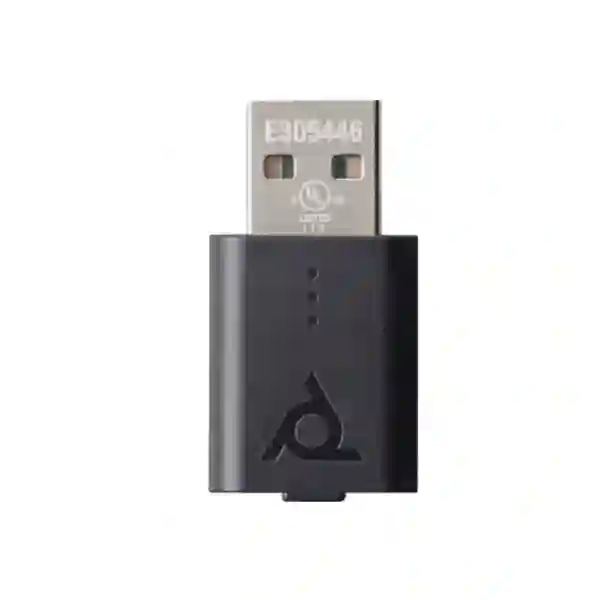
Computer connectivity accessory • Poly Savi DECT
HP Poly Savi D400 USB-A DECT Adapter
Restore the computer connection for a compatible Poly Savi wireless headset with the HP Poly Savi D400 USB-A DECT Adapter. This compact DECT radio adapter plugs into a computer’s USB-A port and communicates with an appropriately matched Savi headset. It is designed for headset-to-computer connectivity; it is not a general Bluetooth dongle, a replacement charging stand or a direct telephone-line adapter.
Before ordering in Tanzania, check the exact Savi headset model, the regional DECT radio variant and whether a standard UC or Microsoft Teams-certified D400 is needed. These details matter more than the similar appearance of different adapters. Share the model or manufacturer part number with FourTeck Tanzania to request a compatibility review and a quote, without assuming a particular configuration is locally stocked.
At a glance: what to verify
| Product role | USB-A DECT receiver for supported Poly Savi headsets |
|---|---|
| Radio technology | DECT; regional variants differ |
| Computer connector | USB Type-A; suitable USB-C adapter may be used |
| Headset compatibility | Requires exact-model and regional-variant verification |
| Teams workflow | Standard UC and Microsoft Teams-certified variants exist |
| Desk-phone connection | Not a direct replacement for an Office telephone base |
| Included items | Confirm actual adapter-only pack contents in quote |
| Local price, inventory and SKU | Not verified for the requested Tanzania listing |
Fast answer for buyers
The HP Poly Savi D400 USB-A DECT Adapter is a computer-side wireless receiver accessory for specific Poly Savi headsets. To choose one correctly, first confirm the headset model and DECT radio region, then select the standard or Microsoft Teams-certified version that fits the intended calling setup. If the receiver is not connecting, check the manufacturer’s subscription procedure before assuming that a replacement is needed.
What the D400 adapter does
The D400 provides the USB-facing part of a compatible Savi headset’s DECT connection. Instead of sending headset audio over a conventional Bluetooth receiver, the computer exchanges call audio with the DECT adapter, which communicates wirelessly with the subscribed headset. This can be a practical way to restore an existing UC headset setup after a receiver has been lost, damaged or separated from its original headset. The headset and host computer remain essential parts of the working system.
Typical usage begins with inserting the adapter into the computer, powering on the headset and confirming that the two devices are subscribed to each other. A successful radio link is only one part of the setup. The operating system and calling application must also use the expected audio device and have access to the microphone. For procurement, it helps to distinguish a faulty adapter from application settings or a headset that simply needs to be subscribed again.
Because several D400 variants exist, the generic product name alone does not establish a suitable replacement for every headset. The safest purchase decision uses the headset’s exact product identity and the matching HP Poly documentation. Buyers should identify whether the accessory is intended for a UC computer connection, which regional radio version the headset uses and whether the intended software workflow needs Teams-specific functionality. Ask for these checks before committing to a replacement.
Who benefits from a replacement USB-A DECT receiver
Contact-centre agents, support teams, reception staff and office professionals often depend on the same headset every day. When the computer-side receiver is missing, a functioning headset may no longer connect for softphone calls. Replacing the appropriate receiver can be more relevant than replacing the entire headset, provided the existing hardware is otherwise serviceable. The D400 is therefore most naturally evaluated as an accessory for an identified Poly Savi deployment rather than an automatic upgrade for any wireless headset.
IT teams managing several workstations may also need a defined accessory spare for break-fix support. Keeping a precise record of headset model, DECT region and adapter version makes it easier to identify which replacement is appropriate. An unlabelled spare that resembles another receiver may be misleading: the part could differ in radio configuration or certification. A simple equipment register can save substantial troubleshooting when devices are reassigned between staff.
Individual remote workers may want to restore a headset after changing laptops or losing an adapter. In that situation, check the new laptop’s USB ports and the organisation’s calling software before purchasing. The D400 uses USB-A directly; a computer equipped only with USB-C needs a suitable accessory converter. The converter is a host-connection item, not a substitute for headset compatibility or successful DECT subscription.
DECT connection rather than a general-purpose Bluetooth dongle
DECT is the wireless technology used by the supported Savi system for its headset radio connection. The D400 participates in that specific headset ecosystem. It should not be described as a universal Bluetooth accessory for smartphones, earbuds, keyboards or unrelated headphones. A generic Bluetooth adapter serves a different use case, even when both accessories plug into a USB port. This distinction is useful when a buyer searches for a USB headset dongle without knowing which radio system their headset requires.
The radio adapter’s purpose is to carry audio between the subscribed compatible headset and the computer. It does not itself supply a microphone, speaker, battery or charging capability. A user who needs an entire new headset should evaluate a complete Savi UC kit or an appropriate alternative headset rather than expect this accessory to function on its own. Similarly, a user looking to connect a traditional desk phone should first identify the office base or telephone interface required by that particular system.
DECT products are sold in different regional radio-frequency configurations. A receiver suitable in one market is not automatically the appropriate component in another. The physical USB connector does not tell you the permitted radio band, and the DECT label by itself is insufficient evidence of interchangeability. For a purchase intended for Tanzania, verify the exact regional product against the headset and applicable deployment requirements, without assuming that a specification published for another country applies locally.
Compatibility starts with the exact Savi model
HP lists D400 accessories and usage across selected Savi product families, including documented 7300 and 8200 UC configurations and certain Office-series models. That is a useful starting point, not permission to treat every product carrying a Savi name as compatible. Headsets that look alike may have different connection arrangements or country-specific radio variants. Confirm the full headset identification shown on the device, its packaging, an original invoice or an approved IT asset record.
For a replacement, compare the full manufacturer part description rather than relying on ‘D400’ alone. Relevant details include the original adapter’s part number, the headset’s regional frequency, any Teams designation and whether the device is a UC or Office model. The original adapter or headset user guide may give the needed clues. If the original receiver is unavailable, the headset model and packaging label are more reliable than a photograph of a similar dongle from an online listing.
Compatibility also involves the intended host. A D400 is primarily a computer USB interface, so verify that the PC or Mac is compatible with the required headset setup and that the softphone will select its audio devices. Do not promise call-control integration with a particular application merely because basic USB audio works. Some integrations depend on the headset version, desktop software, operating system and application settings. A proper check separates headset compatibility, computer recognition and call-control features.
Using D400 with Poly Savi 8200 UC headsets
HP’s Savi 8210 and 8220 UC setup material describes use of a D400 DECT USB adapter for connection to a computer. This makes the 8200 UC series a clear practical example of the D400 workflow. A customer replacing a lost receiver can check the 8210 or 8220 model identification and the original radio specification, then request a corresponding D400 variant. The same general workflow does not prove compatibility with every product marketed under the broader 8200 family.
In the illustrated HP setup process, the receiver is inserted into the computer and the headset is switched on. A green adapter status indication confirms an established connection after successful subscription. If the replacement receiver does not recognise the headset, resubscribing is a sensible next step before concluding that the accessory is defective. The button action on the headset differs among models, so follow the model-specific guide instead of trying an arbitrary combination of controls.
Remember that capabilities such as the Savi 8220 headset’s active noise cancellation belong to the headset, not the D400 adapter. Buying a receiver does not add new microphones, ear-cup features or battery performance to an existing device. A useful replacement decision therefore asks whether the current headset already meets the worker’s needs. If it does, the correct receiver may restore an established setup; if not, it may be time to evaluate the complete headset configuration.
Using D400 with Poly Savi 7300 UC headsets
HP’s documentation for Savi 7310 and 7320 UC configurations includes the D400 USB Type-A DECT adapter among the computer-connection components. This establishes a relevant family for compatibility review, subject to the exact regional version and product identification. Organisations that use these headsets for focused office calling should check whether the receiver being purchased corresponds to the existing UC kit, rather than ordering by family name alone.
For resubscription, HP’s troubleshooting instructions distinguish Savi 7310 and 7320 controls from those on some 8200 models. The headset is placed in subscription mode through its relevant volume-up control, then the D400 subscription button is used. The adapter flashes red and green during subscription, while a solid green indication confirms success. The specific timing and control position should be verified against the supplied headset guide, especially where firmware or physical revisions differ.
The headset’s marketed security features and audio characteristics should not be casually transferred to the replacement receiver as separate claims. For example, information about Savi 7300 headset security describes that complete headset system and should not be rewritten as an unsupported certification of a standalone generic D400 listing. Buyers responsible for call privacy should review the exact approved equipment combination, company policy and any applicable requirements before selecting accessories.
Savi Office installations need additional care
Some HP compatibility listings identify D400 accessories alongside particular Savi Office configurations, including selected models in the 7400 and 8400 lines. These listings require careful interpretation. An Office headset may also depend on a dedicated base that connects to a desk telephone or other endpoint. The D400’s USB-A computer interface does not automatically replace that base or provide equivalent desk-phone ports. The intended connection path must be identified before a purchase.
A buyer may have a working office base but want computer calling on a second workstation. Another buyer may have lost a base and believe a USB adapter will replace it entirely. These are different problems and may need different accessories. The correct recommendation follows the headset’s supported topology: headset to base for an office installation, or headset to a compatible D400 for a supported computer connection. Treat these as distinct configurations unless documentation for the exact model establishes otherwise.
When reviewing Office models, provide the complete designation, not just ‘Savi 8400’ or ‘Savi 7400’. Include any Teams suffix, radio region and original accessory details. Ask whether desk-phone controls, telephone interfaces, base charging or simultaneous connections are required. A USB receiver alone should not be sold as a solution for those functions without evidence that the full intended deployment supports them. This avoids a technically correct part being purchased for the wrong role.
Standard UC and Microsoft Teams-certified variants
HP identifies different D400 variants, including a standard UC version and variants explicitly described as Microsoft Teams certified. The difference is not merely a marketing label to ignore. A Teams-oriented workflow may depend on a supported certified accessory and desktop application behaviour. Buyers who need that specific experience should state it in their request. Buyers using a broader UC environment should not assume that a Teams-designated part is necessary without checking their organisation’s requirements.
HP’s D400 LED guide describes white indications for Teams behaviour on the Teams version. A solid white indication relates to a Teams connection, a pulsing white indication to a Teams notification and a temporary white flashing pattern to a failed connection. The guide also notes that the Microsoft Teams desktop application is required. These signals should not be promised for a standard non-Teams adapter or for every browser-based meeting application.
Basic headset audio and full application integration are separate considerations. A staff member might hear callers but not see the desired call-notification or control behaviour. Procurement should specify the intended desktop softphone and any certification requirements. If the existing headset kit was purchased as a Teams edition, record that fact when seeking a replacement. Do not infer certification from a plain USB-A connector, an unlabelled photograph or the presence of a D400 product-family name.
Regional DECT frequency: a critical order check
HP catalogues D400 products for multiple radio-frequency ranges. Official product descriptions include an 1880–1900 MHz UC example and separate models for other regions. This means radio-region identity is a functional specification, not an incidental suffix. A receiver obtained for one region may be the wrong match for the headset already deployed in Tanzania. It is not responsible to assign one frequency to this generic listing when the user has not supplied the actual local stock code.
Check the part number on the headset or original packaging, then compare it with the exact receiver variant. If the equipment was imported or reassigned between countries, ask an IT administrator to validate that its radio configuration is appropriate for the intended deployment. A successful USB connection alone does not establish that the pairing or local operating conditions are correct. The same caution applies to replacement receivers sourced for travelling employees or mixed-country equipment pools.
No claim of Tanzanian regulatory approval, spectrum eligibility or product registration is made for an unspecified D400 variant here. Such assertions need evidence for the exact unit and applicable rules. Buyers with regulated or large deployments should obtain documentation through their procurement or compliance process. This listing describes the product family and purchasing checks rather than certifying a particular imported configuration. The final quotation should clearly identify the proposed regional manufacturer variant.
USB-A connector and USB-C laptop considerations
The D400 uses a USB Type-A connector for the computer side. On a laptop with an available USB-A port, the manufacturer’s workflow is to connect the adapter directly. This direct connection is a useful first troubleshooting test because it reduces the number of intermediate devices. If a docking station, port expander or hub introduces intermittent behaviour, a direct computer port can help determine where the problem originates. It is a diagnostic recommendation, not a guarantee against every USB fault.
HP also describes using an accessory USB-A-to-USB-C adapter when the computer has only USB-C ports. The converter must be suitable for the connection, and the user should verify whether it is included with the specific product bundle. A USB-C converter does not transform the D400 into a native USB-C receiver or change the DECT radio it uses. Purchase planning should therefore treat the converter as a separate compatibility question when the listing does not explicitly include it.
Before raising a purchase order, inventory the intended computers and their physical ports. Workstations may have accessible rear USB-A ports, while thinner laptops may offer only USB-C. If an enterprise image restricts USB peripherals, the responsible IT team should also test device permissions and update policy. A compatible physical port is necessary but not sufficient for every managed device. The goal is a working headset pathway from headset radio through USB audio to the chosen conferencing or calling application.
What is included and what is not established
The product described is a D400 USB-A DECT adapter accessory. It should not be presented as a complete wireless headset package. A headset, charging cradle, AC power supply, travel case, USB-C converter or software licence must not be assumed to be supplied with an adapter-only purchase. Some complete Savi headset kits include several of those items, but a replacement dongle listing is a different offer. Ask for the actual quotation or pack-content statement when accessories matter.
A customer replacing a receiver usually already owns the headset and its charger. Confirm that the existing headset powers on and accepts charge before blaming the missing receiver for all symptoms. If the headset battery has failed or the charging base is damaged, a new D400 does not repair those issues. Similarly, it does not create a direct wired audio cable connection for a headset not designed to use one. The spare-part role should be clear throughout procurement.
No verified Tanzanian price, stock status, warranty period, local delivery promise or manufacturer part number has been supplied for the specific FourTeck listing. Those fields are deliberately left unclaimed. The requested product can be quoted with the right attributes after the buyer identifies the required variant. This protects buyers from receiving an apparently precise but incorrect item and allows the seller to specify what is actually being offered before an order is finalised.
First-time connection: a practical installation sequence
Begin with the computer on, the compatible headset sufficiently charged and the D400 plugged into a suitable USB-A port. Turn on the headset and give the devices the opportunity to establish their existing subscription. Check the adapter indication and confirm that the operating system recognises the intended audio device. On some setups, application audio can be checked through a test call or sound-control panel. Record the result before changing several settings at once.
If the headset does not connect to the replacement adapter, use the documented resubscription procedure for the exact headset model. HP describes putting the headset into subscription mode using its appropriate volume control, then double-pressing the D400 subscription button until the adapter flashes red and green. When successful, the headset may announce that pairing has succeeded and that the base is connected, while the D400 becomes solid green. Treat those indications as the defined process rather than repeatedly unplugging the device at random.
After connection, test incoming and outgoing audio, mute behaviour and application call routing. If the headset is visible in operating-system settings but silent in the chosen softphone, review the softphone’s microphone and speaker selection. On managed computers, check audio permissions and organisation policy. Avoid performing firmware changes without following the organisation’s support process. A measured setup test is especially helpful before distributing multiple adapters to users with different laptop models.
Understanding the D400 LED indicators
The standard LED information in HP’s D400 support guide helps separate several situations that otherwise look similar. Solid green denotes a headset connection and successful subscription. Fast flashing green indicates an incoming call, while other flashing green activity can correspond to a call, hold or media stream. Solid red indicates that the call is muted. Red and green flashes indicate subscription mode, while a red indication lasting several seconds can show a failed subscription attempt.
The visible signal needs to be interpreted in context. For example, an unresponsive softphone is not necessarily a radio failure if the headset and adapter are connected. A mute indication means the audio path may be functioning while the microphone is intentionally unavailable to the caller. A failed subscription signal points back to pairing, headset mode or compatibility rather than simply to the operating system’s speaker selection. Clear symptom descriptions make support more efficient.
Microsoft Teams-certified D400 versions can also show white Teams-related indications described in HP’s guide, subject to the Teams desktop application and relevant integration. Do not use that white LED behaviour as a test for a generic non-Teams model. If lights behave unexpectedly, consult the exact adapter and headset documentation, especially after software updates. LEDs are useful evidence, but they do not by themselves certify a compatible application setup, radio region or complete audio configuration.
Making headset audio work in a calling application
A connected DECT receiver does not automatically mean the correct microphone and speaker are selected inside every calling application. Computers often have built-in microphones, monitor speakers, webcam audio devices and docking-station interfaces alongside the headset. In the application, select the intended Poly audio device where available, then verify speaker playback and microphone pickup in a controlled test. This prevents a common support case in which the adapter is working but audio is routed elsewhere.
Check system-level privacy controls if the microphone is not reaching the application. A conferencing client may require permission to capture audio, and an enterprise-managed device may apply additional controls. If audio worked previously, note whether a laptop change, operating-system update or newly attached peripheral preceded the problem. Reverting to a known working path and testing one change at a time is safer than installing several utilities without a defined reason.
Call-answer buttons, mute synchronisation and presence indicators can depend on the headset model and integration software. These functions should be tested for the customer’s specific UC client rather than broadly guaranteed. If basic USB audio is available but a particular call-control feature is absent, that may be an integration or supported-device question rather than proof that the receiver is counterfeit or defective. Document the application version, headset model and adapter identity when seeking technical help.
Troubleshooting an adapter that appears disconnected
Start with the basics: confirm the headset is powered on, the D400 is in a computer port and the USB connection is not loose. HP’s support workflow recommends turning off the headset, disconnecting the adapter, restarting the computer, reconnecting the adapter and then powering on the headset. This sequence resets the connection path before resubscription is attempted. It is particularly useful when audio intermittently stops or the adapter no longer seems to recognise its headset.
Where possible, test the receiver directly in the computer rather than through a USB splitter or hub. HP specifically recommends a direct connection during troubleshooting. Check for a solid green subscription indication when the headset is connected. If the D400 enters red-and-green subscription mode but fails, recheck the headset’s corresponding subscription state and the regional/model match. A replacement receiver that cannot subscribe should not automatically be assumed compatible just because it plugs in.
If the problem continues, separate hardware from configuration. Is the adapter visible to the operating system? Does another USB port behave differently? Is the headset charging and functioning? Does the issue occur in every application or only one? Has a firmware or policy update taken place? Record these answers before returning or replacing the accessory. They provide more useful evidence than a general complaint that the headset ‘does not work’.
If sound drops, cuts out or becomes intermittent
Intermittent call audio can originate from more than one place. HP’s wireless Savi UC troubleshooting guidance identifies inconsistent headset-to-adapter connectivity as a common cause of cut-outs, static or apparent loss of connection. However, the computer, softphone, network path and calling service can also affect a user’s experience. A sensible diagnosis checks whether the adapter LED changes during the problem and whether other computer audio or applications are affected.
Begin with a direct USB connection, confirm proper headset subscription and follow the model-specific troubleshooting steps. Check whether a nearby computer or peripheral changes the symptom, without assuming any single interference cause. If local media playback is stable but internet calls fail, the application and network deserve separate investigation. If the headset repeatedly loses subscription during local testing, concentrate first on the headset, receiver and their documented connection process.
For a team deployment, ask affected users to record the time, application, workstation and symptom rather than issuing new receivers immediately. Comparing a few controlled examples may reveal a shared policy or software issue. Avoid promising a particular wireless range in a generic listing because environment, regional variant and headset configuration affect real-world behaviour. The goal is reliable operation in the customer’s actual workspace, verified through a test rather than an unsupported distance claim.
Computer receiver versus office base or desk-phone accessory
A D400 should be purchased for the role it actually performs: compatible headset-to-computer DECT connectivity through USB-A. Desk phones often rely on a separate compatible office base, interface cable or electronic hook switch accessory. These components are not interchangeable merely because they belong to the same Poly Savi family. If the intended destination is a physical telephone rather than a PC calling application, identify that requirement before selecting an accessory.
A headset that originally worked with an office base may have calling and charging features that depend on the base. Replacing that base with a USB adapter could remove expected functions or fail to connect to the telephone at all. Conversely, someone who only needs a laptop softphone may not require an office telephone base if their exact headset is supported for direct D400 connection. The distinction is best settled from the manufacturer’s connection guide and the existing installation diagram.
Where users alternate between desk-phone and PC calling, describe both workflows to the supplier. State whether a charger must remain on the desk, whether the handset interface is needed and whether the computer connection is simultaneous or a separate operating mode. Do not infer multi-device mixing, switching or telephone compatibility from the D400 accessory alone. A clear connection requirement helps prevent buying an adapter when a base, cable or complete headset kit is the relevant item.
Replacing an adapter after moving to a new computer
Changing from a desktop to a laptop can expose limitations that were not visible in the original setup. The new device may lack USB-A, enforce stricter USB permissions or use a different conferencing client. Before assuming the receiver has failed, verify the port, the operating system’s audio-device selection and the headset’s connection indication. If a compatible D400 was transferred with the headset, the physical move does not inherently mean a new receiver must be purchased.
If the original D400 was lost during the move, record the headset’s exact identification and the previous receiver description if available. A procurement team may be able to consult an asset label or purchase record. This is more reliable than choosing a replacement based on the laptop brand or a familiar USB dongle shape. A USB-C conversion accessory might be necessary for the host, but it does not resolve a mismatch between headset and receiver radio variants.
Managed-device policies may be another source of confusion. A USB device that works on an administrator’s test machine may be unavailable to a restricted endpoint because of organisational settings. In such cases, involve IT before deciding that the hardware is incompatible. A short pre-deployment test with the real computer image, real headset and actual call software provides meaningful evidence. The correct purchase is the one that succeeds in the customer’s operating environment.
Supporting shared desks and multiple users
Shared workstations and rotating teams can benefit from well-documented headset accessories, but the D400 should not be assumed to provide instant multi-user switching or automatic pairing with arbitrary headsets. Subscription establishes a relationship between a receiver and a compatible headset. When equipment is reassigned, IT should follow the supported resubscription procedure and verify the resulting audio path. Uncontrolled swaps can create confusion even when all devices appear visually identical.
Label replacement adapters and headset cases with the equipment register reference rather than altering factory markings. Record the model, regional variant, UC or Teams designation and known working computer configuration. This makes it easier to return a receiver to its intended user or identify compatible spare stock. The process can also help teams distinguish adapters that require application configuration from hardware that has been physically lost.
Training desk staff on a few checks can reduce unnecessary support tickets: confirm the headset has power, check the USB receiver, watch for the connected LED status and verify the selected audio device. More complex pairing, software and compliance decisions should remain with the responsible support team. Keeping these roles distinct is particularly useful where many staff share meeting rooms, reception desks or temporary workstations.
Considerations for customer support and contact-centre teams
For agents handling frequent computer calls, a missing receiver can interrupt an otherwise familiar headset workflow. A compatible replacement may help recover the existing setup without retraining users on an entirely different headset. The buying question should nevertheless begin with the exact deployed model and softphone environment. Call-control behaviour, mute indication and application integration should be checked during rollout rather than assumed from an accessory product name.
Support supervisors can define a short acceptance test before deploying replacement D400 units: successful subscription, clear inbound audio, microphone transmission, mute operation and one representative call in the intended client. If the workflow relies on a Teams notification or certified call-control behaviour, include that in the test and procure the appropriate version. A passed test on one machine is evidence for that configuration, not a universal compatibility statement for all endpoints.
Operational continuity also depends on headset charging, workstation audio permissions and network or calling-platform availability. A D400 does not address a depleted battery, a blocked microphone permission or a softphone outage. Keeping support procedures organised by symptom avoids indiscriminate replacement. This customer-first approach can save cost by identifying when the receiver is the relevant part and when another component or configuration change is needed.
Practical considerations for Tanzania-based buyers
Customers purchasing for an office or remote-work environment in Tanzania should specify the actual headset model, location of intended use and required computer connection. This makes it possible to review the correct regional hardware variant and any regulatory or company requirements without assuming that a product designed for another market is automatically suitable. A quote request can include photographs of the device labels, but sensitive internal asset details should be handled through the organisation’s normal communication process.
Connectivity needs may differ between work environments, especially where staff use a mixture of laptops, desktop computers and managed USB-C docking equipment. The receiver’s DECT connection is local to the headset and computer; the quality of a cloud or internet call still depends on the application and network. Testing both local headset audio and a representative external call helps identify whether the remaining issue is audio hardware or broader communication infrastructure.
This page does not assert stock availability, delivery coverage, local office locations, currency pricing, import treatment, warranty duration or Tanzanian radio approval for any unspecified D400 part. Those are order-specific facts that should be confirmed in a quote or formal product documentation. The practical next step is to request the correctly identified adapter, not to assume that a generic listing covers every variation of the Savi D400 family.
A buyer checklist before requesting a quote
First identify what failed. Is the existing USB receiver lost, visibly damaged, intermittently disconnecting or simply not paired with the headset? If the headset remains functional and the receiver alone is missing, a compatible accessory may be appropriate. If the headset does not charge or has physical damage, replacing only the D400 is unlikely to resolve the full problem. Providing the symptom at the start makes the request clearer and helps limit unnecessary parts.
Next capture the exact headset identity, any original adapter manufacturer part number, DECT region and UC or Teams designation. Check the computer’s port type, its operating system and the primary softphone. If the installation includes an Office base or desk telephone, mention that as a separate requirement. Where possible, attach a procurement record or a clear label photograph to the quotation request so the item can be matched against manufacturer documentation.
Finally ask for a written confirmation of the proposed product variant and the actual pack contents. Confirm whether a USB-C conversion accessory is needed, whether the quote is for an adapter only and what support or return conditions apply. Do not use a retailer-specific SKU, barcode or unrelated product number as evidence of the exact FourTeck listing. When identifiers have not been verified for that listing, leave them unspecified until the actual offer is identified.
How to compare alternative ways of restoring headset service
Buying the right D400 is one option among several. If the receiver is intact but the headset is no longer subscribed, a supported resubscription may be the lowest-disruption solution. If the problem lies in application audio routing, adjusting the configuration may solve it without replacing any hardware. If the headset itself is faulty or no longer meets user needs, a complete replacement headset might be the better procurement path. Diagnose the failed link before buying.
A generic Bluetooth receiver should not be treated as an equivalent substitute for a DECT-specific Savi adapter. A USB-C adapter can help with a host connector mismatch but cannot replace D400 radio functionality. An Office base may be necessary for certain telephone-oriented deployments, but is not automatically interchangeable with a UC dongle. Comparing by actual connection requirements is more useful than comparing by accessory shape or the presence of a USB connector.
For teams, consider the total effort of verifying models, subscribing headsets and testing softphone behaviour. A spare receiver is attractive where equipment is standardised and documented. In a heterogeneous fleet, the cost of mistaken compatibility can outweigh the convenience of an unverified spare. Keep the comparison practical: the right choice restores the intended audio path with documented component fit, while an unsuitable accessory introduces avoidable support work.
Device support, updates and responsible maintenance
HP provides setup and troubleshooting material for D400-related Savi UC configurations. For ongoing maintenance, the support team should use documentation associated with the exact headset and receiver version. Manufacturer release notes can help explain changes in adapter behaviour, application interaction or known issues. However, a product-family guide is not automatically a licence to apply any firmware to any regional receiver; follow the appropriate supported update process.
Before changing software on a managed workstation, record the current symptom and, where company policy requires, seek approval for utility installation or firmware updates. HP’s Savi UC setup material describes management software used to configure devices and check for firmware updates. Organisations may already have an approved approach for distributing these tools. Updates should be deliberate and testable rather than a routine guess whenever microphone audio fails.
After maintenance, repeat the same basic acceptance tests used during installation. Confirm connection status, audio input, output, mute and the required application behaviour. Save the tested computer and device identifiers in the help-desk record. Where a hardware fault persists, request model-specific guidance through an appropriate support channel. No particular turnaround time, service level or warranty outcome should be inferred from this product description.
Security and business deployment governance
Businesses dealing with customer conversations should review the complete headset solution under their normal security and device-management policy. Some Savi headset families are marketed with security features, but these must be assessed for the precise supported configuration. It would be misleading to assign a specific encryption claim, formal certification or local approval to a generic standalone adapter without verifying its exact variant and context. Treat security as a system-level purchasing consideration.
IT governance also covers physical control of small accessories. A USB receiver can be lost during laptop relocation or equipment turnover. Maintaining an asset record and a defined replacement procedure helps support staff identify what was issued and which headset it belongs to. Where the company manages USB device access, coordinate with endpoint administrators so a permitted headset adapter is recognised without relaxing unrelated security restrictions.
Users should avoid sharing sensitive application information while troubleshooting and should not expose internal credentials or confidential support records on a public product page. Relevant information for a supplier is usually limited to the headset model, adapter part number, planned host connection and observed symptoms. Keep proprietary details in an authorised purchasing or IT support channel. A practical procurement workflow balances operational continuity with established security practices.
When to select a different accessory or complete kit
The D400 is not the correct choice merely because a buyer owns a Poly-branded wireless headset. Some headsets use different adapters, integrated Bluetooth solutions or other connection systems. Other Savi installations depend on an Office base and specific telephone interfaces. The correct purchase begins with the supported connection diagram for the exact model. If the drawing does not show a D400 or the required regional variant, do not assume compatibility.
Consider a complete headset kit when the existing microphone, battery, ear cushions or charging hardware also need replacement. An adapter-only purchase does not restore worn components and provides no new wearing style or noise-control features. If staff are changing call platforms or moving to a different workstation standard, a fresh evaluation of headset requirements may be more economical than purchasing unrelated spares. That decision should be based on the full workflow rather than a narrow accessory comparison.
Where a buyer has only the name ‘HP Poly Savi D400 USB-A DECT Adapter’, a responsible supplier can begin with a conditional quote request. Identify the original headset, region and software requirements, then match the appropriate manufacturer variant. This is preferable to making unsupported claims about frequency, certification, wireless range or universal compatibility. A clear order specification also makes post-purchase acceptance much easier for the receiving team.
A simple acceptance test after receiving the adapter
Check the labelled part against the quotation before installing it. Verify that the supplied variant matches the intended headset and region, and confirm whether the package is adapter-only. Inspect the USB plug for obvious damage. Connect the receiver to the designated workstation, power on the headset and complete any documented subscription steps. A connected LED status is an encouraging first result but should not be the sole acceptance criterion.
Open the calling application used by the intended staff member and make a controlled test call. Confirm that the caller can be heard, the microphone is clear, mute works and audio returns after a hold or reconnect where relevant. Test the software controls that the deployment genuinely requires. If the device is Teams-certified and that certification is important to the purchasing brief, verify the relevant desktop application experience rather than assuming that basic audio alone is sufficient.
Record the exact tested configuration: headset model, receiver identification, host computer, operating-system version and calling client. If a problem appears, include the LED behaviour and whether it occurs directly in a computer USB port. This creates an actionable support record. For multi-unit orders, pilot the intended configuration before broad distribution. A measured test helps turn a small accessory purchase into a dependable working solution.
Summary: the right part for the right headset
The HP Poly Savi D400 USB-A DECT Adapter is most useful when an organisation needs to connect or reconnect a supported Poly Savi headset to a computer over the appropriate DECT link. Its value is specific, not universal. A correct adapter can restore an established headset workflow, while an incorrect radio variant, wrong Teams designation or mistaken assumption about desk-phone functionality can make an apparently simple replacement unusable.
Before purchasing, match the exact Savi headset model, the regional DECT variant, the preferred UC or Microsoft Teams behaviour and the computer’s USB connection. Then verify application audio and supported controls through a short acceptance test. This sequence is more dependable than choosing by the dongle’s appearance or a generic accessory title. It also supports clearer communication between the end user, procurement team and IT administrator.
For a Tanzania quotation, provide the headset’s complete model number, any available manufacturer part reference, the computer port type and the intended calling application. Ask FourTeck Tanzania to confirm the exact product variant and quoted pack contents. No price, local inventory status or radio approval is assumed here. The next step is a documented compatibility check and an appropriately specified quote.
Frequently asked questions
Is the D400 a Bluetooth dongle?
No. The D400 is a DECT adapter for supported Poly Savi headset systems, not a universal Bluetooth receiver for unrelated headsets or phones.
Can I use it without a Poly Savi headset?
No. It is an accessory that provides computer-side connectivity for a compatible headset. It does not contain a speaker, microphone or charging function.
Will every Savi headset work with it?
Do not assume so. Match the precise headset model, intended connection arrangement and regional DECT variant against the manufacturer’s documentation.
Does this adapter connect directly to a desk telephone?
Its USB-A interface is intended for computer connectivity. Desk-phone installations may require a supported office base and other telephone accessories.
Can I connect D400 to a USB-C-only laptop?
HP describes using a suitable accessory USB-A-to-USB-C converter. Confirm the converter’s suitability and whether it is included in the actual offer.
How do I pair a replacement D400?
Follow the exact headset guide. HP describes putting the headset into subscription mode, then double-pressing the D400 subscription button until red and green flashes indicate pairing mode.
What does a solid green D400 light mean?
HP describes solid green as successful headset subscription and connection. You must still confirm computer audio routing and the desired application behaviour.
What does a solid red light mean?
On the standard D400 LED guide, solid red indicates mute. A brief red status after a failed subscription is a different event, so examine the sequence.
Does the D400 support Microsoft Teams?
There are Teams-certified D400 variants and standard UC variants. The appropriate choice depends on the specific part and the intended Teams desktop workflow.
Why does my adapter show no headset audio?
Check headset power, USB connection, successful subscription and operating-system audio settings, then confirm the application’s selected microphone and speaker.
Can I use any replacement D400 from another country?
Not automatically. HP lists different regional DECT frequency variants. Confirm the correct configuration for the headset and intended market before purchase.
Does the package include a headset or charging stand?
Do not assume that. The requested item is an adapter accessory; the actual pack contents must be confirmed in the supplier quotation.
Can D400 solve choppy internet calls?
It can address a faulty or missing compatible headset receiver, but network, calling-service and application problems need separate diagnosis.
Is the price or stock in Tanzania confirmed?
No verified local price, stock quantity or delivery promise has been provided for this particular listing. Request an exact-variant quotation.
What details should I send for a quote?
Provide the complete Savi headset model, any original receiver part number, regional marking, Teams requirement, computer port and intended calling application.
Is the radio frequency the same for every D400?
No. HP publishes variants for different DECT frequency ranges. Match the exact variant rather than assigning a single frequency to a generic product name.
Request a matched D400 adapter quote
Tell FourTeck Tanzania the exact Savi headset model, any existing adapter part number, the required UC or Microsoft Teams edition, the computer’s USB port type and the intended calling software. Ask for confirmation of the correct regional DECT variant, the supplied pack contents and the available quotation terms.
Request compatibility confirmation and a quote from FourTeck Tanzania.




Reviews
There are no reviews yet.