
Workplace headset charging accessory • Tanzania
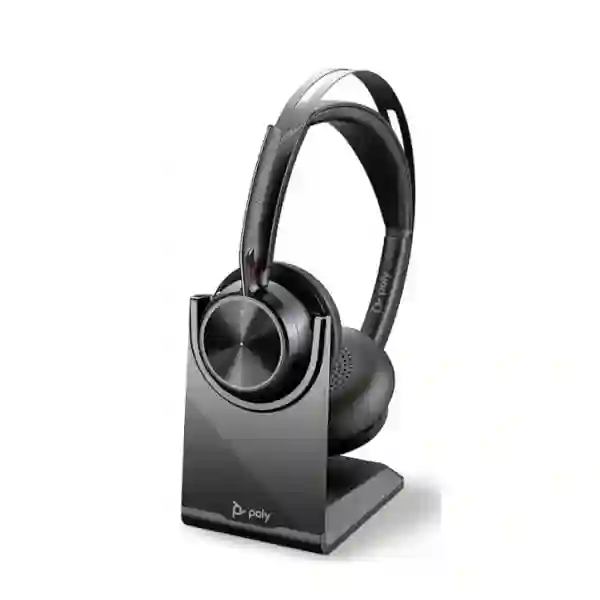
HP Poly Voyager Focus 2 Charging Stand
The HP Poly Voyager Focus 2 Charging Stand is a dedicated desktop charging accessory for supported Voyager Focus 2 and Voyager 4300 headsets. Replace a missing cradle or add a charging point to a regularly used workstation. Choose the USB-A or USB-C stand according to the power connection you have available; confirm the exact variant before ordering.
Standalone stand • Compatible headset sold separately • USB connector choice required
Quick buying guide
- Purpose: Desktop charging stand for an existing supported wireless headset.
- Manufacturer compatibility: Voyager Focus 2 and Voyager 4300 families.
- USB-A variant: HP manufacturer product number 783R6AA.
- USB-C variant: HP manufacturer product number 783R7AA.
- Weight: HP lists 0.24 kg for each stand version.
- Not included in this accessory description: A headset, BT700 Bluetooth adapter, or office telephone base.
- Next step: Confirm the headset model, USB variant, and Tanzania quotation details.
The two manufacturer numbers above identify accessory variants, not a verified FourTeck listing SKU. Local price, stock, warranty handling, and delivery terms require confirmation for the exact offer.
Compare the two charging stand variants
| Check | USB-A stand | USB-C stand |
|---|---|---|
| HP part number | 783R6AA | 783R7AA |
| USB power connection | USB-A | USB-C |
| Manufacturer-listed compatibility | Voyager Focus 2; Voyager 4300 | Voyager Focus 2; Voyager 4300 |
| Published stand weight | 0.24 kg | 0.24 kg |
Manufacturer product identifiers are given to help buyers select a variant. This generic product page does not assign either variant to an unverified target listing.
A practical charging place for a headset used every day
The Poly Voyager charging stand gives a compatible wireless headset a recognizable place to rest between conversations. Instead of leaving a headset beside a keyboard, in a drawer, or connected to a loose charging lead, users can return it to a dedicated desktop cradle. This is useful at a fixed workstation where the same headset supports meetings, customer conversations, training sessions, and ordinary calls during the working day. The stand’s role is straightforward: provide a convenient charging location for a compatible headset. It is an accessory, not a new headset, Bluetooth receiver, telephone base, or audio interface.
For a buyer in Tanzania replacing a misplaced stand or preparing a new desk, the first decision is not about sound quality. It is whether the existing headset belongs to the supported family, whether the desktop has the appropriate USB power connection, and whether a standalone stand is what the user actually needs. A correct replacement helps preserve an existing headset investment without purchasing an unnecessary second headset. For procurement teams, the smallest detail that deserves attention is the USB connector variant. That choice should be checked before a quotation or order is approved.
What is included—and what is not
The manufacturer identifies this accessory as a Poly Voyager charge stand. Its package description for the standalone USB-A and USB-C products lists the relevant charging stand rather than a complete communications kit. The headset itself must be obtained separately if it is not already owned. A standalone stand should not be confused with a retail package whose longer title says headset plus charging stand. Those bundles may contain a wireless headset, a USB Bluetooth adapter, a carrying pouch, or other items, but the charging-stand accessory listing should not be described as including them.
Before requesting a quotation, establish whether the requirement is a spare stand, a replacement for a damaged stand, a second desk location for an existing headset, or a complete headset setup. These are different purchasing needs. A user with a functioning Voyager Focus 2 normally needs only the correct charging accessory when the original dock is missing. A new employee with no headset needs a different product scope. The short name in an internal purchase request is often insufficient to establish the contents, so ask for the exact accessory version and an itemized description.
Compatible headset families
HP’s published specifications identify the Voyager Focus 2 and Voyager 4300 headset families as compatible with the Poly Voyager USB-A Charging Stand and Poly Voyager USB-C Charging Stand. This makes the accessory relevant to people who already use either family at a desk. The compatibility statement is about docking and charging; it does not mean the stand changes the headset’s wireless range, noise reduction, conferencing certifications, microphone performance, or software features. Those functions remain properties of the headset and of the surrounding communications setup.
Model names matter because Poly has several similarly named headset generations and accessories. An original Voyager Focus, a Voyager Focus 2, and another Voyager product should not be treated as interchangeable merely because their names share the word Focus. Some retailers show additional compatible headset ranges, but this page relies on the two families explicitly listed in HP’s current accessory specifications. If the headset label is missing or the model is uncertain, confirm the headset identity before ordering rather than trying to infer compatibility from a photo of its charging contacts.
USB-A and USB-C: choose by the power connection
HP identifies two versions of the Voyager charge stand: a USB-A version with HP product number 783R6AA and a USB-C version with HP product number 783R7AA. Both are listed for the Voyager Focus 2 and Voyager 4300 headset families. These numbers identify manufacturer variants; they are not automatically the SKU assigned to a FourTeck Tanzania product record. For an office purchasing team, the practical difference is the connector used to obtain USB power. The existing power source, available computer ports, and preferred desktop arrangement should guide the choice.
A USB-A computer port or suitably matched USB power source points toward the USB-A accessory; a USB-C source points toward the USB-C accessory. Do not assume that an employee’s headset charging socket determines which standalone dock connector is required, because the headset and dock are different parts of the charging arrangement. Similarly, a USB-C laptop does not prove that the customer’s chosen docking station has a free powered USB-C port. Check the intended charging location, connector availability, and whether any additional power adapter would be needed before the order is finalized.
Understand the stand’s charging-only role
A charging stand is best understood as a place to deliver power to the compatible headset while it is docked. It is not the device used to pair the headset with a computer, and it does not replace the BT700 Bluetooth USB adapter used in supported Voyager Focus 2 computer configurations. A headset may already be connected to a laptop or phone through its normal supported wireless connection while the charging stand remains at the desk as a charging accessory. The stand should therefore be selected for power and docking convenience, not as a fix for an audio connection problem.
This distinction prevents common procurement mistakes. Buying a charging cradle will not automatically add a desktop telephone interface, confer Microsoft Teams certification on an unsupported headset, or turn a standard USB power port into an enterprise call-control system. HP describes a separate Voyager Office Base accessory for configurations that need additional base functionality. Determine the actual requirement before comparing prices: charging an existing compatible headset, connecting it for calls, or changing the broader telephony setup. If the problem is calls dropping, poor microphone pickup, or adapter pairing, troubleshoot the headset and connection rather than presuming a new stand will resolve it.
Everyday setup at a desk
Choose a stable part of the desk where the headset can be placed and removed without straining the USB lead. HP’s Voyager Focus 2 user guidance explains that the charge stand connects to a computer or USB wall charger. Use a suitable port or power source for the selected stand, keep the connector accessible, and position the cradle where the headset can be seated properly. After connecting power, place the compatible headset on its stand in the intended orientation. Confirm that the headset indicates charging according to its own status behavior and user instructions.
The surrounding desk layout is often as important as the charging function. Avoid a location where a keyboard, paper stack, monitor arm, or moving chair might push against the stand. Leave enough space to lift the headset comfortably rather than dragging it sideways. Staff using multiple screens may prefer an edge of the work area that is easy to reach but does not interrupt mouse movement. If users switch between home and office workstations, keeping a stand at one designated desk can make the return-and-recharge routine more predictable.
Power planning for shared USB ports
Many workstations already use USB connections for webcams, external keyboards, mobile devices, docking stations, and Bluetooth adapters. A charging stand requires its own appropriate power connection, so do not count a port that is already occupied. HP’s Voyager Focus 2 guidance notes that users short of computer USB ports can connect the charging stand to a wall charger instead. That is a practical option when the headset’s USB Bluetooth adapter needs to remain connected to the computer. Check whether the chosen wall charger and its connector are available; do not assume an external wall adapter is included with this standalone accessory.
For desks that are frequently rearranged, document which USB source powers the stand so a change in docking-station wiring does not unexpectedly remove charging power. If a laptop is sometimes shut down or disconnected, verify that the chosen USB source continues to supply power when charging is needed. Not every computer port behaves the same way when the host is asleep or powered off. The stand cannot compensate for an unpowered USB connection. Where operations depend on users starting each shift with a ready headset, plan the power path as part of the workspace, not as an afterthought.
How to confirm the correct item before purchase
Start with the name of the existing headset and the reason for buying the accessory. Read the model designation from the headset, original box, deployment records, or another reliable inventory source. Next, identify whether the requirement is an additional stand or a direct replacement. Then examine the available USB power connection at the intended workstation. Finally, compare the requested connector version and manufacturer product number with the quotation. This four-part check is usually more valuable than choosing a charging stand from a generic photo or abbreviated catalogue title.
Where procurement documents use several identifiers, keep them separate. HP’s 783R6AA and 783R7AA are manufacturer product numbers for the USB-A and USB-C stands respectively. A distributor’s internal stock code is a different identifier, while the final FourTeck listing SKU must come from the exact target listing. Never treat an external reseller’s SKU as the Tanzania listing SKU. If the purchasing document simply says Voyager Focus 2 charging stand, ask for the connector option to be recorded explicitly. That small clarification reduces avoidable returns and mismatched expectations.
A useful accessory for hybrid work
Hybrid workers may move a headset between a business office, a home workspace, and meeting locations. A second compatible charge stand can provide a fixed place to recharge at one of those regular workstations, reducing the need to carry the same cradle back and forth. Whether a second stand is worthwhile depends on how often the person changes location and on the available charging alternatives. It is not necessary to buy duplicate stands for every user when the headset’s existing charging method already meets the workflow.
Consider the pattern of work rather than using a generic hybrid-working promise. Someone who spends three days at a permanent desk and rarely travels may find one dock sufficient. A user who regularly changes between two equipped desks could value a permanent docking point at each site. When the workplace has a clear desk policy, a stand also makes it easier to define where the headset is stored while not worn. Keep personal equipment and shared accessories clearly identified where asset accountability matters, especially when similar Poly headsets are used across a department.
Help desk and customer-service applications
In a service environment, the headset is part of a repeatable call-handling routine. A dedicated stand can help staff return the headset to a visible, accessible position after a call block or during a scheduled break. This may be useful for reception personnel, help desk analysts, supervisors, and people who spend much of the day on voice or video conversations. The stand does not influence call routing, answer queues, or support software; its contribution is keeping the compatible headset’s charging location organized and easy to find.
For teams with assigned equipment, decide whether a stand belongs to a named employee or to a particular desk. An employee-assigned stand may follow the headset, while a desk-assigned stand can remain in position when people rotate through the workspace. Either approach can work, but inconsistent asset rules make accessories easy to misplace. A replacement process should record the headset model, the requested USB variant, and whether the old stand is lost, damaged, or merely inconveniently located. This creates a clear support request without confusing the charging accessory with the full communications device.
Meeting rooms and touchdown workspaces
A touchdown desk that is used for short work periods does not always need a permanently installed charging stand. However, a room or workstation assigned to the same staff member for long meeting-heavy days may benefit from a clear charging location. The decision turns on who owns the headset, how the room is managed, and whether a suitable powered USB connection is available. Do not assume a stand supports universal headset charging for visiting employees; the documented compatibility is limited to the relevant Poly headset families.
If a workspace supports several brands of headsets, it is usually better to label the stand with its compatible model family than to present it as a general USB headset dock. Employees cannot determine charging compatibility from the shape of the connector alone. A stand that looks similar may not fit another headset’s charging contacts. When room hardware is shared, communicate whether staff are expected to bring their own headset, use a room-assigned headset, or rely on other audio equipment. This avoids making the charge stand responsible for a meeting-room requirement it was not designed to satisfy.
Working with an existing Voyager 4300 headset
HP’s accessory specifications name Voyager 4300 alongside Voyager Focus 2 for both USB connector versions. This is useful for organizations that operate more than one compatible Poly series and want to avoid stocking unnecessary accessories. The shared manufacturer compatibility statement may simplify an accessory purchase, but it should not be extended to every Voyager headset. The full headset model must still be checked against the supported family. A 4300-series user requiring a charge stand should receive a correct stand and a suitable USB power source, just as a Focus 2 user would.
In mixed headset deployments, record headset models in the same inventory that tracks adapters, charging leads, and desk accessories. A single shared accessory category may be convenient for budget planning, but the connector variants remain distinct products. If the organization is standardizing on one USB power arrangement, it may prefer one connector format where possible; nevertheless, actual compatibility with available workstation power is more important than visual uniformity. If a current headset model is uncertain, confirm with its product documentation before a bulk replacement order.
Distinguish original Voyager Focus from Focus 2
The difference between Voyager Focus and Voyager Focus 2 is not merely a naming detail. Accessories from an older headset generation may have a similar general appearance but should not be assumed to support the newer model. HP’s current charge-stand specifications specifically name Voyager Focus 2. They do not establish general compatibility with the original Voyager Focus. This is especially relevant when replacing stands from a drawer of older IT accessories or when purchasing from secondhand inventories, where product titles may be shortened to Poly Voyager stand.
If a user says the original stand looks almost identical, check the full model rather than relying on that resemblance. A mismatch may lead to a cradle that cannot support or charge the headset correctly. Do not force a headset onto a charging holder, change the contact geometry, or improvise an electrical adapter. If the available accessory cannot be positively matched to the headset family, leave it unassigned until its identification is confirmed. Clear naming in asset records prevents old and new Focus accessories from being mixed during routine staff moves.
Stand versus headset bundle versus office base
Three product descriptions can appear in a purchasing search: a charging stand alone, a headset sold with a charging stand, and a separate office base. The standalone stand is intended for charging a compatible headset already owned by the customer. A headset-and-stand package is a complete equipment purchase with the included accessories specified by that exact bundle. An office base is a different accessory category intended for supported communications configurations. The words stand and base should not be used as though they always describe the same functions.
The correct choice depends on the need. If the headset works and only its charger has been misplaced, replacing the stand is the narrower purchase. If a team is onboarding new users, evaluate a full headset package, including the correct computer connection and charging arrangement. If the buyer needs desk-phone or other base-related features, verify the required Poly office base and its supported setup rather than expecting a simple USB charging dock to provide them. Request an itemized quotation that makes the product boundary clear.
Practical physical details
HP lists the standalone Voyager charging stand at 0.24 kg for the USB-A and USB-C products. The published packaging dimensions are 178 by 229 by 50 millimetres, with a listed package weight of 256 grams. These are useful for freight and receiving records, but the package dimensions should not be presented as the dimensions of the stand in use. The manufacturer information reviewed does not establish a separate set of precise deployed footprint measurements for the requested generic listing. Measure the available desk space if tight clearances are important.
Physical planning is especially relevant around monitor risers, laptop stands, and cable-management trays. Leave clearance so the headset can be lifted vertically from the cradle without hitting nearby equipment. Position the stand on a stable surface and keep USB cable routing away from moving chair wheels and desk-edge pinch points. Where the workplace is shared, a small identification label may help users return the stand to its intended location. Avoid claiming a specific anti-slip construction, dimensions, or material finish unless it is confirmed for the exact variant being purchased.
A sensible way to receive and inspect an accessory
When the accessory arrives, compare the outer label and manufacturer product number with the approved purchase request. Check whether the stand is the intended USB-A or USB-C version and whether any visible damage occurred in transit. Then confirm that the supplied item matches the standalone accessory scope and not a differently described charging base. For an internal receiving process, these checks can happen before the packaging is discarded. Keep the purchase record available in case the wrong variant or an incomplete shipment needs to be reported.
A basic functional check can be made with a known compatible headset and a suitable powered USB connection. Seat the headset as its instructions describe and verify that charging is indicated. Do not treat an unpowered laptop USB port as a conclusive accessory failure. If the stand appears damaged, the connector is bent, or charging contacts do not align normally, stop using it and follow the normal supplier support process. For larger purchases, recording the verified model and port type at goods receipt makes later deployment easier.
How to check that the headset is charging
Charging behavior should be checked on the headset itself, using the status indications described in its relevant user guide. Connect the stand to an appropriate USB power source, place the compatible headset correctly, and allow a moment for its charging indication to appear. If nothing changes, first examine whether the source is supplying power and whether the headset is seated as intended. Do not conclude that the cradle is defective solely because a computer is sleeping or a USB hub is disconnected. A consistent power source is essential.
Headset battery condition, software behavior, and connection issues can all affect the user’s overall experience, but they are not automatically caused by the stand. Keep troubleshooting narrowly focused. Confirm power, connector version, physical alignment, visible damage, and the behavior of the headset with another supported charging method if that method is available. If the issue persists, refer to the manufacturer’s instructions or the relevant support channel. Avoid experimenting with pins, wiring, or unsupported chargers in an effort to make an incompatible accessory work.
When a replacement stand is the right solution
A replacement is sensible when the original compatible stand is lost, physically damaged, or no longer working after basic power and seating checks. It can also be appropriate when a second fixed workstation needs its own charging point. The important distinction is that the problem relates to the availability or condition of the charging accessory. A headset with a defective battery, broken wireless connection, or damaged charging contacts may require a different diagnostic or repair decision, not simply another cradle.
Before replacing equipment, ask whether the existing stand can be tested using a known working USB source and a correctly identified compatible headset. This provides more useful evidence than purchasing a second accessory solely because the headset was flat at the beginning of the day. If several employees report similar charging difficulties, review the shared power arrangement or desk setup. A well-selected new stand adds convenience; it should not be represented as a guaranteed fix for every charging or battery-related issue.
If the headset does not seat correctly
Do not force the headset into the cradle when the fit feels wrong. First confirm that the equipment is a Voyager Focus 2 or a documented compatible Voyager 4300 model. Compare the accessory’s product identification with the approved order and inspect for obstacles that may prevent the headset resting in its normal position. A stand should be used as intended, without improvised clips or changes to its charging contacts. If an older Voyager Focus accessory has been mixed into the workplace, set it aside rather than attempting to adapt it.
Users sometimes identify charging hardware by its USB connector, but the connector only describes the input side of the stand. It does not guarantee that the headset docking end is correct. A USB-A stand and a USB-C stand can both be part of the proper Voyager accessory family, while a different product with the same USB plug may be unsuitable. This is why compatibility and exact accessory identity should be checked separately. If a stand was sourced as an unverified replacement, ask for the manufacturer product number before deployment.
Cleaning and everyday care
Keep the charging stand on a dry, stable surface and protect its USB connector and charging area from rough handling. Routine care can begin with disconnecting the power source and removing loose dust using an appropriate dry, soft cloth. Follow the manufacturer’s device-care guidance for any further cleaning. Do not apply liquid directly to the electrical contacts, use abrasive tools, or attempt to reshape them. If the stand has been exposed to liquid or shows visible electrical damage, discontinue use and seek appropriate support before reconnecting it.
A desk accessory is easy to overlook during workplace cleaning or moves. Prevent cables from being pulled sharply when a monitor or docking station is relocated. Avoid stacking heavy items on the cradle or storing it where the headset holder can be bent. If the desk is frequently shared, clearly marking which headset family the stand supports may prevent wear caused by repeated attempts to dock an unsuitable device. These precautions are ordinary handling guidance rather than a claim of special environmental protection or ruggedness.
Planning charging around the working day
Charging convenience comes from making it easy to return the headset to power during natural gaps in work. Place the stand where users instinctively set the headset after meetings, rather than behind equipment where it may be forgotten. For staff who often join calls at short notice, an established docking routine can reduce the chances of discovering an uncharged headset at the start of a session. The stand does not create extra headset battery capacity or change the headset’s published operating time; it provides a consistent charging position.
Different working patterns call for different charging arrangements. A call-center agent with a fixed desk may prefer a permanent stand; a mobile employee who works from several locations may rely more on a transportable charging method. The right choice depends on whether the stand will actually be used at the point where the headset rests. Train staff in the simple habit of checking the charge indication and returning the device correctly. Do not promise uninterrupted calls or a particular charging speed without verifying the exact headset, power source, and operating conditions.
Procurement considerations for multiple desks
An organization buying several accessories should begin with a list of existing headset models and the USB power available at each destination. Count workstations that genuinely require stands, rather than matching the number of charging stands to the number of employees automatically. Separate lost or failed accessories from requests for a second location. Record whether each desk needs USB-A or USB-C. This lets procurement compare like-for-like units and helps IT avoid delivering a connector variant that cannot be powered at the intended desk.
Ask for a quote that identifies the stand alone, the connector version, and the exact manufacturer’s part number. Where an order covers several locations, include a receiving and deployment plan so accessories are not distributed without being checked. Commercial details such as local stock, shipment timing, warranty handling, and final price must be confirmed for the actual offer; they cannot be inferred from overseas listings. In Tanzania, a useful purchasing conversation is one that establishes product fit and fulfillment terms explicitly rather than relying on generic regional availability statements.
What to verify in a Tanzania quotation
A buyer ordering for a Tanzanian business should request confirmation of the exact stand variant, whether a compatible USB power adapter is needed, and what the quotation actually includes. Ask for current availability, currency, taxes where applicable, delivery location, and applicable after-sales terms directly in the offer. None of these conditions is established merely by the manufacturer compatibility sheet. Do not interpret an overseas price, a manufacturer’s generic warranty statement, or a reseller’s stock indicator as a verified commitment for the Tanzania listing.
Written confirmation is especially helpful when purchasing on behalf of several users. State the full product name, the intended compatible headset family, the preferred USB connector, and the quantity. If the stand is replacing a failed accessory, mention the previous part number if it is known. Confirm whether the receiving team needs packaging labels or documentation to identify each variant. This gives the supplier a specific request while leaving price and service conditions to be validated against the actual Tanzanian commercial offer.
Comparing purchase options fairly
The first option is to keep using an existing functioning stand; that may be adequate when only one workstation requires charging. The second is to purchase a matching replacement stand when the original is missing or damaged. The third is to add a separate stand for another regularly used desk. A fourth possibility, when the user does not own a headset at all, is to consider a verified headset bundle rather than purchasing the accessory first. These choices have different costs and equipment implications even though all may mention the words Voyager and charging.
Compare options by what equipment is already owned, how the headset is used, and what is included with the item being quoted. A standalone accessory is not a better bargain if the intended customer actually needs the complete headset and Bluetooth adapter. Equally, buying a whole headset unnecessarily adds expense when a compatible existing unit only needs its dock replaced. Clarify the buying stage before making the purchase: existing-user maintenance, desk expansion, staff onboarding, or broader communications upgrade. The product content should help customers reach that decision without implying unsupported price savings.
Avoid common ordering mistakes
Common misunderstandings include assuming the stand contains a headset, selecting the wrong USB connector, treating a general Voyager accessory as compatible with every Voyager generation, and confusing the charger with a wireless adapter or office base. Another mistake is copying a retailer’s item code into a different seller’s SKU field. These errors can be prevented by identifying the headset family and requirement first. The most dependable reference for variant selection is the manufacturer’s product number accompanied by the USB-A or USB-C description.
Make the final purchase request easy for someone else to approve. State whether the headset already exists, which compatible model is being used, the exact stand variant if known, and where the stand will be powered. If any item is uncertain, make it a question on the quotation rather than an unsupported assertion in the product description. An accurate accessory listing should answer these questions clearly. It should not distract buyers with Bluetooth range, active-noise-cancelling figures, or microphone specifications that describe the headset rather than this charging stand.
How this accessory fits into a managed headset fleet
IT teams often track headsets as assets while treating small chargers and adapters as incidental supplies. That is understandable, but loss of a charging stand can still interrupt an employee’s normal equipment routine. A lightweight accessory record can capture the compatible headset family, connector variant, purchasing reference, assigned location, and whether the item is a replacement or an additional desk unit. This information makes future support requests easier to understand without turning a simple accessory into a complex managed system.
Standardization helps when it is based on actual deployed hardware. If most desks provide USB-A power and the compatible headsets are consistent, an organization may choose the matching stand for new locations. If the desk fleet is moving toward USB-C power, the other manufacturer variant may be more suitable. Neither choice is universally superior; both are supported for the stated headset families. Document any exceptions rather than assuming a single order code applies to every site. That discipline matters more than promotional language about universal compatibility.
Questions to resolve before a bulk order
For a multi-user request, establish how many staff already have working Voyager Focus 2 or Voyager 4300 headsets, which locations lack charging stands, and which desktops can provide power. Find out whether the purchase is meant to replace lost equipment, equip new workstations, or keep spares. Check whether users are already supplied with an appropriate charging cable that solves their needs. A bulk order should follow these answers; otherwise the organization may purchase stands that sit unused while a separate headset or adapter requirement remains unresolved.
Supply quantities should be tied to real deployment needs rather than forecasts stated as facts. Consider testing the chosen variant with one representative workstation and compatible headset before finalizing a large rollout, particularly where multiple types of docks or powered hubs are installed. Record the result so receiving staff know what should be delivered. If a successful test depends on a wall charger or another power accessory, include that condition in the procurement specification. This is operational planning advice, not a claim that the stand requires special local installation.
A short deployment checklist for the receiving team
The receiving team can follow a simple sequence: read the product label, compare it with the order, identify the USB connector, inspect for shipping damage, locate the intended workstation, and connect the stand to a suitable powered USB source. Next, use a known compatible headset to confirm docking and charging behavior. Label the assigned desk or storage area if that is part of the organization’s asset policy. Record any mismatches before distributing the accessory. These steps establish a repeatable handover without requiring a complicated technical commissioning process.
When multiple staff receive the same accessory, communicate the basic use instructions in ordinary language. Users need to know where the stand is powered, how to place the headset properly, and what indication to check when charging begins. They should also know that the dock is not a Bluetooth pairing device and should not be used to troubleshoot call audio by itself. If a problem occurs, the support ticket should identify the headset model, stand connector, USB power source, and observed charging behavior. Those four details often direct troubleshooting more effectively than a generic report that the headset is not working.
When to use a charging cable instead
Not every user benefits from a permanent desktop stand. Some compatible headset configurations can be charged using their supported cable connection, as described in the headset’s own documentation. For mobile users with little desk space, that method may already be sufficient. The charging stand becomes attractive when a visible docking place is more convenient or when the user wants a stationary accessory at a frequently used workstation. The choice is about the preferred workflow, not a claim that a stand provides a different headset battery or new audio capability.
Before buying another accessory, compare the available charging arrangement with the user’s routine. A person who carries the headset in a bag every evening may prefer fewer desktop peripherals. Someone who regularly places the headset beside a monitor may appreciate the dedicated holder. A shared office could decide to use stands only at permanent work areas rather than at every temporary desk. Check that any cable alternative is supported for the exact headset generation and that it uses a suitable power source. Do not improvise charging arrangements based on connector resemblance alone.
The decision in one minute
Choose this accessory when you already own a compatible Voyager Focus 2 or Voyager 4300 headset and want a dedicated charging cradle at a desk. First confirm the headset family. Second choose the correct USB-A or USB-C stand based on your available powered connection. Third make sure the purchase request describes the standalone stand rather than a headset bundle or office base. Fourth ask for current quotation details and included contents for the Tanzania supply. These checks provide the essential buying answer without relying on unverified stock or pricing claims.
If the headset is from another family, if an audio connection needs repair, or if the order is meant to supply an employee with a complete communications kit, pause the accessory order and verify the appropriate solution. A properly matched stand is a straightforward part of a practical headset workspace. An inaccurately specified stand can create needless delays. The best next step is to request confirmation of the precise USB variant and compatibility for the existing headset before approving the purchase.
Frequently asked questions
Is this listing for the headset or the stand only?
It describes the standalone charging stand accessory. A Voyager Focus 2 headset is not represented as included. Some complete headset bundles have charging stand in their names, but those are different products with their own included items. Specify if you require a complete headset package rather than a replacement or additional charging cradle.
Which Poly headsets are supported?
HP’s current published accessory specifications list Voyager Focus 2 and Voyager 4300 headset families for both USB-A and USB-C charging stand versions. Compatibility should not be extended to other Poly models merely because they look similar. If the exact headset name is uncertain, confirm its model before making a purchase.
What is the difference between the USB-A and USB-C options?
The connector used for USB power is different. HP identifies the USB-A accessory as 783R6AA and the USB-C accessory as 783R7AA. Both are published for the specified Voyager families. Choose based on a suitable powered connection at the workstation, and ask the seller to identify the exact variant being supplied.
Does the stand include a Bluetooth USB adapter?
No Bluetooth adapter is claimed as part of this standalone charging accessory. In supported computer setups the headset uses its normal Bluetooth connection or the relevant Bluetooth adapter for audio. The charging stand provides a docking and charging location; it does not replace a BT700 adapter or establish a new computer audio connection.
Can it connect a headset to a desk telephone?
Do not buy this charging stand as a desk-telephone connection solution. A simple USB charging accessory is distinct from a compatible office base or telephone integration arrangement. Determine the required telephone system, headset configuration, and supported base accessory separately before purchasing hardware to change call connectivity.
Can I use it with the original Voyager Focus?
Do not assume that a product designed for Voyager Focus 2 will work with the original Voyager Focus. They are different headset generations and may require different charging accessories. HP’s verified compatibility listing for these stands names Voyager Focus 2 and Voyager 4300, not a universal range of all earlier Voyager products.
What if my computer has no spare USB port?
HP’s Voyager Focus 2 instructions note that the charge stand can connect to a computer USB port or a suitable USB wall charger. If computer ports are fully occupied, a matching USB power source may be an option. Confirm the power connection and the availability of any required charger separately; do not assume the stand package contains a wall adapter.
Can the stand charge while the laptop is switched off?
That depends on whether the connected USB source remains powered when the computer is shut down, sleeping, or disconnected. The stand requires power; it cannot charge a headset from an inactive port. If charging outside working hours matters, check the behavior of the specific computer or use an appropriate separate USB power source.
Does the stand increase talk time or improve noise cancellation?
No. The stand is a charging accessory and does not change the headset’s battery capacity, microphone array, active noise cancellation, or wireless connection characteristics. Those features are determined by the compatible headset and its operating conditions. A charging routine may help users start work with a charged headset, but it does not create new audio features.
How do I know the headset is charging?
Connect the stand to an appropriate powered USB source, place the compatible headset correctly, and check the charging indication described in that headset’s user guide. If no indication appears, check power and seating first. Avoid treating an unpowered computer port or an incompatible headset as evidence that the stand has failed.
Are the published dimensions the size of the dock?
HP publishes 178 × 229 × 50 mm as package dimensions for the USB-A and USB-C stands. These figures should not be mistaken for the deployed stand footprint. HP also lists 0.24 kg product weight. If the stand must fit in a restricted physical space, confirm its installed dimensions before purchase.
Can one stand be used across multiple employees?
A stand can be positioned at a shared desk where users have compatible headsets, but it should not be promoted as a universal dock. Check headset-family compatibility and the workplace’s equipment ownership rules. If several models are used, a simple label and a documented power connection help prevent incorrect docking or misplaced accessories.
Should I order the USB-A version for a USB-A headset?
Not necessarily. The USB connector on the charging stand describes how the stand receives power, not every connector used by the headset itself. Identify a suitable powered USB source and choose the stand variant for that source. Verify the supported headset family separately instead of guessing from its charging-cable connector.
What is the manufacturer product number?
HP identifies 783R6AA for the Poly Voyager USB-A Charging Stand and 783R7AA for the Poly Voyager USB-C Charging Stand. These are manufacturer identifiers. They should not be copied into the FourTeck Tanzania listing SKU field unless the exact target listing explicitly identifies its SKU that way.
Is a wall charger included?
The manufacturer standalone-accessory specifications identify the charging stand in the box. They do not support a claim here that a separate wall charger is included. If your desk needs a wall power source instead of a computer port, ask for a precise packing list and any separately required equipment on the quotation.
What should I do if the accessory appears damaged?
Do not use a visibly damaged USB connector or charging surface. Disconnect it from power and record the problem with the purchase or receiving team. Avoid attempting electrical repairs, bending contacts, or using improvised adapters. Refer to the supplier and the manufacturer guidance for appropriate support and replacement steps.
Is the charging stand suitable for home office use?
Yes, a compatible stand can be useful on a home office desk where there is a suitable USB power source and a regular place to leave the headset. The decision depends on how the user works. A person who travels frequently may prefer the existing supported charging cable instead of keeping an additional desktop cradle.
Can I purchase one as a spare?
A spare may be useful for equipment maintenance or an additional workstation, provided the headset family and USB connector are verified. If a fleet needs several spare accessories, record the appropriate manufacturer variant and intended desks. Confirm availability and commercial terms for the exact Tanzania offer rather than assuming overseas stock information applies.
Is this the same as the Poly Voyager Office Base?
No. A charging stand is intended to recharge a compatible headset at a desk. An office base is a separate accessory type that may form part of a supported communications connection arrangement. The exact office-base functions must be checked independently. Do not order a simple charge stand when you require additional telephone or connectivity functions.
How can I request the correct variant in Tanzania?
State that you need a standalone HP Poly Voyager charge stand for a Voyager Focus 2 or Voyager 4300 headset, specify USB-A or USB-C, and give the relevant HP product number if known. Ask for confirmation of included contents, current price, availability, delivery details, and applicable support terms in the actual quotation.
Request the correct HP Poly charging stand
Ask FourTeck Tanzania to confirm the suitable USB-A or USB-C variant for your existing Voyager Focus 2 or Voyager 4300 headset. Include the model, preferred connector, quantity, and required delivery details in your quotation request. The offer should confirm current availability, included items, pricing, and applicable commercial terms.
No unverified product URL or checkout destination has been added. Please use the verified contact or enquiry facility provided on the FourTeck Tanzania website.




Reviews
There are no reviews yet.