
Poly charging accessories • Tanzania buying guide
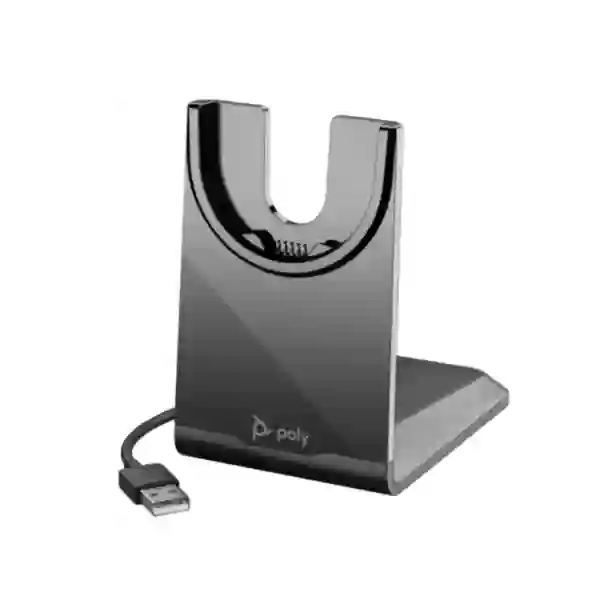
HP Poly Voyager USB-A Charging Stand
The HP Poly Voyager USB-A Charging Stand is the charging-only desktop accessory for buyers who already own a compatible Poly headset and want a defined place to leave it between calls. HP identifies this accessory as 783R6AA and specifies USB Type-A connectivity. Its main verified headset families are Voyager Focus 2 and Voyager 4300. Before ordering for a Tanzania workplace, check the exact headset model, the available powered USB-A connection and the quantity needed. Ask FourTeck for a quote and confirmation of current local terms; this listing does not assume stock, price or a delivery commitment.
Quick answer: is this the right accessory?
Choose this charging-only stand if your headset is a verified compatible Voyager Focus 2 or Voyager 4300 model, you need a desktop place to charge it, and a suitable powered USB-A port is available. Do not choose it to add Bluetooth pairing, desk-phone connectivity or a new headset. Confirm the exact headset model and manufacturer part number 783R6AA with your supplier before ordering.
Next step: request a FourTeck Tanzania quotation for the specific part and quantity.
Verified product specifications
| Manufacturer | HP Poly |
|---|---|
| Manufacturer part number | 783R6AA |
| Connection type | USB Type-A charging connection |
| Principal headset compatibility | Voyager Focus 2; Voyager 4300 series |
| Product weight | 0.24 kg (240 g) |
| Package size | 178 x 229 x 50 mm (W x D x H) |
| Package weight | 256 g |
| HP-listed box contents | Poly Voyager USB-A Charge Stand |
| Warranty in HP specifications | Standard one-year limited manufacturer warranty; verify local terms |
Package measurements do not describe the assembled desktop footprint. Manufacturer information does not confirm Tanzania price, inventory or local delivery arrangements.
A practical home for your compatible Poly headset
If you already rely on a compatible Poly Voyager headset, a dedicated desk stand can make charging a normal part of the working day rather than an afterthought. Place the headset in its designated position when a call or shift ends, and you have a visible, repeatable routine for keeping the device close to its working area. The Poly Voyager USB-A Charging Stand addresses that modest but useful need. It is deliberately a simpler accessory than a complete headset system: its job is to hold and charge the correct headset, not to add new microphone, wireless or calling features.
For many buyers, the important question is not whether a stand looks attractive but whether it fits the headset already in service. HP identifies the USB-A version under manufacturer part number 783R6AA, with compatibility centered on Voyager Focus 2 and Voyager 4300 headsets. Checking that family and the exact model before purchase matters more than choosing by the word Voyager alone. Poly has used that family name across different products, and the names of stands, office bases, cases and adapters can look similar in a purchasing list.
The stand is suited to people who prefer their headset to have an obvious resting position on a desk, as well as teams replacing a lost or damaged accessory. It may also be useful when an employee works between an office desk and another established workstation and needs a charging position in each place. The headset itself remains a separate device. Buying this stand does not supply a spare headset, conferencing application subscription, USB Bluetooth receiver or desk-phone interface.
For organisations purchasing in Tanzania, the most efficient enquiry starts with three details: the full headset model, whether a USB-A powered port is available, and the required number of stands. Those details let the product request focus on a real compatibility and deployment decision instead of an approximate item name. Request a quote and confirmation for part 783R6AA rather than assuming another Voyager-branded charging cradle will provide the same physical fit.
Compatibility: check the headset, not just the connector
HP lists the Voyager Focus 2 and Voyager 4300 series as the principal headset families for this charging stand. The Voyager 4300 family includes models such as the 4310 and 4320, with different mono or stereo configurations and package options. A headset package might contain its own charging stand, while another package may contain only charging accessories of a different type. When considering a second stand, check the exact headset identification and whether one was already supplied with your particular headset package.
Do not confuse the headset’s USB Bluetooth adapter with the connector on its charging stand. A Voyager headset may have been sold with a USB-C or USB-A adapter for computer audio; that adapter is a separate component used for connecting calls. The USB-A designation on this product identifies the stand’s charging connection. It does not, by itself, determine the headset’s audio configuration or the computer’s Bluetooth capabilities. In other words, evaluate headset fit and charging-power access as separate checks.
Some HP accessory materials also refer to compatibility with particular Savi headsets. Those references should not be expanded into a promise that every Savi model, every regional variant or every older Poly headset fits. If your device belongs to a Savi family rather than Voyager Focus 2 or Voyager 4300, obtain confirmation against the precise model and part number before ordering. The same caution applies to older Voyager Focus products whose names closely resemble Focus 2.
A useful compatibility enquiry includes a photograph or written model designation from the headset label, its existing headset kit part number if known, and whether the user wants a charging-only stand or a connection base. If a business has several headset models, list them separately. Standardising a purchase order on an accessory family without checking each model can create avoidable deployment problems. For this particular listing, the verified identifier to quote is HP manufacturer’s part number 783R6AA; that is not necessarily FourTeck’s internal SKU.
What USB-A charging means in daily use
The stand connects to a suitable USB Type-A power source. HP’s Voyager 4300 headset guide describes the charging stand as connecting to a computer USB port or a wall charger’s USB port. This gives users a straightforward placement choice: a USB-A connection at the workstation or a suitable charging arrangement nearby. A computer port may not always remain powered after that computer sleeps or shuts down, so office IT teams should consider the actual power behavior of their equipment when choosing where to connect the stand.
The physical charging task is separate from communication. A BT700 or another supported headset Bluetooth adapter, where applicable, manages the computer-audio connection. The stand itself should not be purchased to solve missing audio, change the microphone, pair a device with a phone or add a wired desk-phone line. If those are the problems a user is trying to solve, the enquiry should be about the headset, adapter or appropriate office base rather than this charging-only product.
The stand is useful precisely because it does not ask the user to manage another audio endpoint. When the shift ends, the wearer can return the headset to its designated charger. HP’s Voyager 4300 user guidance describes the headset indicators during charging and distinguishes the stand from a direct headset USB charging cable. Charging behavior and indicator details depend on the specific headset, so refer to the user guide for that device instead of assuming every model displays the same sequence.
Before deployment, check that the stand can be reached comfortably without stretching the USB connection across a walkway or moving working area. Do not force the cable into an incompatible port, and use the charger and safety guidance appropriate for the headset. A neat cable path is part of a useful workstation setup, particularly at shared counters or small desks where the charging position should not interfere with the keyboard, documents or other equipment.
How to set up the stand at a workstation
First identify the actual headset to be charged. Confirm that it is a supported Voyager Focus 2 or Voyager 4300 model, or obtain specific compatibility confirmation for another model. Inspect the stand and connection for visible damage before use. Place the stand on a firm, clear desktop within reach of the headset user. Avoid positioning it where a cup, a moving chair or frequently handled cables could knock the headset over. The purpose is a reliable resting place, not a complicated installation.
Next connect the stand’s USB-A charging lead to a suitable powered USB port, following the manufacturer’s guidance. For a laptop-based desk, consider whether power remains available when the laptop is disconnected or its lid is closed. If a wall charger is used, the charging source should be suitable for the equipment and the workplace’s electrical arrangements. The presence of a physical USB-A connector alone does not prove that an untested source will behave correctly in every situation.
Then put the compatible headset onto the stand in the proper seated position. Do not twist the headset or apply force to make its charging contacts align. The correct headset should settle naturally in the charging area designed for it. Check the indicator behavior described in the headset’s own guide. On the Voyager 4300 series, HP documents charging lights on the headset; the indicators provide more meaningful information than guessing from how long the headset has been on the stand.
Finally make charging part of a simple daily process: finish the call, remove the headset, place it on the stand, and confirm charging if the battery is low. A team leader or IT support person can demonstrate the routine during headset onboarding. If the stand is being installed for another employee, leave a clear note of the supported headset model and where the powered connection is located. This reduces uncertainty when staff move between desks, work shifts or take equipment home.
Where this accessory adds the most value
At a personal office desk, the main advantage is consistency. The user gains a familiar location for a compatible headset during short breaks, lunch or the end of a working day. There is less dependence on remembering where a loose charging cable was left. It can also reduce desktop clutter by giving the headset a dedicated position, although the stand still needs its USB cable and an appropriate power source. It is a convenience accessory rather than a guarantee of additional battery life or improved headset sound.
At a reception or customer-service position, the value is operational clarity. A headset may be used frequently and returned to the same spot between activities. Staff can see where it belongs, and the charge stand provides a visible reminder to restore it after use. If several people share the position, a short compatibility instruction is more useful than relying on the assumption that all headsets in the building use the same charging accessory. This is especially relevant when equipment has been replaced in stages.
For remote and hybrid workers, a second charging location may be easier to manage than carrying one stand every time the user changes desks. Whether that is worthwhile depends on how frequently the employee moves, the travel arrangement and the exact headset bundle. A compact accessory still needs to be packed and protected if transported. When comparing a spare stand with a direct charging cable, consider what the worker will actually use consistently and whether each workspace has access to reliable power.
For IT teams, a standardized accessory can simplify replacement requests when a compatible headset population is already in place. Instead of purchasing complete new headsets to address a missing charger, the team can request only the required stand after confirming the headset still works. That distinction can help avoid unnecessary equipment changes. It is still essential to verify manufacturer part numbers, ensure the right connector type, and check whether a damaged headset or battery is the real reason for a charging complaint.
USB-A charging stand, USB-C stand or office base?
The Poly Voyager USB-A Charging Stand is not the only accessory with a similar name. HP also identifies a USB-C charging stand under manufacturer part number 783R7AA. Both are described as charging stands for the relevant Voyager Focus 2 and 4300 families. The distinction worth checking is the charging connection available at the desk. Choose based on the exact approved accessory, not merely the shape of a port on the headset’s computer-audio adapter. A site using predominantly USB-C charging ports may need to review the alternative.
A Voyager Office Base is a different product category. An office base can provide additional headset connection functions depending on its exact model and supported setup; that is not a feature claim for this stand. If a buyer needs to link a headset to a desk phone or manage an office telephony workflow, it is important to ask for the appropriate base solution. Ordering part 783R6AA will not by itself create a desk-phone connection or replace the headset’s existing wireless interface.
A direct headset charging cable represents another option. It can be suitable when desk space is limited or when a user travels regularly and prefers a small accessory. A stand makes more sense when the headset has a regular desktop home and the user values the simple action of returning it to a cradle. Neither approach should be presented as universally superior. Power availability, actual charging hardware, desk layout and the user’s habits determine which is the more practical purchase.
The comparison should therefore begin with the job to be done: charging only, portable cable charging or a base with additional communications functions. Then confirm the supported headset and connection. This avoids buying a stand in the hope that it will fix Bluetooth pairing, provide a conference-room interface or turn a wireless headset into a different hardware model. FourTeck’s product enquiry can specify the desired function so the right accessory type can be checked before any commercial commitment is made.
Understanding the published product specifications
HP lists manufacturer part number 783R6AA for the USB-A charging stand. This identifier is useful when matching purchase requests, technical documentation and quotations. It must not be mistaken for a FourTeck listing SKU unless FourTeck’s specific listing explicitly assigns that value. For businesses that use asset or purchasing systems, recording the manufacturer’s identifier alongside the full description reduces ambiguity between closely named accessories and variations of USB-A and USB-C charging equipment.
The published weight is 0.24 kg, or 240 g. This is the stand’s published product weight, not a claim about the headset’s weight or the combined working arrangement. HP separately lists a package weight of 256 g and package dimensions of 178 by 229 by 50 mm. Packaging values are relevant to goods handling and purchase planning, but they should not be reused as the physical dimensions of the assembled stand. No assembled footprint is asserted here because a verified stand footprint was not available.
The HP product specification lists the item in the box as the Poly Voyager USB-A Charge Stand. That listing does not provide grounds to promise a headset, BT700 Bluetooth adapter, desk-phone cable or other optional communications equipment. It is sensible for purchasers to request confirmation of the final supplied package and any locally required power accessory before ordering. If the buyer’s original headset was sold as a bundle, the bundle’s contents should be reviewed separately from this standalone accessory.
HP describes a standard one-year limited manufacturer warranty for the product in its published specifications. Local purchase terms, handling and eligibility still need confirmation from the actual supplier; a manufacturer specification should not be turned into an unsupported promise about a Tanzania transaction. Likewise, the information on this page does not represent a live stock count, local price, delivery schedule or service-level commitment. These commercial points belong in the written quotation for the exact requested quantity.
A useful approach to buying for several users
When purchasing one replacement stand, matching the user’s exact headset and USB-A power access may be enough. For a team purchase, the requirements are broader. Start by making a short equipment list that separates Voyager Focus 2, Voyager 4310, Voyager 4320 and any other models. Record whether the headset was purchased as a standalone unit or as a package with charging hardware. The list helps prevent duplicate purchases and reveals whether all requested stands really correspond to supported devices.
The next step is to count locations rather than assuming one stand per employee. A fixed-desk organisation may prefer one designated stand for each assigned workstation. A hybrid team may need one stand in a main office and another at selected remote desks, but that is a workflow decision, not an automatic product requirement. For shared desks, consider who is responsible for the headset, whether users bring their own units and how equipment is identified when several similar-looking headsets are nearby.
Review USB-A port availability before confirming quantities. Some modern laptops have few free ports, and a user’s Bluetooth adapter may already occupy one. HP’s Voyager headset guidance describes using a wall charger’s USB port for the stand as one option. The correct arrangement depends on local power planning, cable management and employer policies. If adapters, hubs or wall chargers are required, assess them independently rather than assuming they are part of the stand order.
For the purchase request, ask for item description, manufacturer’s part number 783R6AA, quantity, support for the specific headset models, proposed delivery location, stated package contents and applicable purchase terms. Confirm stock and price directly for the actual Tanzania enquiry. Avoid treating pricing or availability shown in another country as a local offer. A well-defined request makes it easier to compare responses and ensure that the accessory received is the intended charging stand rather than a visually similar base.
Headset charging habits that work for busy desks
A charging stand is most useful when its location makes the correct behavior convenient. Put it close enough to reach without rearranging work materials, but away from obvious sources of spills. Teach users to put the headset on the stand when they are finished, not to leave it loosely balanced on top of the computer or hidden beneath papers. The point is to make the charging location visible and predictable for every normal working day.
An employee should still pay attention to the headset’s battery information. For Voyager 4300 headsets, HP documents LED behavior during charging and a way to review battery status. If a headset has been left for an extended period on an unpowered port, time on the stand does not prove that charging occurred. A particularly useful check is to confirm the charging indication when the desk setup is first installed, after a computer or charger is changed, and whenever an unexpectedly low battery level is reported.
For teams that rotate headsets or redeploy older equipment, do not use the stand as a test of universal compatibility. Different headset generations may use different contact arrangements or charging accessories even when product names share common words. If a newly assigned headset does not sit or charge correctly, stop and verify its identity rather than applying pressure. A small accessory mismatch is easier to resolve before it damages contacts or disrupts an employee’s work schedule.
Routine care should be simple and cautious. Keep the stand and contact area free of visible debris, handle the USB lead without pulling sharply, and follow the relevant HP guidance for cleaning and safe use. Do not improvise repairs, use liquids around a connected charging accessory or alter a connector. If charging repeatedly fails with a known compatible headset and a suitable power source, report the exact combination to technical support or the supplier so the stand and headset can be assessed systematically.
Troubleshooting: separate charging problems from audio problems
If the headset does not appear to charge, begin with the obvious distinction between power and positioning. Check whether the USB-A connection has a working power source, whether the stand is seated securely and whether the headset rests correctly in its intended position. A computer port can behave differently when the computer is asleep or powered off. Where allowed by local policy and the manufacturer’s instructions, testing a known suitable USB source helps identify whether the original port was the problem.
Next check the headset model and its own charge indicators. Consult the headset’s guide for the meaning of those indicators, rather than assuming a light on a Bluetooth adapter relates to charging. A Bluetooth dongle may show pairing, mute or call states; that tells you about communication, not the physical charging contacts in the stand. If the headset charges through its supported direct cable but not in the stand, that difference can help technical support narrow the investigation. It does not by itself identify a faulty component.
If a user reports that calls disconnect while the headset rests on the stand, identify whether they are describing normal headset behavior, a connection issue or battery status. The stand is not a wireless base station, so purchasing a second one will not correct a Bluetooth range or softphone configuration problem. The correct troubleshooting path depends on the audio adapter, headset firmware, application settings and work environment. Those issues belong to the headset system, not to the basic charging accessory description.
For persistent faults, record the headset model, stand manufacturer part number, connected power source, observed indicator behavior and steps already tried. Do not open or modify electrical equipment to diagnose a charging fault. If an organisation is considering replacing multiple stands because charging has become unreliable, test a small representative group first. This avoids treating a common port-power or headset-battery issue as a failed batch of accessories without evidence.
Planning for a Tanzania purchase without hidden assumptions
A Tanzania buyer should be able to identify the product confidently before asking about commercial details. This listing describes an HP Poly charging stand with USB-A connection and manufacturer part number 783R6AA. It does not claim a particular showroom, city delivery coverage, current inventory or import arrangement. The user’s location and deployment needs should be discussed as part of the enquiry, not inferred from the website’s market focus. The same approach applies whether the buyer needs one spare for an existing headset or multiple stands for an organisation.
For a business installation, practical local considerations are simple but worth writing down. Confirm the desk has a suitable charging power source, that staff know how to return their headsets to the charging position, and that the equipment will not be placed where power interruptions or unplugged computers make charging unpredictable. These are planning questions, not claims about the national electricity system or a particular office. Any wall charger or power equipment should be assessed against the manufacturer’s guidance and local workplace requirements.
Before approving a purchase order, obtain a quotation that states the actual product variant, quantity, currency, price, applicable taxes if any, delivery terms and warranty or returns conditions. None of these values can responsibly be filled in from manufacturer brochures or unrelated international retail listings. If support is needed for compatibility, provide the exact headset models instead of simply saying Poly Voyager. Clarifying that detail early can make the difference between a useful replacement accessory and a product that cannot be put into service.
The buying decision is straightforward once these points are settled. Use the USB-A stand when the supported headset fits, a charging-only device is the intended solution and there is an appropriate power connection. Consider a USB-C variant when the work area requires that connector, and ask about an office base when communication functions rather than charging alone are needed. Request confirmation from FourTeck Tanzania for the intended part and commercial terms; the quotation is the appropriate place for current local information.
Decision checklist before you request a quote
Start with the exact model name printed on or associated with your Poly headset. Note whether it belongs to Voyager Focus 2, Voyager 4310, Voyager 4320 or another family. If the product name contains Microsoft Teams or UC, include that text as well, since the complete designation helps support personnel identify the device correctly. Do not assume those labels change the stand’s basic charging purpose; they are helpful identifiers when tracing a specific bundle or headset variant.
Confirm that you want an additional charging position, not a replacement headset or another connection method. If a headset works but its stand is missing, the request is a replacement accessory question. If the headset no longer powers on or holds charge through any supported method, it may require diagnosis before a new stand is ordered. If the problem is that a desk phone cannot connect, a charging-only stand is not the right proposed remedy. Describing the original problem is often more useful than guessing which accessory will fix it.
Check the workstation for a suitable USB-A power connection. Ask whether that connection stays powered when the main computer is off, and decide how a shared desk will handle the cable. Confirm who will receive each stand and whether there are multiple headset models within the requested group. For larger orders, a small compatibility review or representative pilot can reduce the chance that one incorrect assumption affects every user. It also creates a simple setup instruction for future staff.
Finally, write the enquiry in specific terms: HP Poly Voyager USB-A Charging Stand, manufacturer part number 783R6AA, compatible headset models, number of units, intended work setting and any commercial questions. Request an itemised confirmation rather than assuming manufacturer documentation verifies local supply. Keep the response with the procurement record so future replacement requests can refer to the same part. This is the practical next step for buyers seeking the correct stand without purchasing unnecessary headset equipment.
Choose the accessory for the job
| Accessory | Consider it for | Important distinction |
|---|---|---|
| USB-A charging stand (783R6AA) | Charging and storing a compatible headset at a USB-A powered position. | No Bluetooth adapter or desk-phone connection function is included. |
| USB-C charging stand (783R7AA) | A related stand variant when the planned power connection is USB-C. | Confirm exact headset fit and accessory before purchase. |
| Direct headset charging cable | Charging through the supported cable where space or mobility is important. | Does not create the same upright desk storage point. |
| Voyager Office Base | Evaluate when supported headset and desk-phone or additional office connections are needed. | Not interchangeable with a simple charging-only stand. |
When a separate stand is the wrong purchase
Not every headset problem is a charging-stand problem. A headset that has lost its microphone function may need application configuration, headset troubleshooting or repair. A headset that cannot be paired with a computer may need attention to its Bluetooth adapter or wireless settings. A user who wants desk-phone integration needs the correct headset and office base combination. A stand cannot reasonably be expected to solve any of these distinct issues, and a buyer should avoid committing to an accessory simply because the headset family name looks familiar.
A new stand may also be unnecessary where an existing, compatible and working charging position already meets the user’s daily needs. Before purchasing more hardware, check whether an original headset bundle included a stand and whether the issue is only an unavailable USB power source. An installed stand can appear unresponsive if its port no longer supplies power when the laptop is shut down. Correcting the workstation connection may be more appropriate than replacing an intact accessory.
The clearest time to buy this item is when a compatible headset needs an additional or replacement desktop charging location and USB-A power is suitable for the workspace. The clearest time to pause is when the model cannot be identified, the user needs an audio interface rather than charging, or the office has not yet decided on its power connections. These simple distinctions help protect the buyer from choosing an accessory with the wrong purpose.
Keeping a deployment straightforward for employees
When stands arrive for several workstations, an IT or facilities team can make deployment easier with a brief standard procedure. Check the accessory part against the approved order, keep its product documentation with the purchase record, and match it to the intended headset. Choose an unobstructed position near the user’s normal work area and connect it to the approved powered USB-A source. Check that the user can place and remove the headset without twisting it or disturbing adjacent desk equipment.
Show the employee what a successful charge looks like on their own headset rather than giving a generic promise about LEDs across models. An illustrated card or quick verbal demonstration can explain where the headset rests, when it should be returned and whom to contact if it does not charge. Shared desks may also benefit from a label that identifies the intended headset family. A small amount of setup guidance can be more useful than adding complicated procedures to what should be a simple accessory.
Finally, record any difference between the delivered items and the order. If one employee has a headset from another family, do not force compatibility by changing the stand or the headset contacts. Resolve the mismatch against the manufacturer’s model information. This measured approach is particularly useful when equipment has been purchased over several years and similar product names hide different generations.
Frequently asked questions
Is the HP Poly Voyager USB-A Charging Stand a complete headset?
No. It is a desktop charging accessory rather than a headset. It does not include a microphone, earcups, speaker drivers or a new wireless audio device. That distinction matters when a buyer is replacing equipment after a loss or failure: an existing compatible headset is still required to make calls. If you need the entire headset, ask for a suitable Voyager Focus 2 or Voyager 4300 configuration instead of this stand. The exact package contents on the HP specification are described as the charging stand. Do not assume that an optional Bluetooth adapter or other accessory is bundled with it.
Which headset families are clearly supported?
HP explicitly lists Voyager Focus 2 and Voyager 4300 headsets as compatible with the USB-A stand. The Voyager 4300 family includes well-known 4310 and 4320 variants. Because individual headsets are sold in different bundles and regional versions, the safest approach is to verify the full headset model and manufacturer identifier before ordering a replacement stand. The word Voyager alone does not prove compatibility, and an accessory designed for one older generation should not be assumed to fit another. Provide a model label or a photograph of the current headset to help identify the required charging equipment.
Does it work with a Voyager 4310 or Voyager 4320?
These headset models belong to the Voyager 4300 family identified by HP for the stand. Nevertheless, a buyer should check the exact complete model or bundle before making a purchase, especially when equipment has been mixed across departments. A model’s USB-A or USB-C Bluetooth adapter label can describe the computer connection rather than the charging stand accessory. The important questions are whether the particular headset is supported and whether the USB-A stand connection has a suitable power source. For a mixed inventory, provide each model separately instead of assuming one part will cover every device marked Poly.
Can I use it with Poly Voyager Focus 2?
HP lists Voyager Focus 2 as one of the supported families for this accessory. The stand can be useful when a Focus 2 headset is already in use and its original charging stand has been lost, damaged or assigned to another workspace. Verify the headset’s exact model before ordering and check if the desired arrangement needs a stand or only its supported direct charging cable. A Focus 2 headset is not included in a standalone stand purchase. Compatibility with Focus 2 also should not be extended automatically to every older headset marketed with a similar Voyager Focus name.
Can I assume that every Poly Savi model works?
No. Some HP accessory compatibility information mentions selected Savi devices, but that is not a blanket compatibility statement for the full Savi product range. Physical fit and charging arrangements can vary across product lines, headset generations and office or UC configurations. If the headset is a Savi model, provide its precise designation and ask for a positive compatibility check rather than relying on the broad brand name. If such confirmation is unavailable, do not purchase this stand on an assumption. For this product page, Voyager Focus 2 and Voyager 4300 remain the clearly verified main fit.
Why is this described as USB-A?
USB-A describes the charging connection used by the stand. The accessory connects to a suitable powered USB Type-A port. It does not mean that the headset must use a USB-A Bluetooth dongle for computer audio, and it does not turn the stand into an audio receiver. The distinction is easy to overlook when a product catalogue contains headsets named USB-A and USB-C, as well as separate USB-A and USB-C stands. Check the stand’s connection and the headset’s compatibility independently. If a workstation offers only USB-C power connections, enquire about the appropriate alternative stand rather than assuming an unverified adapter arrangement.
Will it connect my headset to a desk phone?
No desk-phone connection function is stated for this charging-only accessory. A Voyager Office Base is a different type of product intended for connection scenarios beyond simply placing a headset on a charger. If your goal is to use a headset with a physical desk phone, make that requirement clear in the enquiry and identify the phone and headset models. Ordering this USB-A charging stand cannot be treated as a substitute for the appropriate connection base. Separate the requirement for charging the battery from the requirement for managing calls, as each may need different hardware and compatibility checks.
Is a Bluetooth USB adapter included?
HP’s published standalone product contents identify the Voyager USB-A charging stand, not a BT700 Bluetooth adapter. A headset package may include an adapter, but a stand purchased separately should not be assumed to include one. The adapter is used in supported headset systems for computer audio and pairing, while the stand provides a charging location. If a Bluetooth adapter is missing or broken, specify that as a separate requirement. Do not rely on a charging accessory to solve a missing adapter, poor wireless reception or computer audio configuration issue. Review the written quote and final package confirmation before payment.
Can the stand be powered by a laptop USB port?
HP’s Voyager 4300 guidance describes plugging the charge stand into a computer USB port or a wall charger’s USB port. A suitable laptop port may therefore be a practical option when it provides the required charging power. The important operational detail is that some computer ports may stop supplying power when the computer shuts down, sleeps or is disconnected. Confirm the behavior of your actual workstation instead of assuming the stand is charging merely because it is plugged in. If charging must continue when the computer is absent, discuss a suitable alternative power arrangement consistent with the manufacturer’s instructions.
Does the stand include a wall power adapter?
The published HP box-content entry identifies the Voyager USB-A Charge Stand. It does not establish that a separate wall power adapter is supplied with every purchase. If you plan to charge without using a computer port, ask the supplier to confirm exactly what is included and whether another suitable power accessory will be required. Avoid ordering on the assumption that every item shown in a headset kit photograph belongs to the standalone stand package. For teams, clarifying the included items before delivery is especially helpful because a charging setup may otherwise reach a desk without a usable powered connection.
Is this the same as the Poly Voyager USB-C Charging Stand?
No. HP identifies the USB-A version as manufacturer part number 783R6AA and the USB-C version as part number 783R7AA. Their similar descriptions can make it easy to choose the wrong one when copying an accessory line into a purchase order. Select the variant whose power connection matches the intended desktop arrangement and verify the exact headset compatibility. The connection name on the headset’s Bluetooth audio adapter is not a reliable substitute for checking the stand’s required connector. If a business operates a mixture of older and newer computers, it may need to plan the charging points before selecting a single accessory variant.
Will it make the headset battery last longer?
A charging stand provides a convenient means of charging a compatible headset; it does not, on its own, increase the battery’s designed capacity or guarantee longer talk time. Battery performance depends on the headset, its condition, use patterns and other factors. The practical benefit is that staff may be more likely to return their device to an established charging location between sessions. No special fast-charge claim or extended-battery promise is made for this accessory. If a headset’s battery performance is unexpectedly poor even after correct charging, it should be assessed as a headset or battery issue rather than assumed to need a different stand.
How do I tell whether a Voyager 4300 headset is charging?
HP’s Voyager 4300 user guide explains that the headset indicators flash while charging and that the indicators go off when charging is complete. Follow the guide that corresponds to the user’s specific model and firmware, because it is safer than applying one generic light interpretation to every headset. Check that the headset rests properly in the stand and that the USB-A source is powered. If an indicator is not behaving as expected, compare the result with an approved direct charging method and report the observations to support. Do not mistake the lights of a separate Bluetooth USB adapter for charging feedback.
What should I check if the headset is not charging?
First confirm the headset is a supported model. Next check whether the stand’s USB-A connection receives power and whether the headset is correctly seated without being forced into the charging contacts. Look for visible obstruction or damage and review the indicator information in the headset manual. If a computer port is the power source, check its behavior while the computer sleeps or shuts down. Avoid unapproved chargers, damaged cables or improvised electrical repairs. If the issue persists, document the model, connected power source and observed behavior for technical support. The problem could involve the headset, stand, cable or power connection.
Can I put one stand at work and another at home?
That may be a sensible arrangement for a person who regularly works at two desks with the same compatible headset. The appeal is convenience: each work area has a consistent charging location, so the user carries the headset rather than moving a stand each time. Confirm that both locations have a suitable USB-A charging source and that the second purchase is the same approved accessory for the headset. There is no need to assume every remote employee requires two stands. The best arrangement depends on their working habits, storage space, travel needs and whether a direct charging cable would be more practical.
Is the stand suitable for shared desks and contact centres?
It can be useful at a shared workstation where a compatible headset has an agreed charging location. The stand should not, however, be treated as proof that every employee’s headset will fit or that a shared stand is the right arrangement for hygiene or asset management. A team should decide whether headsets are individually assigned, which model families are used and how users will identify the correct charging point. Clear labeling, a suitable powered connection and straightforward handover instructions are often more important than adding extra accessories without planning. Test representative headset models before ordering a larger quantity.
What is the manufacturer part number?
The verified HP manufacturer part number for the Poly Voyager USB-A Charging Stand is 783R6AA. That identifier is useful for checking manufacturer documentation and for making a precise quotation request. It should be described as a manufacturer part number, not automatically as the SKU assigned to the product by FourTeck Tanzania. An internal seller SKU can be different and should only be used when it is explicitly verified for the exact target listing. Include the product name and this manufacturer part number together in any enquiry to reduce confusion with the USB-C stand or other Poly charging accessories.
What are the listed dimensions and weight?
HP publishes a product weight of 0.24 kg and package dimensions of 178 x 229 x 50 mm, with a package weight of 256 g. The packaging figures describe the packaged product, not the dimensions of the assembled stand placed on a desk. Do not use the package measurements as a design drawing or an exact desktop footprint. If a charging position has very tight clearances, request physical installation dimensions before approving the layout. These details are also not a reason to infer shipping rates or local delivery charges; the quoted logistics arrangement should be confirmed for the actual Tanzania order.
What warranty applies to this charging stand?
HP’s published specifications describe a standard one-year limited manufacturer warranty. This is manufacturer-level information, not a promise that every local transaction has identical processing, return conditions or support arrangements. Actual warranty eligibility, coverage details and claim handling should be confirmed in the quotation and the terms accompanying the supplied item. When buying for a business, retain the product identification and purchase documentation for any future support request. Do not assume that a different country’s retailer terms, exchange policy or special service program will automatically apply in Tanzania. Ask for the applicable written terms before placing the order.
Can I order this product in Tanzania and see a price?
This description identifies the product and gives the information needed to request a precise quotation, but it does not display verified Tanzania stock or a current selling price. State the number of stands required, delivery location and exact headset models, and ask FourTeck to confirm the manufacturer part number, availability, local currency pricing, delivery conditions and any applicable taxes or warranty terms. Overseas online prices are not reliable substitutes for a local offer because purchase conditions can differ. A written quote is the appropriate source for the commercial decision. No unsupported delivery time or stock guarantee is made on this page.
How should IT teams document this accessory?
Keep the full product name, manufacturer part number 783R6AA, USB-A connection type and supported headset family in the procurement record. If equipment is assigned to individual employees, note which workstation holds each stand. For a mixed headset fleet, document the exact model compatibility rather than simply using a broad Poly Voyager label. The record should distinguish a charging stand from a BT700 adapter, a Voyager Office Base and a complete headset kit. This makes future maintenance and replacements more accurate. It is also useful to save the final supplier quotation, since that contains the confirmed local commercial terms rather than general manufacturer information.
Request the correct charging stand
Ask FourTeck Tanzania about the HP Poly Voyager USB-A Charging Stand, manufacturer part number 783R6AA. Include the exact headset model, the number of stands needed, your intended charging connection and the delivery location. Request written confirmation of compatibility, current local availability, price, warranty terms and delivery arrangements before placing the order.
Contact FourTeck Tanzania to request a product and compatibility quotation.




Reviews
There are no reviews yet.