
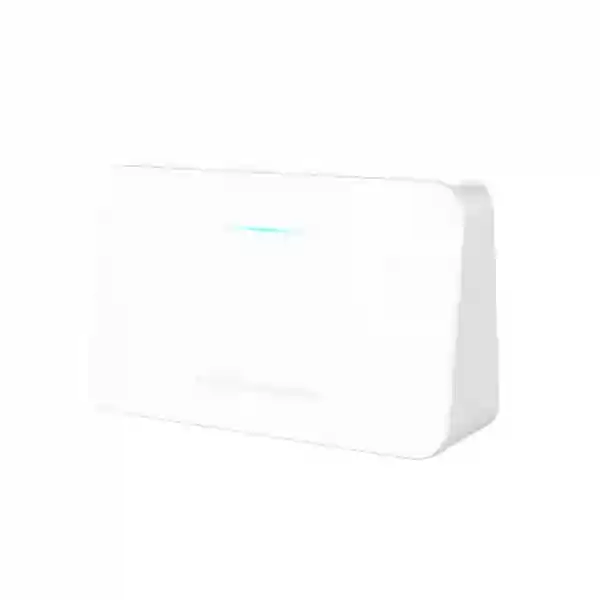
Grandstream GWN7062E Tanzania
The Grandstream GWN7062E is a secure dual-band AX3000 Wi‑Fi 6 router created for small offices, home offices, retail sites, remote teams and compact business networks that need faster wireless access, practical security and straightforward management. Powered by a 1.3GHz dual-core processor, the platform delivers aggregate Wi‑Fi speeds up to 3Gbps, supports up to 128 wireless clients, provides three auto-sensing Gigabit Ethernet ports and supports mesh networking for controlled wireless expansion. For organizations in Tanzania, the GWN7062E offers a useful middle ground between a simple consumer router and a more complex enterprise gateway where cloud management, VPN connectivity, traffic visibility and policy controls matter.
Choose the GWN7062E when you need Wi‑Fi 6, three Gigabit network ports, up to 128 wireless clients, Grandstream mesh support, one VPN tunnel, advanced firewall controls and centralized management through GDMS Networking or GWN Manager in a compact router.
What is the Grandstream GWN7062E?
The GWN7062E is a Grandstream dual-band Wi‑Fi 6 router in the GWN networking family. Grandstream positions it for small-to-medium businesses and home networks, while its quick installation documentation specifically highlights small offices, home offices and remote workers. The router combines 2.4GHz 2×2:2 and 5GHz 3×3:2 MU-MIMO radios with beamforming and XTRA Range technology. Its 802.11ax implementation supports a theoretical aggregate wireless rate of up to 3Gbps across the two bands. As with every wireless product, actual user throughput varies with distance, wall materials, interference, client capabilities, channel width, available internet bandwidth and the number of active devices.
The GWN7062E is also a routing and security appliance rather than only a wireless access point. It supports common WAN connection types, dual-WAN policy options such as load balancing and failover, NAT functions, firewall controls, traffic monitoring through DPI, QoS, guest Wi‑Fi and multiple VPN technologies. Management can be performed locally, through Grandstream GDMS Networking cloud management, through GWN Manager on premises, or through TR-069 where appropriate. This combination makes the model attractive for organizations that want a manageable branch or SOHO router without moving immediately to a large enterprise firewall platform.
Verified GWN7062E highlights
IEEE 802.11a/b/g/n/ac/ax support with up to 2402Mbps on 5GHz and up to 573.5Mbps on 2.4GHz under supported conditions.
The product supports up to 128 concurrent wireless clients, giving small offices and busy home networks room for phones, laptops, tablets and connected devices.
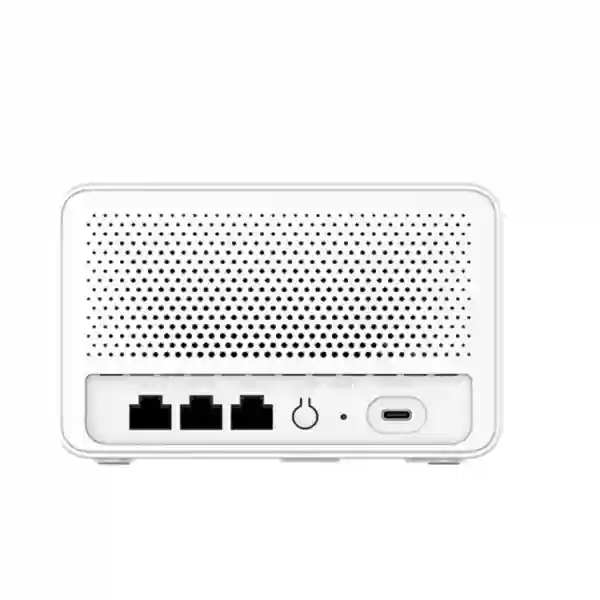
Three auto-sensing 10/100/1000Mbps Ethernet interfaces support wired WAN/LAN connectivity for broadband, switches and local network devices.
Built-in VPN support includes L2TP, PPTP, IPSec, OpenVPN and WireGuard modes, together with DoS protection, blocklists, URL filtering and DPI visibility.
Grandstream mesh capability allows compatible GWN routers and Wi‑Fi devices to extend coverage without treating every area as a completely separate network.
GDMS Networking provides cloud management for GWN routers, while GWN Manager offers a premise-based software management option for organizations that prefer local administration.
Technical specification overview
Specification note: wireless rates, RF power and usable channels can vary by regulatory domain, environment and client capability. Verify the current Grandstream datasheet and local configuration requirements during procurement and deployment.
Where the GWN7062E fits in a business network
The GWN7062E is most convincing when a site needs one compact router to combine internet routing, business-grade Wi‑Fi 6, basic security policy, guest wireless, VPN connectivity and centralized administration. A small office can use it as the main internet gateway and wireless router, with a managed switch connected downstream when more wired ports are required. A retail outlet can use separate staff and guest wireless networks while keeping payment and operational devices on controlled network segments. A home-office user can establish a VPN back to a corporate location while maintaining a separate wireless experience for household devices.
For larger premises, the router should not be expected to solve every coverage challenge by itself. Wireless performance is affected by reinforced concrete, long corridors, shelving, metal, machinery, neighbouring networks and device density. In those environments, the correct approach is to combine the router with strategically positioned Grandstream access points or compatible mesh nodes and to connect those devices through a suitable wired backbone wherever practical. Fourteck Tanzania’s broader networking and infrastructure services are relevant when the requirement includes switching, structured cabling, Wi‑Fi planning, firewall policy, IP telephony or multi-device deployment rather than a stand-alone router purchase.
The three Gigabit ports also deserve attention during design. A business with many wired desktops, IP phones, cameras or servers will normally connect the GWN7062E to a separate network switch. This is not a limitation when planned properly; it is simply the normal architecture for a small business router. The router becomes the gateway and wireless control point while the access switch handles the required port count, VLANs, PoE loads and wired distribution.
GWN7062E security, VPN and management considerations
Security controls
Grandstream includes WPA3-capable wireless encryption options, DoS protection, device blocklists, URL content filtering, secure boot, digitally signed protection for critical control data and a unique security certificate with randomized default credentials. These features help reduce exposure, but secure operation still depends on changing administrative credentials, keeping firmware current, using least-privilege policies and avoiding unnecessary inbound exposure.
VPN connectivity
The platform supports one VPN tunnel and several protocols, including IPSec, OpenVPN and WireGuard options. This can be useful for a branch-to-head-office connection or controlled remote access. Before procurement, confirm the exact VPN topology, authentication model, remote gateway interoperability and performance expectations. Sites that need many simultaneous tunnels or advanced security inspection may require a different gateway class.
Management choices
GDMS Networking can simplify administration when several GWN routers are deployed across branches. GWN Manager provides an on-premise software option. The embedded interface remains useful for a single router. Choose the management path based on who will support the network, how many sites are involved, whether cloud management is acceptable and how configuration backups and firmware updates will be controlled.
GWN7062E vs GWN7062ET
The GWN7062E and GWN7062ET share the same core Wi‑Fi 6 router positioning, but the GWN7062ET adds two RJ11 FXS interfaces for analog telephony. The GWN7062E does not include FXS ports. If the requirement is simply secure Wi‑Fi routing, VPN, mesh and Gigabit Ethernet, the GWN7062E is the more direct choice. If the site also needs analog telephone interfaces integrated into the gateway, the GWN7062ET may be more appropriate. Procurement teams should confirm the exact model code on the quotation because the two names are similar but the telephony hardware differs.
This distinction matters in branch offices, hospitality spaces and small businesses that want to connect traditional analog devices while transitioning to an IP-based network. The correct model should be selected from the actual voice architecture rather than assuming that every GWN7062-series device has FXS capability.
Grandstream GWN7062E Tanzania
Organizations evaluating the Grandstream GWN7062E in Tanzania often have a practical requirement: provide reliable wireless connectivity for an office, branch, home-office, shop, clinic, small hospitality property or professional workspace without deploying a complicated enterprise network stack. The GWN7062E addresses that need with Wi‑Fi 6, three Gigabit Ethernet ports, mesh expansion, guest wireless, VPN options and centralized management. For a Tanzanian business, the buying decision should start with the site layout, user count, internet bandwidth, number of wired devices, expected guest traffic and whether branch connectivity is needed. The product can support up to 128 wireless clients, but that maximum figure should not be treated as a promise that every client can simultaneously consume heavy bandwidth. Capacity planning must consider application mix, radio conditions and the ISP connection.
The model is particularly suitable for compact sites where one gateway can cover the main working area and additional mesh or wired access points can be introduced later if coverage expands. Businesses using cloud applications, video meetings, IP telephony or web-based ERP should place the router in a sensible central or technically appropriate location and avoid hiding it inside metal cabinets or corners that weaken radio propagation. Where the premises contains dense walls or multiple floors, a wireless survey or at least a structured placement plan is more valuable than choosing a router only from the advertised speed.
Fourteck Tanzania can position the GWN7062E within a larger network design that includes managed switches, Wi‑Fi access points, IP phones, firewalls, CCTV and structured cabling. The Fourteck Tanzania technology portfolio covers routing, Wi‑Fi, switching and connected business infrastructure, which is useful when a customer needs more than the router itself. For quotation preparation, provide the number of users, approximate floor area, building layout, primary and backup internet links, required VPN connections, wired device count and any VLAN or guest-network requirements. This allows the product to be evaluated as part of a workable network rather than as an isolated box.
Grandstream GWN7062E Dar es Salaam
In Dar es Salaam, the GWN7062E can be considered for offices, retail outlets, professional practices, logistics companies, small hospitality operations and branch sites that rely on stable internet access for cloud platforms, customer communication and everyday business systems. Dense commercial areas may contain many neighbouring wireless networks, so a good deployment should consider channel use and radio placement rather than assuming maximum wireless rates everywhere. Wi‑Fi 6 efficiency features help when many modern devices share the network, but the available spectrum and the quality of client devices still influence real performance.
Businesses with more than one internet circuit may also value the router’s dual-WAN policy capability for load balancing or failover, subject to the exact port configuration and service design. A backup link can reduce the impact of an ISP outage, but the failover plan should be tested with the actual applications in use. Some cloud sessions, VPNs or payment platforms may react differently when the public IP changes. Where continuity is important, define which traffic must survive a link change and how users will be informed if bandwidth becomes limited on the backup service.
For multi-floor offices, shops with storage areas, or buildings where reinforced concrete limits signal propagation, mesh networking can extend coverage, although wired backhaul is often preferable where cable routes exist. The GWN7062E can therefore operate as the main router while additional GWN wireless devices cover difficult zones. When planning a Dar es Salaam deployment, include switch capacity, PoE requirements for access points or phones, UPS protection for network equipment, and a documented addressing plan. These details can have more influence on uptime than the wireless specification alone. A quotation request should state how many users work concurrently, whether guest Wi‑Fi is required, whether remote workers need VPN access and which critical applications depend on the connection.
Grandstream GWN7062E Mwanza
For businesses in Mwanza, a GWN7062E deployment may suit branch offices, trading companies, professional services, clinics, training spaces and smaller facilities that need a secure Wi‑Fi 6 gateway without the operational overhead of a larger enterprise routing platform. The most important selection question is whether the site’s user and application profile matches the device. If users mainly access email, ERP, web applications, cloud storage, VoIP and video conferencing, the router can provide a strong base when internet bandwidth and radio coverage are correctly planned. If the site carries very high volumes of encrypted traffic, many site-to-site VPNs or complex security inspection, a larger security appliance may be more appropriate.
Mwanza sites that include customer areas or mixed staff/visitor use can benefit from separate SSIDs and guest wireless rather than placing every device on one trusted network. Separating staff, guest and operational devices reduces unnecessary exposure and creates clearer access policies. The GWN7062E supports multiple SSIDs and a dedicated guest wireless option in current documentation. A good implementation should also change default administrator credentials, keep firmware current and document the final configuration so future support does not depend on one person’s memory.
Power continuity and physical installation should also be planned. The router should have suitable ventilation, stable power and, where business continuity matters, UPS support alongside the modem, switch and any other network components. Mounting should keep the radios away from large metal surfaces and avoid inaccessible locations that complicate maintenance. If the premises expands, the mesh capability provides a pathway to add coverage, but additional nodes should be positioned from measured signal quality rather than convenience. For procurement in Mwanza, share the existing ISP equipment, expected internet speed, floor plan, number of wireless clients and wired port requirement so the full bill of materials can be prepared accurately.
Grandstream GWN7062E Arusha
The Grandstream GWN7062E can fit Arusha businesses that need a compact Wi‑Fi 6 router for offices, tourism-related administration, retail counters, training facilities, professional services, home offices and small hospitality back-office networks. These environments often combine staff laptops, mobile phones, printers, cloud applications, video meetings and guest devices. The router’s dual-band Wi‑Fi 6 design and support for up to 128 wireless clients provide useful headroom, but the network should still be segmented and tuned according to the actual device mix. Guest traffic should not have unrestricted access to internal business resources, and critical systems should not depend on congested wireless links when a wired connection is practical.
For hospitality-related environments, one GWN7062E may be appropriate for a reception, office or compact property, while larger guest accommodation areas usually require multiple access points and a more deliberate WLAN architecture. Mesh can simplify expansion where cabling is difficult, but signal quality between nodes must remain strong. If the customer expects seamless coverage through multiple buildings or outdoor areas, the correct design may include dedicated indoor and outdoor access points rather than using the router alone.
Arusha businesses with remote management requirements can use GDMS Networking to centralize router administration, especially where an IT provider supports several locations. This can improve visibility and simplify configuration management, but access to the cloud management account should be protected with appropriate account security and administrative controls. When requesting a quotation, describe whether the router will replace an existing ISP unit, sit behind another gateway, terminate the internet connection directly, or connect through a fiber/4G/5G modem. Also state whether a second WAN path, VPN tunnel, guest network and downstream PoE switch are required. Those details determine how the GWN7062E should be integrated rather than simply supplied.
Grandstream GWN7062E Dodoma
In Dodoma, the GWN7062E can serve compact offices, consultancies, institutional branch locations, project offices, small retail spaces and home-office environments that need controlled business Wi‑Fi and secure routing. A common procurement mistake is choosing a router only from its peak wireless number. For practical performance, confirm how many users are active at the same time, what they are doing and where they sit relative to the router. Twenty users on video calls can create a very different load from twenty users browsing email, even though the client count is the same. Internet upload capacity is especially important for collaboration platforms, cloud backup and remote-access workflows.
The GWN7062E’s QoS and DPI capabilities can help administrators understand and prioritize traffic, but policy should match business needs. Voice and meetings may need priority over bulk downloads. Guest traffic may need bandwidth limits. Remote-access VPN should be restricted to approved users and resources. Staff devices may need a separate SSID from IoT or visitor devices. These design choices transform the router from a simple internet gateway into a manageable business network edge.
For branch deployments in Dodoma, centralized management can also simplify support. A company with sites in several Tanzanian cities can use consistent naming, SSID policy, security settings and documentation to reduce troubleshooting time. Standardization does not mean every branch needs identical hardware; it means the configuration principles and support process are repeatable. Before ordering, confirm whether the site needs only wireless internet or also switching, PoE, IP phones, CCTV connectivity, server access and backup internet. Fourteck can then align the GWN7062E with the surrounding LAN instead of treating it as the entire network design.
Grandstream GWN7062E UAE
For companies with operations in the UAE and Tanzania, the GWN7062E offers a standardized small-site router platform that can be managed consistently across branch offices. The device is suitable for compact corporate spaces, retail outlets, home offices and project locations where Wi‑Fi 6, VPN, guest wireless and cloud administration are more important than high-end security inspection or large numbers of WAN interfaces. The three Gigabit Ethernet ports are sufficient for a simple gateway deployment, while a downstream managed switch can expand wired connectivity and add PoE for IP phones or access points.
A cross-border deployment should focus on configuration standardization. SSID names, guest policies, administrator access, VPN topology, DNS settings, firmware procedures and device naming can be documented as a repeatable template. This is especially useful when IT teams support sites remotely. The GWN7062E’s GDMS Networking management can provide a common operational view for supported GWN routers, while branch connectivity can use the VPN options supported by the platform. However, VPN interoperability and tunnel design should be confirmed with the head-office firewall before equipment is purchased.
Customers coordinating technology between Tanzania and the UAE can also review Fourteck’s UAE networking and IT infrastructure capabilities when projects span both markets. Procurement teams should avoid assuming that regulatory radio settings, ISP handoff methods or local service contracts are identical between countries. Use the same architectural principles while allowing the device configuration to follow each location’s actual connection and local requirements. For a UAE quotation, specify the internet service handoff, office size, user count, required wired ports, remote VPN destination and whether the deployment is a stand-alone site or part of a regional standard.
Grandstream GWN7062E Uganda
For Ugandan businesses, the GWN7062E can provide a manageable Wi‑Fi 6 edge for branch offices, professional practices, training centers, small retail environments and remote-work locations. Its value is not limited to wireless speed. The combination of guest Wi‑Fi, VPN, firewall policy, DPI statistics, QoS and centralized administration can help an IT team create a more controlled network than a basic ISP-supplied router. Before deployment, identify which devices need trusted LAN access, which should be isolated and whether business applications need a secure tunnel to another site.
Where a Ugandan site has variable internet conditions, dual-WAN policy options may help create a primary/backup architecture when two suitable internet services are available. Failover is most useful when both the router configuration and business applications are tested for the changeover. A backup connection with lower speed should be reserved for essential traffic during an outage rather than expected to carry the full normal workload. QoS and user communication can be part of that contingency plan.
For organizations with multiple branches, the Fourteck Uganda technology site provides regional context for networking, communication and structured infrastructure requirements. A GWN7062E quotation should include site size, user count, existing modem or ONT details, whether the router needs to serve Wi‑Fi directly, and whether extra Grandstream access points will be used. Also identify any IP PBX, VoIP phones, CCTV or server applications that must traverse the network. Those systems may require VLAN separation, switch capacity, PoE and firewall rules beyond the basic router configuration.
Grandstream GWN7062E Kampala
Kampala businesses considering the GWN7062E often need a router that can support busy office connectivity without the management complexity of a larger enterprise edge. In a compact office with dozens of phones and laptops, Wi‑Fi 6 can improve efficiency when modern clients share the same radio environment. The advertised maximum of 128 wireless clients offers device capacity, but a quality deployment should still distribute heavy users appropriately and add access points when physical coverage or application demand requires it. Dense surrounding Wi‑Fi networks also make channel planning more important than simply selecting maximum transmit power.
Retail, clinic and customer-facing environments can use the dedicated guest wireless capability to separate visitors from internal devices. Staff systems, point-of-sale terminals, IP phones or operational equipment should be placed on appropriate trusted segments with rules that allow only the traffic they need. The router’s firewall and DPI functions can provide visibility and policy, while a managed switch can extend the network and provide port-level organization. For businesses that already use a dedicated security firewall, the GWN7062E can also be evaluated in a different role, but routing boundaries and double-NAT risks must be planned carefully.
A Kampala branch that connects to a head office can use supported VPN technology, but the one-tunnel limitation should be checked against future requirements. If the business expects several simultaneous site-to-site connections, separate remote-access groups and advanced threat inspection, it may be better to select a higher-end gateway. Where the GWN7062E is appropriate, document the tunnel settings, backup configuration and administrative access so support remains predictable. A useful quotation brief includes the head-office firewall brand, ISP speed, backup link requirement, number of staff, office floor plan and expected guest traffic.
Grandstream GWN7062E Arua
Arua organizations can evaluate the GWN7062E for branch networking where dependable Wi‑Fi, straightforward remote management and secure access are priorities. A branch office may not need a large firewall appliance, but it still benefits from separating guest devices, controlling administrative access and keeping a documented router configuration. The GWN7062E’s Wi‑Fi 6 radios, multiple SSIDs, firewall controls and centralized management features provide a practical foundation for this class of deployment.
For smaller or more remote sites, supportability matters as much as peak performance. GDMS Networking can help a responsible administrator monitor and manage the router without depending entirely on local technical staff. Remote management should be configured securely, and recovery procedures should be documented in case local ISP equipment or addressing changes. If the site uses a backup internet connection, establish how failover will work and which users or applications receive priority when bandwidth is reduced.
Physical environment also deserves attention. The router should be installed in a ventilated, protected location with stable power, but not inside an enclosure that blocks radio propagation. Where a site spans several rooms or buildings, additional wireless nodes or wired access points may be required. Mesh can be helpful when cable runs are difficult, while wired backhaul generally provides the strongest predictable capacity when infrastructure allows it. When requesting a GWN7062E quote for Arua, provide the approximate floor area, wall construction, user count, primary ISP type, backup connection plan, VPN requirement and number of wired endpoints. This makes it possible to identify whether the router alone is sufficient or whether a switch, UPS and additional wireless devices should be included.
Grandstream GWN7062E Mbarara
For Mbarara offices, education-related facilities, small commercial sites and professional service environments, the GWN7062E can provide a compact route to Wi‑Fi 6 without requiring a complex controller appliance. The product’s three Gigabit interfaces make it suitable as an internet gateway, while a separate switch can connect desktop computers, printers, IP phones and other wired equipment. Wireless clients can use both 2.4GHz and 5GHz radios, with the 5GHz band providing the higher peak data rate when range and client capability permit.
The best deployment balances coverage, capacity and business policy. Putting every user on one shared SSID may be simple, but separate networks for staff, guests and operational devices can improve control. The GWN7062E supports multiple SSIDs and traffic controls that can support this design. Administrators should also review DNS, DHCP reservations, firewall rules and any port-forwarding requirement carefully. Directly exposing internal applications to the internet should be avoided when secure VPN access can meet the requirement more safely.
Organizations with branches in Mbarara and Kampala can standardize router configuration and use cloud management to reduce differences between sites. The design should still account for different ISPs, floor plans and user loads. A small branch may run from the router alone, while a larger office may use the GWN7062E as the gateway with a managed switch and multiple GWN access points. For purchasing, state whether the site needs business Wi‑Fi only or also VoIP, CCTV, server access and VPN connectivity. These dependencies influence the switch type, VLAN design, UPS capacity and the final installation scope.
Grandstream GWN7062E Gulu
Gulu businesses that need secure branch connectivity can use the GWN7062E as a compact internet and Wi‑Fi edge, particularly where IT resources are centralized elsewhere. The router’s cloud management support allows configuration and monitoring to be handled by an authorized administrator without requiring permanent local technical staff. This is useful for distributed businesses, but remote administration must be paired with clear account ownership, strong credentials and configuration backup practices.
A Gulu site with remote workers or a head-office connection may use the router’s built-in VPN support. The correct protocol depends on the peer platform and policy requirements. IPSec, OpenVPN and WireGuard options offer flexibility, but the design should be confirmed against the other endpoint before procurement. Because the GWN7062E supports one VPN tunnel, organizations expecting a more complex multi-site topology should validate future growth rather than selecting only for current needs.
Wireless expansion should also be planned from the building. A small office may be covered by the router when positioned well. Longer buildings, dense walls or multiple floors may need mesh nodes or dedicated wired access points. When using mesh, ensure that each node has a strong upstream connection and avoid adding too many wireless hops, because every hop can affect available throughput. When cabling is possible, a wired connection to additional access points usually provides more consistent capacity. A GWN7062E quotation for Gulu should therefore identify approximate coverage area, number of rooms, internet bandwidth, concurrent users, guest access needs, VPN destination and whether additional network equipment is expected.
Grandstream GWN7062E Kenya
For Kenyan businesses, the GWN7062E fits small-office, branch and remote-work deployments that want Wi‑Fi 6, VPN and cloud management in one device. A typical use case could be a Nairobi office branch, retail location or professional workspace where dozens of devices need reliable access to SaaS platforms, VoIP, web meetings and business applications. The router can support up to 128 wireless clients, but wireless design should be based on the expected active workload rather than the theoretical client ceiling.
Regional companies with operations in both Kenya and Tanzania can use a common GWN router platform to simplify training and support. A standardized configuration might define staff and guest SSIDs, QoS policy, management naming, firmware procedures and VPN settings. Each country and branch still needs site-specific ISP configuration and radio tuning. The Fourteck Kenya networking portfolio can support customers coordinating branch connectivity, business communications and wider IT infrastructure in that market.
For Kenya procurement, compare the GWN7062E not only with consumer AX3000 routers but with the operational features the business needs. Central management, guest isolation, VPN options, firewall policy and mesh compatibility may be more important than cosmetic differences. If the site needs many wired ports, add a managed switch. If it needs broad building coverage, add properly positioned access points. If it needs advanced threat prevention, many VPN tunnels or detailed security subscriptions, consider a dedicated next-generation firewall instead. A good quotation should reflect the complete architecture, including UPS, cabling and downstream switching where necessary.
Grandstream GWN7062E Kuwait
In Kuwait, the GWN7062E can be deployed in compact offices, retail sites, project offices and professional home-office environments where Wi‑Fi 6 capacity and centralized administration are priorities. The router’s indoor operating range depends heavily on building materials, nearby networks and placement. High-density concrete construction can reduce 5GHz propagation, so one router should not automatically be assumed to cover a large floor. If coverage testing shows weak areas, Grandstream mesh or wired access points can extend the wireless design.
Business users should also decide whether the GWN7062E is the primary security gateway or part of a larger architecture. Its firewall functions, URL filtering, blocklists, DoS protection and VPN options can suit many SOHO and small branch requirements. A business with strict security inspection, high VPN concurrency or regulatory controls may require a dedicated firewall. The router can still have a role in wireless or branch designs, but responsibility for NAT, DHCP and policy must be clear to avoid double-routing and troubleshooting complexity.
Kuwait-based regional companies can benefit from using consistent configuration templates across Middle East and African branches. The practical advantage is operational: support teams learn one management workflow, device names are predictable, and standard guest or staff policies can be repeated. Procurement should include the required power arrangement, modem/ONT interface, wired switch capacity and any remote VPN peer details. Confirm the local wireless regulatory profile during setup because usable channels and maximum transmit power can vary by country. This is more important than simply copying a configuration from another market.
Grandstream GWN7062E Ghana
Ghanaian small businesses, branch offices and remote teams can consider the GWN7062E when they need a secure Wi‑Fi 6 router with mesh capability and centralized administration. The model is useful where a single device needs to handle internet access, wireless clients, basic firewall rules and a VPN connection. For sites with more wired devices than the three Gigabit interfaces can support directly, the normal solution is to connect a managed Ethernet switch and use the router as the network edge.
A business planning guest Wi‑Fi should decide what visitors can reach, how much bandwidth they can use and whether the guest network should be available continuously or only during operating hours. The GWN7062E provides guest-network and filtering features that can support a controlled design. Business SSIDs should use strong encryption and credentials, and administrative access should be restricted. Periodic firmware review is also important because network devices are security infrastructure, not set-and-forget appliances.
Where Ghana operations connect to regional headquarters, VPN design should be tested with the head-end firewall and ISP. The device supports several common VPN technologies, which gives flexibility, but protocol support alone does not guarantee that every vendor combination will use identical settings. Define encryption parameters, addressing and routing before deployment. For quotation planning, state the branch’s internet bandwidth, floor size, expected number of concurrent clients, whether a second internet link is planned and whether the site needs extra APs, switches or UPS protection. This produces a more realistic deployment scope than requesting only the router model.
Grandstream GWN7062E Nigeria
For Nigerian offices and branch sites, the GWN7062E offers a compact combination of AX3000 Wi‑Fi 6, Gigabit Ethernet, VPN, mesh and cloud management. It can work well for organizations that need to standardize branch networking without deploying a large appliance at every location. A typical branch may connect its ISP handoff to the GWN7062E, attach a managed switch for wired devices, and add GWN access points if the floor plan needs more radio coverage. The router then becomes the consistent edge platform while the LAN scales independently.
Power continuity should be included in the network design. A UPS sized for the router, ISP modem or ONT, switch and critical access points can help maintain connectivity through short interruptions. The router’s own low-power adapter is only one part of the chain; if the upstream modem or switch loses power, the network still goes offline. This is why procurement should consider the complete network cabinet or equipment area, not only the Wi‑Fi router.
For larger Nigerian branches, confirm whether one VPN tunnel and the available firewall feature set match the security policy. If the site requires multiple simultaneous tunnels, deep security subscription services or large-scale segmentation, a dedicated firewall may be needed. The GWN7062E remains attractive for smaller sites where operational simplicity is more valuable than advanced security depth. During quotation, define users, floor area, ISP type, backup internet, required VPN peer, guest Wi‑Fi and wired device count. This allows the solution to include the right switch, cabling and access points instead of discovering those needs after installation.
Grandstream GWN7062E Seychelles
In Seychelles, the GWN7062E may suit small offices, professional practices, retail outlets, administrative areas and compact hospitality support networks where Wi‑Fi 6 and remote management are useful. Island and hospitality environments can present distinctive coverage challenges because buildings may include thick walls, separated structures or outdoor areas. One indoor router should therefore be treated as the starting point of a wireless design rather than assumed to provide uniform property-wide coverage. Mesh nodes or dedicated access points can be added where required, with outdoor-rated hardware used for exposed locations.
For customer-facing environments, staff and guest traffic should be separated. Guests typically need internet-only access, while business systems such as reservations, accounting, VoIP, CCTV management and staff devices may require protected access to internal resources. Multiple SSIDs, firewall rules and QoS can support this separation. However, organizations handling sensitive or regulated data should define their security policy first and assess whether a specialized firewall is required in addition to the router.
Remote support can be valuable when technical resources are not always present on site. GDMS Networking can allow authorized administrators to manage GWN routers centrally, which can reduce the need for simple configuration visits. That does not replace good documentation: record ISP details, addressing, SSID policy, VPN settings, device ownership and configuration backups. When requesting a quote for Seychelles, specify the number of buildings or rooms, expected client count, internet connection, backup link, guest Wi‑Fi requirement and any existing switches or access points. These inputs determine whether a single GWN7062E is sufficient or should be delivered as part of a wider wireless solution.
Selection and sizing checklist
Deployment guidance for a stable GWN7062E network
Start by documenting the ISP handoff and deciding whether the GWN7062E will terminate the internet connection directly or operate behind another gateway. Avoid accidental double NAT unless there is a deliberate design reason. Configure the WAN connection type, DNS and any secondary WAN policy before moving users onto the router. Then create the LAN addressing plan and define any static reservations required for printers, servers, cameras or other devices that benefit from predictable addresses.
Next, design wireless networks by purpose. Staff access should use strong encryption and credentials. Guest access should be isolated from internal resources. IoT devices can be separated if the environment needs tighter controls. Choose SSID names that are clear but do not reveal sensitive organizational details. Place the router in a position that supports radio coverage while remaining physically secure and serviceable. If the building requires extra coverage, add Grandstream mesh nodes or access points based on actual signal measurements.
Security configuration should include a change from all default administrative settings, restricted management access and removal of unnecessary port forwards. Use VPN for remote access instead of exposing internal services directly wherever practical. Review URL filtering and blocklists according to organizational policy. Keep firmware current under a controlled maintenance process and store a configuration backup after successful commissioning.
Finally, test what matters to users: web browsing, video meetings, VoIP calls, cloud applications, VPN access and failover if a secondary WAN is configured. Document the test results, device names and recovery procedures. A router deployment is complete when the organization can support it predictably, not simply when the Wi‑Fi password works.
Related network planning with Fourteck
The GWN7062E is often one component of a larger business network. When the number of wired endpoints grows, a managed switch extends port count and can provide VLAN and PoE capability. When coverage grows, indoor or outdoor access points extend the wireless design. When the organization needs advanced threat inspection, a dedicated firewall can complement or replace the router’s edge-security role. IP PBX systems, IP phones, CCTV and servers then connect through the same network but should be segmented according to business and security requirements.
Fourteck’s regional network helps customers coordinate similar requirements across markets. The Tanzania site focuses on local business technology needs, while the Kenya and Uganda sites support neighboring operations, and the broader Fourteck platform covers integrated networking, IT, communication and security projects. This is useful for organizations seeking consistent branch standards rather than unrelated equipment purchases in each country.
Frequently asked questions about the GWN7062E
Is the Grandstream GWN7062E a Wi‑Fi 6 router?
Yes. The GWN7062E supports IEEE 802.11ax Wi‑Fi 6 together with earlier 802.11a/b/g/n/ac standards. Grandstream markets it as a dual-band AX3000 router with aggregate wireless rates up to 3Gbps under supported conditions.
How many wireless devices can the GWN7062E support?
Grandstream’s current product page states support for up to 128 concurrent wireless client devices. Real-world capacity depends on the applications those clients use, the radio environment and available internet bandwidth.
Does the GWN7062E support mesh networking?
Yes. The router supports Grandstream mesh networking for wireless coverage expansion. Good mesh design still requires strong signal between nodes, and wired backhaul can provide better consistency where cabling is available.
Does the GWN7062E include VPN support?
Yes. Current Grandstream documentation lists support for one VPN tunnel and includes L2TP Client, PPTP Client, IPSec Site-to-Site and Client-to-Site, OpenVPN Server and WireGuard Site-to-Site and Peer-to-Site options.
What is the difference between GWN7062E and GWN7062ET?
Both are Wi‑Fi 6 routers in the same product family. The GWN7062ET adds two RJ11 FXS ports for analog telephony. The GWN7062E has three Gigabit network ports but no FXS telephony ports.
Can the GWN7062E be managed from the cloud?
Yes. Grandstream supports GDMS Networking for cloud management of GWN routers. GWN Manager is also available as a premise-based software controller, while the router has an embedded local management interface.
Is the GWN7062E suitable for a large enterprise?
It is primarily positioned for small-to-medium business and home/remote-work use. A larger enterprise may use it in compact branches, but headquarters or high-security environments may need gateways with more interfaces, VPN scale and advanced security services.
What information should I provide for a quotation?
Provide the required quantity, city/country, number of concurrent users, floor area, internet connection type and speed, wired device count, need for guest Wi‑Fi, VPN requirements, backup WAN requirements and whether switches, UPS equipment or additional access points are required.
Quotation checklist for Grandstream GWN7062E
For a faster and more accurate quotation, include the model name GWN7062E, required quantity, delivery destination, expected project timing and whether you need supply only or supply with configuration. If the router will be installed as part of an office network, add the number of users, number of wired endpoints, whether a managed or PoE switch is required, and whether the site needs extra wireless coverage.
If VPN is required, identify the remote peer and whether the connection is site-to-site or remote access. If dual-WAN is required, describe both internet connections. If guest Wi‑Fi is required, state whether guests should be internet-only and whether bandwidth limits are expected. If the organization already uses Grandstream GDMS Networking or GWN Manager, mention that so provisioning can align with the existing management method.
Do not rely on a generic request such as “need Wi‑Fi router” when the router is supporting business-critical applications. A little information about the site enables better selection, cleaner installation and fewer changes after deployment.
Decision recap
The Grandstream GWN7062E is a strong fit when the requirement is a compact Wi‑Fi 6 router with up to 3Gbps aggregate wireless speed, up to 128 concurrent wireless clients, three Gigabit Ethernet ports, mesh networking, guest wireless, firewall controls, built-in VPN and centralized management. It is especially suitable for small offices, home offices, remote workers, retail locations and branch sites.
Choose it based on actual site needs rather than headline speed alone. Check internet bandwidth, coverage area, client density, wired port count, VPN topology and future growth. Add switches and access points when the site needs more ports or broader coverage, and consider a dedicated security appliance when the requirement goes beyond the GWN7062E’s small-business gateway role.
Talk to Fourteck about your GWN7062E requirement
Fourteck can help evaluate the GWN7062E against your user count, internet service, office layout, VPN requirement and wider network infrastructure. Whether you need a single router or a branch design with switches, Wi‑Fi expansion, IP telephony and secure connectivity, provide the project details so the quotation reflects the complete requirement.




Reviews
There are no reviews yet.