
Dinstar DXP60 Expansion Module Tanzania
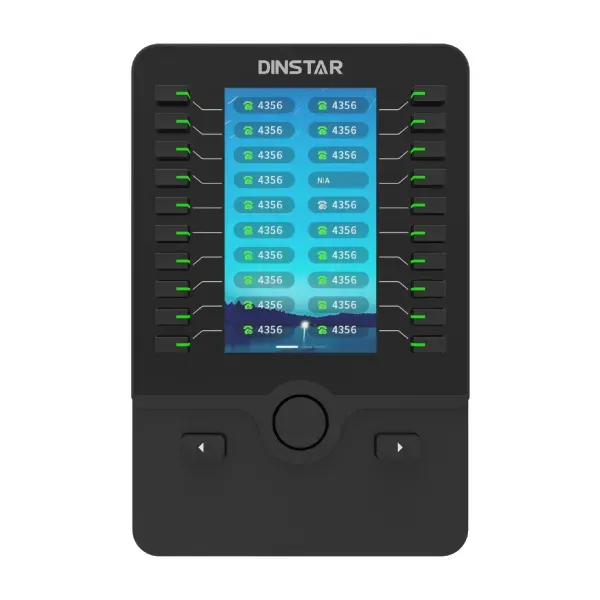
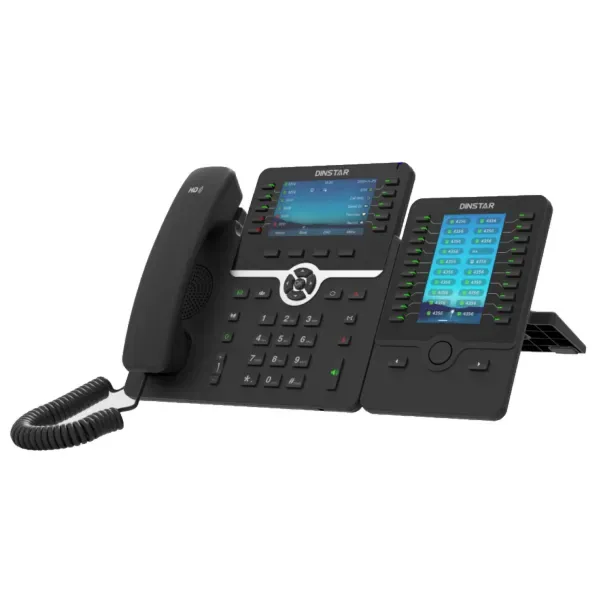
The Dinstar DXP60 Expansion Module is built for people who need faster access to a large number of extensions and telephony functions from a compatible Dinstar business phone. Instead of forcing receptionists, service desks, administrative assistants, supervisors and managers to navigate repeated menus, the DXP60 places programmable controls beside a 4.3-inch color screen. Dinstar specifies 20 physical keys with dual-color LEDs, three display pages and up to 60 programmable keys. Up to three modules can be daisy-chained with supported C63, C64 and C66 series phones, creating a practical path for desks that must monitor and handle a high call volume.
What the Dinstar DXP60 is designed to do
A normal business IP phone can provide line keys and programmable buttons, but call-heavy roles often need more direct access than the base handset can offer. The DXP60 expands the control surface of compatible Dinstar SIP phones so staff can assign frequently used functions to visible keys. Dinstar lists functions such as speed dial, direct dial, BLF/BLA, call transfer, DND, call back, BLF list, intercom, call park, call hold, call forward, call waiting and voicemail. The exact behavior of any key still depends on the connected phone, its firmware, the PBX and the way the button is configured, so procurement should treat the expansion module as part of the complete endpoint and PBX design rather than as an independent telephone system.
The screen is specified at 272 × 480 pixels with backlight. Three flippable pages let the same physical key area represent up to 60 programmable functions. The dual-color LED indicators provide visual status information for supported features, which is particularly useful where a receptionist or operator needs to see whether an extension is idle, active or otherwise presented by the configured BLF behavior. Two adjustable stand angles help users position the module beside the phone for desktop visibility.
For larger desks, Dinstar allows up to three DXP60 modules to be connected with supported phones. When two or three modules are used, Dinstar’s installation guidance states that an external 5V/1A power adapter is required, and the adapter is not included by default. This is an important quotation detail: buyers planning multi-module operator positions should confirm the number of modules, power accessories and exact supported handset before ordering.
Verified Dinstar DXP60 features and buying relevance
4.3-inch color display
The backlit 272 × 480 color LCD provides a clear visual surface for key labels, pages and status information. Color icons help users distinguish functions more quickly during busy call-handling periods.
20 physical keys per page
Each page presents 20 physical keys with dual-color LEDs. Three pages increase the programmable capacity to 60 positions without making the desktop footprint excessively wide.
Up to 60 programmable keys
Programmable functions can support frequent call-handling actions such as speed dial, BLF, transfer, call park, intercom and voicemail, depending on the phone and PBX configuration.
Up to three modules
For operator positions that need even more monitored destinations, Dinstar supports daisy-chaining as many as three DXP60 modules with compatible C63, C64 and C66 series phones.
Two adjustable angles
The stand offers two desktop angles so the module can be aligned with the user’s seated position and the adjacent IP phone.
Two 10/100 Ethernet ports
Dinstar lists two RJ45 10/100 Mbps Ethernet ports on the module. Installation also uses the extension-module connection and supplied cabling as described in the manufacturer’s guide.
Compatibility with Dinstar C63, C64 and C66 series phones
Dinstar identifies the DXP60 for use with the C63 series, C64 series and C66 series. That compatibility statement matters because expansion modules are not generic USB keypads and should not be assumed to work with arbitrary SIP phones. Before ordering, confirm the exact handset model and firmware used at the target desk, the number of DXP60 units required per phone, and whether the intended PBX supports the BLF or feature behavior that users expect.
FourTeck Tanzania already lists several compatible-family handsets. Buyers evaluating a DXP60 can review the Dinstar C63G Business IP Phone, Dinstar C64G Business IP Phone, Dinstar C64GP PoE Business IP Phone, Dinstar C66G Business IP Phone and Dinstar C66GP PoE Business IP Phone. These links help procurement teams compare the base endpoint before adding the expansion module, especially where PoE, SIP-account capacity and user role influence the final phone choice.
Deployment planning for reception and high-call-volume desks
A productive expansion-module deployment starts with a list of the actions the user repeats throughout the day. A reception desk may need BLF keys for departments, direct transfer destinations, management extensions, security, meeting rooms and frequently called external contacts. A service desk may prioritize queue supervisors, escalation teams, call park positions and speed dials. A manager may prefer direct keys for assistants, senior staff and branch offices. Mapping these workflows before configuration produces a cleaner key layout and reduces the temptation to assign every available key without a clear purpose.
Page organization also deserves planning. Because the DXP60 provides three pages, users can group keys by department or function instead of mixing unrelated destinations. For example, page one might contain the most active extensions, page two internal departments and page three external or special functions. A simple documented naming convention makes training easier and helps support teams rebuild the same layout after a phone replacement or firmware reset.
For organizations deploying multiple operator positions, standardization has operational value. The same key map, labels and PBX feature codes can be repeated where user responsibilities are similar. If several DXP60 modules are connected to one phone, plan desktop space, cable routing and the required external 5V/1A power adapter. The final quote should distinguish the phone, module quantity and power accessories so that installation is not delayed by missing components.
Dinstar DXP60 Tanzania
For organizations searching for the Dinstar DXP60 Expansion Module in Tanzania, the first purchasing question should be whether the intended user genuinely needs more visible and programmable controls than the base phone provides. Reception desks, switchboard-style users, executive assistants, call-center supervisors and service counters often work faster when extensions and frequent actions are accessible directly. The DXP60 gives these roles up to 60 programmable positions across three pages, while dual-color LED indicators can provide useful visual status when BLF and related functions are correctly supported by the PBX. This is different from buying a higher-specification phone simply for a larger screen: the expansion module is specifically about increasing the number of accessible telephony controls around a compatible Dinstar endpoint.
Tanzanian deployments should also consider the wider voice environment. The module does not replace an IP PBX, SIP trunk, network switch or handset. It extends a supported Dinstar phone, so call quality and feature behavior still depend on the PBX, LAN, VLAN and WAN design. Organizations with branches should confirm that BLF subscriptions, transfer methods, park behavior and security policies work consistently across the network. Where the phone is centrally provisioned, the expansion-key template should be included in the endpoint standard so replacement phones can be restored without rebuilding the entire layout manually.
Procurement teams in Tanzania should provide the exact Dinstar phone model, number of DXP60 modules per desk, required key functions, PBX platform, extension count and desired power arrangement when requesting a quotation. If two or three modules are planned, include the external power requirement in the bill of materials. It is also worth identifying how many users need an expansion module at all; standard desks may remain better served by the phone’s built-in keys, while only call-intensive positions receive the DXP60. This role-based approach controls cost and creates a more purposeful deployment.
Dinstar DXP60 Dar es Salaam
Dar es Salaam businesses often concentrate customer service, logistics coordination, sales, hospitality administration, property management and corporate reception functions in busy offices where a few users handle far more calls than the rest of the staff. The Dinstar DXP60 can be useful in exactly those positions because it gives a compatible C63, C64 or C66 series phone a larger programmable control surface. A receptionist can dedicate keys to departments, managers, meeting rooms and service teams; a logistics coordinator can group frequently contacted branches and operational contacts; a customer-service supervisor can use status keys and call-handling shortcuts according to the capabilities of the connected PBX.
In a Dar es Salaam office with many endpoints, network planning remains central. The DXP60 itself does not solve congestion, jitter or poorly designed voice VLANs. The base phone and PBX need stable LAN and WAN connectivity, and any BLF monitoring relies on SIP signaling that should be supported and scaled correctly by the PBX. If dozens of monitored extensions are assigned across several operator consoles, confirm how the PBX handles subscriptions and whether the chosen firmware and provisioning method support the intended layout. This matters especially for organizations consolidating several departments or branches under one communications platform.
Before ordering in Dar es Salaam, map the operator workflow and count the required keys. One DXP60 provides up to 60 programmable positions across three pages; additional modules may only be needed when the user must directly monitor a very large extension list. Where two or three modules are selected, plan for the specified 5V/1A external adapter and sufficient desk space. A good quotation request should state the compatible Dinstar handset, PBX type, number of monitored extensions, required functions, module quantity, headset requirement and whether the operator station must follow an existing organization-wide button template.
Dinstar DXP60 Mwanza
Mwanza organizations considering the DXP60 may be expanding an existing SIP phone system, standardizing a branch office or creating a central reception point that needs direct access to many staff members. In these situations the expansion module is most valuable when it reduces repetitive navigation on the phone. The 4.3-inch color display and dual-color LED keys can present a more structured operator view, while three pages let administrators group contacts and functions logically. An office can keep the most active extensions on the first page, departmental destinations on the second and specialist functions or external contacts on the third.
For a Mwanza branch connected to a PBX elsewhere, planners should verify that the WAN and security path supports the intended SIP behavior. BLF, call transfer and other feature interactions can depend on the PBX, NAT strategy, firewall rules and provisioning profile. The DXP60 may provide a button for a function, but the end-to-end platform determines whether that function operates as expected. A small pilot deployment is useful where the business is introducing a new phone model or PBX profile, because it allows the team to validate labels, LED behavior, transfers and page organization before rolling out several consoles.
Procurement in Mwanza should also consider continuity and support. Document which key is mapped to which extension or feature and keep that information with the phone configuration. If an operator moves desks or a handset is replaced, the documented map helps the support team restore service quickly. Buyers should specify the exact compatible Dinstar handset and intended number of DXP60 units. Where multiple modules are needed, the external power requirement must be included. The result should be a workstation designed around the user’s call pattern rather than an expansion module purchased simply because it offers a large number of keys.
Dinstar DXP60 Arusha
Arusha has businesses in tourism, hospitality, transport, education, professional services and general commerce where a reception or reservations team may need to direct a high volume of calls efficiently. The Dinstar DXP60 can support those roles when it is paired with a supported C63, C64 or C66 series SIP phone. Rather than searching directories repeatedly, an operator can use programmable keys for departments, managers, service desks, frequently called partners and other destinations. BLF or line-state indications can provide at-a-glance context when supported by the PBX, helping staff decide where to transfer a caller.
For hospitality and service environments, key labeling should follow the language and workflow used by staff. Generic labels such as “Line 1” or “Key 12” create unnecessary confusion. It is more useful to name destinations according to the role users recognize, such as reservations, accounts, security, front office, maintenance or management, while keeping personal extensions where direct monitoring is necessary. The three-page structure allows this information to be grouped cleanly and reduces the chance that a new employee has to memorize a complex key arrangement on the first day.
Arusha buyers should confirm system compatibility before finalizing a DXP60 purchase. The module is intended for specific Dinstar phone families and should not be treated as a universal SIP accessory. The PBX must also provide the features assigned to the keys. If the operator requires two or three modules, plan the external 5V/1A adapter and verify desk layout, cabling and accessibility. A quotation should include the phone model, module count, PBX platform, number of monitored extensions, headset needs and expected functions. This makes it easier to size the workstation correctly and avoid purchasing more programmable capacity than the user will realistically use.
Dinstar DXP60 Dodoma
Dodoma offices, institutions and service organizations may use centralized reception and administration teams to route calls between departments. The Dinstar DXP60 provides a practical way to increase direct-access keys for those users without changing the core PBX architecture. Its 20 physical dual-color LED keys, three pages and 60 programmable positions can help a receptionist or administrative coordinator reach internal destinations with fewer steps. The 4.3-inch color display also gives the user a dedicated view of the expansion layout instead of relying solely on the base handset screen.
The most effective Dodoma deployment begins with user-role analysis. A general office desk may not need an expansion module at all, while a central operator can benefit from a carefully organized directory of departments and managers. This role-based allocation avoids unnecessary equipment and keeps the deployment easier to support. If several operators perform the same function, use a consistent key template so employees can move between workstations without relearning the layout. Standard labels and page groupings also simplify remote troubleshooting.
Technical teams should verify the exact Dinstar handset family, firmware level and PBX integration. BLF, transfer, voicemail, park and intercom functions depend on the connected system and should be tested according to the planned workflow. If two or three DXP60 units will be chained to one phone, include the external power adapter required by Dinstar’s guidance. Dodoma procurement requests should identify phone model, PBX platform, extension quantity, key assignments, module count, power accessories and installation scope. A clear bill of materials protects the project from small omissions that can stop a reception console from being usable on installation day.
Dinstar DXP60 UAE
UAE organizations with structured IP telephony often have reception areas, executive assistant stations, contact desks and shared-service teams that need to monitor a larger extension population than a standard handset can display comfortably. The Dinstar DXP60 adds up to 60 programmable functions per module across three pages and can be daisy-chained up to three units with supported C63, C64 and C66 series phones. This makes it suitable for roles where the value comes from speed of access: seeing a status indicator, reaching a colleague, transferring a caller or invoking a frequently used function without navigating through several phone menus.
For UAE multi-site environments, configuration governance is important. Key maps should be documented and, where possible, tied to the phone provisioning process. If offices in different locations use the same department structure, a consistent first page can place common destinations in identical positions while later pages contain site-specific contacts. This approach reduces training time and helps centralized IT teams support operator stations remotely. The PBX should also be checked for BLF subscription capacity, feature-code conventions and transfer behavior before a large-scale expansion module rollout.
A UAE bill of materials should specify the exact phone and expansion count, not only the DXP60 name. Buyers planning two or three modules need the manufacturer-specified 5V/1A external power adapter, while a single module may operate according to the phone/module installation design. Desk dimensions, cabling and headset use should also be reviewed because operator positions can become crowded. The objective is a clean, ergonomic console that improves call handling rather than a dense bank of buttons with unclear labels. Confirm firmware, PBX support, accessories and the final key plan before procurement.
Dinstar DXP60 Uganda
Ugandan businesses evaluating the Dinstar DXP60 may be connecting a headquarters reception desk, branch administration team or customer-service function to a SIP PBX. The module is useful when a limited number of users need much greater button capacity than the rest of the organization. Instead of upgrading every desk to an expensive endpoint, the business can deploy compatible Dinstar phones broadly and add the DXP60 only where high call volume, monitoring or frequent transfers justify it. This makes the accessory a role-specific productivity tool rather than a default component for every extension.
Branch connectivity should be assessed if the PBX is hosted at another site or in a data center. BLF and other SIP features create signaling traffic and depend on stable communication with the PBX. The DXP60’s LEDs and keys are only the user interface; the network, firewall and call platform provide the underlying service. Uganda deployments should therefore confirm voice VLANs, QoS, WAN reliability and firewall behavior where relevant. A pilot operator station can verify that transfer, park, speed dial and monitored extensions behave as expected before the configuration is replicated.
Procurement teams should include the exact supported C63, C64 or C66 series phone model, number of DXP60 modules, required functions and external adapter requirement for multi-module setups. If the organization operates in more than one Ugandan city, consistent page layouts can simplify training across branches while allowing selected keys to differ by local department. Accurate labeling, backup of the phone configuration and a written extension map are low-cost practices that make future changes easier. The module is most valuable when the organization treats configuration as part of the deployment rather than leaving users to define dozens of keys individually.
Dinstar DXP60 Kampala
Kampala offices with active reception, sales, healthcare administration, logistics, education or customer-support desks can benefit from a more structured call-control surface. The Dinstar DXP60 offers 20 physical dual-color LED keys and three selectable pages, allowing as many as 60 programmed destinations or functions on one module. A receptionist can place the most frequently used extensions on page one, group departmental or branch contacts on page two and reserve page three for special functions such as voicemail, park positions or important external numbers. The exact key types available are controlled through the supported Dinstar phone and its configuration.
Kampala businesses should pay attention to how staff actually transfer calls. Some organizations use blind transfer, others prefer attended transfer, and some rely heavily on parking or pickup. The DXP60 should be programmed around that real workflow. Training should explain not only which key to press but what the LED state means within the configured PBX. This prevents users from assuming that every color or status has the same meaning across different systems. The 4.3-inch display can make labels readable, but consistent naming is still essential.
For quotations, list the phone model, PBX, extension count, monitored users and desired expansion-module quantity. If two or three modules are required, add the appropriate external 5V/1A power adapter and confirm the desk has enough space. Large installations should validate firmware and provisioning first so button templates can be deployed consistently. A well-designed Kampala operator console should help staff answer and route calls faster, reduce searching and minimize configuration differences between desks, while the rest of the IP telephony environment provides stable connectivity and the required PBX features.
Dinstar DXP60 Arua
Arua branches and regional offices can use the Dinstar DXP60 when one or two staff members act as the communication hub for a larger organization. In smaller branch environments, the need is not always for a complex switchboard; it may simply be to reach headquarters contacts, local departments and service teams quickly. The DXP60 gives a compatible Dinstar phone a dedicated 4.3-inch display and up to 60 programmable keys, helping administrators reduce manual directory searches and repetitive dialing during busy periods.
For a branch connected to a remotely hosted or headquarters PBX, reliable IP connectivity is important. BLF and other real-time status functions depend on signaling between the phone and PBX, so the WAN path, firewall and SIP design need to be stable. The expansion module cannot compensate for an unreliable network, but when the underlying voice service is engineered correctly it can make day-to-day call routing easier. Organizations should test the actual feature set they intend to use, particularly transfer, BLF, park and voicemail shortcuts.
Arua procurement teams should avoid oversizing the console. One DXP60 already offers three pages of keys, which may be enough for many branch operators. Multiple modules become relevant only when the user needs simultaneous access to a much larger list. If two or three are connected, Dinstar specifies an external 5V/1A adapter. Include the exact phone, module count, adapter, PBX platform and key requirements in the quotation. It is also useful to keep a copy of the key map at headquarters so central support can guide local staff through changes without relying on memory or screenshots taken after a problem occurs.
Dinstar DXP60 Mbarara
Mbarara businesses moving to structured SIP telephony may have receptionists, administrators or supervisors who handle a disproportionate share of incoming and internal calls. The Dinstar DXP60 is designed for that type of user. It expands compatible C63, C64 and C66 series phones with a large programmable key surface, providing up to 60 functions on three pages and dual-color LED feedback. The module can be used for speed dials, BLF, transfer and other supported functions, allowing users to spend less time navigating menus or remembering extension numbers.
For growing organizations, it is useful to plan the key layout with future extensions in mind. Leaving some logical capacity on each page can make later additions cleaner than filling every key immediately. Departments can be grouped by page or by location, and the most active contacts can remain in the easiest positions. Where staff turnover occurs, clear labels and a simple page legend help new users become productive more quickly. If several offices use the same Dinstar platform, shared templates can reduce training variation.
Mbarara deployment planning should include PBX compatibility, firmware, network quality and power. A multi-module operator station requires the external power adapter specified by Dinstar, and additional modules take more desk width. Buyers should decide whether one module’s 60-key capacity is enough before adding more. The quotation should also identify whether headsets, PoE phones, VLAN changes or PBX configuration services are part of the project. The DXP60 is an endpoint accessory, so the best results come when it is delivered as part of a complete telephony plan rather than installed without considering the underlying call-routing and network design.
Dinstar DXP60 Gulu
Gulu organizations can consider the DXP60 for reception counters, institutional administration, hospitality coordination, commercial offices and branch operations where one person must connect callers with many internal destinations. A supported Dinstar phone can manage normal calling on its own, while the DXP60 adds a more efficient visual directory of programmed actions. The module’s 20 physical dual-color LED keys are reused across three pages, creating up to 60 programmable positions without requiring an excessively large single-page panel.
A good Gulu configuration should reflect the user’s priority list. The first page can contain the people or departments contacted most often, while later pages can hold less frequent destinations and special features. Avoid assigning keys merely to fill space; unused or poorly named keys can make the console harder to understand. When BLF is used, the PBX must provide the relevant subscription and status information. Users should be trained on what each LED state indicates in their system and how to perform the preferred transfer workflow.
For branch offices, centralized documentation is especially useful. Keep a written or exported configuration showing module page, key position and assigned function. This assists remote support and speeds restoration after equipment replacement. Gulu buyers should confirm the exact C63, C64 or C66 series handset, module count, PBX version and external power accessory if more than one DXP60 is used. Network readiness, headset needs and desk layout should also be included in planning. The aim is to make the operator’s job simpler and more repeatable, not merely to maximize the number of buttons beside the phone.
Dinstar DXP60 Kenya
Kenyan businesses with multi-department offices, contact desks, hospitality operations, healthcare administration, logistics or distributed branches can use the Dinstar DXP60 to add direct controls to supported business phones. The module does not add extra SIP accounts by itself; instead, it gives the user more programmable keys for functions exposed by the connected phone and PBX. This distinction is important when comparing quotes. The phone model determines its SIP-account capacity and core telephony features, while the DXP60 expands the user interface available for handling those functions.
In a Kenya deployment, the organization should identify which user roles need expansion. Receptionists may want a broad BLF list and transfer destinations, executive assistants may focus on managers and departments, and support supervisors may need call park or speed-dial functions. A standardized page structure can be deployed across branches with local exceptions. Because one module already supports up to 60 programmed positions, most offices should test a single module first and add more only when the user genuinely needs the additional capacity.
Technical planning should confirm compatibility with the C63, C64 or C66 series handset and verify expected PBX behavior. If two or three modules are chained, include the required 5V/1A external power adapter. Desk layout, cable routing and headset placement should be reviewed together so the final workstation remains usable. Procurement requests are clearer when they state the base phone model, module count, PBX, number of monitored extensions, desired key functions and whether installation includes provisioning or merely hardware supply. This reduces ambiguity and makes it easier to compare proposals on a like-for-like basis.
Dinstar DXP60 Kuwait
Kuwait offices that use formal reception, executive assistant, operations or customer-service desks can benefit from a programmable expansion module when a base handset no longer exposes enough direct controls. The Dinstar DXP60 gives supported C63, C64 and C66 series phones a 4.3-inch color display and up to 60 programmable keys. This can support fast access to internal extensions, speed dials and PBX functions without asking users to remember codes or move repeatedly through soft menus during active call periods.
For enterprise and multi-branch environments, consistency should be designed before rollout. Button labels, page organization and commonly used functions can follow a corporate standard while selected positions remain available for local departments. Central IT teams should verify PBX support for BLF, transfer and other key functions and ensure the phone firmware is consistent. Where security policies require specific SIP or provisioning controls, the base phone and PBX should be configured accordingly; the DXP60 simply presents the assigned features to the user.
Kuwait buyers planning several modules at one desk should note Dinstar’s guidance that two or three expansion modules require an external 5V/1A power adapter. Include this accessory in the bill of materials and confirm desk space, especially where an operator also uses a headset, computer screens and other equipment. The best purchasing request states the exact phone, module quantity, key count, PBX platform, extension list and deployment scope. This allows the final operator console to be sized for the real call-handling workload rather than built around the maximum possible configuration by default.
Dinstar DXP60 Ghana
Organizations in Ghana can use the Dinstar DXP60 at call-intensive desks where a compatible Dinstar SIP phone needs more direct access to extensions and common functions. The expansion module provides 20 physical keys with dual-color LEDs and three pages for up to 60 programmable positions. This design is useful when a receptionist or administrator works with a large internal directory and must transfer callers quickly, monitor line status or reach specific departments without repeatedly searching the phone directory.
A Ghana deployment should start by separating user roles. Standard desk users may be fully served by their phone’s built-in controls, while a central receptionist may receive one DXP60 and a larger operator role may receive more. This avoids buying the accessory for users who will not benefit from it. The configuration can then be arranged by priority and page, with clear labels that reflect the names staff use every day. In larger companies, a shared template helps support teams maintain consistent layouts across locations.
The underlying IP telephony architecture remains important. BLF, transfer, park, voicemail and related functions are delivered through the phone and PBX, so compatibility should be confirmed before rollout. For multi-module setups, account for Dinstar’s external 5V/1A power requirement. Ghana procurement requests should include the exact C63, C64 or C66 series handset, number of DXP60 units, PBX system, monitored extension count, desired keys, power accessories and installation scope. With these details established, the expansion module can be deployed as a precise productivity tool instead of an accessory whose large key capacity is never fully organized.
Dinstar DXP60 Nigeria
Nigerian enterprises, service organizations and branch networks can evaluate the Dinstar DXP60 for operator-style positions where rapid extension access matters. A large office may have hundreds of endpoints but only a few users who need to see and reach many of them. The DXP60 is suited to that concentrated requirement: it expands a supported C63, C64 or C66 series phone with a 4.3-inch color display, 20 physical dual-color LED keys and three pages that provide up to 60 programmable functions.
For larger Nigerian environments, PBX scale and signaling behavior should be reviewed. If several consoles monitor many BLF targets, confirm that the PBX and network are designed for the resulting subscriptions and that the configured status behavior is reliable across sites. Do not assume that because a phone registers successfully every expansion-key function will behave identically. Test transfers, BLF, call park, voicemail and other intended actions with the real PBX version and firmware. This is particularly important when the organization operates multiple sites connected through WAN or VPN links.
The physical operator environment should also be considered. One DXP60 may meet most needs, while two or three modules are justified only for very large monitored lists. Dinstar requires an external 5V/1A adapter when two or three modules are used, so procurement must include the power accessory. Provide the phone model, PBX, module quantity, desired keys, headset type, desk layout and provisioning expectations when requesting a quote. A documented button plan and consistent labels make the workstation easier to use, easier to support and easier to reproduce if a receptionist moves or hardware is replaced.
Dinstar DXP60 Seychelles
Seychelles businesses in hospitality, tourism, administration and professional services may have front-office users who regularly connect guests, customers and partners to internal departments. The Dinstar DXP60 can make that workflow more direct when paired with a supported Dinstar C63, C64 or C66 series phone. Its programmable keys can be assigned to commonly used contacts and functions, while the color screen and dual-color LEDs give the operator a dedicated visual interface for the expansion layout.
In hospitality-style environments, a well-designed key map should reflect the real service journey. Instead of filling the module alphabetically, the first page can contain the destinations most frequently required by front-office staff, while additional pages group administration, operations, maintenance or management contacts. The exact labels and functions should match the PBX and the terms used by employees. This reduces transfer mistakes and helps new staff learn the system more quickly. BLF status can further support call routing where it is properly configured and supported.
For island or remotely supported sites, documentation and spare planning become particularly useful. Keep the phone and expansion-module configuration backed up where possible and record module page/key assignments. Confirm the exact Dinstar handset, firmware and PBX before ordering. If the station uses two or three DXP60 units, include the external 5V/1A power adapter specified by Dinstar. Quotation requests should also state whether deployment involves new IP phones, replacement of an existing reception console, remote PBX integration or local installation services. This allows the module to be sized as part of the complete communication requirement rather than treated as a standalone accessory.
How to choose the right DXP60 quantity
One DXP60 already supports up to 60 programmable positions across three pages, so the correct quantity should be based on how many destinations a user must access frequently and how much page switching is acceptable. A receptionist monitoring 30 to 50 extensions may be comfortable with one module. A large operator who needs immediate access to a wider directory may justify two or three modules. More hardware is not automatically better: a very wide console can consume desk space, require additional power and create a harder-to-read layout if the keys are not organized carefully.
A practical sizing exercise is to list the operator’s top 20 actions, next 20 actions and occasional functions. If most of the workload fits naturally across the first two pages of one module, start there. If several departments or branches each require a visible key set, consider extra modules. Remember that Dinstar’s guidance requires external 5V/1A power when two or three modules are used. Always confirm accessory requirements before finalizing the purchase order.
Quotation checklist for the Dinstar DXP60
State the exact C63, C64 or C66 series phone model that will be used with the module.
Specify whether each operator needs one, two or three DXP60 modules.
Provide the PBX make, version and any provisioning method relevant to the endpoint.
List expected BLF, speed-dial, transfer, park, intercom, voicemail or other required functions.
Include the external 5V/1A power requirement when two or three modules are deployed.
Clarify whether the request is hardware-only or includes configuration, migration, testing or user handover.
Dinstar DXP60 frequently asked questions
How many programmable keys does the DXP60 provide?
Dinstar specifies 20 physical keys per page and three display pages, providing up to 60 programmable keys on one DXP60 module.
Which phones support the Dinstar DXP60?
Dinstar identifies the DXP60 for its C63 series, C64 series and C66 series SIP phones. Confirm the exact model and firmware before procurement.
Can more than one DXP60 be connected to a phone?
Yes. Dinstar states that up to three DXP60 modules can be daisy-chained with supported phones. When two or three modules are used, the installation guidance specifies an external 5V/1A power adapter.
Does the DXP60 support BLF and call transfer?
Dinstar lists BLF/BLA, speed dial, transfer and several other call functions among the programmable key capabilities. Final behavior depends on the connected phone, PBX and configuration.
What is the DXP60 screen resolution?
The module uses a 4.3-inch 272 × 480-pixel color display with backlight.
Is the DXP60 a standalone IP phone?
No. It is an expansion module designed to work with supported Dinstar SIP phones. A compatible handset and PBX environment are required for telephony functions.
Decision recap
Choose the Dinstar DXP60 when a compatible Dinstar C63, C64 or C66 series phone needs more direct programmable controls for reception, administration, supervision or other high-call-volume work. One module provides up to 60 keys over three pages; up to three modules can be daisy-chained for larger operator requirements. The most important buying checks are the exact handset model, PBX compatibility, required key functions, module quantity and power accessory requirement for multi-module installations.
FourTeck can use those details to prepare a more accurate quotation and help match the expansion module to the correct base phone and deployment scope. For best results, provide the extension list and operator workflow, not only the product name. That allows the proposal to account for the real number of programmable positions, supported handset, accessories and configuration effort required.
Plan your DXP60 operator station
Share your Dinstar phone model, PBX platform, number of monitored extensions, desired functions and quantity of operator desks. FourTeck can use that information to help align the DXP60 quantity, compatible handset and required accessories with your deployment. Availability, commercial terms, warranty scope and delivery details should be confirmed at the time of quotation rather than assumed from a product page.




Reviews
There are no reviews yet.