
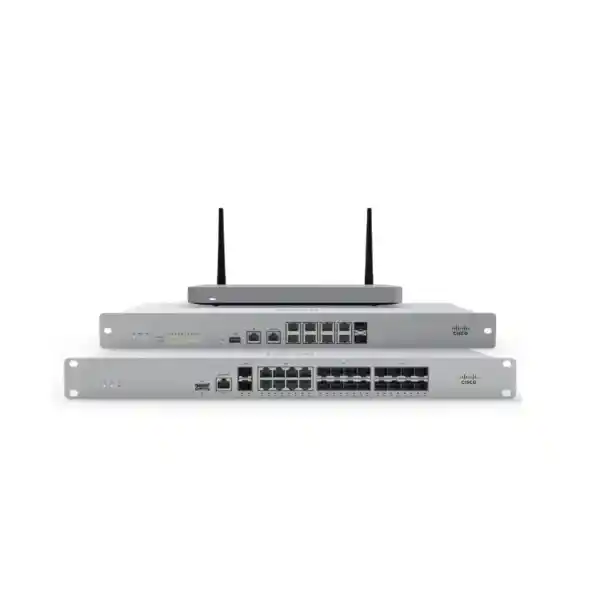
Cisco Meraki MX Tanzania
Cisco Meraki MX is a cloud-managed Security & SD-WAN appliance family designed for distributed networks that need centralized administration, secure site connectivity, policy control and branch visibility. Current Cisco documentation positions the MX portfolio around cloud-managed security and SD-WAN, while individual models differ in throughput, interfaces, recommended device counts, cellular options, VPN scale and lifecycle status. For buyers in Tanzania, the right approach is therefore not to select an MX appliance only by model popularity; it is to map the appliance to the actual WAN, security, branch and licensing requirements of the organization.
Direct answer
Cisco Meraki MX combines cloud management, firewalling, VPN and SD-WAN capabilities in one managed edge platform. Depending on the selected model and license, organizations can use MX for branch internet security, AutoVPN connectivity, WAN failover, traffic shaping, segmentation, remote administration and centralized policy operations.
Best-fit projects
Typical projects include multi-branch businesses, headquarters with remote sites, retail chains, education networks, hospitality environments, professional services firms, distributed offices and organizations that want a consistent cloud-managed security and SD-WAN operating model.
Before ordering
Confirm the exact MX model, internet speeds, number of users and devices, required VPN tunnels, security services, WAN links, rack or desktop format, cellular requirements, license tier, subscription term and future growth. Product capabilities should always be checked against the current Cisco datasheet for the chosen model.
What Cisco Meraki MX solves
A distributed business often has several problems at the WAN edge at the same time. Internet circuits must be protected, branch sites need secure connectivity, application traffic needs prioritization, guest and staff networks may require separation, remote administrators need visibility, and the company may want resilience if one WAN service fails. Traditional designs can meet those goals with multiple products, but that can increase configuration effort and make operations inconsistent from branch to branch. Meraki MX addresses this problem by bringing security, SD-WAN and centralized cloud management into one appliance family.
Cisco documentation describes Meraki MX as an enterprise security and SD-WAN platform for distributed deployments requiring remote administration. The Meraki Dashboard is central to deployment and ongoing management. Depending on model and software support, MX features can include stateful Layer 3 and Layer 7 firewalling, WAN link balancing, automatic WAN failover, AutoVPN-based SD-WAN, IPsec VPN support, content filtering, intrusion detection and prevention, malware protection, traffic shaping, VLAN and DHCP functions, NetFlow, syslog and remote packet-capture tools. These capabilities should be treated as portfolio capabilities rather than assumed identically across every appliance, because the exact feature set and performance depend on model, firmware and license.
For procurement teams, this makes the buying process more architectural than transactional. A small office may prioritize ease of deployment and dual-WAN resilience. A larger branch may need greater throughput, more local interfaces and a larger tunnel count. A campus or concentrator role may require a different platform. Newer Cisco secure WAN platforms carrying the MX management experience also extend the portfolio for high-capacity environments. The practical decision is therefore based on traffic profile, security services, VPN topology and expected growth rather than a single headline throughput figure.
Key Meraki MX capabilities to evaluate
Cloud management
Meraki Dashboard provides centralized configuration and visibility, which is particularly useful when a company has multiple branches or sites with limited local IT resources. Administrators can apply policy from a common management plane and investigate network behavior without treating every branch as a standalone appliance.
Security and firewalling
The MX family supports firewall and security functions that can include application-aware controls, intrusion prevention, malware protection, content controls and network segmentation. Buyers should confirm which security services require a specific license and how those services affect usable throughput on the selected model.
SD-WAN and AutoVPN
Meraki AutoVPN simplifies secure site-to-site connectivity and can be combined with SD-WAN policy to use multiple transport options. Dynamic path decisions can consider link quality metrics such as loss, latency and jitter, helping organizations make better use of available WAN services.
WAN resilience
Many MX appliances support multiple WAN uplinks, with model-specific options for Ethernet, fiber or integrated cellular. Redundancy planning should include both the appliance capability and the actual carrier diversity, because two logical links that share one physical path may not provide true resilience.
Cisco Meraki MX model and lifecycle guidance
The Meraki MX name covers several generations and performance classes. This matters because search results frequently mix current products with older appliances. For example, Cisco documentation notes that some earlier platforms such as MX64, MX65, MX84 and MX100 have firmware limitations and are not the best reference point for a new greenfield deployment. Current planning should start with Cisco’s latest MX family documentation and the sizing guidance for the intended role.
Small and medium branch models may be appropriate where user counts and internet bandwidth are moderate and where organizations value simple cloud administration. Some variants include wireless or cellular functionality, while others focus on wired security and SD-WAN. Larger branch, campus and concentrator models add greater capacity, higher-speed interfaces and more extensive VPN scale. Cisco’s newer secure-router platforms under the Meraki management architecture extend high-performance branch options further. Because the portfolio evolves, the exact recommendation should be validated at quotation time rather than copied from an old model comparison.
| Decision area | Questions to answer | Why it matters |
|---|---|---|
| Internet and security throughput | What are primary and backup WAN speeds, and which security services will run? | Security inspection can create different performance demands than basic firewall forwarding. |
| VPN scale | How many branches, remote networks and tunnels are expected? | A hub, concentrator or large branch can require substantially more tunnel capacity than a small site. |
| Interfaces | Do you require copper, fiber, multigigabit, PoE, dedicated WAN or cellular? | Physical connectivity can eliminate a model even when its security performance is adequate. |
| Licensing | Which security and SD-WAN features are needed, and for what subscription term? | License selection affects functionality, support and long-term cost. |
Compatibility, deployment and integration
An MX deployment should be planned as part of the full network. At the LAN side, define VLANs for staff, voice, wireless guests, servers, cameras, building systems and other device classes as required. Review DHCP scope design, static routes, upstream or downstream Layer 3 boundaries, switch trunking, access-point requirements and any existing IP addressing constraints. At the WAN side, document carrier handoffs, public addressing, PPPoE or static configuration where applicable, upstream modems or ONTs, backup links and the desired failover behavior.
VPN design is equally important. AutoVPN is attractive for organizations that want simplified Meraki-to-Meraki site connectivity, while standards-based IPsec interoperability can be relevant for non-Meraki peers. The final design should account for hub-and-spoke or meshed requirements, routing, overlapping subnets, cloud workloads, remote access, failover and security policy. Where a company operates Microsoft Azure, AWS or other cloud environments, virtual MX options may be relevant for extending Meraki-managed connectivity into cloud networks, subject to the capabilities and limitations of the chosen virtual platform.
Operational readiness should also be included. Administrators need appropriate Dashboard organization access, documented ownership, MFA practices, alerting, firmware-management procedures, configuration standards and a change process. Meraki simplifies centralized management, but good governance is still necessary. A cloud-managed platform becomes more valuable when naming, network templates, VLAN standards, alert rules and site documentation are consistent across the organization.
Related FourTeck resources
For broader network planning, review the FourTeck Tanzania integrated IT and network solutions overview, which explains how firewalls, switching, wireless and supporting infrastructure fit together. Buyers comparing equipment categories can also use the FourTeck Tanzania business technology shop to frame compatibility and capacity questions before requesting a specific model.
Organizations planning deployment or lifecycle assistance can review FourTeck Tanzania technology services. Regional buyers can reference FourTeck Kenya networking and security solutions and FourTeck Uganda IT and networking solutions for neighboring-market technology coverage.
Cisco Meraki MX Tanzania
Organizations evaluating Cisco Meraki MX in Tanzania usually fall into one of several groups: businesses replacing an older edge firewall, companies connecting multiple branches, organizations standardizing security across sites, and teams that want simpler remote management without maintaining a separate management server at each location. In each case, the first design task is to translate the business requirement into measurable network inputs. Those inputs should include the speed of the primary internet service, any planned bandwidth increase, the number of active users, the number of connected devices, expected VPN traffic, cloud-application usage and the security inspection features that will be enabled.
For Tanzania deployments, WAN reliability and site diversity deserve special attention. A business may operate a head office in Dar es Salaam with branches in other regions, or it may have warehouses, retail points, hospitality sites or project offices that depend heavily on centralized applications. Meraki MX can provide a consistent cloud-managed operating model across those sites, but the design should still account for carrier availability, handoff type, backup connectivity and the operational impact of a link failure. Where two fixed links are available, confirm whether they follow diverse infrastructure. Where cellular backup is being considered, verify local carrier coverage and the exact MX model or supported cellular architecture.
Security policy should be designed around business roles rather than a single flat LAN. Staff devices, guest Wi-Fi, IP phones, servers, cameras and IoT equipment often have different trust levels. VLAN segmentation and firewall policy can reduce unnecessary lateral access while simplifying troubleshooting. For multi-branch environments, AutoVPN can reduce the manual complexity of building site-to-site connectivity, while SD-WAN policies can help prioritize important applications over the available links.
Procurement teams should ask for an exact model and license recommendation, not only a generic “Meraki MX” quotation. A useful request includes current WAN speeds, planned upgrades, device count, site count, VPN peers, security requirements, interface requirements and desired subscription term. That allows the selected platform to be checked against current Cisco documentation and lifecycle guidance. FourTeck Tanzania can then align the appliance with related switching, wireless, rack, power and cabling requirements instead of treating the firewall as an isolated purchase.
Cisco Meraki MX Dar es Salaam
Dar es Salaam businesses frequently combine headquarters functions with customer-facing sites, warehouses, branch offices, professional services environments and internet-dependent operations. Cisco Meraki MX can be a strong fit when the IT team needs centralized control across these different locations. A head office may require higher VPN capacity and more complex segmentation than a small branch, while remote sites may prioritize simple deployment, automatic VPN establishment and dependable failover. Using the same Meraki management plane across both roles can make policy and visibility more consistent.
The starting point for a Dar es Salaam deployment should be a WAN and application inventory. Identify the primary ISP, backup service, public IP requirements, cloud systems, SaaS platforms, voice applications, remote-access users and branch dependencies. For organizations using Microsoft 365, ERP, cloud CRM, hosted voice or video conferencing, WAN quality matters as much as nominal bandwidth. SD-WAN decisions can then be based on which applications require low latency and which can tolerate a lower-priority path during congestion or failover.
Security segmentation is particularly relevant in mixed-use sites. Guest Wi-Fi should not share the same access level as finance workstations, servers, network-management systems or surveillance equipment. Retail environments may need separation for POS traffic. Hotels and customer-facing businesses may need a clear boundary between guest access and internal systems. MX firewall policy and VLAN design can be used as part of that architecture, but switch and wireless configuration must be coordinated so the segmentation is consistent end to end.
Before requesting a Dar es Salaam quotation, document the number of sites, users, internet links and expected growth over the next several years. Include whether the device will be rack mounted, whether fiber WAN interfaces are required, whether redundant power is important, and whether a high-availability design is being considered. Licensing should be quoted with the appliance so the operational feature set and renewal responsibility are clear from the start. This avoids the common mistake of comparing only hardware cost while overlooking the subscription and support model of a cloud-managed security platform.
Cisco Meraki MX Mwanza
For organizations operating in Mwanza, a Meraki MX project often centers on dependable branch connectivity and the ability to manage network security without requiring specialist staff at every location. A site may connect back to a Dar es Salaam head office, a data center, a cloud environment or several peer locations. The value of the Meraki approach is that administrators can monitor and configure distributed sites through the Dashboard while using secure VPN and SD-WAN functions to connect the business network.
A good Mwanza design begins with circuit reality. Confirm the available fixed internet services, expected speeds, public-address requirements and realistic backup choices. If the site depends on one primary provider, the business should assess the operational cost of an outage and decide whether a secondary fixed circuit or cellular option is justified. The MX model must then support the required WAN arrangement and enough encrypted traffic for the applications that continue to operate during failover.
Many branch environments also host a mixture of devices that should not be treated equally. Office users, printers, cameras, wireless guests, phones, building controls and specialized operational equipment may all share the same physical switching infrastructure. VLANs and firewall policy can create clearer security boundaries, while traffic shaping can help keep critical business traffic usable when bandwidth is limited. These controls are most effective when the switch, access point and firewall design use the same segmentation plan.
When preparing a quotation for Mwanza, provide the current topology rather than only the number of users. Include WAN speeds, number of local subnets, VPN destinations, types of connected devices and any existing Cisco Meraki equipment. If the branch is part of a wider rollout, also identify whether standard templates, common VLAN numbering and a uniform security policy will be used. That information can help determine whether a smaller branch model is sufficient or whether additional capacity is justified for growth, VPN use or higher security inspection demand.
Cisco Meraki MX Arusha
Arusha organizations in hospitality, tourism, professional services, education and regional operations may need secure internet access for both internal teams and customer-facing environments. Cisco Meraki MX can support this type of mixed network when the security architecture distinguishes business systems from public or guest access. The appliance can sit at the WAN edge while coordinated switching and wireless policies maintain separate traffic paths for staff, guests, cameras, voice devices and other operational systems.
Hospitality-style environments make capacity planning especially important. Guest internet demand can vary sharply, and video streaming can consume substantial bandwidth. At the same time, reservation platforms, payment systems, back-office applications and staff communications may require consistent service. SD-WAN and traffic-shaping policy can be used to protect business-critical flows, but policy should be built around measured link capacity and realistic user behavior. The correct MX model should also be selected according to the expected security throughput when relevant inspection services are enabled.
Arusha branches that connect to another office can use AutoVPN for Meraki-to-Meraki connectivity. This can simplify deployment compared with maintaining many manual tunnels, especially when the business adds sites over time. However, IP addressing should be planned in advance to avoid overlapping networks between branches, and routing should be documented so future expansion remains manageable. If third-party VPN peers are required, standards-based IPsec capability and the exact interoperability design should be confirmed.
A procurement request should state whether the Arusha site is a standalone location or part of a larger Meraki organization. It should also include WAN handoffs, user and device counts, wireless guest requirements, voice services, surveillance systems and future branch plans. The appliance license term should align with the organization’s procurement cycle and lifecycle strategy. Rather than selecting an older MX because it appears in online search results, validate the proposed model against current Cisco lifecycle and firmware guidance before purchase.
Cisco Meraki MX Dodoma
Dodoma offices, institutions and distributed organizations can use Cisco Meraki MX where secure branch networking, centralized control and reliable inter-site access are priorities. The Meraki Dashboard can be particularly valuable when infrastructure is managed by a central IT team that needs visibility into remote locations without traveling to each site for routine configuration. The operational benefit grows when multiple branches follow the same network standards and naming conventions.
For a Dodoma deployment, start with the services that cannot tolerate extended interruption. These may include cloud applications, remote desktop access, ERP systems, voice platforms, payment systems or secure connectivity to another office. Then determine the acceptable outage duration and whether a secondary WAN path is needed. Dual-WAN capability is useful only when the broader design provides meaningful path diversity and correct failover policy. Testing the failover process after deployment is as important as specifying it on paper.
Network segmentation should also reflect operational roles. Administrative users, public Wi-Fi, servers, IP cameras and contractor devices may require different policies. Using clear VLANs and inter-VLAN rules can reduce unnecessary access and make troubleshooting easier. If the site has Meraki switches and access points, integrated Dashboard visibility can provide a more unified operational view, although each product family still needs appropriate configuration and licensing.
Before ordering, the Dodoma site should be documented with an interface map, WAN details, subnet plan, user count, device count, VPN requirements and planned subscription term. If the organization already owns MX appliances elsewhere, include those models and firmware levels so compatibility and lifecycle can be considered. A standardized architecture can make future expansion simpler, but standardization should not force every site onto the same hardware class if traffic and resilience requirements differ significantly.
Cisco Meraki MX UAE
Businesses operating between Tanzania and the UAE may use Cisco Meraki MX to create a consistent security and SD-WAN architecture across offices, branches and cloud-connected environments. The strongest use case is often operational consistency: the same Dashboard organization can provide administrators with centralized monitoring, templates, alerting and policy visibility across geographically separated sites. This can reduce the variation that develops when each office is built with unrelated edge platforms.
For UAE deployments, internet bandwidth can be considerably higher than in smaller branch environments, so model sizing must take full inspection and VPN requirements into account. A platform that is adequate for basic firewall forwarding may not be appropriate when high-speed security services, multiple VPN tunnels, application controls and encrypted traffic are active. Interface type is also important. Larger sites may require fiber WAN or high-speed LAN connectivity, and those physical requirements should be checked against the exact MX or secure-router model.
Cross-region connectivity should be designed around application flows rather than geography alone. Some traffic may need direct internet access at each location, while other applications may require secure connectivity to a central data center or cloud environment. SD-WAN policy can help select paths based on application requirements and link performance. If cloud workloads are hosted in public cloud, vMX options may provide a Meraki-managed termination point, subject to the supported capabilities of the selected cloud deployment.
Procurement teams should align licensing terms across sites where practical, because scattered renewal dates can create administrative overhead. They should also confirm ownership of the Meraki organization and Dashboard administrator roles so the customer maintains appropriate operational control. When Tanzania and UAE sites are part of one project, the quotation should clearly separate hardware, licenses, accessories, installation scope and any carrier dependencies rather than treating the solution as a single undifferentiated line item.
Cisco Meraki MX Uganda
Uganda organizations with branch networks can use Cisco Meraki MX to simplify security and site-to-site connectivity across multiple locations. A centralized IT team can use Dashboard management to monitor appliances, deploy policy and troubleshoot connectivity without maintaining a separate management appliance at each branch. This is useful for companies operating a headquarters-plus-branches model, especially when some locations have limited on-site technical staff.
The design should begin with a realistic bandwidth and resilience assessment. Primary and secondary internet options can vary by location, so each branch may need a slightly different WAN plan while still following the same security architecture. Meraki SD-WAN and failover functions can help use multiple links effectively, but the business should decide which applications receive priority when capacity is constrained. Critical applications, cloud voice and business systems may need different treatment from recreational or guest traffic.
Security segmentation also helps when branch networks combine user computers, Wi-Fi, CCTV, phones and other devices. Rather than allowing unrestricted communication between every endpoint, VLANs and firewall rules can define only the access each group needs. This is especially useful for guest wireless, surveillance networks and devices that do not require access to business servers. A coordinated switch and access-point configuration is necessary so the segmentation defined at the MX edge is consistently implemented.
For procurement, provide the number of Uganda sites, internet speeds, user counts, expected VPN topology and any high-availability requirements. Confirm whether the equipment will be installed in a rack, whether fiber interfaces are necessary and whether cellular backup is part of the plan. Cisco licensing should be included in lifecycle budgeting, and the exact subscription should be matched to the required security features. The model recommendation should always be checked against current Cisco documentation rather than relying on older reseller comparisons.
Cisco Meraki MX Kampala
Kampala is a common hub for organizations that manage several Ugandan sites, making it a natural location for a larger branch, headquarters edge or VPN hub role. Cisco Meraki MX can support these architectures, but the head-office appliance should be sized for aggregate traffic rather than only local users. If ten branches send traffic through Kampala, the hub may process considerably more VPN and security traffic than a branch with the same number of employees.
A proper Kampala design should document whether branches use direct internet breakout or backhaul selected traffic to headquarters. Full backhaul can simplify some central controls but can also increase bandwidth requirements and dependency on the hub. Local breakout can reduce unnecessary WAN usage, while cloud-managed security policy maintains control at the branch edge. The best architecture depends on applications, compliance requirements, cloud usage and the availability of reliable connectivity.
High availability should be assessed separately from dual-WAN connectivity. Two internet links protect against some carrier failures, while appliance redundancy addresses a different failure mode. If the Kampala site is business-critical, determine whether the selected MX model and deployment design support the required availability approach. Power protection, rack cooling, switching redundancy and carrier diversity also influence total service resilience.
When requesting a quotation, Kampala customers should include expected tunnel counts, peak encrypted throughput, user and device count, security inspection requirements and future branch expansion. If the network will grow significantly, selecting a platform with reasonable headroom can reduce premature replacement. Licensing and support terms should be clear, as should ownership of the Meraki Dashboard organization. This operational detail is important because the cloud management platform becomes part of day-to-day network administration.
Cisco Meraki MX Arua
Arua branch deployments may place a stronger emphasis on resilience and remote manageability than on very high throughput. Cisco Meraki MX can be appropriate where a central team needs visibility into a site that may not have a full-time network engineer. The ability to manage configuration through the Dashboard and establish secure site connectivity can reduce the number of tasks that require local intervention.
Connectivity planning should reflect the actual services available to the specific site. If a single fixed connection is the normal WAN path, identify a practical backup and confirm the selected MX model supports the required failover method. Cellular can be attractive as a backup in some cases, but coverage, signal quality, data plans and device compatibility must be checked rather than assumed. For critical branches, regular failover tests should form part of operations.
Arua locations may also have a mixture of office users, wireless devices, surveillance equipment and voice systems. Segmentation is useful because these device classes have different security needs and traffic patterns. Cameras, for example, may generate continuous traffic but require access only to recording or management systems. Guest wireless should normally be separated from internal resources. Business voice traffic may benefit from QoS and traffic-priority policies.
The quotation process should include more than the firewall appliance. Check rack space, UPS capacity, switch uplinks, WAN handoff, transceivers if required, patching and the Meraki license. If the Arua site is joining an existing Meraki deployment, provide the organization name, current topology and branch addressing plan so the new site can be integrated consistently. A documented standard for VLANs, naming, alerts and configuration reduces support complexity as more remote branches are added.
Cisco Meraki MX Mbarara
Mbarara organizations considering Cisco Meraki MX can benefit from a design that treats the appliance as both a security boundary and a branch connectivity platform. Instead of focusing only on blocking internet threats, the project should define how the site connects to headquarters, cloud applications, remote workers and any other business locations. This produces a clearer sizing requirement and prevents the appliance from being chosen only by a raw firewall number.
If the Mbarara branch handles cloud-based ERP, collaboration, voice or remote desktop applications, link quality can directly affect user experience. SD-WAN policy can help choose between available paths based on performance and business priority. However, the effectiveness of this design depends on having properly engineered WAN links and clear application policies. Bandwidth, latency, jitter and packet loss should be observed during normal and peak periods where possible.
Security controls should reflect local operations. A retail, distribution or service site may need dedicated segments for staff, point-of-sale systems, Wi-Fi, cameras and management. Firewall policy can limit unnecessary traffic between those segments. If remote support is required, define approved access methods and administrator roles rather than creating broad inbound exposure. Centralized Dashboard tools can assist troubleshooting, but secure administrator practices and MFA remain important.
For procurement, document the expected number of users and devices, internet bandwidth, VPN destinations, switch topology and required security features. Include growth projections rather than sizing only for today’s traffic. The license tier and term should be selected with the same care as the hardware because cloud-managed operation and security capabilities depend on the subscription model. Current Cisco lifecycle information should be checked so a new project is not based on a platform approaching software or hardware limitations.
Cisco Meraki MX Gulu
For Gulu sites, Cisco Meraki MX can provide a manageable platform for secure branch internet access and connectivity back to central resources. Organizations that operate widely dispersed offices often value the ability to use common policy and remote troubleshooting tools from one Dashboard. This can be more practical than maintaining unique configurations and management methods for every branch.
The branch design should be based on operational criticality. If the site can tolerate a short WAN outage, a single primary connection may be acceptable. If the site supports revenue-generating or mission-critical activity, a backup path may be justified. The MX selection then needs enough capacity to run the required security and VPN services over both normal and failover scenarios. When cellular is part of the backup design, verify the implementation options for the specific appliance rather than assuming every MX model has built-in cellular.
Network security also benefits from separating devices according to function. Gulu offices may have staff computers, IP phones, Wi-Fi access points, printers, cameras and building equipment on the same site. VLANs can reduce the broadcast and security scope between those groups, while inter-VLAN policy allows only the traffic required for business operations. This approach becomes easier to support when switch ports and wireless SSIDs use a documented segmentation standard.
A useful quotation request includes a simple topology drawing, current IP ranges, WAN details, number of endpoints, VPN peers and whether centralized templates will be used. It should also note physical needs such as rack mounting, power, cooling and uplink optics. Licensing should be included from the beginning, along with renewal ownership and the intended subscription term. These details make the difference between buying a device and deploying a sustainable branch architecture.
Cisco Meraki MX Kenya
Kenya deployments can range from small branches to high-bandwidth headquarters, so Cisco Meraki MX sizing should be tied to the role of each site. Organizations with operations in both Kenya and Tanzania can use a common Meraki design to standardize policy, VPN connectivity and Dashboard administration across borders. The architecture can still use different appliance sizes at different sites while maintaining consistent VLAN, security and monitoring standards.
For Nairobi or other large urban sites with fast internet connectivity, security throughput and high-speed interfaces may be critical. A branch with smaller circuits may instead prioritize simple dual-WAN failover and centralized troubleshooting. Rather than buying one model everywhere for administrative convenience, match each site to its actual traffic and resilience requirements. Templates can provide standardization without forcing identical hardware when capacity differs.
Cross-border site connectivity should also be assessed with cloud applications in mind. If most systems are SaaS-based, direct local internet breakout may be more efficient than routing all traffic through one country. If sensitive internal applications are centralized, secure site-to-site VPN may remain essential. Meraki AutoVPN can simplify the connectivity between Meraki sites, while SD-WAN policy can help optimize path selection over available circuits.
Kenya procurement teams should request exact model, license, accessories and deployment assumptions in one quotation. Include bandwidth, user count, number of sites, VPN topology and any requirement for fiber or cellular interfaces. If the hardware will be part of a larger regional standard, document Dashboard ownership and renewal responsibility across entities. This avoids confusion when licenses expire or administrative changes are required later.
Cisco Meraki MX Kuwait
Kuwait organizations may evaluate Cisco Meraki MX for distributed offices, retail branches, service locations and regional networks that need centralized security administration. High-bandwidth internet services can place greater demands on firewall and security inspection performance, so sizing should use the throughput relevant to the enabled security services rather than only the maximum basic forwarding rate.
Branch networks often carry a mixture of corporate traffic, voice, guest access, cameras and cloud applications. Meraki SD-WAN and policy controls can help prioritize critical traffic and improve utilization of multiple WAN paths. At the same time, VLAN segmentation and firewall policy can isolate lower-trust device classes from sensitive business systems. This is particularly important where public-facing Wi-Fi or IoT equipment shares the same physical infrastructure as internal users.
For regional businesses that also operate in Tanzania, a shared Meraki management approach can make policy deployment and troubleshooting more consistent. However, local internet architecture, carrier handoffs and regulatory requirements may differ, so the WAN design should remain site-specific. It is also important to determine where cloud workloads and data-center services are located, because that affects VPN topology and the value of local internet breakout.
A Kuwait quotation should therefore identify the exact site role, current and future bandwidth, required tunnel count, security services, interface type and licensing term. Larger offices should also consider high-availability requirements and power or rack redundancy. Cisco lifecycle guidance should be reviewed before approving a model, especially when online listings include older MX platforms that may still appear commercially available but are less suitable for a new long-term deployment.
Cisco Meraki MX Ghana
Ghanaian businesses can use Cisco Meraki MX where branch connectivity, cloud-managed security and consistent policy across multiple sites are important. A common deployment pattern is a main office connected to smaller branches, with each location requiring protected internet access and secure connectivity to shared applications. Meraki Dashboard management can simplify this model by giving administrators one place to view appliance status, events and configuration.
WAN planning should still be tailored to each Ghana site. Primary circuit capacity, backup options, public IP requirements and application dependency can differ widely. For a branch that relies heavily on cloud services, local internet availability may be the main concern. For a location dependent on a centralized ERP or file system, site-to-site VPN quality may be more critical. SD-WAN policy can help balance those needs when more than one link is available.
Security policy should include internal segmentation as well as internet protection. User computers, guest wireless, cameras and servers do not all require the same access. Building separate VLANs and applying least-necessary firewall policy can reduce risk and make traffic easier to understand. Where Meraki switching and wireless are also used, integrated visibility can help identify client behavior across the network, but design discipline remains essential.
Before buying, Ghana customers should provide user and device counts, internet speeds, branch count, VPN requirements, security features and growth expectations. Hardware accessories and licensing should be included in the bill of materials, and responsibility for subscription renewal should be documented. The selected platform should be checked against current Cisco performance and lifecycle information so the customer is not basing a new security project on an outdated model comparison.
Cisco Meraki MX Nigeria
Nigeria’s large and diverse business environment creates a wide range of Cisco Meraki MX use cases, from small distributed branches to high-capacity headquarters and retail networks. Centralized cloud management can be valuable where an IT team supports many geographically separated sites. Standard templates, alerting and remote diagnostic tools can reduce configuration drift and help teams maintain a consistent security posture.
WAN resilience is often a central design consideration. Organizations may use multiple fixed internet links, cellular backup or combinations of providers. The MX platform can support link balancing and failover on appropriate models, but the wider solution should consider path diversity, modem or carrier handoffs and the business priority of each application. A backup circuit that cannot support critical cloud or VPN traffic may not meet the intended continuity objective.
Large Nigeria deployments should pay particular attention to aggregate VPN scale and security throughput at hubs. The head-end site may process traffic from many branches, so its requirements can be much higher than the local user count suggests. High-speed interfaces, rack format, redundant components and future tunnel growth may influence platform selection. Where public cloud is part of the architecture, a virtual MX may also be evaluated for cloud connectivity within the supported feature set.
Procurement requests should separate hardware, licensing, accessories and implementation scope. Include exact bandwidth, number of sites, expected tunnels, security requirements and interface needs. If the rollout will happen in phases, define the final target scale rather than sizing only for the first few branches. This makes it easier to select a platform with reasonable headroom and to plan Dashboard administration and license renewal across the full organization.
Cisco Meraki MX Seychelles
Seychelles businesses may use Cisco Meraki MX for hospitality, professional services, distributed offices and organizations that need secure connectivity between island locations and external systems. In these environments, centralized management can reduce the need for frequent on-site network administration, while VPN and SD-WAN functions can provide structured connectivity to headquarters, cloud resources or other branches.
The WAN design should place strong emphasis on the availability and characteristics of local connectivity. A site may have limited choices for physically diverse circuits, making backup planning especially important. If cellular or a secondary provider is considered, test real performance at the intended location. The MX appliance should be sized for the primary link but also configured so critical applications remain usable if failover capacity is lower.
Hospitality and guest-facing networks require careful segmentation. Public Wi-Fi should be isolated from hotel operations, finance systems, staff devices, cameras and building-management equipment. Traffic shaping can prevent non-essential guest activity from affecting reservation, payment or business communications. The firewall design should be coordinated with the wireless and switching architecture so that VLANs and policies remain consistent throughout the property.
When requesting a Seychelles quotation, include the site type, number of users, guest-device estimates, WAN services, VPN destinations, security inspection requirements and any requirement for high availability. Hardware shipping and deployment logistics should be scoped separately rather than assumed. The chosen model and license should be verified against current Cisco information, ensuring that the appliance supports the intended throughput and interfaces while remaining appropriate for the organization’s expected lifecycle.
Licensing and subscription planning
Meraki licensing is a fundamental part of the solution and should be reviewed before hardware approval. The exact license options depend on platform and generation. Cisco documentation for current secure WAN platforms shows multiple subscription choices covering enterprise, advanced security and SD-WAN-oriented capabilities, while traditional MX appliances are also associated with specific Meraki licensing models. The quotation should therefore name the license, term and feature level explicitly rather than simply stating that a license is included.
A business should also identify who owns renewal management. If appliances across several regions are part of one Dashboard organization, renewal timing and budgeting should be centralized where possible. This helps avoid unexpected service or management issues and gives finance teams a predictable lifecycle view. For new projects, compare one-year, multi-year and organizational-standard terms according to budget policy and planned hardware life.
Cisco Meraki MX quotation checklist
✓ Primary WAN speed and handoff
✓ Backup WAN speed and type
✓ Number of users and devices
✓ Number of sites and VPN peers
✓ Required security inspection features
✓ Expected cloud and SaaS applications
✓ Need for AutoVPN or third-party IPsec
✓ Required LAN and WAN interface types
✓ Cellular requirement, if any
✓ Rack, desktop and power constraints
✓ VLAN and segmentation requirements
✓ High-availability requirement
✓ Current Meraki organization, if applicable
✓ License tier and term
✓ Planned bandwidth growth
✓ Deployment, testing and documentation scope
Frequently asked questions
What is Cisco Meraki MX?
Cisco Meraki MX is a family of cloud-managed security and SD-WAN appliances for branch, campus, distributed-network and VPN use cases. The portfolio combines centralized Dashboard management with firewall, VPN, WAN and security capabilities that vary by model and license.
Which Cisco Meraki MX model should I buy?
Choose the model only after confirming internet speed, security services, user and device count, VPN throughput, tunnel scale, interfaces, WAN links and growth. Older MX models can still appear in online listings, so current Cisco lifecycle guidance should be checked before purchase.
Does Meraki MX support dual WAN?
Many MX platforms support multiple WAN links and can provide link balancing or failover, but the number and type of WAN interfaces are model specific. Confirm the exact appliance datasheet and the intended carrier handoffs.
Can Meraki MX connect branches automatically?
Meraki AutoVPN is designed to simplify secure site-to-site connectivity between Meraki networks. The final topology still requires correct IP addressing, routing and policy design, especially for multi-hub or large distributed environments.
Can Meraki MX connect to third-party firewalls?
MX supports standards-based IPsec VPN scenarios in addition to Meraki AutoVPN. Exact interoperability, encryption parameters, routing and limitations should be validated for the third-party peer and firmware version.
Does Cisco Meraki MX require a license?
Meraki deployments use subscription licensing. The appropriate license and term depend on the platform and required features. Hardware and license should be quoted together so total lifecycle cost is clear.
Can Meraki MX use cellular backup?
Certain MX variants have integrated cellular capabilities, while other deployment options may use supported cellular solutions. Availability and implementation vary by model, so the exact hardware and local carrier requirements must be checked.
Is Meraki MX suitable for high-bandwidth headquarters?
The portfolio includes platforms intended for larger branches, campus and concentrator roles, but selection depends on required security throughput, VPN scale and interfaces. Current high-capacity secure WAN platforms managed through Meraki should also be considered where appropriate.
Decision recap
Cisco Meraki MX is most compelling when an organization values centralized cloud management, secure branch connectivity and a consistent SD-WAN/security operating model across distributed sites. The product family should not be purchased from a generic model list. Start with the workload: internet bandwidth, security inspection, VPN scale, interfaces, WAN resilience, device count and growth. Then confirm the exact current Cisco platform and license that fits those requirements.
Consultation panel
To prepare a Cisco Meraki MX recommendation, share your site count, city or country, current WAN speeds, expected backup links, user count, major applications, VPN requirements, security services, interface needs and preferred subscription term. If you already use Meraki, include the current MX models and Dashboard organization structure. FourTeck can use those details to narrow the correct platform class and identify the supporting switching, wireless, rack, power and cabling requirements.




Reviews
There are no reviews yet.