
Enterprise access switching for Tanzania
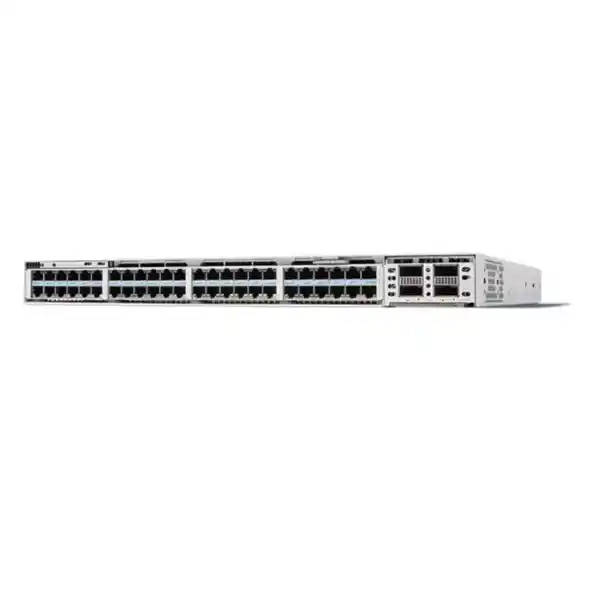
Cisco C9350-48U Smart Switch
The Cisco C9350-48U is built for organizations that need a high-density, resilient access layer with 48 Gigabit Ethernet copper ports and higher-power PoE for modern connected devices. It is a practical choice for networks where most endpoints still require 1G access but the power demand at the edge is increasing because of cameras, access-control systems, sensors, collaboration devices, intelligent building equipment, and other PoE-powered endpoints.
Up to 60W UPOE per port
StackWise-1.6T
Modular high-speed uplinks
Who should consider the C9350-48U?
This model is aimed at enterprise access networks that want to keep standard Gigabit Ethernet at the user edge while gaining substantially more power headroom than a conventional 30W PoE+ switch. That makes it relevant when the network has a large mix of powered endpoints but does not require 2.5G, 5G, or 10G copper on every desk or device. If your main requirement is higher endpoint power rather than multigigabit access speed, the C9350-48U can provide a more focused fit than a higher-end multigigabit model.
Typical deployment areas include enterprise offices, education environments, healthcare facilities, retail locations, security networks, and smart-building access layers. The important design question is not simply how many ports are needed. Buyers should also count the number of powered devices, record each device’s expected wattage, decide how much redundancy is required, and confirm the uplink architecture before ordering. The switch can support 60W UPOE on each access port, but the total available PoE budget depends on the installed power-supply combination.
Key capabilities at a glance
| Access ports | 48 × copper 10/100/1000 Mbps downlink ports |
|---|---|
| PoE capability | Up to 60W UPOE per access port; IEEE 802.3bt Type 3 |
| Maximum port-limited PoE ceiling | Up to 2,880W across 48 ports when the installed power configuration can supply it |
| Default power supply | PWR-C2-850WAC family according to Cisco ordering information |
| Uplink architecture | Field-replaceable network module; supported choices include C9350-NM-2C and C9350-NM-8Y |
| Uplink bandwidth | Up to 200 Gbps total with supported module configurations |
| Switching bandwidth | 496 Gbps standalone bandwidth specification |
| Forwarding rate | 369.024 Mpps standalone |
| Stacking | StackWise-1.6T, up to eight compatible C9350 members with the same license level |
| Form factor | 1RU-class chassis; 4.4 × 44.5 × 38.3 cm chassis dimensions |
| Weight | Approximately 6.42 kg with the default power supply |
Power budget, uplink ports, optics, licensing, stack accessories, and redundancy depend on the exact ordered configuration. Confirm the complete bill of materials for the intended deployment rather than treating the base switch alone as a finished design.
48 ports of Gigabit Ethernet for a dense access layer
The C9350-48U provides 48 copper downlink ports supporting 10 Mbps, 100 Mbps, and 1 Gbps Ethernet. For many business networks, that remains the right access speed for desktop computers, printers, IP phones, cameras, building controllers, badge readers, sensors, and other edge devices. A 48-port format also helps reduce the number of chassis required in wiring closets where port density matters.
A useful way to decide whether this model fits is to separate access-speed demand from uplink demand. If the majority of end devices need no more than 1G, there may be limited value in paying for multigigabit copper on every port. At the same time, aggregation traffic from dozens of endpoints can still require fast uplinks. The modular uplink design addresses that second requirement independently, allowing the access layer to remain 1G while the uplinks scale to substantially higher speeds.
For network refresh projects, this separation can make migration planning easier. Existing Category-rated copper infrastructure can continue serving many 1G endpoints, while the core or distribution side can be upgraded with higher-speed fiber as the network grows. The right cabling and optics still depend on distance, fiber type, interface choice, and the selected network module, so those items should be confirmed during design.
UPOE for power-hungry edge devices
A central reason to choose the C9350-48U is its 60W UPOE capability. Cisco specifies support for IEEE 802.3bt Type 3, with up to 60W available on each downlink port. This creates more flexibility for endpoint categories that exceed traditional PoE+ power levels. Examples can include higher-feature surveillance cameras, access-control equipment, sensors, intelligent lighting components, collaboration endpoints, and other powered network devices whose requirements fall within the supported power class.
The phrase “60W per port” should not be interpreted as a promise that all 48 ports can simultaneously deliver 60W with the base power supply. Forty-eight ports multiplied by 60W equals 2,880W, which is the port-limited ceiling. Reaching a high aggregate power level requires an appropriate combination of installed power supplies. Cisco’s current data sheet provides a matrix showing how available PoE changes as additional or higher-capacity PSUs are added.
Build a power worksheet before purchase. Count each powered endpoint, note its maximum or planned draw, add expansion headroom, then select the PSU configuration that can support the total while meeting the required redundancy policy. This is more reliable than choosing a switch solely from its maximum per-port rating.
This approach is especially important for security and smart-building networks, where cameras or controllers may have different power requirements and where future devices can increase the load. It also avoids a common design mistake: having enough Ethernet ports but not enough available PoE wattage to power the intended endpoint mix.
Modular uplinks for aggregation and core connectivity
The C9350-48U uses replaceable network modules for high-speed uplink connectivity. Cisco lists the C9350-NM-2C and C9350-NM-8Y as supported options for this model. The C9350-NM-2C provides two 40/100GE QSFP28 slots. The C9350-NM-8Y supports eight 1/10/25GE interfaces or four 50GE interfaces, giving designers several ways to match uplink speed, fiber design, port count, and migration plans.
The modular approach matters because access-layer requirements rarely stay fixed for the life of a switch. A network may begin with lower-speed uplinks and later need more bandwidth for video, wireless traffic, cloud applications, surveillance recording, large file movement, or additional users. Selecting the correct module at deployment time can reduce avoidable bottlenecks and help align the switch with the capacity of the upstream distribution or core.
The base switch should therefore be evaluated together with the uplink module and transceivers. Optics are not interchangeable simply because connector shapes look similar. Confirm the interface speed, optic type, fiber medium, wavelength, distance, and Cisco compatibility for the exact module. When planning a redundant design, also decide whether uplinks will be distributed across multiple upstream devices and how routing or link aggregation will be implemented.
StackWise-1.6T for scale and operational simplicity
Cisco C9350 switches support StackWise-1.6T with up to 1.6 Tbps of stack bandwidth. Up to eight compatible C9350 switches can participate in a data stack when they meet Cisco’s supported design requirements, including the same license level. A stack presents multiple physical switches as a more unified system for management and forwarding, which can simplify access-layer operations in larger wiring closets.
For a 48-port model, an eight-member stack can provide substantial port density while preserving a common operating model. This is useful where one switch is not enough but administrators want to avoid treating every chassis as an isolated island. The architecture also supports distributed forwarding across members and resilient control-plane behavior, helping the stack continue operating through certain failures.
Stacking still requires planning. Stack cables must be the C9350-compatible StackWise-1.6T types, and Cisco states that older Catalyst 9300 stacking cables are not compatible with the C9350 platform. Cable length affects rack layout, and the design should account for physical switch placement, power-supply depth, service access, and failure domains. A stack is not a substitute for a complete high-availability design; upstream redundancy, power resilience, software strategy, and maintenance procedures all remain important.
For organizations moving from standalone access switches, StackWise can reduce repetitive configuration and make capacity expansion more systematic. Additional members can be incorporated as port demand grows, subject to Cisco’s stacking rules and licensing requirements.
Power redundancy and StackPower+
The C9350 chassis provides three power-supply bays, which gives designers more options for PoE capacity and resilience than a single-PSU access switch. Depending on the selected PSU combination, additional supplies can increase available PoE and provide redundancy. This is particularly relevant when a closet powers business-critical cameras, physical-security devices, phones, or other endpoints that should remain available through a single power-supply failure.
Cisco also supports StackPower+ on the C9350 series. StackPower+ can combine power resources across connected switches into a shared pool, allowing power to be redistributed based on demand and design policy. Cisco documents support for up to four switches in a StackPower+ ring. In an eight-member data stack, power stacking is therefore designed as separate power domains rather than one eight-switch power ring.
Before using power sharing, decide whether the objective is maximum PoE capacity, N+1 redundancy, protection from a PSU failure, or a combination of those goals. The correct answer changes the number and wattage of supplies that should be ordered. Power design should also include upstream electrical protection, UPS capacity, generator strategy where relevant, and the expected runtime needed during mains interruptions. These external power systems are separate from the switch’s own PSU redundancy.
Performance for enterprise access workloads
Cisco specifies 496 Gbps of switching bandwidth for the C9350-48U in standalone operation and a forwarding rate of 369.024 million packets per second. With stacking, Cisco’s published figures increase because the stack fabric contributes additional capacity across members. These values provide context for the platform’s role as a modern enterprise access switch rather than a basic unmanaged or lightly managed edge device.
The switch uses Cisco Silicon One technology for hardware-based forwarding. For buyers, the practical point is that traffic handling, policy enforcement, and access-layer services are implemented on a platform designed for enterprise-scale operations. The value is not just raw throughput; it is the combination of forwarding capacity, stacking, modular uplinks, PoE, management, security capabilities, and software features that can be applied consistently across the access network.
Performance numbers should still be interpreted in the context of the full topology. A 48-port switch can aggregate many endpoints, so uplink oversubscription, application traffic patterns, storage transfers, video streams, wireless backhaul, and east-west traffic can influence the correct uplink design. Where the expected aggregate traffic is high, choose the network module and upstream capacity to avoid turning the uplink into the limiting factor.
Management and licensing considerations
Cisco C9350 Series Smart Switches use a modern licensing model, and Cisco documents support for Cisco Networking Subscription licensing. The C9350 platform is also covered by Cisco’s current smart-switch licensing documentation, including management through Cisco Smart Accounts where applicable. License selection affects the software capabilities and management experience available to the deployment, so licensing should be treated as part of the solution design rather than an afterthought.
Before ordering, define which operational platform the organization will use, which features are required, and whether the existing Cisco account structure is ready for the intended license. Organizations standardizing on Cisco Catalyst Center or other supported Cisco management workflows should verify the exact feature entitlement, software release, and license tier needed for their use case. Cisco’s switching licensing matrix distinguishes between feature sets and subscription entitlements.
For existing environments, also check interoperability with the rest of the network. A switch refresh can affect automation templates, monitoring systems, authentication policies, configuration standards, logging, telemetry, and lifecycle procedures. Building these operational requirements into the purchase decision helps prevent a technically compatible switch from becoming an operational mismatch.
Software release planning
Cisco introduced the C9350-48U with Cisco IOS XE 17.18.1, according to the platform release notes. Cisco’s recommended-release guidance is updated over time as fixes and maintenance releases become available. For that reason, do not assume the first supported release is the best production release for a new installation.
Before deployment, review Cisco’s current recommended software for the C9350 family, then confirm that the selected image supports the required uplink modules, optics, features, management platform, and operational policies. A production rollout should also include a rollback plan, configuration backup, maintenance window, and validation checklist. When several switches will be stacked, software alignment is especially important because the stack should be planned as one operational system.
Lifecycle management should continue after installation. Security advisories, recommended releases, software maintenance updates, and hardware-support notices can change during the product’s service life. Assign ownership for reviewing those items so the access layer does not remain indefinitely on the original deployment image.
Physical installation and rack planning
The C9350-48U chassis is approximately 4.4 cm high, 44.5 cm wide, and 38.3 cm deep, with a listed weight of about 6.42 kg when fitted with the default power supply. Cisco notes that higher-capacity 1600W power supplies extend farther than smaller PSU options, which can affect rack depth and cable clearance. Rack planning should therefore be based on the final ordered configuration, not only the base chassis dimensions.
Airflow and environmental conditions also matter. Cisco specifies an operating range that varies with altitude, and the platform uses field-replaceable fan components. Maintain clear airflow paths, avoid blocking intake or exhaust areas, and ensure the room can handle the combined heat output of switches, power supplies, UPS systems, and other equipment. Dense PoE deployments can increase power consumption and heat, so cooling capacity should be considered alongside electrical capacity.
For Tanzania deployments, power continuity can be as important as port count. Where the business requires network services to remain available through utility interruptions, size the external UPS around the real switch load, PoE load, uplink equipment, and required runtime. The switch’s redundant PSUs improve internal resilience but do not replace an adequately engineered site power system.
Where the C9350-48U fits especially well
Security and surveillance
A strong fit when many IP cameras or security endpoints need 1G connectivity and some devices require more power than standard PoE+. Uplink sizing should account for aggregate video traffic and recorder or data-center paths.
Smart buildings
Useful for access-control equipment, sensors, lighting-related endpoints, and other IP-connected building systems where centralized power can simplify edge deployment. Confirm the exact power class of each endpoint.
Enterprise offices
Suitable for dense wired access where desktops, phones, printers, cameras, and collaboration endpoints mainly require Gigabit Ethernet, while uplinks need room to grow beyond 10G.
Education and campus networks
Can support classrooms, labs, administrative endpoints, cameras, and powered devices across a consistent access design. StackWise can help scale wiring-closet density where many access ports are required.
Healthcare environments
Appropriate for general enterprise network access where resilient wired connectivity and powered endpoints are required. Application-specific medical-device compatibility must be validated separately.
Retail and branch aggregation
A useful option for sites with many cameras, access points, terminals, sensors, or other devices when centralized switching, PoE, and resilient uplinks are more important than multigigabit copper.
When another C9350 model may be a better fit
The C9350-48U is not the best answer for every access network. If endpoints only need up to 30W PoE+, a C9350-48P may provide the required port density without selecting the 60W-focused U model. If no powered devices are required, a data-only variant can be more appropriate. Conversely, if the access layer needs multigigabit copper for high-performance wireless access points or other devices, consider the C9350 multigigabit models rather than assuming 1G is enough.
The decision should be based on the endpoint inventory and growth plan. Record how many ports need 1G, how many require multigigabit speeds, how many need PoE, the maximum expected wattage per powered device, the total power budget, and the desired uplink speed. This prevents overbuying in one area while under-sizing another.
It is also worth considering whether a 24-port model offers a better physical fit for smaller closets, or whether a 48-port model reduces chassis count and simplifies expansion. A right-sized access layer is usually the result of a port-and-power plan, not just a comparison of switch model numbers.
C9350-48U vs C9350-48P: the practical difference
| Decision point | C9350-48U | C9350-48P |
|---|---|---|
| Access speed | 48 × 1G copper | 48 × 1G copper |
| Maximum PoE per port | Up to 60W UPOE | Up to 30W PoE+ |
| Best suited to | Higher-power edge devices while retaining 1G access | Conventional PoE+ endpoint fleets |
| Stacking | StackWise-1.6T | StackWise-1.6T |
If the endpoint fleet includes a meaningful number of devices above 30W, the C9350-48U gives additional per-port headroom. If nearly every powered endpoint remains within PoE+ limits, the 48P may be sufficient. In both cases, aggregate power still depends on the installed PSU configuration.
C9350-48U vs multigigabit C9350 models
The main distinction is access speed. The C9350-48U is a 1G access switch with up to 60W UPOE, while selected C9350 multigigabit models support 2.5G, 5G, or 10G copper and can offer different PoE capabilities. Multigigabit access is valuable where endpoints can actually use the extra bandwidth, such as certain high-performance wireless access points, workstations, or edge systems.
If most connected devices negotiate at 1G, choosing a multigigabit switch does not automatically improve application performance. The end device, copper cabling, upstream design, and application path all have to support the higher rate. The C9350-48U is therefore a sensible option when the dominant requirement is 1G connectivity plus more PoE power, while the HX, HXN, HM, or other multigigabit variants should be considered when higher access speeds are a real requirement.
A mixed estate is also possible. Organizations can use C9350 models with different port capabilities in the access layer and, where Cisco support rules permit, stack compatible C9350 models at StackWise-1.6T speeds when license levels align. Design the mix around endpoint needs instead of forcing one port type onto every closet.
Tanzania deployment checklist
For a Tanzania network project, the most useful buying step is to turn the intended deployment into a verified bill of materials. The switch is one component. Uplink modules, optics, stacking accessories, power supplies, licenses, rack hardware, patching, UPS capacity, and software planning can all affect whether the final system works as intended.
List current devices, spare ports, planned growth, and any dedicated management or infrastructure connections.
Record endpoint wattage and total expected load, then add realistic expansion headroom.
Select the network module, optics, fiber type, distance, and upstream interfaces as one design.
Define PSU, stack, uplink, and site-power resilience according to the business impact of failure.
Match required software and management capabilities to the correct Cisco licensing option.
Use a current Cisco-recommended IOS XE release compatible with the planned features and hardware.
Allow for PSU depth, airflow, cable bend radius, service access, room temperature, and heat load.
Map VLANs, routing, authentication, monitoring, configuration templates, cutover, and rollback.
Buying considerations that prevent common mistakes
Do not size the switch by port count alone
A switch can have enough free ports and still be under-sized if the PoE budget is too low or the uplink capacity is insufficient. Port, power, and uplink calculations should be completed together.
Do not assume the uplink module is included
The C9350 platform uses modular uplinks. Confirm the exact network module and optics in the quote or bill of materials. An access switch without the intended uplink hardware is not a complete deployment.
Do not assume one PSU unlocks maximum PoE
The maximum 2,880W port-limited figure requires enough installed power capacity. A single default PSU provides only part of that total. High-power deployments should be designed from Cisco’s current PSU/PoE matrix.
Do not reuse older Catalyst 9300 stack cables
Cisco states that C9350 switches use the specified StackWise-1.6T and StackPower cable families and are not compatible with stacking or StackPower cables from the previous Catalyst 9300 generation.
Do not separate hardware from software planning
License level, management platform, software release, and operational tooling affect how the hardware will be used. Verify those requirements before finalizing the order.
Network design example: high-density powered access
Consider a floor or facility zone with a mixture of user devices, cameras, door controllers, phones, and sensors. The access design may require forty or more active copper ports, but only a subset of the devices needs more than 30W. In that case, the C9350-48U can provide one consistent 48-port access platform while retaining higher-power capability for the endpoints that need it.
Start by assigning every endpoint to a planned port and recording its power class. Add the expected PoE draw, then include spare capacity for device replacement and expansion. If the total exceeds the available budget from the initial PSU, add or upgrade power supplies based on Cisco’s supported combinations. Next, estimate aggregate traffic. Surveillance video, wireless access, or heavy business applications may justify 25G, 40G, 50G, or 100G uplink options depending on the rest of the network.
If one chassis is not enough, decide whether to add another standalone switch or create a StackWise-1.6T stack. A stack can improve management consistency and scale port density, but rack layout and stack-cable length should be planned in advance. For higher availability, distribute uplinks, use appropriate power redundancy, and ensure the upstream design can survive the failure scenarios that matter to the business.
This design process turns the C9350-48U from a model number into an engineered access solution. It also produces a much more accurate quote because required accessories are identified before installation day.
Migration from an older access switch
Replacing an older switch is more than moving cables from one front panel to another. Before cutover, document VLAN assignments, trunks, routing interfaces, spanning-tree behavior, port-security settings, authentication, QoS, DHCP-related protections, monitoring, logging, time synchronization, management addressing, and any automation that depends on the existing device. If PoE-powered devices are involved, confirm the new power budget and endpoint negotiation behavior.
The uplink migration deserves separate attention. If the new C9350 uses a different optic or higher-speed interface, the far-end switch must support that link type and the fiber path must be appropriate. Where a temporary parallel connection is possible, it can reduce cutover risk. When replacing a stack, plan member numbering, stack cabling, configuration ownership, and software version before connecting production endpoints.
After cutover, validate more than link lights. Test client addressing, routing reachability, authentication, voice or camera traffic, PoE status, monitoring, redundancy, uplink failover, and management access. A structured post-change checklist helps catch issues that may not appear during a basic connectivity test.
Frequently asked questions
Does the Cisco C9350-48U provide 60W on all 48 ports?
Each access port supports up to 60W UPOE, but simultaneous delivery across all ports depends on the installed PSU capacity. The theoretical port-limited ceiling is 2,880W. Use Cisco’s current power-supply and PoE matrix to select a configuration that can support the planned load.
Is the C9350-48U a multigigabit access switch?
No. Its 48 copper downlinks support 10/100/1000 Mbps. If endpoints require 2.5G, 5G, or 10G copper, evaluate a C9350 multigigabit model instead.
What uplink modules are supported?
Cisco lists the C9350-NM-2C and C9350-NM-8Y as supported on the C9350-48U. The 2C module provides two 40/100GE QSFP28 slots, while the 8Y supports eight 1/10/25GE interfaces or four 50GE interfaces.
How many C9350 switches can be stacked?
Cisco supports up to eight C9350 switches in a StackWise-1.6T data stack when the supported design requirements are met, including matching license level across members.
Can Catalyst 9300 stack cables be reused?
No. Cisco states that C9350 switches use the specified StackWise-1.6T and StackPower cable families and are not compatible with stacking or StackPower cables from earlier Catalyst 9300 platforms.
Does the switch include the maximum-power PSU configuration?
No. Cisco ordering information lists an 850W-class default PSU for the C9350-48U. Higher aggregate PoE budgets require additional or different supported power-supply combinations.
What is the switching capacity?
Cisco publishes a standalone bandwidth specification of 496 Gbps and a forwarding rate of 369.024 Mpps for the C9350-48U.
Which IOS XE release should be installed?
Use Cisco’s current recommended release for the C9350 family rather than assuming the original introductory software is the preferred production release. Validate feature, module, optic, and management compatibility before deployment.
Is this switch suitable for cameras and access control?
It can be a strong fit because it combines 48 Gigabit ports with up to 60W UPOE per port. Confirm each endpoint’s Ethernet, PoE, and interoperability requirements and calculate the total PoE budget before purchase.
What should be included in a quote?
The base switch should be considered together with the selected license, uplink module, compatible optics, any additional PSUs, stack and power-stack cables if required, rack accessories, and any site-specific infrastructure needed for the deployment.
Request a Cisco C9350-48U configuration review
For a reliable C9350-48U deployment in Tanzania, prepare the required port count, powered-device list, approximate PoE load, uplink speed, fiber distance, redundancy goals, and preferred management approach. These details make it possible to select the correct switch configuration, uplink module, power supplies, optics, stack accessories, and licensing without guessing.
Request a quote or configuration review with your network requirements. Pricing, stock, warranty terms, delivery, and service scope should be confirmed for the exact requested configuration before purchase.




Reviews
There are no reviews yet.