
Up to 2 × 400G uplinks
Up to 3.2 Tbps
1RU fixed core
Cisco C9550-48L4CD Smart Switch for Enterprise Core and Distribution
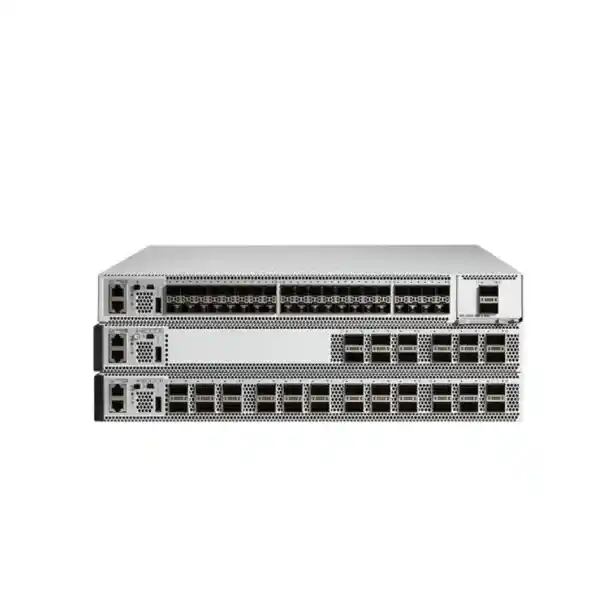
The Cisco C9550-48L4CD Smart Switch is built for organizations that need to aggregate a large number of high-speed fiber links without moving to a modular chassis. It combines forty-eight 50/25/10/1G downlink ports with four QSFP-DD uplink interfaces that can provide four 100/40G links or two 400G links, making it a practical fit for medium-to-large campus cores, distribution blocks, fabric border roles, and high-capacity aggregation designs.
For buyers in Tanzania, the most important question is not only whether the switch is fast enough. A successful deployment also depends on selecting compatible optics and fiber, matching uplink speeds to the rest of the network, planning resilient power and airflow, choosing the correct licensing model, checking software compatibility, and confirming whether the current rack and upstream infrastructure can support the planned migration. This page focuses on those practical decisions so that the switch can be evaluated as part of a complete network design rather than as an isolated hardware purchase.
Request a bill-of-materials review that includes the C9550-48L4CD, optics, power redundancy, licensing, software release, cabling, and uplink design before placing an order.
Quick specification summary
| Model | Cisco C9550-48L4CD Smart Switch |
|---|---|
| Primary role | Fixed enterprise core, distribution, aggregation, and fabric border |
| Downlink ports | 48 × SFP56 supporting 50/25/10/1G |
| Fixed uplinks | 4 × QSFP-DD; design options include four 100/40G or two 400G uplinks |
| System bandwidth | Up to 3.2 Tbps |
| Forwarding rate | Up to 2.6 Bpps |
| Data plane | Cisco Silicon One E104 ASIC with 64 MB low-latency shared-memory buffer |
| Control plane | AMD x86, up to 3.8 GHz, 4 cores; 16 GB DDR5; 18 GB flash |
| Optional local storage | Up to 960 GB SATA SSD for supported application-hosting use cases |
| Form factor | 1RU, approximately 4.39 × 44.45 × 46.1 cm including fan/tray handles |
| Weight | Approximately 9.45 kg with two power supplies and fans |
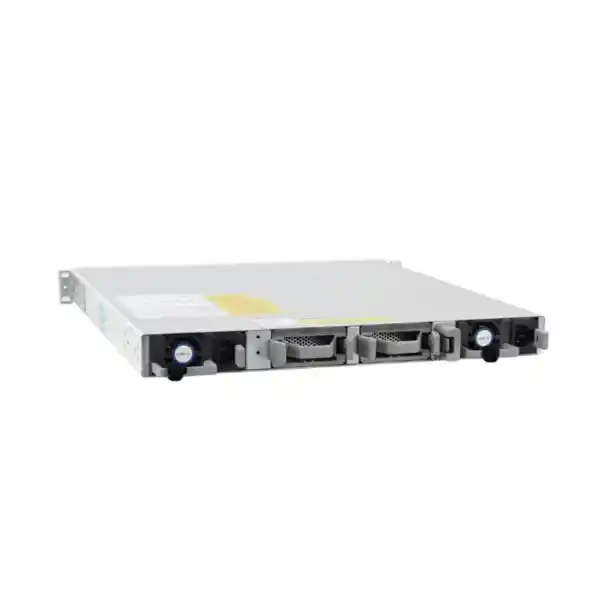
| Default power supply | C9K-PWR-750WAC; chassis has two power-supply bays |
Who should consider the C9550-48L4CD?
This model is designed for networks that have outgrown basic 10G aggregation or that need to consolidate many high-speed access, server, wireless, security, or distribution links into a compact core. It is particularly relevant where an organization wants the simplicity of a fixed switch but still needs substantial bandwidth headroom. With forty-eight multirate downlinks, a network team can connect a mixture of 1G, 10G, 25G, and 50G optical interfaces while planning higher-capacity 100G or 400G northbound connectivity.
A typical fit is a medium-to-large campus where several access or distribution switches are being consolidated into one redundant core pair. It can also fit a fabric border or aggregation role where routing scale, segmentation, telemetry, automation, and resilient forwarding are important. Cisco positions the model for core and distribution in medium-to-large enterprise campus environments, so it should be evaluated against the expected route count, MAC scale, uplink utilization, failure-domain design, and future port growth rather than chosen only from headline throughput.
The C9550-48L4CD is less attractive when the environment needs very large 100G port density, modular line-card expansion, or the maximum route and buffer scale available elsewhere in the C9550 family. It may also be excessive for a small site that only requires a handful of 10G uplinks. In those cases, a lower-density platform can reduce cost and operational complexity. The right selection begins with topology, traffic, resilience, and growth requirements.
Port architecture: dense 50G aggregation with 400G backbone options
The defining feature of the C9550-48L4CD is its combination of forty-eight SFP56 downlink ports and four QSFP-DD uplink interfaces. The SFP56 ports support 50G, 25G, 10G, and 1G speeds, allowing the switch to aggregate multiple generations of campus infrastructure. This is valuable during phased upgrades because not every connected switch or appliance needs to move to the same speed on day one. A design can retain selected 10G or 25G links while introducing 50G where new access or distribution equipment can use the additional bandwidth.
The QSFP-DD uplink side is intended for high-bandwidth backbone connectivity. Cisco documents the platform as supporting four 100/40G or two 400G fixed uplinks. That gives architects several ways to build the northbound layer: multiple 100G links for diverse upstream paths, 400G connectivity when the adjacent platform supports it, or a design that combines link redundancy and traffic engineering around the organization’s actual topology. The correct choice should be based on traffic flows, oversubscription targets, optical reach, path diversity, and the capabilities of the device at the other end.
Port speed alone does not determine whether an optic will work. Buyers should verify the exact transceiver product ID, connector type, wavelength, fiber type, maximum reach, software release, and peer-device support. The same nominal Ethernet speed can be delivered by different optical standards that are not interchangeable. For example, a short-reach multimode link and a long-reach single-mode link may both be 100G but require completely different optics and fiber plant. A purchase order that lists only “100G optics” is not detailed enough for a reliable deployment.
Performance, forwarding scale, and what the numbers mean
The C9550-48L4CD uses a Cisco Silicon One E104 ASIC and provides up to 3.2 Tbps of system switching capacity with forwarding performance up to 2.6 billion packets per second. Those figures place it well above conventional access switching and make it suitable for demanding aggregation and core roles, but capacity planning should still be done around real traffic. A switch with several terabits of switching capacity can still experience congestion if multiple high-speed inputs converge on a smaller set of uplinks or if traffic patterns create persistent hot spots.
The E104-based models provide 64 MB of dedicated low-latency shared-memory buffering. Buffer requirements depend on workload. Campus user traffic, voice, video, storage, backup jobs, large application transfers, and bursty server traffic can behave very differently. Network teams should consider not only average utilization but also microbursts, queue behavior, quality-of-service policy, and whether the network regularly concentrates traffic from many downlinks into a few uplinks. Where deep buffering is a major design requirement, compare the workload against other platforms rather than assuming all high-capacity switches behave the same.
Cisco publishes switching and routing scale for the E104 models that includes up to 64,000 MAC addresses and up to 512,000 longest-prefix-match IP routes in the relevant scale profile, with additional limits for host routes, multicast, ACLs, NetFlow, and other table resources. The platform also uses flexible SDM templates so hardware resources can be allocated according to different deployment priorities. These scale figures are important for large routed campus designs, segmentation-heavy environments, fabric border roles, and networks that collect detailed flow telemetry.
For procurement, treat “up to” figures as engineering limits rather than a promise that every feature combination reaches every maximum at the same time. Features can compete for hardware resources, software releases can change feature availability, and the selected SDM template matters. A design review should therefore document the expected number of routes, endpoints, VRFs, VLANs, ACL entries, NetFlow records, multicast groups, and security policies. That makes it possible to validate the intended configuration before the network is placed under production load.
High availability: build redundancy around the whole system
A core switch is only useful when the surrounding design is resilient. Cisco supports StackWise Virtual on the C9550 family, allowing two physical switches to operate with system-level redundancy while maintaining separate hardware. Stateful switchover is available with StackWise Virtual, and Cisco also lists in-service software upgrades and software maintenance upgrades among the platform’s resilience capabilities. These features can reduce disruption, but they do not replace good topology design or change-management discipline.
When deploying a redundant pair, plan independent power feeds where possible, diverse fiber paths, redundant uplinks, appropriate port-channel design, and failure scenarios for links, optics, line-side devices, power supplies, and an entire switch. The objective is to prevent a single failure from isolating an important part of the campus. A pair of core switches connected through the same patch panel, the same upstream device, the same power circuit, or the same physical conduit may look redundant on a diagram while still sharing a real-world point of failure.
The chassis has two power-supply bays and Cisco lists one power supply as the minimum operating requirement. For the C9550-48L4CD, the default power supply is the C9K-PWR-750WAC. Supported combinations include two 750W AC supplies as well as specific AC/DC combinations. If the business requirement calls for power redundancy, the second supply and the upstream electrical design should be included in the bill of materials. Redundant supplies connected to the same failing circuit do not provide the same protection as supplies fed from independent protected sources.
Cooling also belongs in the availability plan. The 1RU chassis uses five fan trays, and Cisco supports airflow options matched to the power-supply and fan configuration. Rack placement should preserve the intended airflow direction and avoid mixing incompatible cooling patterns. Before installation, verify cabinet depth, blanking, room cooling, inlet temperature, cable management, front and rear clearance, and access for replacing field-serviceable components.
Current software caveats to check before finalizing optics and cabling
Cisco’s current IOS XE 26.2.x release notes list several limitations that can directly affect a procurement plan. Breakout cables are listed as unsupported, the CVR/QSA adapter module is listed as unsupported, and the SFP-10G-T-X module cannot operate in 1G mode on the C9550 in that release. These points are easy to miss when a design assumes that a form factor or adapter commonly used on another Cisco platform will behave the same way here.
Software support evolves, so these limitations should be rechecked against the exact IOS XE release selected for deployment. Do not purchase breakout assemblies, adapter modules, or copper transceivers for this switch based only on generic Cisco compatibility or experience with another model. Validate the exact C9550-48L4CD hardware, transceiver or cable product ID, and target software release together. This is especially important for refresh projects that intend to reuse optics or cabling from an existing core.
Security and segmentation capabilities
The C9550 platform is designed to combine high-speed forwarding with enterprise security functions rather than forcing all security decisions into external appliances. Cisco lists hardware ACL enforcement, VXLAN-based segmentation, Cisco TrustSec, line-rate MACsec, and support for advanced encryption. The platform also includes capabilities tied to Cisco’s broader security architecture, including inline threat protection and post-quantum cryptography functions where supported by the relevant software, license, and deployment design.
For a campus core, the practical value is policy enforcement close to the traffic path. Segmentation can separate business units, guest services, operational technology, servers, voice, wireless, and other trust zones while routing between them according to policy. ACL scale, routing scale, VRF design, identity integration, and encryption requirements should all be treated as architecture inputs. Security features can affect table allocation, licensing, operational procedures, and troubleshooting, so the desired policy model should be defined before hardware is ordered.
MACsec can protect Ethernet links against interception or tampering when the complete link design supports it. It is useful on sensitive inter-building or inter-device connections, but it should not be assumed to replace IPsec, application encryption, or endpoint controls. The encryption method should be chosen according to where the trust boundary sits and what threat the organization is trying to address.
Security also depends on software lifecycle and operational hygiene. Plan authenticated administrator access, centralized identity where appropriate, secure management protocols, logging, configuration backup, image verification, vulnerability review, change control, and timely software maintenance. A high-performance switch can still become a risk if management interfaces are exposed, credentials are shared, old software is left unpatched, or monitoring is incomplete.
Cisco IOS XE, automation, telemetry, and application hosting
Cisco IOS XE provides the software foundation for the C9550-48L4CD. Cisco lists Layer 2 switching, IP routing, IPv6 routing, multicast, enterprise quality of service, Flexible NetFlow, SD-Access, BGP EVPN, programmability, and out-of-band management among the platform’s supported capabilities. The exact feature set should be checked against the selected software version and license because platform support does not automatically mean every function is active in every commercial configuration.
Flexible NetFlow can provide detailed traffic visibility for capacity analysis, security investigation, and application troubleshooting. Streaming telemetry and programmable interfaces can feed network-management or automation platforms with more structured data than traditional manual polling alone. In a growing campus, this can improve operational consistency by reducing repetitive command-line tasks and enabling configuration templates, compliance checks, state monitoring, and faster fault isolation.
The control plane uses an AMD x86 processor with four cores and 16 GB DDR5 memory, while the E104 platform includes 18 GB of flash. Cisco also supports optional SATA SSD storage up to 960 GB and allocates resources for supported application-hosting use cases. Application hosting can be useful when a validated design benefits from running approved services close to the network, but the SSD is an option and should not be assumed to be present in every ordered unit.
Automation should be introduced with guardrails. Treat configuration as controlled infrastructure, use role-based access, test changes before broad rollout, capture backups, and separate monitoring from write access where practical. API access can increase operational speed, but it can also increase the blast radius of a mistake if credentials or automation logic are poorly controlled.
Licensing: include software entitlement in the design, not as an afterthought
The C9550 family uses Cisco’s current networking licensing model. Cisco documents support for Cisco Networking Subscription licensing and Meraki Classic Licensing on the C9550 Series, with the C9550 supporting the Switching Advantage tier for the operating-system license. Subscription options are mapped to fixed-core sizes, and license management can involve Cisco Smart Accounts and Virtual Accounts depending on the chosen model.
Before requesting a quote, define how the switch will be managed, what advanced features are required, whether the organization already has a Cisco Smart Account, and whether licensing must align with an existing enterprise agreement or Meraki environment. The hardware price alone is not a complete project cost. Subscription term, support tier, software entitlement, management platform, implementation effort, optics, spare parts, and power redundancy may all affect the total commercial scope.
Licensing rules can change and entitlement can depend on the ordered package, so the final quote should show the specific license product, term, and management model rather than a generic line such as “Cisco license included.” That makes renewal planning clearer and reduces the risk of discovering after installation that a required management or security capability was not part of the selected package.
Physical, rack, power, and cooling planning
The C9550-48L4CD is a 1RU fixed switch measuring approximately 4.39 cm high, 44.45 cm wide, and 46.1 cm deep including fan and tray handles. Cisco lists a weight of approximately 9.45 kg with two power supplies and fans. These dimensions make the switch compact for its port density, but rack planning still needs to account for front and rear cable bend radius, transceiver clearance, power cords, airflow, service access, and any cable-management hardware.
The default power supply for this model is a 750W AC unit, and the chassis provides two power-supply bays. Cisco’s thermal data lists approximately 2000 BTU per hour for the C9550-48L4CD with the 750W AC power-supply configuration. Facilities teams should use the vendor’s current installation guide and site electrical standards to size circuits and cooling, rather than equating power-supply rating directly with constant switch consumption.
For Tanzania deployments, power quality and continuity should be considered as part of the network architecture wherever the site experiences utility variation or generator transfer events. The exact UPS size, runtime, protection level, and electrical design depend on the complete rack load and local site conditions. A network-core project should therefore be coordinated with facilities or electrical specialists instead of adding a UPS as a generic accessory at the end of the procurement process.
Cooling is equally important. Dense optical interfaces and high-throughput switching create a meaningful heat load. Keep airflow paths clear, use the correct fan direction, maintain blanking where required, and avoid placing hot exhaust from one device directly into the intake of another. Environmental alarms should be integrated into monitoring so rising temperature or fan issues are detected before they become outages.
Tanzania deployment checklist: plan the network around real site conditions
An enterprise core refresh in Tanzania should begin with a site survey and topology review. Confirm the number of buildings, access closets, server rooms, data-center connections, internet edge links, WAN handoffs, wireless controllers, firewalls, and high-bandwidth application paths. Measure existing uplink utilization and identify which links are constrained during peak periods. This provides evidence for deciding where 25G, 50G, 100G, or 400G is justified rather than selecting speeds only because the interfaces are available.
Fiber infrastructure is often the next constraint. Document fiber type, connector type, patch-panel path, strand availability, approximate distance, splice points, and any known loss issues. Existing multimode cabling may be suitable for some short-reach upgrades but not for every target speed or distance. Single-mode fiber can support long-reach options, but optics must still match both ends. When the cabling record is incomplete, optical testing before procurement can prevent expensive transceiver changes later.
The design should also separate campus resiliency from carrier resiliency. A redundant core pair does not create redundant internet or WAN service unless the upstream paths are also diverse. Where business continuity depends on external connectivity, review provider handoffs, physical entry paths, edge routers or firewalls, addressing, routing policy, and power dependencies. The C9550-48L4CD can form a strong campus aggregation layer, but it should be integrated into the larger availability design.
Finally, define operational ownership. Decide who will manage IOS XE, who can approve changes, how configurations are backed up, where logs and telemetry are collected, how software updates are tested, and what escalation process applies during an outage. This is especially important for a new platform generation because the fastest hardware provides little value if the support team does not have a repeatable operating model.
Migration planning from an existing campus core
A core migration should be treated as a controlled service change, not simply a hardware replacement. Start by collecting current configurations, interface descriptions, VLANs, routed interfaces, static routes, dynamic-routing neighbors, VRFs, ACLs, multicast settings, quality-of-service policy, spanning-tree roles, port channels, monitoring integrations, DHCP relay, time synchronization, authentication settings, and management-plane controls. The goal is to distinguish requirements that must be preserved from legacy configuration that should not be copied forward.
Build a port-mapping worksheet that records the existing interface, remote device, speed, optic, fiber path, VLAN or routed purpose, redundancy group, and planned new interface. This exposes missing optics and cabling decisions before the maintenance window. It also helps identify old links that should be retired, consolidated, or upgraded rather than reproduced one-for-one.
Next, test the target software version and critical features in a lab or staging environment where feasible. Verify routing adjacencies, first-hop redundancy, StackWise Virtual design, port channels, access control, telemetry, management authentication, and monitoring. Confirm whether any existing optics or adapters are unsupported on the new platform. The current IOS XE 26.2.x notes are particularly important because breakout and QSA/CVR assumptions can change the physical migration plan.
The change plan should define a sequence, success criteria, rollback trigger, rollback method, owners, and expected validation tests. After cutover, verify more than link status. Check routing tables, neighbor relationships, VLAN reachability, application paths, DNS and DHCP behavior, wireless and voice services, internet access, monitoring, logging, redundancy state, error counters, CPU, memory, temperature, and interface utilization. A structured validation checklist reduces the chance that a partially working service is mistaken for a successful migration.
Where downtime must be minimized, build as much of the new core as possible in parallel, pre-stage configurations, label cables and optics, and perform a rehearsal with the implementation team. The exact method depends on the existing topology, but preparation usually provides more value than trying to make the maintenance window faster through improvisation.
How the C9550-48L4CD compares within the C9550 family
The C9550 Series includes several fixed models aimed at different density and scale requirements. The C9550-24L4CD provides the same general multirate downlink concept at lower port density. The C9550-48L4CD doubles that downlink count to forty-eight and is positioned as a balanced option for medium-to-large enterprise core and distribution. The C9550-32C focuses on 100/40G QSFP connectivity. Larger 2RU models provide higher density or scale, including the C9550-96L4D and C9550-64C-XL.
Choosing between these models is not only a question of port count. Compare required interface types, desired uplink speeds, current and projected route scale, buffering needs, rack space, power, expansion strategy, and the number of devices the network can realistically consolidate. A design that needs thirty 100G connections should not force those requirements into a model optimized for multirate SFP56 downlinks. Conversely, a campus with many 10/25/50G fiber links may find the forty-eight-port SFP56 architecture much more efficient.
| Model | Typical reason to consider it | Planning focus |
|---|---|---|
| C9550-24L4CD | Lower-density multirate fixed core | 24 × 50/25/10/1G class downlinks |
| C9550-48L4CD | Balanced density for medium-to-large campus aggregation | 48 multirate downlinks with high-speed QSFP-DD uplinks |
| C9550-32C | Dense 100/40G fixed aggregation | QSFP-oriented port requirements |
| C9550-96L4D / C9550-64C-XL | Higher density or larger-scale fixed core | 2RU form factor, greater scale, different port mix |
Bill of materials: what to confirm before requesting a final quote
A complete quote should identify more than the switch chassis. For each C9550-48L4CD, confirm the software and license package, subscription term, power-supply configuration, fan and airflow direction, required optics or direct-attach cables, fiber patch cords, rack accessories, console or management requirements, and any optional SSD. If the design uses a redundant core pair, the quote should clearly show quantities for both systems and the components that provide link and power diversity.
Do not assume a generic SKU or bundle contains every component needed for production. The model identifier C9550-48L4CD is a Cisco product ID, but the target Tanzania listing SKU should only be populated when it is explicitly verified for that exact listing. A quote should therefore rely on the verified commercial record rather than inventing a local SKU from the model number.
Design questions to answer before purchase
- What role will the switch perform? Core, distribution, aggregation, fabric border, or a combination affects routing scale, uplink design, redundancy, and policy.
- How many ports are needed now and in three to five years? Include growth, spare capacity, and migration overlap rather than sizing only to the current occupied ports.
- Which links genuinely need 50G, 100G, or 400G? Use measured traffic and application requirements to avoid unnecessary optics cost or under-sized uplinks.
- Can the existing fiber plant support the planned optics? Validate fiber type, distance, connectors, patching, loss budget, and physical path diversity.
- What is the resilience target? Decide whether the design needs dual switches, dual power, dual upstream devices, diverse fiber paths, and independent electrical feeds.
- Which software features are required? Document routing, EVPN, SD-Access, security, telemetry, automation, multicast, QoS, and management requirements before selecting licenses.
- What operational platform will manage the switch? Align Cisco Smart Account, subscription, cloud or on-premises management, monitoring, logging, authentication, and configuration backup.
- Does the rack environment fit? Check rack depth, cable space, airflow, cooling, power, UPS capacity, grounding, and service clearance.
- Are planned optics and adapters supported on the target IOS XE release? Recheck current compatibility data immediately before ordering.
- How will migration be tested and rolled back? Predefine validation and rollback so the maintenance window is controlled rather than improvised.
Frequently asked questions
Is the Cisco C9550-48L4CD an access switch?
It is primarily positioned as a fixed core and distribution switch for medium-to-large enterprise campus networks. It can aggregate access switches, but its high-speed optical port mix and routing scale are intended for the aggregation and core layers rather than typical edge-user access.
How many 400G uplinks can it use?
Cisco documents the model with four QSFP-DD uplink interfaces and an uplink design of four 100/40G or two 400G fixed uplinks. The exact optical modules and peer compatibility must be validated for the planned software release and link distance.
Can the 48 downlink ports run at different speeds?
The SFP56 downlink ports support 50G, 25G, 10G, and 1G speeds. This supports mixed-speed migration, but each specific optic or cable must be supported at the intended speed and software release.
Does the switch support redundant operation?
Yes. The C9550 platform supports StackWise Virtual, stateful switchover with StackWise Virtual, redundant hardware components, and software mechanisms such as ISSU. A resilient solution still requires correct topology, diverse links, appropriate power design, and operational testing.
Does the chassis include two power supplies?
The chassis has two power-supply bays, while Cisco lists one supply as the minimum and the 750W AC unit as the default for this model. If the project needs power redundancy, confirm the second supply and electrical feed in the quoted bill of materials.
Is SSD storage included?
Cisco supports up to 960 GB of SATA SSD storage for application-hosting use cases, but the ordering guide treats SSD as an option that must be selected during ordering. Do not assume it is included unless the exact configuration says so.
What software does the C9550-48L4CD run?
The platform runs Cisco IOS XE. Current Cisco documentation lists IOS XE 26.2.1 as the minimum software requirement for the C9550 Series, with the exact introductory release depending on the model. Feature availability should be checked against the release and license selected for the project.
Can existing optics from an older Cisco switch be reused?
Possibly, but reuse should never be assumed. Check each transceiver product ID in Cisco’s compatibility information for the C9550-48L4CD and the intended software release. Also confirm speed, fiber type, reach, connector, and compatibility at the remote end.
Does it support breakout cables?
Cisco’s current IOS XE 26.2.x release notes list breakout cables as unsupported on the C9550 Series. Because software support can change, verify the latest release notes immediately before procurement rather than designing around an assumption.
What should be provided when requesting a quote in Tanzania?
Provide the required quantity, desired redundancy, current network topology, downlink and uplink speeds, fiber types and distances, optic requirements, software features, management model, subscription term, rack and power information, and any migration or implementation services required. This allows the quote to cover the complete deployable configuration rather than only the chassis.
Is the C9550-48L4CD the same as a Catalyst 9500 switch?
No. The C9550-48L4CD belongs to Cisco’s newer C9550 Series Smart Switches. Its model number, software support, port architecture, licensing, and compatibility should be validated against C9550 documentation rather than assumed from older Catalyst 9500 platforms.
Request a Cisco C9550-48L4CD configuration review
For a reliable enterprise-core deployment, confirm the entire design before ordering: chassis quantity, 50/25/10/1G downlinks, 100G or 400G uplinks, optics, fiber, power redundancy, airflow, rack fit, IOS XE release, Cisco licensing, routing scale, segmentation, monitoring, and migration requirements.
Share your topology and target link speeds to prepare a bill of materials aligned with the intended Tanzania deployment. Final price, stock, delivery timing, warranty, support entitlement, and commercial availability should be confirmed on the current quote rather than assumed from generic product information.




Reviews
There are no reviews yet.