
CISCO CATALYST 1200 • BUSINESS ACCESS SWITCHING
Cisco Catalyst C1200-16P-2G Network Switch
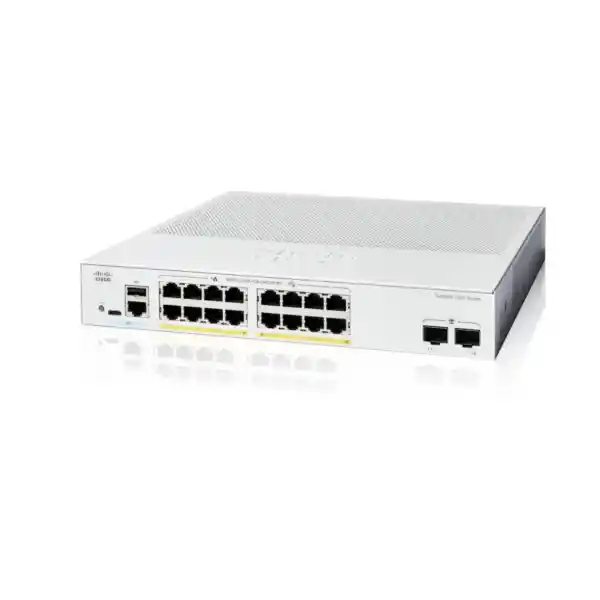
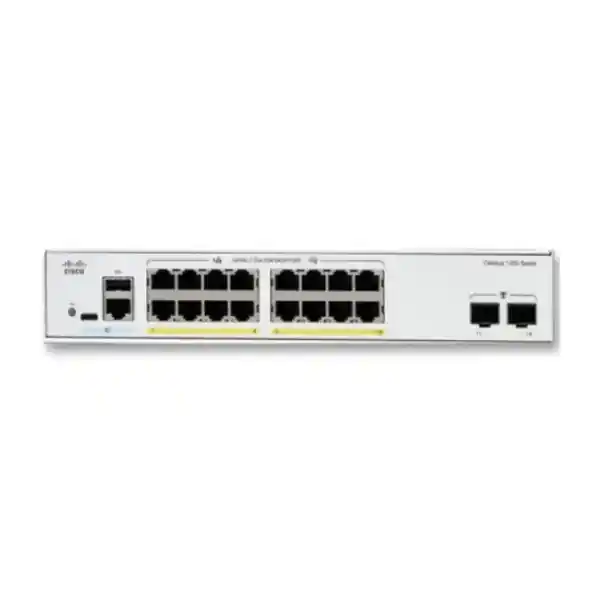
Connect office users and compatible powered devices through one compact managed switch. The Cisco Catalyst C1200-16P-2G suits smaller business networks that need Gigabit connectivity, practical traffic separation and centrally supplied Ethernet power. It provides 16 copper access ports, two Gigabit SFP uplinks and a shared 120W PoE budget, giving buyers a clear starting point for an office, branch or dedicated equipment cabinet.
Buying for a Tanzania project? Request a quotation from FourTeck Tanzania with your endpoint list, maximum power requirements and uplink details so the proposed equipment can be checked against the actual installation.
Verified hardware at a glance
| Specification | Detail |
|---|---|
| Manufacturer / series | Cisco / Catalyst 1200 |
| Model | C1200-16P-2G |
| Copper interfaces | 16 × 10/100/1000 Ethernet, PoE+ capable |
| Uplink interfaces | 2 × Gigabit SFP |
| PoE standards and limit | IEEE 802.3af / 802.3at; up to 30W per copper port within the shared 120W budget |
| Switching capacity | 36 Gbps |
| Forwarding rate | 26.78 million packets per second, measured with 64-byte packets |
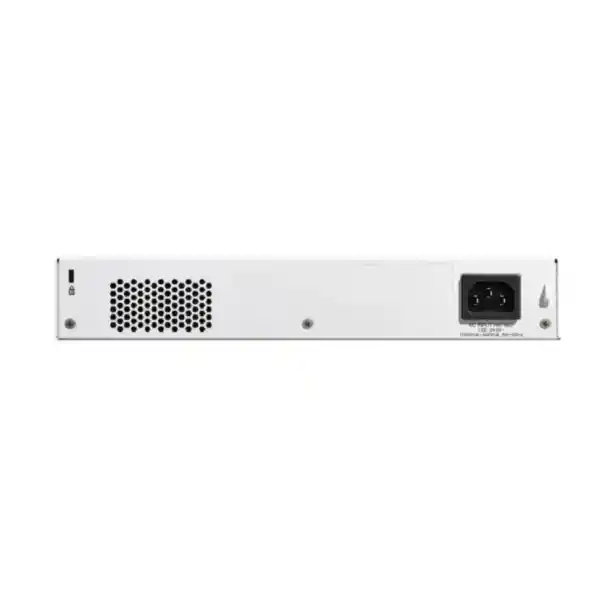
| Cooling / mounting | Fanless; rack-mountable |
| Dimensions, W × D × H | 268 × 297 × 44 mm |
| Power input | Internal supply, 100–240V AC, 50–60 Hz |
The forwarding figure describes packet handling under the stated test condition. It does not represent internet bandwidth, a faster individual port or a guarantee of application throughput. Check the complete proposed configuration, including optics and connected devices, before placing an order.
Is this the right switch for your network?
Begin with the devices that need a wired connection and the work they perform. A small office may have several computers, a printer, a few IP phones and wireless access points. A separate equipment cabinet may serve cameras and a recorder connection. These arrangements have different power and traffic patterns even when their cable counts look similar. Selecting by the number of occupied sockets alone can leave important requirements unresolved.
This model is worth considering when the site needs a moderate number of Gigabit access connections, a manageable mix of powered endpoints and a simple connection back to the wider LAN. Its quiet design is also useful when equipment sits near people. Treat it as one part of the network: the internet gateway, wireless system, endpoint configuration and cabling still determine whether users receive the service they expect.
- A practical fit: an office access layer where the planned endpoint power load fits the available budget and the uplink can carry the measured traffic.
- Check more carefully: a cabinet already close to full occupancy, a growing camera estate, or access points with demanding power and wired-speed requirements.
- Choose around the application: if the design depends on faster uplinks, higher endpoint speeds or enterprise resilience features, define those requirements before selecting the hardware.
For a replacement project, record what the old switch actually does. A unit with the same number of front-panel ports may still differ in uplink speed, management behaviour or available power. A short requirement sheet makes those differences visible before procurement, when changing the selection is easier.
Plan the PoE budget before allocating ports
Power over Ethernet carries data and electrical power over the Ethernet connection to a compatible endpoint. It can simplify placement of phones, access points and cameras because power is supplied from the network cabinet. Compatibility still depends on the endpoint power standard and demand. Confirm the exact device model rather than assuming that every product described as PoE uses the same electrical arrangement.
A per-port limit and a shared budget are different
There are two checks: whether each endpoint can be powered by an individual port, and whether all powered endpoints fit the total allocation. A port capable of supplying up to 30W does not reserve that amount for every connected device. Sixteen allocations of 30W would total 480W, well above this model’s 120W shared allowance. Use the relevant switch-side allocation when preparing the schedule; endpoint consumption and power reserved by the switch can differ.
| Example item | Calculated allocation |
|---|---|
| 6 phones at 7W each | 42W |
| 2 access points at 20W each | 40W |
| 2 cameras at 12W each | 24W |
| Combined illustrative allocation | 106W across 10 powered ports |
| Unallocated allowance in this example | 14W before any additional design reserve |
These figures are planning assumptions, not specifications for any particular phone, access point or camera. They illustrate why spare sockets do not necessarily mean spare power. Replace every assumed value with a verified requirement, including cable losses where relevant, and check the switch’s actual negotiation and allocation behaviour during commissioning.
Allow for changing operating conditions
Some endpoints draw more power when extra functions are active. A camera may enable infrared illumination; an access point may change its radio configuration; an attached accessory may alter the demand of a phone. Ask for the manufacturer’s maximum requirement and check whether a device reduces functionality when supplied with less power. Build the equipment schedule around the required operating mode rather than a convenient idle reading.
Also agree which services matter most during an outage or a capacity shortage. The PoE configuration provides power-management controls, but those controls need an intentional policy. Record critical endpoints, review the configured priorities and test the intended result in a maintenance window. Power scheduling can be useful in some offices, while cameras or communication devices may need continuous operation. Make that distinction in the requirement before applying schedules.
A UPS supporting the switch can keep compatible powered endpoints supplied while its battery capacity lasts. Runtime must account for the switch itself, the connected PoE load and every other device on the UPS. Backing up this cabinet alone will not keep an upstream router, internet circuit termination or remote server available unless those dependencies have appropriate power continuity too.
Allocate access ports and growth space
Prepare a port map with one row for each physical connection. Include computers, printers, phones, access points, cameras, local appliances and links to other switches. Mark which connections need PoE and which simply use Ethernet data. This separates the socket requirement from the electrical requirement and makes it easier to see whether one cabinet can serve the proposed area.
Count a phone with a connected computer according to the actual topology. Some phones include a downstream Ethernet connection for a computer, but its speed and operation depend on the phone model. Confirm that arrangement rather than assuming one desk always requires one switch port. Include meeting equipment, temporary service connections and planned additions that are already part of the business requirement.
Keep a deliberate growth allowance. If all copper ports are assigned on the first day, even a small expansion may require another switch, extra uplink capacity and another power source. Equally, buying a larger platform without a credible expansion need can tie up budget. Compare the present port map with a realistic future layout and select a size that accommodates both.
Label cabinet patch leads and room outlets consistently. A useful port description identifies a location and a device role without relying on one employee’s name. Keep unused connections documented and administratively disabled where appropriate. A clear map reduces the time spent tracing cables when a user moves desks or a powered device needs attention.
Design the uplink around traffic and media
The two SFP uplinks are Gigabit interfaces. Select supported transceivers for the required connection, and verify both ends of the link. A family datasheet may list optics for several different switch variants, so the presence of a 10G module elsewhere in that document does not make it suitable for this model. Confirm interface speed as well as module compatibility.
For fiber, record whether the installed cable is single-mode or multimode, its route length, connector arrangement and the optic fitted at the other end. A correct module choice must match the complete optical path. Include patch leads and any required adapters in the quotation, and ask whether the proposed transceivers are included or supplied separately. Avoid leaving those details to installation day.
Estimate how much traffic crosses the cabinet uplink. Camera streams going to a recorder elsewhere, access-point users reaching central services and office file transfers may all share it. Local traffic between devices attached to this switch follows a different path. Mapping those flows helps distinguish an access-port limitation from an uplink bottleneck or an application problem.
Where appropriate, link aggregation can combine compatible links into a logical connection. Both ends need a matching design and configuration. Aggregation distributes traffic according to its forwarding method; a single transfer should not be assumed to gain the combined speed of every member link. It also consumes physical interfaces that could otherwise be used for a different purpose.
If the expected workload requires a 10G uplink, choose a switch with the required interface capability. A sound purchase decision starts with the required traffic path and leaves the model selection open until the bandwidth, media and resilience requirements are understood.
Separate device groups with a clear VLAN plan
VLANs let the access network carry separate logical groups over shared switching infrastructure. This is useful when office computers, voice devices, cameras and management interfaces require different treatment. The Catalyst 1200 administration interface supports access and trunk configurations, allowing endpoint connections and links carrying multiple VLANs to be configured for their intended roles.
Plan the VLAN identifiers, IP subnets, default gateways and DHCP responsibility together. A VLAN name alone does not provide an address service or determine which other networks it may reach. If wireless access points carry several SSIDs, confirm how those networks are tagged on the wired connection. A mismatch between the access point and switch can leave one wireless network working while another fails.
A simple requirement might place staff devices, voice, surveillance and network management in separate groups. Treat that as a design example, not a compulsory numbering scheme. Record which services each group needs: a camera may need its recorder and time source, while a staff computer may need printers and business applications. Use those relationships to guide routing and access policy.
Decide where traffic between VLANs will be routed. This switch supports static routing, but the appropriate location depends on the organization’s inspection and security requirements. If traffic must pass through a firewall for policy enforcement, preserve that path in the design. Enabling a local route without reviewing the consequences can change how security controls see the traffic.
Keep business voice traffic predictable
A phone network needs more than an Ethernet socket that provides power. Confirm the handset’s PoE requirement, its provisioning method, the voice VLAN arrangement and the route to the telephone system. Include any computer connected through the handset in the access-port design. This avoids discovering during a cutover that desk connectivity depends on an untested phone setting.
Quality of service can give selected traffic different treatment when links become busy. The switch provides controls for traffic classification and queue mapping, including DSCP-based handling. Apply a consistent policy across the relevant network path rather than expecting one switch to control congestion everywhere. Decide where traffic markings are trusted and where they should be assigned by the network.
For example, a large upload and an active phone call may compete for the same outbound link. A properly designed queue policy can influence how that switch handles the competition. It cannot repair packet loss elsewhere, create extra internet capacity or remove delay introduced by a remote service. Test the phone system during representative background traffic to understand the complete result.
Agree acceptance criteria that users can recognize: phones register, inbound and outbound audio works, transfers behave as required and normal data use can continue during calls. Include any business-critical handset accessories in the test. If the deployment uses a hosted voice platform, coordinate its network requirements with the gateway and service configuration before treating a successful power-up as a completed installation.
Connect cameras and Wi-Fi with their full requirements in view
Surveillance connections
For a surveillance cabinet, list every camera model and the destination of its recordings. Check the maximum power requirement for the operating features you will use, including illumination or other accessories. Then identify which camera streams leave this switch and which remain within the local network. This produces a more useful requirement than simply asking how many cameras the switch can support.
Recording reliability also depends on the recorder, storage and network path. Consider the number of simultaneous streams, configured bit rates, viewing sessions and any remote access. Keep cameras in the appropriate network group and restrict access according to the organization’s policy. A managed access switch can support that design, while recording retention and image quality remain functions of the complete surveillance system.
Wireless access-point connections
An access point brings two separate requirements to the switch: wired bandwidth and electrical power. Check both against its manufacturer’s documentation. A newer radio standard does not by itself prove that a Gigabit Ethernet connection is sufficient for the intended workload. Likewise, a device may advertise PoE operation yet require a higher power class for all radios or accessories to function.
Where an access point serves staff and guests, plan the wired VLANs together with the SSID configuration and gateway policy. Keep its management access separate where the design calls for that. The switch does not replace the access point, wireless planning or wireless management platform. Validate coverage, client experience and isolation using the actual access-point model and configuration before signing off the project.
Apply access controls that the team can maintain
The platform includes tools such as 802.1X authentication and access control lists. Those capabilities are useful when connected to a clear access policy. For 802.1X, confirm endpoint support, RADIUS services, credentials or certificates, and the expected behaviour if authentication infrastructure is unavailable. A switch setting alone does not supply the identity system or configure every client.
Introduce authentication in a controlled pilot. Test a managed computer, an approved device that cannot use the same authentication method and an unauthorized connection. Record the expected outcome for each. Include recovery access for administrators before changing production ports, especially where an incorrect policy could prevent the team from reaching the switch.
An ACL can filter traffic using defined matching rules. Write the required communication paths in plain language before translating them into a configuration. For example, identify which staff group may reach a recorder interface and which management host may administer network equipment. Test both permitted and denied traffic so that a rule set is checked for its intended effect.
Keep the policy small enough to review. Every exception should have a purpose, an owner and a reason to remain. Protect management access, maintain controlled administrative credentials and review unused services. Restrict physical access to the cabinet as part of the same operational plan. These measures work together; no single switch feature establishes a complete security outcome for the business.
Manage the switch and preserve a recoverable configuration
The built-in browser interface provides a practical route for configuration and monitoring. Cisco also lists Cisco Business Dashboard and the Cisco Business mobile app among the series management options. Select the operating approach that fits the support team, and confirm software-version compatibility and any management-platform requirements before adding the switch to an existing workflow.
Define a stable management address and record how administrators will reach it. Use the appropriate protected management network and authorized access path. For remotely supported sites, document which upstream services must be working before the switch can be reached. The ability to open an interface during installation is useful, but it does not by itself provide a recoverable remote-support design.
Configuration persistence deserves an explicit handover check. Changes in the running configuration must be saved to the startup configuration to survive a reboot. After validating the settings, save them and create an appropriately protected backup. A configuration file may contain sensitive information, so control who can access it and how it is stored.
Record the installed firmware version, management details, port map and date of the accepted configuration. Review firmware changes against Cisco’s applicable release guidance and the organization’s change process. Schedule disruptive work, identify a recovery method and keep a known working backup before changes. These are practical requirements for operating the device, not reasons to leave updates unattended indefinitely.
If central monitoring is required, the switch supports SNMP, including SNMPv3. Agree which events and measurements matter, which system receives them and who responds. A monitoring platform that collects data without an assigned owner can leave an outage unnoticed despite apparently successful setup.
Check cabinet space, ventilation and power continuity
A fanless switch is attractive near desks, in smaller equipment areas and in other locations where fan noise would be distracting. It still produces heat and needs suitable ventilation. Leave the clearances required by the installation guidance, keep ventilation openings unobstructed and assess the enclosure with all its equipment operating rather than judging it while the cabinet is empty.
Measure more than the chassis. Allow for power connections, patch leads, fiber bend radius, mounting hardware and access for maintenance. Confirm that the proposed mounting arrangement is suitable for the switch and cabinet, and ask the quotation to identify the included accessories. Rack-mountable equipment still needs the correct physical installation components.
The electrical plan should identify the available supply, suitable power lead, distribution arrangement and UPS where required. Check the actual installation rather than assuming the correct plug or backup equipment will arrive with the switch. Use competent personnel for electrical work and keep network maintenance access practical.
For a Tanzania site, provide the real site location and installation conditions when requesting the quotation. A conditioned office cabinet and an exposed equipment area present different requirements. Do not infer industrial or outdoor suitability from the metal enclosure or the presence of fiber ports. Review temperature, moisture, dust, physical protection and cable routes for the intended location.
Finally, define what the business needs during a power interruption. Maintaining a local camera link, retaining internet access and keeping all office systems running are different objectives. The UPS and upstream power design should be selected around the required outcome and tested under the planned load.
Replace an existing switch with a planned cutover
Before disconnecting the current unit, capture its configuration and label the active connections. Record which ports carry ordinary endpoints, multiple VLANs, uplinks or aggregated links. Check whether there are unexpected downstream switches, phone pass-through connections or equipment powered by external injectors. These details explain why a cable-by-cable move can fail even when every new link light appears normal.
Separate reusable infrastructure from items that need revalidation. Existing fiber may be suitable while its transceivers are not. A cabinet may have enough height but insufficient space for the connected leads. The current PoE load may already be close to a limit that nobody has documented. Inspect these items before committing the replacement equipment to the change window.
Prepare the new configuration in advance where practical. Set management access, VLANs, port roles and the required security policy, then verify them against the approved network design. Do not assume a configuration copied from a different Cisco family will operate unchanged. The required behaviour should drive the new settings, and the relevant administration documentation should guide the implementation.
Schedule the move around business dependencies. Phones, cameras and wireless access points may all lose service while their connections change. Inform the responsible operators through the organization’s normal change process, agree the permitted interruption and identify which services must be tested first. Keep the old configuration and a documented rollback approach available until the replacement is accepted.
After the move, update the network records immediately. Record changed port assignments, optic details, device locations and any agreed exceptions. A successful migration includes documentation that the next technician can use, not just a network that appears operational at the end of the installation window.
Commissioning checks that show the network is ready
Agree the acceptance checks before installation so that the buyer and installer share the same definition of completion. A simple link-light inspection is insufficient for a network carrying power, segmented traffic and business applications. The following sequence can be adapted to the actual equipment list and change window.
- Verify the delivered items. Match the model, quantity and quoted accessories to the order. Record the device identity for asset management and check the chassis for visible shipping damage before installation.
- Check physical links. Confirm each intended connection negotiates as expected, inspect cabling and verify the optical path where used. Investigate unexpected speed or stability before applying application-level workarounds.
- Validate addressing and segmentation. Test DHCP or the planned static addressing, default gateways, required application access and the intended restrictions between groups. Check every SSID and voice network that crosses a trunk.
- Exercise the powered endpoints. Bring the planned devices online and inspect their negotiated power and normal functions. Include features that affect maximum demand and examine the remaining allocation for the approved design.
- Test business services. Verify calls, recordings, wireless access, printing and other required workflows with the responsible users. Run representative concurrent traffic rather than testing each service only in isolation.
- Confirm recovery and handover. Save the accepted configuration, create the backup, check authorized management access and complete any agreed restart or outage test in the approved window.
Use the available port-utilization and interface statistics to establish a baseline. Record significant error counters and traffic levels rather than immediately clearing evidence during a fault investigation. A short baseline gives later support work a point of comparison when someone reports a slow connection or a device begins repeatedly reconnecting.
Keep the results with the port map and configuration record. Acceptance notes should identify the equipment tested, any unresolved issues and the person responsible for follow-up. This makes future expansion more predictable because the original design assumptions and observed behaviour remain available.
Compare alternatives by the requirement that changes
| Requirement | Selection approach |
|---|---|
| More endpoint connections | Compare a higher-port-count switch and include its power, cabinet and uplink requirements. |
| Higher total PoE demand | Choose a model with sufficient shared power after checking individual endpoint compatibility. |
| Faster inter-switch traffic | Specify the required uplink speed and compatible media before selecting the switch. |
| Higher-speed wired access points | Match the access port speed and power capability to the access-point requirement. |
| Enterprise access architecture | Assess the required resilience, software features, management approach and operating skills as a complete design. |
Make comparisons using complete proposals. A lower hardware price may exclude optics, patch leads or required configuration work. A larger switch may offer capacity that the site will never use. The useful comparison is the total proposed equipment and scope against the requirement, including ongoing operation and a realistic allowance for expansion.
For a wider enterprise-access evaluation, review the Cisco Catalyst 9200 Series overview. Confirm the exact alternative’s specifications independently; a family name alone is insufficient to establish feature or installation compatibility.
What to include in a Tanzania quotation request
A clear request makes it easier to assess this switch against your actual deployment and to compare offers on the same basis. Provide the model name and quantity, then attach a simple connection schedule. For a replacement, include the current switch model and the functions that must be preserved.
- Endpoint schedule: device types, exact powered-device models, quantities, required operating modes and a reasonable growth allowance.
- Uplink details: upstream equipment, required speed, fiber type and route length, or the intended copper connection. State whether existing optics are expected to be reused.
- Network policy: required VLANs, gateway arrangement, voice services, management access and any authentication or access-control requirements.
- Physical conditions: cabinet dimensions, mounting plan, available power distribution, UPS objective and site conditions that affect installation.
- Commercial scope: required accessories, configuration work, acceptance tests, documentation and the site location for any requested service.
Ask the written quotation to confirm current TZS pricing, applicable charges, availability, estimated lead time, supplied accessories and the warranty or support terms offered. Those details need confirmation for the actual order. Keep the equipment requirement and any optional installation scope identifiable so that a procurement comparison reflects what each proposal includes.
If your application has a fixed deadline, state the required completion date and the consequences of interruption. That gives the quotation process a concrete scheduling requirement without assuming stock, delivery or deployment commitments that have not been agreed.
Frequently asked buying questions
Can all 16 ports supply 30W simultaneously?
No. The per-port capability remains subject to the shared PoE budget. A design requiring 30W on each of 16 ports would need 480W of switch-side allocation. Prepare the endpoint power schedule and leave an appropriate reserve rather than multiplying the port count by the maximum per-port figure and treating that as available power.
Does this switch provide 10G uplinks?
The C1200-16P-2G has two Gigabit SFP uplinks. A 10G requirement calls for a model with suitable faster interfaces and compatible optics. Check the exact product code in the quotation because different switches in the same family can have materially different uplink arrangements.
Can it power phones, cameras and wireless access points together?
It can serve a compatible mix when the individual power requirements, combined allocation and connection count fit the design. Verify the actual endpoint models and their required operating modes. The number of devices that can be powered depends on those requirements; one universal supported-device count would be misleading.
Is the fanless design suitable for an occupied office?
The absence of a cooling fan can help where fan noise is undesirable. Placement still needs ventilation, physical protection and access for maintenance. Check the complete cabinet arrangement, including heat from other equipment and space for connected cables, before deciding that a particular office location is suitable.
Can it separate staff devices, voice and surveillance?
A VLAN design can provide separate logical groups, with routing and access policy determining how those groups communicate. Include the gateway, DHCP services, wireless configuration and permitted application paths in the plan. Test both required connectivity and intended restrictions before handing the network over.
Are SFP modules, installation and commercial terms included?
Confirm each item in the written quotation. The required optics depend on the upstream device and cable path, while installation and configuration depend on the agreed scope. Request explicit accessory, pricing, availability and support details for the proposed order so there is a clear record of what will be supplied.
Request a C1200-16P-2G quotation
Share your connection schedule, powered-device models, uplink requirements and installation location with FourTeck Tanzania. Include any existing network details that affect replacement or expansion. Ask for a proposal that identifies the switch, compatible accessories and the requested configuration or installation scope, with current commercial terms confirmed in writing.
Start with the endpoint list. Confirm power and uplinks. Order against an agreed equipment schedule.




Reviews
There are no reviews yet.