
Business access switching • Tanzania
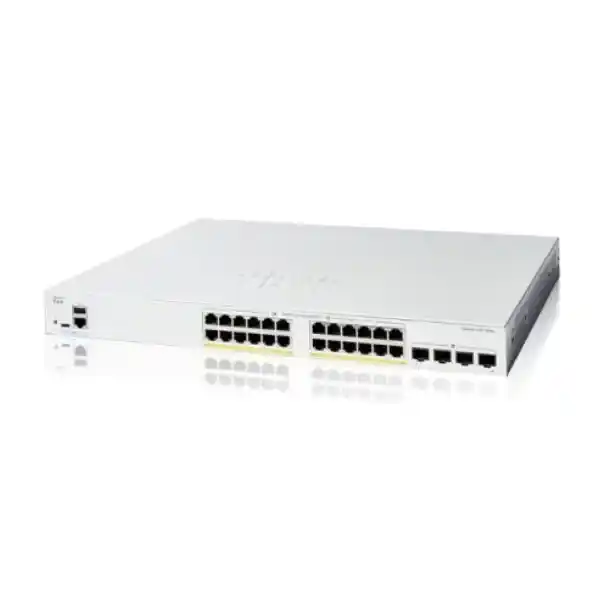
Cisco Catalyst C1200-24P-4G Network Switch
Connect business endpoints and power compatible network devices from a fanless Gigabit switch. Select your port count, PoE load and uplink capacity together, then request a quotation based on the complete installation.
A 24-port PoE access switch for a carefully sized business LAN
The Cisco Catalyst C1200-24P-4G Network Switch suits a business that needs Gigabit wired connections and centralized power for compatible IP phones, wireless access points and cameras. It combines 24 copper Ethernet ports with four separate Gigabit SFP uplinks, so an office can connect endpoints while retaining dedicated connections toward the wider network. Its 195 W PoE budget is shared across the powered devices. That combination makes endpoint count, device power requirements and upstream traffic the three most useful starting points for selection.
For a Tanzania project, begin with a port schedule rather than a broad request for a PoE switch. Record the equipment to be connected, which devices require power over the network cable, and where the switch will connect upstream. Request a quotation from FourTeck Tanzania using that information. A clear requirement allows the proposed switch, compatible optics, cabling and installation scope to be assessed together before an order is placed.
This model is particularly worth considering when a small or medium business wants VLAN separation, traffic prioritization and manageable access connections without specifying an enterprise campus platform. Its fanless hardware can also be useful near occupied areas. Selection still depends on the intended load: a quiet switch with enough physical ports can remain the wrong choice if the connected devices require more power or faster links than it provides.
Verified hardware at a glance
| Copper access ports | 24 × 10/100/1000 Mbps RJ-45 |
|---|---|
| Dedicated uplinks | 4 × Gigabit SFP |
| Power over Ethernet | IEEE 802.3af PoE and 802.3at PoE+ |
| Shared PoE budget | 195 W; up to 30 W per supported copper port within that total |
| Switching capacity | 56 Gbps |
| Forwarding rate | 41.67 million packets per second with 64-byte packets |
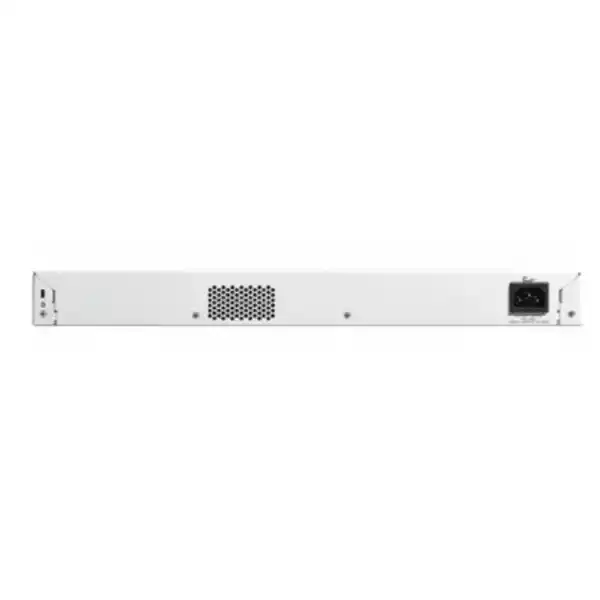
| Cooling | Fanless |
| Installation | Rack-mountable; approximately 445 × 299 × 44 mm |
| Electrical input | Internal universal supply, 100–240 V AC, 50–60 Hz |
| Operating range | −5°C to 50°C; 10–90% relative humidity, noncondensing |
The access-port speed and uplink speed describe different parts of the traffic path. Each copper connection can negotiate up to one Gigabit per second with a compatible endpoint. Each SFP uplink is also a Gigabit interface. The published switching capacity describes the switch fabric; it does not mean that a single endpoint, fiber link or internet connection operates at 56 Gbps. Application performance also depends on the other equipment and services in the path.
The four SFP positions provide flexibility for a suitable uplink design, but they should not be treated as a promise that optical modules are included. Specify the exact compatible transceivers and fiber patching in the bill of materials. Confirm the delivered hardware package, power lead and mounting accessories against the supplier quotation before scheduling installation.
Decide whether this model matches your requirement
A practical fit is an office with a mixture of powered and nonpowered endpoints, moderate uplink demand and an administrator who needs visibility beyond an unmanaged switch. Desktops and printers can occupy copper ports without drawing PoE power, while compatible phones and access points use the remaining ports and share the power budget. A mixed deployment should therefore be assessed by both occupied ports and total planned power, rather than by either number alone.
Consider another model when the requirement includes 10G uplinks, multigigabit access connections, power above the available PoE allowance, or a specific enterprise stacking design. This product has 1G copper ports and 1G SFP uplinks. A requirement for a faster access link is not resolved by adding a faster transceiver to a slot designed for Gigabit operation. Likewise, spare ports do not increase the electrical capacity available to the devices already connected.
Avoid selecting solely by the Cisco name or the number 24. Write down any essential routing, authentication, management and resilience requirements, then check those against the current software documentation. Where an existing network depends on a particular feature, validate that feature and the target firmware before accepting a substitution. A short technical review at procurement is easier to manage than discovering a platform mismatch during a production change.
Plan the 195 W PoE budget before filling the ports
PoE+ support identifies a power standard and per-port capability; the switch also has a separate total power limit. All 24 access ports support PoE, but 24 devices cannot each be allocated 30 W simultaneously from a 195 W budget. Dividing the total evenly gives about 8.1 W per port across 24 ports, which is a budgeting illustration rather than a guaranteed allocation for every endpoint. The actual design needs the requirements of the selected equipment.
Create a worksheet with device model, quantity, required PoE standard and maximum switch-side power allowance. Use the endpoint manufacturer’s documentation and account for how power is negotiated or allocated. A phone operating with an expansion module may have a different requirement from a basic handset. A camera with additional operating features may need more power than a simple indoor unit. An access point may need a particular power mode to provide its intended functions.
Leave a deliberate reserve for changes instead of designing exactly to the published total. The appropriate margin depends on the endpoints and the organization’s expansion plans. Review the worksheet when devices are added or replaced, even if unused ports remain. If the planned allocation exceeds the budget, reduce the load, distribute equipment across another suitably sized switch, or choose a model with more PoE capacity. Do not assume that low observed consumption on one quiet day proves adequate capacity for every operating condition.
An illustrative power and port worksheet
| Example device group | Illustrative switch-side allowance | Calculated allocation |
|---|---|---|
| 8 IP phones | 7 W each | 56 W |
| 4 wireless access points | 20 W each | 80 W |
| 4 IP cameras | 10 W each | 40 W |
| Combined powered devices | 16 copper ports occupied | 176 W |
| Remaining published PoE allowance | 195 W minus 176 W | 19 W before any additional planning reserve |
These figures are hypothetical planning inputs, not specifications for particular phones, access points or cameras. Replace them with verified power requirements for the exact devices being purchased. The example uses 16 powered ports and leaves eight copper ports physically available, but it leaves only 19 W of the published power budget. That is why an apparently spacious port schedule can still have limited room for additional powered equipment.
Add nonpowered equipment to the same worksheet so that physical port demand remains visible. Four desktops and two printers would use another six copper connections without adding PoE load, leaving two access ports in this example. Also record any copper port used for an uplink, recorder or local appliance. The four dedicated SFP uplinks can preserve copper access capacity when the chosen upstream connection uses suitable SFP modules.
Use the worksheet as a discussion tool for the quotation. It should show which assumptions are confirmed, which device choices remain open and how much expansion is expected. A project with several unselected access points needs a more cautious decision than one with a fixed and validated endpoint list.
Understand what the four Gigabit SFP uplinks can do
SFP uplinks are useful when the access switch must connect toward another cabinet or distribution point using an appropriate optical connection. The link requires compatible modules at both ends, a suitable fiber type and a supported optical path. Confirm connector type, wavelength, distance and the equipment at the far end as one set of decisions. Matching only the shape of the module is not sufficient to establish compatibility.
This is the 4G uplink model. Its SFP uplinks operate at Gigabit speed; it is not the 4X variant with 10G-capable SFP+ uplinks. If several access points, a busy recorder or large file transfers will share one uplink, estimate the combined traffic crossing that connection. A network with modest internet demand can still have heavy local traffic between endpoints and servers. Determine where those servers and recorders sit before deciding that one Gigabit uplink is enough.
Multiple physical uplinks also require a deliberate logical design. Do not connect extra cables between switches simply to create more bandwidth. Where link aggregation is appropriate, configure and validate a compatible arrangement at both ends. Where links provide an alternate path, review loop prevention and recovery behavior. Several available uplink slots are useful resources, but they do not automatically combine into one faster path or provide uninterrupted operation.
Use VLANs to organize staff, voice, guest and camera traffic
The platform supports VLANs, allowing different groups of devices to share the switch while belonging to separate logical networks. A small business might assign staff computers, telephones, surveillance devices and equipment management to different VLANs. The useful starting point is the required communication pattern: identify which groups need to reach shared services and which should remain separated. A list of VLAN numbers alone does not define a secure network.
Plan access-port membership and uplink tagging together. A port connected to a straightforward endpoint may have a different profile from a port connected to an access point carrying multiple wireless networks. The upstream switch or firewall must agree on the intended VLAN handling. A mismatch can prevent devices from receiving addresses or can place traffic in the wrong segment. Document the intended port role so that replacement equipment can be connected consistently.
Decide where inter-VLAN traffic should be routed and inspected. The switch provides static routing capabilities, but traffic requiring firewall inspection should follow the intended security path. Enabling local routing without considering that path can undermine an otherwise sensible segmentation plan. Use a documented communication matrix and test both permitted and prohibited connections. For wider enterprise migration requirements, review the Catalyst 2960-X replacement planning guide alongside a model-specific assessment.
Keep voice and business traffic usable during busy periods
Quality of service provides controls for prioritizing selected traffic when interfaces are congested. Voice is a common reason to configure it, because calls are sensitive to delay and uneven packet arrival. The useful objective is to identify the business traffic that needs preferential treatment and apply a consistent policy along its path. Merely purchasing a switch with QoS does not establish that policy.
Cisco’s administration guidance includes classification using CoS and DSCP and configurable queue scheduling. The engineer should decide which traffic markings can be trusted and how they map to the desired behavior. A phone, computer and access point can present different traffic patterns on their ports. A blanket trust policy applied without reviewing those patterns may give inappropriate traffic the same treatment as business-critical communications.
Test with realistic competing traffic rather than checking calls only when the network is idle. Include the router, firewall, WAN connection and any remote service in the assessment. Prioritization at this switch cannot compensate for every bottleneck elsewhere, and it does not create additional physical bandwidth. If sustained demand exceeds uplink capacity, capacity planning remains part of the solution. Record the chosen policy with the port schedule so future changes preserve its intent.
Management that fits the team supporting the site
Cisco documents browser-based administration and CLI access for this family, with Cisco Business Dashboard also available as a management option. Choose the operating approach that the responsible team can maintain. A single office may prefer direct administration, while a team looking after several sites may want a consistent monitoring and management process. Confirm the current software requirements and management setup before making either approach part of the project acceptance criteria.
Give the switch a useful hostname, location record and predictable management address. Identify who owns administrator access and who is authorized to make changes. Restrict access to the intended management network, use secure management methods and keep the credential handover within the organization’s approved process. These are deployment practices to specify, rather than benefits that appear automatically when the hardware is connected.
Configuration records should include a backup, firmware version, VLAN assignments, uplink configuration and the date of the last approved change. Keep a copy outside the switch so a hardware failure does not remove the only record of the design. If the switch will be managed remotely, establish how authorized staff will reach it during an upstream problem. A remote-only support arrangement needs a realistic recovery procedure as well as normal day-to-day access.
Match phones, access points and cameras individually
An Ethernet connection and a PoE label are not a complete compatibility assessment. For each endpoint, check the supported link speed, required power standard, maximum power allowance and any behavior under reduced power. The C1200 access ports provide up to Gigabit Ethernet and PoE+. Equipment that depends on higher access speeds or a power standard beyond this capability needs a different solution or an explicitly validated operating mode.
For wireless equipment, distinguish user-facing radio capability from the speed of the wired backhaul. A high-capacity access point can have requirements that make a one-Gigabit switch port a constraint. Review the intended user load and the manufacturer’s Ethernet and power specifications together. FourTeck Tanzania’s Cisco wireless access point guidance can help frame the wireless requirement, but the exact AP-to-switch pairing still needs verification.
For phones, include accessories and the required voice-network behavior. For cameras, include operating features and the traffic path to the recorder. Locate any recorder and storage system in the diagram so continuous video traffic is counted on the correct uplink. A switch can have enough PoE power yet insufficient upstream capacity for the chosen surveillance design, or enough bandwidth but too little power. Treat those as separate checks and record the result for every device group.
Place the fanless chassis in a suitable rack environment
Cisco identifies this model as fanless and rack-mountable. Fanless cooling removes a fan noise source from the switch, which can be attractive in an office cabinet near staff. It still produces heat and needs an appropriate installation environment. Do not equate the absence of fans with permission to place it in a sealed enclosure, cover its ventilation openings or mount it next to equipment that exhausts hot air into the available space.
The chassis is approximately 445 mm wide, 299 mm deep and 44 mm high. Check the usable cabinet space, front patching room, rear power clearance and access for maintenance before installation. Cabinet dimensions on a purchase order do not always describe the usable space after cable managers, power distribution and existing equipment are fitted. Arrange patch leads so a technician can reach the intended port without pulling adjacent connections loose.
The published operating limits are −5°C to 50°C and 10–90 percent relative humidity without condensation. Assess conditions at the installed switch position, not just the temperature elsewhere in the building. Plan protection from dust, moisture and unauthorized physical access according to the premises. For outdoor endpoints or inter-building links, specify a suitable cabling and protection design; the switch’s rack installation specification is not a claim that its chassis is suitable for outdoor exposure.
Include the connected devices in your power-continuity plan
The switch uses an internal AC supply with a published input range of 100–240 V at 50–60 Hz. Verify the delivered power lead and the site’s electrical arrangements as part of the installation. Electrical work and protective measures should be assessed by qualified personnel for the actual premises. The hardware input range alone does not establish the suitability of a socket, distribution circuit or backup-power arrangement.
When a UPS supports a PoE switch, the backup load includes the switch and the power delivered to its endpoints. The 195 W PoE budget is not a complete wall-power figure and should not be used by itself to predict runtime. Size the UPS using an appropriate total load assessment and the desired operating duration. Include the firewall, upstream switch, internet equipment and any local recorder that must remain available for the business service to work.
Agree what success during an outage means. Keeping phones powered is useful only if the relevant calling path remains available. Keeping cameras powered is useful only if the necessary recording and storage path also operates. Ask for a documented backup-power scope and an acceptance check under the intended load. Runtime and service continuity depend on the full design, battery condition and connected equipment; they should be established for the installation rather than assumed from the switch model.
Practical deployment scenarios
Office with phones and shared services
Map desk computers, printers, telephones and wireless access points to a single port schedule. Separate the device groups logically where required, then confirm how they reach the firewall and local services. This model can be considered when Gigabit access, the combined PoE allowance and 1G uplinks meet that office’s traffic and growth expectations. Count shared desk arrangements carefully so an assumed spare port does not disappear during installation.
Small hospitality or guest-facing site
Keep guest connectivity requirements separate from staff and operational services in the design. Verify access-point power and uplink demand rather than choosing the switch from room count alone. A guest-facing site may also need equipment spread between cabinets, which changes fiber, upstream capacity and maintenance requirements. Establish which services must continue during a local power interruption before sizing backup power.
Camera and administration network
List the exact cameras, their power allowances and where their streams are recorded. Continuous recording traffic should be included when choosing uplinks and recorder connections. Administrative computers can share the physical switch while following a separate logical policy, provided the VLAN and firewall design enforces the intended separation. Allow room for additional cameras in both the port count and power worksheet.
Compare the nearby Catalyst 1200 variants
| Model | Access ports / PoE budget | Uplinks | Selection question |
|---|---|---|---|
| C1200-24T-4G | 24 Gigabit ports; no PoE | 4 × 1G SFP | Are all endpoints separately powered? |
| C1200-24P-4G | 24 Gigabit PoE+ ports; 195 W | 4 × 1G SFP | Does the mixed device load fit 195 W? |
| C1200-24FP-4G | 24 Gigabit PoE+ ports; 375 W | 4 × 1G SFP | Is more aggregate PoE power required? |
| C1200-24P-4X | 24 Gigabit PoE+ ports; 195 W | 4 × 10G SFP+ | Are faster upstream links required? |
These differences show why a similar-looking product name should not be accepted as an automatic substitute. The FP variant changes the aggregate power allowance, while the 4X variant changes the uplink capability. Neither change should be selected without considering the other requirements. A project can need both additional power and faster uplinks, in which case the shortlist must account for both rather than solving just one constraint.
Also review installation details when changing models. For example, Cisco lists a fan on the 24FP-4G variant while the 24P-4G is fanless. That can matter in a cabinet near occupied space. Ask procurement to preserve the exact agreed model and list any proposed alternative separately with its differences. Availability, commercial terms and included accessories should be confirmed in the quotation for whichever model is ultimately selected.
Prepare a complete Tanzania quotation request
Send FourTeck Tanzania the exact requested model, quantity and a brief description of the site. Include the copper endpoint count, powered-device list, planned expansion and upstream connection requirements. Where the switch will replace existing equipment, add the old model and a summary of its role. This helps identify whether the task is a straightforward access-switch purchase or part of a wider network redesign.
Ask the quotation to distinguish hardware from transceivers, patch leads, cabinet work, configuration, installation and support. State whether you need only supply or also an agreed deployment scope. Provide the site location so the proposed delivery or service arrangements can be confirmed for that project. Do not rely on a general country reference to establish local stock, site attendance, lead time or installation coverage.
Commercial details need their own written confirmation: price, tax treatment, delivery terms, warranty arrangements and any support entitlement should be specified for the exact offer. Where a TZS quotation is required, request it directly rather than converting an overseas advertised price. If optional software, management services or support are proposed, ask what they provide and whether they are required for your intended use. A clear bill of materials makes it easier to compare offers on the same scope.
Commissioning and handover checks
Before connecting the production network, verify the delivered model and prepare the management configuration in a controlled setup. Confirm the selected firmware against current vendor guidance, record the version and save the intended configuration. Review the existing network diagram and agree a change window with the people responsible for affected services. If replacing an active switch, preserve the previous configuration and define a practical rollback path.
During installation, validate the copper links, PoE operation, VLAN placement and uplink behavior. Test representative devices from each group rather than relying only on link lights. Confirm that staff can reach approved services, guest traffic follows its intended restrictions and surveillance or voice systems behave as required. Check that management access is available from the authorized network and blocked where the design requires it to be blocked.
At handover, provide a port map, cable labels, configuration backup, management details and a list of installed optics. Record the agreed acceptance results and any outstanding items with an owner. After a period of normal operation, review whether power use and uplink utilization match the planning assumptions. Use the findings to refine the expansion plan, especially if endpoint choices changed between quotation and installation.
Diagnose power, connectivity and performance separately
If a newly connected device does not start, first establish whether the issue is electrical power or network communication. Check the endpoint’s required PoE standard, its cable and the switch’s available power allocation. A device that powers up but cannot reach its application needs a different investigation from one that receives no power. Swapping several settings at once makes it harder to identify the cause and preserve a reliable configuration.
If a device has a link but cannot communicate, review the intended port profile, address assignment and gateway path. Compare the connection against the port map and use a known working endpoint or cable where appropriate. Verify that any required VLAN is carried upstream and that firewall policy permits the intended service. Keep changes within an agreed troubleshooting process, particularly when other users share the same uplink.
If performance becomes poor only during busy periods, investigate traffic patterns before replacing the switch. Determine which links are carrying the load, whether errors point to a physical connection problem and whether application traffic is competing at an upstream bottleneck. Review the QoS policy and the capacity assumptions from the original design. A structured diagnosis can distinguish a faulty connection, a configuration problem and a legitimate need for faster infrastructure.
Questions buyers ask about this switch
Can all 24 ports power devices at once?
All 24 copper ports support PoE, but simultaneous operation depends on the combined power allocation remaining within 195 W and each endpoint meeting the supported standard. Twenty-four PoE-capable ports do not mean 24 simultaneous 30 W allocations. Validate the actual device list before purchase.
Does this model have 10G uplinks?
No. This model has four Gigabit SFP uplinks. The similarly named 4X variant offers 10G-capable SFP+ uplinks. State the required upstream speed explicitly when requesting a quotation so the suffix is checked against the network design.
Is it suitable for a quiet office?
Cisco lists the 24P-4G hardware as fanless. That can help where fan noise matters, but cabinet placement, surrounding equipment and ventilation still affect the working environment. Confirm physical space and operating conditions before deciding where to install it.
Can it replace the router or firewall?
It provides managed switching and static routing capabilities, but that does not establish it as a replacement for the site’s internet router or security firewall. Map routing and security functions separately, and retain the appropriate device for the required WAN and inspection services.
Are SFP modules included?
Do not assume they are included simply because SFP slots are present. Ask the quotation to identify the required compatible modules, quantity, fiber type and accessories. Confirm the supported optical path and the equipment at both ends before ordering transceivers.
Can existing Ethernet cables be reused?
Cisco specifies Category 5e or better for 1000BASE-T. Existing cables should still be assessed for condition, termination and suitability for the planned data and PoE load. A cable label alone does not prove that an installed run will perform as required.
What information is needed for an accurate price?
Provide the exact model, quantity, endpoint and PoE worksheet, uplink specification, site location and required supply or installation scope. Ask for current commercial terms and accessory inclusions. Price, stock, delivery and service scope require confirmation for the particular quotation.
What should be checked before adding more devices?
Recheck free copper ports, total PoE allocation, uplink load and backup-power capacity. A spare port is only one part of the expansion decision. Update the port map and configuration records so the support team knows which service the new device belongs to.
Request a switch and accessories quotation
Share your endpoint list and required uplink arrangement with FourTeck Tanzania to request a quotation for this 24-port PoE+ switch. Include the maximum power requirements of the proposed phones, access points and cameras, along with any existing optics or cabling you hope to reuse. Specify whether the requirement covers hardware supply, configuration or a wider installation project.
The most useful next step is a bill of materials that confirms the exact switch, compatible uplink modules, accessories and agreed scope. Ask for current pricing, availability, delivery terms and warranty arrangements with the quotation. That provides a concrete basis for procurement while keeping the technical decision tied to the needs of your network.




Reviews
There are no reviews yet.