
FOURTECK TANZANIA • COPPER-LED 10G SWITCHING
Cisco Catalyst C1300-12XT-2X Network Switch
Plan faster local connections for a compact server, storage or specialist workstation network. This managed switch is worth evaluating when your requirement centres on copper 10G connections with SFP+ options for suitable equipment links. Match the hardware to the actual workload, check the complete connection path and request a Tanzania quotation covering the accessories and services your project needs.
Next step: Send your endpoint count, interface details and uplink plan to request a model-specific quote.
A quick suitability check
Evaluate for copper-led 10G
A focused server, storage or workstation environment where endpoint adapters, cabling and traffic measurements justify faster local links.
Review the wider design
Check shared uplinks, security boundaries, management access and spare capacity alongside the chassis specification.
Choose another power option for PoE
If endpoints rely on power from their switch, compare suitable PoE hardware or verify a separate power arrangement.
Key specifications at a glance
| Specification | Detail |
|---|---|
| Copper data ports | 12 × 10 Gigabit Ethernet |
| SFP+ data ports | 2 × 10 Gigabit Ethernet |
| Management | 1 × Gigabit Ethernet out-of-band |
| Switching capacity | 280 Gbps |
| Forwarding rate | 208.33 Mpps, 64-byte packets |
| PoE | Not supported |
| Chassis | Rack-mountable; one fan |
| Dimensions / weight | 268 × 300 × 43.94 mm / 2.64 kg |
| Input power | Internal 100–240 V AC, 50–60 Hz |
Performance figures are manufacturer specifications. Application results depend on connected equipment and the complete network path. Confirm the supplied package, required accessories and intended software during procurement.
Where this 10G switch fits
For an organisation moving large files between local servers, shared storage and specialist workstations, the first question is where traffic slows down. This model is a candidate when the required connections are mainly copper Ethernet and the intended devices can benefit from 10 Gigabit links. A small server room, an editing team or a departmental application environment may need faster local communication without a large number of access ports. Start with the actual traffic paths and the interfaces already installed in the equipment.
An upgrade makes the most sense when several requirements align: endpoints have suitable network adapters, the cable plant can support the intended speed, storage can sustain the workload, and upstream connections are sized for concurrent use. Replacing the switch alone may leave the original bottleneck elsewhere. Establish whether users are waiting on network transfers, disk performance, application processing or internet connectivity before deciding what to buy.
Use this page to define that requirement and request a model-specific quotation from FourTeck Tanzania. Include the number of switches, the devices to be attached and the proposed copper and fibre connections. Procurement should confirm the exact supplied identifier, accessories, commercial terms and support arrangements in the quotation. A specification match is the starting point; a complete equipment list and deployment plan make the purchase usable.
Read the port layout correctly
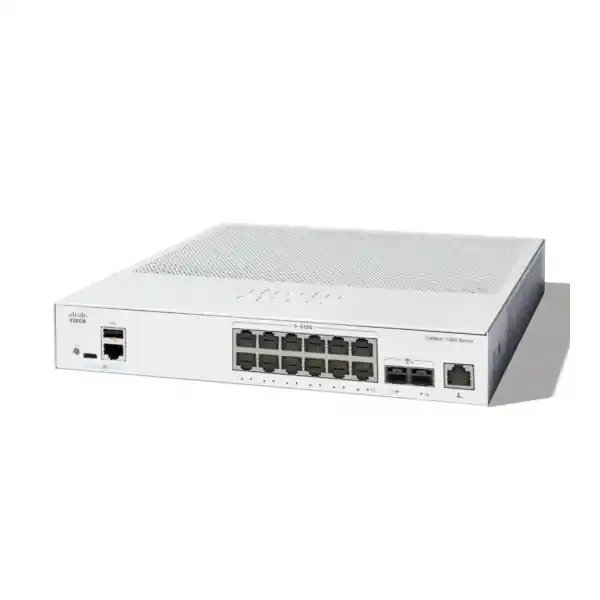
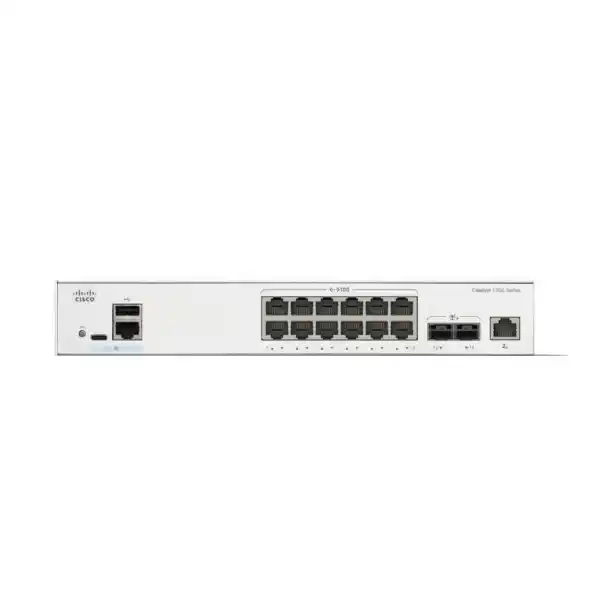
The Cisco Catalyst C1300-12XT-2X provides twelve 10G copper data ports and two 10G SFP+ data ports, plus a separate Gigabit Ethernet out-of-band management port. Cisco lists 280 Gbps switching capacity and a forwarding rate of 208.33 million packets per second for 64-byte packets. These figures describe switching capability under defined conditions; they are not a promise that every application or file transfer will reach a particular throughput.
Separate data connections from management connections in the port schedule. Give every proposed attachment a role, destination and media type. For example, a server, a storage appliance and an upstream switch each occupy a data connection, while the management path serves administrative access. Counting the management socket as another production uplink would make the port plan misleading. Label the intended role before installation and retain that schedule for support.
Also separate physical port count from spare capacity. A design that fills every data port on the first day leaves little room for testing, replacement equipment or an additional uplink. Decide which connections are essential, which could move to an access switch and which should remain reserved. If the design requires substantially more copper or fibre connections, compare a different port mix before committing to this chassis.
Decide between copper and SFP+ connections
Copper connections can be a practical choice where servers and workstations already use compatible Ethernet adapters and suitable structured cabling. The advantage is familiarity: the installation team can trace patch panels, label wall outlets and document links using established practices. However, connector appearance does not establish performance. Review each end-to-end channel, including permanent cabling, patch leads and intermediate connections, against the required Ethernet speed and distance.
The SFP+ slots provide a different media option for appropriate upstream or equipment links. Select transceivers or direct attach cables only after checking Cisco support for the exact switch, the remote device and the intended software release. Fibre selection also requires matching the fibre type, connector arrangement, reach and optical requirements at both ends. An optic chosen solely because it fits the slot can leave the link unsupported or unable to establish.
List accessories separately in the quotation rather than treating them as implied inclusions. Identify which connections need transceivers, which need fibre patch leads and which may use a supported direct attach assembly. Confirm whether any required modules or cables are included with the supplied package. This makes competing quotations easier to compare and reduces the chance of an installation waiting on a small but essential component.
Build a copper cabling checklist
Before reusing an existing channel, collect available cable records and test information. Inspect termination quality, patch lead condition, routing and labelling. Record the intended length and where the path passes through cabinets or patch panels. If the cabling history is unclear, include assessment in the project scope rather than assuming that an established link will support a faster service. A connection that works at its current speed still needs evaluation for the proposed upgrade.
Check the network adapters as carefully as the cable. Record their exact models, supported operating modes, driver versions and the host operating systems. Confirm the speed expected at each attachment and verify it during commissioning. Do not infer intermediate multigigabit speeds from the 10G headline alone; obtain the exact supported speed combination for both link partners when existing equipment depends on a particular mode.
Plan the physical work around normal operations. Identify which live links must be moved, label both ends before disconnection and reserve suitable replacement patch leads. After installation, record negotiated speed and inspect link stability during representative use. If errors appear, investigate the complete path instead of immediately blaming the switch. A documented cable channel and endpoint inventory give the support team a useful starting point for isolating problems.
Size the network around traffic paths
Port speed and workload throughput answer different questions. A fast connection to a workstation does not mean that every destination can receive data at the same rate. A file service may be limited by its storage, a backup job by its software settings, and an internet task by the external circuit. Map the source, destination and shared links for the operations that matter most to the business.
Then examine concurrency. Several users may access one storage appliance while a backup process and a server migration are active. The shared destination or uplink can become the limiting point even when individual access links are lightly used. Gather measurements during busy periods and maintenance tasks, not only during quiet hours. Use those observations to decide whether an uplink arrangement, adapter upgrade or application scheduling change is also required.
For acceptance, agree on a small set of representative tasks and measurable outcomes before the order is placed. These might include opening a project from shared storage, completing a defined backup set or moving a test data set between designated hosts. Record the test environment and compare results consistently. A repeatable workload test is more useful than treating a theoretical switching figure as an application service guarantee.
Practical server and storage scenarios
A small virtualisation environment may use separate traffic groups for host administration, application access and backup. This switch can be evaluated as the connection point when the host adapters and required media match its interfaces. First document how the virtual switches, physical adapters and upstream network relate. Decide which paths require isolation and which require access to shared services. The design should be reviewed against the hypervisor and storage vendor requirements.
A creative team may have several workstations reading from a central file service. In that case, measure the working set, simultaneous users and storage capability. Faster workstation links are useful only if the server and the rest of the path can sustain the activity. Consider whether project archives, live editing data and scheduled backups compete for the same resources. Use a realistic project rather than an unusually small test file during evaluation.
A departmental server room may instead need a compact aggregation point for a limited collection of equipment. Here the purchase decision should account for future attachments and the upstream architecture. Document the consequences of a switch outage and decide whether the business can accept a single device in that role. These examples describe possible design uses, not validated application certifications or a guarantee that this model meets every server or storage requirement.
VLANs and the routing boundary
Catalyst 1300 supports VLAN configuration and IPv4 static routing. These capabilities let a designer organise traffic groups and define appropriate local routing where the overall policy permits it. Begin with a simple inventory of users, servers, management systems and other device groups. Give each group a clear purpose and record the communications it needs. Create the addressing and VLAN plan before connecting production equipment.
The important decision is where traffic between groups should be inspected and controlled. Routing traffic locally may change which firewall rules it traverses. If a security requirement says that two networks must communicate through a firewall, reflect that requirement in the gateway placement and routing design. A VLAN name on its own does not establish an access policy. Verify both the intended routes and the actual allowed and denied traffic.
Coordinate tagged and untagged membership with every connected host, access switch and firewall interface. Record which links carry multiple VLANs and which serve a single network. Test management reachability after applying the final plan, with a recovery method available in case access is lost. For related planning, review the FourTeck Tanzania guidance on Cisco firewall installation and configuration. Keep the switch configuration and firewall policy consistent throughout the change.
Management access that remains understandable
The dedicated management interface is useful only when its surrounding network is deliberately planned. Decide which administrators and systems should reach it, how addresses are allocated and where access restrictions are enforced. Document the path from the administration workstation to the switch. Treat management availability as a separate requirement from normal application connectivity so that a change in one does not create an unexpected dependency in the other.
Define an administrative baseline before commissioning. It should cover named responsibility, credential handling, approved management methods, time settings and the location of configuration backups. Use the security options supported by the deployed release and disable unnecessary access where the design permits. Limit management reachability to appropriate sources and test those restrictions. Avoid leaving the only usable recovery information in the memory of the person who performed the installation.
Keep the operating procedure short enough to use during an incident. Include the switch identity, physical location, management address, upstream connections and the approved way to obtain access. Store sensitive credentials through the organisation’s normal protected process rather than embedding them in a shared port diagram. After any addressing or access-policy change, verify that authorised administrators can still connect and that the current documentation reflects the working configuration.
Link aggregation and realistic resilience
The administration guide documents LACP for forming logical link aggregation groups. Aggregation can be considered where the remote device supports a compatible arrangement and the workload benefits from multiple physical links. Match the configuration on both sides and record which ports belong to the group. Do not attach parallel cables casually: the intended logical topology must be established before the links are introduced into production.
Define the benefit being sought. Additional aggregate capacity across several conversations differs from increasing the speed of one conversation. Traffic distribution depends on the participating equipment and its forwarding behaviour. A design should therefore be tested with the actual mix of hosts and applications. Write down what should happen when one member link is disconnected and confirm that the observed behaviour matches the approved acceptance criteria.
Link redundancy also has limits. Two cables to the same device may protect against one cable fault while leaving the device, power source or upstream service as a common dependency. Review the complete path and the business recovery requirement. If continuous service is essential, include an architecture review rather than assuming that an aggregated uplink resolves every failure case. The quotation should distinguish ordinary connectivity from any separately scoped resilience design.
Stacking requires a complete port plan
Cisco documents front-panel stacking for compatible Catalyst 1300 models. Stack compatibility depends on the model family, and ports assigned to stacking are no longer available as ordinary network interfaces. If stacking is required, verify the exact member models, supported software, permitted stack interfaces and interconnect media before ordering. Do not assume that any product carrying the Catalyst name can join the same stack.
Draw the proposed stack and identify every inter-switch connection. Then revise the production port schedule to reflect the interfaces consumed by that design. Include the appropriate cables or optics in the equipment list and record any remaining uplink requirement. A standalone port plan copied unchanged into a stack proposal can overstate the available connections. The physical topology and the logical operating arrangement should be reviewed together.
Agree on operational responsibilities as well. Record the intended member identities, management approach, maintenance procedure and recovery process. Test the approved failure scenarios during commissioning rather than presenting stacking as a promise of interruption-free operation. The organisation should understand which faults the design is intended to tolerate, which dependencies remain shared and how software maintenance will be performed. For a small environment, compare that operational commitment with an appropriately designed standalone arrangement.
Power, cooling and installation space
This rack-mountable model measures 268 × 300 × 43.94 mm, weighs 2.64 kg and uses an internal 100–240 V AC, 50–60 Hz power supply. It has one fan, so it should not be specified as fanless. Confirm the supplied mounting accessories and power cord with the quotation, and check the cabinet arrangement before delivery. Chassis dimensions alone do not include the working space needed for cabling and access.
Assess the intended location with the equipment installed around it. Review airflow, cable dressing, dust exposure and the ability to reach connections safely. Verify the applicable environmental limits in the current hardware documentation for the final installation. A cabinet that appears tidy when open may behave differently once the door is closed and neighbouring equipment is operating. Include power and cooling checks in the readiness review.
Where service continuity matters, review the power path from the distribution point to the connected hosts and upstream equipment. Backup power planning should consider the full application path, not just the switch. Determine who will respond to a power event and how orderly recovery will be checked. These are site design considerations; local electrical suitability, backup runtime and installation services must be established for the actual project rather than assumed from the product specification.
Understand the non-PoE limitation
This model does not supply Power over Ethernet. It should therefore be selected for data connectivity with an appropriate separate power arrangement for any endpoint that needs one. If a proposed connection includes an IP phone, wireless access point, camera or other powered device, identify its power requirement explicitly. The presence of a copper Ethernet socket does not establish that the switch can power the attached equipment.
When most endpoints need PoE, compare a suitable PoE switch rather than treating injectors as an automatic solution. The design must account for the required power standard, the demand of each endpoint and the total budget. If separate injectors are considered, verify their data-rate compatibility, electrical requirements and installation arrangement. Include every required component in the cost comparison so that the chosen option can be evaluated fairly.
The same distinction matters when replacing an existing access switch. A faster data interface does not compensate for losing an essential endpoint power function. Inventory the present connections before proposing this unit as a replacement. Identify which devices have independent supplies and which depend on their switch. That simple check can prevent a technically fast switch from being ordered for a role that requires a different hardware capability.
Compare the port mix before buying
Choose the switch by the connections the environment actually needs. A copper-heavy server area has a different requirement from a fibre aggregation cabinet or a floor full of powered access devices. Count occupied ports, planned additions and links reserved for infrastructure. Separate the need for faster host connections from the need for faster uplinks. Those requirements can lead to different hardware choices even within one switch family.
If most links use optical media, request a comparison with an appropriate fibre-oriented model and verify whether any ports are shared or independent. If the requirement is many ordinary user connections with only a small number of fast uplinks, compare an access-switch design. If the proposed project requires specialist routing, extensive enterprise integration or a defined high-availability architecture, have those requirements assessed independently rather than inferring them from branding.
Consider operational fit alongside hardware. The team needs to configure, monitor, update and recover the selected equipment. Review its procedures against the actual platform and release. Existing scripts or configurations should be validated before reuse. The FourTeck Tanzania Catalyst 2960-X replacement guide covers a separate migration need; use it when that is the starting point, and avoid treating this compact 10G model as an automatic replacement for every older Catalyst switch.
Prepare a migration that can be checked
Begin with an inventory of the current environment. Capture connections, VLAN membership, addressing, gateway locations and the role of each upstream device. Note any application or management dependency that must remain reachable during the change. Take an approved backup of the existing configuration and confirm that the responsible team can access it. The goal is to know what must work before deciding how to reproduce it.
Prepare the target configuration and port labels before the maintenance window. Review the proposed changes with the people responsible for servers, storage and security. Where practical, test a representative device or connection before moving the full workload. Define a clear rollback decision point and preserve the equipment and information needed to restore the previous arrangement. A rollback plan should describe an achievable action, not simply say that the old switch is available.
During cutover, move connections according to the approved schedule and verify each major dependency in order. Record deviations and avoid making unrelated improvements in the same window unless they have been scoped. After acceptance, update diagrams, backups and the operational handover. Keep unresolved issues visible with an owner and an agreed next action. These steps help turn a hardware replacement into a controlled change with evidence of the resulting behaviour.
Commissioning and acceptance checks
Acceptance should establish that the delivered equipment and the completed configuration match the purchase and design. Check the physical model identity, accessory list and condition of the supplied items. Record the installed software version and confirm that its use follows the project’s maintenance policy. Verify the port labels and expected link state before starting application tests. Investigate any mismatch while the installation team still has the necessary context.
Test the network services that the business depends on. Confirm authorised management access, correct addressing, intended VLAN membership and the agreed routing paths. Include negative tests where isolation is required: a successful permitted connection does not prove that an unwanted connection is blocked. Verify any configured aggregation or stack arrangement against its own acceptance criteria. Keep the test scope proportionate to the network role and the consequences of failure.
Finally, run the representative application tasks agreed during planning and document the results. Note which hosts, files, tools and conditions were used so that later comparisons remain meaningful. Review interface behaviour while the workload runs and investigate unexplained errors or instability. Obtain acceptance against the defined criteria, save the working configuration and hand over the current records. A short, accurate acceptance report is more useful than an unsupported claim that everything is faster.
Keep ownership and support information current
Decide who owns the configuration after handover and who may authorise a change. In a small IT team, the same person may look after servers, switching and security, but the records should still distinguish those responsibilities. Record the normal escalation route and the information needed when an issue is reported. A short incident description should identify affected users, the time of the problem and whether it follows a recent change.
Retain a baseline after commissioning. Include the approved port schedule, relevant addressing, current software information and the location of the configuration backup. When an endpoint moves or an uplink changes, update the records at the same time. Otherwise a later fault investigation may begin with an inaccurate diagram. Review the documentation periodically against the physical installation rather than assuming that an old handover pack still describes the network.
Separate routine monitoring from application acceptance. A link can remain up while users experience a storage or server problem, and an application may work while a redundant path has failed. Choose checks that reflect both the infrastructure and the services it supports. Define what an alert means, who responds and what evidence should be captured. That operating discipline helps the organisation obtain lasting value from a correctly selected switch.
Build a complete Tanzania quotation request
For a Tanzania project, request a quotation that identifies the exact switch, quantity and intended deployment. Supply a concise connection schedule, preferred media and any stack requirement. State whether the purchase is hardware only or whether assessment, configuration, installation or handover should be separately priced. Give the actual delivery destination so that logistics and commercial terms can be confirmed for that order.
Ask for an itemised bill of materials covering the chassis and every necessary accessory. Confirm the supplied product identifier, package contents, required optics or cables, mounting provisions and power cord. Cisco’s ordering table uses C1300-12XT for this model’s order product ID; have the quotation reconcile that identifier with the requested C1300-12XT-2X model. Keep manufacturer identifiers separate from the seller’s own listing SKU.
Clarify price, applicable charges, availability, delivery estimate, warranty terms and support scope directly in the offer. None should be assumed from this technical overview. If procurement compares several proposals, use the same connection and service requirements for each. This allows the decision to reflect the usable installation and ongoing responsibilities rather than a chassis price that leaves essential components or work outside the comparison.
Questions buyers commonly ask
Is this a 10G access switch or a switch with only 10G uplinks?
The copper data connections themselves are rated for 10 Gigabit Ethernet, alongside the two SFP+ connections. Evaluate the endpoint interfaces and cabling as part of the design. A model with ordinary Gigabit access ports and faster uplinks serves a different requirement.
Can it speed up access to a NAS?
It can be considered where the NAS, clients and cabling support the intended links. Actual improvement depends on the complete workload path, including storage and host performance. Measure the present limitation and test a representative transfer before setting an expected result.
Are SFP+ optics included?
Do not assume inclusion. Have the quotation identify package contents and separately list any required optics, direct attach assemblies or fibre leads. Compatibility must be checked against the switch, remote equipment and intended connection.
Can it power access points or IP phones?
No. This is a non-PoE switch. Select a suitable endpoint power arrangement or compare a switch designed for the required PoE service. Check both the power requirement and the intended data connection.
Can I use the management port for another server?
Plan the separate Gigabit management connection for its administrative role. Allocate production devices to the data ports and keep the management path documented. Do not count the management interface as an additional general-purpose server connection.
Can it be stacked with an existing Cisco switch?
Verify the exact existing model and the supported Catalyst 1300 stacking family. Shared branding is insufficient. The proposed software, stack ports and cables also need checking, and any interfaces used for stacking must be removed from the ordinary data-port budget.
Is a software configuration from another Catalyst reusable?
Use it as design evidence and validate the target configuration against this platform. Interface names, supported behaviour and operational procedures can differ. Test required services and recovery access before migrating production connections.
What should I send for a quote?
Provide quantity, deployment destination, endpoint types, copper and fibre requirements, expected growth and any aggregation or stacking plan. Include the accessories and services you want priced so that the response can address the full requirement.
Request a model-specific switching quote
Share your connection schedule with FourTeck Tanzania and request a quotation for the Cisco Catalyst C1300-12XT-2X Network Switch. Include server and storage interfaces, upstream equipment, cable information and the number of spare ports you want to retain. Identify any requirement for stacking, link aggregation or a dedicated management network so that the equipment list can be checked against the intended design.
Ask for confirmation of the exact supplied identifier, accessory compatibility, commercial terms and any separately scoped implementation work. This is particularly useful when the purchase is part of a wider server, storage or network refresh. A clear requirement lets procurement compare complete proposals and gives the deployment team a practical starting point for configuration, testing and handover.




Reviews
There are no reviews yet.