
CISCO CATALYST 1300 • BUSINESS ACCESS NETWORKING
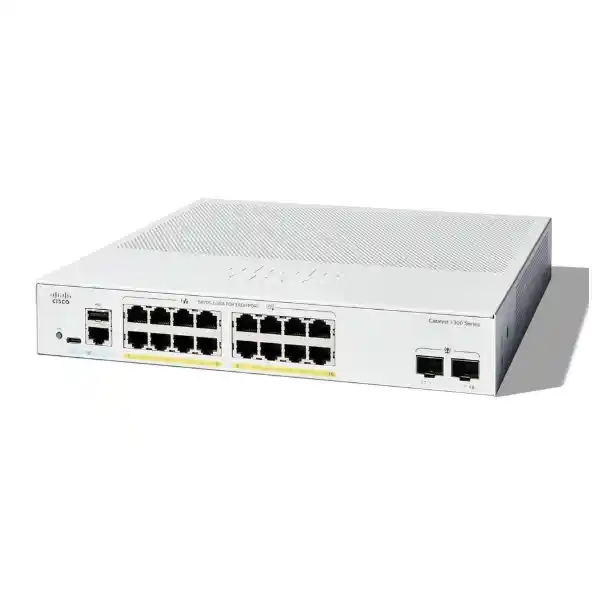
Cisco Catalyst C1300-16FP-2G Network Switch
A practical access switch for powered business devices
For a small office, branch, reception area or equipment room, the right switch must provide enough network connections and enough power for the devices attached to them. The Cisco Catalyst C1300-16FP-2G brings managed Gigabit access and a shared PoE+ supply into one compact platform. It suits buyers who want to connect compatible IP phones, wireless access points and cameras while keeping different business services organized. Request a FourTeck Tanzania quotation with your endpoint list, power requirements and uplink details so the proposed equipment can be checked against your deployment.
The purchase decision should start with three questions: how many copper connections are needed, how much PoE must be allocated at the same time, and how much traffic must leave the switch. A design that answers all three is more useful than choosing equipment by port count alone. This model deserves consideration when Gigabit access is appropriate and the uplink requirement fits a Gigabit fiber connection. If your design calls for faster uplinks, higher device power or substantial expansion, establish those requirements before approving the bill of materials.
Verified hardware at a glance
The following model-specific specifications provide a starting point for equipment selection. Treat them as hardware capabilities rather than a promise that every connected application will achieve its own maximum throughput. Overall results also depend on the endpoints, cabling, upstream equipment and configuration.
| Item | Specification |
|---|---|
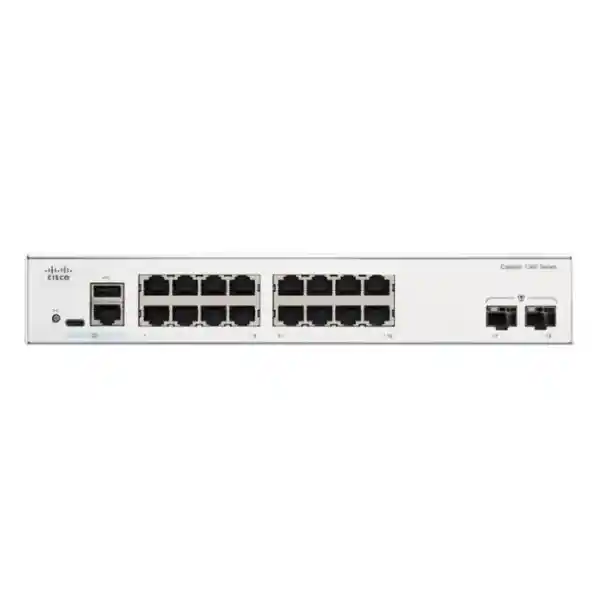
| Access connections | 16 × 10/100/1000 Mbps RJ-45 ports |
| Power delivery | PoE/PoE+; up to 30W per compatible port, within the shared budget |
| Total PoE budget | 240W across connected powered devices |
| Uplinks | 2 × Gigabit SFP slots |
| Switching capacity | 36 Gbps |
| Forwarding rate | 26.78 million packets per second, measured with 64-byte packets |
| Cooling | Fanless |
| Power input | Internal universal supply; 100–240V AC, 50–60 Hz |
Check whether the port layout fits your site
Build a port schedule before deciding that a sixteen-port switch is large enough. Record every phone, camera, access point, printer, workstation and network appliance that needs a direct connection. Include devices planned for the next stage of the project. Count the connections that will physically terminate at this cabinet, rather than using the total headcount for the building. Several users might connect over Wi-Fi, while a single reception desk could need multiple wired services.
Keep the upstream connection visible in this schedule. When a suitable SFP link carries traffic to another switch, it can preserve copper ports for local endpoints. If the uplink instead uses a copper access port, that port is no longer available for another local device. The appropriate arrangement depends on the equipment at the other end and the cable route already installed.
Do not assume that every wall outlet must be active immediately. Mark required, spare and future outlets separately. This makes the quotation easier to assess and shows whether expansion can be handled within the existing switch. For an office expecting additional cameras or meeting rooms, leaving practical space in the plan may prevent an early replacement or the need for another cabinet.
Understand the 240W shared PoE budget
PoE selection has two separate limits: the power available on one port and the total power available across the switch. Check both against the powered device specification. An endpoint that needs more than the supported per-port level cannot be made suitable simply because other ports are unused. Equally, a group of individually compatible devices can exceed the total budget when their allocations are added together.
For illustration, eight allocations of 30W total 240W. Sixteen allocations of 30W total 480W, which exceeds this model’s budget. Dividing 240W by sixteen gives 15W per port as an arithmetic average, not an automatic setting or a guarantee of the power delivered to each endpoint. Cable losses and the distinction between power supplied by the switch and power received by a device must be considered.
Prepare the calculation using documented maximum requirements and the allocation behavior of the selected equipment. Typical idle consumption alone is a weak basis for procurement. Cameras may use additional functions at night, and an access point may require more power when all intended features are active. Include an explicit reserve for agreed additions rather than filling the available budget on the first installation day.
Worked example: checking a mixed device plan
Consider a hypothetical branch with four access points allocated 25W each, six phones allocated 7W each and four cameras allocated 12W each. The planned allocation is 100W plus 42W plus 48W, giving 190W across fourteen powered ports. On that simplified worksheet, 50W remains within the total budget and two copper ports remain unused. These figures illustrate the method; they do not certify compatibility with any particular endpoint.
The next check is more important than the arithmetic. Confirm that the wattages describe the relevant switch-side allocation, that each device uses a supported PoE standard, and that the complete set behaves as expected during startup. An example based on received device power must be adjusted for the actual power delivery arrangement. A nominal spare allowance should not be treated as guaranteed capacity for an unspecified future product.
Use the same worksheet to test proposed changes. If two new cameras require more power than the remaining allowance, update the design before purchasing them. If the current devices fit electrically but all ports are occupied, the limiting factor becomes connection count. Keeping both columns in one record helps the buyer see which requirement drives the next equipment decision.
Plan Gigabit SFP uplinks around real traffic
The two SFP uplinks provide a different connection medium from the RJ-45 access ports, but their speed class remains Gigabit. Fiber can be useful where the upstream cabinet is connected through an existing optical route. It does not automatically make this switch suitable for a design that requires a 10G uplink. Select the uplink speed from the traffic requirement and then choose hardware that supports it.
Map the direction of important flows. Camera streams going to a recorder in another cabinet, wireless clients reaching a central gateway and workstation backups to a remote server can all contribute to upstream demand. Their combined busy period matters more than a simple total of endpoint port speeds. Also identify which services stay local to the switch and which cross the uplink.
Two physical uplinks do not mean that one application receives twice the speed of a single link. Where link aggregation is proposed, both ends must support and be configured for the chosen arrangement. Distribution depends on traffic flows and the equipment’s selection method. If a single large transfer must exceed a Gigabit link, assess a faster-uplink platform rather than relying on the presence of a second SFP slot.
Specify optics and fiber as part of the order
An SFP slot is a receptacle for a compatible module. The purchase specification should identify the intended module and the link at the other end. Record the fiber type, connector arrangement, link distance and remote interface before selecting optics. Avoid choosing a module only because it physically fits the slot. Compatibility and the optical characteristics must agree across the complete link.
For an existing fiber installation, ask for the available cable records or test results. A route described only as “fiber to the main building” leaves too much uncertainty for an accurate bill of materials. Check the installed patch panels, available strands and any intermediate connections. Include the correct patch leads and allow cabinet space for routing them without sharp bends or strain.
Clarify whether modules, patch cords and installation work appear as separate line items in the quotation. This prevents the project from reaching installation day with the switch present but the uplink incomplete. For a new link, agree who will supply, terminate and test the cable. Define the acceptance evidence in advance so the network team can distinguish an optical-path problem from a switch configuration issue.
Separate services with a clear VLAN design
Managed VLAN configuration is useful when different services share the same physical switch. The objective is to give each connection an intentional role and to carry only the required networks across upstream links. Start with a simple service map covering staff, voice, guest wireless, cameras and management where those groups are needed. Avoid creating extra VLANs without an operational reason.
Document the access or trunk role of each port, including tagging expectations at the connected device. A workstation port and a port feeding an access point with multiple wireless networks may need different treatment. Review the upstream switch or firewall configuration at the same time. A VLAN definition on one device does not establish a complete path through the rest of the network.
VLAN separation is one part of the design. Decide where traffic between groups will be routed and which policies will allow or deny it. For example, a guest network may need internet access while being prevented from reaching staff services. Write that requirement as a testable behavior. The installer can then validate the intended result rather than stopping after the VLAN names appear in a configuration screen.
Place routing and firewall policy deliberately
The Catalyst 1300 platform includes static routing capabilities, but the network still needs a deliberate decision about where routing belongs. Some projects keep gateways on a firewall so that interdepartment traffic follows centrally managed security policies. Other designs use a routing switch for selected local paths. Choose the approach according to the required controls, addressing plan and support model.
A routing feature should not be interpreted as a replacement for every service provided by an internet security gateway. Identify who supplies internet access, address translation, remote connectivity and inspection where required. Keep the responsibilities of the switch, router, firewall and wireless system clear in the project documentation. This makes later changes easier to evaluate and reduces contradictory configurations.
Before enabling a new routed path, establish which subnets should communicate, how replies will return, and whether existing policies still apply. Include a rollback method if the management network changes. For a small branch, a straightforward gateway arrangement that the support team understands may be preferable to additional routing complexity. The practical goal is predictable communication with an accountable owner for each policy decision.
Connect IP phones with an end-to-end voice plan
Compatible PoE phones can receive network connectivity and electrical power from their switch connection. The wider voice service still depends on the phone system, endpoint provisioning, addressing and upstream connectivity. Prepare the phone model list and its maximum power requirements before sizing the installation. Count additional accessories where they affect the chosen phone’s requirements.
Quality of Service can prioritize selected traffic when configured appropriately. Establish where voice traffic is identified, which markings are trusted and how the upstream network treats those markings. Priority at one switch cannot correct every source of delay on a congested internet connection or a distant service. Validate voice behavior across the path used by real calls.
Include representative tests in the handover: place an internal call, make an external call where the service is available, check audio in both directions and repeat the test while normal business data is moving. If phones share a desk connection with computers, confirm the intended voice and data arrangement for the actual devices. Keep the port roles and phone provisioning responsibilities documented so future desk moves can follow the same pattern.
Match wireless access points by speed and power
An access point must be checked against both the Ethernet connection and the available power. A device with a faster wired interface may operate differently when attached to a Gigabit port, depending on its supported modes. Likewise, an access point may limit functions when it receives less power than its preferred operating mode requires. Obtain the manufacturer’s requirements for the exact model and intended configuration.
The switch is only one input to a successful wireless installation. Floor layout, wall construction, client density, radio settings and upstream capacity influence the user experience. Avoid using the number of switch ports as a substitute for a wireless design. A small premises may need only a few carefully placed access points, while an awkward building layout may require more connections than its headcount suggests.
For broader planning, see FourTeck Tanzania’s Cisco wireless access point guidance. Supply the intended access point models with the switch enquiry so the wired speed and power requirements can be reviewed together. Keep this review specific to the selected endpoints; a shared brand name alone does not establish that every operating mode will be supported.
Plan camera connections beyond the port count
For surveillance deployments, list each camera, its power standard, its maximum requirement and the destination of its video traffic. Include features that may change consumption, such as lighting or movement, where applicable to the selected camera. An outdoor camera connected to an indoor switch still requires a suitable cable route and installation practices for its environment.
Work out whether the recorder is connected locally or reached through an uplink. In the latter case, the aggregated video traffic needs to fit the upstream path alongside other business services. Consider the bitrate settings and expected simultaneous streams rather than relying only on the camera resolution. Recording, playback and remote viewing can create different traffic patterns.
During commissioning, check representative cameras under the conditions in which they will actually operate. A daytime image alone does not demonstrate that the complete power plan works after lighting features activate. Agree who owns camera addressing, recording settings and access permissions. The switch can be part of a surveillance network, but it does not provide the recorder’s storage capacity or determine retention periods. Keep those separate requirements visible in the project scope.
Manage access to the switch itself
The management interface is an operational asset and should have a defined owner. Decide which administrators need access, from which network they will connect and how credentials will be held. Use the secure management services appropriate to the supported software and the organization’s policy. Disable services that the approved design does not require rather than leaving an unexplained collection of access methods enabled.
Where endpoint authentication is planned, check the identity service and device behavior before applying the policy to all production ports. A deployment using 802.1X needs supporting components and a tested exception process for devices that cannot participate in the same way. Pilot the policy with representative phones, printers or other specialist equipment and record the intended outcome.
Operational discipline matters after installation. Record who can approve a change, where the latest configuration backup is stored and how an administrator can recover access. Avoid sharing unrestricted management credentials with every person who uses the network. Make sure ownership survives staff changes by using the organization’s approved account and credential procedures. These decisions help keep a small branch manageable without making routine troubleshooting unnecessarily difficult.
Protect the topology and prepare for faults
Spanning tree and link aggregation are tools for building an intentional topology. They require a design that matches the physical connections. Before adding a second cable between switches, decide whether it is part of an approved aggregated link, an alternate path controlled by the topology protocol, or an accidental loop. Document that decision at both ends.
Choose the expected upstream path and test the effect of losing it. A second cable may improve resilience against a cable fault, but it does not create redundancy for the entire switch or its power source. Similarly, spare fiber strands do not guarantee an automatic failover arrangement. Identify the failure you want to tolerate and verify the complete design against that requirement.
For important services, create a short fault checklist covering link status, upstream reachability, power allocation and configuration changes. Keep a current port map accessible to the support team. When a user reports that a phone and computer have both stopped working, knowing that they share a connection can save time. A clear topology and modest recovery plan are often more useful to daily operations than adding redundant-looking cables without a tested purpose.
Install fanless hardware with ventilation and power in mind
Fanless cooling is helpful when equipment is located near occupied work areas, but the switch still needs an appropriate installation environment. Keep ventilation paths clear and avoid placing equipment in a sealed, crowded enclosure without considering heat. Assess the temperature where the switch operates, particularly inside a cabinet containing other powered devices.
Confirm the proposed mounting arrangement and the accessories supplied for the exact order. Rack-mountable equipment still needs compatible hardware for the intended rack. Check cable access, plug clearance and the ability to remove the unit for maintenance. A compact switch can become awkward to service if patch leads obscure the connections or the cabinet has no room for sensible cable management.
If backup power is required, size the UPS for the complete supported load and the desired runtime. Include the switch’s own consumption, attached PoE load and any other essential equipment sharing the UPS. The PoE budget alone is not the same as the total electrical input requirement. Also consider the gateway and upstream equipment: keeping phones powered does not preserve their service if another required part of the path has lost power.
Compare requirements before choosing a nearby model
Model names that look similar can describe materially different power or uplink arrangements. Compare the complete product identifier on the quotation against the approved design. A change from one variant to another should trigger a review of the requirements it affects, even when the replacement has the same number of front-panel copper ports.
For this purchase, keep a short decision matrix with four columns: required copper connections, total PoE allocation, uplink speed and management or resilience requirements. Add a fifth column for expected expansion if the site is growing. Evaluate any proposed alternative against those entries instead of treating a higher port count or a larger power figure as a universal improvement.
If the project needs broader enterprise switching features or a different operational model, use FourTeck Tanzania’s Catalyst 9200 planning overview as a separate starting point for discussion. It is not a declaration that the two platforms are interchangeable. Ask for a requirements-based comparison covering hardware, software, support and the practical work needed to migrate the existing installation.
Check migration and expansion expectations
Treat the selected unit as an individual switch in the network plan. This exact model is not included in Cisco’s supported hardware-stacking model list. Connecting two switches with Ethernet creates an inter-switch connection; it does not, by itself, turn them into one hardware stack. If unified stack operation or stack-level failover is a project requirement, identify that requirement before selecting the platform.
For a replacement project, compare the existing configuration with the functions required on the new switch. Preserve a record of VLAN memberships, upstream interfaces, endpoint power needs and management addressing. Do not assume that a configuration file from another Cisco product family can be loaded unchanged. Review the supported configuration approach and test the necessary behavior before the maintenance window.
Consider how the site would expand if the first unit becomes full. A second standalone switch adds its own power requirement, management responsibility and upstream traffic. It may be a reasonable next step, but the cabinet, electrical supply and topology must accommodate it. Alternatively, selecting a larger or differently equipped platform at the outset may better match a documented growth plan. Compare those options using the expected installation workload and operating requirements, as well as the hardware quotation. This helps avoid a procurement decision that solves the initial connection count while leaving the next stage undefined.
Commission the installation in clear stages
Start with an approved connection plan and a record of the equipment delivered. Check the model identifier, agreed accessories and intended cabinet position before moving live cables. Take a baseline of the existing network where a replacement is involved, including the services that must keep working. Set a maintenance window that matches the business impact of the change.
Next, establish management access and apply the planned port roles, VLANs and power settings. Connect a representative device from each service group before transferring the full installation. Verify its addressing, expected destinations and any restrictions that should apply. Testing one device on every intended role can expose an assumption before it affects all users.
Finish with application checks, configuration preservation and a handover record. Include a controlled restart when appropriate to the agreed maintenance plan so that the saved configuration can be validated. Document outstanding issues rather than hiding them in an informal conversation. The project is ready for operational acceptance when the business services, support access and recovery information have been checked against the agreed scope.
Keep useful operating records after handover
Maintain a port map that relates switch interfaces to patch-panel positions and endpoint names. Update it when a camera is replaced or a desk moves. A record that matches the cabinet is a practical troubleshooting tool; an outdated diagram can send a technician to the wrong connection and extend an outage.
Review utilization and power allocation after the network reaches normal use. Compare observed behavior with the assumptions used during design, especially when new applications or endpoints are introduced. Keep the agreed monitoring responsibilities clear. A device being reachable does not by itself establish that every service is healthy or that enough capacity remains for the next expansion.
Plan software maintenance using the documentation and release information applicable to the installed hardware. Keep a backup and a recovery method before making changes. Schedule updates with regard to the site’s business hours and verify the services afterward. Avoid treating a firmware change as an unrelated administrative task: for users relying on powered phones or wireless access, the switch is part of the service path and deserves a coordinated maintenance process.
What to include in a Tanzania quotation request
Send the requested model name with the quantity, deployment location and intended installation date. Add the number and model of powered devices, the maximum power required for each, and the available uplink type. Where the switch replaces existing equipment, provide a port schedule or sanitized configuration information that shows the required functions without exposing credentials.
Ask for a quotation that separates the switch, optics, mounting accessories, cabling and any requested deployment work. Confirm the electrical cord arrangement and what is included in the specific offer. Request current commercial terms directly, including price, supply status, delivery scope and the applicable warranty or support arrangement. Those details should be confirmed for the exact order rather than inferred from a general product description.
State the acceptance requirements in the enquiry. Examples include successful phone registration, access to specified business applications, intended guest-network restrictions and working camera streams at the recorder. This makes it easier to align equipment and project scope. If only hardware supply is required, say so explicitly; if installation or configuration is needed, ask for those services to be quoted and their coverage confirmed for the location.
Buyer questions
Can every port deliver its maximum PoE+ allocation at once?
No. The per-port capability and the shared supply are separate limits. Add the proposed allocations and check them against the total budget. Use the exact endpoint requirements and confirm the intended operating modes before accepting a design.
Are the SFP connections 10G uplinks?
No. This model uses Gigabit SFP uplinks. If a new backbone requires 10G, choose equipment with verified support for that requirement and review the corresponding optics and upstream interfaces.
Will it power any camera or access point?
Compatibility needs an individual check. Confirm the endpoint’s PoE standard, maximum power and Ethernet requirements. A device requiring higher-power PoE or a faster wired connection may need a different switch or an alternative power arrangement.
Can I replace an unmanaged switch without planning VLANs?
Start with the behavior the existing network needs to preserve. A managed switch offers additional controls, but unnecessary changes during replacement can complicate troubleshooting. Establish a simple approved configuration, then add segmentation through a planned change with tests for each service.
Does fiber make the whole network faster?
Fiber provides a transmission medium appropriate to the selected optics and route. The interface speed and the rest of the network still set practical limits. Choose it for the actual link requirement rather than assuming that an optical connection removes every bottleneck.
Is price or local availability confirmed on this page?
Request a current quotation for the exact equipment and accessories. Confirm supply, delivery arrangements and commercial terms before placing an order. Project-specific requirements should be included in that request so any proposed alternative can be evaluated properly.
Request a switch quotation matched to your devices
Contact FourTeck Tanzania to request a Cisco Catalyst C1300-16FP-2G quotation. Include your port schedule, PoE worksheet and upstream connection details, together with any existing equipment that must be retained. Ask for the proposed bill of materials and service scope to be confirmed before ordering.
A useful quotation should show how the switch fits the intended installation: which devices connect, how their power is allocated and how traffic reaches the rest of the network. With those requirements agreed, you can assess the offer on its suitability for your site and plan the installation with clear acceptance criteria.




Reviews
There are no reviews yet.