
FourTeck Tanzania · Managed office networking
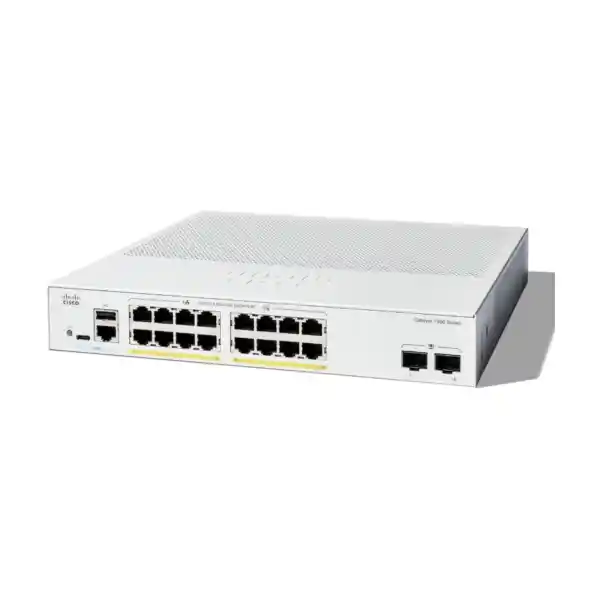
Cisco Catalyst C1300-16T-2G Network Switch
Managed Gigabit access for a clearly defined office network
If your office needs controlled wired connectivity for computers, printers and other locally powered equipment, the Cisco Catalyst C1300-16T-2G Network Switch offers a compact way to organise those connections. Its role is straightforward: bring an office access network onto a managed platform with dedicated fibre uplink options, while giving the administrator tools to separate traffic and inspect network behaviour.
For buyers in Tanzania, the useful starting point is the equipment that will actually connect. List workstations, printers, any local server connections and links to the rest of the building. Identify which devices require power through Ethernet and which already have an independent power supply. That distinction determines whether this particular model belongs in the design.
Request a FourTeck Tanzania quotation using the exact model name and your intended connection plan. Include the uplink type and any configuration requirements so that the proposed bill of materials can be assessed as a complete purchase. Confirm commercial terms in the written quotation before placing an order.
Choose this model when your requirement is managed Gigabit access without an Ethernet power budget. If the project depends on powered access ports, faster fibre uplinks or a larger number of outlets, resolve those requirements before choosing the chassis. A small amount of planning at this stage prevents avoidable accessory purchases and disruptive changes after installation.
Best fit
Managed wired access where connected equipment has its own suitable power source.
Confirm before ordering
Endpoint count, compatible optics, uplink capacity and required configuration.
Choose another model when needed
PoE access power, 10G uplinks or hardware stacking is a project requirement.
The hardware facts that determine fit
| Item | Specification |
|---|---|
| Model | Cisco Catalyst C1300-16T-2G |
| Copper access | 16 × 10/100/1000 RJ45 ports |
| Fibre uplinks | 2 × 1G SFP slots |
| Switching capacity | 36 Gbps |
| Forwarding rate | 26.78 Mpps, measured with 64-byte packets |
| Power to endpoints | Non-PoE |
| Cooling | Fanless |
| Mounting | Rack-mountable |
| Chassis size (W × D × H) | 268 × 272 × 43.94 mm |
| Unit weight | 2.18 kg |
| AC input | Internal supply, 100–240V AC, 50–60 Hz |
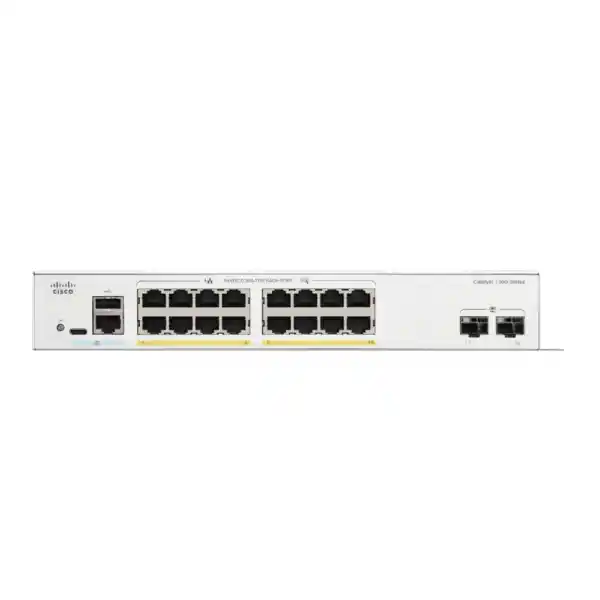
Cisco specifies sixteen 10/100/1000 copper access ports and two separate Gigabit SFP slots. The latter are uplink interfaces rather than additional ordinary RJ45 sockets. The switch is rack-mountable and fanless, with an internal universal AC power supply.
Treat published switching performance as an equipment specification rather than a forecast for every application. A file transfer also depends on storage, endpoint adapters, software and every shared connection along its route. Procurement should evaluate the path used by the real workload instead of comparing a single headline figure.
Record the proposed placement and cable routes alongside the hardware specification. Connector access, patch-cord bend space and power-cord clearance can matter as much as the enclosure measurements when fitting a compact cabinet. Confirm mounting accessories and the regional power cord with the supplier rather than assuming the quotation includes every installation item.
Plan sixteen access connections around the actual equipment
Begin with a port schedule. Give each intended connection a device name, room or outlet reference and business purpose. Distinguish an occupied desk from a cabled outlet that may remain unused, and identify equipment that needs a connection even outside normal office hours. This produces a more realistic requirement than counting staff alone.
For example, a proposed office might have ten desktop computers, two shared printers, one local application device and one copper connection to a firewall. That illustrative plan occupies fourteen access connections before future additions. It shows why a nominal sixteen-user office and a sixteen-port equipment requirement are different calculations.
Reserve capacity deliberately. A temporary training desk, a replacement printer being tested alongside the old one or a new meeting-room device can consume the last available connection. If projected growth already exceeds the remaining room, compare a larger switch at the quotation stage. Adding another unit later also adds power, patching and an inter-switch connection to manage.
Check existing cabling before moving equipment onto a new switch. An old patch lead, poor termination or unsuitable cable route can undermine an otherwise sensible hardware purchase. Label both ends of each permanent run and keep the port schedule accessible to the person responsible for support. These records make future moves easier and help separate a cabling fault from a configuration problem.
The target is a connection plan that a technician can implement and another technician can understand later, including any ports intentionally left unused.
Select the right SFP modules and fibre path
The two SFP uplinks on this model operate at 1G; they are not 10G SFP+ uplinks. A fibre connection requires an appropriate supported transceiver and a compatible device at the far end. Do not assume that any module with a similar physical shape will satisfy the link requirement.
Prepare the fibre information before requesting accessories. Record whether the installed cable is single-mode or multimode, the approximate route length, available fibre strands and connector type. Then identify the far-end switch or media interface. The selected optical pair must agree on the relevant transmission characteristics, and the completed path must remain within the link budget.
Check what is already installed rather than purchasing against a verbal description such as “standard fibre.” A cabinet may contain patch leads that differ from the permanent cable, or an existing module may have been chosen for another link. Photographs of labels and a fibre test record can resolve uncertainty before equipment is ordered.
Ask the quotation to identify each transceiver and patch lead separately, including quantity. Written confirmation should distinguish the switch chassis from the optics needed to make the uplink operational. This makes comparisons between offers more useful and avoids treating an unpopulated SFP slot as a ready-to-use fibre connection.
For a critical uplink, plan how the team will recognise and isolate a fault. Keep an accurate endpoint record and establish who can inspect each end. A carefully documented fibre path is easier to maintain than an unlabeled link that only its original installer understands.
Non-PoE operation: match the switch to the power plan
This T model does not provide Power over Ethernet to connected endpoints. That is a central buying consideration for projects containing IP phones, wireless access points, cameras or other equipment commonly powered through a network cable. An Ethernet data connection alone does not establish a suitable power arrangement for those devices.
If an endpoint supports a local adapter, verify the exact adapter and its requirements before relying on that approach. An injector may be another design option, but it must match the endpoint’s supported standard and power demand. Include its mains connection, placement and maintenance implications in the equipment plan.
Compare the overall installation effort as well as the initial switch price. Several separately powered devices can require additional sockets and a more complex backup-power arrangement. A suitable PoE switch may be the better fit where most endpoints need Ethernet power, especially when centralised power continuity matters.
This model is easier to justify when the connected equipment is already independently powered and the project needs data access rather than a power distribution function. That could include a group of desktop computers and printers or a managed connection point for existing locally powered devices.
List power requirements beside each endpoint in the port schedule. Mark any item that has not yet been verified so it can be resolved before purchase. Include both the switch and the dependent network equipment when discussing backup power; keeping only one part running may not preserve the business service.
Use VLANs to organise the LAN deliberately
VLAN support allows an administrator to group traffic into separate broadcast domains. A practical office design might distinguish staff workstations, voice equipment and device management. Those are examples of network roles, not a required configuration for every installation. The right arrangement depends on the applications and the policy the organisation intends to enforce.
Define the purpose of each network segment first. Record the devices that belong in it, the services they need and the connections they should not have. Then agree the corresponding configuration on the upstream network. A well-named VLAN is useful only when its membership and allowed communications are understood.
The switch provides VLAN membership controls, including tagged connectivity for links that carry multiple networks. Both ends of such a connection need a consistent design. A mismatch can leave some devices working while others lose addressing or access, which makes a hurried migration difficult to diagnose.
Segmentation should be paired with an explicit routing and access policy. Creating separate VLANs does not by itself establish every security boundary a business may expect. Decide where traffic between networks will be handled and where restrictions will be enforced.
During acceptance, test representative devices in each segment. Verify permitted business services and a small set of deliberately prohibited paths. Record the expected result before testing so that a blocked connection is recognised as policy rather than treated automatically as a fault. This turns an abstract VLAN design into behaviour that the business and support team can assess.
Decide where routing and security policy belong
The Catalyst 1300 platform includes Layer 3 capabilities, but the network design still needs a clear answer to a basic question: which device will act as the gateway for each subnet? An office can become unnecessarily difficult to support when a new switch is introduced without settling that ownership.
For a simple project, keeping existing gateways on the established router or firewall may reduce the amount of change required. In other designs, local routing may be appropriate. Make that decision against required traffic paths, inspection needs, addressing, support skills and the capabilities of the installed software.
Draw up a communication matrix before configuring gateways. For each device group, identify essential destinations such as application servers, printers, DNS services or the internet. State which device should enforce restrictions and how the administrator will check the result. Avoid creating an unintended path around a policy control.
If replacing an existing switch, record how the current network handles these functions. Do not infer the gateway role from the position of equipment in a cabinet. Configuration evidence and working traffic tests are more useful than the apparent cabling order.
Any requirement for a particular routing protocol, route scale or enterprise feature should be checked against the exact platform and firmware before purchase. A family name alone is insufficient proof of a specialised function. The written design should describe the required outcome so that hardware selection and configuration can be reviewed together.
Give voice and interactive traffic a considered QoS policy
Quality of service controls let an administrator prioritise selected traffic when links are busy. That can be useful where calls or other interactive applications share a connection with less time-sensitive transfers. The policy needs to reflect the network’s actual traffic rather than assigning maximum priority to every application.
Identify the likely congestion point first. It may be an uplink, a firewall interface or an internet connection rather than the access connection to a particular desk. A useful policy follows the service across the relevant path and remains consistent with the way other equipment classifies traffic.
Agree which sources are trusted to mark priority. Accepting every endpoint’s requested classification can weaken the intended policy, while ignoring established markings can make a carefully configured voice deployment behave inconsistently. Document the chosen approach and test a representative call during an agreed competing transfer.
Prioritisation cannot create extra bandwidth or repair an unreliable external connection. If an office regularly saturates its upstream path, the solution may include capacity changes or application scheduling as well as QoS. Interpret test results in that wider context.
Remember the separate power requirement when planning desk phones on this non-PoE model. Voice traffic handling and endpoint power are distinct parts of the purchase. A complete acceptance check should cover registration, calling, audio behaviour and the ability to recover after the planned restart sequence, using the actual phone and telephony system proposed for the office.
Control administrator access and maintain accountability
A managed switch introduces an administrative interface that deserves its own access plan. Decide who should change configuration, where they should connect from and how responsibility transfers when personnel or service providers change. These decisions are easier to make before the device becomes part of everyday operations.
Cisco documents security features including management access controls and port-based authentication. Select the features that fit the organisation’s existing systems and available support skills. An authentication design may depend on external services, compatible endpoints and a tested response when those services are unavailable.
Keep management access separate from ordinary user activity where the design allows it. Prefer encrypted administration, restrict unnecessary exposure and retain a documented recovery method. Store credentials in the organisation’s approved system rather than leaving them in a commissioning email or on an equipment label.
Apply changes in an order that preserves authorised access. Restricting an interface or changing a management network without confirming the upstream path can lock out the administrator. Plan local recovery and keep an agreed rollback point for significant changes.
Accountability also depends on records. Keep the approved configuration, the reason for major changes and the person responsible for future maintenance. These records help distinguish an intentional policy change from an unexplained service interruption. They also reduce dependence on one individual’s memory when the office grows or a different technician takes over.
Prevent accidental loops when adding network connections
A network loop can be introduced during an ordinary desk move or cabinet tidy-up. Before adding a second path between switches, decide how the network will handle that path. Two patch cords should not be treated as automatic resilience or extra usable capacity without an appropriate design.
Use a simple physical topology record showing each upstream connection and its destination. Mark links that are intended to remain disconnected until an approved change. Labels make it easier for staff to recognise a legitimate spare lead and reduce the temptation to join unused sockets during troubleshooting.
The platform’s spanning-tree capabilities should be configured to suit the network. Confirm the intended topology behaviour with the administrator responsible for neighbouring switches. Changes at one device can affect the forwarding path elsewhere, so agreement across the connected equipment matters.
For a redundant-path proposal, define the failure being addressed. A second cable to the same upstream device does not address every possible outage. Consider common power sources, shared physical routes and the upstream device itself before describing the result as resilient.
Test an agreed failure scenario during commissioning if resilience is part of the requirement. Record which path should remain active, what interruption is acceptable and how normal operation will be restored. A clear test is more valuable than an assumption based on the presence of additional cables.
Do not include hardware stacking as a capability of this model. Cisco’s supported stacking-model list does not include this particular sixteen-port 2G variant.
Choose placement with maintenance access in mind
Fanless construction is useful when a switch will sit near people, but placement still needs care. Provide ventilation, a stable mounting arrangement and access for maintenance. A small cabinet crowded with adapters and tightly bundled cables can be awkward to support even when the switch itself occupies little space.
Cisco lists the chassis at 268 × 272 × 43.94 mm and 2.18 kg. Allow additional room for patching and the power connection rather than measuring only the metal enclosure. Check shelf loading or rack installation requirements against the actual mounting arrangement and confirm the required accessories before installation.
Inspect the intended environment for dust, moisture and heat sources. The product should be selected and installed within its documented environmental limits; fanless does not imply outdoor or weatherproof construction. A protected indoor equipment location is a different requirement from an exposed area or industrial enclosure.
Consider how a technician will replace a patch lead or inspect the identification label without disrupting neighbouring connections. Keep the power connection identifiable and avoid using the switch as a shelf for unrelated equipment.
Finally, include the cabinet and dependent devices in the backup-power discussion. The appropriate runtime comes from the business requirement and the total connected load. Record the intended shutdown or recovery sequence so staff understand what service should remain available when normal power is interrupted.
Commission the switch as a planned change
Schedule commissioning around the effect on users. Even a small office can depend on its network for payment processing, printing, file access or calling. Agree a change window, nominate a business contact and define how users will report problems after migration.
Before moving cables, capture the existing port assignments and identify the upstream connection. Record current addressing and any special device requirements. Preserve the information needed to put the old arrangement back if an unexpected dependency prevents completion.
Configure and review the new device before transferring the whole office. Start with a limited set of representative connections and verify management access, addressing and essential applications. Expand the migration once the basic path is understood. This makes faults easier to isolate than changing every connection simultaneously.
Keep an explicit checklist for what must work before the change is accepted. Include local services as well as internet access; a successful web page load says little about a printer, application server or voice device on another network segment.
After migration, label the final connections and remove abandoned temporary cabling. Update the records to match what was installed, rather than leaving the proposed design as the only reference. Agree who owns the final configuration and where the support information will be kept.
Any installation or configuration work should appear as an agreed quotation item. Buying the chassis alone should not be interpreted as an automatic commitment to a complete migration service.
Monitor useful evidence instead of waiting for a complaint
The administration tools include status and statistics views that help the operator inspect the switch. Interface activity and error information can be useful starting points when users report inconsistent performance. Interpret those observations alongside the physical cabling and application path rather than assuming every complaint originates at the switch.
Establish a baseline after commissioning. Record which ports are normally connected, the expected link speeds and the identity of each uplink. If something changes later, that baseline gives the support team a concrete comparison.
A practical troubleshooting record should include the affected device, time of the problem, applications involved and whether other users were affected. Note whether the issue occurs on a wired connection, across an uplink or only when reaching an external service. Those distinctions help narrow the investigation.
For repeated faults, change one relevant factor at a time and record the result. Substituting a known working patch lead, testing another permitted port or comparing another endpoint can be useful when done methodically. Unrecorded changes across several devices can obscure the original cause.
Assign responsibility for reviewing alerts or periodic checks if central monitoring is part of the design. Collecting information without an owner does little for service continuity. The monitoring arrangement should fit the organisation’s staffing and support process, including who can investigate an issue when the normal administrator is unavailable.
Keep configuration backups and firmware maintenance manageable
Cisco’s firmware guidance calls for a configuration backup before an upgrade and a reboot to apply the new software. Plan that interruption with the business and use the correct software for the exact device. Review the applicable release information before deciding on an update.
Maintain a known working configuration copy outside the switch. Label it with the device identity, date and purpose so it can be distinguished from an older or experimental version. Protect the copy appropriately because network configuration can contain sensitive operational details.
A maintenance plan should state who is authorised to update software, who receives the outage notice and how success will be checked afterwards. Where local recovery may be needed, arrange access before the maintenance window begins. Do not depend solely on the same remote path that the change could interrupt.
Check the configured behaviour after a planned restart. The intended settings should persist, authorised management should remain available and representative users should regain their required services. Record the outcome and update the baseline if the approved configuration changed.
Avoid combining unrelated changes just because a maintenance window is available. A clearly scoped update is easier to assess and reverse than an update performed alongside several undocumented policy or topology changes. The aim is a maintainable device with a recoverable configuration, not simply a completed software upload.
Compare alternatives using the requirement that changes
Keep the C1300-16T-2G on the shortlist when the connection count, Gigabit uplink requirement and independent endpoint power arrangement all fit. A different model becomes appropriate when one of those assumptions changes. Identify the limiting requirement so that a comparison answers a real purchasing question.
For a phone, camera or wireless installation, start with power delivery. For a growing office, start with the planned outlet count. For traffic moving to central storage or a busy aggregation point, start with the required uplink capacity and actual workload. These lead to different alternatives even if the present network appears similar.
Where a project calls for broader enterprise access options, review FourTeck Tanzania’s Cisco Catalyst 9200 planning guide as a starting point for a separate platform assessment. Verify the exact proposed model and software requirements rather than treating a family name as a direct replacement specification.
For a wireless-led project, the Cisco wireless access point guidance can help frame the connected-device requirement. Choose the access point and switching arrangement together, including power, wired connection speed and management responsibilities.
Compare complete offers with the same accessory and service scope. A cheaper chassis quotation can become less useful if it omits the optics, mounting items or agreed configuration needed by the project.
Three practical deployment scenarios
Office workgroup
A team wants managed connections for a fixed group of computers and shared printers. Most equipment already has local power, and the upstream connection requirement is understood. This is a sensible scenario to assess against the available access connections, provided the port schedule leaves the planned growth allowance.
Existing fibre-linked room
An office needs a managed access point for wired equipment in a room served by an installed fibre route. The important purchase detail is the optical path: cable type, connector arrangement, length and far-end equipment. Select the required modules only after those details are checked, then commission the complete link.
Branch refresh
An organisation wants to replace an unmanaged switch and gain a documented configuration. The first phase should establish addressing, business services and a manageable segmentation plan. The value depends on a controlled migration and support ownership as well as the hardware itself.
These scenarios are illustrations, not claims that every office with a similar description should buy this model. A workgroup with many powered endpoints, a saturated uplink or an immediate need for more connections may require another selection.
Use the closest scenario to prepare a concise brief for the quotation. Describe what works today, what is causing difficulty and the result expected after installation. Specific requirements make it easier to check whether the proposed equipment actually addresses the problem.
A Tanzania quotation checklist that supports comparison
State the exact manufacturer and model, the required quantity and the intended site environment. Include the port schedule or a short summary of connected equipment. Identify any uncertain requirement clearly so that it is addressed before acceptance of the offer.
Ask the written quotation to separate the chassis, transceivers, fibre patch leads, mounting accessories, power-related items and any agreed professional work. Specify the far-end equipment for each proposed optical connection. This helps avoid comparing one complete installation offer with another that covers only the switch.
Request the current price and applicable currency, availability, delivery terms and warranty terms for the offered unit. Confirm whether any support or configuration service is included and who will provide it. None of those commercial details should be inferred from the model specification alone.
Provide a delivery destination when requesting commercial terms, and ask for any location-dependent arrangements to be stated in the offer. Do not assume that a general Tanzania enquiry establishes a particular delivery time or on-site service commitment.
Agree the acceptance evidence where configuration is part of the purchase. That could include a final port schedule, a protected configuration backup, representative application tests and a brief handover record.
Finally, record who approves changes to the equipment list. Substitutions involving another model, different optics or altered service scope should be assessed against the original requirement. A matching brand name is not enough to establish equivalent power, uplink or operational characteristics.
Buyer FAQs
Does this switch power IP phones or cameras?
No. This is the non-PoE variant. Verify a suitable local power supply or compatible injector for each endpoint, or assess a PoE switch when central Ethernet power is part of the requirement. Include the chosen power arrangement in the quotation.
Are the uplinks 10 Gigabit?
No. The two SFP uplinks are 1G interfaces. If the design requires 10G connectivity, select a model specified for that requirement and check the optical modules, far-end interface and cabling as part of the same decision.
Can I order the switch without fibre modules?
Ask the supplier to state the package contents. An SFP slot needs a suitable module to establish an optical link. Have the quote identify the required optics and patch leads explicitly so the accessory scope is clear before ordering.
Will a new switch increase my internet connection speed?
A switch purchase alone does not change the contracted internet service. Investigate where congestion occurs and compare local transfers with external application performance. The router, firewall, provider connection and endpoint may each affect the observed result.
Can the office keep its existing addressing?
That depends on the migration design. Record current gateways, DHCP arrangements and VLAN membership before making changes. Retaining the established scheme may reduce disruption, but the administrator should verify it against the proposed configuration and required policy.
What should be included in the handover?
Request the final connection schedule, approved management details through a suitable private channel, a protected configuration backup and the agreed acceptance results. Identify the person responsible for maintenance and how future changes will be recorded.
What are the Tanzania price, stock and warranty terms?
Request those details in the current written offer from FourTeck Tanzania. The technical specification does not establish a local selling price, available stock, delivery commitment or the terms applicable to the particular supplied unit.
Request a FourTeck Tanzania quote
Send the exact model name, required quantity, connected-device list and intended uplink arrangement when requesting your quotation. Include existing fibre details, far-end equipment and any requirement for configuration or migration assistance.
Ask for a written bill of materials and current commercial terms so the offer can be checked against your installation plan. Resolve endpoint power and optical compatibility before purchase. With those requirements agreed, the proposed switch and accessories can be assessed on their ability to deliver the connections your office actually needs.
Request a quote for your switch, required optics and agreed configuration scope.




Reviews
There are no reviews yet.