
FOURTECK TANZANIA · MANAGED SWITCHING
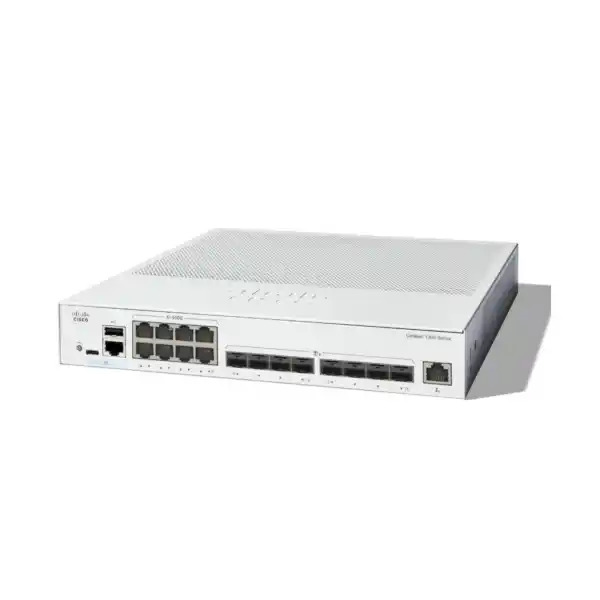
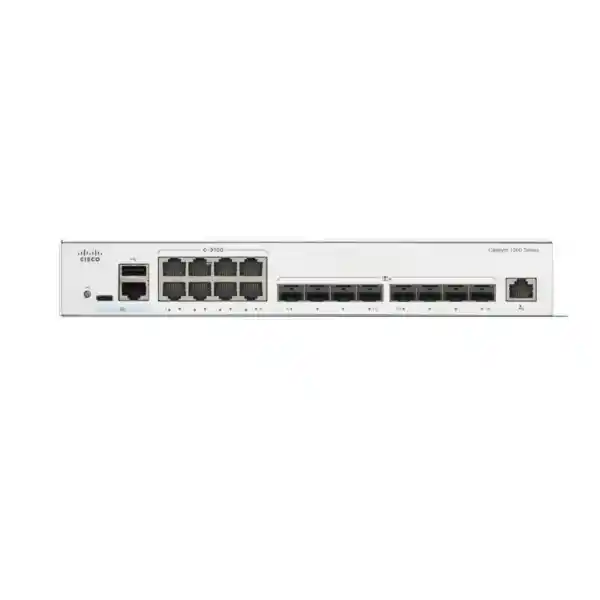
Cisco Catalyst C1300-16XTS Network Switch
Bring copper-equipped systems and fibre-capable uplinks into one managed 10G network design. Select the switch, connection media and deployment scope together, with a clear port plan and compatibility checks for the equipment you already use.
Next step: Request a quotation with your device list, cable routes and uplink requirements so the proposed components can be reviewed as a complete connection plan.
Connection and buying priorities
| Requirement | What to establish before ordering |
|---|---|
| Copper-equipped systems | Adapter models, intended operating speed and complete cable-channel suitability. |
| Fibre-capable connections | Supported modules at both ends, fibre type, route distance and patching. |
| Expansion and resilience | Ports reserved for growth, aggregation or a validated stacking design. |
| Powered endpoints | A separately specified power source for devices that require PoE. |
| Commercial comparison | An itemized bill of materials and written supply and support terms. |
Where this 16-port switch fits
Choose the Cisco Catalyst C1300-16XTS Network Switch when your network needs a compact managed 10 Gigabit Ethernet platform with an even balance of copper connections and fibre-capable interfaces. Its port mix suits a small server room, a business network aggregation point, or a branch that needs faster local connections between servers, storage and downstream switches. For a Tanzania quotation, begin with the number of connections, the media at each end and the traffic those connections must carry.
The most useful buying question is whether your workload benefits from both connection types. A business with copper server adapters and fibre runs to other cabinets has a different requirement from an office connecting ordinary desktop computers. This model can bring those higher-speed paths together, but the surrounding equipment still determines the result. Identify the application that is slow, where its data travels and which link currently limits it before deciding that a switch upgrade alone will solve the problem.
Ask FourTeck Tanzania for a quotation based on your actual topology. Include the existing switch models, server network adapters, storage interfaces, cable information and intended uplink destinations. A clear requirement helps separate essential components from optional additions and makes it easier to compare proposals on a like-for-like basis. State whether you require hardware only, compatibility assessment or a separately scoped deployment proposal so the quotation reflects the work you intend to procure.
Verified hardware at a glance
The published Cisco specifications identify eight 10G copper RJ-45 ports, eight 10G SFP+ interfaces and one separate Gigabit Ethernet out-of-band management port. These are sixteen traffic interfaces plus a dedicated management connection. The SFP+ interfaces are separate from the eight copper traffic ports; this is not a layout in which eight shared combo connections reduce the available data-port count.
Cisco lists 320 Gbps switching capacity and a forwarding rate of 238.1 million packets per second for 64-byte packets. These figures describe the switching platform under the manufacturer’s stated conditions. They are not a promise of application throughput, storage speed or internet bandwidth. The switch is rack-mountable, measures 268 × 300 × 43.94 mm and weighs 2.68 kg.
The model uses an internal 100–240V AC, 50–60 Hz power supply and has one fan. Cisco specifies an operating temperature range of −5°C to 50°C. It does not supply Power over Ethernet. Plan a suitable installation environment and separate endpoint power arrangements where required. Confirm the exact supplied accessories and regional power cord on the quotation rather than treating a general product-family package description as a contractual contents list.
Plan copper links around the complete cable channel
Copper is convenient when a nearby server, storage appliance or other device already presents an RJ-45 interface. Before assigning those links, record the adapter model and the speed you intend each connection to negotiate. A socket that looks familiar does not establish the supported operating mode of the device behind it. Check both ends, including any intermediate panel or coupler.
Cisco’s installation guidance calls for Category 6A or better cabling for 10G ports. Assess the complete installed channel, including patch leads and patch panels, rather than relying on the label on one cable. For an existing structured cabling installation, obtain its certification results where available. Where records are missing, allow for testing before treating the channel as ready for the intended connection.
Lay out rack cabling so connectors remain accessible and cable bundles do not obstruct ventilation. Label each connection with its destination and purpose. Reserve enough slack for service access without creating tight bends or pressure against the switch face. Ask the network designer to resolve any requirement for intermediate copper speeds against the exact hardware and software documentation; do not assume that every mode mentioned in a family-wide administration menu applies to every model.
Specify fibre, optics and direct-attach links as a system
An SFP+ cage is only one part of a working link. A fibre connection also needs a supported optical module, suitable fibre and a compatible interface at the far end. For each run, record the fibre type, approximate route length, connector presentation, patch-panel arrangement and the other device’s exact model. Those details should drive accessory selection.
Ask for module compatibility to be checked for both devices and the intended software releases. Match the optical characteristics at the two ends and account for the full installed path. A pre-existing fibre cable should be assessed from its records and condition, not selected simply because its connector can be inserted. Include patch leads and any necessary termination work in the project scope when they are part of the requirement.
For a short connection within a rack, ask whether an explicitly supported direct-attach cable is appropriate. Confirm support and length before ordering. Do not assume that any cable marketed as SFP+ will operate in every platform. Request separate bill-of-materials lines for optics or direct-attach cables, and require the quotation to state what is included. That makes a bare-switch price and a usable installed-link price easier to distinguish.
Allocate the port budget before selecting accessories
Build a port schedule that includes today’s devices and the connections needed to operate the design. Count server interfaces, storage interfaces, downstream switch links, upstream connections and any ports reserved for the chosen resilience arrangement. Then add a deliberate allowance for growth. Free sockets shown in a product photograph are not the same as free ports remaining after the topology is implemented.
An illustrative planning exercise might allocate four copper links to servers, two to storage-related equipment and leave two copper positions for expansion. On the SFP+ side, a different exercise could reserve connections for downstream switches, an upstream path and future requirements. These are design examples, not a prescribed configuration or assurance that the connected equipment is supported. The final schedule must follow your actual device inventory.
Record the purpose, destination, cable type and expected speed beside every proposed connection. Identify whether a link is standalone, part of an aggregation group or reserved for another function. This simple record often reveals a capacity issue earlier than a headline port count does. If the planned layout consumes the available interfaces immediately, compare a larger platform or a different topology before committing to the purchase.
Use it for server and storage connectivity with realistic expectations
A mixed-media switch can be considered where business applications exchange substantial data locally, such as file services, backup traffic, virtual-machine storage access or workstation access to shared projects. Suitability still depends on the servers, storage system, protocols and operating requirements. Review the storage vendor’s network guidance when the switch will carry a workload with specific availability or latency requirements.
Describe the workload in practical terms: how much data moves, when it moves, how many systems transfer simultaneously and whether it shares links with interactive business applications. A short burst of backup traffic creates a different planning problem from sustained access by multiple hosts. Collect measurements during busy periods and retain a baseline so that any upgrade can be assessed against the original requirement.
Do not infer a file-transfer result from an interface label. Disks, application processing, encryption, server adapters and the receiving system may all affect observed throughput. If storage connectivity is business critical, define an acceptance test with the storage administrator before ordering. Include the exact traffic pattern and recovery checks that matter to the application, rather than relying only on a successful ping or a single copying test.
Aggregate downstream switches without confusing access and distribution roles
Another potential role is bringing several downstream switches into one faster local switching point. This can suit an organization whose user devices remain on access switches while servers and inter-switch traffic require higher-speed paths. Start with a topology drawing showing where traffic enters, which systems it must reach and whether it crosses a firewall or another routing boundary.
Determine how much simultaneous traffic each downstream connection must carry. An access switch with many active users may place a different demand on its uplink from one serving lightly used devices. Include camera streams, backups, wireless traffic and scheduled transfers where relevant. The appropriate uplink arrangement follows the traffic and resilience requirement, not just the number of endpoints listed in an inventory.
This model’s role in such a design should be explicit. Endpoint power can remain at a separately selected PoE access layer, while aggregation concentrates connectivity higher in the network. Review the capacity and availability of the path beyond the aggregation switch as well. Increasing local link speed may move the limiting point to a firewall, another switch or a server interface, which should be considered in the overall budget.
Segment traffic with a documented VLAN plan
The platform supports VLAN management, including IEEE 802.1Q tagging. This lets an administrator organize separate logical networks over the switching infrastructure. For procurement and design discussions, describe the groups that need separation and the systems they must reach. Examples might include business users, servers, guests, network management and building systems.
Prepare a VLAN schedule showing the name, identifier, subnet, default gateway and intended member ports for each group. Where a link carries several VLANs, document the tagging expectations at both ends. Agree on the handling of untagged traffic before cutover. A mismatch can leave a link physically active while the required service remains unreachable, so include functional tests for each network.
VLAN separation is part of a wider access policy. Specify which traffic is allowed between groups and which device enforces that policy. For example, guest access to an internet service should not imply access to business storage. Treat such examples as requirements to implement and test. Avoid assuming that creating VLAN names automatically creates the desired security boundary or moves existing devices into the correct network.
Decide where inter-VLAN routing and security belong
The Catalyst 1300 platform provides Layer 3 capabilities, including static routing. This can be relevant where selected internal networks need to communicate through the switching layer. The appropriate role depends on your addressing plan, security policy and the features supported by the intended software release. Have the designer identify the gateway location for every subnet.
Moving a gateway changes the path that traffic takes. Before doing so, check whether a firewall currently inspects that traffic and whether the proposed design would bypass that inspection. Define the required controls first, then choose the routing location. Document return routes and the handling of traffic bound for external networks so that a working outbound path is matched by a working path back.
Do not treat all Cisco Catalyst families as feature-equivalent. In particular, the current combined datasheet identifies OSPF support with C1300X models; it should not be inferred for this C1300 model. If a tender requires a specific dynamic routing protocol, enterprise management feature or scale limit, make that a named compatibility check. A clear mandatory-feature list is more useful than a broad request for a Layer 3 switch.
Use link aggregation for the requirement it actually addresses
Link aggregation and LACP are supported management features. They allow suitably configured connections between compatible devices to form a logical group. This may be useful when a design needs several physical paths between the same systems. Confirm support on the connected server, storage appliance or switch, and agree on the configuration at both ends.
The benefit depends on how traffic is distributed. Do not assume that adding two links makes every individual transfer run at twice the speed. State whether the objective is carrying several simultaneous conversations, maintaining connectivity after a member-link failure or both. Select the arrangement against that objective and the behavior of the participating equipment.
Put each member connection on the port schedule and include its cable or optic in the bill of materials. Test the group under load, remove one member during an agreed maintenance exercise and verify the expected behavior. Check the restored state when the connection returns. Record the result and the acceptable interruption for the application; an available feature does not establish a site-specific failover time or a guarantee of uninterrupted sessions.
Plan stacking as a separate topology decision
Cisco includes this model in the C1300 10G stacking family and describes stacks of up to eight supported switches. The published family rules matter: cross-stacking between the listed families is not supported. Do not assume that another switch can join the same stack because its product name also contains Catalyst 1300.
List every proposed member by exact model and validate the complete set together. Confirm the software requirements, supported interconnects, physical arrangement and the interfaces assigned to stacking. Front-panel connections used for this purpose must be accounted for when calculating the ports left for normal network traffic. A stack proposal should include the required interconnect components as explicit items.
Stacking can simplify administration, but it should be evaluated alongside the failure scenarios that matter to the business. Ask what happens if a member, interconnect or power source is lost and what maintenance affects the group. Keep recovery procedures and configuration records available outside the devices themselves. Select a stack because its operational behavior suits the site, not merely because a future expansion option appears on a specification sheet.
Protect the topology against accidental loops
The administration guide documents spanning-tree controls for managing Layer 2 topology. These matter when switches have redundant physical connections. Decide how the network should converge and which device should hold the intended root role before introducing extra links. Adding a second cable without a coordinated design can create a network fault rather than useful redundancy.
Classify ports according to their purpose. A connection to another switch needs a different review from an endpoint-facing connection. Features such as BPDU Guard should be applied with an understanding of the equipment on the port and the desired response. Document exceptions so that a later maintenance change does not defeat the original topology design.
During acceptance testing, compare the actual forwarding path with the planned one. Check that the loss and restoration of an agreed link produce the expected result. Include a review of event logs and port state after the exercise. Keep the test controlled and scheduled, with an available rollback path. The aim is to demonstrate the installed design’s behavior, not to assume a universal recovery time from the presence of a protocol.
Control device access and administrative access deliberately
The documented security features include 802.1X authentication and controls such as DHCP snooping. Their value depends on integration with the site’s authentication and addressing services. Begin by identifying which devices can authenticate, which require an exception and who owns those exceptions. Plan service behavior for an authentication-system outage as part of the design.
Roll out access controls in a way that preserves required business services. A static-address device, a network appliance and a user workstation may need different handling. Record approved device behavior and test it before applying a broad policy. For DHCP-related controls, identify the legitimate server path so that the intended protection does not interrupt address assignment.
Restrict administration to the people and networks that need it. Establish individual administrative identities where appropriate, agreed privilege levels and a controlled method for keeping recovery credentials. Review enabled management services against the organization’s policy. These are operating responsibilities, not outcomes obtained merely by purchasing a managed switch. Include a named owner for account reviews and for responding to unexpected access or configuration changes.
Write inter-network access rules from business requirements
The access-control documentation describes rules that match traffic characteristics and apply the configured action. Before implementation, translate the business requirement into an explicit communication matrix. Identify the source group, destination service, protocol, direction and owner of each permitted flow. This is easier to review than a long rule set with no explanation of its purpose.
For example, a backup system may require access to selected servers while ordinary users require only the application services those servers provide. Specify those needs precisely and decide where enforcement belongs. Consider dependencies such as name resolution, time services and management access so that an apparently narrow policy does not accidentally break a required supporting function.
Have the administrator test both permitted and prohibited traffic after the change. Keep a record of the expected result for each case and review rules when systems are retired or moved. Switch access controls should form part of the network policy, while any requirement for advanced firewall inspection must be assessed separately. Do not infer a firewall service or security subscription from the availability of switching ACLs.
Keep application priorities and capacity planning aligned
The Quality of Service documentation covers traffic classification and queue behavior. These tools can help an administrator define how competing traffic is treated at a congested point. Start by identifying the applications that have a specific service requirement and where contention can occur. A priority policy should reflect that requirement rather than giving every business application the highest priority.
Agree on how traffic markings are handled across connected devices and where the network should trust or change those markings. Document a small, understandable set of service classes. Test during the relevant busy period and look at the behavior of both priority and ordinary traffic. A policy that preserves one application but makes essential supporting services unusable does not meet the wider requirement.
QoS does not create extra bandwidth or repair an overloaded application server. If a link is persistently full, review the capacity plan as well as queue settings. For backup windows, large transfers and interactive workloads, scheduling may also be part of the answer. Define the observation that would justify adding capacity later so that the design can evolve from measured demand.
Make management and monitoring part of the purchase
The switch can be administered through an on-box web interface or command-line interface. Decide which method your support team will use and ensure the configuration records are maintained consistently. The dedicated management connection should have a documented role in the management design. Its usefulness during a fault depends on having an available, controlled path to reach it.
The SNMP documentation provides management options for monitoring systems. Confirm the supported configuration that fits your monitoring platform and the organization’s security policy. Agree on what should generate an alert, who receives it and what action follows. A dashboard that nobody checks is less useful than a small set of meaningful alerts with a clear owner.
Keep a baseline of port use, negotiated speeds, error behavior and normal busy-period demand. Record device identity, software version and configuration backup location. Correlate events using consistent time settings across the network. Before handover, demonstrate that the administrator can reach the management interface, retrieve the required monitoring information and find the latest recovery records without relying on undocumented knowledge from the installer.
Prepare the rack, power and maintenance arrangements
Check rack position, mounting hardware, cable routing and service access before delivery. Leave ventilation openings unobstructed and assess the temperature where the device will actually operate, including warm periods and the effect of adjacent equipment. A room thermostat reading may not represent the conditions inside a crowded cabinet. Resolve dust, moisture or unsuitable enclosure conditions during site preparation.
Plan power continuity around the complete service. If the network depends on servers, storage, a firewall and another switch, protecting only one device may not preserve the application. Ask the responsible team to size any UPS arrangement from the actual connected equipment and required runtime. Include power-cord compatibility, grounding arrangements and accessible isolation in the site-readiness review.
Set a maintenance process for software review, backup and recovery. Cisco publishes release notes with changes and resolved issues, so the intended release should be checked against the actual deployment. Do not apply an update simply because its version number is newer. Evaluate relevant changes, schedule the work, preserve the prior configuration and define the recovery route before starting.
Compare alternatives by media balance and required function
A useful comparison starts with the physical connections your design requires. A network dominated by copper-equipped devices may need a different port balance from one dominated by optical links. If growth is likely to exhaust this layout, compare a higher-port-count option early. Include the cost of the complete link arrangement rather than assessing switch hardware prices in isolation.
If the main requirement is powering phones, cameras or wireless access points, compare an appropriate PoE access-switch design. This model can still have a separate role elsewhere in a network, but it should not be selected as the source of endpoint power. List both the required power standard and the total endpoint demand when evaluating powered alternatives.
For enterprise refresh projects, also compare software operations, required protocols, management integration and resilience expectations. FourTeck Tanzania’s published guidance on Cisco Catalyst 2960-X replacement planning is relevant when the request is part of a wider legacy access-network migration. Keep that broader refresh decision distinct from choosing a mixed-media 10G model for a specific local connectivity requirement.
Build a quotation that procurement can evaluate
Send a concise requirement containing the intended switch quantity, the role of each unit and the device inventory it must connect. Add a topology drawing if available. Identify mandatory technical requirements separately from preferences, and state the intended operating environment. For a Tanzania procurement request, include the destination and project timing so that the commercial response can address those details explicitly.
Ask for a bill of materials that separates switches, optical modules, direct-attach cables, copper patch leads, mounting accessories and any proposed power-continuity equipment. If configuration, testing, documentation or installation is required, request those as defined scope items. State the expected handover deliverables and the person who will accept the work. Do not assume services are included in a hardware price.
Request written confirmation of the exact model, included accessories, warranty terms, support options, price, tax treatment, availability and delivery arrangement. Those details belong to the specific quotation and should not be inferred from a generic product description. A deadline should be checked commercially before a project schedule depends on it. Resolve any substitutions against the same mandatory requirements before accepting an alternative.
Define a practical deployment and acceptance sequence
Before cutover, capture the existing configuration and port map, identify the users or services affected and agree on a maintenance window. Prepare the new configuration from the approved design. Validate addressing, VLAN membership, management access and connected-device compatibility in a suitable staging arrangement where possible. Assign responsibility for the decision to proceed or roll back.
During the change, label and verify each moved link against the port schedule. Check the negotiated operating state and then test the application path, including any routing or firewall boundary. Repeat the agreed service tests from the relevant user and server networks. A lit port establishes only part of the result; the intended application must also work under the expected access policy.
Complete handover with the final topology, port schedule, configuration backup, software record and test results. Record outstanding items and who will resolve them. Confirm that the site team knows the support contact route and the recovery procedure. For future expansion, retain the reserved-port plan and the conditions that would trigger another capacity review. These records make the installed network easier to operate after the project team leaves.
Buyer questions
Does this model power access points, cameras or IP phones?
No. It is a non-PoE switch. If those endpoints require power through Ethernet, specify a suitable PoE switch or an independently verified power arrangement. Check endpoint power needs as a separate part of the design, including the required standard and total demand.
Are transceivers and fibre cables automatically included?
Do not assume they are. Ask the quotation to list the exact optical modules and cables supplied for each intended link. Compatibility must cover both connected devices, the installed fibre and the required distance. The presence of an SFP+ interface does not define a complete optical connection.
Can I use the existing copper cabling?
Assess the installed channel against the intended operating speed. Cisco’s guidance calls for Category 6A or better for 10G ports. Check the patch leads and panels as well as the permanent cable, and obtain testing where existing certification or condition is uncertain.
Will a faster switch make my internet connection faster?
It does not increase the bandwidth supplied by your internet service. A local upgrade may address a bottleneck inside the site, but the external circuit, firewall and application remain part of the path. Identify the limiting point through measurements before choosing the remedy.
Is this a direct substitute for any other Catalyst switch?
No universal substitution should be assumed. Compare the exact interface arrangement, required software functions, power needs, configuration practices and management integrations. An existing configuration should be reviewed and validated for the destination platform rather than treated as automatically portable across Cisco product families.
Can it be stacked with any Catalyst 1300 model?
No. The supported stacking family must be checked for every proposed member. Cisco distinguishes the all-10G C1300 family from other stacking families. Request validation of model combinations, software and interconnects before purchasing components for a stack.
Should storage and office traffic share the same switch?
That is a design decision based on application requirements, security policy, traffic levels and failure tolerance. Ask the storage administrator to review the proposal. Define separation, capacity and acceptance tests before using shared infrastructure for a workload that has particular operational requirements.
What information is most useful for a compatibility quotation?
Provide the switch quantity, topology, connected-device models, network adapter details, intended speeds, cable types and distances. Add required routing or security functions and resilience expectations. These details let the proposal address actual connections instead of relying on a general statement that devices are compatible.
How should I compare two prices for this requirement?
Compare the complete bill of materials and the stated commercial terms. Check optics, cables, accessories, proposed services and support alongside the hardware line. Ask each supplier to identify exclusions, taxes, delivery conditions and the exact model so that differences are visible before purchase.
What should be tested before the project is accepted?
Agree on tests for link operation, required applications, VLAN access, management reachability and any designed failure behavior. Include configuration backup and documentation in the handover. Record results against the original requirements so that acceptance reflects the delivered service rather than only successful device power-on.
Request a switch and connectivity quotation
Share your planned connections with FourTeck Tanzania: switch quantity, connected-device models, copper and fibre requirements, route distances and required network functions. State whether the request covers hardware only or also requires a separately defined configuration and deployment proposal.
Ask for the complete bill of materials and written commercial terms. Review the proposed model, accessories, compatibility, availability, delivery arrangement and support scope before placing the order.




Reviews
There are no reviews yet.