
FOURTECK TANZANIA · BUSINESS ACCESS SWITCHING
Cisco Catalyst C1300-24FP-4G
Plan powered business connections with a clear view of endpoint demand, uplink capacity and network management.
Request a model-specific quotation from FourTeck Tanzania with your endpoint list and uplink requirements.
Choose the switch around powered endpoints
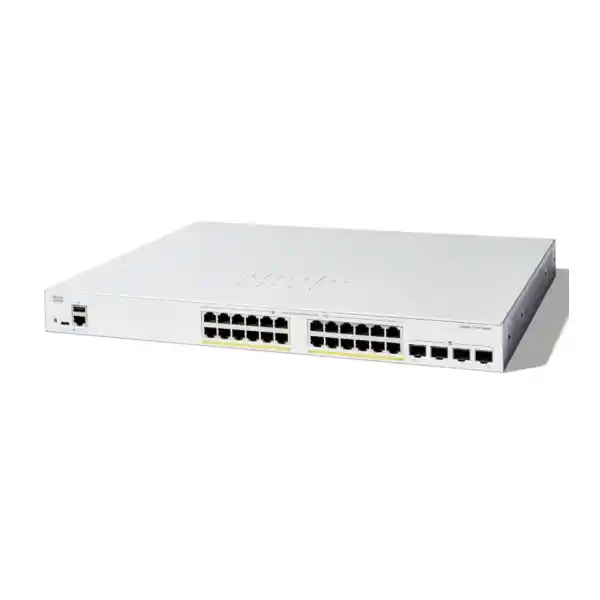
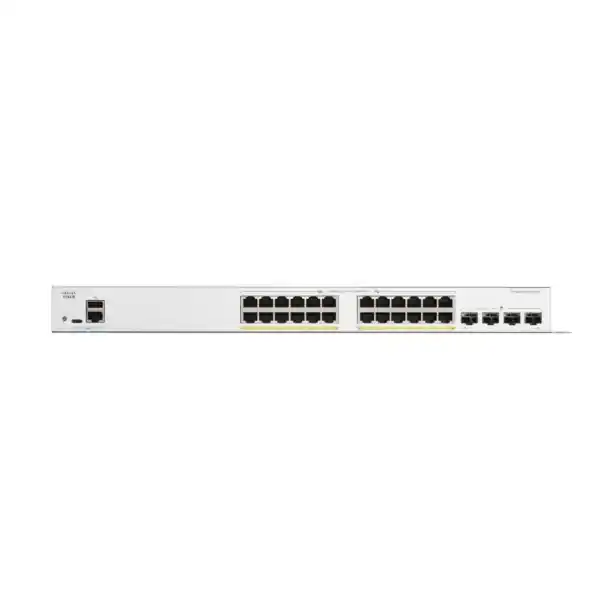
The Cisco Catalyst C1300-24FP-4G Network Switch is a practical candidate for a business access network that needs powered Ethernet connections, separate network segments and manageable uplinks. It combines 24 Gigabit copper access ports with four Gigabit SFP slots and PoE+ capability. For Tanzania buyers, the purchasing decision should start with the devices being connected, their combined power requirement and the traffic travelling upstream.
Use this page to assess an office, branch, reception area, teaching space or surveillance network before requesting a quotation. The strongest fit is a deployment whose endpoint connections and upstream links can operate within Gigabit limits. Share your device inventory, power requirements and uplink details with FourTeck Tanzania so the proposed equipment can be checked against the actual installation.
A useful selection process considers the complete connection path: endpoint, cable, switch port, uplink and destination. A switch alone cannot correct an undersized internet service, an overloaded server or an unsuitable wireless design. Establishing those boundaries early makes the quotation more useful and reduces avoidable changes during installation.
At a glance
| Item | Specification or check |
|---|---|
| Access connections | 24 × 10/100/1000 copper Ethernet |
| Powered endpoints | PoE+; individual-port and shared-budget checks apply |
| Uplink connections | 4 × Gigabit SFP |
| PoE planning | 370W conservative basis; Cisco also lists 375W |
| Installation | Rack-mountable; active fan cooling |
What to confirm in the hardware specification
Cisco identifies this model as a managed, rack-mountable switch with 24 10/100/1000 Ethernet ports supporting up to 30W PoE+ per port, subject to the shared budget. Its four SFP uplinks operate at Gigabit speed. The model should therefore be evaluated as an access switch with 1G uplinks.
There is a documentation discrepancy worth resolving before ordering: Cisco’s ordering table states a 370W power budget, while its PoE specification table states 375W. Use the lower figure for preliminary planning and request confirmation of the applicable specification for the supplied unit. The worked power example below deliberately uses that conservative approach.
The chassis has active fan cooling. Position it where ventilation and equipment noise are acceptable, with room for cable management and servicing. Ask for confirmation of the supplied power cord, mounting accessories and optics in the quotation. The presence of an interface on the switch does not establish that every accessory needed to use it is included.
Start with a port inventory
Count connections by function before deciding whether a single switch is enough. Include workstations, printers, phones, cameras, access points, meeting equipment and any local infrastructure connection. Then record which devices need power through Ethernet and which have independent supplies. An empty socket and unused PoE capacity are different forms of spare capacity, and the design should allow for both.
Map each connection to a physical outlet and an intended network segment. A short inventory might contain a device description, room, patch-panel number, power requirement, network role and owner. This is more useful than a simple count of employees because a small team may operate many cameras or wireless devices.
Allow spare ports according to the organisation’s expansion plan rather than applying an arbitrary percentage to every site. A planned additional department, reception phone or new camera location provides a concrete reason to reserve capacity. Keep that reserve visible in the port schedule so it is not unintentionally consumed during the first installation.
Understand the two PoE limits
Power over Ethernet has both an individual-port limit and a shared-switch limit. An endpoint must fit the power standard and allowance available on its connection, and all powered endpoints together must fit the total allocation. Passing one check does not establish that the other has passed.
Read the endpoint manufacturer’s power requirements, including any conditions that activate heaters, extra radios, displays or accessories. A device’s usual measured consumption may be below the power it requests or needs during a demanding operating state. Use a consistent planning basis across the inventory and keep operational headroom appropriate to the installation.
The available power for the endpoint may also differ from the power supplied at the switch because the cable introduces loss. Request a review of both the powered-device requirement and the switch-side allocation. A high-power device requiring PoE++ or proprietary passive power needs separate compatibility assessment; do not select it on the strength of the PoE+ label alone.
A worked power-planning example
Consider a hypothetical installation with eight phones budgeted at 7W each, six cameras at 12W each and four access points at 25W each. The assumed switch-side allocations total 56W, 72W and 100W respectively, producing a combined planning load of 228W across eighteen powered connections. These are illustrative allowances rather than specifications for any particular endpoint.
Against a conservative 370W planning ceiling, the arithmetic leaves 142W before any additional reserve is set aside. The installation still needs a device-by-device check: every access point must accept the offered power standard, and its maximum allocation must match the assumption used in the calculation.
Keep electrical input sizing separate from that calculation. The PoE allocation is not the complete wall-power consumption of the switch and attached devices. A UPS assessment must account for the switch itself, conversion losses, other protected equipment and the required runtime. Document the assumptions so later additions can be evaluated without reconstructing the original design.
Match IP phones to the wider voice system
A powered switch can simplify desk-phone cabling, but a functioning telephone service also depends on addressing, provisioning, the call platform and the route to that platform. Check the precise phone model and power mode, especially where a phone shares a desk connection with a computer.
The Catalyst 1300 administration documentation includes voice VLAN functions and LLDP-MED network policies. These can support a deliberate voice-network design when configured consistently with the phones. They do not establish that every handset will discover the intended settings automatically.
For commissioning, test registration, incoming and outgoing calls, a sustained conversation and any required transfer or conference functions. Repeat a representative test while ordinary business traffic is present. If the call platform sits elsewhere, include the firewall and wide-area connection in troubleshooting. Keep the phone provisioning process documented so replacing a handset is a predictable support task rather than a new installation exercise. Record who controls the voice settings before changing existing desk connections.
Assess access points beyond their Wi-Fi label
Review the wired requirements of each proposed access point. A radio standard or advertised wireless rate does not tell you its required Ethernet speed, power class or behaviour when supplied with reduced power. Obtain those details from the exact access-point documentation and compare them with the connection being offered.
This model’s copper ports are Gigabit interfaces. Where an access point requires multigigabit Ethernet to deliver the intended design, compare a suitable alternative switch. Where it needs a higher power class, review power compatibility separately. A cable that physically fits is only the beginning of the assessment.
The site’s wireless plan should also account for placement, coverage, client density and the connection back to the network. For broader selection guidance, see Cisco wireless access point planning in Tanzania. Use the selected access-point models to produce a power and port schedule before treating the switching requirement as complete.
Plan cameras around recording traffic
For a surveillance design, count powered cameras and identify where their video streams terminate. If the recorder is connected elsewhere, the uplink may carry the combined recording traffic continuously. If the recorder is local, remote viewing, backups and other destinations still need consideration.
Build the estimate from the intended recording profiles, including resolution, frame rate, compression settings and simultaneous streams. Avoid treating a camera count as a bandwidth measurement. The same number of cameras can create very different traffic patterns depending on configuration and scene activity.
Check the highest expected power state of each camera, including night operation and any additional mechanisms. Confirm that outdoor cabling and installation protection are designed for the actual environment. Put management access and recorder access into the network policy, then test both permitted viewing and restricted access from unrelated user segments. A successful live picture during a short daytime test does not establish that the complete recording and power plan has been validated.
Treat the uplink as a shared resource
Devices accessing a destination outside the local switch share the relevant upstream connection. An office using cloud applications, a network recorder on another switch or a central file server may therefore place quite different demands on the uplink even when the access-port count is identical.
Estimate simultaneous demand rather than simply adding every endpoint’s interface speed. Record regular activities such as backups, software distribution, video recording and large file transfers. Identify which transfers can overlap and which are scheduled outside business hours. This creates a more realistic view of the traffic that matters to users.
The four SFP slots offer connection choices, but multiple slots do not automatically combine themselves into one faster application path. Review the upstream device, the intended topology and any aggregation configuration. If the business requires an individual connection beyond Gigabit speed, select hardware with the appropriate interface capability before buying optics or allocating installation time. A growth plan should include upstream demand as well as spare access ports.
Specify fiber and optics as a complete link
A fiber quotation should identify both ends of the connection. Record the upstream equipment and interface, the installed fiber type, the route length, patching arrangements and connector details. Select compatible transceivers for the exact devices, speed and optical path rather than using the broad description “fiber module.”
Where existing optics are being reused, capture their manufacturer and part number and check support for the proposed switch. An available module is not automatically an appropriate module. A migration is also a useful opportunity to review fiber labels and confirm that the documented path matches the physical installation.
Include the necessary patch leads and any planned spare optics in the bill of materials. Request a clear statement of what the switch quotation includes and what is priced separately. During acceptance, record the installed module identities and verify the completed link under representative traffic. This helps distinguish future cable, optics and configuration issues without relying on memory of the installation.
Use VLANs to define network roles
The VLAN functions documented for this platform allow logical separation of traffic into different broadcast domains. A practical design might assign separate roles to business users, telephones, surveillance equipment, guest access and switch administration. The actual structure should follow business needs and support capability.
For each role, write down its addressing, permitted destinations and route to shared services. Then map that design to access ports and the VLANs carried over uplinks. An endpoint port and an uplink generally serve different purposes, so their tagging and membership settings need a deliberate review.
Separation alone does not define a complete access policy. Communication between segments depends on routing and the controls applied at the appropriate points. Test a small sample of permitted and prohibited connections before copying a configuration across the whole site. Keep the diagram understandable to the people who will maintain it; a complicated segmentation plan that cannot be supported consistently can create avoidable operational problems.
Decide where routing and security policy belong
Cisco documents IPv4 routing and static-route configuration for the Catalyst 1300 platform. Whether the switch should act as a gateway in a particular installation depends on the intended traffic paths and security policy. That is a design decision, not an automatic consequence of having routing features.
For example, a business may want selected traffic between internal systems to take a local path while requiring other communication to pass through a firewall. Draw those paths before assigning gateway addresses. Confirm that return routes, shared services and management access follow the intended design.
Keep the role of the switch clear in the quotation and implementation plan. Stateful inspection, internet security and remote-access requirements need their own assessment. FourTeck’s Cisco firewall configuration guidance provides related planning context. The practical objective is a network in which connectivity and policy can both be explained and tested, with an identified owner for changes to each layer.
Apply quality of service to an actual problem
The documented QoS controls include traffic classification and prioritisation options. These are useful when different applications compete for a constrained connection, especially where delay-sensitive traffic shares a path with large transfers. Begin by identifying where that competition occurs.
Choose which traffic markings should be trusted and where the policy is enforced. Endpoint settings, switch configuration and upstream treatment need to agree. Marking every application as high priority removes the intended distinction and makes the policy harder to justify.
Validate the result using a representative workload and observations from the affected applications. A voice call that works on an otherwise idle network provides limited evidence about busy-period performance. Equally, a slow application may be constrained by its server or external connection rather than by switching priority. Keep the QoS design focused on the identified bottleneck, document the expected outcome and retain a comparison from before and after the change. This makes later adjustments more evidence-based.
Set access controls without losing maintainability
The administration guide describes security functions including port-security controls and 802.1X authentication. Their suitability depends on the endpoint population and the surrounding authentication services. A printer, desk phone, employee laptop and shared meeting-room device can have different onboarding requirements.
Define how approved devices connect, how replacement devices are admitted and how exceptions are handled. Test those paths before applying restrictions broadly. A security setting that prevents routine equipment replacement can increase support effort and encourage undocumented workarounds.
Protect administrative access as a separate task. Limit who can change the switch configuration, maintain accountable credentials and establish how emergency access is recovered. Keep the management network reachable through an approved operational path without giving ordinary guest devices unnecessary access. Review unused connections and the consequences of adding an unplanned downstream device. The useful outcome is controlled access with a support process that the organisation can actually sustain, rather than a collection of features enabled without an operating plan.
Choose a management process your team can support
The switch’s web interface provides basic and advanced display modes, and the documented quick-access functions include password changes, software upgrades and configuration backups. These tools should sit within a clear operating process, particularly where several people or an external service team share responsibility.
Assign a stable management identity, record where the configuration backup is kept and name the person or team authorised to approve changes. Keep the hardware identity and software version in the asset inventory. Avoid making day-to-day support depend on one person’s laptop or an undocumented address.
Before a firmware change, review the relevant release documentation and the effect on required features. Schedule the work, retain a suitable backup and define a recovery path appropriate to the site. The fact that a management option is available does not establish that it is already configured or monitored. Ask for the proposed management approach to be described in the implementation scope so the handover has a clear endpoint.
Make monitoring useful to support staff
Decide what the business needs to know when a connection fails. A basic operational record should connect a switch port to a room, endpoint and service owner. Without that mapping, even an available interface status can leave the support team guessing about who is affected.
Use the platform’s available status information to establish a baseline after commissioning. Record representative port utilisation, power allocation and any relevant errors. Choose alerting and monitoring arrangements that suit the installed software and the organisation’s tools, then verify that someone receives and acts on a test event.
Keep device clocks aligned with the organisation’s time source. Consistent timestamps make it easier to compare a user report with switch, firewall and application events. Document the escalation path for a powered device that loses service, distinguishing loss of electrical power, loss of Ethernet link and an application failure. These are different symptoms, and separating them early makes troubleshooting more efficient.
Design additional links carefully
The Catalyst 1300 documentation covers link aggregation and spanning-tree configuration. These functions require a topology agreed at both ends of the relevant connections. Connecting an additional cable without understanding its role can create a network problem instead of improving resilience.
For any planned second path, state whether it is intended for traffic distribution, standby connectivity or another specific purpose. Confirm the upstream design and the behaviour expected when a connection fails. Link aggregation distributes eligible traffic across member links according to its operation; do not assume a single transfer will obtain the combined nominal speed.
Write down which equipment, power source and cable route remain shared. Two cables can still depend on the same upstream device or physical route. Test the agreed failure case during commissioning and observe recovery from the user’s perspective. If the requirement extends to hardware stacking, validate the exact model and supported design separately rather than transferring a feature claim from another member of the Catalyst family.
Place the switch for serviceability
Choose the installation location before finalising the cabinet and patching requirements. Check usable rack space, cable bend room, ventilation, power access and the path needed to remove or replace equipment. Include the impact of the completed cable bundle, not just the dimensions of the empty chassis.
Keep labels readable after patching and allow access to the equipment identification. Separate the physical arrangement from assumptions about environmental suitability. A cabinet in a controlled office has different exposure from an outdoor enclosure or a hot, dusty equipment space.
Discuss noise where the switch will be near staff, visitors or recorded meetings. Confirm that airflow is not blocked by tightly packed equipment or stored materials. A tidy installation has practical value: it makes faults easier to trace and reduces the chance that a routine move disconnects an unrelated service. Request a cabinet and cabling review when the existing installation has little spare room or unclear patching documentation.
Plan power continuity for the whole service
Identify which services need to remain available during a mains interruption and for how long. Protecting the switch may keep powered endpoints running, but a complete service may also require the router, firewall, recorder, call platform or upstream network equipment to remain operational.
Build a UPS load estimate from the complete protected equipment set. Use an appropriate allowance for endpoint power and equipment overhead, then assess runtime against the chosen UPS and battery condition. Avoid treating a published maximum PoE allocation as either a measured load or a guaranteed runtime.
Define how the site will respond when backup power is nearly exhausted and how services return after an outage. Test a controlled interruption where operationally appropriate. Confirm restart behaviour and the availability of important applications after power is restored. For a Tanzania procurement request, provide the actual site power arrangement and continuity objective; the quotation can then be reviewed against that requirement without assuming a particular level of local electrical reliability.
Use deployment scenarios to check fit
An office with phones and ordinary wired business devices may benefit from a consolidated powered access layer, provided the endpoint and traffic inventory fits. The useful check is whether the desk layout, power requirement and upstream workload leave room for the organisation’s next planned changes.
A reception or hospitality area may combine phones, selected access points and operational devices. Here, guest access and business systems need clearly defined network roles, and the physical location should account for equipment sound and servicing.
A teaching or training space may have bursts of simultaneous activity when devices download software or access shared resources. That usage pattern deserves explicit uplink planning. A camera-focused installation has a different priority: sustained recording traffic and the power demand of its devices.
These scenarios are examples of requirements to assess, not a statement that every installation in those sectors fits this model. Use the real endpoint list and operating pattern to decide whether the specification is appropriate.
Recognise when another switch is the better fit
Consider a different platform when the design requires faster endpoint connections, a higher individual power allowance or substantially different uplink capacity. Also review alternatives when the required operational architecture depends on features whose support has not been established for this exact model and software.
A higher port count does not solve every limitation. It may add sockets while leaving an upstream bottleneck unchanged. Similarly, increasing a shared power budget does not establish compatibility with a device that needs a different power standard. State each requirement independently when comparing options.
For a broader enterprise access evaluation, review Catalyst 9200 planning in Tanzania and request a comparison against the required architecture. That page covers a different selection scope; this product assessment remains focused on a specific powered access-switch requirement. Compare complete configurations and operating needs, including management, accessories and support, so the decision follows the business requirement rather than a family name alone.
Prepare a controlled migration
Before replacing an existing switch, capture its port assignments, uplinks, addressing, network segments and any functions that business services depend on. Record the connected endpoint models and identify power-sensitive devices. Photograph or document the patching where labels are incomplete, then reconcile that record with the intended new layout.
Prepare the new configuration in a way that permits a small representative test before the full cutover. Do not assume that an existing configuration can be transferred unchanged across product families. Verify the meaning and availability of each required function in the target software.
Choose a maintenance window and identify who can validate the affected services. Keep the previous configuration and a practical rollback arrangement available until acceptance is complete. Where remote staff depend on the connection being changed, arrange an appropriate recovery method before starting. A migration plan should end with confirmed service operation and updated documentation, rather than ending when the new switch first shows active links.
Agree on acceptance before installation
An acceptance checklist helps procurement and technical staff share the same definition of completion. Start with equipment identity, supplied accessories, installed software and the final port schedule. Confirm that the quotation and delivered configuration refer to the intended product and any agreed options.
Test a representative device in each network role. Check addressing, access to required services and any deliberately restricted communication. Validate powered endpoints in the operating states that matter, including a suitable restart test and the expected busy-period workload.
Record the uplink arrangement and, where applicable, demonstrate the agreed failure response. Confirm that configuration changes are saved and that a usable backup is handed over. Verify that administrative access works through the intended management path.
The final record should identify any unresolved limitations, the responsible support contact and the procedure for future changes. This makes the installation reviewable and provides a reference when a later expansion alters the original assumptions.
Build a quotation that can be compared
For a Tanzania quotation, provide the quantity required, installation environment, endpoint inventory and expected uplink connection. Include relevant device part numbers and their power requirements. If fiber already exists, supply its type, route length and the equipment at the other end.
Ask for separate identification of switch hardware, transceivers, patch leads, cabinet requirements and any configuration or installation work being offered. Request confirmation of the supplied accessories and the support or warranty terms applicable to the exact offer. That detail makes it easier to compare proposals with different inclusions.
Price, stock, delivery arrangements and service scope should be confirmed in the quotation. No current local price or stock position is established by this product description. Keep optional items clearly marked and ask how they affect the design. The objective is a bill of materials that explains how the requested network will be connected and operated, with commercial terms that procurement can evaluate directly.
What to keep after handover
Retain the final port map, network diagram, management details and configuration backup in the organisation’s approved documentation system. Store credentials through the appropriate secure process. Record the purchase details and agreed support route so future staff can identify the equipment and obtain the relevant assistance.
Treat additions as changes to a planned system. When connecting another access point or camera, update the power calculation, spare-port count and traffic estimate. Where a new network segment is introduced, review its addressing, uplink membership and access policy together.
Schedule an operational review when usage changes materially or when the business introduces an application with different performance requirements. The aim is to preserve the assumptions that made the original choice suitable. Clear records make that review straightforward: the team can compare the new demand with the original design and decide whether a configuration change, extra capacity or a different switch is warranted.
Buyer questions
Can every powered port deliver its maximum at the same time?
The individual-port allowance and the shared-switch allocation must both be satisfied. Calculate the combined requested power for the actual endpoints, including demanding operating modes and an appropriate reserve. Do not multiply the port count by the per-port maximum and assume that figure is available to all devices simultaneously.
How should I handle Cisco’s two published power-budget figures?
Use 370W as a conservative preliminary planning ceiling and request confirmation for the equipment being quoted. Cisco’s ordering and PoE specification tables show different figures. Avoid committing a design whose success depends on the difference between those values until the applicable rating is confirmed.
Can I use this model for a faster upstream connection?
The specified SFP uplinks are Gigabit interfaces. Establish the required upstream speed before selecting the switch and transceivers. Where a faster individual link is required, compare a suitable model with the necessary interface capability. Additional physical connections require a supported topology and deliberate configuration.
Will existing phones, cameras and access points work?
Compatibility needs to be checked by exact endpoint model. Review Ethernet speed, power standard, requested allocation and any provisioning or network requirements. Test representative devices before a wider rollout. A shared connector type or a familiar brand name does not establish that every operating mode will be available.
Does buying the switch complete the network installation?
The installation may also require optics, patch leads, cabinet work, addressing, VLAN configuration and changes to upstream equipment. Identify those requirements in the bill of materials. Agree on commissioning tests and handover documents so procurement can see what is included and the technical team can verify completion.
What information should I send for a Tanzania quotation?
Provide the requested quantity, device list, power requirements, uplink equipment and installation environment. Include any existing fiber details and the required continuity objective. Request confirmation of price, availability, supplied accessories and applicable support terms for the exact offer, together with any installation work you want assessed.
Request your switching quotation
Send FourTeck Tanzania your device inventory, power requirements and upstream connection details. Ask for the proposed hardware, accessories and implementation scope to be listed clearly so you can assess the complete installation.
Next step: request a quotation for the Cisco Catalyst C1300-24FP-4G and confirm the applicable power specification before ordering.




Reviews
There are no reviews yet.