
CISCO CATALYST 1300 · BUSINESS ACCESS
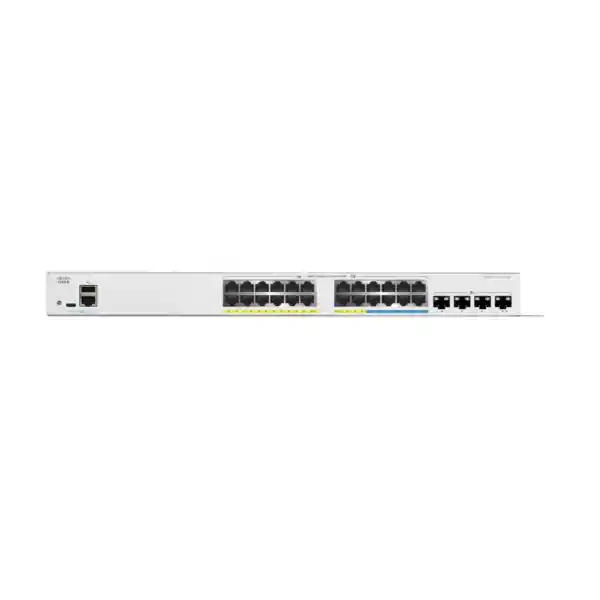
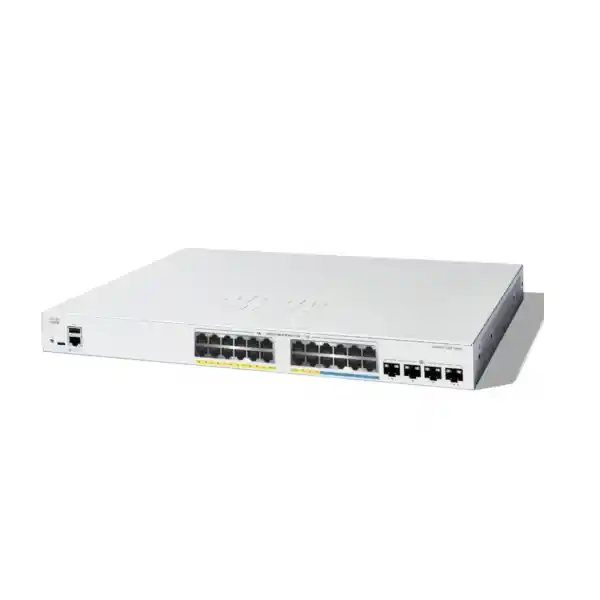
Cisco Catalyst C1300-24MGP-4X Network Switch
Connect everyday business equipment and selected multigigabit endpoints through one planned access layer. Check the port mix, powered-device load and uplink components before requesting your Tanzania quotation.
At a glance: fit and buying checks
- Consider for a mixed-speed business access layer with compatible PoE endpoints.
- Allocate the eight faster copper connections deliberately.
- Validate each powered device and the combined power schedule.
- Specify compatible uplink components and confirm what the quotation includes.
Choose the access switch around the devices you need to connect
A business access network often has two different requirements at once: dependable connections for ordinary office equipment and faster wired backhaul for selected wireless access points. The Cisco Catalyst C1300-24MGP-4X Network Switch addresses that mixed requirement with a combination of Gigabit and 2.5 Gigabit copper connections, PoE+ and high-speed uplinks. It is worth considering when the endpoint inventory includes both standard desk devices and a smaller group of devices that can actually use multigigabit Ethernet. Start a quotation request with the endpoint list, power requirements and upstream connection details so the proposed equipment can be checked against the intended installation.
For a Tanzania purchase, distinguish the verified hardware specification from the commercial offer. The exact hardware model is identified here, while price, availability, delivery arrangements, included accessories and support terms should be confirmed in the quotation. That makes the page useful during technical shortlisting without treating an unverified stock position or service promise as a product feature. Procurement and IT teams can use the following guidance together: one to establish the order requirements, the other to check whether the proposed access design is practical.
Read the port mix correctly before allocating connections
This model provides 16 copper ports rated at 10/100/1000 Mbps, eight 2.5G copper ports and four 10 Gigabit SFP+ uplink slots. The 24 copper ports support PoE+, with a total switch PoE budget of 375W. Cisco lists 30W PoE+ capability per copper port, subject to that shared budget. The eight multigigabit connections are the key distinction when comparing this unit with a switch whose access ports are all Gigabit.
Make a port schedule before selecting the quantity of switches. Put endpoints that need faster backhaul into the multigigabit allocation and retain ordinary connections for equipment whose own interface is limited to Gigabit or below. Include printers, desktop computers, access points, phones, cameras and any fixed equipment that will be connected through the same cabinet. Record spare connections deliberately rather than treating all unassigned ports as available for any future requirement. A spare ordinary port cannot provide the same upgrade path as a spare multigigabit port when the next device needs a faster interface.
Keep physical connections separate from user counts. A wireless access point can serve many users while occupying one copper connection. A workstation and phone arrangement can have a different physical-port requirement depending on the phone’s passthrough capabilities and the cabling design. Count the actual cables that will terminate on the switch and document any dependency on another device remaining powered. This produces a more dependable bill of materials than ordering from a headcount alone.
Use the faster ports where they can change the result
A faster access connection is useful when the attached device, its traffic and the rest of the path can benefit from it. For a wireless refresh, check the Ethernet interface of each proposed access point and the power mode needed for the intended radio features. The Wi-Fi generation printed on an access point does not establish the correct switch port or PoE requirement. Review those as separate specifications, then map the access point to an appropriate physical port.
For wired equipment, identify whether the workload is local or internet-bound. Moving files to a local server, accessing shared storage and transferring large design files can create a different pattern from using hosted business applications. If a user is constrained by a remote application, a service-provider link or a server’s storage performance, changing the access connection alone may leave the perceived delay unchanged. The useful purchasing question is which part of the complete path is currently limiting the task.
Avoid allocating faster connections solely by job title or department. Use device capability, expected demand and measured symptoms where available. A small connection inventory can capture endpoint interface speed, present link negotiation, typical workload and intended replacement date. That record also helps with later moves: staff can see why a particular access point or workstation was assigned to a certain connection instead of accidentally losing the intended benefit during routine repatching.
Plan PoE as a shared power resource
Power over Ethernet should be sized from the requirements of the connected devices, including the operating modes the project expects to use. List each powered endpoint, its applicable PoE standard and its documented power requirement. Identify equipment whose consumption changes with accessories, radios, heaters, illumination or other features. Check the endpoint manufacturer’s terminology so values measured at the device are not confused with the power that must be allocated at the switch.
An illustrative calculation shows why the aggregate matters. Eight endpoints allocated 25W each and twelve endpoints allocated 10W each produce a planning total of 320W. Against the stated switch budget, that leaves 55W of arithmetic headroom. These figures are assumptions for demonstrating the calculation, not a compatibility certification for any access point, phone or camera. The final schedule should use the actual device specifications and the intended allocation method.
Do not calculate a full deployment by multiplying a port count by the highest per-port capability and assuming the result is available. Check both the individual connection and the total. Define which devices are operationally critical, how additions will be approved and what reserve is needed for the next planned change. Where the proposed endpoints exceed either requirement, change the switch selection or distribute the equipment across a revised design before placing the order.
Select uplink media for the actual upstream connection
The SFP+ slots are interfaces for suitable uplink components; a usable optical connection still requires compatible transceivers, the correct fiber path and a matching far end. Prepare the upstream switch model, intended interface speed, fiber type, connector arrangement, route length and any existing optic identifiers. These details allow the connection to be checked as one complete link instead of buying an optic from a speed label alone.
For a short cabinet connection, a supported direct-attach option may be worth evaluating. For a fiber connection, verify the supported optic against the exact switch and software documentation, then confirm the far-end specification and the installed fiber. Do not assume that an optic already working in another Cisco platform is automatically approved for this model. Likewise, an occupied slot shown in a product photograph does not establish what is included with the quoted switch.
Ask for the uplink components to appear explicitly in the bill of materials. Record quantities at both ends, patch leads and any additional work on the installed pathway. If existing components will be reused, mark them as customer-supplied and identify who will verify their condition. This keeps the equipment quotation understandable and reduces the chance that a technically suitable chassis arrives without the components needed to connect it to the rest of the network.
Match uplink capacity to the traffic path
Cisco specifies 152 Gbps switching capacity and 113.08 million packets per second forwarding for 64-byte packets for this model. These are platform figures, not a promise that one application or internet session will achieve those rates. An application depends on its endpoints, protocol, server resources, connection speeds and other traffic along the route. Use the platform figures to understand the equipment category while sizing the actual links for the workload.
Separate traffic that stays within the access switch from traffic that travels upstream. A group of local endpoints may exchange data without using the same path as traffic toward a remote server, firewall or internet gateway. Identify the busiest destinations and the times when multiple activities overlap. Backup jobs, software distribution and large file transfers can coincide with routine business use even if the daily average traffic looks modest.
If the design uses link aggregation, confirm its behavior and configuration at both ends. Multiple member links do not automatically mean that a single transfer can use their combined bandwidth; distribution depends on how flows are assigned. Establish the required normal capacity and the acceptable capacity after a member failure. This gives the buyer a useful performance requirement that can be tested, rather than a broad expectation created by adding together interface labels.
Keep business groups separate with a deliberate VLAN plan
The Catalyst 1300 series supports VLANs, including IEEE 802.1Q tagging and voice VLAN functions. A useful deployment begins with a list of business groups and the communication each group needs. Staff devices, visitors, voice equipment, cameras and infrastructure management can have different requirements. Give each segment a clear purpose, then identify where addressing, routing and access policy will be provided.
Document the native or untagged behavior and the tagged VLANs for every uplink and access-point connection. An access point carrying several wireless networks may need a different port configuration from a printer or a single-purpose camera. Use a consistent naming scheme so an installer can relate the patch-panel label, switch description, VLAN and business role without reconstructing the design from memory.
Segmentation should be reviewed together with routing and security policy. Creating VLANs by itself does not establish which groups may communicate after traffic reaches a router or other gateway. Define permitted destinations and test both the allowed and restricted paths. For example, visitors may need internet access while having no business reason to reach internal administrative interfaces. Treat that as an acceptance requirement for the complete network, with the responsible enforcement device identified in the design.
Decide where routing and security policy belong
Cisco documents Layer 3 capabilities for the Catalyst 1300 family. Before using local routing, decide whether the access switch, an upstream distribution device or a firewall should act as the gateway for each network. The choice affects troubleshooting, traffic visibility and how communication between groups will be controlled. A small network can be easy to operate when those responsibilities are explicit, even if the topology itself is simple.
Prepare an addressing schedule with subnets, gateway addresses, DHCP responsibilities and routes. Identify the return path for traffic as carefully as the outgoing path. Record any dependency on a central server or branch connection so a local outage can be diagnosed in context. Where security inspection is required between particular groups, ensure the chosen path actually passes through the intended enforcement point.
For an existing estate, compare required features individually rather than assuming that every product carrying the Catalyst name has identical software, management or routing behavior. A configuration from another Cisco family should be treated as design input for review. If a tender requires a specific protocol, scale, integration or control-plane behavior, request explicit confirmation against the exact model and software release before treating the requirement as satisfied.
Give voice traffic a tested priority policy
Cisco documents quality-of-service and voice VLAN capabilities in this switch family. Their value depends on an agreed policy across the route that voice traffic actually takes. Identify the call-control system, endpoint requirements and the devices where congestion may occur. Decide which markings will be trusted and which will be assigned by the network, then keep the policy consistent at the relevant boundaries.
A useful voice test includes ordinary business traffic and a representative busy period. Confirm call setup, two-way audio, device registration and recovery after a planned connection interruption. Where a phone provides a downstream workstation connection, test the data and voice roles together. This can reveal tagging or access-policy mistakes that a successful phone registration alone would not expose.
Prioritization manages competition for available capacity; it does not create more capacity on an overloaded internet connection or repair an unstable external service. If call quality is the reason for the switch purchase, record the original symptoms and the proposed acceptance criteria. That makes it possible to distinguish a corrected local queueing problem from a continuing issue elsewhere in the communications path and helps avoid buying additional hardware without evidence.
Choose a management approach the operating team can maintain
The documented management options include a built-in web interface, Cisco Business Dashboard support and SNMP monitoring. Choose the method that fits the people responsible for the network and the existing monitoring environment. A single-site installation may have different operational needs from a repeatable branch deployment, but both need clear administrative ownership and a recoverable configuration.
Agree on the management address, authorized administrator sources, account ownership and configuration-backup process before installation. Keep administrative access distinct from ordinary user access where the network design supports that arrangement. Protect credentials through the organization’s approved process and make sure responsibility can be transferred when staff or service arrangements change.
Monitoring should answer practical questions: which connections are active, whether error counters are rising, how uplinks are being used and whether the powered endpoint load is approaching the planned limit. Establish a baseline soon after acceptance. An alert is most useful when it has an owner, an expected response and enough context to identify the affected business function. Decide those details during handover rather than collecting statistics without an operational purpose.
Check cabling before treating a faster interface as an upgrade
The copper path includes more than the visible patch lead. Review the permanent cable, patch panels, outlets, intermediate connections and leads at both ends. Request suitable testing for the speed and PoE application being proposed. Existing cable labels can be useful evidence, but they do not by themselves establish that the installed channel remains in good condition or was terminated correctly.
During commissioning, record negotiated connection speed and check for errors while representative traffic is running. If a connection does not perform as expected, isolate the endpoint, leads and installed cable path systematically. Replacing the switch is unlikely to solve a defect elsewhere in that path. A documented port schedule makes this work faster because the physical route and endpoint are known.
Include cable management in the installation scope. Leave enough access for maintenance and avoid placing mechanical strain on connectors. Keep labels readable after the cabinet is populated. If the project is staged, identify which connections have been tested, which are awaiting endpoint installation and which remain reserved. This prevents a partly completed cabling job from being mistaken for a fully accepted switch deployment.
Prepare the cabinet, power and cooling
Cisco lists the chassis at 444.3 × 350 × 43.94 mm and approximately 5.53 kg. The model is rack-mountable and uses a fan. Check the cabinet for usable depth, supported mounting, cable clearance and access to power before confirming the installation location. Physical fit should include the connected leads and working space, not only the chassis dimensions.
A PoE budget describes power available to endpoints; it is not the complete input-power requirement for UPS sizing. Include the switch’s own consumption and the rest of the connected equipment when planning backup power. Define which business functions need to remain available and whether upstream devices, internet equipment and application servers have equivalent continuity arrangements. Keeping one switch powered does not preserve an application if another essential part of its path has stopped.
Consider the real cabinet environment during busy operation. Look at ventilation, dust, access restrictions and the heat generated by adjacent equipment. Confirm the applicable manufacturer installation limits for the exact deployment and avoid assuming suitability for an outdoor, industrial or unconditioned location. An equipment-room review before procurement can uncover practical changes that are easier to address before hardware arrives.
Office and branch deployment example
Consider an office planning a mixture of desktop connections, IP phones and new access points. The useful starting point is a floor and cabinet inventory, followed by a physical port allocation and a powered-device schedule. Assign the faster connections to devices with a verified need and keep the uplink design aligned with where office applications and shared files are hosted.
For a branch, include the firewall and WAN connection in the acceptance plan. Test business application access, name resolution, printing and voice services from the intended segments. Identify which functions can continue locally if the branch loses its external connection. This is a planning scenario, not a statement that any particular branch application or phone is compatible without checking its requirements.
Operational simplicity often comes from documentation rather than from adding more features. A branch handover can include one cabinet diagram, a port schedule, the management method, backup location and escalation contacts agreed by the customer. If future expansion is expected, reserve both physical connections and the relevant power headroom so the first change does not immediately require a redesign.
Wireless, hospitality and learning-space planning
A wireless-focused installation should be driven by access-point placement and demand, with the switching design following the verified endpoint requirements. Count the access points served from each cabinet, identify their Ethernet capabilities and check how guest, staff or teaching networks will be carried. The switch can form part of the wired access design, while radio coverage and client capacity require their own assessment.
In hospitality or shared learning spaces, visitor access may have different policies from business or administrative traffic. Record the required separation, authentication approach and application reachability, then test from representative clients. Access points may depend on a controller, cloud service, license or management platform; those requirements belong in the wider wireless bill of materials and should not be inferred from the switch choice.
For a broader wireless project, review Cisco wireless access-point planning for Tanzania alongside the switch requirements. Select the actual AP model before finalizing the powered-port allocation. A multigigabit connection and an adequate power mode are separate checks, and passing one does not establish that the other is suitable.
Cameras and other powered network equipment
A shared access cabinet may connect cameras, intercoms, access-control equipment or other powered endpoints. Build the inventory from exact device models and operating requirements. Some equipment needs more power under particular conditions or with accessories enabled. Check those requirements directly instead of assuming that every device described as a network camera has the same power profile.
Identify the destinations for recording, management and administration. A camera that can reach a recorder may still have an unintended path to unrelated business devices if the network policy is too broad. Write the intended communication requirements into the design and verify them during acceptance. If video is carried across an uplink, assess the combined traffic and the effect of other activities sharing that route.
For essential operational devices, define the required behavior during a power interruption, planned restart and upstream failure. Agree which tests are acceptable for the site and schedule them with the responsible owner. Use the findings to decide whether the proposed shared cabinet is appropriate or whether equipment should be separated for operational reasons. These decisions depend on the application and continuity requirement, not simply on whether a port can supply power.
Compare alternatives using the constraint that matters
The right alternative depends on what the design runs out of first. If the main constraint is the number of multigigabit endpoints, compare their required speed and quantity. If the constraint is aggregate power, compare a verified power schedule with candidate models. If the requirement is a particular management or enterprise integration, evaluate that capability directly before choosing from hardware summaries.
An all-Gigabit PoE switch may be a sensible shortlist option where every planned endpoint is limited to that speed. A design needing more faster copper connections, higher per-device power or additional access ports should be evaluated against a different configuration or platform. These are selection directions rather than promises that another named model will meet the project without review.
When replacing an existing switch, capture the old model, configuration, uplink components and operational dependencies. A port-for-port match is only one part of equivalence. Confirm the management workflow, required network functions and migration method as well. Compare complete quoted configurations, including the accessories and services actually required, so an apparently lower chassis price does not obscure omitted project components.
Build a quotation that procurement can compare
Ask FourTeck Tanzania for a quotation identifying the exact requested model, required quantity and proposed use. Include the endpoint schedule, the allocation of faster connections, expected powered load and the upstream switch details. If there is an existing equipment list or site drawing, provide it as part of the requirements so assumptions can be reviewed before the order is finalized.
Request clear line items for uplink optics or supported connection cables, patch leads, mounting items where needed and any requested configuration or installation work. Identify customer-supplied components separately. Confirm the power-cord arrangement, package contents and hardware condition in the offer rather than inferring them from a general product description. Support and warranty terms should also be stated for the actual supplied equipment.
Commercial comparison should use confirmed terms: quoted price, applicable charges, delivery arrangements, offer validity and payment conditions. Where a service is requested, define its scope and acceptance deliverables separately from hardware supply. This gives both procurement and IT a concrete basis for approval and leaves fewer unresolved details for the installation window.
Commission the installation against useful acceptance checks
Begin commissioning with the agreed design and a saved record of the initial configuration. Confirm the physical model and connected components, then test representative endpoints from each planned network role. Verify addressing, gateway reachability, name resolution and access to required applications. Check that the intended faster endpoints negotiate appropriately and that powered equipment operates in the expected mode.
Test permitted and restricted communication deliberately. Verify guest access boundaries, administrative access and any voice or camera paths relevant to the project. Observe uplink usage and error counters during representative activity. If redundancy is part of the agreed design, test the defined failure cases within an approved maintenance window and record what changed, what remained available and how recovery occurred.
Finish with an exception list and clear ownership for unresolved items. Save the accepted configuration and provide a port map, component inventory, management details and test results through the customer’s approved documentation process. An installation is easier to support when the handover explains the intended behavior and the evidence collected, rather than merely stating that all front-panel lights were on.
Questions buyers ask before ordering
Does this switch provide 2.5G on every copper connection? No. The access-port layout is mixed. Allocate devices according to the documented port groups and keep the connection schedule with the cabinet records. If every endpoint needs a multigigabit connection, evaluate the full requirement against an alternative design instead of assuming the model name indicates uniform access speed.
Can every powered device use the maximum port power at once? The shared budget must accommodate the complete connected load. Check the exact endpoints and their required operating modes before deciding how many can be powered together. Keep a documented reserve for planned changes and avoid treating a successful initial boot as proof that every future operating condition has been covered.
Will it work with my wireless access points? Check Ethernet interface speed, the required PoE standard, power mode and VLAN behavior for each AP model. Controller or cloud-management compatibility is a separate wireless requirement. A matching connector is only the beginning of the assessment; the intended AP functions must remain available under the selected power and network configuration.
Are the SFP+ transceivers included? Package contents have not been established for a specific FourTeck Tanzania offer here. Ask for the exact included items and for separately required uplink components to be listed in the quotation. Verify both ends of the link and identify any customer-supplied fiber or connection cable.
Can this replace an older Cisco switch directly? It may be a candidate if its capabilities meet the actual requirements, but the migration needs a model and configuration review. Check required functions, endpoint power, uplinks, management and any existing stack dependencies. Plan a change window and rollback method rather than assuming configuration interchangeability from the Cisco brand name.
Will changing the switch make internet access faster? It can help only where a limitation in the local switching path is relevant to the symptom. The provider connection, gateway, wireless link, remote service and endpoint can each affect performance. Establish the bottleneck and the intended improvement before using internet speed as the acceptance test for a switching purchase.
How should UPS capacity be selected? Use the input-power requirements of the complete equipment set and the required runtime. Include the switch, powered endpoints as reflected in its input load, upstream equipment and other essential dependencies without double-counting the same load. Ask the power-system designer to verify capacity and runtime for the actual operating assumptions.
Is the switch suitable for an exposed or industrial location? Suitability depends on the documented environmental and installation limits and the real site conditions. Review the enclosure, temperature, dust, moisture and mounting requirements before selection. Do not treat a business access switch as an outdoor or industrial product without explicit manufacturer evidence for the intended use.
What are the price and delivery time in Tanzania? Request a current quotation for the exact quantity, required components and delivery destination. A verified price or stock commitment has not been supplied for this page. Confirm the applicable commercial terms and any requested services in the offer before scheduling a project around the equipment.
What information makes the quotation more accurate? Send the device count, exact powered endpoint models, required access speeds, upstream equipment, fiber details and cabinet constraints. Add the required configuration scope, acceptance expectations and preferred project timing. This allows the quotation to address the working installation rather than only the switch chassis.
Request a Cisco access-switch quotation for Tanzania
Share your port schedule, powered-device requirements and uplink details with FourTeck Tanzania to request a quotation for this model. Specify which accessories and services you want included, and ask for availability, delivery arrangements and support terms to be confirmed for the exact offer. If the design is still being developed, identify the unresolved requirements so they can be checked before an order is approved.




Reviews
There are no reviews yet.