
CISCO CATALYST 1300 • TANZANIA PRODUCT ENQUIRY
Gigabit PoE+ access with room for faster uplinks
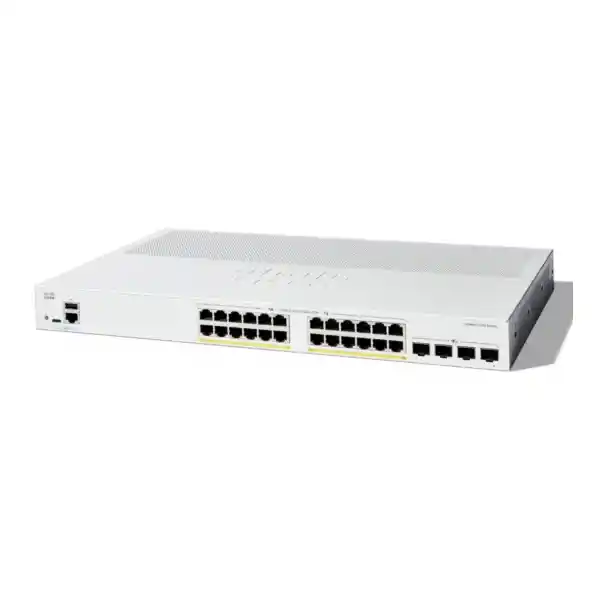
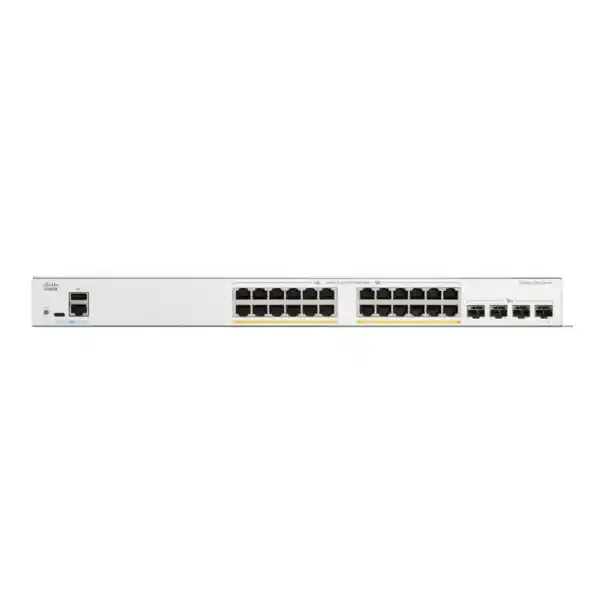
The Cisco Catalyst C1300-24P-4X Network Switch brings together 24 Gigabit Ethernet PoE+ access ports and four 10 Gigabit SFP+ uplinks for a managed business network. Its shared 195W PoE budget makes it a candidate for mixed deployments of compatible IP phones, wireless access points and cameras, provided their combined power requirements fit the available budget.
For a business in Tanzania, the buying decision starts with three practical questions: how many devices need a wired connection, how much power must the switch supply, and what capacity is required between the access layer and the rest of the network? Request a FourTeck Tanzania quotation with your endpoint list and uplink requirements so the proposed equipment can be checked against the actual installation.
Check capacity and power together
Each copper access port supports up to 30W PoE+, but the whole switch shares 195W. This does not mean 24 devices can each receive 30W simultaneously. The copper ports are Gigabit; the four SFP+ ports provide the separate 10G connection options. A faster uplink does not turn a connected laptop, phone or access point into a 10G endpoint.
Verified hardware at a glance
| Manufacturer / series | Cisco / Catalyst 1300 |
|---|---|
| Exact model | C1300-24P-4X |
| Copper access interfaces | 24 × 10/100/1000 Ethernet ports |
| Uplink interfaces | 4 × 10 Gigabit SFP+ ports |
| Power over Ethernet | PoE / PoE+; up to 30W per supported copper port |
| Total PoE budget | 195W shared across connected powered devices |
| Installation format | Rack-mountable; fanless design |
| AC input | Internal power supply, 100–240V AC, 50–60Hz |
| Chassis dimensions | 444.3 × 299 × 43.94 mm |
| Unit weight | 3.95 kg |
| Operating temperature | −5°C to 50°C; minimum cold-start ambient 0°C |
These are hardware selection details, not a statement of local stock or package contents. Confirm the exact orderable part, power lead, mounting accessories, required optics and commercial terms in the quotation.
Where this 24-port PoE switch fits
A mixed office access layer is a natural place to evaluate this model. Desktops and printers can use its Gigabit connections while compatible phones and access points receive power through their network cables. The combination can reduce the number of separate endpoint power adapters, although the building still needs suitable electrical supply, structured cabling and an installation plan. Leave spare copper ports for desks that may be added later.
A branch office with a central equipment cabinet may also benefit from separating endpoint connectivity from upstream capacity. The access ports serve local devices; an SFP+ connection can carry aggregated traffic toward a compatible distribution switch or other supported upstream device. Select the uplink from actual traffic patterns. An office that mainly accesses internet services has a different requirement from one that moves large files to local servers throughout the day.
For a small hospitality, education or administrative environment, first identify which devices belong to staff, guests, voice and building systems. The physical switch can be part of that design, but the security policy, wireless configuration and routing arrangement must be defined separately. The presence of managed features is useful only when somebody configures, documents and maintains them.
Choose a different access platform when the endpoints require multigigabit copper speeds, more power per port than this model provides, or a larger total PoE allocation. A 24-port form factor alone is not enough evidence of suitability. Ask for an equipment selection that accounts for present requirements, realistic growth and the team that will operate the network after commissioning.
Build the PoE budget before placing the order
Prepare a schedule of every device expected to draw power from the switch. For each endpoint, record its exact model, required PoE standard and maximum input requirement from the manufacturer. A camera with additional functions can have a different demand from a basic fixed camera; an access point may also change its operating capabilities according to the power supplied. Budget for the intended operating mode rather than assuming that a low observed idle reading is sufficient.
Add the switch-side power allocations and compare the result with 195W. Account for cable losses and the distinction between the power a switch supplies and the power a device receives. Keep a reasonable margin for changes instead of designing around every available watt. A list of 24 PoE-capable ports describes connection opportunities; it does not remove the shared power constraint.
The following calculation is an illustrative planning exercise, not an approved endpoint combination. Suppose eight phones are allocated 7W each, four access points 20W each and two cameras 15W each at the switch. The total is 56W + 80W + 30W = 166W. That leaves 29W against the stated budget, subject to the actual devices, negotiated allocations and installation conditions being checked.
Now consider six devices each needing a 30W switch allocation. They account for 180W, leaving 15W before adding other powered endpoints. This explains why an apparently modest number of high-demand devices can consume most of the available power. If the planned schedule exceeds the budget, consider a suitable higher-budget model or distribute the load across a deliberately designed installation.
PoE priority and monitoring are useful operational tools on the platform. They help an administrator identify allocated power and decide which devices should have priority if resources become constrained. They do not increase the physical power available. Confirm operation with the complete endpoint load, including a controlled restart, before relying on the system for normal business activity.
Match the four SFP+ uplinks to the actual connection
The four SFP+ interfaces allow a different upstream design from a switch limited to Gigabit uplinks. Their value is the capacity available for combined access traffic, subject to the connected equipment and selected media. Plan each link from both ends: the remote port, supported transceiver or cable, required speed, distance and physical route must all agree.
For fiber, collect the existing fiber type, connector details, route length and patching information before specifying optics. For a short cabinet connection, ask whether a supported direct-attach cable is appropriate. Do not order an arbitrary module because its mechanical shape matches the cage. A physical fit alone does not establish hardware, firmware, temperature or operational compatibility.
Separate a need for additional aggregate bandwidth from a need for a second path. Two cables following the same route may still share a physical failure point. A redundant connection should be designed with the upstream topology and recovery behavior in mind. Record which links are ordinary uplinks, which are part of a link aggregation group and which, if any, are assigned to stacking.
Treat optics and interconnect cables as explicit quotation items unless their inclusion is confirmed. A request that states only ’10G fiber’ leaves several important decisions unresolved. Supply the far-end equipment model and installation distance so the proposed connection can be checked. Where the upstream equipment offers only a slower interface, the design must address that limit rather than assuming the new switch removes it.
Separate users, voice, guests and cameras with a clear VLAN plan
Managed VLAN configuration lets an administrator define separate logical networks and decide how ports carry their traffic. For example, an office design might use different VLANs for staff devices, IP phones, guest wireless access and cameras. These are proposed design roles rather than a factory configuration. The right arrangement depends on the organization’s applications, addressing plan, security requirements and existing equipment.
An endpoint port and an uplink do different jobs. A conventional access port places an ordinary endpoint into its assigned network, while a trunk can carry multiple VLANs between compatible devices. When an access point presents several wireless networks, its switch connection must match the tagging and management settings expected by that access point. A mismatch can leave some services working while others remain inaccessible.
Document the intended communication between networks before enabling it. A camera might need to reach a recorder and time service while remaining separate from staff workstations. A guest device may need internet access without permission to contact internal systems. VLAN membership establishes network separation, while the routing and filtering policy determines which traffic can cross those boundaries.
Keep management access in the design from the beginning. Identify the administrator’s source network, the management address, the route needed to reach it and the method for recovering access after an error. Apply changes in a controlled sequence so that modifying a trunk or management VLAN does not unintentionally disconnect the person configuring the switch.
An effective handover includes a port map showing the device, location and VLAN assignment for each connection. It should also identify trunks and their permitted VLANs. This simple document makes future changes easier to assess and helps support staff distinguish a physical connection problem from a policy or tagging problem.
Decide where routing and security policy belong
This platform offers Layer 3 capabilities, including IPv4 and IPv6 routing. That creates an architectural choice: some communication between local networks may be handled by the switch, or the design may keep that function on an upstream router or firewall. Make the choice according to required controls, traffic flow and operational responsibility.
Consider a staff workstation communicating with a local server. If the connection crosses a routing boundary on the switch, confirm where the corresponding restrictions are enforced. If the organization expects a firewall to inspect that traffic, the route design must actually send the traffic through that firewall. A drawing that shows a firewall somewhere in the network does not establish that every local session passes through it.
For a straightforward deployment, write down the subnets, gateway locations, return routes and DNS dependencies before changing any production addresses. Include the existing internet router and any remote networks. An otherwise correct local route can still fail when the receiving network has no return path or when a required policy blocks the response.
Do not select the C1300 on the assumption that every feature of another Catalyst platform is available. Cisco distinguishes the C1300 from the C1300X; for example, the current shared datasheet assigns OSPF support to C1300X models. If an existing design requires a particular routing protocol, verify that requirement against the exact model and intended software release.
Ask for a written feature check when replacing an existing switch that carries routing or security responsibilities. It should identify the functions currently in use and whether the proposed platform supports the intended behavior. That comparison is more useful than treating a broad ‘Layer 3’ description as proof that two switches are operationally interchangeable.
Use QoS to support voice alongside normal office traffic
Quality of Service allows traffic classification and queue treatment to form part of the network design. For a voice deployment, agree which devices may mark traffic, which markings the network will trust and how upstream equipment will handle the same traffic. The C1300 command documentation includes QoS trust controls; their settings need to match the surrounding infrastructure.
Assess call quality while other work is happening. A quiet demonstration with one phone and no competing traffic says little about a busy office. Include realistic file transfers, wireless usage and other expected applications in the acceptance exercise. Record what happens at the access switch and at the internet edge so an upstream bottleneck is not mistaken for a problem with the handset.
Prioritization does not create bandwidth or repair an unstable external connection. If the internet path is congested, the complete design may need traffic control at the router or firewall as well. Identify which organization manages each part of the path and which measurements it can provide during troubleshooting.
Voice VLAN settings should be coordinated with the phones, call platform, addressing services and any discovery methods used. Verify the exact phone models and their expected power requirements. A compatible Ethernet connection and adequate PoE are important starting points, but registration, calling features and external call service depend on other components.
Before rollout, test a representative phone at a real desk location and verify the attached workstation if the phone provides a pass-through network port. This catches practical details such as the intended data VLAN, voice VLAN and cabling arrangement. Document the resulting port profile so later desks can be provisioned consistently.
Apply access controls in a sequence the support team can operate
The C1300 security feature set includes 802.1X authentication and DHCP snooping. These are configurable controls with supporting dependencies, not an assurance that every connected device is automatically trusted or protected. Introduce them through a defined policy and a representative test group.
For 802.1X, identify the authentication service, endpoint configuration and exception process before enforcing access. Test a managed workstation, a phone and any device that cannot use the same authentication method. Agree how the organization wants to behave if the authentication service is unavailable. The desired balance between access continuity and restriction should be deliberate.
DHCP snooping requires the administrator to understand where legitimate address-service messages enter the switch. A trusted uplink and an ordinary endpoint port have different roles. Enable the feature with the appropriate VLAN scope and trust settings, then verify that clients can still obtain and renew addresses. Incorrect trust settings can interrupt a working network.
Apply management restrictions separately from end-user policy. Limit administration to the people and networks that need it, use secure management methods supported by the release, and keep account ownership clear. Retain a recovery path when changing administrator access rules. A narrowly scoped management policy is useful only when authorized staff can still operate the equipment.
Keep a record of intended exceptions. Cameras, printers and other fixed-function endpoints often need different treatment from managed laptops. Document the reason and review it when the endpoint changes. A visible exception process is easier to maintain than a collection of unexplained port settings added during troubleshooting.
Plan aggregation, loops and stacking as separate decisions
Link aggregation and stacking address related but different needs. An aggregation group combines appropriately configured connections between devices; a stack lets compatible switches operate as a managed system. Neither should be introduced simply because spare ports are available. Begin with the business requirement: additional aggregate capacity, a second path, simpler management or expansion.
The C1300-24P-4X is included in Cisco’s C1300 Family 1 stacking group. Cisco documents stacking within compatible families and does not support cross-family stacking. Confirm the exact proposed members, software compatibility and supported interconnects before placing an order for a multi-switch installation. A matching brand or similar front panel is not enough.
Stacking uses selected high-speed ports for the inter-switch connections. Those ports must be accounted for in the overall interface plan and are not simultaneously ordinary uplinks. Show the stack links and remaining upstream links in the design so the number of available external connections is clear.
Where ordinary redundant Ethernet connections are used, configure link aggregation and spanning-tree behavior deliberately. Adding a second unplanned cable can create a loop rather than the intended resilience. Confirm the far-end configuration before connecting it, and test how the network behaves when one link is disconnected during an agreed maintenance window.
For a stack, document member numbering, physical order, cabling and the procedure for replacing a member. Ask which applications would remain available during the failure scenarios that matter to the organization. Avoid interpreting a stack feature as a promise that every device remains powered or that every service survives every hardware failure.
Install for access, airflow and practical power continuity
Place the switch where staff can manage cabling and perform maintenance without disturbing adjacent equipment. Check rack depth, cable bend space and the position of the electrical outlet or power distribution unit. Although this model is fanless, it still needs suitable ventilation. A closed cabinet packed with warm equipment can create an unsuitable operating environment.
For an installation in Tanzania, use the actual site conditions rather than a general assumption about the country. Record the cabinet location, expected ambient conditions, dust exposure, available electrical supply and the condition of existing cabling. An indoor network switch should be assessed against its stated environmental limits; it should not be treated as an outdoor or industrial device.
If the powered phones, cameras or access points must continue through a mains interruption, include the switch in the backup-power calculation. Include the router, firewall and any other equipment required for the service to work. Keeping the access switch running does not keep internet access or a remote call service available if the rest of the path loses power.
Size a UPS from the intended complete electrical load and required runtime, with the battery condition and reserve accounted for. The PoE budget is power allocated to endpoints; it is not the complete AC draw used for every backup calculation. Ask for a site-specific electrical plan when continuity is a project requirement.
Use tested structured cabling and clear labels. A port that repeatedly falls back to a slower negotiated speed or intermittently loses a powered endpoint deserves investigation before handover. Keep the test records and port map with the installation documents so future support work starts from a known baseline.
A practical commissioning and handover checklist
Agree acceptance criteria before moving production devices. Identify the services to be tested, the staff who can confirm them and the maintenance window available for any cutover. For an existing network, preserve the current configuration and record the original cable positions before disconnecting anything. Define a rollback point so the team knows when to restore the previous arrangement.
Start the new installation with an appropriate software review and a secure management configuration. Confirm administrative access from the intended network and record the firmware version used. Where configuration is prepared in advance, validate it against the exact platform rather than assuming an existing configuration file can be copied without changes.
Test a representative endpoint from each network role. A staff workstation should obtain its intended address and reach required applications. A phone should register and complete the agreed call tests. A wireless access point should present the intended networks. A camera should communicate with its recorder and authorized viewing system. Record results rather than relying only on link LEDs.
Verify power with the planned devices connected, and review the switch’s reported allocation and status. Check the intended uplink speed, permitted VLANs and any aggregation or stack configuration. If resilience has been specified, test the agreed link or member failure case with the relevant stakeholders present. Observe recovery and note any service that needs separate attention.
Save the validated running configuration as the startup configuration and retain an appropriately protected backup. Include the management details, port map, addressing plan, uplink assignments and recovery procedure in the handover. Explain who is responsible for future configuration changes and software maintenance. These records turn a completed installation into a network that can be operated consistently.
Compare alternatives by the requirement that changes
If the endpoint schedule fits the power allowance and copper Gigabit access is sufficient, this model is a relevant option. If aggregate PoE demand is the limiting factor, compare a suitable higher-budget variant using the current manufacturer specification and the exact quotation. If uplink capacity is unnecessary, compare the actual cost and functionality of a slower-uplink option rather than choosing by naming similarity.
If modern access points need more than a Gigabit copper connection or require higher-power PoE, evaluate a platform that explicitly provides those capabilities on the required number of ports. The presence of 10G SFP+ uplinks on this switch does not meet a multigigabit copper endpoint requirement.
For an existing enterprise deployment, compare operational requirements as carefully as hardware. Review the current routing protocols, management tools, authentication integrations, configuration practices and support expectations. A replacement that matches port count may still require a different management approach or fail to meet a particular feature dependency.
Keep the comparison focused on the functions your organization will actually use. A clear list of essential requirements, optional improvements and planned growth makes a quotation easier to assess. It also helps avoid buying a more expensive platform for features that will never be configured while overlooking a practical requirement such as enough power or the correct fiber module.
Questions buyers ask before choosing this model
Are all 24 copper ports 10 Gigabit?
No. The 24 copper access ports support 10/100/1000 Ethernet. The four SFP+ interfaces provide the separate 10 Gigabit connection options. If a workstation, server or access point needs a copper connection above Gigabit speed, specify that requirement before selecting the access switch.
Can every PoE port supply its maximum power at once?
The total available PoE budget is shared. Plan the sum of the required switch-side allocations across all endpoints and keep that sum within the available budget. Per-port PoE+ capability should not be interpreted as enough aggregate power for every port to operate at its individual maximum simultaneously.
How many phones, cameras or access points can I connect?
The answer depends on the exact devices, their required operating modes, available ports and combined power demand. Prepare the endpoint models and quantities first. Count non-powered devices as well, because they still occupy access ports. Allow for growth in both the connection schedule and the power calculation.
Will a high-power access point work with all its features?
Check that access point’s installation documentation for its required PoE standard, input power and behavior under a reduced power supply. Also check its Ethernet speed requirement. An endpoint may need a different switch to provide its intended capabilities. Neither the access point brand nor its wireless generation alone establishes compatibility.
Are the SFP+ modules and connection cables included?
Confirm this in the quotation. Select the supported module or direct-attach cable according to the far-end equipment, connection distance and existing cabling. Do not assume that the base switch description includes everything required for a working optical connection. List each needed accessory in the bill of materials.
Can I manage several switches as a stack?
This model supports stacking within the applicable compatible C1300 family. The proposed member models, interconnects, software and port allocation need verification. Ports assigned to stacking must be included in the design. Treat the stack topology as an engineering decision with documented maintenance and recovery procedures.
Does it replace my router or firewall?
Its routing capabilities can support selected local network designs, but the complete requirement must be reviewed. Internet access, remote connectivity and traffic inspection may still depend on separate equipment and services. Decide gateway placement and policy enforcement together so traffic follows the paths required by your security design.
Is this the same as C1300X-24P-4X?
No. C1300-24P-4X and C1300X-24P-4X are distinct models. Compare exact interfaces, power capability and supported features rather than shortening either identifier. Ensure the quotation and final order preserve the full requested model name. Similar-looking identifiers should not be accepted as an automatic substitution.
Can I reuse my existing VLAN settings?
The intended network segmentation may be reusable, but validate the actual configuration on this platform. Check access and trunk behavior, permitted VLANs, management addressing and the upstream device settings. Test representative devices before migrating the remaining connections, and keep the old configuration available for rollback.
What determines the price and delivery arrangement in Tanzania?
Request a quotation for the exact hardware and required accessories. Confirm the applicable commercial terms, availability, delivery arrangement and support scope directly for that offer. This product description does not establish a current price, stock position or delivery commitment, and no external currency conversion should be treated as a local selling price.
What should I provide with an enquiry?
Send the required quantity, exact endpoint models, expected PoE load, upstream equipment and cabling details. Include whether the project is a new installation or a replacement, the intended VLANs and any essential routing or authentication requirements. Describe the site conditions and required accessories so the proposed bill of materials can be checked.
Request a Cisco switch quotation from FourTeck Tanzania
Start with the equipment schedule and the role this switch will perform. A useful enquiry explains which devices need network connectivity, which need PoE and how the switch will connect upstream. State any non-negotiable features so the selection can be reviewed before purchase.
- Hardware: C1300-24P-4X quantity and whether substitutions may be considered.
- Endpoints: phone, access point and camera models, quantities and power requirements.
- Connections: far-end switch or router model, uplink speed, fiber details or cabinet cable distance.
- Configuration: VLANs, gateway placement, authentication requirements and any proposed stacking.
- Installation: rack space, power continuity needs, accessories and the required project scope.
Ask for itemized confirmation of the base switch, interconnects, mounting and power accessories, configuration work and any agreed support. Confirm stock, pricing, delivery and warranty terms in the specific offer. This keeps the purchase decision tied to a complete installation rather than the switch chassis alone.
Request your C1300-24P-4X quotation with the endpoint list and uplink specification.
Related Tanzania network planning guidance
If the switch will power wireless equipment, review the Cisco wireless access point planning guidance alongside the exact access point specifications. It provides useful context for coordinating wireless requirements with wired connectivity and power.
For a replacement project involving an older Catalyst environment, see the Catalyst 2960-X replacement planning guidance. Use that broader migration discussion to frame a feature review; it does not establish this C1300 model as a direct replacement for every existing enterprise switch.




Reviews
There are no reviews yet.