
CISCO CATALYST 1300 SERIES · TANZANIA
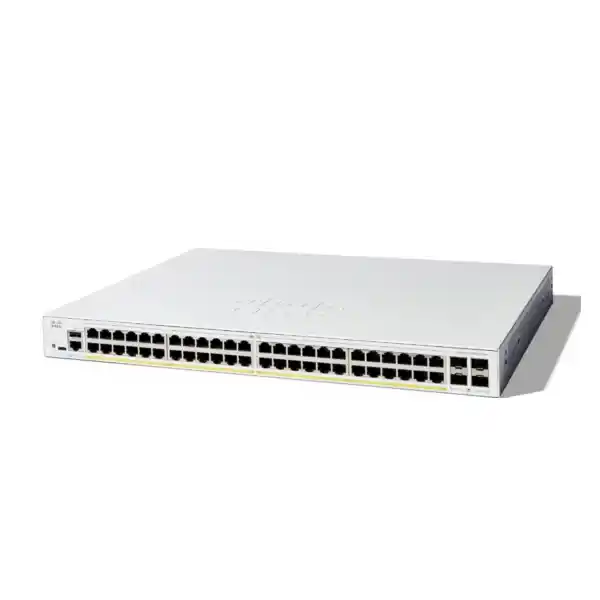
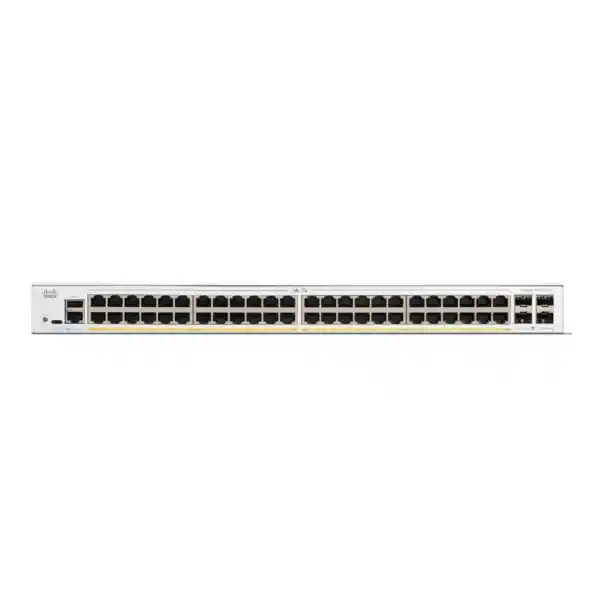
Cisco Catalyst C1300-48FP-4G Network Switch
Equip a busy office or branch with wired connections and centralized power for compatible phones, cameras and wireless access points. This managed access switch combines 48 Gigabit PoE+ ports, a 740W shared PoE budget and four Gigabit SFP uplinks. It suits projects that need substantial endpoint power while retaining a 1G uplink design.
Request a model-specific quotation from FourTeck Tanzania. Provide your endpoint list, power requirements and uplink plan so the proposed equipment can be checked against your network.
The buying decision: power density with Gigabit uplinks
The first question is whether your project needs more powered access connections, more upstream bandwidth, or both. This model addresses the first requirement particularly well. It brings a large set of endpoint connections into one managed device, with a shared power allowance that can support a mixed deployment when the individual device requirements fit. Its four optical uplink slots remain Gigabit interfaces. Choose it around that combination rather than treating every 48-port Catalyst model as interchangeable.
An office moving from separate desktop power adapters to Ethernet-powered phones may value simpler power management. A surveillance installation may need many camera connections in one cabinet. A branch combining staff devices, wireless access points and communications equipment may need a consistent port configuration. These are useful starting scenarios, but none establishes compatibility by itself. The endpoint model, requested operating mode, cable route and traffic destination still determine whether the design works.
Before purchasing, prepare two separate totals: occupied Ethernet ports and planned PoE allocation. Then identify the busiest upstream path. A switch can have enough sockets but insufficient power for the proposed devices, or enough power but an unsuitable uplink for the traffic. Reviewing all three together makes the quotation more useful and helps avoid buying an access switch that requires an early replacement.
Verified hardware at a glance
| Item | Specification | Planning implication |
|---|---|---|
| Access interfaces | 48 × 10/100/1000 Ethernet | Connect compatible wired endpoints; access speed is up to 1 Gbps per port. |
| Endpoint power | IEEE 802.3af PoE and 802.3at PoE+; up to 30W per port at the switch | Check each endpoint standard and power request. |
| Shared PoE allowance | 740W | The total allocation must fit the switch-wide budget. |
| Uplinks | 4 × Gigabit SFP | Specify compatible modules for the intended fiber link. |
| Switching performance | 104 Gbps switching capacity; 77.38 Mpps forwarding rate (64-byte packets) | Internal switching figures do not describe internet speed or one uplink’s capacity. |
| Chassis | 444.3 × 350 × 43.94 mm; rack-mountable | Allow space for cables, ventilation and access. |
| Power input | Internal universal supply: 100–240V AC, 50–60 Hz | Confirm the supplied power cord and site power arrangements. |
Treat the switch, optical modules, fiber leads and power protection as separate items in the purchasing discussion. A module appearing in a product-family accessory table does not automatically establish suitability for every port on every model. The final bill of materials should name the exact items to be supplied and identify any equipment that the project will reuse.
How to size the PoE budget
The power figure is a shared allowance, not an allocation available independently on every connection. For a preliminary worksheet, list each powered device, quantity, required standard and maximum requested power. Use the endpoint manufacturer’s information for the intended configuration, including optional accessories and operating modes. A typical consumption reading from an existing installation is useful operational evidence, but it should not automatically replace the maximum allocation required for a new design.
For example, consider an illustrative plan with 20 devices budgeted at 12W each, 12 devices at 20W each and eight devices at 25W each. The arithmetic is 240W + 240W + 200W = 680W across 40 powered ports. That leaves 60W of nominal shared allowance and eight unoccupied copper ports. This is a planning calculation only: it does not certify any phone, camera or access point, and it excludes the switch’s own electrical consumption.
A second example shows why the per-port figure must be considered separately. Forty-eight allocations of 30W would require 1,440W. That exceeds this model’s total budget. A deployment with every copper port occupied can still be appropriate when the actual required allocations fit, but the port count alone cannot demonstrate that result. Allow useful headroom for future additions and for changes to the endpoint specification rather than designing directly against the last available watt.
At commissioning, compare the planned allocation with the switch’s reported power status. Investigate devices that fail to power, negotiate unexpectedly or restart under particular conditions. Recheck the device specification, cabling and configured power settings before concluding that the switch needs replacement. Preserve the final power worksheet with the network documentation so later additions are assessed against the same assumptions.
Choose uplinks from the traffic path
A practical uplink review starts with where information travels. Users accessing a remote application, cameras recording to an upstream recorder and wireless clients sending traffic through a central firewall all place different demands on the same cabinet connection. Sketch the destinations and identify which flows share each path. Use observed busy-period measurements from the existing network when they are available, together with the expected load from new equipment.
The 4G version is a Gigabit-uplink design. If the requirement calls for a 10G optical connection, compare an appropriately specified 4X model instead. This is a procurement distinction with direct operational consequences: installing a faster optical module cannot be assumed to upgrade a slot beyond its supported rate. Agree the switch model and the remote interface speed before ordering the transceivers.
Link aggregation can combine compatible links for aggregate traffic and resilience when configured correctly at both ends. It should not be budgeted as a guarantee that one file transfer will use the sum of all member-link speeds. The distribution method and traffic pattern matter. Ask the network designer to explain the expected benefit for your workload, including what happens if one member connection fails.
Four available slots also create a design choice about how many to populate initially. Buying unnecessary modules adds cost, while omitting a required remote-end module can delay installation. Record the planned primary connection, any additional path, the remote switch port and the intended configuration. This small amount of documentation makes a mixed copper-and-fiber purchase easier to check before delivery.
Fiber modules and cabling: confirm both ends
Specify an optical connection as a complete path. The quotation should identify the transceiver at each end, the installed fiber type, connector arrangement, route distance and any patch panels. Matching connector shapes are not enough to establish a working optical link. If the existing installation has incomplete records, request a survey or cable test before finalizing the equipment list.
A replacement project should record the exact identifiers of reusable modules rather than describing them only as “Cisco SFP.” Their supported speed and optical characteristics must suit the proposed interfaces and fiber. Photograph labels where records are unavailable, and include the remote equipment model in the compatibility discussion. Avoid assuming that an optic previously used elsewhere in the network is suitable for this connection.
For copper access cabling, plan the permanent runs, patch-panel positions and patch leads together. A working connection during a brief desk test does not establish that a concealed run is ready for a powered endpoint in its final location. Label both ends, retain test results where available and distinguish cabling faults from switch configuration faults during acceptance.
Include spare patch leads and a clear port map in the installation plan. This is particularly useful when many similar devices terminate in one cabinet: a readable label can prevent a phone, camera or uplink from being moved into a port with a different policy. Reserve a documented process for temporary connections so troubleshooting does not quietly change the network design.
Separate staff, voice, cameras and guest access
The platform provides VLAN management, including voice VLAN functions. For a mixed business network, plan logical groups before assigning physical ports. Possible groups include staff workstations, IP phones, cameras, wireless guest access and switch administration. The final structure should follow your organization’s requirements rather than create a different VLAN for every device without a clear reason.
A VLAN plan should show the identifier, purpose, subnet where applicable and the ports that carry it. Record which endpoint ports send untagged traffic and which connections need tagged traffic for another network device. An uplink configuration must agree with the device at the other end. A mismatch can make an otherwise healthy connection appear partly broken because only some groups have connectivity.
When an access point carries several wireless networks, coordinate the wireless-to-VLAN mapping with the wired design. Guest access should have an intentional route to the services it needs. Camera access should follow the recording and administration requirements. Decide where communication between groups will be controlled and test those rules from representative endpoints rather than relying only on a configuration screenshot.
For phone deployments, validate the handset’s discovery and VLAN behavior with the chosen configuration. Test a phone by itself and, where relevant, a workstation connected through the phone’s pass-through interface. Record how each obtains its network settings. A successful call is one acceptance item; staff data access, management access and restart behavior should also be checked.
Routing and security need a defined role
Cisco documents IPv4 interfaces and static-route configuration for this platform. Decide whether the switch will perform any local routing or primarily provide access connections to an upstream gateway. Either approach needs an explicit address plan and a clear owner for route changes. The existence of a routing function does not establish that this device should take over every role currently performed by a router or firewall.
Where communication crosses security boundaries, identify the device that enforces policy and the path traffic must follow. A staff network, guest network and camera network can have different access requirements. Write those requirements as simple allowed and denied flows before implementing them. This makes the design review understandable to the business owner and gives the installer a concrete acceptance checklist.
Access control lists are available for traffic filtering. Use them as part of a documented policy, with careful attention to the interface, direction and effect of each rule. Start with a small set of understood requirements and validate changes during an agreed maintenance window. Keep a recovery route available so an administrator does not accidentally remove their own ability to manage the switch.
Protect management access separately from ordinary endpoint connectivity. Limit administration to authorized users and approved network paths, and review which management services are enabled. Avoid copying an old configuration without understanding inherited accounts or access rules. Store credentials and backups under the organization’s normal access controls, and record who is responsible for future configuration changes.
Quality of service for shared business traffic
The administration guide provides quality-of-service controls using mechanisms such as DSCP and class-of-service mappings. These settings can help organize how traffic is handled when links are contested. Their usefulness depends on a consistent policy across the relevant network path. Assigning a priority at the access switch alone cannot establish the behavior of a separate internet connection or remote service.
For a deployment with IP phones, agree which traffic should receive preferential treatment and where markings are accepted. Test calls while representative business traffic is active. Listen for practical symptoms and examine the relevant interface conditions rather than assuming that a voice VLAN automatically resolves every audio problem. The handset, local network, gateway and external service remain parts of the same troubleshooting path.
Keep the initial policy understandable. Overly complex classification can make a small branch harder to maintain without delivering a measurable benefit. Document the selected traffic classes, who may change them and the circumstances that justify a review. Revisit the policy after major application changes, a new wireless installation or a significant increase in upstream utilization.
Common deployment scenarios
Office access with desk phones
Begin with seating plans, spare desk requirements and a list of handset models. Allocate powered connections where needed and separate the future growth allowance from today’s occupancy. Check whether shared meeting spaces, reception devices and printer locations add further connections. A single cabinet can simplify administration, but it also concentrates many users on one device, so recovery planning should match the business impact of an outage.
Camera connections feeding a recorder
List each camera’s required power and where its recording traffic terminates. Review optional functions such as illumination or accessories using the endpoint specification. Identify whether recording stays local to this switch or crosses an upstream connection. Keep remote viewing, recording storage and camera administration in the traffic discussion. The switch supplies connectivity and compatible endpoint power; it does not replace a recorder or establish retention capacity.
Wireless access across a floor or branch
Prepare the access point models and their requested wired speed and power mode. Some projects need features beyond the access interfaces provided here, so approve the exact pairing before purchase. Confirm the wireless management approach separately. For related planning, consult FourTeck Tanzania’s Cisco wireless access point guidance, then return to the specific endpoint compatibility and cabling requirements for this switch.
A staged switch refresh
Replace equipment around a documented port map and agreed maintenance window. Start with a pilot group that represents the different device types rather than moving only the easiest connections. Confirm configuration behavior on the new platform, then migrate the remaining ports in controlled groups. Keep the old device and its configuration available until the acceptance checks are complete and the rollback window has closed.
Installation planning for a Tanzania project
A local purchase should begin with an exact bill of materials and a clear delivery destination. Ask for the quoted model identifier, supplied accessories, power cord arrangement and any separately charged items. Confirm current availability and lead time in the quotation. Those commercial details can vary independently of the manufacturer’s technical specification, so a product description should not be treated as a stock commitment.
Check cabinet depth, accessible mounting positions and the route taken by copper and fiber leads. Leave practical space for installation and maintenance rather than filling every available gap. The physical plan should show how an engineer can identify the switch, disconnect the correct cable and reach the power connection without disturbing unrelated equipment. Confirm the mounting hardware included in the supplied package.
Plan backup power around the intended electrical load and required runtime. Include the powered endpoints and the other devices needed for the business service, such as the router, firewall or recording equipment. A protected switch cannot keep a service available if another essential part of the path loses power. Have the UPS supplier or installer validate the sizing against the actual equipment and operating conditions.
Ask the site’s responsible personnel to review power distribution, grounding, ventilation and cabinet security before installation. Where the environment presents heat, dust, moisture or outdoor exposure concerns, assess whether the location and enclosure are suitable for the equipment. Do not assume an office access switch is an industrial or outdoor device. Describe the intended installation conditions in the quotation request so suitability can be reviewed early.
A commissioning plan that produces useful evidence
1. Establish a safe management baseline
Use an isolated setup where practical and record the hardware identity and installed software version. Establish the planned management address, authorized administrator access and the route needed to manage the switch. Cisco provides a web-based initial configuration workflow, but the final settings should follow your network plan. Keep local recovery access available while changing management connectivity.
2. Apply a reviewed port template
Create the required VLAN and port assignments from the approved port map. Identify uplinks distinctly from endpoint connections and check the expected behavior on both ends of each inter-switch link. Do not make all ports identical for convenience when their roles differ. Move a small representative group first and resolve configuration questions before expanding the migration.
3. Test the service, not only the link light
Check that representative endpoints receive the intended addressing, reach authorized services and are blocked from destinations they should not access. Test phone calls, camera recording and wireless client access as appropriate to the project. Confirm that the power allocation remains within the approved design. Keep the results understandable enough for the customer’s technical contact to review.
4. Save and hand over the working state
Save the approved configuration and retain a protected backup outside the switch. Record the final port labels, management details, equipment identifiers and known exceptions. Explain the recovery process and the conditions that should trigger an escalation. Agree who receives the handover documents and who is authorized to request changes after the installation is accepted.
Operate the switch with a clear maintenance routine
Interface statistics provide evidence about traffic and errors. Establish a normal operating baseline after the deployment settles, then compare against it when users report a problem. A complaint that “the network is slow” should be narrowed to an affected device, application, time period and traffic path. This makes it easier to distinguish a local connection problem from upstream congestion or an application issue.
Cisco also provides spanning-tree functions for controlling redundant Layer 2 paths. Redundancy should be planned rather than created by adding spare cables between switches without a reviewed topology. Identify the intended root and the expected active and blocked paths. Test recovery during an agreed window, including whether endpoint services return as expected, and retain the test outcome with the network diagram.
Configuration and software maintenance should have an owner. Review the relevant release documentation before an update, confirm the model and installed version, and keep a known working backup. Schedule changes when the business can accommodate a recovery period. Avoid making a new software installation and several unrelated design changes in one window when that would make a failure difficult to diagnose.
For everyday additions, use a short change record: endpoint identity, port, assigned network and required power. Remove temporary exceptions when they are no longer needed. Periodically compare documentation with the live cabinet so moved cables and replacement endpoints do not accumulate into an inaccurate inventory. Good records reduce dependence on the person who performed the original installation.
Compare alternatives before approving the model
| Requirement | Direction to evaluate |
|---|---|
| Many powered Gigabit endpoints; 1G uplinks are sufficient | Evaluate this model against the endpoint power worksheet and traffic plan. |
| 10G optical uplinks are required | Compare C1300-48FP-4X and confirm the complete model-specific quotation. |
| Endpoint connections must exceed 1 Gbps | Evaluate an appropriate multigigabit access model. |
| Devices require a higher per-port power standard | Choose a model explicitly supporting the endpoint’s required power level. |
| Existing enterprise features must be preserved | Map the required functions and management workflow before selecting a replacement. |
The closest-looking model name is not always the closest operational match. Give the reviewer your mandatory requirements separately from preferences: endpoint count, power per device, upstream capacity, security policy, management method and recovery expectations. That distinction makes it possible to explain why one option fits without relying on a generic claim that one product family is better than another.
If this purchase is part of a wider lifecycle project, FourTeck Tanzania’s Catalyst replacement planning guidance provides a related starting point. A wider replacement discussion should still return to the exact feature requirements of the old and new equipment. Do not assume this model is a direct substitute for every switch with the same number of access ports.
Prepare a purchasing brief your technical team can approve
Start the brief with the business outcome in one sentence: for example, connect a new office floor, consolidate camera connections or replace an access cabinet while retaining existing services. Then state the number of switches and why that quantity is needed. If the work spans several cabinets, provide a separate endpoint and uplink summary for each one; a single building-wide total can conceal differences between locations.
Attach an endpoint schedule with one row per device type and columns for quantity, exact model, required operating mode, location and planned connection. Identify which items are already owned and which are part of the new purchase. Mark uncertain information clearly so it can be resolved before the order is approved. This is more useful than filling gaps with assumptions that only become visible during installation.
Provide a simple diagram showing the access cabinet, upstream equipment and important service destinations. It does not need elaborate artwork. Its purpose is to reveal dependencies: which path carries recording traffic, where staff reach shared applications, how guests reach the internet and where administrators connect. Ask the reviewer to return any design assumptions alongside the proposed equipment list.
For a replacement, identify the features that must continue working on the first day. These may include a particular management process, endpoint discovery behavior, permitted network groups or a monitoring integration. Separate those requirements from optional improvements. A functional checklist provides a better basis for comparing offers than a long list of feature names with no connection to the existing operation.
Finally, define the completion evidence before requesting installation services. Specify the handover documents, representative service tests, approved maintenance window and person who accepts the work. Clarify whether cable remediation, optical testing, endpoint configuration and upstream changes are included. If another contractor owns part of the path, agree how the teams will coordinate testing and how unresolved dependencies will be recorded.
Acceptance checks for mixed endpoint networks
For each representative device, record the expected result before the test begins. A phone might need to obtain its intended settings and complete an internal and external call. A camera might need to appear on the correct recorder and produce a usable recording. A wireless client might need to reach approved applications from the intended network. Adapt the tests to the services actually purchased rather than treating these examples as a universal commissioning script.
Include a controlled restart check when the organization authorizes it. Verify that the agreed configuration persists and that the connected services return in an acceptable sequence. Record any manual intervention that is required, since that affects recovery planning. Do not interrupt production endpoints merely to complete a generic checklist; agree the affected devices and timing with the site contact first.
Close the acceptance record with exceptions and ownership. If an endpoint has a pre-existing fault, a cable needs replacement or an upstream policy change remains outstanding, state who will resolve it and what remains untested. Keep that record with the final configuration backup and port map. It gives the purchasing team a concrete basis for sign-off and the support team a useful starting point for later investigations.
Frequently asked buying questions
Can every port supply the maximum PoE+ allowance at once?
No. The per-port capability and switch-wide budget are separate limits. Work out the total required allocation for the connected devices. The power worksheet example above illustrates why having an available powered port does not necessarily mean that enough shared power remains for another maximum-demand endpoint.
Does 4G mean mobile network connectivity?
Here it identifies the model with four Gigabit SFP uplinks. It does not describe a cellular modem. If your project includes a mobile internet connection, select and configure the appropriate gateway separately and include it in the overall traffic and power-continuity plan.
Can I use this switch for phones, cameras and access points together?
Potentially, when each endpoint’s Ethernet and power requirements fit and the combined design passes the port, power and traffic checks. Provide exact endpoint models rather than only device categories. Compatibility should cover the intended operating mode and software configuration, not merely whether an Ethernet plug fits.
Are optics and installation included?
Confirm both in the written quotation. List the required modules, patch leads, configuration work and installation scope as separate deliverables where applicable. Existing fiber or cabling may need inspection before reuse. Neither a product title nor an accessory list establishes what a particular commercial offer includes.
What should I provide for an accurate quotation?
Send the quantity of switches, endpoint inventory, requested power modes, uplink speed, remote switch models, fiber details, cabinet information and delivery destination. Include any mandatory security or management requirements. For a replacement, add the existing configuration and port map through an appropriate private channel after agreeing the review scope.
What are the current price, availability and warranty terms in Tanzania?
Request current commercial details for the exact model and supply package. Ask for the quoted price, applicable charges, expected fulfillment arrangements and written warranty or support terms before ordering. These conditions need confirmation for the particular offer; no fixed price, stock level or delivery promise is stated here.
Request a Cisco switch quotation
Ask FourTeck Tanzania for a quotation for the Cisco Catalyst C1300-48FP-4G. Share your powered-device worksheet and uplink requirements so the proposed switch, optics and accessories can be reviewed together. Include the installation location and any required configuration or support scope.
Before approving the order: confirm the exact model, included items, current price, availability, delivery arrangements and applicable written support terms. A reviewed bill of materials gives your team a clearer basis for procurement and acceptance.




Reviews
There are no reviews yet.