
FOURTECK TANZANIA · MANAGED NETWORK ACCESS
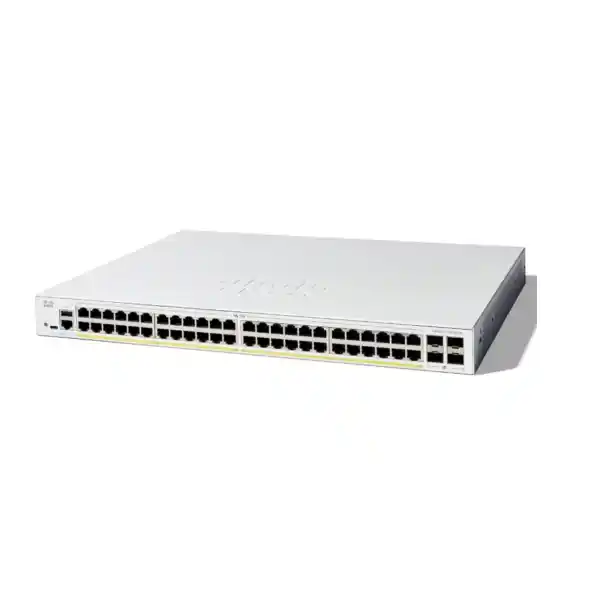
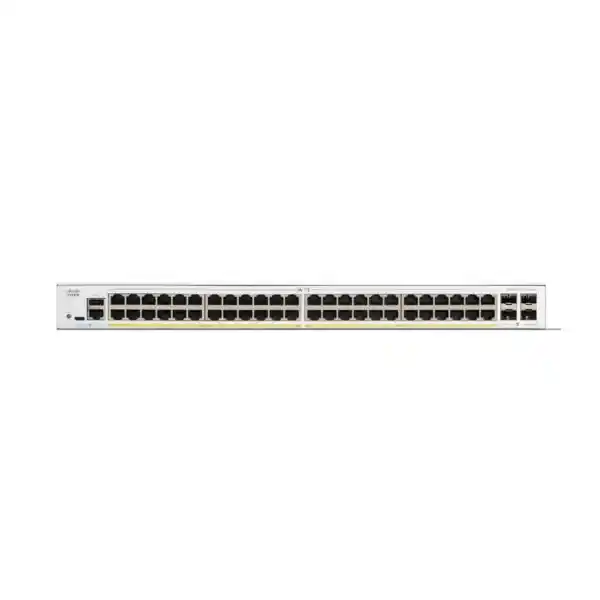
Cisco Catalyst C1300-48P-4G Network Switch
For a Tanzania office or branch that needs wired connections for desks, phones, wireless access points and compatible cameras, the Cisco Catalyst C1300-48P-4G combines 48 Gigabit copper ports with PoE+ and four Gigabit SFP uplinks. It is a managed access switch for a network where endpoint power, traffic separation and day-to-day administration matter. The first buying question is whether your endpoint power requirements and upstream traffic fit this particular configuration.
Request a FourTeck Tanzania quotation with your endpoint list, proposed uplink arrangement and existing network details. Include the exact power specification for every device that will use PoE. This gives the quotation a useful technical starting point and helps identify whether the requested model, a higher-power variant or a switch with faster uplinks is the better fit. Confirm commercial terms and the exact supplied hardware before placing an order.
Verified hardware at a glance
Use the specification summary below to identify the requested model. The uplink speed and shared power allocation deserve particular attention because similar-looking part numbers can describe materially different switches.
| Specification | C1300-48P-4G |
|---|---|
| Copper access ports | 48 × 10/100/1000 Mbps RJ-45 |
| Fibre/uplink interfaces | 4 × Gigabit SFP |
| Endpoint power | PoE+; up to 30W per port, subject to total allocation |
| PoE planning figure | 370W conservative planning budget; confirm supplied unit |
| Switching capacity | 104 Gbps |
| Forwarding rate | 77.38 million packets per second with 64-byte packets |
| Installation format | Rack-mountable; active fan cooling |
| Hardware stacking | This model is not listed among supported hardware-stacking models |
Make the 48-port layout work for your site
Start with a physical port schedule rather than the number of employees. A desk can require a computer connection, an IP phone connection or a shared phone-and-computer arrangement, depending on the phone and network design. Printers, meeting-room devices, access points and cameras also consume connections. Include maintenance equipment and any locally connected servers in the count. Leave a deliberate allowance for changes instead of allocating every available connection at installation.
Record where each cable terminates and which service it supports. A useful schedule includes the patch-panel reference, room or desk, endpoint owner, intended network segment and whether power is required. That record makes the purchase easier to size and helps an administrator distinguish an unused connection from a temporarily disconnected endpoint. It also reduces the chance that a replacement device is moved to a port with the wrong configuration.
Check the location of the cabinet against the cable routes. Forty-eight connections in one chassis can simplify a concentrated office installation, but it does not remove the need for sound structured cabling. Where several buildings or distant areas are involved, assess the distribution design before assuming that every endpoint should return to a single cabinet.
Size PoE from a device inventory
Power over Ethernet lets a compatible endpoint receive network connectivity and electrical power through its Ethernet connection. The important purchasing distinction is between the capability of an individual port and the total power available across the switch. A port count alone cannot tell you how many of your chosen devices can operate together.
Cisco’s ordering description lists a 370W PoE budget for this model, while another table in its current combined datasheet lists 375W. Use 370W as the conservative planning figure and confirm the available budget for the supplied unit before ordering. Do not interpret the 30W PoE+ port rating as a promise that all 48 ports can supply 30W simultaneously.
Build a worksheet with each endpoint model, quantity, applicable PoE standard and required allocation. Use manufacturer specifications and the switch’s allocation behaviour when checking the total. Average consumption measured during a quiet period can understate the allocation needed at startup or during demanding operation. Leave suitable headroom for changes and confirm any endpoint that needs a higher power class.
A worked power-planning example
Consider an illustrative deployment with 20 phones allocated 7W each, eight cameras allocated 10W each and four access points allocated 20W each. Those assumed allocations total 300W: 140W for phones, 80W for cameras and 80W for access points. Against a conservative 370W planning limit, that leaves 70W before any additional design allowance. These are example inputs, not verified consumption figures for real endpoint models.
The same list uses 32 copper ports, leaving space for other connections, but spare ports do not automatically imply spare power. Adding several demanding access points could exhaust the power allocation before the cabinet runs out of sockets. Conversely, adding ordinary non-PoE computers may increase port use without adding PoE demand.
Replace every assumed value with the requirement for the proposed device. Review the total again if camera heaters, additional radio features or other operating modes affect power. Ask the supplier to check both the individual endpoint match and the combined allocation. If the worksheet is too close to the limit, compare a larger budget or distribute endpoints across a suitable alternative design.
Understand the four Gigabit SFP uplinks
The 4G variant provides four Gigabit SFP interfaces for uplink planning. Choose it where that upstream speed is appropriate for the measured workload. A high internal switching-capacity figure does not make an individual uplink faster. For example, traffic from many access ports can still compete for the capacity of the connection leading to a server, router or another switch.
Map the busiest traffic paths before deciding how to use the uplinks. Office internet access, camera traffic to a recorder, wireless client traffic and backups can have different patterns. Identify which flows stay within the access switch and which must cross an upstream connection. A design with modest internet demand can still have substantial internal file-transfer or video traffic.
If your design calls for 10 Gigabit uplinks, compare a suitable 4X model before purchasing. Also assess the equipment at the other end: a faster access switch cannot create additional capacity on a slower upstream interface. For an aggregation design, have the network engineer verify peer support and traffic distribution rather than treating several links as a guaranteed faster path for every individual transfer.
Specify optics and fibre as part of the quotation
An SFP slot is the interface into which a suitable transceiver is fitted. It does not by itself specify the installed optical module, transmission distance or fibre type. List the existing fibre infrastructure and the peer device when requesting an uplink quotation. Include the connector arrangement, required reach and the transceiver part number already installed at the far end, if one exists.
Ask for compatible optics to be identified as separate quotation line items unless their inclusion is explicitly confirmed. The two ends must be selected as a working link, taking account of the medium and optical characteristics. A module that physically fits a socket is not sufficient evidence that it will operate correctly with the intended switch, software and remote transceiver.
Have the installer inspect, clean and test the fibre path before relying on it for production traffic. Record the modules and patch leads used so future maintenance does not become a guessing exercise. Where an existing link is being reused, validate its condition during the project instead of assuming that a previous installation proves it is suitable for the new connection.
Keep business networks clearly separated
Plan network segments around the services that need to communicate. Staff computers, guests, phones, cameras and management access often have different requirements. A useful design starts with a short communication policy: which endpoints need internet access, which need local applications and which should have access to administrative services.
The Catalyst 1300 platform supports VLAN configuration. The practical work is agreeing the VLAN identifiers, access-port membership and tagged uplinks across the complete path. A VLAN created on the access switch must be handled consistently by the connected router, firewall and wireless infrastructure. Otherwise a device can have a physical link while its required service remains unreachable.
Treat separation and permission as related design tasks. Define where routing takes place and where communication rules are enforced. Test representative permitted and restricted paths before handing over the installation. Keep a readable network diagram with the configuration backup so someone investigating an issue can connect the intended policy to the actual ports and uplinks.
Plan routing and firewall responsibilities
This switch family offers Layer 3 static routing capabilities, which may be useful where an approved design calls for local routing between network segments. Decide the role of that function before deployment. The right arrangement depends on where your organization wants to inspect traffic, enforce policy and manage changes.
For a simple branch, the firewall might remain the gateway for several segments. In another design, an access or distribution switch may route selected internal traffic while the firewall controls internet access. Document the selected approach, return paths and service dependencies. Moving a gateway can change which device sees the traffic, so it deserves more review than changing a port label.
Ask the engineer to validate the required routing features against the selected firmware and design. Avoid buying on the assumption that a small-business platform has every function or operational behaviour of another Catalyst range. If the project has a detailed enterprise feature specification, compare it line by line before accepting a substitution.
Support IP phones with a complete voice design
A phone deployment needs a power plan and a traffic plan. Check each handset’s PoE requirement, Ethernet capabilities and expected connection arrangement. If a computer connects through the phone, verify the handset’s downstream port behaviour and the configuration needed to carry the intended voice and data networks.
Prepare voice-network identifiers, address allocation, name resolution and access to the call-control service before moving handsets. The switch is one part of the service path. Registration failures can originate in addressing, firewall rules or the telephony platform even when the access port is working correctly.
Use a staged acceptance test with actual handsets: confirm registration, incoming and outgoing calls, audio in both directions and any essential operational features. Test while representative data traffic is present. Record the settings and ownership of the phone system so an administrator knows which team to involve when a later change affects service.
Match wireless access points by both speed and power
Obtain the exact access-point model before choosing its switch connection. A product described broadly as a business access point can have a very different power requirement and Ethernet interface from another device in the same category. Check the mode in which it is expected to operate and whether all intended functions are available with the proposed power source.
The copper access interfaces on this model are Gigabit Ethernet. If the access-point design requires a multigigabit wired connection or a power level beyond PoE+, assess an appropriate alternative. The radio’s advertised capabilities should not be used as a shortcut for choosing the wired connection.
For a compatible wireless deployment, confirm the management network, SSID-to-VLAN mapping and upstream policy with the wireless administrator. Test a client on each intended wireless service, including guest isolation where required. FourTeck’s Tanzania wireless planning page provides additional context for discussing access-point selection and the wired infrastructure supporting it.
Evaluate camera and recorder traffic
A camera worksheet should capture the exact camera models, operating power requirements, proposed recording settings and recorder location. A camera that changes operating mode can have a different power demand from its idle condition. Verify the device manufacturer’s requirements rather than assuming every camera can share the same allocation.
Work out whether recording streams remain within the access switch or traverse an uplink. The recorder placement, number of streams and viewing pattern determine which network connections deserve closer capacity assessment. Include remote viewing and scheduled exports if they form part of normal use. Port quantity alone is a poor basis for deciding whether the design is complete.
Include the video system in commissioning. Confirm recording continuity, live viewing and the expected access restrictions using the actual recorder and cameras. Identify who manages camera credentials and firmware. A working Ethernet link establishes connectivity, but the complete recording service needs its own acceptance criteria.
Choose an administration approach the team can maintain
Cisco documents an on-box web interface and command-line management for this platform. Select the administration method that suits the people who will operate it and their change process. Initial convenience matters, but access recovery, configuration backups and a clear handover matter over the life of the installation.
Create an explicit management plan: administrative addresses, permitted management locations, responsible accounts, credential storage and the procedure for approving configuration changes. Restrict administrative access to the people and systems that need it. Agree how a local technician will obtain authorized access if the usual remote management path is unavailable.
Request a handover that explains the finished configuration in ordinary operational terms. It should identify the uplink, important endpoint groups, recovery arrangements and where the current backup is stored. A network team should be able to answer who can change a port and how that change will be recorded without relying on the original installer being present.
Introduce access controls in stages
The platform supports access-control features including 802.1X authentication. Whether you use them should depend on an operational policy and the capabilities of connected endpoints. Phones, printers, cameras and managed computers can need different onboarding arrangements. Inventory those differences before applying a uniform rule across all ports.
If authentication is part of the project, plan the identity service, endpoint configuration and recovery procedure together. Pilot the policy with representative devices and document the expected outcome when authentication cannot complete. A secure design must remain understandable to the staff who will investigate an endpoint that fails to connect.
Keep management access available through an approved recovery arrangement while changes are tested. Apply restrictions in controlled stages, capture the working configuration and make the rollback procedure clear. Ask for the required feature combinations to be checked against the chosen firmware; the presence of individual features does not establish that every combination is appropriate.
Use QoS where it solves an identified problem
Quality of Service can help organize how traffic is handled when links are busy. Begin by identifying the applications that are sensitive to delay and the places where contention is expected. A voice call, a large backup and an interactive application do not necessarily need the same treatment, but every traffic class should have a clear purpose.
Coordinate any QoS configuration across the relevant devices rather than relying on a single switch setting. Decide which markings can be trusted, how traffic is classified and how the upstream network handles it. Validate the intended behaviour with representative traffic. Unnecessary priority rules can make troubleshooting harder without improving the experience users care about.
Treat bandwidth planning as a separate task. Prioritization cannot add physical capacity to an undersized uplink or improve an unrelated internet service fault. If ordinary workloads repeatedly saturate a link, investigate capacity and traffic scheduling alongside any QoS policy.
Prepare the cabinet and power supply
This is a rack-mountable model with active fan cooling. Plan its location as part of the network project, allowing for cable organization, ventilation and access for maintenance. Confirm the supplied mounting accessories and the dimensions needed for the selected cabinet before delivery. Avoid placing the switch where ordinary furniture, stored items or dense cabling will obstruct airflow.
Have a qualified installer check the power arrangement and the suitability of the cabinet environment. Include the proposed endpoint load when discussing backup power. Centralizing endpoint power makes a power event at the cabinet relevant to every connected powered device, so the intended continuity requirement should be explicit.
Ask for the supplied power cord and local installation arrangements to be confirmed with the quotation. Consider equipment access, environmental monitoring and maintenance ownership as practical site requirements. Do not assume that the switch purchase includes electrical work, backup-power equipment or site preparation unless those items appear in the agreed scope.
Plan backup power around the whole service
To estimate a useful UPS requirement, start with the equipment that must keep operating during an outage. The switch, its powered endpoints, upstream router or firewall and any essential local server may all be part of the same business service. Keeping a phone powered does not preserve calling if the rest of the voice path has lost power.
Specify the desired runtime and ask for a load assessment using the intended configuration. The PoE allocation is one input; it should not be substituted directly for the complete AC consumption of the installation. Include other equipment sharing the UPS and a reasonable allowance for the planned operating state.
Agree how the backup arrangement will be tested and maintained. An acceptance exercise should verify the business outcome you need, such as continuing selected network services through a controlled power interruption. Record the test conditions so future staff understand what was demonstrated and which dependencies remained outside that test.
Migrate an existing cabinet with a rollback plan
Before disconnecting an old switch, capture its port schedule, network segments, uplink details, addressing, traffic rules and endpoint power requirements. Photograph or label the physical patching for operational reference and save the existing configuration through the organization’s approved process. Resolve unknown links before the change window.
Build and review the proposed configuration ahead of the migration. Select a small representative set of endpoints for initial testing, then expand the move once the essential services work. Define a clear point at which the team will pause or restore the previous arrangement if a critical requirement cannot be met.
Do not assume configurations can be copied unchanged between different Cisco families. Confirm the supported commands and features for this platform. Where the project replaces an older enterprise installation, compare management, resilience and uplink needs as well as the copper-port count. The Tanzania Catalyst replacement planning page can support that broader discussion.
Commission against a written acceptance checklist
Agree what success means before installation starts. A useful checklist identifies representative wired computers, phones, access points and cameras, along with the application or service each must reach. Include both normal connections and the restrictions the design is intended to enforce.
During commissioning, verify endpoint addressing, expected network membership, uplink operation and the combined power allocation. Test the services users depend on, rather than stopping when link indicators illuminate. Where the design includes alternate paths, have the engineer validate the expected behaviour under the agreed test conditions.
Complete the handover with a configuration backup, port map, management-access instructions and a record of outstanding issues. Confirm that the intended configuration remains available after an approved restart test. Any exception should have an owner and an agreed next step, giving the buyer a clear basis for accepting the installation.
Diagnose a connection by following its service path
When an endpoint is not working, separate physical connection, power, addressing and application behaviour in the investigation. Record what changed and whether the issue affects one port, one endpoint type or an entire group. This gives the administrator a direction and avoids replacing equipment before understanding the fault.
For an affected powered endpoint, compare its requirement with the approved power worksheet and the allocation shown by the switch. For a device with a link but no useful connection, review the intended network membership, address assignment and gateway path. If local access works while remote access fails, include the upstream connection and relevant policy in the investigation.
Keep a simple incident record with the affected port, endpoint identifier, time, symptom and corrective action. Where a cable or device is moved for testing, document the temporary change and restore the intended configuration afterward. Good records make recurring problems easier to recognize and protect the accuracy of the port schedule.
Plan expansion before the last free port disappears
Keep separate forecasts for connections, power and upstream traffic. A change that adds only a few devices can affect all three in different ways. New desks might primarily consume copper ports, while new wireless coverage may place greater demands on power and uplink capacity. Review the likely next phase of the site before committing to the initial configuration.
Mark an expansion trigger in the network record, such as a planned service change or a defined reserve of unused connections. The appropriate trigger should come from your organization’s needs and operating experience. It gives procurement time to evaluate the next step without turning every addition into an urgent purchase.
Consider where future equipment would be installed and how it would connect to the existing network. Additional switches require their own cabinet space, power, uplink design and management plan. An expansion path is more useful when those dependencies are visible than when it is based only on an expectation that another switch can be added later.
Define responsibility for the finished installation
Agree who owns the switch configuration, structured cabling, electrical supply, wireless service and connected applications. These responsibilities may sit with different teams. A written boundary helps the person reporting an issue reach the right owner without assuming that every network symptom has the same cause.
For any requested configuration or installation service, ask for a scope describing the work, prerequisites, acceptance criteria and handover. State who supplies administrative access to existing systems and who approves the maintenance window. Identify dependencies that must be ready before the installation can be completed.
Arrange a practical change process for the period after handover. Even a small office benefits from recording new endpoint models, updated port assignments and changes to power demand. Keep the inventory and backup aligned with the deployed configuration so the next expansion, repair or equipment replacement begins from a dependable record.
Compare nearby options by the requirement that changes
Keep the full model designation on the purchase request. The C1300-48P-4G is distinct from a 48-port non-PoE model, a higher-budget FP variant and a 4X uplink variant. Changing a few characters can alter the part of the specification that makes the purchase suitable.
If your device worksheet shows insufficient power, compare the C1300-48FP-4G configuration. If the constraint is upstream speed, assess the C1300-48P-4X or another suitable design. Where both constraints apply, compare both attributes together. Recheck the whole specification of the alternative rather than assuming every other feature remains identical.
Hardware stacking is another separate requirement: this 4G model is not included in Cisco’s list of supported hardware-stacking models. If a unified hardware stack is required, select a supported platform and validate the intended arrangement. Similarly, requests for multigigabit access ports or power beyond PoE+ need explicit model selection.
Build a useful Tanzania procurement request
Give FourTeck Tanzania the model name, required quantity and a short description of the site. Attach the endpoint schedule and indicate which devices need power. Include the upstream equipment, required fibre connections and whether the project involves a new cabinet or an existing installation. These details make a technical comparison more useful than an undifferentiated request for a 48-port switch.
Ask the quotation to identify the exact orderable hardware, included accessories, proposed optics and any optional work. Confirm the price and applicable currency, availability, delivery arrangements and warranty terms for that quotation. Treat installation, migration, configuration and ongoing support as defined scope items that require confirmation.
For procurement review, keep the quotation aligned with the acceptance checklist. If your organization requires documentation, asset labels or a particular handover format, include that requirement early. This makes it easier to compare competing proposals on the equipment and work actually being offered.
Frequently asked questions
Is this a PoE switch?
Yes. The requested model has 48 PoE+ capable copper access ports. Check the total endpoint allocation against the shared power budget, as well as checking each individual device’s power standard and requirement.
Does 4G mean mobile connectivity?
In this product designation, the relevant distinction is the four Gigabit SFP uplinks. This switch is selected for wired network access and uplink connectivity; a mobile internet requirement needs a suitable separate gateway and service.
Can it power 48 devices at 30W each?
That would require 1,440W of port allocation, far above the conservative 370W planning budget. A full set of powered endpoints must be assessed using their actual requirements rather than the maximum port rating multiplied by the number of ports.
Can I use it for a new wireless network?
It can be considered where the exact access points match its Gigabit interfaces and PoE+ capabilities. Verify the access-point operating requirements, network segmentation and total power allocation before choosing it.
Are fibre modules supplied?
The presence of SFP interfaces does not establish package contents. Ask the quotation to name any included modules and identify the correct pairings for the intended fibre link.
Does it replace a firewall or wireless controller?
Define those functions separately in the network design. Selecting an access switch does not establish the internet-security policy, wireless control architecture or application configuration required by the site.
Can it replace an existing enterprise switch directly?
Compare the existing configuration, uplink capacity, power, operational features and resilience requirements first. Equivalent port counts do not establish functional equivalence, and the migration should have a tested rollback procedure.
What should I send to request a quote?
Provide the exact model, quantity, endpoint inventory, PoE requirements, uplink details and any requested configuration work. Ask for the supplied power budget and all commercial terms to be confirmed for the proposed unit.
Request a configuration-led quotation
Share your endpoint and uplink plan with FourTeck Tanzania to request a quotation for the Cisco Catalyst C1300-48P-4G Network Switch. Include the equipment that needs PoE, any fibre requirements and the scope of installation or migration work you want considered.
Ask for confirmation of the exact hardware, power budget, accessories, optics and commercial terms before ordering. A clear configuration and handover plan will help your team assess the proposed switch against the business services the network must support.




Reviews
There are no reviews yet.