
FourTeck Tanzania • Managed wired networking
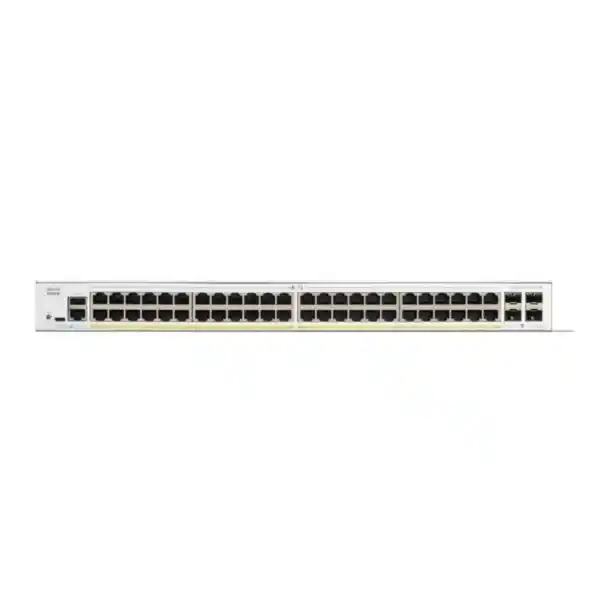
Cisco Catalyst C1300-48T-4G Network Switch
Build an organised access network for offices that need many wired connections in one equipment rack. This Cisco managed switch provides 48 copper Gigabit Ethernet ports and four dedicated 1 Gb SFP ports. It is a practical candidate when endpoints have their own power and the uplink design fits Gigabit connectivity.
Request a quotation from FourTeck Tanzania with your port count, network diagram and uplink details. Confirm the complete equipment list and commercial terms before purchase.
Start with the network you need to build
A switch purchase works best when it begins with the connections and applications the business actually needs. Count fixed workstations, shared printers, meeting-room equipment, local servers and any infrastructure connections. Separate devices that connect directly to this cabinet from those connected elsewhere. Include a realistic allowance for moves and additions, and identify which services must remain available during a maintenance window.
For an office access layer, the central question is often how to provide enough reliable wired connections while keeping administration manageable. This model can consolidate many endpoint connections into a single planned installation. Its suitability depends on the traffic leaving that installation, the power arrangements at the endpoints and the level of resilience required by the organisation.
Use the information below as a buying and deployment checklist. The suggested layouts are planning examples; the final design should reflect your actual cabling, security policy and upstream equipment. A small office with mostly cloud applications has a different traffic pattern from a laboratory moving large files to a local server, even when both offices have the same number of desks.
- Choose the access switch around connected devices, application demand and support requirements.
- Identify shared uplinks and local server connections before deciding that a port count alone is sufficient.
- Keep installation tasks, accessories and acceptance tests in the procurement discussion from the start.
Exact-model specifications at a glance
| Item | Specification |
|---|---|
| Copper interfaces | 48 × 10/100/1000 Mbps RJ-45 |
| Dedicated uplinks | 4 × Gigabit SFP |
| PoE output | Not supported on this model |
| Switching capacity | 104 Gbps |
| Forwarding rate | 77.38 million packets per second, measured with 64-byte packets |
| Dimensions, W × D × H | 444.3 × 288 × 43.94 mm |
| Unit weight | 3.95 kg |
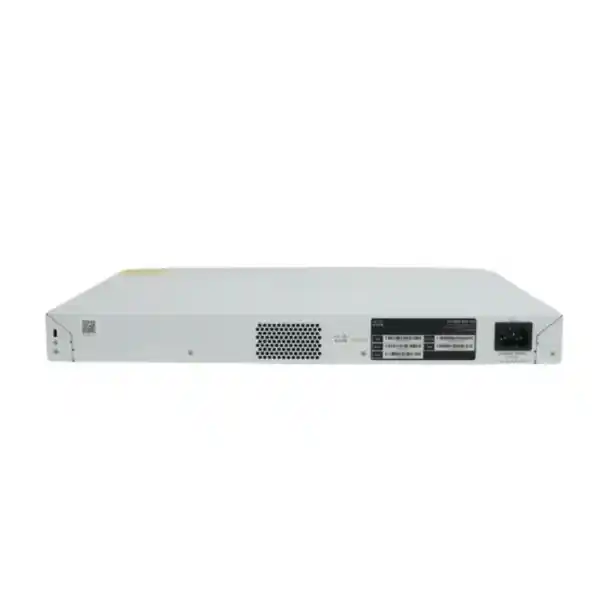
| Power input | Internal universal supply, 100–240 V AC, 50–60 Hz |
| Cooling | One fan; this model is not fanless |
Published switching figures describe the switch fabric and forwarding test conditions. They should not be read as an internet-speed promise or as the bandwidth available to one application. End-to-end performance also depends on the negotiated link speed, the path through the network, endpoint capability and the workload running at the time.
Decide where this model fits
Consider this switch for a department, administration floor, training room or branch cabinet where wired endpoint density is the main requirement. Build a simple inventory with device names, expected connection locations and application owners. That inventory gives both procurement and the technical team a common description of the project and makes it easier to identify overlooked connections before installation begins.
For a training room, record whether each position needs one connection or whether instructors, demonstration equipment and shared resources require additional outlets. For an administration floor, include shared facilities and meeting spaces rather than counting employees alone. For a branch, document how local applications behave when the wide-area connection is unavailable. These questions help establish the operational requirement without relying on an assumed number of ports per person.
A useful fit review also identifies exceptions. A workstation used for occasional documents differs from a media-editing computer that continuously transfers large files. A peripheral with a local power adapter differs from equipment expected to draw power through Ethernet. List exceptions explicitly so that the final bill of materials includes the right network equipment for each role.
- Good starting point: a structured wired access installation with a documented upstream path.
- Review further: concentrated storage traffic, high-bandwidth wireless aggregation or unusual environmental conditions.
- Define separately: availability targets, recovery procedures and responsibility for managing the switch.
Plan endpoint power before ordering
The power method belongs in the endpoint inventory. For every device, record whether it uses a mains adapter, an approved injector, a separate power system or a PoE-capable access switch. Check the device documentation rather than inferring its power needs from the presence of an Ethernet socket. The Ethernet data connection and the electrical supply are separate parts of the installation plan.
If a project contains only a few remotely powered devices, compare the practical cost of separate injectors with the cost of a suitable PoE model. Include the extra power outlets, cable management, replacement parts and backup-power arrangements involved. If many endpoints depend on Ethernet power, ask for a switch comparison that covers the required power standard and the total simultaneous power budget.
Also consider who restores service after a power interruption. A phone powered from a desk adapter may follow a different backup-power path from the switch in the equipment cabinet. A working network port does not prove that the endpoint is powered or operational. Record each dependency so that support staff can distinguish connectivity faults from power faults without unnecessary equipment replacement.
Before sign-off, ask the installer to demonstrate the actual endpoint power arrangement. The acceptance record should identify any injectors or adapters included in the supply and any items the customer must provide. This makes the scope clear and avoids discovering missing power components after the switch has been mounted and patched.
Size uplinks around shared traffic
Map the paths that leave the access switch: internet access, connections to other floors, access to business servers and backup destinations. Identify which applications share each path and when they are busiest. The relevant measure is simultaneous demand, including scheduled activity, rather than the total number of installed desktop computers. An otherwise quiet office can generate a sharp traffic peak during a backup or software rollout.
A practical sizing exercise records normal utilisation, busy-period utilisation and known future workloads. If measurements exist, use them. If they do not, build an application list and document the assumptions behind the design. Separate traffic between devices on the same access switch from traffic that must cross an uplink, because those two patterns place different demands on the rest of the network.
When higher-speed aggregation is a stated requirement, compare the C1300-48T-4X, which Cisco lists with four 10 Gigabit SFP+ uplinks. Make the comparison before committing to optics or cabling. A change in uplink class can affect both ends of the connection and the accessory list, so it should be treated as an architectural decision rather than a last-minute module substitution.
Do not buy extra upstream links without a defined purpose for them. Specify whether each connection is active capacity, a controlled alternative path or reserved for a future phase. Label that purpose on the network diagram and in the installation record. The support team should be able to explain the expected traffic path during normal operation and after a link failure.
Choose fibre components as a matched connection
For each proposed optical link, capture the equipment and port type at both ends, the installed fibre type, the number of available strands, connector details and the route length. Ask the supplier to verify the exact transceiver compatibility against the intended devices and software. A module that fits mechanically is not enough evidence that the complete optical connection is suitable.
Treat the optical path as a complete set of components. Patch leads, fibre panels, adapters and the installed cable all contribute to the result. A quotation should identify which elements are included and which already exist at the site. Record the far-end equipment model, since the access switch is only one part of the link and cannot determine the other end’s capabilities.
Before installation, arrange a clear naming scheme for fibre pairs and panel positions. During commissioning, capture the module identifiers and the tested path in the handover record. Keep spare components appropriate to the actual installed design rather than collecting unrelated optics. This approach helps a support team replace a failed component without guessing which type was originally specified.
Do not assume optical modules or patch leads are included with the switch. Ask for their inclusion to be stated in the bill of materials. If a link is intended for a later project phase, describe the future requirement separately so that the current purchase is not confused with a fully equipped fibre deployment.
Use VLANs to organise access by role
Cisco documents VLAN management and voice VLAN functionality for the platform. VLANs allow an administrator to organise separate broadcast domains and carry the intended groups across tagged connections. A useful business design starts by naming those groups and defining why they exist, then assigning the relevant access ports and uplinks to them.
For example, a planning worksheet might distinguish staff workstations, shared devices, a voice environment and network management. These are examples, not prescribed VLAN numbers or an automatic configuration. Decide which groups need to communicate, which services they require and where that communication will be routed and controlled. Merely assigning different names does not create the complete access policy.
For each wall outlet, record the intended access role and any tagging requirements of the connected device. For every inter-switch connection, document the allowed VLANs and ensure the settings agree at both ends. This is especially useful during an office move, when a correctly patched cable can still deliver the wrong network if the destination port has a different role.
Test representative devices in each group and test access that should be denied as well as access that should work. Include address assignment, name resolution and access to required business applications. The resulting worksheet becomes a practical support document and gives future administrators a reason for each port assignment rather than an unexplained collection of VLAN settings.
Choose the routing and security boundary deliberately
The platform supports Layer 3 functions, including static routing. Decide whether the switch or the existing firewall/router will provide the gateways for the planned networks. This choice affects traffic paths, troubleshooting and where policy is enforced. Keep the design understandable to the people responsible for operating it after installation.
If the firewall currently inspects communication between departments, review what would happen before moving those gateways elsewhere. A route that permits packets to reach a destination does not by itself reproduce the firewall’s rules, logging or inspection behaviour. Write down the required traffic flows and confirm that the proposed design enforces them at the intended point.
List address ranges, default gateways, upstream routes and the return path for each network. Avoid changing several unrelated design elements during the same cutover unless the project requires it. A controlled migration is easier to diagnose when the team can compare a small set of planned changes with a known working baseline.
Keep internet access, remote-access services and external security responsibilities in the wider network design. This access switch should be evaluated in its assigned role. Ask for any advanced routing requirement to be checked against the exact platform and software before approving the purchase, especially if the project specification was written for another Catalyst family.
Apply access controls with a testable policy
Cisco’s access-control documentation covers MAC, IPv4 and IPv6 access control lists. These can admit or deny matching traffic where the rules are applied. Build any rule set from a clear requirement: the source, destination, service and business reason for allowing or blocking the flow. A short, understood policy is easier to maintain than a long list assembled without ownership.
Test rule order, unmatched traffic and the direction of enforcement. Include the supporting services that applications need, such as address assignment and name resolution. A policy that appears correct for a business application can still interrupt the application if its supporting flows were overlooked. Keep a recovery method available while changing management-related rules.
For identity-based access, the platform documents 802.1X authentication with an external authentication server. Review endpoint support, server availability and the intended behaviour when authentication fails or the server is unreachable. Pilot a representative mix of devices before expanding the policy across the office; printers and specialist equipment may need a different onboarding approach from managed computers.
The aim is a documented access decision that can be checked during commissioning. Assign responsibility for reviewing exceptions and removing temporary permissions. Keep the switch-management network limited to the administrators and systems that need it, and make sure the team has an approved way to recover access if a configuration change prevents remote administration.
Protect address assignment without disrupting clients
DHCP snooping is documented for the platform and requires deliberate configuration. It distinguishes trusted and untrusted paths so that authorised address-assignment traffic can be treated appropriately. Before enabling it, identify where the legitimate DHCP responses enter each network and confirm the relevant VLANs and uplinks.
Create a small pilot rather than applying a new address-control policy to every endpoint at once. Test a device obtaining a fresh lease, a returning device and any equipment using a fixed address. Record the expected DHCP server and the correct gateway information. If the network uses relays or other intermediaries, include them in the review rather than assuming all replies originate on a directly connected port.
This is also a useful point to clean up the addressing plan. Document reserved addresses and infrastructure addresses, and decide who owns changes to each scope. Keep the record accessible to the support team so that an unexpected address can be investigated against a reliable baseline. Address controls work best alongside an accurate network inventory and consistent change procedures.
Prioritise applications with a measured QoS plan
The Cisco administration guide describes Quality of Service controls, including traffic classification, queue handling and bandwidth-related settings. These tools let administrators give selected traffic preferential treatment under the configured conditions. Begin with the applications that are sensitive to delay and establish how their traffic will be identified at the network boundary.
Agree on a consistent policy across the switch, upstream equipment and any relevant wide-area path. Decide which devices may supply trusted traffic markings and how other traffic should be classified. Avoid assigning every important business application to the highest priority: priorities are useful only when they express a real difference in treatment during contention.
Use a repeatable test with the applications the business actually runs. Compare normal operation with a busy period and record the effect of the policy. Include less time-sensitive work such as large downloads or backups, since these workloads may share the same path. QoS is a traffic-management tool, so it should be evaluated together with adequate link capacity and healthy endpoints.
Document the chosen policy in business terms as well as technical terms. An application owner should understand which service receives priority and why. A future administrator should be able to trace that requirement to the implemented settings, making the policy easier to review when applications, providers or equipment change.
Design alternative links and aggregation carefully
The platform supports LACP for dynamic link aggregation. Where the network design uses it, confirm that both ends agree on the group membership and relevant interface settings. Treat the group as one planned connection and document which physical ports belong to it. Do not connect parallel links and assume the equipment will infer the intended design.
Link aggregation distributes eligible traffic according to the configured forwarding method; it should not be treated as a promise that a single transfer will use the combined speed of every member. Assess the actual traffic mix and test it with the peer equipment. Include a controlled member-link failure in commissioning to confirm the observed behaviour matches the design.
Cisco also documents spanning-tree controls, including RSTP. Select a consistent loop-prevention approach for the surrounding network, establish the intended root location and distinguish endpoint ports from links to other switches. A loop-prevention configuration should reflect the topology, especially where older equipment or multiple paths already exist.
This exact model is not among Cisco’s listed hardware-stacking models. If a project requires a multi-switch stack, select a supported platform and design that stack explicitly. For any availability target, include upstream devices, cable routes and power dependencies in the review. Two cables passing through the same vulnerable route do not provide the same protection as independently planned paths.
Prepare administration, backups and recovery
Cisco provides an on-box web interface and command-line administration for this series. Choose a management method that the operations team can support, then define administrator ownership, permitted management sources and the access details that belong in the secure handover. Avoid relying on one person’s browser session or an undocumented local account.
Review the installed software against current Cisco support information before deployment. The appropriate release depends on the exact hardware, required features and relevant release guidance; do not assume the newest available file is automatically the right choice for every installation. Record the selected version and the reason for it, and preserve a recovery plan for maintenance work.
The administration guide distinguishes running configuration from startup configuration. Save approved changes so that they survive a reboot, and keep a protected backup outside the switch. Applying a setting during a live session is not the same as completing the configuration-retention process. Include a planned restart in testing when the maintenance scope allows it.
Make the recovery documentation usable. Record the cabinet location, device label, management address, configuration backup location and the person or team responsible for changes. Store credentials through the organisation’s approved process. After installation, verify that another authorised administrator can locate the documentation and carry out the agreed support procedure without depending on the original installer.
Monitor the network with useful baselines
The platform’s status tools include interface statistics, port utilisation and device health information. Establish a baseline after commissioning so that future readings have context. Record negotiated link speeds, expected upstream ports and the normal state of connected services. This helps support staff distinguish a persistent design constraint from a new fault.
The SNMP documentation describes monitoring and notification configuration, including SNMPv3. If a management platform will be used, agree on access permissions, notification destinations and the events that warrant action. Test that the monitoring system receives the intended information; enabling a feature on the switch alone does not prove that the operational process is complete.
Choose a small set of signals that someone will review. Link changes, sustained uplink load and device health are more useful when they have an owner and a response procedure. Avoid collecting a large amount of information without deciding how it will support fault diagnosis or capacity planning.
Compare busy-period observations with the assumptions made at purchase. If application demand changes, use those measurements to decide whether to alter the topology, schedule intensive jobs differently or replace an upstream connection. A baseline also helps explain why an access-switch replacement may not fix a problem originating in an endpoint, internet service or remote application.
Prepare the rack, cabling and power path
Check cabinet depth, mounting arrangements and space for cable bends before delivery. Allow the ventilation clearance required by the installation documentation and keep cable bundles clear of air openings. Consider how technicians will reach patch panels, power leads and management connections after the cabinet is fully populated.
Cisco specifies Category 5e or better cabling for 1000BASE-T. Inspect the existing structured cabling and patch leads rather than assuming every installed outlet is ready for the intended service. Label both ends consistently and investigate links that negotiate below the expected speed. A clear patching schedule reduces disruption when desks move or an individual outlet needs troubleshooting.
Review the complete power path with the people responsible for the site. Determine whether the cabinet has appropriate backup power, how long service needs to continue during an interruption and which upstream components must remain running. Size protection and backup arrangements for the actual connected load and the operational requirement, using the relevant equipment specifications.
Keep environmental suitability in the installation review. A business equipment cabinet should provide a controlled location with appropriate ventilation and access. If the proposed location is unusually hot, dusty, damp or exposed, request a suitability assessment before committing to this installation. Do not treat a standard office switch as an outdoor or industrial device simply because Ethernet cabling can reach the location.
Move from the old switch with a controlled cutover
Begin with a record of the existing port roles and the services currently working. Photograph or document patching where helpful, capture the relevant configuration through the approved process and identify critical users. Schedule the change with enough time to validate applications and return to the previous arrangement if the agreed success criteria are not met.
Translate the required behaviour into a reviewed configuration for the new platform. Do not assume that a configuration from another switch family can be pasted unchanged. Pay attention to VLAN membership, management access, upstream connections, address-control features and any service-specific settings. Where practical, prepare and test the new configuration before disconnecting the old equipment.
During cutover, move connections in labelled groups and test each group against its expected role. Maintain a simple change log with the time, patching change and test result. This gives the team a way to isolate an issue without undoing every connection or making unrelated changes under pressure.
After business acceptance, update the network diagram and asset record. Keep the previous equipment and rollback information for the agreed retention period, following the organisation’s policy. Close the project only when configuration backups, management ownership and the final accessory list have been handed over, so that the installation remains supportable after the change window ends.
Define acceptance before the installation begins
Agree on a short acceptance plan while the quotation is being reviewed. Define what successful service looks like for each group of users and which representative devices will be tested. This gives the customer and installer an objective way to assess the result and prevents a single successful internet test from standing in for the whole network.
- Physical checks: correct equipment, secure mounting, clear labels and tidy patching.
- Connectivity checks: expected link speeds, correct network membership and access to required resources.
- Policy checks: permitted traffic works and selected prohibited paths are blocked as designed.
- Operational checks: administration access, monitoring, configuration retention and protected backups.
- Application checks: representative business workflows complete under agreed test conditions.
Where an alternative path has been designed, test it in a controlled window and record the observed interruption. Where an endpoint uses separate power equipment, include that power arrangement in the demonstration. Any unresolved item should have an owner and an agreed next step, rather than disappearing from the handover because the switch itself is reachable.
The final record should be understandable to the customer’s support team. Include the tested topology, software version, accessory identifiers and configuration location. Keep the distinction between a completed test and a future recommendation clear. This makes later expansion easier because the next engineer can see what was installed, what was verified and what remains outside the current scope.
Frequently asked buying questions
Can this switch power IP phones, cameras or access points?
No. The requested model does not supply PoE. Check each endpoint’s supported power method and include the required adapters, injectors or an appropriate PoE switch in the design. Ask for the power arrangement to appear clearly in the quotation.
Are the four SFP ports 10 Gigabit?
No. They are Gigabit SFP ports. Projects needing faster aggregation should compare an appropriate uplink platform and verify both ends of the connection before buying modules. The optical accessories and the far-end port must match the proposed design.
Can I use it for a growing office?
Potentially, provided the endpoint count, shared traffic, power requirements and operational expectations fit. Prepare a device inventory and a traffic estimate, then leave a documented allowance for growth. Review the exceptions, such as specialist workstations or centrally powered equipment, before finalising the model.
Does creating VLANs automatically complete network security?
No. VLANs organise traffic, but the wider design must define communication between groups, management access and the enforcement point for policy. Ask the installer to demonstrate both required access and selected blocked access, and keep the tested rules in the handover.
Are optical modules included?
Do not assume they are included. Request an itemised bill of materials showing the optical modules, patch leads and other accessories needed for each link. Identify existing components separately so that procurement can see exactly what the proposed supply covers.
What information helps with a Tanzania quotation?
Provide the required quantity, installation location, endpoint inventory, existing network diagram, upstream equipment and any fibre details. State the required installation scope and acceptance criteria. Ask for pricing, availability, applicable charges, delivery arrangements and support terms to be confirmed for the specific offer.
Can it replace an existing switch without configuration work?
Plan for a configuration review and application testing. Existing VLANs, port roles, addressing and management rules need to be understood before migration. Preserve a known working baseline and an agreed rollback procedure so the change can be managed within the available maintenance window.
What should be included in the handover?
Ask for the final network diagram, port schedule, equipment inventory, tested configuration and backup location. Confirm who owns administration and ongoing changes. Record any remaining tasks and the boundaries of the supplied work so that future support begins from a clear, shared understanding.
Request a FourTeck Tanzania quotation
Share your required quantity, wired-device count, uplink design and any installation requirements. Ask for a complete proposal covering the switch, verified compatible accessories and the work needed to bring the planned network into service. Include any existing equipment that must remain in use so the proposed design can be reviewed as a whole.
Confirm the exact orderable hardware, current price, availability, delivery arrangements and applicable warranty or support terms in the quotation. If you need configuration or migration assistance, ask for that scope and its acceptance criteria to be stated separately. This gives procurement a clear comparison and gives the technical team a practical basis for installation.
Request pricing and a complete bill of materials for your Tanzania project.




Reviews
There are no reviews yet.