
CISCO CATALYST 1300 · BUSINESS ACCESS SWITCHING
Cisco Catalyst C1300-8FP-2G Network Switch
A compact managed switch for powered business devices
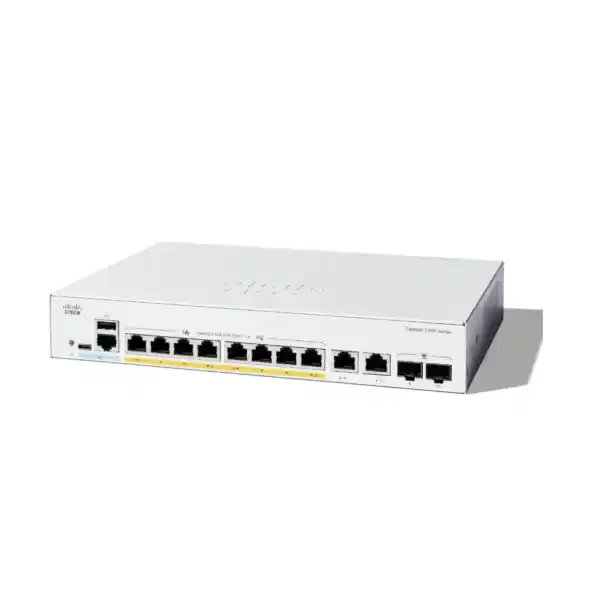
Equip a small office, branch, reception area or equipment zone with managed wired connectivity and centrally supplied endpoint power. The Cisco Catalyst C1300-8FP-2G Network Switch brings eight Gigabit PoE+ access ports together with two Gigabit copper/SFP combo uplinks. It suits a carefully sized mix of compatible IP phones, wireless access points and network cameras where administrators need control over traffic and connected devices.
For Tanzania buyers, the starting point is the device schedule: how many connections are needed, how much power each endpoint requires, and where the uplink will terminate. This model is particularly useful when the requirement is a compact access switch with manageable segmentation rather than a large wiring-closet platform. Request a FourTeck Tanzania quotation with your endpoint models and uplink details so the proposed equipment can be checked against the actual installation.
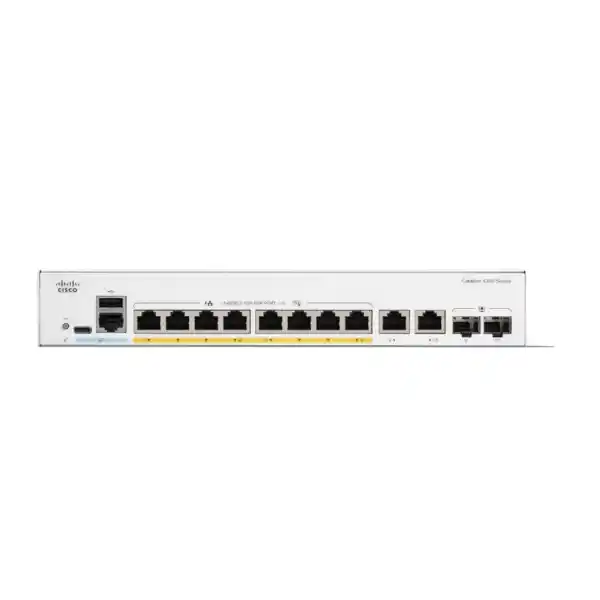
Keep the important boundaries in view. The shared PoE budget is 120W, the uplinks operate at Gigabit speed, and the copper and SFP sides of each combo interface share one logical port. This model is not a hardware-stacking option. These details matter more to a successful purchase than the number of sockets visible in a product photograph.
Verified hardware at a glance
| Access connections | 8 × 10/100/1000 Ethernet ports with IEEE 802.3af PoE / 802.3at PoE+ |
|---|---|
| Endpoint power | Up to 30W per PoE+ port, within a shared 120W budget |
| Uplinks | 2 × Gigabit RJ-45/SFP combo ports; one active medium per combo port |
| Switching performance | 20Gbps switching capacity; 14.88Mpps forwarding rate for 64-byte packets |
| Cooling | Fanless design |
| AC input | Internal universal power supply, 100–240V AC, 50–60Hz |
| Platform role | Managed business access switching with Layer 3 capabilities |
| Hardware stacking | Not supported on this model |
Use this summary to establish the hardware fit, then compare the proposed configuration with the requirements of every attached device. A port count alone does not show whether the power allocation, uplink capacity or security policy is adequate. The final purchase list should also identify any required optical transceivers, fibre patch leads, copper patch leads and mounting accessories.
Manufacturer specifications describe the platform. The quotation should separately confirm the exact supplied unit, included accessories and commercial terms. Avoid treating a family-level feature list as a promise that every Catalyst 1300 variant has the same interfaces or expansion options.
Build the PoE plan before choosing the switch
Start with a worksheet containing each powered device, its exact model, its required PoE standard and its maximum requested power. Include optional modules and operating modes that change consumption. A phone with an expansion console, a camera using illumination, or an access point enabling additional functions can have a different requirement from the basic device running at idle.
The total is a shared resource. As an illustrative calculation, four endpoints each requiring 20W of switch-side allocation would account for 80W, leaving 40W before any additional reserve or allocation differences are considered. Eight endpoints each requiring 20W would need 160W and therefore exceed this switch’s budget. These examples are planning arithmetic, not compatibility statements for specific phones, cameras or access points.
Also distinguish the power allocated by the switch from the power an endpoint reports consuming. Negotiation and cabling affect practical planning. Use the manufacturer’s maximum requirements, check the operating allocation during commissioning, and leave room for foreseeable changes. A design that relies on every device remaining at its lowest observed consumption is difficult to maintain when devices restart or features are enabled.
Define which devices are operationally critical before installation. Cisco’s PoE controls include port priority and power monitoring, but priority cannot create additional capacity. If the required allocations do not fit, choose a suitable larger power budget or redesign the powered-device distribution. Do not assume that the ‘FP’ model designation means all eight ports can provide their individual maximum simultaneously.
Understand the two combo uplinks
A combo uplink offers a choice of connection medium within one logical interface. Use its copper connection where the upstream equipment and cabling suit an electrical Ethernet link, or use the SFP side with a compatible optical solution where fibre is appropriate. The two physical media options do not turn one combo interface into two independent active links.
That distinction prevents an easy procurement error: counting the front-panel receptacles as twelve separate network connections. The switch provides eight access ports plus two combo uplink interfaces. Plan around those logical interfaces and record which medium each uplink will use. Label the selected connection so a later technician can understand why a nearby unused receptacle is present.
For fibre, agree the fibre type, link distance, connector arrangement and the interface at the far end. Select optics that are supported for the intended switch and match the remote equipment. A mechanically fitting module is not sufficient evidence of interoperability. Confirm whether modules and patch leads are included in the quotation; their presence should never be assumed from a description of SFP-capable ports.
Each uplink remains a Gigabit connection. If the project needs a 10Gbps connection to a server, aggregation switch or storage system, select hardware with the required uplink specification. Two links also need a deliberate network design: connecting both without an appropriate topology and configuration can introduce operational problems rather than an automatic capacity improvement.
Choose the right workload for Gigabit access
Think about where traffic travels, how many devices send at the same time and which paths are shared. An office sending modest application traffic to an upstream router has a different demand pattern from a camera group continuously streaming recordings across a single uplink. Identify the busy periods and the direction of the flows before deciding that the interface speeds are sufficient.
The published switching and forwarding figures describe switch performance under the stated measurement conditions. They are not an internet-speed commitment or a guarantee of a particular application’s throughput. End-to-end results also depend on endpoint interfaces, packet sizes, cabling, upstream equipment and congestion elsewhere in the network.
For a practical assessment, list the traffic that must leave this access switch. Include video recording, file transfers, cloud backups, guest wireless use and voice calls. Determine whether any local devices exchange substantial traffic with one another. This simple map is often more useful than comparing a headline capacity figure without considering where the traffic will actually go.
Allow for growth in both traffic and physical connections. Spare power is useful only when a suitable port is also available, and spare ports do not solve an oversubscribed upstream path. If the installation is expected to expand soon, compare the total cost and operational impact of starting with a larger model against adding more equipment later.
Segment office, voice and guest traffic deliberately
VLAN support lets an administrator organise devices into logical network groups. A useful small-business design might distinguish employee equipment, IP telephony, guest wireless access, cameras and switch management. The exact groups should follow the organisation’s operational needs and access policy rather than a generic list copied into every installation.
Write down which devices need to communicate before applying configuration. For example, a camera may need a recording server and time service, while a guest client may need internet access without access to internal applications. This communication matrix provides a clearer commissioning target than simply creating several VLAN numbers and assuming separation is complete.
Map the switch configuration to the upstream router, firewall and wireless equipment. Agree which VLANs are carried on each uplink, where endpoints receive addresses, and which interface supplies each default gateway. Mismatched tagging or an incorrect port assignment can make otherwise healthy devices appear unavailable. A port schedule should therefore include both the physical endpoint and its intended logical network.
VLANs organise traffic, while the routing and security policy determine permitted communication between groups. Where isolation is required, test both the allowed paths and the paths that should fail. Keep management access within a planned administration network, and confirm that a later access-point or phone replacement will receive the intended network settings.
Support IP phones with an end-to-end voice plan
An IP phone needs more than electrical power and a link light. It must receive the correct network settings, locate its call-control service and exchange media through the required network paths. Before replacing a switch serving phones, capture the existing addressing, VLAN behaviour, provisioning arrangements and any computer connections that pass through the phones.
Cisco documents voice VLAN functions and traffic-priority controls for the platform. Use them as part of an agreed telephony design, with the relevant phone models and call-control environment checked before rollout. Discovery behaviour and tagging should be verified on the actual endpoints rather than assumed from the fact that they use Ethernet.
Quality of Service can give selected traffic preferential treatment during contention. Its value depends on consistent classification and handling along the relevant path. A priority setting on one switch cannot correct an overloaded internet service, an unsuitable upstream policy or a remote provider issue. Include the router and any WAN links when assessing call quality.
During commissioning, place simultaneous calls while normal business traffic is present. Check two-way audio, transfer behaviour and any features the organisation relies on. Record which ports serve phones and whether a connected computer is expected to use a different network. This makes later troubleshooting more focused when a user reports a phone issue that is actually related to addressing or an upstream service.
Check access-point power and Ethernet requirements separately
A wireless access point has two distinct wired requirements: sufficient supported power and a suitable Ethernet connection. Confirm both for the exact model and operating mode. A radio’s advertised wireless capability does not establish whether a Gigabit wired port or a PoE+ power source will meet the intended deployment requirement.
Some access points need higher-power PoE standards or multigigabit Ethernet to support their intended feature set. For those requirements, choose an appropriate switching model after checking the access-point documentation. Do not infer that an access point is a full-feature match simply because it starts up when connected.
Also plan the wireless network mappings. Multiple wireless networks may need corresponding VLANs across the switch uplink and access-point port. Document the management network, permitted tagged networks and upstream gateways so an administrator can reproduce the settings when the access point is replaced.
Evaluate the expected aggregate load from wireless users, especially where a single access point serves many active clients. Coverage design, client density and application demand belong in the wireless assessment alongside the wired switch selection. FourTeck Tanzania’s verified Cisco wireless access-point guidance offers a related planning reference for buyers coordinating the two purchases.
Use a camera schedule for surveillance deployments
For a small camera group, central PoE can make power distribution easier to manage. The buyer should still prepare a camera schedule covering the exact camera models, operating power, recording destination and expected streams. Include functions such as lighting, heaters or movement where they affect the selected camera’s power needs.
Calculate the traffic that must reach the recorder or monitoring system. Camera count by itself is a poor guide because resolution, frame rate, compression settings and simultaneous streams change the load. Consider where the recorder connects and which uplink carries the recordings. Review remote-viewing traffic separately from the continuous recording path.
Define the access policy for cameras and recording systems. Operators may require video viewing while only a smaller group should administer the equipment. Place devices in the planned network groups and verify that recording continues after the intended restrictions are applied. Keep device management reachable through the agreed support path.
During handover, test the cameras together in representative operating conditions, including the modes that increase their power draw. Record the switch ports, device labels and recording destinations. If a future camera upgrade raises the total power or traffic requirement, reassess the complete group rather than replacing the device and assuming the previous design remains suitable.
Match management tools to the team that will maintain it
The platform supports browser-based administration and a command-line interface. Select the normal management method around the people responsible for the network, their access arrangements and their ability to recover from a configuration error. A manageable installation should remain understandable after the original installer has finished the job.
Cisco’s web interface provides Basic and Advanced display modes. An administrator may therefore need to select the appropriate view to find a particular setting. Agree a standard process for configuration changes: identify the requirement, review the impact, apply the change, verify service and retain the resulting configuration.
CLI access can suit teams that prefer repeatable command-based administration. Use the documentation for the installed software release and verify syntax before carrying settings across from another switch family. The Catalyst name does not mean a configuration exported from a different Cisco platform can be applied unchanged.
For organisations considering Cisco Business Dashboard, confirm the planned deployment, supported software and management requirements separately. Central management should have an identified owner and a recovery process. Keep a local administration route documented so normal maintenance does not depend on one person’s laptop or an undocumented account.
Apply access controls with a clear recovery path
Managed switching provides tools for controlling network access, but their usefulness depends on policy and configuration. Begin by deciding who may administer the switch, which endpoints may attach to each area and which business services each network group requires. Avoid enabling unfamiliar controls across every port before testing their effect.
The platform includes capabilities such as 802.1X authentication and port security. Authentication-based deployments need compatible endpoints and the appropriate supporting authentication infrastructure. Devices without the expected authentication behaviour require a deliberate policy rather than an unplanned exception during installation.
Access control lists can match traffic attributes and enforce configured rules. Develop rules from the communication matrix, pay attention to direction and ordering, and check the treatment of traffic that matches no explicit entry. A rule set can interrupt legitimate services if essential supporting flows are omitted.
Keep a recovery route available while changing management restrictions. Test administrator access and application behaviour before closing the maintenance window. Maintain a protected record of the approved policy and the reason for each significant exception, so later changes can be reviewed without weakening isolation through guesswork.
Decide where routing and security inspection belong
This managed platform has Layer 3 capabilities, including support for routing between configured networks. Whether that routing belongs on the switch or on an upstream firewall is a design decision. Start with the communication policy and the inspection requirements, then select the forwarding path that enforces them.
Local routing can suit selected internal flows, while a firewall may be the required policy point for traffic between groups with different trust levels. If a flow is routed locally, verify that the chosen design still applies the necessary restrictions. A diagram showing the intended path helps prevent accidental bypass of the organisation’s security policy.
Do not purchase this model as a substitute for every function supplied by a business router or security appliance. Confirm requirements such as internet-edge services, remote access and application inspection against the equipment selected to perform those roles. The switch’s contribution is wired access and the supported network functions configured for the installation.
Document the gateway for each network, relevant routes and the return path. When troubleshooting, confirm addressing and reachability in both directions. A network can have correct switch-port assignments yet fail because the upstream equipment lacks a route back to the source.
Prepare the physical installation and power continuity
Choose a location that provides access for maintenance, protects the equipment and allows appropriate ventilation. Fanless operation is useful in occupied spaces, but it does not remove the need to manage heat. Avoid placing the unit in a tightly packed enclosure or treating a compact form factor as permission to obstruct its ventilation.
Check the manufacturer’s current installation requirements against the intended cabinet, shelf or mounting arrangement. Confirm the exact unit dimensions, cable bend space and required accessories before finalising the enclosure. Rack-mountable does not by itself establish that the particular brackets required for your cabinet are included in the quoted package.
The internal AC supply is specified for universal input. Confirm the supplied power cord and the site’s electrical arrangements with the quotation and installation team. If continuity during a power interruption matters, size backup power for the switch and its connected load, together with the upstream equipment needed to keep the service usable.
A working access switch alone cannot preserve an internet call if the router or connection equipment loses power. Plan the complete service path. Record which equipment is backed up and use the intended operating load when evaluating the backup arrangement, rather than sizing it from the switch’s endpoint-power budget alone.
A practical replacement and commissioning sequence
Before disconnecting an existing switch, capture a port map, network assignments, connected devices, management addressing and relevant upstream settings. Identify any business processes that rely on the network during the change. Agree a maintenance window and a rollback point that the responsible team can realistically use.
Prepare the new configuration and check it against the equipment schedule. Confirm management access first, then validate representative endpoints from each network group. Move connections in a controlled sequence so a failed service can be associated with a specific change rather than a whole cabinet of unlabeled cables.
Test the business outcomes the installation is meant to support. These may include phone registration and calls, wireless access, guest isolation, camera recording, printing and access to internal applications. Check that settings intended to prevent access are effective as well as confirming that required access works.
Complete the handover with the final port schedule, configuration backup, software version, management details and unresolved items. Store credentials through the organisation’s approved process. A concise record of the installed state saves time when a device is moved or a later upgrade changes the power and traffic assumptions.
Monitor the installation after normal work begins
Commissioning establishes that the configuration works at handover; normal business activity shows how the design behaves over time. Establish a baseline during representative use, especially if voice, wireless and recording traffic share the same uplink. Compare future observations with that baseline when users report a change.
Cisco’s status and statistics tools expose information useful for checking interfaces, utilisation and PoE conditions. Review the relevant readings when diagnosing an endpoint problem. A failed camera or phone may involve cabling, network settings, power allocation or an upstream service rather than a defective switch port.
Give ports meaningful descriptions and keep physical labels aligned with the documentation. When a device is added, update the inventory and the power calculation at the same time. This small administrative habit helps avoid a situation where several individually reasonable changes exceed the original design.
Plan configuration backups and software maintenance as routine operational tasks. Review the applicable release guidance before an upgrade, set aside a suitable maintenance period and verify key services afterwards. Make the person responsible for accepting the change explicit, particularly where the switch serves devices that operate outside office hours.
Compare alternatives by the requirement that changes
| If the requirement changes | What to compare |
|---|---|
| More wired devices | A larger access-port count and an updated port schedule |
| More endpoint power | A higher shared PoE budget, checked against every device |
| Higher-power endpoints | The exact required PoE standard and per-port capability |
| Faster wireless or uplinks | Suitable multigigabit access or 10Gbps uplink interfaces |
| One hardware stack | A model explicitly listed as supporting the required stacking design |
| Specialist environments | Hardware whose environmental and installation ratings fit the site |
This eight-port model is a sensible candidate when the measured requirements stay within its port, power and uplink limits. Moving to a larger platform should solve a defined requirement, such as additional connections or a higher-capacity upstream path. Comparing unrelated headline features can obscure the practical difference that matters.
Include accessories, installation effort and ongoing administration in the comparison. A low equipment price may not be the lowest project cost if it requires extra devices, more power outlets or an early replacement. Equally, a more complex platform may add work without helping a small, stable installation.
Where replacing another Cisco family, check configuration portability and feature equivalence individually. Shared branding does not establish identical software, optics support or expansion behaviour. Ask for a model-specific comparison centred on the existing network’s essential functions and the changes expected during its planned service life.
Information to include in a Tanzania quotation request
Send the required quantity, exact switch model and a description of the deployment. Include a port-by-port endpoint list wherever possible, with the manufacturer’s model numbers for powered devices. State whether the switch will serve an office, a small wireless zone, phones, cameras or a mixture of these.
Describe the upstream connection: copper or fibre, the remote equipment, the required speed and any existing transceivers. For fibre, provide the known cable type and approximate link length. Include the planned VLANs and whether configuration work must be coordinated with a router, firewall, telephony platform or wireless system.
Ask for a clear scope covering the hardware, required modules, patching, mounting items and any requested configuration work. The quotation should state the offered commercial terms, availability and delivery arrangements for your order. Confirm warranty and support details for the actual supply rather than assuming that a general manufacturer statement defines the seller’s complete service obligation.
Provide the delivery location and any site-access or maintenance-window constraints so they can be assessed. This page does not establish stock, a local office, an installation commitment or a delivery promise. Those details should be confirmed through the quotation process for the intended order and destination.
Agree what successful delivery will demonstrate
Before approving the final proposal, turn the important requirements into a short acceptance record. Identify the representative devices to be connected, the services that must work, and the person who will confirm the result. A clear record helps the buyer and installer discuss the same outcome when equipment and configuration are supplied together.
Include a check that the planned endpoints operate simultaneously, that the required upstream services are reachable, and that network isolation behaves as specified. If backup power is part of the project, agree how its operation will be assessed. If fibre is included, confirm that the supplied link components match both ends of the connection.
Also agree the handover documents and any work that remains the customer’s responsibility. Examples include access to upstream equipment, endpoint credentials, existing cable certification or coordination with another service provider. Clarifying these dependencies before the installation date makes the quoted scope easier to review and reduces uncertainty when an otherwise functional switch cannot complete a service that depends on another system.
Buyer FAQs
Can all eight PoE ports run at 30W together?
No. The individual port capability and the shared budget are separate limits. Eight allocations of 30W would total 240W, exceeding the 120W available budget. Build the device schedule around the maximum required allocation and verify the operating result during commissioning.
Are the SFP and copper uplink sockets separate active ports?
Each combo interface offers a choice between copper and SFP media for one logical uplink. Count two combo uplinks in the network plan. Confirm the selected medium, far-end interface and any required modules before placing the order.
Will this switch power any IP phone or access point?
Compatibility depends on the exact endpoint’s power standard, power demand and operating requirements. Check the manufacturer’s documentation for each device. Endpoints requiring higher-power PoE or faster wired interfaces may need a different switch to meet the intended feature set.
Does this model provide 10Gbps uplinks or hardware stacking?
No. This model has Gigabit combo uplinks and is not a hardware-stacking model. If either function is a project requirement, select a model explicitly supporting it and verify the required interconnects and topology.
Does a managed switch configure network separation automatically?
The intended separation requires a planned configuration across the switch and relevant upstream devices. Define the networks, gateways, permitted communication and management access, then test the result. Device discovery or a link light does not confirm that the required security policy is working.
Can it connect to a firewall from another vendor?
Assess the connection through the required Ethernet speed, VLAN handling, routing and policy requirements. A mixed-vendor network needs matching settings at both ends. Validate the proposed configuration instead of relying on a general claim that every feature will interoperate.
Are optics, mounting accessories and installation included?
Confirm those items in the quotation. A description of interface capability or rack mounting does not establish the contents of a particular supply package. Ask for an itemised list that distinguishes hardware, accessories, configuration work and any ongoing support.
What is the price in Tanzania?
Request a current quotation for the quantity and scope you need. Pricing, applicable charges, stock status and delivery arrangements must be confirmed for the order. Providing endpoint and uplink details helps ensure that the quote includes the equipment needed for the planned installation.
Request a switch quotation matched to your devices
Send FourTeck Tanzania your endpoint list, required quantity, uplink medium and intended installation location. Include the model numbers and maximum power requirements of phones, access points and cameras, together with any network segmentation or configuration needs.
Ask for the Cisco Catalyst C1300-8FP-2G with the necessary accessories itemised and the commercial terms confirmed. A device-based review gives you a clearer basis for approval: the right port count, sufficient shared power, appropriate uplinks and a documented scope for the work you need.




Reviews
There are no reviews yet.