
CISCO CATALYST 1300 · COMPACT BUSINESS SWITCHING
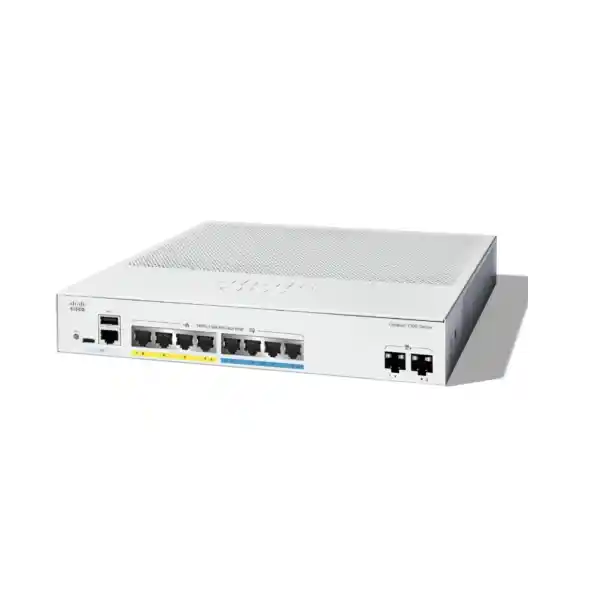
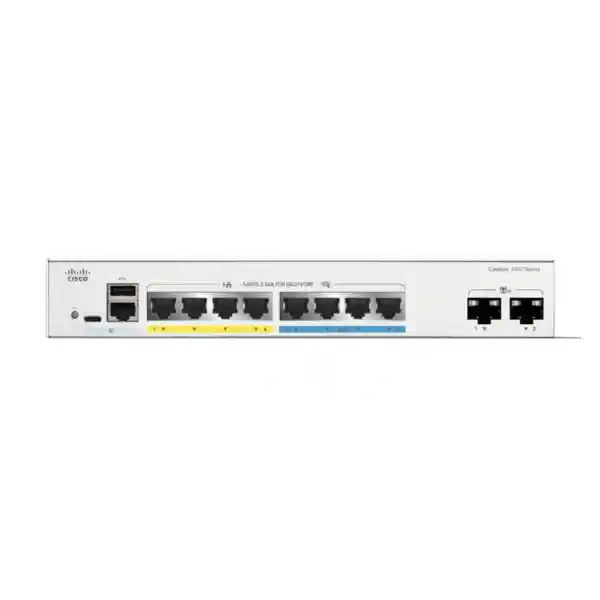
Cisco Catalyst C1300-8MGP-2X Network Switch
Give selected access points and workstations a faster wired connection while keeping phones and other compatible devices on the same managed access switch. This compact model combines multigigabit access, PoE+ and 10G uplinks for small offices and branch networks in Tanzania. Request a quotation from FourTeck Tanzania with your endpoint list and upstream connection requirements.
The right fit: a small number of faster wired devices
Choose this switch when the network has a clear mix of ordinary Gigabit connections and a few endpoints that benefit from higher access speed. A small office might need faster connections for compatible wireless access points while retaining straightforward connections for phones, printers or desktop equipment. The eight copper ports keep the device count focused; the two separate uplink slots provide a path towards the rest of the network without consuming those copper connections.
The buying decision should start with three lists: how many devices need a cable, which of them need more than a Gigabit, and how much power each powered device requires. If those lists fit the available ports and power allowance, this model is a practical candidate. If the project already needs more than four faster copper links, a larger multigigabit switch is a better starting point than a design dependent on immediate expansion.
Its value also depends on what sits upstream. Faster access links help most when traffic can continue through a suitable uplink to the destination, whether that is a server, another network segment or a core switch. Buying faster access ports alone does not change a slow internet connection, an overloaded server or a wireless coverage problem. Match the switch to a defined bottleneck and an expected traffic pattern.
Verified hardware at a glance
The port mix is the defining feature of this exact model. Treat the Gigabit ports, multigigabit ports and SFP+ slots as different resources when building the bill of materials. The following specifications identify the hardware; they do not describe a bundled package of optics, installation services or support.
| Specification | C1300-8MGP-2X |
|---|---|
| Manufacturer and series | Cisco Catalyst 1300 |
| Copper access ports | 4 × 10/100/1000 Ethernet and 4 × 2.5GbE |
| Uplinks | 2 × 10 Gigabit SFP+ |
| Power over Ethernet | PoE+ on 8 copper ports; up to 30W per port |
| Total PoE allowance | 120W shared across powered devices |
| Switching capacity | 68 Gbps |
| Forwarding rate | 50.60 million packets per second, measured with 64-byte packets |
| Cooling and mounting | Fanless; rack-mountable |
| Dimensions, W × D × H | 268 × 298 × 43.94 mm |
| Unit weight | 2.64 kg |
| Power supply | Internal; 100–240V AC, 50–60 Hz |
What the four 2.5GbE ports change
A multigigabit port can remove a Gigabit ceiling from a suitable endpoint connection. That matters when a device can actually send or receive more traffic than its existing wired link carries. Wireless access points are a common example, because several clients may share their wired backhaul. A workstation transferring large local files can be another candidate, provided its adapter and the storage destination can use the extra capacity.
Allocate the faster connections deliberately. Start with devices whose traffic is most likely to exceed a Gigabit, then place ordinary endpoints on the other copper ports. A printer with modest traffic will gain little from occupying a scarce multigigabit connection. Record the allocation on the patch panel or port schedule so later additions do not displace a device that depends on the higher speed.
Check the whole copper channel, including patch leads, wall outlets and terminations. A cable label by itself does not prove that an installed run will negotiate and hold the intended speed. Include link-speed verification and error checks in commissioning, especially when reusing older cabling. If a connection falls back to a lower speed, investigate the endpoint settings and physical channel before assuming the switch lacks capacity.
Avoid translating port speed into a promised application result. File-transfer speed also depends on storage, protocol overhead and the receiving system. Wireless performance depends on the radio environment and client capabilities. The useful question is whether the access link is currently restricting a known workload. A measured before-and-after test with the intended endpoint gives a more dependable answer than a headline speed comparison.
PoE planning: work within the shared 120W allowance
Power over Ethernet lets a compatible endpoint receive power and data through its Ethernet connection. This can simplify the placement of access points, phones and cameras where a separate local power outlet would be inconvenient. Compatibility still depends on the endpoint standard and its required operating mode. A device needing higher-power PoE++ is not automatically a suitable match for this PoE+ switch.
Separate the per-port ceiling from the total switch allowance. A port may support up to 30W, while the switch shares 120W across all powered devices. Eight ports multiplied by 30W would require 240W, so that full allocation is outside this model’s budget. Establish the required power allocation for every endpoint rather than multiplying the number of ports by a typical consumption figure.
Use each endpoint manufacturer’s documented power requirement and account for the switch’s allocation method. Some devices have different power needs when optional radios, accessories or operating features are enabled. Average consumption observed during a quiet period is a poor substitute for the required allocation. Allow useful headroom so a replacement endpoint or a small addition does not force an unexpected power redesign.
For illustration only, four devices allocated 20W each plus two allocated 10W each total 100W, leaving 20W of the stated budget unallocated. This is arithmetic, not a compatibility declaration for any particular access point or phone. The final calculation must use the real equipment list and relevant power requirements. Also check startup behaviour and simultaneous restarts during acceptance testing.
A centralized power source can make backup-power planning easier, but it also creates a shared dependency. If the switch loses power, the endpoints relying on its PoE supply lose power too. Include the switch, its expected load, the upstream equipment and the required operating time when selecting a UPS. The 120W endpoint allowance is not the complete AC load to use for UPS sizing.
Plan the two SFP+ uplinks before ordering accessories
The uplink slots provide 10G SFP+ connectivity rather than ordinary 10G RJ45 access sockets. Decide where each uplink will terminate and what physical connection is needed before selecting accessories. A short equipment-cabinet connection and a link through an existing fibre installation can require different components, even when both are intended to operate at the same data rate.
For an optical connection, the design needs agreement on both ends: supported transceivers, fibre type, connector arrangement, wavelength and required distance. Existing fibre should be identified rather than assumed. For a suitable short connection, a compatible direct-attach cable may be worth considering. Confirm compatibility with the exact switch software and the equipment at the far end; a matching plug shape alone does not complete that check.
Two uplinks can support different design goals. They may connect to separate destinations, form a properly configured aggregate, or be assigned to a supported stacking arrangement. Those roles compete for the same physical slots. Draw the intended connections first so the project does not count a slot twice, particularly when stacking and upstream resilience are both required.
Link aggregation should be evaluated by workload. It can distribute multiple traffic flows across member links when both ends are configured appropriately, but an individual transfer does not automatically obtain the sum of all member speeds. Redundant links also need a loop-safe design. Include the upstream device configuration, allowed VLANs and failure tests in the scope instead of treating a second cable as a complete resilience solution.
Organize staff, guest and device traffic with VLANs
VLAN segmentation allows one physical switching environment to carry logically separate networks. A typical design may separate staff devices, guest wireless traffic, voice endpoints and equipment management. The exact structure should follow the organization’s access requirements, not an arbitrary number of networks. Keep the design understandable enough that the people supporting the site can identify the purpose of each segment.
Build a small communication matrix before configuration. Write down which users or devices need to reach each service, which traffic should reach only the internet, and which administrative systems need management access. Then decide where routing and security policy will be enforced. A VLAN boundary defines a segment; it does not, by itself, supply every rule needed to protect traffic passing between segments.
Coordinate switch-port settings with the rest of the network. A wireless access point carrying several SSIDs may need a trunk carrying the corresponding VLANs, while a normal endpoint generally needs its intended access network. Addressing, DHCP services, gateway settings and upstream allowed-VLAN lists must agree. A mismatch at any of those points can leave an apparently healthy physical link unable to carry useful traffic.
Test both permitted and prohibited communication. Confirm that a staff device reaches its required applications and that a guest device cannot reach resources outside the agreed policy. Keep management access available through an approved path before tightening restrictions. A written port schedule and addressing plan make later changes safer, especially when a small site has no resident network administrator.
Prioritize voice and other time-sensitive traffic
Quality of Service can give selected traffic preferential treatment when links become busy. It is useful when phone calls or other time-sensitive applications share infrastructure with larger background transfers. The policy should reflect the actual applications and where congestion occurs. Prioritizing a category on the access switch cannot correct every delay elsewhere in the network.
Define which devices or markings the network should trust. Allowing every endpoint to claim the highest priority can undermine the purpose of the policy. Keep the treatment consistent along the path, including uplinks and the device handling internet access. If voice and data use separate VLANs, document both the network assignment and the prioritization rules so future changes preserve their relationship.
Test calls or other critical sessions while generating representative competing traffic. Check the experience in both directions and at busy periods, rather than relying on a quiet-network demonstration. If problems persist, investigate uplink utilization, internet performance and the application endpoint as well as switching. QoS is a way to manage contention; it does not create additional bandwidth or guarantee a particular service experience.
Use management features to keep the network supportable
The Catalyst 1300 platform offers local web-based management and a command-line interface. Choose the operational method that the support team can maintain confidently. A straightforward documented configuration is usually more valuable than enabling features without a clear owner. Record the management address, the approved access path and who is responsible for configuration changes before the switch enters production.
Keep configuration backups in a controlled location and take a new backup after approved changes. Separate the running configuration from the intended saved state in the handover process, and verify that the desired settings survive a planned restart. A successful live test does not prove that an unsaved change will remain after a power interruption.
Establish a baseline of normal operation. Record endpoint link speeds, expected powered-device allocations, uplink utilization and any relevant error counters. When someone later reports a slow connection, those records help distinguish a new fault from an existing limitation. Name ports by purpose and destination so remote troubleshooting can start with useful information rather than physical guesswork.
Assign ownership for firmware review and maintenance windows. Check the release documentation applicable to the installed version before upgrades, particularly where authentication or stacking is involved. Include a rollback plan and configuration backup. A managed switch delivers the greatest operational benefit when monitoring, change control and recovery procedures remain active after the installation has been completed.
Match access controls to the people and devices using the site
The platform includes tools such as access control lists and 802.1X authentication that can contribute to a planned access policy. These features need configuration and supporting decisions. Authentication based on an external identity service requires a compatible service and an agreed operational design; it should not be presented as an automatic result of connecting the switch.
For a small site, begin with the essentials: restrict administrative access, use appropriate administrator credentials, disable unused access where practical and keep an accurate list of connected equipment. When introducing authentication, test the real endpoint types. A laptop, desk phone and printer may need different onboarding approaches, and an overly broad exception can weaken the intended control.
Agree what should happen when an authentication dependency is unavailable. The business may have different requirements for a reception phone, a staff workstation and a maintenance device. Document the approved behaviour and test it during commissioning. Where downloadable ACLs or other advanced identity integrations are required, verify the applicable firmware, feature interactions and identity-system requirements as a separate engineering step.
Switch-level controls should sit within a wider security design. Internet inspection, remote access and application-specific protection still need appropriate upstream systems and policies. FourTeck Tanzania’s Cisco firewall installation and configuration guidance can help frame that separate discussion. The intended outcome is a coherent path for allowed traffic, with clear enforcement and a supportable way to investigate blocked connections.
Suitable deployment scenarios
The following are planning examples rather than prevalidated equipment bundles. Each becomes a suitable deployment only after the endpoint count, cabling, power demand and upstream requirements have been checked. They show where a compact mixed-speed access switch can be useful without implying that every office or wireless project has the same requirements.
Small office wireless upgrade
Reserve faster copper connections for compatible access points and retain ordinary Gigabit links for equipment with lighter traffic. Check each access point’s power requirement and enabled operating mode. Include coverage assessment separately; a faster wired backhaul does not replace a wireless survey or correct poor radio placement.
Branch office with mixed endpoints
Combine a modest number of phones, user devices and network equipment under a documented port plan. Decide which endpoints need backup power and how the branch reaches shared applications. Keep enough connection and power headroom for foreseeable additions instead of consuming every resource on the first day.
A department near a faster upstream network
Connect a small workgroup to suitable upstream switching while assigning the faster access links to the workloads that need them. Check server and storage performance before expecting quicker file movement. Review whether one local switch becomes an unacceptable shared dependency for the department’s critical services.
Fanless installation still needs careful placement
A fanless chassis avoids the cooling-fan noise associated with some switches and can be useful near occupied work areas. It still releases heat and needs unobstructed ventilation. Do not place it in an enclosed cabinet without reviewing airflow, cable access and the heat produced by nearby equipment. Select a location where staff cannot accidentally disconnect power or disturb patch leads.
Check practical fit as well as chassis measurements. Allow room for front patch leads, uplink accessories, cable bend requirements and access to the power connection. A cabinet that accommodates the bare metal enclosure may still be awkward once all connections are fitted. Confirm the required mounting accessories and supplied regional power cord as part of the quotation rather than assuming the package matches the installation.
Inspect the intended environment for heat, dust, moisture and physical access. Where the site conditions are unusual, validate the applicable environmental limits in the current installation documentation before purchase. The compact form factor is not evidence of suitability for outdoor or exposed installation. Provide a stable power source and keep any backup-power arrangement accessible for maintenance.
Stacking and expansion need an uplink plan
Cisco lists this model within the Catalyst 1300 Family 1 stacking group, with support for stacks of up to eight compatible switches. Family compatibility matters: a general Catalyst name is not enough to establish that two devices can join the same stack. Confirm the exact members, software versions, interconnects and topology before treating stacking as an expansion strategy.
Stacking is different from simply linking standalone switches together. It affects management, inter-switch traffic and the available port plan. On a compact switch with only two SFP+ slots, reserving connections for the stack can materially change how upstream links are provided. Work through the topology as a whole, including the path that remains available if a member or interconnect fails.
For a small installation, a standalone configuration may be easier to maintain when expansion is unlikely. For an expanding site, compare a planned stack with a larger single switch and with a conventional access-to-distribution design. Include the cost of compatible interconnects, operational complexity and remaining expansion capacity. More devices do not automatically produce a better network if they share the same unresolved power or upstream dependency.
When a different switch is the better choice
Use the project’s non-negotiable requirements to filter alternatives before comparing prices. A compact mixed-speed model is attractive only when its constraints match the deployment. Choosing the wrong access-port mix or power allowance can add more cost through extra equipment and changes than it saves at purchase.
| Your requirement | Buying implication |
|---|---|
| More than four multigigabit endpoints | Compare a model with more faster copper access ports. |
| Eight devices each requiring a 30W allocation | Select a larger total PoE budget; this combination exceeds 120W. |
| A device requiring PoE++ for its intended mode | Select and verify the required higher-power PoE standard. |
| 10G RJ45 connections directly to several endpoints | Compare a switch designed with the required copper interfaces. |
| More than eight copper connections from the outset | Choose sufficient port density and retain practical growth capacity. |
| Specific enterprise software or management workflows | Validate the exact platform, feature set and operational compatibility. |
Replacement projects: migrate the network purpose, then the settings
Before replacing an existing switch, inventory the equipment connected to every active port. Note the endpoint, cable destination, negotiated speed, VLAN assignment and whether power is supplied through the switch. Record uplinks and any special connections separately. This prevents a visually similar replacement from overlooking a less visible requirement such as a tagged voice network or a particular optical link.
Translate the intended behaviour into the new configuration rather than assuming commands and defaults transfer unchanged between product families. Verify management access, addressing, VLAN handling, routing responsibilities and authentication requirements. Keep a reference copy of the old configuration, but review obsolete settings instead of carrying them forward without a reason.
Stage the new switch before the planned change window. Prepare labels, backups and a clear order for moving cables. Choose a rollback point and define the conditions that would trigger it, especially where phones or shared applications are business critical. If the old design contains undocumented dependencies, allow time to discover them without rushing the final cutover.
After the change, test representative endpoints from each network segment rather than checking only the administrator’s laptop. Verify both local services and upstream access, along with powered-device operation after restart. Update the network diagram and port records immediately. A replacement is complete when the operational documentation describes the installed network accurately enough for the next person to support it.
Commissioning checklist for a usable handover
Agree acceptance criteria before installation so the project has a clear completion point. Useful criteria describe observable outcomes: the intended link speed on selected ports, successful access to required services, expected separation of guest traffic and sufficient power for all specified endpoints. Avoid making a single internet speed test stand in for the entire network assessment.
During physical checks, confirm secure mounting, clear ventilation, stable power and labelled connections. Verify the identity of each connected endpoint against the port schedule. Inspect for link errors and confirm the expected uplink speed. If existing fibre or copper cabling is reused, keep its test results or condition notes with the handover rather than leaving its quality undocumented.
During service checks, confirm addressing, name resolution, gateway reachability and the applications that matter to the site. Test the allowed traffic between segments and the restrictions that should apply. Where voice is in scope, place representative calls while the network carries other traffic. Where resilience is in scope, test the agreed failure cases in a controlled maintenance window.
Finish with a configuration backup, saved settings, management-access instructions and named operational owners. Record any exclusions or remaining limitations clearly, including equipment awaiting replacement or cabling operating below the planned speed. A concise handover should let the support team identify the topology, recover the configuration and escalate an issue without reconstructing the project from memory.
Keep local-network and internet tests separate in the acceptance record. A transfer between suitable local devices helps assess the internal path without introducing the internet service as another variable. A separate test to the actual cloud application shows the wider user experience. Record the test endpoints, connection type and time so later comparisons remain meaningful. If the business expects growth, retain the initial measurements as a baseline for deciding when additional ports, power capacity or upstream bandwidth are needed.
Prepare a complete Tanzania quotation request
Send the exact model name together with the quantity required and the intended installation environment. Add the number of copper endpoints, which devices need faster links and which need PoE. For powered devices, provide the manufacturer and model so their requirements can be checked. A device inventory is more useful than a broad request for an eight-port switch.
Describe the uplink destination and distance, including any existing fibre type or required cabinet connection. State whether a second uplink is intended for additional traffic, resilience or stacking. Ask the quotation to identify the switch, compatible accessories and any separately scoped configuration or installation work so the total equipment requirement is visible before ordering.
Request current confirmation of price, stock, lead time, supplied accessories, warranty terms and any support arrangement relevant to the quoted unit. Those commercial details should come from the actual offer. If an organization has a procurement approval process, include its required documentation and acceptance criteria early so technical selection and purchasing review progress together.
For a wireless-led project, FourTeck Tanzania’s Cisco wireless access point selection guidance provides a related starting point. Keep the access point and switch decisions coordinated: power, wired speed, wireless design and upstream capacity all contribute to the final result. Request an equipment match based on the real deployment rather than assuming every Cisco-branded component is interchangeable.
Buyer questions answered
Are all eight copper ports 2.5GbE?
No. This model has four Gigabit copper ports and four 2.5GbE copper ports. Map the faster endpoints to the correct connections during installation. If more than four devices need multigigabit access, compare a switch with the appropriate faster-port count before ordering.
Can it deliver 30W on every copper port at once?
No. Although the ports support up to 30W each, the shared PoE budget is 120W. Eight simultaneous 30W allocations would total 240W. Build a power worksheet using the actual endpoints and leave suitable headroom for the intended deployment.
Does it have 10G RJ45 uplinks?
Its two uplinks are SFP+ slots. Choose compatible optics or an appropriate supported cable arrangement for the intended connection. Do not order ordinary RJ45 patch leads as a substitute for completing the SFP+ accessory and far-end compatibility checks.
Will it make the internet connection faster?
It does not increase the bandwidth purchased from an internet provider. It may improve an internal connection when that connection is the actual bottleneck. Assess the access link, uplink, router, service connection and destination application before predicting a performance improvement.
Can it power a wireless access point?
A compatible PoE or PoE+ access point may be suitable, subject to its documented power requirement and the remaining switch budget. Check the exact access point and its intended operating mode. Higher-power requirements or optional features can change the equipment match.
Is it suitable for a quiet office?
The exact model is fanless, which removes cooling-fan noise from the placement decision. It still needs appropriate ventilation and a protected location. Check cable access, heat, mounting and power arrangements before placing it beside users or inside office furniture.
Does a VLAN replace a firewall?
A VLAN separates a network segment, while a broader security policy determines which communication is permitted. The correct enforcement point depends on the design. Plan routing and security rules together, and test isolation as well as permitted access after configuration.
What should be confirmed before purchase?
Confirm endpoint counts, required link speeds, power allocations, cabling, uplink accessories and the operational configuration scope. Then obtain current commercial terms for the exact unit. A complete quotation should make clear which equipment and services are included and which remain separate.
Request a Cisco switch quotation from FourTeck Tanzania
Share your endpoint list, required powered-device allocations and uplink plan for the C1300-8MGP-2X. Ask for confirmation of the complete switch and accessory scope, current commercial terms and any configuration work required. A clear device and connection plan helps turn the model selection into an equipment request that can be reviewed and ordered with confidence.




Reviews
There are no reviews yet.