
FOURTECK TANZANIA • MANAGED ACCESS SWITCHING
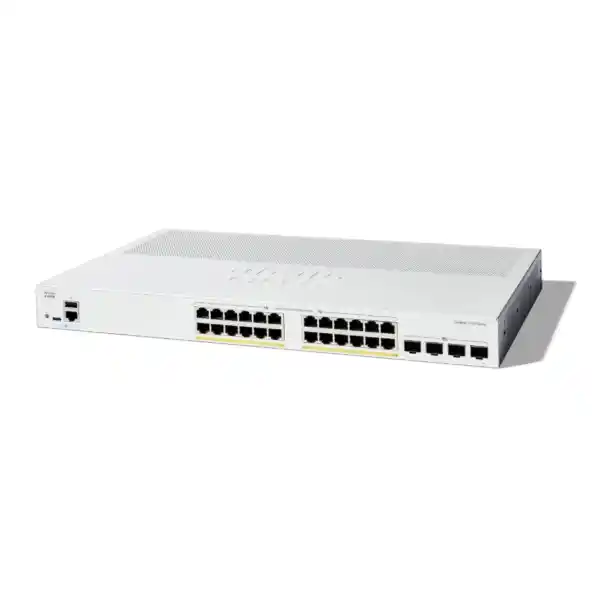
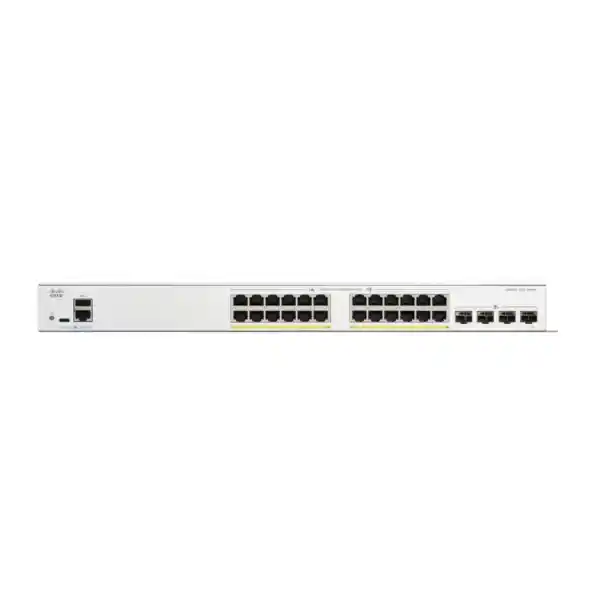
Cisco Catalyst C1300X-24P-4X Network Switch
The Cisco Catalyst C1300X-24P-4X is a managed access switch for businesses that need to connect and power everyday network devices while providing a faster path upstream. It combines 24 Gigabit copper ports with PoE+, a shared 385W power budget and four 10G uplink interfaces. For a Tanzania office or branch planning phones, cameras and compatible wireless access points, the buying decision starts with the endpoint list, power requirements and uplink design.
Is this the right switch for your project?
Request a FourTeck Tanzania quotation with your device quantities, required uplink distance and preferred deployment arrangement. A useful quotation should identify the switch, compatible connection accessories and any separately requested services. This page explains where the model fits and what to confirm before ordering, so the purchasing team and the network administrator can work from the same requirements.
Choose this model when Gigabit access connections suit the attached devices and centralized Ethernet power will simplify the installation. If the project calls for faster copper connections, unusually demanding powered equipment or a different resilience architecture, assess those requirements before choosing the chassis. The right switch is the one that meets the deployment requirements with enough room for expected changes.
Verified hardware at a glance
Cisco specifies 10/100/1000 access connections, up to 30W PoE+ per copper port within the aggregate budget, and four SFP28 interfaces operating as 10G uplinks. Their 25G capability is reserved for stacking. The published switching capacity is 128 Gbps, with a forwarding rate of 95.23 million packets per second. These are platform specifications rather than a guarantee of application throughput.
The rack-mountable chassis measures 444.3 × 270 × 43.94 mm and weighs 3.96 kg. It uses an internal 100–240V, 50–60Hz power supply and active fan cooling. Confirm the complete rack arrangement, power connection and accessory requirements against the quoted package before installation. A chassis dimension alone does not account for cable routing, ventilation clearance or the space needed to work safely.
Plan the access ports around real devices
Create a port schedule before placing the order. List every workstation, printer, phone, camera, wireless access point and infrastructure connection expected in the cabinet. Record whether each connection needs switch-supplied power and whether it belongs to a staff, guest, voice, surveillance or management network. This simple inventory turns a general request for a network switch into a clear technical specification.
Count physical connections rather than employees alone. One person may use several devices, while a shared area can contain equipment that is easy to overlook during a desk count. Meeting rooms, reception areas, payment terminals, security desks and spare office spaces can all change the required connection count. Mark unused wall outlets separately so they are not automatically treated as active devices.
Reserve capacity according to the organization’s likely growth. A spare connection is useful only when there is also sufficient power, upstream bandwidth and cabling to support its future use. Decide which changes are already planned, such as adding cameras or expanding wireless coverage, and include those in the design. Avoid relying on an unspecified promise to expand later when the cabinet is already close to its practical limits.
Record the negotiated speed needed for each device. A faster upstream link does not change the speed supported by an individual access connection. For a wireless project, compare the access point’s Ethernet requirement with the proposed switch port rather than choosing by Wi-Fi generation alone. Where the endpoint requires a faster wired connection to meet the design objective, shortlist a suitable multigigabit alternative.
Build a PoE budget that survives expansion
The most important power calculation is the total demand of the devices connected to the switch. Do not multiply the number of powered ports by the highest per-port rating and assume that amount is available simultaneously. Separate the power requirement of each endpoint from the aggregate capacity of the chassis, then check both conditions before deciding that a device combination will work.
As an illustrative planning exercise, suppose eight phones are allocated 7W each, six cameras 12W each and four access points 20W each at the switch. The arithmetic is 56W plus 72W plus 80W, giving 208W across eighteen connections. These figures are hypothetical planning allowances, not specifications for any particular phone, camera or access point. Replace them with the actual required allocations for the products being purchased.
The exercise leaves six copper connections unassigned, but those connections should not be treated as an unlimited power reserve. A later device can demand more than the equipment installed initially. Review the total after adding every planned endpoint and keep a deliberate allowance for changes. The engineering margin should reflect the device mix and operating conditions rather than an arbitrary marketing percentage.
Cisco’s PoE controls distinguish power allocation from actual consumption. An endpoint may be allocated more power than it happens to use at the moment. Review negotiated allocation, consumption and available power during commissioning instead of relying only on a quiet-period reading. The relevant management pages also provide port priority settings, which should follow an agreed business requirement.
Ask camera suppliers for the power requirement with the intended features enabled. Lighting, accessories or environmental functions can change the requirement compared with a basic operating state. Ask wireless suppliers whether the access point changes its available functions at different power levels. A device lighting up does not, by itself, establish that it is operating in the mode required by the project.
Document which devices matter most during a constrained operating condition. For example, the organization may place particular importance on a reception phone or selected security equipment. Apply that decision consistently to the port schedule and operational procedures. Power priority is a configuration choice; it does not create additional electrical capacity or replace a correctly sized installation.
| Hypothetical devices | Allocated total |
|---|---|
| 8 phones × 7W | 56W |
| 6 cameras × 12W | 72W |
| 4 access points × 20W | 80W |
| Illustrative combined allocation | 208W |
Use the actual switch-side requirements of the selected endpoints for a final design.
Match uplinks, optics and cabling
Before selecting an uplink accessory, identify both ends of the connection. Record the upstream device model, available interface, intended speed, cable route and approximate distance. The connector shape alone does not establish compatibility. The proposed optical modules or direct-attach cable should be checked against the supported options for the exact equipment and intended operating mode.
For a fiber connection, include fiber type, connector arrangement, patch-panel route and the existing termination details in the request. Photographs and an accurate cable record can reduce ambiguity, but technical compatibility still needs to be confirmed. Two modules that fit into their respective cages may use different optical characteristics and fail to form a usable link.
For equipment in the same rack, ask whether a supported direct-attach connection is suitable. For connections between cabinets or buildings, the physical route and environmental design need a separate review. Do not select a connection simply because the advertised distance is greater than the estimated route. Compatibility, optical budget, installation quality and the intended network arrangement all matter.
Draw the upstream links and stacking connections on the same diagram before ordering accessories. A front-panel interface allocated to a stack connection cannot simultaneously be counted as an independent upstream connection. Show the ports consumed by each function so that the final installation matches the design. Include spare connection requirements explicitly if the organization expects to change the topology later.
When several links are intended to work together, document the configuration at both ends. Cisco provides link aggregation and LACP controls, but a group of cables does not automatically form a correctly configured aggregated link. Check the participating ports, VLAN settings and upstream design as part of commissioning. Define the expected behavior when a member link is disconnected.
Separate users, voice, guests and cameras
A useful network design starts with a list of communication needs. Staff may need business applications and printers, guests may need internet access, cameras may need recording services, and administrators may need management access. Write down those relationships before configuring the switch. This prevents the network from evolving into a collection of exceptions that nobody can explain later.
The C1300X VLAN management interface supports tagged and untagged membership with port VLAN identifiers. Keep those settings consistent across the path. For an ordinary endpoint connection, document the intended network clearly. For a connection carrying several VLANs, record which VLANs are permitted and how untagged traffic is handled on the connected equipment.
Creating separate VLANs is only part of the design. The organization also needs to decide where traffic between networks will be routed and where access policy will be enforced. If a guest device should reach the internet but not a finance system, test that exact requirement. A diagram showing differently colored networks does not establish that the intended restrictions are working.
Avoid changing the management network without a recovery plan. Confirm how the administrator will reach the switch after the change, including addressing, routing and access permissions. Arrange local access during initial commissioning when possible. Losing access during a remote change can turn a minor configuration adjustment into an extended interruption.
For projects that include wireless, align the switch configuration with the access point and upstream policy. Define the network assigned to each wireless service and confirm how the access point presents that traffic on its Ethernet connection. FourTeck Tanzania’s wireless planning page can help frame the wider access point selection discussion, while the exact AP-to-switch match still requires a model-level review.
Decide where routing belongs
The 1300X family supports Layer 3 routing, including OSPFv2 and OSPFv3. Treat routing as a design choice tied to the wider network. Determine whether this switch will carry access traffic toward an existing gateway or whether it will also provide a routing function for local networks. The answer affects addressing, policy placement and troubleshooting responsibility.
For a small deployment, a simpler design can be easier to operate than using every available capability. Identify the actual reason for moving a gateway or introducing a dynamic routing protocol. It might be a topology requirement or an established organizational standard. If there is no clear operational benefit, assess the additional complexity before adding it.
Where dynamic routing is required, have the network engineer define the intended neighbors, advertised networks and failure behavior. Confirm the firmware and feature details for the proposed deployment. Review the upstream configuration as part of the same change. Routing depends on agreement between devices; it cannot be validated solely from the switch’s configuration screen.
Keep security policy visible when changing the routing location. A change that creates a shorter local path may also change which controls see the traffic. Ask who owns the policy and how it will be verified after installation. The purchase specification should identify the required traffic behavior, while the implementation plan should show how the selected design delivers it.
Plan stacking as part of the topology
Cisco supports stacks of up to eight compatible switches in this family. Its administration guide distinguishes C1300X stacking from the stacking-capable C1300 family: they cannot be combined into one mixed stack. If an existing network already contains another Catalyst platform, list its exact model rather than assuming that a shared brand or a similar product name establishes stacking compatibility.
Choose between a standalone installation and a stack based on the operating requirement. A stack can make sense where several switches will be managed together, but it introduces shared design decisions about interconnections, member roles and maintenance. A single cabinet with modest connection needs may call for a different arrangement from several cabinets serving a larger floor.
Ask for a drawing showing every stack member and each interconnecting cable. Mark the intended topology and the upstream links that remain available. Make the accessory list match the drawing so procurement can see whether the quotation includes every required connection. An order for several chassis without the connection design leaves an important part of the installation unresolved.
Define what the business expects when a cable, member or power source becomes unavailable. Then identify which of those events the proposed topology addresses. Stacking should not be treated as a general guarantee of uninterrupted operation. Shared power, an upstream dependency or the placement of a critical endpoint can still affect service even when the stack itself is correctly configured.
For an expansion project, record the firmware versions and planned maintenance approach before adding equipment. Agree who will apply changes, verify member status and update the diagram afterward. Cisco’s stack management pages show connection information and distinguish 10G and 25G stack speeds; those observations can be included in commissioning records without confusing them with external uplink speed.
Think about how the network will be supported after the original installer leaves. Label the members and cables so the physical arrangement can be reconciled with the management view. A clear record is especially useful when a remote administrator is guiding a local colleague through a hardware check. The benefit comes from a manageable installation, not simply from connecting several switches together.
Four practical deployment scenarios
Office and branch access
begin with the desk and shared-area connection schedule. Include phones, printers and meeting-room equipment alongside computers. Establish which services must remain reachable during business hours and how changes will be approved. This model is a candidate where the endpoint connection requirements fit its access-port capability and the calculated powered-device demand fits the available budget.
Surveillance aggregation at an equipment cabinet
list each camera model, its operating power requirement and the path to the recording service. Identify which traffic stays local and which traffic crosses an upstream link. Recording performance also depends on the recorder, storage and wider network. The switch should be selected as one part of that system rather than treated as a guarantee of video retention or recording quality.
Wireless access for a business floor
map the proposed access points to physical switch connections, then check their required Ethernet speed and power mode. Coordinate that work with the wireless design so the installed network supports the intended coverage and service. Ask for an alternative switch assessment where an access point’s wired requirement exceeds the capability of the proposed access connection.
A managed network for a growing organization
document the current cabinet and the next planned expansion before deciding whether to start with a standalone unit or a stack. Consider who will maintain the configuration, where backups will be kept and how faults will be reported. The organization’s staffing and operating procedures are as relevant to the buying decision as the number of interfaces.
These scenarios are planning examples rather than fixed installation packages. The same switch can sit in very different networks, and similar-looking projects can have different power, cabling and policy requirements. Share the intended role and the actual device list with the quotation request so the proposal can be checked against a concrete use case.
Prepare the cabinet and power arrangement
Check the cabinet before the hardware arrives. Confirm usable mounting space, the route for power and data cables, the position of patch panels and room for future maintenance. Leave enough access to identify and disconnect individual connections without disturbing unrelated equipment. A tidy cabinet is easier to troubleshoot, but the priority is a safe and serviceable physical installation.
Review ventilation with the cabinet in its normal operating state. A rack that looks open during installation may become restricted after doors are closed and adjacent equipment is running. Include the room conditions, cabinet loading and nearby heat sources in the assessment. Choose the mounting location with the active cooling design in mind and check manufacturer installation guidance for the required clearances.
Account for equipment noise when deciding where the cabinet will be located. A switch installed close to a quiet work area can create a different experience from the same switch inside a dedicated communications room. Ask the site team to consider normal occupancy, acoustic expectations and access control together rather than selecting a location solely because a power socket is nearby.
Size backup power for the full protected installation. The PoE budget describes power available to connected devices; it should not be used as a substitute for a complete UPS load assessment. Include the switch’s own consumption, conversion losses, the upstream equipment and the desired runtime. Have the electrical arrangement checked by the appropriate qualified personnel for the site.
Decide which connected services need continuity during a mains interruption. Powering an access point or phone is useful only if the other equipment needed by that service is also available. Trace the service path through the upstream network and any local servers or communications equipment. Use that dependency list to define a realistic backup-power requirement.
For Tanzania procurement, specify the delivery destination and site details in the request so the commercial proposal can address the actual project. Obtain written confirmation of delivery arrangements, accessories and any agreed installation scope. The product description alone should not be read as confirmation of local stock, a particular delivery time or service coverage at an unspecified location.
Commission the switch with clear acceptance checks
Start by reviewing the delivered model and the agreed bill of materials. Compare the hardware, accessories and connection components with the quotation before the installation window begins. Record any discrepancy while there is still time to resolve it. Confirm who has authority to accept substitutions; a similar description is not enough to establish that an alternative meets the original requirement.
Build a documented baseline configuration before connecting every production device. Set the management arrangement, administrator access and intended port roles. Apply an appropriate firmware selection after reviewing the relevant Cisco release notes and the organization’s maintenance policy. Do not assume that a software version is suitable solely because its number is newer than the version currently installed.
Cisco’s web interface offers Basic and Advanced display modes, with configuration and maintenance functions accessible through its setup pages. Use the appropriate view for the task, and retain a record of the settings that matter to ongoing support. A successful first login is an initial step rather than a complete commissioning test.
Connect representative endpoints first and check the behavior that users actually need. Confirm that a workstation reaches the right application, a phone registers with its communications service, a camera reaches its recorder and an access point presents the intended networks. Use the real device models and the agreed operating modes rather than relying only on a generic connectivity test.
Test the intended restrictions as well as permitted traffic. A guest connection should be assessed against the specific guest-access policy, and an administrator should verify the approved management path. Record the expected result before testing. That makes it easier to distinguish a genuine fault from a misunderstanding about how the network was supposed to work.
Inspect uplink status, connection errors and powered-device allocations under a representative load. Where the design includes multiple links or a stack, carry out the agreed controlled failure checks during the maintenance window. Define an acceptable result in terms of the organization’s requirement and the documented design; do not introduce a service-continuity promise that was never part of the project.
Finish by saving the intended configuration, arranging a backup and updating the connection schedule. Record the installed firmware, management addressing and the location of recovery information. Give the operational owner a clear handover so that the network can be supported without depending entirely on the memory of the person who performed the installation.
Keep ongoing support manageable
Name an operational owner for the switch before the project closes. That owner should know how changes are requested, where configuration records are stored and who responds to a reported fault. Shared responsibility without clear ownership can lead to undocumented changes or missed maintenance. The equipment is easier to support when the organization has an agreed process for looking after it.
Retain a baseline of normal behavior after commissioning. Record active connections, typical utilization, expected power allocations and the services associated with important ports. When a fault occurs later, these records provide a point of comparison. A change from the known baseline is often more useful than an isolated reading taken after a problem has already been reported.
Make endpoint changes part of the power and port review. Adding a camera, replacing an access point or moving a phone can affect assumptions made during the original design. Update the schedule at the same time as the physical change. Otherwise, a network that was correctly sized at installation can gradually drift beyond its intended operating conditions.
Plan software maintenance around the business rather than treating it as an improvised response to every issue. Review the applicable release information, capture the current state and define a recovery approach before making a change. Confirm whether the reported issue is relevant to the installed model, software and configuration. A careful maintenance process reduces uncertainty during troubleshooting.
Ask for support terms to be stated explicitly in the commercial offer. Identify what is included, who provides assistance and which matters require a separate service agreement. Keep purchase and equipment records available for future support discussions. Avoid assuming a particular replacement arrangement, response time or onsite entitlement from a generic product-family description.
Compare alternatives by the requirement that changes
If the endpoint list requires more physical connections, compare a larger port-count model or a design using several switches. Consider how those options affect cabinet space, power, upstream connectivity and support. Buying another chassis later may be straightforward, but the original uplink and power design still needs to accommodate it. Make the expansion path explicit before choosing the initial quantity.
If the main difference is powered-device demand, compare both aggregate budget and the required power at each connection. A switch with a larger total budget may still be unsuitable for a particular endpoint if its per-port capability is insufficient. Conversely, high-capability ports do not remove the need to calculate the combined load across the installation.
If faster wireless access is the requirement, compare the access point’s wired needs with a multigigabit switch option. State the required port speeds and power modes directly in the request. Avoid using a broad phrase such as future ready as the specification; it leaves too much room for different interpretations of what the network is expected to support.
If this purchase replaces a legacy Catalyst installation, describe the current role, management practices and dependencies. Do not treat the C1300X as an automatic equivalent for every older Cisco switch. Review the routing role, configuration approach, stacking architecture and operational expectations as part of the selection. FourTeck Tanzania’s separate legacy replacement guide addresses that wider migration discussion.
Compare quotations using a consistent bill of materials. Separate the hardware from connection accessories, services and any agreed support options. An apparent difference in chassis price can reflect different assumptions about what the project includes. Procurement can make a clearer decision when every supplier has been asked to meet the same written requirement.
Buyer questions
Can every powered port run at its maximum rating simultaneously?
The combined demand must remain within the shared chassis budget. Confirm each endpoint’s required allocation and the total planned load. The availability of power on every copper connection does not establish that every connected device can draw the highest port rating at the same time.
Can the SFP28 interfaces provide ordinary 25G uplinks?
Cisco reserves that operating speed for stacking on this model. Specify the external connection requirement separately and choose compatible components for the supported uplink mode. Treating the cage type as proof of every possible operating speed can lead to an incorrect accessory order.
Is this the right choice for all modern access points?
It depends on the exact access point, its required power mode and its Ethernet connection requirement. Provide the AP model and intended operating configuration for review. Where the desired design requires faster copper access or a different power capability, assess another switch rather than assuming universal suitability.
Are optics and stacking cables included?
Have the quotation state the exact contents. Connection components depend on the distance, upstream equipment and topology, so they should be identified in the bill of materials. Do not assume that a chassis order includes every accessory needed to connect it to the existing network.
Will replacing an unmanaged switch automatically separate guest and staff traffic?
The desired separation requires a configured design across the relevant devices. Document the networks, gateways and access rules, then verify them with representative clients. New hardware creates an opportunity to implement the policy; installation alone does not establish that policy.
What should a Tanzania buyer provide for a useful quote?
Share the switch quantity, deployment role, endpoint models and quantities, power requirements, existing upstream equipment, cable distances and any stacking plan. Include the delivery destination and requested services. Current pricing, availability, delivery and commercial terms should be confirmed against that specific request.
Can an existing configuration be copied unchanged?
Have the administrator review it against the target platform and software. Preserve the original as a reference, identify the settings that implement the business requirement and validate the proposed configuration before cutover. Keep a recovery plan and an agreed maintenance window for a production replacement.
Request a project-specific quotation
Send FourTeck Tanzania your endpoint schedule and a simple network diagram for a C1300X-24P-4X quotation. Include the number of switches, planned powered devices, required connection speeds, uplink routes and any stacking requirement. Identify which equipment is already installed so the proposed connection components can be assessed against both ends of each link.
Ask the proposal to itemize the selected hardware, compatible optics or cables, requested services and applicable commercial terms. Confirm stock, pricing, delivery, package contents and support arrangements before ordering. With those details agreed, the purchase can be assessed against a defined network requirement and handed to the installation team with a clear scope.




Reviews
There are no reviews yet.