
CISCO CATALYST 1300X • BUSINESS ACCESS SWITCHING
Managed Gigabit access with room for faster uplinks
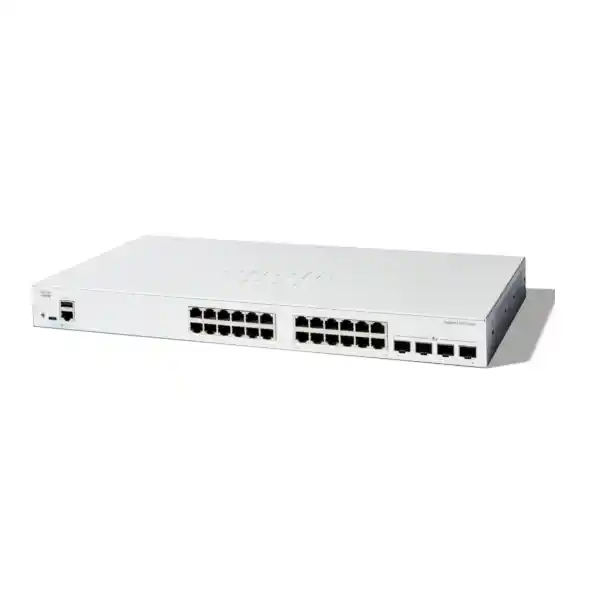
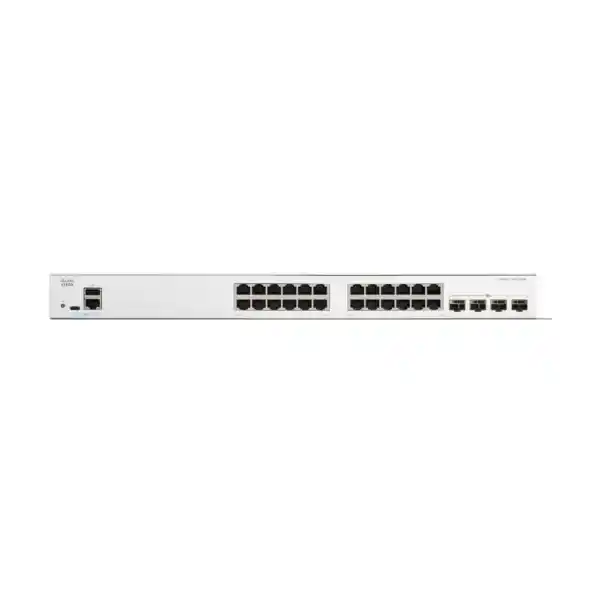
The Cisco Catalyst C1300X-24T-4X Network Switch suits Tanzania businesses that need managed wired connectivity for computers, printers and independently powered network devices. It combines 24 Gigabit Ethernet access ports with four 10G uplink interfaces, plus Layer 3 capabilities for a planned business network. Request a FourTeck Tanzania quotation with your endpoint count, uplink requirements and preferred deployment arrangement.
Decide on these three points first
Endpoint power
Choose this data-only switch when connected equipment has its own power source. Phones, cameras and access points that depend on Ethernet power need a suitable PoE switch or separately specified compatible injectors. Identify that requirement before comparing switch prices, because endpoint power changes the equipment list and the backup-power plan.
Uplink speed and media
Match the upstream connection to the aggregation switch, server or firewall. The SFP28 cages support 10G uplinks; 25G operation is reserved for stacking. Ask for compatible media to be listed separately in the quotation so that connectors, fiber type and the far-end interface are checked together.
Management and growth
Plan who will configure the network, which systems require separation, and how additional ports will be added. A managed switch is most useful when its policies and documentation are maintained. Base the design on the next planned equipment additions as well as the devices being connected today.
Technical specification snapshot
| Item | Specification |
|---|---|
| Manufacturer / family | Cisco / Catalyst 1300X |
| Exact model | C1300X-24T-4X |
| Copper access interfaces | 24 × 10/100/1000 Ethernet RJ-45 ports |
| Uplink interfaces | 4 × SFP28 cages: 10G uplinks; 25G for stacking only |
| Power over Ethernet | Data-only model; does not supply PoE |
| Published switching capacity | 128 Gbps |
| Published forwarding rate | 95.23 million packets per second, based on 64-byte packets |
| Physical dimensions | 444.3 × 270 × 43.94 mm, width × depth × height |
| Unit weight | 3.28 kg |
| Cooling / mounting | One fan / rack-mountable |
| AC input | Internal universal supply, 100–240V AC, 50–60 Hz |
Published switching capacity describes the switch fabric, rather than the speed of one computer or internet connection. Application performance also depends on endpoint interfaces, uplink loading, cabling and the destination system. Confirm the complete configuration when comparing proposals.
Where this switch fits in a business network
This model is a candidate for an office access layer, a branch equipment cabinet or a department that needs centrally managed wired ports. Suitable endpoint examples include desktop computers, docking stations, printers and small servers with appropriate Ethernet interfaces. These are deployment examples, rather than a promise that every device or application will achieve a particular throughput. Check the interfaces and traffic patterns of the actual equipment before finalizing a design.
Start with a port schedule. List each outlet, its connected device, its intended network and whether it must remain available during a power interruption. Include shared equipment and administrative connections that are easy to overlook during an initial count. A floor with twenty desks may still need more than twenty switch ports once printers and other wired devices are included. Count physical connections rather than employees, and reserve a deliberate allowance for planned changes.
Also identify where traffic travels. Staff using mainly hosted applications place different demands on the network from teams regularly transferring large files to local storage. A faster upstream connection is useful only when the destination and intervening equipment can support the intended traffic. Mapping those paths before purchase helps avoid spending on the wrong part of the network.
Gigabit access and 10G uplinks: understand the difference
The copper ports provide the endpoint access layer, while the uplink interfaces connect the switch to other network equipment. A fast uplink can carry traffic from several active devices, but it does not change a connected computer’s own negotiated access speed. For example, upgrading an upstream connection does not turn a Gigabit desktop adapter into a multigigabit adapter. Evaluate both sides of the connection when responding to slow transfers.
Use measured demand where possible. Review normal traffic, busy periods and occasional activities such as backups or large software deployments. A quiet average can hide short periods of congestion. For a new site without monitoring history, document realistic assumptions about concurrent use, local services and anticipated growth. Those assumptions can then be checked after installation rather than becoming an unexplained purchasing decision.
Keep internet bandwidth separate from local network capacity in the proposal. The switch cannot increase the subscribed speed of a service-provider circuit, and a faster circuit cannot fix damaged internal cabling. When users report poor performance, distinguish local file access, internet access and application response time. That separation makes the uplink decision easier to justify and later troubleshooting more focused.
Select fiber, optics and cables as one connection
For an optical connection, specify both ends of the link together. Record the available fiber type, connector arrangement, route length and the receiving equipment’s interface. Check that the intended transceivers are supported for the exact devices and software involved. Mechanical fit alone does not establish compatibility, and two optical modules with similar descriptions may use different wavelengths or reach specifications.
Where a direct-attach cable is proposed for nearby equipment, verify support at both ends and choose a length that allows orderly routing. Avoid relying on a description such as “10G cable” without an exact part number and intended application. The quotation should distinguish switch hardware, optical modules, direct-attach cables, patch leads and any additional patching work. This makes the usable connection visible in the total cost.
Inspect the existing path before reusing it. Fiber documentation, labeling and connector condition can matter as much as the nominal cable type. For copper endpoints, assess the installed cabling and termination quality against the required Ethernet service. Ask the installer to record link results and identify any marginal runs. A documented media plan is more useful than assuming every existing outlet will perform correctly after a switch replacement.
Plan VLANs around business access requirements
VLAN support lets a managed network organize groups of devices into separate logical networks. The useful starting point is an access requirement: which users need a business application, which devices need only a specific server, and which systems should be administered separately? Define those relationships before choosing network names and address ranges. A simple design that matches actual responsibilities is easier to maintain than numerous unexplained segments.
For example, office computers and building devices may have different access needs. Write down permitted communication, essential services and the person responsible for each group. Consider address assignment, DNS, time synchronization and monitoring as part of the design, rather than concentrating only on end-user applications. Systems that appear isolated may still require a controlled path to these supporting services.
When traffic must move between networks, decide where routing and security policy will be applied. VLAN separation on its own does not define every permitted communication path. Have the network administrator review both allowed access and expected denials, including access to the switch management interface. This creates testable acceptance criteria and avoids a design that is tidy on a diagram but unclear in operation.
Layer 3 routing and the reason to consider OSPF
The Catalyst 1300X platform supports Layer 3 functions, including OSPFv2 and OSPFv3. OSPF is useful where a network design requires participating routing devices to exchange reachability information. Whether it belongs in a particular deployment depends on the topology, operational skills and existing routing environment. A small installation may have a straightforward static-routing design; a more interconnected environment may justify dynamic routing.
Before enabling OSPF, establish the addressing plan, intended neighbors and route boundaries. For IPv4 operation, IP routing must be enabled, and the participating devices need compatible settings. Treat router IDs, areas and advertised networks as planned configuration items. Avoid enabling a routing protocol simply because it is available, since every additional control mechanism introduces an operational responsibility.
For an existing routed network, ask the network owner to approve the proposed integration and its failure behavior. Confirm which paths should be preferred and which should remain available if a link is lost. Test the actual application path after changes, rather than checking only that a neighbor relationship appears. Routing support does not establish the suitability of the switch for every core-network requirement or replace a separate security-policy review.
Use access controls with a clear policy
The platform provides access-control lists, with documented controls for MAC, IPv4 and IPv6 traffic. Their value comes from a precise policy: identify the traffic that must pass, the traffic that should be denied, and the interfaces where the policy belongs. Keep rule descriptions understandable to the person who will maintain the network after the original installation.
Build an application access matrix before applying restrictions. For each device group, record required servers and services, the direction of communication, and any administration exceptions. Test with representative endpoints, including a device that should be denied access. A successful connection from one administrator’s computer does not establish that a policy is correct for all users.
Switch filtering should be coordinated with the organization’s firewall and identity controls. Decide which device owns each policy so that changes do not create overlapping or conflicting rules. Include a controlled recovery path for administrators and record approved exceptions with a reason and review date. This makes it easier to investigate access problems without weakening the intended separation.
Quality of Service for mixed business traffic
Quality of Service, or QoS, lets the switch prioritize selected traffic according to a configured policy. This can be relevant when delay-sensitive applications share a busy connection with bulk transfers. Begin with the applications that matter to the business and establish how their traffic will be identified. Do not assume that every connected endpoint should be allowed to assign itself the highest priority.
Coordinate traffic markings and queue behavior across the intended path. A policy applied to one access switch cannot guarantee application performance through equipment outside that policy. If meetings become unreliable during backups, investigate the actual congestion point and consider scheduling as well as network controls. Increasing capacity, adjusting workloads and applying a suitable QoS policy solve different aspects of the problem.
Test a proposed policy under representative contention. Check both the priority application and ordinary work so that improving one service does not make other essential tasks unusable. Keep a record of the business reason for the policy and review it when applications or uplink arrangements change.
Keep management practical and controlled
Cisco documents both a browser-based interface and a command-line interface for this switch family. Choose a management approach that the support team can operate consistently. A graphical interface can help review settings, while a command-line workflow may suit repeatable administration. The best choice is the one supported by an accurate configuration record, appropriate access control and a clear change process.
Assign a meaningful hostname and maintain a record of the management address and responsible owner. Limit administrative access to the intended support systems. Define how administrator accounts are created, reviewed and removed, particularly when external contractors are involved. Credentials should be transferred through the organization’s approved secure process rather than included in a general handover document.
Prepare for loss of remote access before the switch enters service. Confirm the available local administration method, necessary cables and the staff member who can reach the equipment. Keep configuration backups in a controlled location and record the software release associated with each backup. These basic preparations can shorten a recovery exercise because the support team does not first have to reconstruct how the network was built.
Stacking for growth: reserve ports and plan the change
The C1300X family supports front-panel stacking of up to eight switches. Cisco specifies that C1300X devices stack with other C1300X devices, rather than with stacking-capable C1300 models. The similar family names therefore need careful attention in a mixed-equipment proposal. Confirm every intended member’s exact model and software compatibility before approving stack accessories or a migration plan.
Stacking uses designated interfaces and media, so the connection plan must distinguish external uplinks from stack links. Do not count an interface twice when preparing the bill of materials. Record the topology, member identification, chosen stack speed and cable routing. The supported 25G stack operation should be described as a stack connection, without implying a general-purpose 25G server or aggregation uplink.
Plan member additions and stack-setting changes as maintenance activities. Cisco’s documented stack workflow includes settings that take effect with a reboot. Agree on a change window and a recovery procedure before altering production equipment. Where continuity is a design objective, test the intended failure scenarios and remaining application connectivity. A stack is one part of a resilience plan, alongside power, upstream paths and recovery arrangements.
Common deployment scenarios
A new office cabinet
Prepare a schedule covering desks, shared printers, independently powered devices and the upstream connection. Assign outlets to their intended networks before patching begins. Label both ends of each run and agree on a small set of application tests. This makes the first installation easier to accept and gives the support team a useful starting record.
A department with local storage
Check where large transfers originate and which server or storage interface receives them. Review simultaneous use and backup windows before choosing uplink media. Confirm that storage performance and server networking can support the requirement, because adding switch capacity alone may leave a different bottleneck unchanged.
A growing branch network
Start with a documented access design and an agreed expansion path. Decide whether later growth is best served by additional standalone switches, a compatible stack or a different port-density choice. Include the operational effect of each option, such as administration, spare parts, cabling and the maintenance work required to add capacity.
When a different switch may be a better choice
Choose a PoE model when the project requires the access switch to power compatible endpoints. Work from the individual devices’ power requirements and the total planned load. Separately powered devices can make a data-only switch appropriate, but that choice should be explicit. Include the cost, location and backup arrangements of any injectors or power adapters in the comparison.
Consider a multigigabit access model when endpoints genuinely require more than Gigabit speeds at the copper port. A faster uplink cannot remove that access-port limit. Similarly, a design requiring general-purpose 25G connectivity should use equipment that explicitly supports that service. The presence of an SFP28 cage on this switch is not sufficient evidence for such a requirement.
For organizations with strict platform standards, compare management integration, routing scale, security policy, support requirements and operational tooling against the exact specification. A procurement standard may call for another Catalyst family even when the port count looks similar. Treat this product as a candidate to assess against the requirement, rather than an automatic equivalent to every other managed Cisco switch.
Rack placement, cooling and power continuity
Check the proposed cabinet before ordering. Allow room for cable bends, patching, access to power and the airflow clearances required by the installation instructions. The switch has a fan, so placement should account for cooling and acoustic expectations. A cabinet beside staff workstations deserves a different placement review from a dedicated equipment room, even when both have sufficient rack space.
Assess conditions at the equipment location rather than relying only on the general room temperature. Nearby power equipment, closed doors, dust and obstructed ventilation can affect the operating environment. Keep the device accessible for inspection and avoid using the top of installed equipment as storage. Have an appropriately qualified installer address mounting, grounding and electrical work for the actual site.
If continuity matters, size backup power for the full network path. Include the firewall or router, upstream equipment and any externally powered endpoints that must remain usable. Agree on the required runtime and an orderly recovery process. Maintaining power to one access switch will not preserve a business application if the application server, internet device or another essential part of the path loses power.
A controlled replacement for an existing switch
Before removing existing equipment, capture its configuration and physical connections. Record port assignments, tagged networks, uplinks, management settings and any unusual endpoint dependencies. Photograph or document the patching layout according to the organization’s policy. This is especially helpful where the cabinet has grown over time and labels no longer reliably describe the connected devices.
Translate the existing design into a requirement for the new platform. Do not assume that a configuration file from another Cisco family can be applied unchanged. Compare supported features, interface naming and software behavior, then build and review the intended configuration before the change window. Keep the old equipment and a usable record available until the replacement has passed agreed checks.
For a legacy Catalyst project, the Catalyst 2960-X replacement planning guide for Tanzania provides broader migration context. Compare platform requirements separately from this product’s fit. A shared port count alone does not establish a replacement recommendation, and existing stacking accessories or management workflows should be checked rather than assumed transferable.
Commissioning checks that make the purchase usable
Agree on acceptance criteria before installation starts. Verify that the intended endpoints connect, receive the correct addressing and reach their approved services. Test representative devices from each planned network, including a restricted device that should not reach protected systems. Record results against the port schedule so that the completed installation can be checked by someone other than the installer.
Check uplink behavior under a representative workload and inspect interface statistics for unexpected errors or drops. Use a test that reflects the business requirement, such as access to a relevant application or a controlled local transfer. A single successful ping is useful for basic reachability but does not demonstrate that the intended workload or security policy behaves correctly.
Where redundancy has been specified, perform controlled tests within an approved maintenance window. Check the expected response to a lost link, a member change or a relevant restart, as appropriate to the agreed design. Save the accepted configuration and hand over a concise record of what was tested. This gives future support staff evidence of the working baseline.
Software maintenance and ongoing ownership
Use Cisco documentation for the exact C1300X model when reviewing software. Similar product-family names do not make software packages interchangeable. Read release notes for the intended version, including supported hardware, prerequisites and known limitations. Select a maintenance approach that reflects the organization’s applications and change process rather than assuming a newer version should be installed without review.
Before an upgrade, retain a controlled configuration backup and define how the network will be recovered if the result is unacceptable. Inform affected users of the agreed maintenance window and verify the important application paths afterward. Record the installed version, the reason for the change and any differences observed. This turns software maintenance into a traceable operational activity.
Assign a clear owner for monitoring and configuration records. That owner should know where backups are held, who can approve changes and how incidents are escalated. Review the port schedule when devices move or departments change. Good records help preserve the value of managed switching because the network remains understandable after the initial project team has moved on.
A useful starting point for incident investigation
When a connection fails, first establish its scope. Determine whether one device, one network group or the whole cabinet is affected. Check physical connections and endpoint power before making broad configuration changes. Record the time of the problem and any recent equipment moves or maintenance, since a clear timeline can narrow the investigation considerably.
Compare the affected connection with a known working one while preserving the intended access policy. For intermittent faults, collect relevant interface observations and application symptoms during the incident rather than relying only on a later test. Change one variable at a time where practical, and record the outcome. That approach helps distinguish a cabling issue from an addressing, policy or upstream problem.
Keep an escalation record with the exact model, software release, affected ports and tests already completed. Include only information appropriate for the approved support channel. A concise evidence record helps the next administrator continue the investigation without repeating every preliminary check.
Build a complete quotation for Tanzania procurement
Request a quotation that separates the switch from the items needed to make it operational. Include the quantity, intended uplink media, patching requirements and any stacking arrangement. Ask the quotation to identify exact component part numbers and quantities. This makes proposals easier to compare and helps purchasing staff avoid approving a base unit while overlooking essential connection hardware.
Have commercial terms stated for the actual offer. Confirm the quoted currency, applicable charges, availability, delivery arrangement and the support or warranty terms supplied with the proposed equipment. Request confirmation rather than treating a general product description as a commitment. If a particular power cord, accessory or service is important to acceptance, have it named in the quotation.
For a multi-location organization, provide the intended equipment quantities and delivery requirements for each site. Keep the technical design consistent where that is useful, while allowing for different local cabling and cabinet conditions. Installation, configuration, training or ongoing support should be separately scoped and confirmed if required. A product enquiry does not establish a service commitment for a particular location.
Information to include with your enquiry
Send the exact model name, the number of units and a brief description of the business requirement. Include the current and expected number of wired connections, whether endpoints need Ethernet power, and the type of upstream device. If fiber already exists, provide its documented type and route information. If that information is unknown, identify it as a survey item rather than guessing.
For replacement work, include the existing switch models and a summary of the features that must be retained. Describe any required routing, segmentation, monitoring or resilience behavior. State the proposed maintenance window and whether the old switch must remain available for rollback. These details help distinguish a straightforward hardware quotation from a deployment that needs additional design work.
Share diagrams and configuration information through an approved channel and remove credentials or other unnecessary sensitive details. A high-level topology and endpoint schedule are often sufficient to start a requirements discussion. The aim is to make the requested outcome clear enough for the final equipment list and service scope to be reviewed before an order is placed.
Frequently asked buyer questions
Does this model provide Power over Ethernet?
No. This is a data-only switch. Equipment that needs Ethernet power requires a suitable PoE source, such as an appropriately selected switch or compatible injector. Include all endpoint power requirements in the enquiry so that the proposed solution can be checked as a whole.
Can the SFP28 interfaces be used for 25G uplinks?
Cisco specifies 10G uplink operation, with 25G available for stacking only. Specify general-purpose 25G requirements separately when discussing alternatives. Confirm the exact media and the intended function of every interface before ordering, particularly where a proposal combines uplinks and stack connections.
Can it stack with a Catalyst C1300 switch?
Cisco’s C1300X administration guidance permits stacking within the C1300X family and excludes stacking with stacking-capable C1300 devices. Check complete model identifiers and software compatibility when expanding an existing installation. An Ethernet connection between different switches is a separate design from forming one supported hardware stack.
Will it increase our internet connection speed?
It does not change the bandwidth purchased from an internet provider. It may form part of a better local network design, but performance should be assessed across the full path. Check the service circuit, gateway, endpoint and application as well as the access switch when investigating slow internet use.
Are transceivers and stacking cables included?
Confirm the contents of the specific quotation. Do not assume that every accessory required by your design is included with the base switch. Ask for separate component descriptions and quantities, then check the two ends of each optical or direct-attach connection for compatibility.
Is this a direct replacement for an older Catalyst switch?
That depends on the exact existing platform and the functions being used. Compare power delivery, uplinks, stacking, routing, administration and support requirements. Prepare and test a configuration for the intended platform instead of assuming an old configuration or accessory set will transfer without changes.
What is the current price and availability in Tanzania?
Request a current FourTeck Tanzania quotation for the required quantity and equipment list. The final offer should confirm pricing, applicable charges, availability and delivery arrangements. Include accessories and any requested services so that purchasing decisions reflect the complete deployment rather than the switch alone.
What should we check before choosing between standalone and stacked operation?
Compare expected growth, the number of cabinets, uplink needs and the support team’s operating approach. Account for stack interfaces and compatible cables in the design. Agree on maintenance and recovery procedures for the chosen arrangement, then test the behavior that matters to your applications before accepting the installation.
Request a C1300X-24T-4X quotation
Send FourTeck Tanzania your quantity, endpoint power requirements, uplink connection details and planned growth. Request an itemized proposal covering the switch, required media and any separately scoped deployment work. Confirm the technical configuration and commercial terms together before ordering, so the equipment list matches the network you intend to operate.




Reviews
There are no reviews yet.