
CISCO CATALYST 1300X • TANZANIA PRODUCT GUIDE
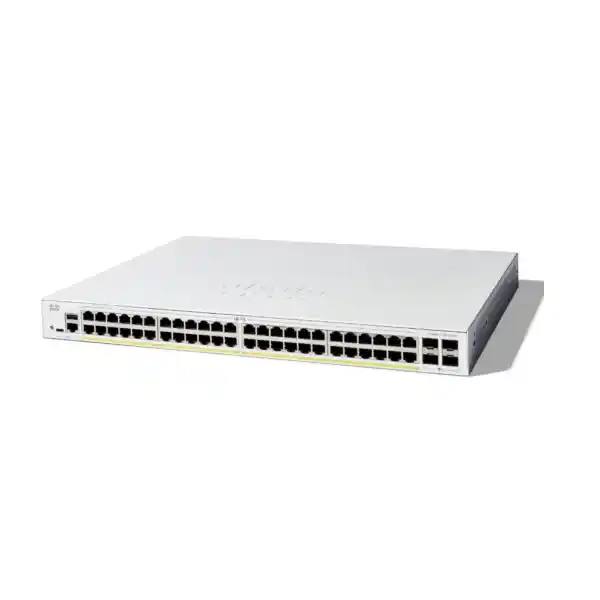
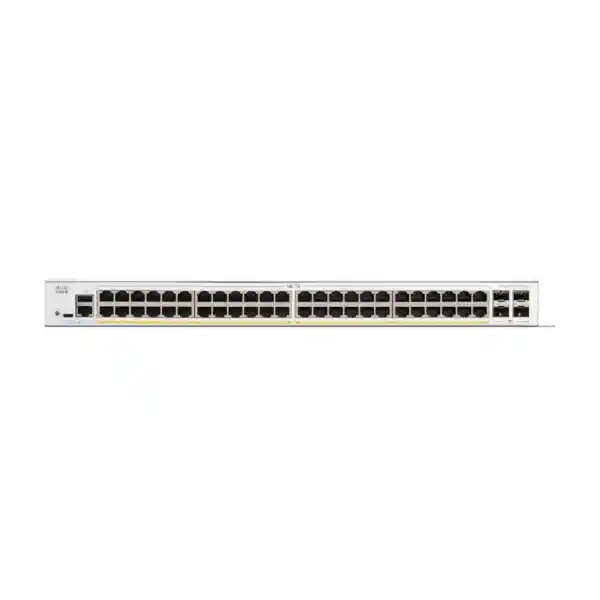
Cisco Catalyst C1300X-48P-4X Network Switch
Choose an access switch around the devices you need to connect
The Cisco Catalyst C1300X-48P-4X Network Switch suits a business access network that needs many wired connections, centralised endpoint power and a deliberate path back to the wider LAN. For a Tanzania purchase, begin with the equipment schedule: what connects today, what will be added next, and which services must remain available during maintenance. Request a quotation from FourTeck Tanzania with that schedule so the proposed equipment can be assessed against the actual installation.
The most useful buying question is whether the switch matches the combined requirements of your endpoints. A cabinet serving staff computers, phones, cameras and access points has several demands at once. Some devices consume only data bandwidth; others also draw power. Some need access to shared applications, while others should have tightly controlled communication. Treat these as separate design decisions rather than assuming that enough physical sockets automatically means the network is correctly sized.
This product page focuses on the exact 48-port PoE model in the Catalyst 1300X family. Keep the full model reference on the equipment list, quotation and purchase order. Similar-looking names can describe different power budgets, uplink capabilities or access-port speeds. A short description such as “Cisco 48-port switch” is insufficient when comparing offers or approving a substitution.
Verified hardware at a glance
Use the specification table as a starting point for selection. The PoE allowance is shared across powered devices, and interface capabilities must be considered in their intended operating mode. Accessories, endpoint compatibility and final configuration still require a separate check against the proposed design.
| Item | C1300X-48P-4X |
|---|---|
| Access interfaces | 48 × 10/100/1000 Ethernet PoE+ ports |
| Per-port power capability | Up to 30W PoE+; assess each endpoint’s requirements |
| Shared PoE budget | 740W across powered endpoints |
| Uplink interfaces | 4 × SFP28 slots for 10G network uplinks |
| Stacking distinction | 25G operation available for stacking only |
| Form factor | Rack-mountable chassis |
| Dimensions (W × D × H) | 444.3 × 340 × 43.94mm |
| Unit weight | 5.06kg |
| AC input | Internal universal supply, 100–240V, 50–60Hz |
| Cooling | Fan-cooled |
Match the port plan to the building
Count connections by room and function before choosing how many switches to buy. Include desktops, printers, meeting-room equipment, phones, access points, cameras, building systems and any local servers. Record which outlets are occupied, which are reserved and which need repair. A port schedule based only on current staff numbers can overlook devices that do not belong to an individual employee.
Keep a modest, intentional allowance for change. An unused port can be valuable for a new workstation, a temporary relocation or fault isolation, but unused capacity should have a reason. If expansion is expected in another building, filling one cabinet with spare ports may not solve that requirement. Cable routes, cabinet positions and the distance to endpoints can matter more than the total socket count purchased.
Consider how patching will be maintained. Label the switch port, patch-panel position and outlet consistently, and assign an owner to the record. Decide whether phones share an outlet with computers or use separate runs. Document any endpoint that must remain powered when users leave. These simple records help the support team distinguish a disconnected cable from a configuration change without disturbing unrelated users.
Build a practical PoE power schedule
Create a power worksheet for every device that will draw power through Ethernet. Record the exact endpoint model, required power standard, maximum requested allocation and any operating modes that change consumption. An access point with optional radios, a camera using illumination or a phone with accessories can have different needs from an apparently similar device. Use manufacturer requirements for those endpoints rather than estimating from their physical size.
For an illustrative planning calculation, suppose twenty devices are budgeted at 15W each and ten more at 25W each. The combined planning allowance is 550W. Against this model’s published 740W budget, that leaves 190W before any additional design reserve. This is arithmetic for a hypothetical equipment schedule, not a compatibility statement or a promise about actual consumption. Installation losses, allocation behaviour and endpoint requirements still need review.
Do not divide the power budget by the number of ports and assume every endpoint will be suitable. The switch’s per-port capability and its aggregate allowance impose different constraints. A device with an individual requirement above the port’s supported level will not become suitable because other ports are unused. Equally, many individually suitable devices can collectively exceed the available budget.
Plan the operating priority of powered equipment. Identify which endpoints are business critical, which can be interrupted during a planned change and which should have independent continuity arrangements. Test startup with the intended population instead of checking only one sample device. A network that behaves correctly during normal use should also be assessed after the cabinet has lost power and all connected equipment requests service again.
Plan the uplink as an end-to-end connection
Treat an uplink as a complete connection between two specified devices. Record the switch at each end, the selected port, the supported transceiver or cable, the route and the required speed. A higher-speed slot does not establish a working link by itself. Both ends need compatible media and settings, and the installed cabling must be appropriate for the chosen connection.
Separate ordinary network uplinks from stack interconnections in the equipment schedule. This model’s 25G capability is for stacking only; it should not be specified as a general 25G connection to a server, firewall or core switch. Reserve the necessary interfaces for the intended role before assuming all uplink slots remain available for other connections.
Estimate upstream demand from simultaneous activity rather than adding every access-port rating as if all devices transmit continuously. Backups, camera recording, file transfers and software distribution can overlap. Identify where those flows terminate: some may stay within a cabinet, while others traverse the building backbone. The right uplink plan depends on those paths and on the capacity of the equipment receiving the traffic.
If multiple connections are proposed for resilience or capacity, ask the designer to document the topology and failure behaviour. Two cables do not automatically provide a safe or useful design. Establish which link carries traffic, what happens when one path fails and how recovery will be verified. Include the required media and spare strategy in the quotation rather than treating them as incidental accessories.
Use VLANs to organise the access layer
The platform supports VLAN configuration and voice VLAN functions. VLANs allow devices to be grouped into separate broadcast domains, with routing needed for communication between those domains. For a business installation, this can provide a useful structure for staff systems, guest access, telephony, cameras and network administration.
Choose those groups according to access requirements and operational ownership. For example, list which applications staff need, which recording system receives camera traffic and whether guest devices should reach any internal resources. Then turn that list into an agreed communication policy. A VLAN name on a diagram is only a label until port membership, uplink carriage and routing behaviour implement the intended design.
Keep the patching record and VLAN record together. When a desk moves, the support team should know whether its new outlet needs a different port role. When a new wireless network is introduced, verify the complete path between the access point and the device providing its gateway. A consistent naming scheme reduces ambiguity when the same service crosses more than one cabinet.
Avoid making the first deployment unnecessarily complicated. Use as many network groups as the policy and support model require, and give each a clear purpose. A design that nobody can maintain can become difficult to troubleshoot even when the hardware is working correctly. Keep a simple approved diagram and a concise list of permitted communication paths available to the people responsible for changes.
Define access policy before enabling inter-network traffic
Cisco documents MAC, IPv4 and IPv6 access control lists for this platform, with binding options that apply the rules to relevant traffic. These controls can help implement a defined access policy. They require explicit configuration and testing; the presence of security features does not mean a newly installed switch automatically enforces the organisation’s intended restrictions.
Write the policy in business terms first. A camera might need its recorder and a time service; a staff workstation might need application servers and printers; a guest device might need only internet access. Include administration and monitoring requirements so legitimate maintenance is not accidentally blocked. Turn the approved requirements into technical rules with someone accountable for future revisions.
Validate both permitted and prohibited paths. A successful login to an application shows only that one useful flow works. Test that a device cannot reach destinations it should not use, and check that essential supporting services remain accessible. Record the outcome and retain a safe way to restore the previous configuration if a change blocks management access or disrupts a required service.
Decide where deeper inspection belongs in the wider network. Switching access rules are one part of a security design, alongside endpoint controls, identity, firewall policy and management practices. Select the enforcement point for each requirement deliberately. This avoids expecting a switch purchase to resolve unrelated application, endpoint or internet-security problems.
Decide where routing should happen
The Catalyst 1300X platform includes Layer 3 functions, with Cisco documentation covering IPv4 routing and OSPF. OSPFv2 requires IP routing to be enabled. That capability is useful only when it fits the network architecture and the team can configure and maintain the required routing relationships.
For a small installation, keeping gateways on an existing upstream device may be a sensible operational choice. For a larger design, placing some routing at the switching layer may be worth assessing. Decide by considering traffic paths, policy enforcement, available support skills and failure handling. The presence of a routing feature is an option to evaluate, not an instruction to redesign every existing network.
If dynamic routing is proposed, request a diagram showing neighbours, advertised networks and the expected path during a failure. Identify who owns address allocation and who approves route changes. Validate the design with the exact firmware and adjacent devices before the cutover. Keep the implementation focused on the intended site role rather than enabling additional protocols simply because they are available.
Assess stacking as an operational choice
Cisco’s administration guide permits C1300X switches to stack with other C1300X units and explicitly excludes stacking with C1300 models. Confirm the full model identity of every proposed member. Similar branding across the two families is not evidence that an existing stack can accept this switch.
A stack should be planned as a system. Document its physical member order, interconnections, reserved interfaces and management arrangement. Decide where ordinary uplinks attach and what happens if a member is removed or loses power. Coordinate the software plan before assembling equipment, and validate the intended topology rather than relying on assumptions from a different Cisco switch family.
Compare a stacked design with independently managed switches using the needs of the support team. Centralised administration can be useful, while separate units may suit some operational boundaries. The decision should consider maintenance windows, fault isolation and the consequences of a configuration error. Stacking does not create independent power continuity for endpoints connected to a failed member.
Label stack cables as carefully as user-facing patch leads. Include the interconnection diagram in the handover pack and identify which interfaces are unavailable for ordinary network duties. A technician replacing a cable should be able to understand its role without tracing every connection through a crowded cabinet.
Voice and application traffic need a consistent policy
The platform provides configurable quality-of-service functions, and its voice VLAN facilities include settings relevant to telephony traffic. These tools support an engineered traffic policy. They do not guarantee call quality when other parts of the path are congested, misconfigured or unavailable.
For a phone deployment, agree how traffic will be identified and treated from the endpoint through the upstream network. Review the busiest expected period, including file transfers and other competing activity. Test real calls during a representative load and record practical observations such as audible interruption, delayed audio or registration failure. This is more informative than checking that a phone receives power.
Keep the troubleshooting process broad enough to find the actual cause. A voice problem may relate to the endpoint, application platform, local network or upstream service. Establish an initial baseline before changing several settings at once. When a policy is revised, verify both the intended application and ordinary user traffic so an improvement for one service does not create an avoidable problem elsewhere.
Fit the switch to the cabinet and power plan
Check the cabinet before placing the order. Measure available mounting space and usable depth, including patch leads, power connections and room for servicing. Review the existing equipment layout and how a technician will reach the switch without disturbing other devices. A rack that has enough nominal space may still be awkward to maintain if cables obstruct connectors or ventilation.
The exact model is rack-mountable and uses an internal universal AC supply. Cisco lists a chassis measuring 444.3 × 340 × 43.94mm and weighing 5.06kg. It is fan-cooled rather than fanless. Use these details to assess physical fit, handling and placement, while checking the installation instructions for mounting and ventilation requirements.
For backup power, calculate the complete supported load and the required runtime. Include the switch, powered endpoints and any upstream equipment essential to the service. A phone or camera can remain powered locally yet lose its useful connection if the upstream network or application system is unavailable. Ask whoever sizes the UPS to work from the full equipment schedule and appropriate electrical input figures.
Review environmental conditions at the actual installation point. Keep water exposure, dust accumulation, heat sources and restricted airflow out of the plan. An enclosed cupboard may behave differently from the room around it. Confirm the mounting location and maintenance access during the site assessment rather than discovering these constraints after equipment arrives.
Common deployment scenarios
Office access: map each desk, printer and meeting-room outlet, then add the powered devices that share the cabinet. Identify teams that depend on local applications or frequent large file transfers. The key questions are how many concurrent users the upstream network serves, which systems require restricted access and whether changes can be made without interrupting the whole office.
Hospitality or shared premises: assess guest services separately from internal operations. Record where access points sit, what they need for power and how their traffic returns to the appropriate gateway. A high number of wireless users does not translate directly into the same number of switch ports, but it can change uplink demand. Capacity planning should include the likely busy period and the building’s physical layout.
Surveillance access: produce a camera schedule with model, power requirement, location and recording destination. Check how the design behaves when several devices restart together and whether recording traffic crosses the backbone. Keep access to the camera network intentional. A recording system’s storage and processing capacity remain separate requirements from the switch’s ability to connect the cameras.
Education or shared work areas: account for classrooms, computer rooms, administration and temporary equipment. Plan who may change a port role and how unused outlets are managed. Document the difference between an approved classroom device and an unplanned connection. The switch selection should follow the institution’s access policy and support resources rather than a single headline capacity.
Branch connectivity: identify the local services that must continue when the upstream connection is unavailable. Separate the local switching requirement from internet capacity and remote application availability. Record who can access the cabinet, who has configuration responsibility and how support staff will diagnose a fault remotely. These responsibilities influence the usefulness of the finished installation as much as the hardware specification.
When a different model deserves consideration
Reassess this selection when endpoints require more than Gigabit access speed. Faster uplinks do not increase the negotiated speed of an individual access port. If a device has a higher-speed Ethernet interface, establish whether a Gigabit connection is acceptable for the intended workload or whether a multigigabit switch is needed.
Check another power option if the endpoint requires more power per port than this model provides. Do not infer compatibility from the fact that an endpoint uses an RJ-45 connector or describes itself as PoE capable. Exact power standards and requested allocations matter. Keep the endpoint model and its operating requirements visible in the comparison.
Evaluate a different architecture when the requirement calls for general 25G uplinks, a particular enterprise software environment, specialised resilience or an exposed installation location. Write those requirements into the specification before comparing products. A lower-priced alternative is useful only if it satisfies the capabilities and operating model the site actually needs.
For an existing Cisco network, compare management procedures and feature requirements rather than relying on shared branding. The 1300X administration documentation describes its own software and configuration workflow. Validate any migration template with the target platform. Preserve the ability to recover the existing service while the replacement configuration is being proved.
Prepare a controlled migration
Start with an inventory and a current diagram. Record the old switch’s connections, port roles, network groups, uplinks and management details. Identify undocumented devices before the cutover; an unfamiliar cable may support a service that becomes visible only when it stops working. Assign someone to confirm business priorities and someone to approve technical changes.
Prepare the new equipment away from the live network where practical. Use the approved addressing plan and configuration standards, and check the intended software against current Cisco release notes. The exact model appears in Cisco’s supported-platform documentation, but a supported release still needs review for the proposed features and any relevant caveats.
Move a representative group of devices first when the site allows a staged transition. Include at least one device from each important role so the test covers data access, powered endpoints and restricted traffic. Agree the success criteria beforehand. A small pilot should answer whether the design works as intended, not simply whether the switch lights turn on.
Set a rollback trigger and retain what is needed to restore the previous arrangement. Define who makes that decision and how users will be informed of an interruption. Keep the migration log simple: connection moved, result observed and any correction applied. After acceptance, update the diagram and remove superseded instructions that could confuse a later support visit.
Acceptance checks that demonstrate a working installation
Connectivity: verify each required outlet and confirm the endpoint reaches its intended service. Where a device negotiates an unexpected speed or repeatedly disconnects, investigate the cable path and configuration before accepting the port. Record exceptions clearly so an intermittent issue is not mistaken for a completed task.
Power: test the intended population of powered devices and review the allocation under representative use. Confirm that each device operates in the expected mode. A unit that boots but disables some functions may still be unsuitable for the proposed power arrangement. Include the restart behaviour in the acceptance plan where service continuity matters.
Policy: check traffic that should be allowed and traffic that should be restricted. Include administration, name resolution and other essential supporting services. Test from representative devices in the actual groups rather than assuming one successful workstation proves every network role. Retain a concise record of the results for future fault comparison.
Operations: verify that the responsible team can access the management interface, save the intended configuration and retrieve the necessary handover records. Demonstrate the agreed recovery procedure without introducing unnecessary disruption. The installation is easier to support when the owner receives both a working network and a clear account of how it was configured.
Keep day-to-day support manageable
Give the support team a cabinet diagram, port schedule and approved configuration record. Document which devices are powered through the switch and which services depend on each uplink. Keep administrative access under the organisation’s normal access-control process. Assign ownership for software review, backups and changes so these tasks do not become nobody’s responsibility.
Choose monitoring according to useful operational questions: is an important connection down, is an endpoint repeatedly losing service, or is a capacity constraint developing? Establish a baseline during normal operation and review alerts for relevance. Excessive noise can make a real problem harder to notice, while no records can make recurring problems difficult to prove.
For a fault, work through the path systematically. Confirm the endpoint, outlet, patch lead, switch port, network policy and upstream service. Change one variable at a time where practical and record the outcome. A clear process helps avoid replacing working equipment when the problem is a damaged cable, an endpoint setting or an unrelated application issue.
Schedule periodic reviews after meaningful changes. New cameras, access points or applications can alter the power and traffic profile of a cabinet. Compare the updated equipment schedule with the original design and decide whether capacity or policy needs adjustment. Keeping records current is usually simpler than reconstructing the installation during an outage.
What to include in a Tanzania quotation request
Provide the exact product name and required quantity, along with the endpoint schedule and a simple network diagram. State whether the project is a new installation, an additional cabinet or a replacement for existing equipment. Include the location for the requested supply arrangement so commercial terms can be confirmed for the actual order.
List uplink and stacking accessories by intended connection, not just by connector type. Include the equipment at both ends, cable route and desired operating speed. Ask for the bill of materials to identify what is included and what remains to be sourced. This makes it easier to compare quotations that otherwise appear to contain the same switch.
Request written confirmation of the supplied unit, accessories, applicable warranty and support terms, any proposed services and the total quoted cost. If local pricing is offered, assess the stated TZS amount and included charges directly from the quotation. Confirm stock status and lead time for the specific order rather than relying on a general product page.
If configuration or installation is required, describe the scope and ask for it to be confirmed separately. Specify the handover documents and acceptance checks expected. A product quotation alone should not be interpreted as a commitment to survey, install, configure or maintain the network. Agree those responsibilities before the procurement is finalised.
Frequently asked buyer questions
Can all powered endpoints use their maximum allocation at once?
The answer depends on the sum of the planned allocations and the shared budget, as well as each port’s capability. Calculate the complete equipment schedule and leave an appropriate reserve. The number of PoE-capable sockets does not establish how many demanding endpoints can operate together.
Is this suitable for a modern wireless deployment?
Assess the access point’s exact power requirements, desired wired speed and expected load. Some deployments can be served well by Gigabit access; others need a different access-port speed or power level. Review the whole wireless design rather than choosing a switch from the access point’s wireless generation alone.
Does it connect directly to the internet?
A typical business design still needs the appropriate upstream gateway, security policy and service connection. Establish those roles in the diagram before deployment. Switching, routing and internet service are related parts of the network, but a switch order does not supply an internet connection.
Can existing optical modules or cables be reused?
Reuse depends on verified compatibility with the selected interfaces, required operating mode and connection at the other end. Provide exact part numbers for assessment. A module fitting physically into a slot is not sufficient evidence that the proposed link is supported.
Will this automatically improve a slow network?
First identify the bottleneck. An access-layer replacement may help a capacity or operational requirement, but it will not independently resolve a slow application server, inadequate internet connection or faulty endpoint. Measure the existing issue and choose acceptance checks that demonstrate whether the intended improvement has occurred.
Are price, availability and service coverage confirmed here?
No order-specific commercial terms are established by this description. Request a quotation that confirms the exact item, accessories, applicable terms and any separately agreed services. Treat the written offer as the place to resolve supply and scope questions before purchase.
Request the right configuration from FourTeck Tanzania
Send the full model reference, quantity, endpoint power schedule and uplink requirements to FourTeck Tanzania when requesting a quotation. Include whether stacking is planned and whether existing equipment must be retained. These details allow the product and accessory list to be checked against a concrete requirement.
For related planning, review the Tanzania site’s Cisco wireless access point guidance when connecting wireless equipment, or its Catalyst replacement guidance when refreshing an older access network. Use those wider resources to clarify requirements; select this exact product on the strength of its own verified capabilities and the needs of your installation.
Ask for a written offer with confirmed commercial terms and a clear bill of materials. If you need help with a site assessment or implementation, describe the requested work so its availability and scope can be confirmed. Proceed when the switch, powered devices, media and operating plan have been reviewed together.
Request a C1300X-48P-4X quotation for your Tanzania project.




Reviews
There are no reviews yet.