
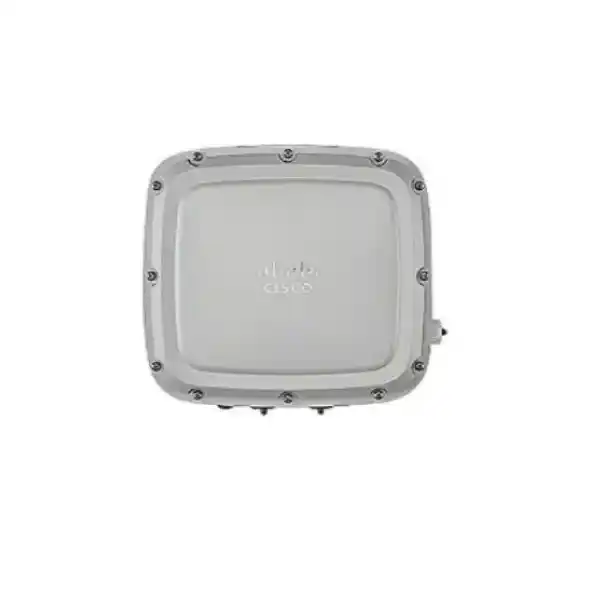
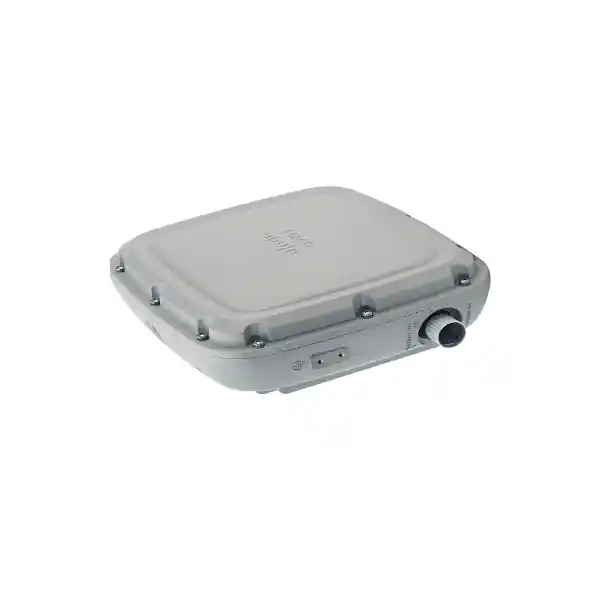
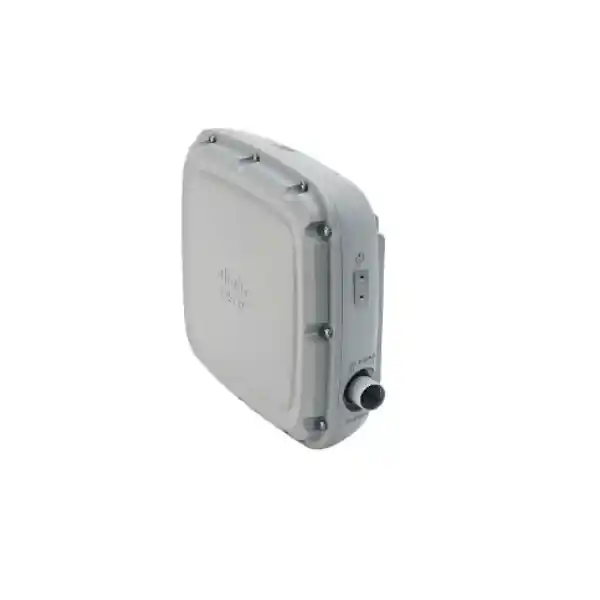
Integrated directional antenna
4×4:4 on 2.4 GHz & 5 GHz
IP66/IP67 enclosure
Cisco Catalyst C9124AXD Outdoor Access Point
The Cisco Catalyst C9124AXD Outdoor Access Point is built for enterprise and service-provider networks that need high-efficiency Wi‑Fi 6 outdoors with coverage deliberately aimed toward a target area. Unlike an omnidirectional access point that spreads RF energy around the mounting point, the C9124AXD uses integrated directional antennas. That makes it a practical option for outdoor spaces such as campus approaches, yards, loading zones, courtyards, pedestrian routes, industrial work areas and other locations where the design goal is to put usable wireless capacity in a defined direction.
For buyers in Tanzania, the most important planning questions are not only “how fast is it?” but also “where should the RF energy go, how will it be powered, what controller and software will manage it, and which regulatory-domain version is correct for the deployment?” The C9124AXD can deliver strong enterprise capabilities when those decisions are made correctly. Use the guidance below to assess fit before requesting a quotation or finalizing a bill of materials.
At a glance: what the C9124AXD brings to an outdoor WLAN
Who should consider this model?
The C9124AXD is most compelling when the physical site calls for controlled, directional coverage. A typical example is an access point mounted on a building, pole or tower and aimed toward a courtyard, loading area, gate approach, open work zone or another outdoor section where users are mainly located in front of the AP. The integrated antenna design can simplify the physical build because there is no separate Wi‑Fi antenna assembly to select, mount and cable. At the same time, directional coverage still requires a proper RF survey and careful orientation; a directional antenna is not a guarantee of greater range in every environment.
Organizations that need broad 360-degree coverage around a mounting point should compare the directional AXD with the C9124AXI, which uses integrated omnidirectional antennas. Sites that need a specialized external antenna pattern should compare the C9124AXE. Choosing among these variants is fundamentally an RF-design decision, not simply a performance ranking.
Directional antenna design: why it matters
Cisco specifies integrated directional antennas for the C9124AXD on both the 2.4 GHz and 5 GHz client-serving bands. The current Cisco data sheet lists peak gain of 9 dBi for the integrated 2.4 GHz antenna and 9 dBi for the integrated 5 GHz antenna. Cisco also publishes beamwidth figures of approximately 70 degrees azimuth and 65 degrees elevation at 2.4 GHz, and approximately 55 degrees azimuth and 50 degrees elevation at 5 GHz. These figures describe the antenna pattern rather than a promised coverage distance. Real-world coverage depends on transmit-power limits, client capabilities, obstructions, mounting height, interference, channel plan, weather exposure, target data rates and the return path from the client device.
This distinction matters in outdoor networking. A high-gain access point can transmit effectively toward a target area, but many mobile devices have much lower transmit power than the infrastructure. If the AP can hear or reach farther than the client can reliably answer, the connection will not perform as expected. Good design therefore works from the required application and client population backward to cell size, mounting position, EIRP limits and minimum accepted signal levels.
Directional coverage can also improve RF reuse because energy is concentrated where it is needed instead of being radiated equally behind the AP. In multi-AP outdoor environments, that can help the designer manage overlap and co-channel interference, but it does not eliminate the need for channel planning. The orientation of the AP becomes a critical commissioning step, especially where multiple units cover adjacent sectors.
Wi‑Fi 6 capacity for mixed outdoor clients
The C9124AXD supports 4×4:4 operation on both 2.4 GHz and 5 GHz, giving the AP four spatial streams per band under the appropriate power mode. Wi‑Fi 6 is designed to use airtime more efficiently when many clients share a radio. OFDMA divides channel resources into smaller allocations that can be scheduled for different clients, while MU‑MIMO allows the AP to serve multiple compatible devices across spatial streams. BSS coloring helps devices distinguish overlapping basic service sets so spectrum can be reused more effectively in dense designs, and Target Wake Time can help compatible battery-powered clients reduce unnecessary radio activity.
These features are useful in environments where the WLAN has a mixture of smartphones, tablets, laptops, scanners, handheld terminals, cameras, IoT devices and operational equipment. The benefit is not simply a higher theoretical data-rate figure. For a well-designed network, the larger value is more predictable use of airtime and improved efficiency when many active clients contend for service.
Cisco lists PHY rates for the 9124AX family up to 5.38 Gbps under specific channel and radio conditions. That is a radio-layer maximum, not an internet-speed promise or a per-client throughput guarantee. Actual user throughput is lower and is influenced by channel width, client radio design, protocol overhead, interference, distance, controller policy, upstream switching and WAN capacity. Capacity planning should therefore use application requirements and expected concurrent clients rather than a single headline PHY number.
Power planning is a major buying decision
Power design directly affects the capabilities available on the C9124AXD. Cisco supports 802.3af PoE, 802.3at PoE+, 802.3bt PoE++, Cisco UPOE and auxiliary DC input, but the AP does not provide the same feature set at every power level. This is one of the most important details to verify before a switch port or injector is chosen.
| Power source | Practical design implication |
|---|---|
| 802.3af | Cisco’s power table shows the client-serving radios disabled in this mode, so 802.3af should not be treated as a normal full-service operating target. |
| 802.3at PoE+ | The radios operate with reduced spatial-stream capability and the wired path is limited relative to the highest-power mode. |
| 802.3bt / UPOE / suitable DC | This is the design point for full 4×4 radio operation and the 2.5 GbE multigigabit uplink capability described by Cisco. |
For new installations, plan the AP, switch or injector, cable run and surge/environmental protection as one system. Confirm that the power source can provide the intended operating mode at the actual cable length. If a design expects multigigabit Ethernet but powers the AP below the level required for full operation, the WLAN can be constrained before it is commissioned.
Cisco also supports PoE output on the additional 10/100/1000BASE‑T downlink interface when the C9124AX is powered from a suitable 802.3bt/UPOE source or from an adequately rated external DC supply. Whether this is useful depends on the overall design and attached equipment; it should be reviewed as part of the bill of materials rather than assumed by default.
Wired interfaces and backhaul choices
The C9124AXD includes a 100/1000/2500BASE‑T Ethernet uplink, a Gigabit Ethernet SFP interface, a 10/100/1000BASE‑T Ethernet downlink that can provide PoE output in supported power conditions, and an RJ‑45 management console port. These interfaces give a designer several ways to integrate the AP into an outdoor network while keeping the wireless edge aligned with the upstream switching architecture.
The 2.5 GbE copper uplink is particularly relevant where aggregate wireless traffic could exceed a traditional one-gigabit bottleneck. Cisco specifies 2.5G, 1G and 100M support and notes multigigabit operation over suitable Category 5e cabling. However, cable quality, termination, environmental glands and switch-port capability still need to be validated. A link negotiated at 2.5 GbE is only one part of end-to-end capacity; switch uplinks, controller design, security services and WAN bandwidth can become the next constraint.
The SFP interface can be useful where the outdoor topology calls for fibre, electrical isolation over distance or a different physical distribution strategy. Exact SFP selection, fibre type and power arrangement should be matched to Cisco-supported components and the site design. Do not treat the presence of an SFP port as a substitute for grounding, lightning-risk assessment or outdoor cabling practice.
Rugged enclosure for exposed locations
Outdoor access points must tolerate conditions that indoor devices are not built to handle. Cisco specifies the Catalyst 9124AX Series with IEC 60529 IP66/IP67 ingress protection. The published operating temperature range is -40°C to 65°C without solar loading and -40°C to 55°C with solar loading. Cisco also publishes 0% to 100% condensing operating humidity, wind resistance testing, corrosion testing, solar-radiation testing and vibration testing for the series.
Those ratings are valuable for exposed installations, but installation quality remains essential. Cable entries, grounding, mounting hardware, torque, drip loops, surge protection and connector weatherization can determine whether an otherwise rugged AP performs reliably over time. The enclosure rating should not be interpreted as permission to ignore the installation guide or local electrical and structural requirements.
Physical planning also needs to consider the AP dimensions and weight. Cisco lists the unit at approximately 25.9 × 23.3 × 8.1 cm without mounting brackets, and the AXD at approximately 2.9 kg. Mounting structures should be selected for the unit, bracket, cable load and environmental forces expected at the site. Pole or tower work should be performed using appropriate safety practices and qualified personnel.
Controller, software and network integration
Cisco documents the C9124AXD for use with Cisco Catalyst 9800 Series Wireless Controllers. The series supports enterprise deployment models such as centralized and FlexConnect configurations, and Cisco’s 9124AX documentation also describes relay-node or mesh-style use cases for locations that are not directly connected to a wired network. The right architecture depends on the site’s WAN design, controller placement, operational model and feature requirements.
Before adding the AP to an existing Cisco WLAN, confirm the exact IOS XE software release and feature support required for the regulatory domain and controller. Cisco’s data sheet identifies minimum software levels for the 9124AXD and Cisco maintains a feature matrix and release documentation that should be checked during implementation. This matters especially for organizations upgrading an established controller estate or standardizing on a particular long-lived software train.
Licensing also belongs in the purchasing conversation. Cisco points buyers to Cisco DNA Software for Wireless for licensing information. The correct subscription and network entitlement depend on the architecture, feature set and current Cisco ordering rules. A hardware-only comparison can therefore understate the complete solution requirement. Ask for the AP, controller readiness, software entitlement and support requirements to be reviewed together.
Security and RF visibility
The C9124AX family supports enterprise wireless security features including WPA3 and WPA3‑Enterprise 192, alongside established 802.1X authentication options. Cisco also incorporates Trust Anchor technologies in the Catalyst 9100 family, including image signing, Secure Boot and a hardware trust anchor. These capabilities help provide a stronger platform foundation, but they do not replace correct WLAN policy, identity design, segmentation, patch management and secure administrator access.
Cisco’s RF ASIC can perform spectrum analysis and enables functions such as Cisco CleanAir, wireless intrusion-prevention capabilities, FastLocate and Dynamic Frequency Selection. In outdoor environments, RF visibility can be especially useful because interference may come from devices and networks outside the organization’s direct control. Spectrum-aware troubleshooting can help teams distinguish a coverage problem from interference, congestion or an upstream-network issue.
For sensitive enterprise deployments, define security requirements before installation: authentication method, certificate lifecycle, guest access, device onboarding, VLAN or fabric segmentation, management-plane access, logging and monitoring. The access point is one component of that security architecture. Features that depend on additional Cisco platforms or licenses should be validated for the intended solution rather than assumed to be active automatically.
BLE 5 and IoT-ready design
Cisco integrates a Bluetooth Low Energy 5 radio into the 9124AX series. Cisco describes location-based use cases such as asset tracking, wayfinding and analytics. The AXD also includes an internal omnidirectional BLE antenna, separate from the directional client-serving Wi‑Fi pattern. This can be useful where an organization wants outdoor Wi‑Fi infrastructure to participate in a broader location or IoT strategy.
The presence of BLE hardware does not by itself deliver a complete tracking system. Location accuracy and application functionality depend on the software platform, tag ecosystem, calibration, AP placement and the physical environment. If the project includes asset visibility, visitor experience or operational telemetry, define those outcomes early so the wireless design can account for both client coverage and location-services requirements.
Practical Tanzania deployment scenarios
Campus outdoor corridors
Aim coverage along paths between buildings, entrances or shared outdoor spaces where users move through a defined sector.
Warehouses and yards
Extend enterprise connectivity toward loading bays, dispatch areas, scanning zones or other operational spaces outside the building envelope.
Industrial sites
Serve defined outdoor work zones where rugged hardware, centralized policy and predictable RF design are more important than consumer-style coverage.
Hospitality compounds
Provide planned Wi‑Fi toward courtyards, pool-adjacent zones, walkways or outdoor guest areas while integrating with the enterprise WLAN.
Gates and approach areas
Focus wireless service toward security posts, entry lanes or vehicle/pedestrian approach zones when the antenna can be correctly aligned.
Outdoor operational networks
Support handheld devices, tablets, telemetry and business applications where outdoor users need policy-consistent access to corporate systems.
These scenarios are examples of fit, not coverage guarantees. Tanzania includes a wide variety of dense urban, coastal, inland, industrial and campus environments. Each site can have different interference levels, mounting constraints, power availability and backhaul options. A site survey and link-budget review are the appropriate way to turn a product specification into a deployable design.
Regulatory-domain and Tanzania type-approval checks
Cisco sells the C9124AX series in regulatory-domain variants, represented by the suffix after the model number. Cisco explicitly instructs customers to verify that the exact AP model and regulatory domain are approved for use in the destination country. This is especially important for outdoor Wi‑Fi because allowed channels, transmit power and other radio parameters are governed by local rules and by the software domain configuration.
Tanzania Communications Regulatory Authority guidance states that electronic communications equipment intended for sale or use in the United Republic of Tanzania is subject to type approval. Therefore, the final quotation and import/deployment plan should confirm the exact Cisco part number, regulatory-domain suffix and applicable Tanzania approval status. Do not order a suffix solely because it is common in another country or appears available from an overseas reseller.
Because regulatory approvals can change over time and Cisco has introduced broader “Rest of World” domain handling in newer software and hardware families, validation should be performed against current Cisco and TCRA information at the time of purchase. This product page intentionally does not claim a specific Tanzania approval code or regulatory suffix without an exact, current listing for the part being quoted.
Installation details that affect the bill of materials
The access point package includes the AP, grounding hardware and an Ethernet-port termination plug. Cisco’s installation documentation notes that mounting brackets are optional and are included only if ordered. That means the mounting method should be identified before procurement so the correct bracket and site hardware are present when installers arrive.
Cable selection also needs attention. Cisco notes that the supplied CAT 5e gland is intended for CAT 5e cable. If CAT 6 or CAT 6A cable is used, Cisco specifies the AIR-ACC-CAT6= accessory kit. This is a small line item compared with the AP itself, but missing outdoor termination hardware can delay installation or tempt teams into nonstandard sealing methods.
A complete outdoor BOM may therefore include the access point, the correct mount, compatible PoE source or injector, outdoor-rated Ethernet or fibre components, appropriate cable gland, grounding conductor, surge protection and any site-specific structural hardware. The exact list depends on how the AP is powered and connected. For tower or pole deployment, also confirm safe access, bracket orientation and the ability to aim the directional pattern accurately.
Preinstallation configuration can reduce commissioning time by confirming that the AP can join the controller, receive the expected configuration and operate with the selected software before a technician mounts it in a difficult-to-access location. Record serial numbers, switch ports, cable identifiers and planned AP names as part of the deployment documentation.
C9124AXD vs. C9124AXI vs. C9124AXE
| Model | Antenna approach | Best suited to | Design consideration |
|---|---|---|---|
| C9124AXD | Integrated directional | A defined outdoor sector or target area | AP orientation and beam placement are critical |
| C9124AXI | Integrated omnidirectional | Coverage distributed around the mounting point | RF energy is intentionally less sector-focused |
| C9124AXE | External antenna ports | Specialized antenna patterns or antenna placement | Requires careful selection of supported external antennas and cabling |
All three models belong to the same rugged outdoor Wi‑Fi 6 family, so the antenna architecture is often the deciding factor. The AXD is not automatically “better” than the AXI or AXE; it is better when directional integrated coverage matches the RF design. This comparison should happen before procurement, because changing antenna strategy after installation can require different hardware.
Key technical specifications
| Wireless standard | IEEE 802.11ax (Wi‑Fi 6), with backward support for relevant 802.11a/b/g/n/ac operation |
|---|---|
| Client radio architecture | 4×4:4 on 2.4 GHz and 5 GHz under full-power operation |
| Wi‑Fi 6 features | Uplink/downlink OFDMA, uplink/downlink MU‑MIMO, Target Wake Time, BSS coloring, beamforming, MRC and DFS |
| Integrated Wi‑Fi antennas | Directional, dual-polarized; 9 dBi peak gain at 2.4 GHz and 9 dBi peak gain at 5 GHz per Cisco data sheet |
| BLE | Bluetooth Low Energy 5 with integrated omnidirectional antenna |
| Primary copper uplink | 1 × 100/1000/2500BASE‑T Ethernet |
| Additional interfaces | 1 × Gigabit Ethernet SFP, 1 × 10/100/1000BASE‑T downlink with supported PoE-out conditions, RJ‑45 management console |
| Power input options | 802.3af, 802.3at, 802.3bt, Cisco UPOE and 24–56 V auxiliary DC; feature availability varies by power level |
| Ingress protection | IEC 60529 IP66/IP67 |
| Operating temperature | -40°C to 65°C without solar loading; -40°C to 55°C with solar loading |
| Dimensions | Approximately 25.9 × 23.3 × 8.1 cm without mounting brackets |
| Weight | Approximately 2.9 kg for C9124AXD |
| Controller family | Cisco Catalyst 9800 Series Wireless Controllers |
| Security | WPA3 and WPA3‑Enterprise 192 support, 802.1X/EAP options, plus Catalyst 9100 secure-platform capabilities |
Specifications can vary by software release, regulatory domain, channel plan and power mode. The exact Cisco part number and intended deployment should be checked before ordering.
What to verify before requesting a quote
- Coverage objective: define the outdoor sector, user locations, applications, expected concurrent clients and minimum performance target. This determines whether the directional AXD pattern is appropriate.
- Mounting position: identify the wall, pole or tower location, mounting height, aiming direction and structural constraints. Confirm the required Cisco bracket and site hardware.
- Power budget: confirm whether the switch or injector can provide the power mode required for full 4×4 operation and 2.5 GbE, and verify cable length and power loss.
- Backhaul: decide between copper and fibre integration, confirm upstream switch interfaces and ensure end-to-end bandwidth is appropriate for the expected load.
- Controller readiness: verify the Cisco Catalyst 9800 controller model, IOS XE release, AP capacity, licenses and feature support.
- Regulatory-domain suffix: confirm the exact Cisco regulatory-domain part number and current approval for Tanzania before import or deployment.
- Cable and glands: confirm outdoor-rated cable type and the correct Cisco termination accessory, especially if CAT 6 or CAT 6A is specified.
- Grounding and surge protection: include site-appropriate grounding, bonding and surge-protection requirements in the installation scope.
- RF survey: validate channel availability, interference, target signal levels, expected cell boundary and AP orientation rather than relying on nominal range claims.
- Lifecycle operations: plan monitoring, software maintenance, configuration backup, access method and physical servicing for an AP that may be mounted high or in a restricted outdoor location.
Design notes for real-world performance
Do not design by maximum distance alone
Outdoor WLANs are often described in terms of “range,” but range without a target data rate and client type is not useful. A low-rate client may remain associated farther away than a device can sustain the throughput needed for voice, video, scanning or business applications. Define the application first, then set the minimum signal, signal-to-noise ratio and channel utilization targets needed for it.
Use directional coverage to shape cells
The AXD can help contain a cell toward a target zone, but nearby reflective structures, vehicles, metal surfaces, trees and terrain can alter the effective pattern. Survey data and post-installation validation should confirm that coverage lands where users actually operate and that neighboring cells have appropriate overlap for roaming.
Keep channel width realistic
Wide channels can increase peak PHY rate but consume more spectrum. In multi-AP or interference-prone environments, narrower channels may deliver better reuse and more stable aggregate capacity. The correct width should follow the RF plan, regulatory channel availability and client requirements rather than a default preference for the largest value.
Remember the client return path
Enterprise AP radios and antennas can be stronger than phones, tablets or handheld devices. A successful design balances AP transmit power with client capability so both directions of communication remain reliable. This is especially important with directional infrastructure antennas and in open outdoor spaces where a device may “see” the AP from farther away than it can communicate back effectively.
Frequently asked questions
Is the Cisco C9124AXD a Wi‑Fi 6E access point?
No. The C9124AXD is a Wi‑Fi 6 (802.11ax) outdoor access point serving the 2.4 GHz and 5 GHz bands. It is not a 6 GHz Wi‑Fi 6E model. If 6 GHz outdoor operation is a requirement, the project should evaluate newer Cisco outdoor platforms and the regulatory rules that apply to 6 GHz use in the deployment country.
Does the C9124AXD need external Wi‑Fi antennas?
No. The AXD has integrated directional Wi‑Fi antennas. This is one of its defining characteristics. If the design needs user-selectable external antennas, the C9124AXE is the variant to compare.
What is the difference between AXD and AXI?
AXD uses integrated directional antennas, while AXI uses integrated omnidirectional antennas. Choose AXD when the RF design requires coverage aimed toward a defined sector. Choose AXI when coverage should be distributed more broadly around the mounting point.
Can I power it with standard PoE?
The AP supports multiple PoE standards, but capability changes with the available power. Cisco’s power table shows that 802.3af does not provide normal client-radio operation, while 802.3at operates the radios with reduced capability. Full 4×4 operation and 2.5 GbE are associated with 802.3bt/UPOE or suitable DC power. Confirm the planned operating mode before selecting the switch or injector.
Can the C9124AXD be used with a Cisco Catalyst 9800 controller?
Yes. Cisco lists Catalyst 9800 Series Wireless Controllers as the supported controller family for the 9124AX series. The exact controller software release and required licenses should be checked for the intended feature set and regulatory domain.
Is the C9124AXD waterproof?
Cisco specifies IP66/IP67 ingress protection for the series. It is better to describe the unit by its certified ingress rating than simply call it “waterproof.” Correct glands, grounding, mounting and installation practices remain essential to maintain outdoor reliability.
Does it support WPA3?
Yes. Cisco lists WPA3 support and WPA3‑Enterprise 192 support for the 802.11ax capabilities of the 9124AX family. The complete authentication and security design depends on controller configuration, identity services, client support and policy.
What Ethernet speed does it support?
The primary copper uplink supports 100 Mbps, 1 Gbps and 2.5 Gbps. Full 2.5 GbE availability is tied to the appropriate power mode. The AP also provides a Gigabit Ethernet SFP interface and a separate copper downlink interface.
Is a mounting bracket included?
Cisco’s installation guide states that mounting brackets are optional and are included only if selected when ordering. Confirm the intended mounting method and required bracket before finalizing the order.
Which regulatory-domain suffix should I buy for Tanzania?
Do not select a suffix by assumption. Cisco instructs customers to verify country approval and the correct regulatory domain, while TCRA requires type approval for communications equipment sold or used in Tanzania. The exact part number should therefore be confirmed against current Cisco and TCRA information at quotation time.
Why this model can be a strong fit for enterprise outdoor networks
The C9124AXD combines four things that are often needed together: Wi‑Fi 6 efficiency, enterprise controller integration, rugged outdoor construction and an integrated directional antenna pattern. That combination can reduce the number of separate RF components in a sector-style deployment while maintaining the operational model of a Cisco Catalyst wireless network.
Its value is highest when the deployment is designed around the product rather than simply substituting it for an indoor AP. Outdoor RF is different: there are longer sight lines, more variable interference, weather exposure, difficult mounting locations and often more expensive service visits. Correct power, grounding, cable sealing, controller compatibility and regulatory-domain selection all have direct impact on reliability.
For that reason, the recommended buying process is to start with the coverage objective and site constraints, choose the antenna model, verify power and backhaul, confirm controller/software readiness, then validate the exact Tanzania-approved part number. That sequence is more reliable than choosing the AP from headline specifications and trying to fit the rest of the design around it later.
Request a Cisco C9124AXD solution quote for Tanzania
For an accurate quotation, provide the target outdoor coverage area, approximate mounting location, expected client types, existing Cisco controller model and software release, preferred copper or fibre backhaul, and available PoE standard. This allows the access point, regulatory-domain part number, mounting accessories, power components and licensing requirements to be reviewed as one deployable solution.
Next step: request a configuration review and quotation for the Cisco Catalyst C9124AXD Outdoor Access Point. Availability, exact regulatory-domain suffix, licensing, mounting hardware and final bill of materials should be confirmed for the specific Tanzania deployment before ordering.




Reviews
There are no reviews yet.