
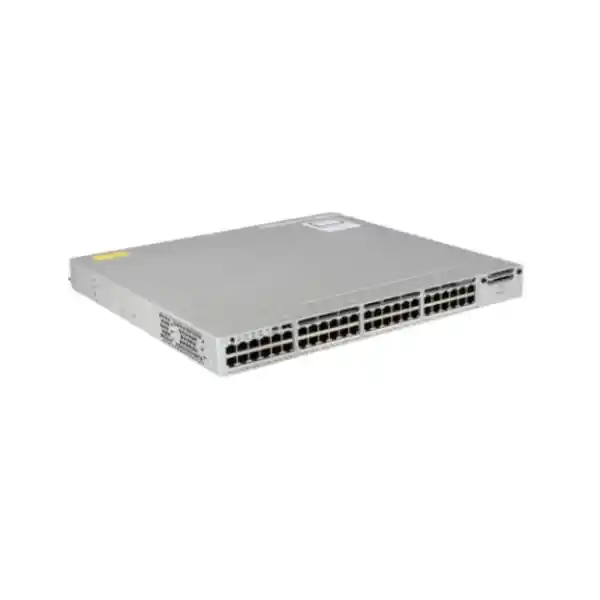
CISCO CATALYST · TANZANIA PROCUREMENT
48 powered Gigabit connections, with enhanced segmentation
The Cisco Catalyst C9200-48PB network switch suits access-layer projects that need PoE+ endpoints and separately routed network groups. Its modular uplinks and enhanced VRF capabilities should be specified alongside power supplies, licensing and compatible stack members. Request a configuration review from FourTeck Tanzania before finalizing the order.
Configuration at a glance
| Manufacturer / platform | Cisco Catalyst C9200-48PB |
|---|---|
| Access connections | 48 × 1G Ethernet with PoE+ |
| Orderable identity to confirm | C9200-48PB-A · Network Advantage |
| Uplink choices verified for this model | 4 × 1G or 4 × 10G network module; confirm selected components |
| Switching / forwarding | 176 Gbps / 130.95 Mpps, as published by Cisco |
| Routing scale | 32 VRFs; validate software, license and deployment requirements |
| Stacking | StackWise-160; up to eight compatible PB members |
| PB stack membership | C9200-24PB and C9200-48PB only |
| PoE budget, supported AC configuration | 740 W with one supply; up to 1,440 W with the appropriate two-supply arrangement |
| What requires a quotation | Exact supplied configuration, software term, accessories, price, availability and commercial terms |
Who should choose this enhanced-segmentation access switch?
Choose this platform when a business network needs a substantial number of powered Gigabit connections and a deliberate plan for keeping user groups separate. A shared office floor may contain staff computers, desk phones, wireless access points, cameras and equipment managed by outside contractors. These devices can have different access requirements even when they terminate in the same cabinet. The buying decision should therefore combine connection count, endpoint power, routing separation and the way the network will be operated.
For Tanzania procurement teams, the useful starting point is a documented requirement rather than a chassis-only price comparison. Identify the equipment that will connect today, the additional devices expected during the next expansion, and the applications that must remain available during maintenance. Then decide whether the PB model’s enhanced segmentation is needed. A simpler access design may justify another switch, while an organization with several separately routed networks has a clearer reason to consider this model.
The short product name does not define a complete order. Cisco’s ordering information identifies C9200-48PB-A as the Network Advantage version with enhanced VRF capability. Ask for the complete manufacturer part number on the quotation and match the hardware, software entitlement and accessories to the intended design. Treat the title on this page as the requested platform identity; the accepted bill of materials should establish exactly what will be delivered.
Request a configuration-led quotation from FourTeck Tanzania. Provide your endpoint inventory, expected power demand, proposed uplinks, existing switch models and segmentation requirements. This gives the purchasing and technical teams a shared basis for checking the offer before an order is placed.
Key specifications and what they mean
The C9200-48PB is a modular-uplink access switch with 48 Gigabit Ethernet PoE+ access ports. Cisco positions the PB family for enhanced virtual-network deployments. That combination is useful when an access cabinet must provide both physical connections and a more structured approach to separating traffic. The access ports are Gigabit ports; buyers planning multigigabit connections should assess another platform against their actual endpoint requirements.
Cisco publishes 176 Gbps switching capacity and 130.95 million packets per second forwarding rate for this model. These are platform specifications, rather than a promise about the speed of a particular application or internet connection. Upstream bandwidth, endpoint limitations, traffic patterns and the configuration remain relevant. Use the figures to compare hardware classes, then validate the proposed topology against the workload.
Modular uplinks allow the upstream connection choice to be addressed as part of the configuration. The hardware installation guide identifies four-port 1G and four-port 10G uplink network-module options for this model. Specify the module, the required optics or cables, and the matching interface at the other end. An empty uplink-module position or an incompatible transceiver can prevent an otherwise correct switch purchase from meeting the design.
Keep switching capacity, uplink speed and stack bandwidth as separate entries in the technical evaluation. Each describes a different part of the system. A procurement document that combines them into a single speed claim makes it harder to understand where congestion could occur and which component needs to be upgraded.
Understanding the PB model’s routing separation
A virtual routing and forwarding instance, or VRF, provides a separate routing context within a device. This is useful when multiple groups need distinct routing tables rather than only separate Ethernet broadcast domains. For example, a design team might separate business users from building systems and a contractor network, with carefully defined paths to the shared services each group is allowed to use.
Cisco documents support for 32 VRFs on the C9200-24PB and C9200-48PB platforms. It also identifies the enhanced VN family as supporting 32 virtual networks for applicable SD-Access deployments. These related terms belong to their respective routing and fabric designs; they should not be treated as a count of physical ports, customers or security appliances. Confirm the intended operating mode, software release and license requirements before building a design around the stated scale.
The practical question is how many independently routed groups the organization actually needs, who owns their policies and where traffic can cross between them. Write down the permitted relationships before configuration begins. Include shared DNS, directory services, printing, monitoring and application access where relevant. A separation plan that omits common services can create avoidable faults when users move onto the new network.
Routing separation also needs an enforcement design. Determine where firewall inspection or access-control policy will apply, which traffic remains local, and which traffic should pass upstream. The switch should be selected as one component of that architecture. Network separation does not, by itself, establish an organization’s security policy or demonstrate compliance with a particular framework.
For a straightforward office network, enhanced VRF scale may be unnecessary. For an environment with several operational domains, it can be a meaningful selection criterion. Ask the designer to explain the required routing contexts in plain language so the purchasing justification matches the intended deployment.
Plan endpoint power before selecting supplies
Power over Ethernet simplifies endpoint installation by carrying power and data over the network connection to compatible equipment. However, the presence of PoE+ on the access ports does not establish how much power is available to all connected devices together. Collect the manufacturer power requirements for every phone, access point, camera and other powered device, including any higher-demand operating modes.
Cisco’s hardware documentation lists 740 W of available PoE power for the C9200-48PB with a supported single 1 kW AC supply, and up to 1,440 W with the appropriate two-supply arrangement. The supply’s rated output and the available endpoint budget are different quantities. Confirm the exact power supplies and the resulting budget on the quoted configuration rather than using the supply label as the endpoint allowance.
An illustrative planning exercise is to multiply the number of devices in each group by their requested allocation and add those groups together. Twenty devices allocated 15 W each represent 300 W before other endpoint groups are counted. This is an example calculation, not a claim about the consumption of any particular product. Use verified endpoint figures and allow for the additional equipment already included in the project roadmap.
Evaluate normal operation and the loss of one power supply separately. A configuration using both supplies to meet a larger endpoint load may have less power available after one supply fails. Identify which services must remain powered, decide how the design will preserve them, and test the expected behavior during commissioning. Two populated supply slots alone do not prove that every powered endpoint will remain operational under every failure condition.
Record the final allocation worksheet alongside the port schedule. When a new access point or camera is proposed later, the administrator can check both a free port and a sufficient power allowance before approving the addition. This prevents incremental changes from consuming an undocumented reserve.
Choose uplinks around traffic, distance and resilience
Start uplink selection with the destinations used by connected devices. A floor of users working mainly with remote applications has a different traffic pattern from a cabinet serving cameras that continuously send traffic to local recording systems. Identify where the busiest flows go, when demand peaks and which shared links carry the combined load. Avoid assuming that every endpoint reaches its maximum rate at the same time.
For the documented 1G and 10G module options, match both ends of each connection. The aggregation switch needs a suitable interface, and the transceiver or cable selection must fit the module, software and physical medium. For fiber connections, check fiber type, connector, reach and optical compatibility. For direct-attach connections, check the supported cable and practical routing distance.
A faster uplink does not change the rate of an individual Gigabit access port. It can provide additional shared capacity toward other network devices, subject to the actual topology. This distinction matters when an organization buys high-performance wireless access points: the access port itself may still be the constraint even if the upstream links have spare bandwidth.
If continuity is a requirement, draw the intended physical paths and identify shared dependencies. Two uplinks can still depend on the same upstream chassis, power source or cable route. Establish which failure the second path is intended to address, then have the network designer validate the relevant protocols and supported topology. Redundancy should be assessed against a defined failure scenario.
Do not infer 25G or 40G module compatibility from a general Catalyst 9200 family description. Require exact chassis and software confirmation for any uplink option beyond the model-specific choices verified here. The accepted quotation should list the selected module and connection components explicitly, with no reliance on a family-level marketing summary.
Stacking: the compatibility restriction that affects expansion
Cisco’s stacking guide states that C9200-24PB and C9200-48PB switches can stack only with each other, rather than with other C9200 models. C9200L switches must also remain outside that stack. This is a critical check when a purchase is intended to expand an existing installation. The similar appearance of model names does not establish that the new switch can join the current stack.
Within the supported design, the PB platform uses StackWise-160 and supports up to eight members. Stack members need compatible software and the same license level. Specify the correct stacking hardware and cables as part of the order, then plan member placement, cable lengths and the intended ring arrangement. Do not assume that a switch-only quotation includes everything needed for a completed stack.
For an existing cabinet, collect the full model numbers before selecting the expansion approach. A site with a different Catalyst variant may require a separate stack or another supported interconnection design. Comparing those alternatives early helps avoid an order that provides enough physical ports but cannot fit the operational structure expected by the administrator.
Stacking can simplify management, but it also creates shared operational considerations. Agree how configuration changes will be reviewed, how software upgrades will be scheduled and what recovery information will be kept outside the stack. During acceptance, test the agreed loss-of-member and link-failure scenarios using an approved maintenance procedure. The objective is evidence that the installed design behaves as expected.
Decide whether a larger stack is desirable before treating the maximum member count as a target. Cabinet layout, uplink placement, failure boundaries and maintenance practices can favor a smaller grouping. Expansion capacity is most useful when it supports the organization’s operational plan.
Software, subscriptions and management decisions
The quoted license matters as much as the chassis identity. Cisco’s ordering guide distinguishes the perpetual Network Stack entitlement from the term-based software subscription. It identifies the PB orderable model with Network Advantage. Ask for the complete license description and applicable subscription term so the purchase can be reviewed as a complete solution rather than as an isolated hardware line.
Cisco’s current ordering process includes a matching software term license and describes three-, five- and seven-year choices. The exact subscription selection, entitlement and commercial terms need to be established on the quotation. A reference to Network Advantage should not be interpreted as confirmation that every management service, integration or subscription is included indefinitely.
Choose the management approach according to who will operate the installation. A team administering a few cabinets may have different needs from an organization maintaining standardized configurations across several sites. Define administrator roles, access methods, monitoring, configuration backup and change approval before deployment. If a centralized management or fabric platform is proposed, ask for its dependencies and licensing as separate, clearly explained items.
Software selection should consider supported features, compatibility and operational maturity. A release appearing in a configuration guide is not automatically the best production release for every network. Have the responsible engineer review the intended image against the exact hardware, required functions and applicable release notes. Include the recovery process and configuration backup in the implementation plan.
At handover, keep a record of hardware serial numbers, entitlements, subscription dates and the account responsible for managing them. Confirm how the organization will obtain supported software and assistance under the purchased terms. This makes future maintenance and renewal decisions easier to assess.
Access security and policy preparation
Begin access security with a simple inventory of what may connect and what each device needs to reach. Separate administrator access from ordinary user traffic, document privileged accounts and define how configuration changes will be approved. These operational decisions make the technical controls easier to apply consistently and easier to audit after the network is handed over.
Cisco documents IEEE 802.1X port-based authentication for this platform family, including interaction with a RADIUS authentication service. Deployment requires planning for endpoint support, identity policy and the behavior when authentication infrastructure is unavailable. Pilot the policy with representative computers, phones and other devices before applying it across an entire floor.
Where endpoints do not support the preferred authentication method, ask the security designer to define an appropriate exception process. Avoid treating a device’s physical location or recognizable name as sufficient authorization. Document who approves exceptions, which resources those devices can reach and how the exception will be reviewed when the equipment is replaced.
Cisco also documents IP Source Guard using learned or configured bindings on applicable Layer 2 interfaces. Its dependencies and behavior need to be understood before enabling it, particularly for devices with static addressing. A control that is appropriate for one endpoint group can interrupt another group if the supporting address information is incomplete.
Use a staged implementation plan with a rollback point and a small test population. Check normal access, denied access, device replacement and loss of the supporting service. Record the result in terms that the network owner can understand. The goal is a usable, maintained policy with clear responsibility for ongoing changes.
Wireless, voice and camera deployment considerations
For wireless access points, check the required Ethernet rate and power mode against the exact AP model. Some modern AP designs need more than a Gigabit connection or a different power class to deliver their intended capabilities. This switch should be assessed against those requirements before it is included in a wireless bill of materials. Radio performance cannot be determined from the switch’s port count alone.
For desk phones, collect the supported power requirements and understand whether another device will connect through the phone. Plan voice and data access policy, addressing and any application-specific quality requirements with the communications team. Include representative call testing during migration, especially where the replacement also changes VLAN assignments or upstream routing.
For cameras, review sustained traffic toward the recording destination, endpoint power and the intended separation from business users. A camera deployment can create predictable upstream demand even when ordinary office usage is light. The number of spare ports therefore gives only part of the expansion picture; power headroom, upstream capacity and recorder connectivity also matter.
Mixed endpoint cabinets benefit from a labeled port schedule. Identify each patch-panel connection, device owner, intended network and power requirement. Keep that record current when equipment moves. It is often the difference between a quick service change and a time-consuming search through unlabeled cables during an incident.
For broader AP selection questions, consult the FourTeck Tanzania wireless planning guide linked below. Review the switch and wireless requirements together so the access network supports the chosen devices without relying on assumptions about family names or advertised radio speeds.
Prepare the cabinet and power environment
Cisco’s installation guidance calls for a dry, clean, well-ventilated environment with suitable temperature control and unrestricted airflow. Select a cabinet location that protects the equipment and allows qualified staff to reach the ports and rear components. Keep construction dust and other contaminants away from the installation. A switch cabinet should be treated as part of the network design.
Check usable rack depth, rear clearance, cable routing and access for maintenance. The chassis measurement alone does not include all the space needed for power connections and cable bends. A proposed position should allow staff to identify indicators, replace serviceable components and trace connections without placing strain on nearby equipment.
For power continuity, define the required runtime and the equipment that must remain operating during an interruption. Include powered endpoints in the load assessment, together with upstream connectivity and any supporting systems. A UPS supporting only part of the path may keep the switch running while the application remains unavailable. Size and validate the backup arrangement as a complete service path.
If dual power supplies are specified, establish the intended power-feed arrangement with the responsible electrical and facilities teams. Identify shared sources and document which failure conditions the design addresses. Ask for the appropriate power cords and connection requirements on the quotation. Do not leave those details until equipment reaches the rack.
Tanzania projects should record the actual conditions at the intended site rather than assume that every building has the same cooling, electrical protection or maintenance access. Share those conditions during technical review. Any additional installation work or local service provision should be stated in the agreed project scope.
A practical configuration checklist for quotations
An actionable quotation begins with the complete manufacturer part number and a clear description of the intended deployment. State whether the switch will operate independently or join a supported PB stack, and list the equipment already installed. This helps reviewers catch a model mismatch before accessories and software are priced around it.
Ask the supplier to itemize the uplink module, transceivers or direct-attach cables, power supplies, stacking components, power cords and required licenses. Distinguish components included in the offer from components that the buyer will provide. Where existing parts will be reused, require an exact compatibility check rather than an assumption based on their appearance.
Commercial review should establish equipment condition, current availability, the offered warranty or support terms, and the scope of any installation work. These are quotation-specific matters. A product-family description cannot establish that a particular unit is in stock, that a service contract is included, or that delivery will meet a project deadline.
For a Tanzania purchase, ask for a written commercial breakdown that explains the quoted currency, applicable charges, delivery arrangement and acceptance terms. Use the supplier’s confirmed offer for those decisions. There is no verified price or delivery promise on this page, so the final purchasing comparison should use quotations prepared for the same configuration and scope.
Before approval, have both technical and procurement owners review the bill of materials. The technical reviewer checks fit and dependencies; the procurement reviewer checks that those agreed requirements appear in the commercial offer. Record any approved substitutions so the receiving team knows what to expect.
Deployment and migration sequence
Start with a discovery record covering existing switches, uplinks, endpoint connections, addressing, routing and access policies. Capture configurations and note which services depend on the cabinet. Where a business cannot tolerate a long interruption, identify a pilot area and an achievable maintenance window before setting the cutover date.
Prepare the new configuration in a controlled environment. Validate the selected software, management access, licensing state and component recognition. Where practical, test with representative powered endpoints and the intended uplink equipment. This stage should resolve basic fit and configuration questions before the switch becomes responsible for live services.
Create a migration sheet that maps each old connection to its new port and required policy. Agree the order of reconnection, the checks after each group is moved and the conditions that trigger rollback. Preserve access to the previous configuration and any equipment needed to restore service within the agreed window.
After cutover, check the applications people actually use. Confirm that authorized users can reach their services, separated groups remain appropriately isolated, phones register and calls work, access points operate in the intended mode, and cameras reach their recording system. A link indicator alone is insufficient evidence of a successful migration.
Close the migration with an updated port schedule, configuration backup and a list of accepted exceptions. Assign ownership for outstanding tasks and explain how the network will be monitored during its first operating period. This makes handover a defined project step.
Acceptance checks and ongoing operation
Agree acceptance criteria before installation so both parties know what completion means. The criteria should cover received components, intended software and licensing, endpoint connectivity, power allocation, routing separation, management access and the selected resilience scenarios. Tests should reflect the purchased scope and the business services that depend on it.
For a stacked deployment, record member identities, software compatibility and the observed stack connections. For powered devices, review actual allocations against the design worksheet. For uplinks, confirm the negotiated connection and inspect error information over an appropriate observation period. Keep the baseline with the commissioning records so later changes can be compared against it.
Monitoring should support practical action. Decide who receives alerts, what constitutes a service-impacting condition and how the responder will reach the equipment. Include a process for configuration backup after approved changes. A monitoring tool is most useful when someone owns the response and has the information needed to investigate.
Plan capacity review around business changes. New APs, additional cameras, a larger team or a new application can change the demand on a cabinet. Review port utilization, power allocation and shared links together before approving expansion. This gives the network owner a more reliable basis for upgrades than waiting for users to report poor performance.
Maintain an asset record and a periodic review of software, support coverage and relevant lifecycle notices. Keep credentials and recovery information under the organization’s normal access controls. The purpose is to make the next maintenance event predictable, whether it involves a routine update or a failed component.
Compare this model with the requirement
A useful comparison starts with the problem the switch must solve. If the design needs enhanced routing separation at a Gigabit access edge, the PB family deserves consideration. If most endpoints need faster copper connections, or the network has another power requirement, compare suitable alternatives before committing to this chassis.
For an expansion project, stack membership can outweigh a seemingly attractive specification. A different model already installed in the cabinet may lead to a separate switching group or a revised architecture. Assess the operational consequences, accessory costs and maintenance plan alongside the hardware price.
For a small network with limited segmentation needs, ask whether the additional capability will be used and maintained. For a larger segmented design, ask the opposite question: whether the proposed switch provides the necessary scale without forcing a later redesign. The right answer depends on the documented requirement.
Buyers replacing older equipment can use the linked Tanzania migration guide as a starting point for discovery. Treat any replacement comparison as a design exercise that includes configuration, power, optics, stacking and licensing. Similar port counts do not establish a direct replacement.
Buyer questions about this configuration
What is the Cisco Catalyst C9200-48PB used for?
It is an enterprise access-switch option for connecting and powering Gigabit endpoints where enhanced routing separation is part of the network design. Evaluate it for the intended users, endpoint power and upstream connections, with particular attention to whether the PB-specific capabilities are needed.
Is C9200-48PB the complete ordering code?
It identifies the platform, but the quotation should contain the complete manufacturer part number. Cisco lists C9200-48PB-A with Network Advantage and enhanced VRF capability. Confirm that exact orderable configuration, the required subscription and the selected accessories before purchase.
Can it join an existing C9200 or C9200L stack?
Check the full models first. Cisco restricts PB stacking to C9200-24PB and C9200-48PB members. An existing switch from another C9200 variant or from the C9200L family cannot be assumed to join that stack. A separate interconnection design may be needed.
Will all connected PoE devices have enough power?
That depends on their allocations and the installed supplies. Add the requirements for every endpoint and review the budget for both normal operation and the agreed failure conditions. Include planned additions, and verify the resulting power configuration in the accepted bill of materials.
Are uplink optics and stacking cables included?
Inclusion must be established by the quotation. Ask for individual line items or an explicit included-components list. Match optics, cables and stacking parts to the exact chassis, module, software and topology. Do not infer accessory inclusion from the product title.
Does enhanced VRF support replace a firewall?
VRFs separate routing contexts, while the wider security design determines how traffic is inspected and permitted between groups. Define the required access relationships and enforcement points with the network designer. Select the switch and firewall roles together around those requirements.
Is this the right switch for modern wireless access points?
Compare the AP’s exact wired speed and power needs with the proposed switch configuration. A wireless project that needs multigigabit access or a different power class requires another suitability assessment. The AP’s radio generation alone does not establish compatibility or expected throughput.
What should I send for a Tanzania quotation?
Provide endpoint quantities and models, power needs, existing switch identities, uplink requirements, segmentation goals, rack conditions and the required project scope. Include the delivery location and commercial requirements for a specific offer. Request written confirmation of availability, equipment condition, support and delivery terms.
Related Tanzania planning guides
Request a configuration-led C9200-48PB quote
Share your endpoint inventory, expected PoE load, required network separation, uplink connections and existing switch models with FourTeck Tanzania. Ask for a complete bill of materials covering the exact chassis, software, power supplies and connection accessories.
Use the written quotation to confirm price, availability, equipment condition, support terms and the agreed delivery or installation scope. Approve the configuration after the technical and purchasing requirements have been checked together.




Reviews
There are no reviews yet.