
FOURTECK TANZANIA · ENTERPRISE ACCESS SWITCHING
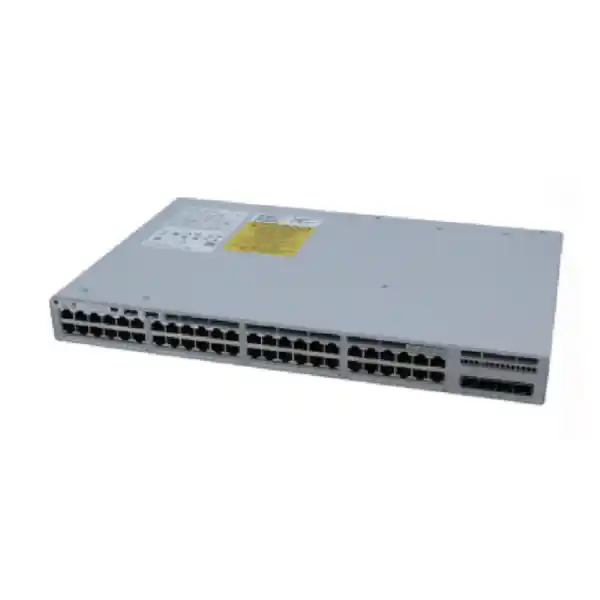
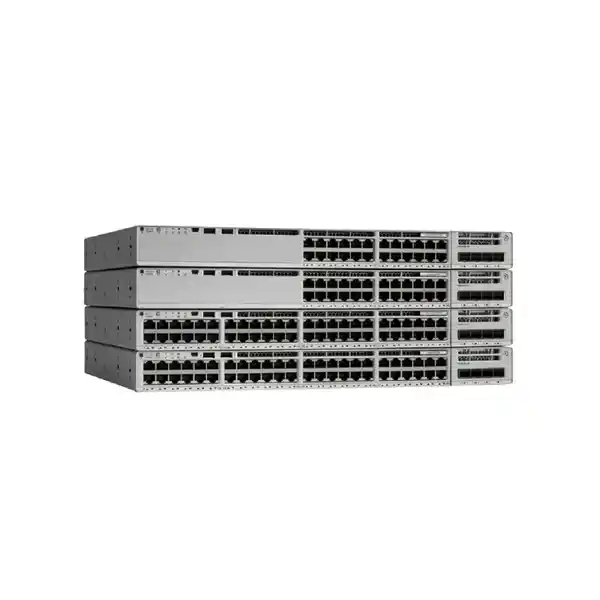
Cisco Catalyst C9200-48PL Network Switch
Connect a busy office floor with 48 Gigabit Ethernet access ports while providing shared PoE+ power for compatible phones, wireless access points and other powered endpoints. The Cisco Catalyst C9200-48PL suits buyers who need enterprise access switching, replaceable uplink modules and a carefully sized power budget. Its partial PoE+ design makes endpoint power planning an essential part of the purchase.
Request a configuration quote from FourTeck Tanzania with your endpoint list, uplink requirements and preferred licence edition. The quote should identify the complete switch part number, power supplies, network module, optics, subscriptions and any stacking accessories before an order is placed.
Is this the right switch for your network?
This model is a practical candidate for an organisation with many wired connections and a moderate number of powered devices sharing the same access cabinet. Typical planning examples include an office with desktop computers and IP phones, an administration block with printers and access points, or a business branch consolidating several small switches. These are design examples, rather than claims that every device or application is automatically compatible.
Start with two separate counts: the number of Ethernet connections and the power required by endpoints that draw electricity from the switch. A computer or printer with its own power supply consumes a network port without using the PoE allowance. A compatible phone or access point consumes both. Keeping these counts separate helps explain why a 48-port partial PoE+ switch may fit a mixed office even when a fully powered access design needs another configuration.
A suitable design also needs a clear route from the access switch to the rest of the network. Decide whether that route needs Gigabit or 10 Gigabit uplinks, how many links are required and whether the far-end equipment supports the chosen optics. If most endpoints need high power, or new wireless equipment needs multigigabit Ethernet, compare a different platform before settling on this model.
Technical specification snapshot
| Item | Verified platform detail | Buying implication |
|---|---|---|
| Manufacturer and family | Cisco Catalyst 9200; modular C9200 platform | Specify C9200-48PL rather than a similarly named C9200L model. |
| Copper access ports | 48 × 10/100/1000 Ethernet ports | Access connections support up to 1 Gbps; these are not multigigabit downlinks. |
| Power over Ethernet | Partial IEEE 802.3at PoE+, up to 30W per port within the available budget | Individual port capability and total switch power must both suit the endpoint. |
| Default primary supply | PWR-C6-600WAC in Cisco’s current data sheet | Confirm the exact supplied power configuration on the quotation. |
| AC PoE budget | 370W with one supported 600W AC supply; 740W with two in the documented configuration | Additional capacity depends on installing the appropriate second supply. |
| Uplink choices | C9200-NM-4G: four 1G ports; C9200-NM-4X: four 1G/10G ports | Select a compatible network module and matching transceivers. |
| Stacking | StackWise-160; up to eight compatible members | Requires suitable stacking hardware, software compatibility and matching licence level. |
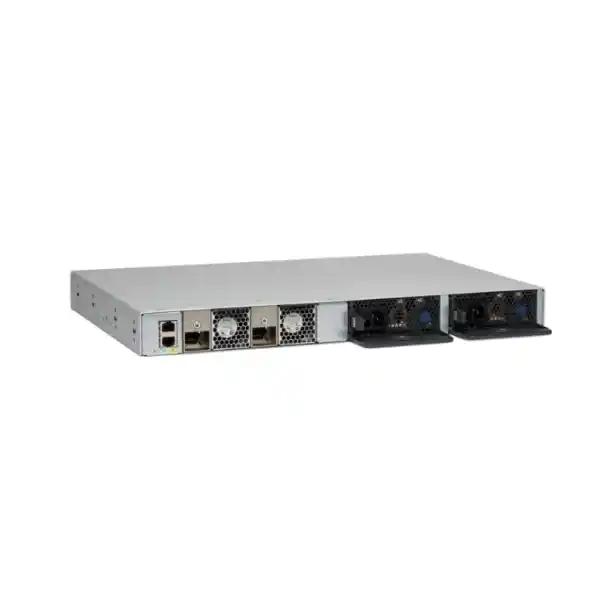
| Serviceable hardware | Two power-supply slots and two field-replaceable fans | Redundancy depends on the parts actually installed. |
| Software | Cisco IOS XE; Network Essentials and Network Advantage ordering variants | The licence suffix and subscription selection belong in the order. |
| Chassis dimensions | 4.4 × 44.4 × 35 cm, height × width × depth | Depth becomes 39.1 cm with fan FRUs and power supplies installed; allow cable clearance. |
Specifications describe the platform, not a promise that every optional component is included in a particular offer. Treat the final bill of materials as the purchase reference. A photograph or shortened product name cannot establish which uplink module, second power supply or licence entitlement will be delivered.
Understand partial PoE+ before you order
Partial PoE+ describes a shared power limitation. It does not mean that the switch has only a small fixed group of Ethernet data ports. The important question is how much power all connected powered devices can request together. A switch can have free network sockets while its available PoE budget is already committed. This distinction matters when adding access points, replacing phones or expanding camera coverage after the original installation.
Cisco documents a 370W PoE budget for this model with one supported 600W AC supply and 740W with two in the relevant AC configuration. The 600W supply rating is not the amount that can be allocated entirely to endpoints. The switch itself also requires power. Use the documented PoE budget when preparing a device schedule, and confirm the installed supplies rather than treating the power-supply label as endpoint capacity.
PoE+ supports up to 30W at an individual switch port within the overall allowance. That per-port ceiling does not imply that all 48 ports can provide 30W simultaneously. Forty-eight allocations of 30W would require 1,440W, which exceeds the documented two-supply AC budget for this partial PoE model. Likewise, an endpoint requiring more than the supported per-port power needs a separate compatibility assessment even when the total budget has spare capacity.
A worked planning example
Suppose an illustrative office schedule contains 20 phones budgeted at 7W each and six access points budgeted at 25W each. Those planning figures total 290W: 140W for the phones plus 150W for the access points. Against a 370W allowance, the arithmetic leaves 80W before further design reserve. These are hypothetical allocations, not measured consumption figures or a guaranteed endpoint count. Use each actual device’s supported maximum requirement and the switch’s allocation behaviour for the real calculation.
Include reasonable headroom for future additions and changing endpoint modes. Some devices draw different power when radios, accessories or other functions are enabled. Record the power requirement for the intended operating mode, identify essential devices and decide how power should be prioritised if available capacity falls. A budget that only fits under ideal everyday consumption can be difficult to expand and may not meet the business requirement during a fault.
Choose uplinks around the traffic path
The modular uplink bay lets you select the access-to-distribution connection separately from the 48 copper access ports. Cisco lists the C9200-NM-4G as a four-port 1G network module and the C9200-NM-4X as a four-port 1G/10G option. The choice should follow the application traffic, existing aggregation equipment and fibre infrastructure. Confirm the network module as an explicit line item rather than assuming it is included with a base switch.
A 10G uplink can provide more shared upstream capacity than a 1G connection, but it does not turn an individual Gigabit desktop port into a 10G port. Think about where traffic travels: local file transfers, shared storage, internet access, voice services and wireless clients can place different demands on the upstream connection. Existing utilisation measurements are more useful than choosing a link speed only from the number of desks.
For optical links, specify the fibre type, approximate distance, connector arrangement, speed and transceiver requirements at both ends. Check the exact optic against Cisco’s compatibility information for the intended hardware and software release. A module with the right physical shape is not sufficient evidence of compatibility. Include patch leads and any required fibre termination work in the wider project scope so the installed switch has a complete working path.
Do not select 25G or 40G modules just because they appear elsewhere in the Catalyst 9200 family catalogue. Cisco restricts the C9200-NM-2Y and C9200-NM-2Q options to the documented PXG models. For the C9200-48PL, use the supported 1G and 10G module choices described here. Where the design needs higher uplink speeds, reassess the platform and the far-end equipment together rather than relying on a family-level description.
StackWise-160 and controlled expansion
Stacking can make several compatible access switches operate as one managed system. This model supports Cisco StackWise-160, with a documented maximum of eight compatible members. That can be useful when a cabinet needs more connections while the operations team wants a coordinated management approach. Stacking is an optional design choice: a standalone switch may be appropriate where the current port requirement and maintenance approach are straightforward.
Compatibility requires more than finding another unit with Catalyst 9200 printed on the front. Confirm every member’s exact model, licence level and software compatibility. Cisco does not support mixing C9200 modular models with C9200L fixed-uplink models in the same stack. The enhanced-VRF PB variants also have specific stacking restrictions, so a stack proposal should be checked against the current release documentation for all proposed members.
Specify the correct C9200 stacking hardware and suitable cable lengths for the physical arrangement. The bill of materials should describe adapters, cables and the planned connections between members. Leave room to service the rear of the equipment and label the stack links clearly. A logical network drawing and a cabinet drawing answer different questions; both are helpful when the person preparing the order is not the person installing it.
Stacking bandwidth is a system interconnection figure, not an internet speed or an individual device throughput guarantee. Application experience still depends on access-port speed, uplinks, the traffic pattern and the wider network. Discuss member failure, maintenance windows and configuration recovery as part of the design. A stack can simplify administration, but it does not remove the need to test failure behaviour against the organisation’s actual service requirements.
Power resilience and the single-supply failure case
The chassis has two power-supply slots, allowing a second compatible supply to be included where the design calls for it. Decide what the second supply is meant to achieve. It may provide additional PoE capacity, power redundancy within a planned load, or a combination of objectives. Those objectives are related but they are not interchangeable, especially when powered devices are essential to business operations.
If the endpoint load exceeds the allowance available from one remaining supply, installing two supplies does not by itself guarantee that every endpoint stays powered after one fails. Prepare a normal-operation power calculation and a separate failure-case calculation. For this model’s documented 600W AC arrangement, use the relevant single-supply PoE allowance when evaluating the failure case. Decide which endpoints must remain operational and how the configuration will express their priority.
Trace the external power path as well. Two supplies connected to one unprotected source still share that source’s failure risk. Assess the available circuits, power distribution units, UPS capacity and required runtime with the responsible facilities team. Keep switch consumption and powered endpoint consumption in the UPS assessment, and allow for the other equipment needed to keep the service useful, including the upstream network and any local communications platform.
Request the appropriate power cords for the intended cabinet power distribution. Confirm access to supply handles, cord retention and adequate ventilation before finalising the rack layout. Cisco’s installation guidance requires an unused power-supply slot to have the appropriate blank installed for cooling. Installation and replacement should follow the current hardware instructions, including the procedure for the exact supply type. Redundant components help only when the overall power and maintenance design supports the intended outcome.
Select the licence edition with the network design
Cisco lists C9200-48PL-E for Network Essentials and C9200-48PL-A for Network Advantage. The shorter hardware name does not establish which licence edition is being purchased. Put the complete orderable part number on the quotation and match it to the functions the network will actually use. This is particularly important when adding a member to an existing stack or following an enterprise equipment standard.
Prepare a functional requirement list before choosing an edition. Describe the intended access role, any routing requirement, segmentation objectives and management expectations. Have the proposed edition checked against Cisco’s current feature information for the chosen IOS XE release. Advanced functions can depend on licensing, platform limitations and configuration; a family-wide feature list does not establish entitlement for a particular purchase.
Cisco’s current ordering guide distinguishes the perpetual Network Stack licence associated with the hardware suffix from the required aligned term software selection for new orders. Ask for the subscription product, edition and term to be itemised. Confirm support coverage, software entitlement and renewal obligations in the commercial offer. This helps distinguish quotations that appear identical from the base hardware name while supplying different software packages.
Segmentation, endpoint access and voice traffic
Give each kind of device an appropriate network role. Separate workstations, phones, guest connectivity and infrastructure management according to the organisation’s policy. Define which networks must communicate and where that communication will be controlled. A VLAN plan is a useful starting point, but meaningful separation also requires a clear design for routing, access rules and the upstream systems that enforce them.
Cisco documents IEEE 802.1X port-based authentication and DHCP snooping for the Catalyst 9200 platform. If these functions are required, validate their operation for the selected software release and authentication infrastructure. Introduce controls with a test group first. Printers, phones and other endpoints can have different onboarding needs, so assess how each device will obtain the access it requires.
Voice planning also needs the correct phone power requirement, addressing, VLAN arrangement and path to call control. Quality of Service can organise traffic treatment where congestion occurs, but it does not create bandwidth. Align policies across the network and test calls under representative traffic. Assign responsibility for administrative access, logging, configuration backup and recovery; the switch must be configured around an approved operational policy.
Common business scenarios
An office floor with wired computers and compatible IP phones is one useful planning example. Record phone-only connections, direct workstation connections and any supported workstation-through-phone arrangement. Check the actual phone capability before assuming that one switch connection can serve both devices. This model is worth evaluating when the combined endpoint power requirement is moderate and the organisation wants managed access switching.
An administration block might combine printers, reception devices, wired offices and ceiling access points. Review wireless traffic as well as the access point’s physical connection. A single access point may aggregate many users. Check its power mode and Ethernet speed: some devices suit Gigabit PoE+, while others need more power or multigigabit backhaul to meet their intended operating requirements.
A branch with many self-powered Ethernet devices and fewer PoE endpoints can have high port demand but modest power demand. Document likely additions before ordering, particularly if a refresh will replace self-powered devices with powered equipment. These scenarios describe selection questions, rather than confirmed installations or compatibility guarantees. Share the actual endpoint inventory and implementation needs so the proposed configuration can be assessed against the real environment.
When to compare another Catalyst model
If most ports need substantial PoE power, compare the C9200-48P and its supported supply configuration against the full endpoint schedule. If all endpoints have their own power, compare a suitable data-only configuration such as the C9200-48T. If access devices need speeds above Gigabit, evaluate an appropriate multigigabit model. Each comparison should begin with the workload and connection requirements.
A fixed-uplink C9200L variant may also be worth considering where its design meets the requirement. Check the differences in uplinks, stacking and serviceable components rather than comparing the port count alone. A closely related product name is not sufficient evidence that a model will integrate with an existing installation. Match the complete designation to the network design and quotation.
For an older access network, migration needs a review of fibre links, management access, existing features and the functions that must continue working. FourTeck’s Catalyst 2960-X replacement guidance provides broader migration context. The exact replacement choice still depends on the installed model and the required design; do not treat this partial PoE switch as an automatic substitute for every older 48-port switch.
Cabinet fit, cabling and site preparation
Check usable cabinet depth with components installed, then add room for connectors, cable bends and maintenance access. Cisco lists a 35 cm chassis depth that becomes 39.1 cm with fan FRUs and power supplies installed. External cabinet dimensions do not establish usable working clearance once rear power distribution, patch leads and door space are considered. Assess the actual rack arrangement before delivery.
Review the cable plant before migration. Label patch-panel positions, identify uncertain links and record connections that cannot be interrupted during normal working hours. A switch upgrade will not repair a damaged cable termination. Investigate the entire path for links that negotiate below the intended speed or show errors, including patch leads, wall outlets, patch panels and the endpoint interface.
Assess airflow, ambient conditions and physical access against Cisco’s installation requirements. Keep ventilation paths clear and select an appropriate network environment for fan-cooled equipment. Define whether rack work, fibre preparation, patching, configuration and testing are required as part of the project. For a Tanzania deployment, provide the actual site location, cabinet details, access requirements and preferred change window so the implementation scope can be confirmed.
A migration sequence that is easy to verify
First capture the present port assignments, VLANs, uplinks, management addressing and service dependencies. Back up the existing configuration through the organisation’s approved process. Identify critical devices and agree who can confirm that their services work after the move. Record unusual settings while the old network remains available for investigation, rather than trying to reconstruct them during a production interruption.
Next stage the proposed equipment. Verify the received model, supplies, licence edition, network module and accessories against the order. Prepare the configuration and test representative endpoints in a controlled environment. Where stacking is planned, validate the intended members, software and links before moving production cables. Keep a documented rollback method available throughout the agreed change window.
During cutover, move connections in a sequence that makes faults easy to isolate. A link light is only one observation: confirm addressing and application access, plus phone or wireless service where relevant. Save the final configuration and update the port schedule after acceptance. Hand over installed hardware details, backup procedures and authorised access information so another administrator can understand the system without relying on the installer’s memory.
Acceptance checks after installation
Define success before the new switch becomes the only path to production services. Check representative wired devices across the relevant segments and confirm their expected link speeds. Test address assignment and the business applications users need. Where a device is intentionally isolated, verify its permitted connections and the approved restrictions. This evaluates the delivered design instead of merely counting active ports.
For powered endpoints, compare reported available and allocated power with the design schedule. Confirm each selected device operates in its intended mode. If a resilience test is required, agree a controlled procedure and maintenance window before simulating a failure. A system that works with every supply present and a light workload has not yet demonstrated the required failure behaviour.
Check uplink operation, error counters and traffic behaviour during representative use. Where the design includes redundant paths or a stack, verify the intended topology and approved failover behaviour. Record a baseline for later troubleshooting. Acceptance should also establish that authorised staff can manage the switch, review relevant logs and recover the configuration, with credentials handled through the organisation’s approved process.
Prepare a complete configuration enquiry
Send FourTeck Tanzania a brief network summary with the required switch quantity, number of wired connections and list of powered endpoints. Include exact device models where possible, their intended operating modes and any expected expansion. State which services are essential during a power or link fault. This information helps turn a general product enquiry into a configuration that can be checked line by line.
Provide the uplink speed, fibre type, distance and far-end equipment. Identify whether the switch will operate alone or join a stack, and provide existing member models, licence levels and software details for a stack addition. Include the cabinet dimensions, power distribution arrangement and any UPS requirement. Describe routing, access-control and management needs in functional terms if the preferred licence edition has not yet been decided.
Ask the quotation to separate hardware, network module, transceivers, additional supply, stacking accessories, software subscriptions and support. Confirm whether any installation, configuration or training work is included. Request current pricing, availability, delivery terms and warranty details for the exact offer. These commercial points need confirmation in the quotation and should not be inferred from the platform specification.
Plan the first year of operation
Agree how the switch will be monitored after handover. Useful observations include uplink utilisation, interface errors, changes in powered-device allocation and the state of installed supplies and stack links. Decide who receives operational alerts and how they distinguish a service-impacting fault from a routine change. Establishing this ownership early helps ensure that warning signs are investigated while there is still time to act.
Keep an accurate inventory of connected devices as desks, phones and wireless equipment change. An installation that starts comfortably within its power allowance can become constrained through several small additions. Review the device schedule before adding powered equipment, and update labels whenever connections move. Record the intended role of spare ports so that expansion follows the network design instead of creating an undocumented mixture of functions.
Create a software maintenance process that includes release suitability, configuration backup, a change window and a recovery plan. The newest available release is not automatically the right release for an established environment. Check the required feature support, known restrictions and operational guidance before scheduling an update. Where a support agreement is needed, confirm its scope and entitlement as part of procurement rather than waiting for an incident.
Retain the final quotation, installed part numbers, serial information and configuration records in the organisation’s approved system. Document which components are optional and what would be needed to expand capacity later. This makes a future supply replacement, uplink change or additional stack member easier to assess, and gives the next administrator a clear starting point when reviewing the installation.
Compare quotations on the same basis
Two offers using the same shortened switch name may describe different deliverables. Create a simple comparison showing the complete hardware designation, licence edition, subscription term, primary supply, secondary supply, network module and optics. Include quantities for each item. This prevents a lower base price from obscuring components that still need to be purchased before the network can be connected.
Check the proposed support and implementation scope separately. Ask which activities are included in configuration, installation and acceptance, and which remain the customer’s responsibility. Confirm the relevant warranty terms for the supplied equipment and any service agreement that the project requires. Avoid treating a general reference to support as evidence of a particular response time, replacement arrangement or coverage period.
Finally, compare each proposal against the same endpoint schedule, traffic needs and failure requirements. A technically complete quote should explain the assumptions that influence capacity and resilience. If the proposals use different power supplies, uplink speeds or licence editions, resolve those differences before choosing solely on price. The goal is a documented configuration that fits the network and can be verified when the equipment arrives.
Frequently asked questions
Does partial PoE+ mean only some ports carry data?
No. This model has 48 Gigabit copper access ports. Partial PoE+ describes the shared power provision for powered devices. Count Ethernet connections and power requirements separately; a free network port does not prove that spare PoE capacity remains.
Can all 48 ports provide 30W at once?
No. That would require 1,440W of allocated port power. Cisco’s documented AC configuration provides 370W with one supported 600W supply and 740W with two. The individual port limit and the shared budget both apply.
Are 10G uplinks built into the base switch?
The C9200-48PL uses a modular uplink design. Specify the supported C9200-NM-4X module for the relevant 1G/10G uplink option and confirm compatible optics. Do not assume the module or transceivers are included unless they appear in the offer.
Can this switch join a C9200L stack?
No. Cisco does not support mixing modular C9200 and fixed-uplink C9200L models in one stack. For a proposed C9200 stack, check every member’s exact model, licence level, software compatibility and applicable restrictions.
Will it power any wireless access point?
Compatibility depends on the access point’s power requirement, supported PoE mode and Ethernet speed, plus the switch’s remaining budget. Check the exact model. Some newer access points need higher power or faster Ethernet than this switch’s Gigabit PoE+ access design provides. See FourTeck’s Cisco wireless access point guidance for broader selection questions.
Is a second supply enough to guarantee uninterrupted service?
No. Assess the load that one remaining supply can sustain, the external power sources and the other equipment needed by the service. Define and test the required failure behaviour. Two installed supplies can provide extra capacity without guaranteeing every endpoint survives a supply failure.
Which licence edition should I request?
Request a configuration review against your required functions. The -E variant identifies Network Essentials and -A identifies Network Advantage. Include the aligned software subscription selection and check licence consistency when expanding an existing stack.
How do I get a price for Tanzania?
Request a quotation for the complete configuration, including modules, power supplies, optics, software and any required services. Current price, stock, delivery, warranty and support terms must be confirmed for that offer rather than assumed from the product name.
Request your C9200-48PL configuration quote
Send FourTeck Tanzania your endpoint inventory, expected PoE load, uplink details, licence requirements and deployment location. Ask for a complete bill of materials with current commercial terms. A clearly specified configuration gives your team a practical basis for comparing the offer, preparing the cabinet and checking the installation before it becomes part of your production network.




Reviews
There are no reviews yet.