
FOURTECK TANZANIA • ENTERPRISE ACCESS SWITCHING
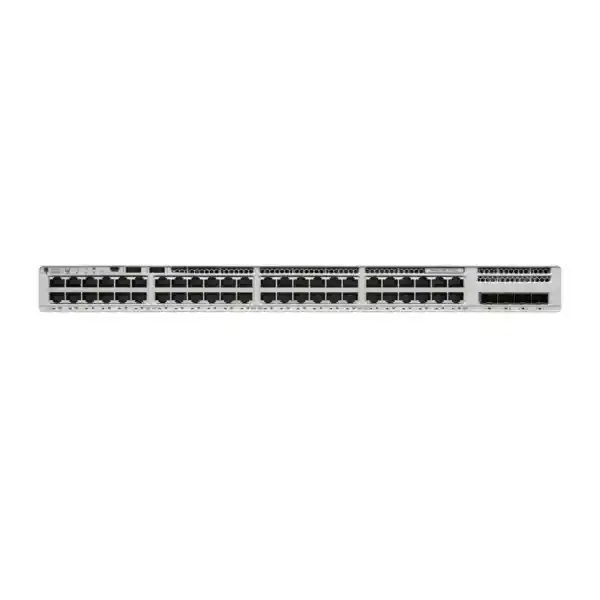
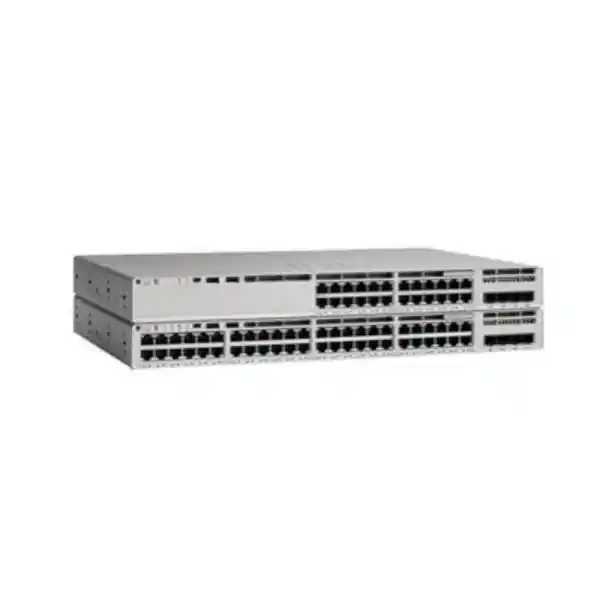
Cisco Catalyst C9200-48T Network Switch
Connect a busy office, teaching environment or branch LAN with 48 Gigabit Ethernet data ports and an uplink configuration matched to your network. This modular Catalyst access switch suits organisations that need managed wired connectivity for devices with their own power source. Request a configuration-based quotation from FourTeck Tanzania, including the licence edition, uplink module, optics and any resilience accessories your deployment requires.
Modular 1G / 10G uplinks
StackWise-160 support
No PoE output
Choose around your actual access-network requirement
A strong fit for wired users
Consider this model when desktops, printers and other independently powered devices need centrally managed connections. Map the outlets that will be active at handover and reserve capacity for growth, rather than using the building’s total outlet count as the only sizing measure.
Plan a different power solution
IP phones, cameras and wireless access points often depend on PoE. This data-only switch cannot supply that power. Inventory each endpoint’s power arrangement before choosing between a separate power solution and a switch designed for the required PoE standard and budget.
Build a complete uplink design
The removable uplink module lets the order reflect the upstream connection. Choose the speed, optical media and resilience arrangement together. A matching connector alone does not establish compatibility with the distribution switch, installed fibre or selected software release.
Technical snapshot
| Item | Verified platform detail |
|---|---|
| Access interfaces | 48 RJ-45 Ethernet ports supporting 10/100/1000 Mbps. |
| Ethernet power | Data-only access ports; no PoE or PoE+ output. |
| 1G uplink option | C9200-NM-4G: four 1 Gigabit uplink ports. |
| 1G / 10G uplink option | C9200-NM-4X: four 1G/10G uplink ports. |
| Switching capacity | 176 Gbps; Cisco lists 336 Gbps with stacking. |
| Forwarding rate | 130.95 Mpps; Cisco lists 250 Mpps with stacking. |
| Stacking | StackWise-160; up to eight compatible members with the required hardware and configuration. |
| Hardware serviceability | Two power-supply slots and two field-replaceable fans. |
| Operating system | Cisco IOS XE; select a supported release for the intended configuration. |
| Orderable licence variants | C9200-48T-E: Network Essentials. C9200-48T-A: Network Advantage. |
Published switching and forwarding figures describe different platform measures. They are not a promise of application throughput, internet speed or the capacity of any single uplink. Evaluate the selected module, traffic pattern and upstream equipment when sizing the complete path.
Start with ports, endpoint power and the network role
Begin with a simple schedule of the equipment that will connect to this cabinet. Record each device type, its location, the outlet identifier, its expected connection speed and how it receives power. This prevents a common procurement error: ordering enough Ethernet sockets while overlooking that several endpoints also need electricity through those sockets. Include any planned printers, meeting-room devices or additional desks in the same schedule.
A 48-port access switch can consolidate a substantial group of wired connections, but port density is only one part of the decision. Determine where the default gateways will sit, where security policies will be enforced and which upstream devices carry traffic towards shared applications. This establishes whether the access layer primarily extends VLANs or also participates in the routing design. Have the engineer map required functions to the chosen licence and software release.
For a Tanzania project, the initial brief should also identify who owns the LAN, who approves addressing changes and who will operate the switch after handover. Those answers affect implementation scope and documentation. They do not depend on the number of ports purchased, yet missing ownership can delay a technically straightforward installation.
Specify the uplink module before comparing quotations
The modular uplink design is a central reason to select this platform. A purchase description that stops at the base switch name leaves an important connection decision unresolved. The four-port 1G module and four-port 1G/10G module support different upstream requirements. List the chosen module as an explicit line item, and separately identify any transceivers or direct-attach cable assemblies that the design requires.
Choose media from the actual route between cabinets. Record the fibre type, connector arrangement, patch-panel path and approximate link length. Identify the equipment and port type at the far end. Ask the implementation engineer to verify the complete combination against Cisco compatibility information for the selected release. Reusing an existing optic should be a checked decision, especially when migrating from another switch generation.
Cisco lists 25G and 40G modules within the wider product family, but those options are restricted to specific PXG models and are not options for this data-switch model. If the access design requires uplinks above 10G, reassess the platform before purchasing. This avoids treating a family-level accessory list as evidence that every accessory fits every chassis.
Size upstream capacity around shared traffic
A cabinet of user devices does not automatically need every port to transmit at its maximum rate simultaneously. Equally, a lightly used office design can become unsuitable when the same cabinet starts supporting large file transfers, desktop imaging or shared storage access. Describe the busiest expected activity and where that traffic travels, rather than selecting an uplink speed from user count alone.
For example, users working mainly in remote business applications may be constrained by the WAN connection or firewall. A laboratory moving large datasets to local servers can place much more pressure on the link to the distribution layer. These are planning examples, not measured performance claims. The useful question is which shared link will carry simultaneous traffic during the busiest practical period.
Where several physical uplinks are proposed, define their intended use and the compatible configuration at both ends. Aggregated links do not guarantee that one application flow will use the sum of all member speeds. The design should state how traffic is distributed, which failure conditions it must tolerate and how the result will be tested. Include normal operation and a degraded-link condition in the acceptance plan.
Choose the licence edition from required functions
The -E and -A suffixes identify Network Essentials and Network Advantage respectively. Avoid choosing the edition simply because the chassis and port count appear identical. Write down the intended switching, routing, segmentation and management functions, then verify their entitlement and platform support. A feature assumed during procurement can become a design constraint during commissioning.
Cisco’s current ordering guide requires a Network Stack licence and a Cisco Catalyst or Cisco DNA Software subscription at initial purchase. The Network Stack entitlement is perpetual and included according to the hardware suffix; the software subscription is a separate term selection. Have the quotation identify the subscription type, tier and term clearly. Do not treat an unspecified subscription as included merely because a base hardware description is present.
Keep support coverage and software subscriptions as separate commercial questions. Ask what each quoted item provides, which account will hold the entitlement and who manages renewal decisions. If an existing management environment is involved, provide its version and deployment model for compatibility review. Account assignment and entitlement records should be available to the customer’s nominated administrator at handover, with responsibilities agreed before the order is placed.
Plan stacking as a defined architecture
StackWise-160 can bring compatible switches into one logical system with shared management. Cisco supports up to eight compatible stacking-capable members, subject to the documented model restrictions, matching licence levels and compatible software. This makes stacking a design option for increasing access-port density in a cabinet, rather than a reason to assume that any nearby Catalyst switch can join.
The C9200-STACK-KIT and appropriate stack cables must be addressed in the bill of materials. Do not combine this platform with C9200L switches in a stack. Some other C9200 variants have additional restrictions, so provide exact existing part numbers before planning an expansion. Confirm member compatibility individually instead of relying on the shared 9200 family name.
Agree the physical order, member numbering, active-switch preference and cable route before installation. A clear cabinet elevation helps the operator associate interface names with actual equipment. Plan a complete ring where the approved design calls for one, and document how the team will check its state. Leave enough access to inspect connectors and replace a component without disturbing unrelated cabling.
Stacking can simplify administration, but it does not remove the need for failure planning. Test the consequences of losing a member or stack connection, including the endpoints attached to the affected hardware. State acceptable disruption for each business service. A resilient topology needs a practical recovery procedure and maintained documentation as well as compatible equipment.
Design power continuity beyond a second power supply
The chassis has two power-supply slots, allowing the power design to include a secondary compatible supply. The exact supplied units must appear in the quote. Two available slots are not evidence that two supplies ship with a particular offer, and a power-supply rating is not a statement of constant energy use.
If two supplies are selected, examine their upstream dependencies. Connecting both to the same unprotected outlet can leave a shared point of failure. Review the rack power distribution, available UPS capacity and desired runtime with the team responsible for the premises. The switch, upstream network and business-critical endpoints must be considered together; keeping one device powered does not preserve an end-to-end service on its own.
For independently powered phones, cameras or access points, document where their power originates and what backup it has. This is especially relevant when a data-only switch replaces equipment that previously supplied PoE. A working Ethernet link does not establish that the endpoint will remain operational during a supply interruption. Include controlled recovery after power returns in the deployment checklist.
Prepare the rack and cabling for maintainable operation
Confirm the rack position, available depth, mounting arrangement and access to both sides of the cabinet before scheduling the work. Follow Cisco’s installation guidance for mounting, grounding and ventilation. The field-replaceable fan design helps component servicing, but the installation still needs suitable airflow and a physical environment within the manufacturer’s operating limits.
Check how 48 patch leads will be dressed around the front of the switch. Poor cable management can obscure port indicators, strain connectors and make later changes slower. Use a patch schedule that relates each switch interface to a patch-panel port and room outlet. Label the uplinks separately so that routine desk moves do not disturb a shared connection.
Inspect existing copper channels before attributing a connection problem to the new switch. Damaged patch leads, poor terminations and undocumented intermediate connections can limit a device’s negotiated speed or cause errors. Record the initial link status and error counters during commissioning, and investigate unexpected results. The objective is a usable access network with a traceable physical path, rather than a rack that merely powers on.
Define VLANs and security boundaries before migration
Document which groups of endpoints should share a network and which should be separated. Typical planning categories might include staff devices, guest access, building systems and management interfaces. These examples describe possible policy boundaries; the correct grouping depends on the organisation’s applications and security requirements. Use an agreed VLAN and addressing schedule so that installers and administrators work from the same design.
Decide where traffic between those groups will be inspected and controlled. Creating separate VLANs does not by itself define every permitted connection. Record required access to DNS, authentication, printing and business applications, along with any restrictions. Have the engineer translate the approved policy into the appropriate switching, routing and firewall configuration for the licensed platform.
Test representative journeys across those boundaries. A staff computer may need a shared printer while a guest device should reach only authorised services. A management workstation needs a different access path from a normal user desk. Written examples are useful acceptance criteria because they make the intended result understandable to both technical staff and the business owner.
Introduce access authentication with endpoint awareness
Cisco documents IEEE 802.1X port-based authentication for the Catalyst platform. Deploying it requires the surrounding authentication design, including a suitable RADIUS service and endpoint preparation. Treat the switch as one component of that system. An authentication capability is useful only when its policy, identity source and failure behaviour are understood.
Before enabling a policy broadly, inventory devices that may not behave like managed laptops. Printers, specialist appliances and shared-room equipment can require different handling. Agree the authorised approach for each class and test it on representative ports. Avoid applying a blanket template to the whole cabinet without checking feature interactions and restrictions in the guide for the selected release.
Also decide what should happen when the authentication service is unavailable. The answer involves both availability and access control, so it should be approved by the relevant owners. Record how support staff identify a failed authentication, how they distinguish it from a cabling problem and how exceptions are reviewed. A staged rollout with observable results gives the team a clearer route to reliable enforcement.
Apply protection features with a recovery plan
DHCP snooping is one example of a documented access-layer control that requires deliberate configuration. Its trust boundaries must align with the legitimate DHCP path. Simply enabling a feature without understanding the topology can interrupt address assignment. Confirm configuration guidance for the software release actually being deployed, especially when updating a template inherited from older equipment.
Use a change plan that identifies the intended protection, the dependent services and the signs of an incorrect result. For addressing controls, test a newly connected client as well as an already connected one. For access policies, verify both an allowed connection and a blocked attempt. Keep a recovery method available to the engineer performing the change.
Administrative access deserves the same care as endpoint access. Decide which management hosts and accounts can reach the switch, how configuration changes are recorded and where logs are reviewed. Restrict access according to the organisation’s operating policy. These implementation decisions should be discussed in the project scope; purchasing managed hardware alone does not create a maintained security configuration.
Common deployment scenarios
Office access refresh
An organisation expanding its wired desks can use this platform where devices have independent power and the upstream design fits the modular uplink options. Begin with the active outlet schedule, application traffic and future seating plan. Include any new meeting-room or reception equipment before reserving spare ports.
Teaching and laboratory networks
A teaching space or computer laboratory may need many managed data connections in one cabinet. Evaluate how software deployment, shared resources and concurrent lessons affect traffic. Keep administrative, teaching and visitor requirements explicit, and test the busiest expected workflow before accepting the final configuration.
Branch or departmental cabinet
A branch can benefit from a documented access layer that aligns with central administration. Establish the WAN and firewall responsibilities, remote management path and local recovery procedure. The design should explain what local staff can check when remote access is unavailable and which faults require escalation.
Compare nearby models by the requirement they solve
Choose a suitable PoE platform when the access switch must power endpoints. The C9200-48P belongs to the PoE+ side of the family, but any alternative still needs its own port-power and total-budget review. Do not make a substitution solely from a similar model name. The requirement should state the number and power class of connected devices, including planned additions.
Compare C9200L alternatives when a fixed-uplink design meets the project requirements. Fixed and modular platforms differ in their accessory and stacking arrangements, so compare complete configurations rather than just chassis prices. Conversely, if the project needs higher-speed access ports or uplinks outside this model’s scope, define those requirements early and select a platform that supports them.
A smaller port count may be appropriate for a lightly populated cabinet, while a larger multi-switch design may fit a concentrated access area. Consider cabinet locations and cable routes alongside total port count. Buying extra capacity in the wrong room can create awkward interconnections later. A useful comparison therefore accounts for endpoint location, upstream connectivity, power needs and administration together.
Replace an older switch with a controlled transition
Begin a replacement by exporting the current configuration and documenting what each active port serves. Identify uplinks, VLANs, management addressing and any policy exceptions. Review the configuration for relevance instead of assuming that every historical setting should move forward. An upgrade is a useful opportunity to remove abandoned port assignments and correct unclear descriptions.
Stage the new equipment before the maintenance window. Verify the intended software, selected module, entitlements and management access. Prepare a patching sequence and keep the previous configuration available to the engineer. Agree a rollback trigger with the business owner so that an unresolved issue does not turn a planned change into an open-ended outage.
After moving representative endpoints, check their actual applications and shared services. Then proceed through the remaining groups using the patch schedule. Record exceptions as they occur. Teams replacing a legacy access estate can also use FourTeck’s Catalyst 2960-X replacement planning guidance to frame the wider migration discussion. The final choice still requires an exact comparison of the existing switch and the proposed configuration.
Make handover evidence useful to the operating team
Agree the acceptance checks before installation begins. They should include the expected port speeds, correct VLAN placement, management access and successful use of agreed applications. For uplinks and any stack, capture the operational state and investigate unexpected warnings. Where resilience is in scope, perform approved failure tests and record the observed service impact.
The handover pack should relate physical equipment to the logical network. Request the final port schedule, cabinet diagram, management addressing, software version and configuration backup. Keep entitlement records and support responsibilities alongside the equipment inventory. Ensure the customer knows where these records are held and who maintains them after subsequent changes.
Give support staff practical fault information. A link-down alert, authentication failure and unavailable application do not indicate the same problem. A concise escalation guide can help distinguish physical connectivity from addressing, policy and upstream faults. Include the approved method for obtaining console access if normal management connectivity is lost, and keep administrative credentials in the organisation’s authorised credential system.
Leave practical port capacity for day-to-day changes
Build the port schedule from active connections and planned changes. As an illustrative exercise, a team expecting 36 desks and four shared devices has 40 immediate data connections, leaving eight of the 48 access ports before any further additions. That arithmetic does not establish the right reserve for every site, but it makes assumptions visible. Add meeting spaces, temporary users and equipment that may have been omitted from the initial desk list.
Allow the organisation to choose an appropriate growth margin. A department expecting more staff needs a different reserve from a stable equipment room. Consider whether new connections will be concentrated in this cabinet or distributed elsewhere. Spare switch ports have limited value when there is no suitable cable route to the intended endpoint.
Keep the capacity record current after installation. Record reserved interfaces separately from unused ones and remove obsolete assignments through the normal change process. When an additional device is proposed, the operator should be able to see whether there is an available outlet, a usable switch port, sufficient upstream capacity and an appropriate power arrangement. This prevents a small desk change from becoming an unexpected network redesign.
Check application behaviour across the complete path
List the business services that must work after commissioning and identify representative users for each. A successful ping is useful evidence of basic connectivity, but it does not confirm that a user can sign in, print, transfer a file or complete a business transaction. Choose checks that reflect the actual working day and include dependencies such as authentication and name resolution.
Where voice or interactive applications are carried over the wired network, review traffic classification and prioritisation as part of the wider design. Policies need to be consistent across the devices that carry the traffic. Prioritisation cannot replace missing link capacity, repair a poor WAN connection or provide electrical power to a phone on a data-only port.
If users report inconsistent performance, collect evidence about when it occurs and which paths are affected. Compare local and remote application behaviour, interface errors and shared-link utilisation before making changes. This gives the engineer a concrete starting point and helps separate access-network issues from server, wireless or service-provider constraints. Record the agreed application checks in the handover report so later troubleshooting has a baseline.
Keep software and recovery responsibilities clear
Assign an owner for reviewing software maintenance and scheduling changes. The most recently published release is not automatically the appropriate choice for every existing network. Select a supported release after reviewing its platform coverage, feature dependencies, known issues and compatibility with the management environment. Avoid making a release decision from the hardware name alone.
Before an upgrade, retain the approved configuration backup and document the recovery approach for the actual deployment. A standalone unit and a multi-member stack require different operational planning. Confirm console access, maintenance-window ownership and the criteria for proceeding or reverting. The business should know which services could be affected and who will assess them during the change.
Afterwards, verify the expected software state, management reachability, uplinks and representative applications. Update the inventory and saved documentation with the result. Routine maintenance is easier when the original quotation, entitlement details, configuration records and acceptance evidence remain available to the operating team. Discuss any ongoing maintenance requirement as a defined service scope, with commercial terms confirmed separately for the project.
Prepare a configuration-based Tanzania quotation
Send the project quantity, target site requirements and intended access role with the enquiry. Include the desired licence tier if it has already been approved; otherwise supply the functions that need verification. State whether the order is for a new standalone switch, a new stack or an expansion of existing hardware. For an expansion, provide exact member part numbers and software information.
Ask the commercial response to distinguish the chassis, licence and subscription, uplink module, transceivers, stacking hardware, secondary supply and any implementation work. This makes competing offers easier to compare and helps reveal omitted dependencies. It also allows optional resilience items to be considered deliberately rather than appearing as assumptions after purchase.
Confirm current price, tax treatment, stock status, lead time, product condition and applicable support terms in the quotation. Those details depend on the actual offer and are not established by the platform name. If delivery or commissioning is needed at a Tanzania project location, state the destination and requested scope so that feasibility and commercial terms can be confirmed for that enquiry.
Buyer questions
Does this switch provide PoE for phones or access points?
No. The T model has data-only access ports. Endpoints need an appropriate independent power source, or the project should use a suitable PoE switch. Check each device’s required standard and power demand before choosing an alternative. A voice VLAN configuration does not supply electrical power.
Are the 10G uplink ports built into the base chassis?
The platform uses a removable uplink module. The C9200-NM-4X provides the listed 1G/10G uplink option; confirm that module and any required optics in the offer. The base model name alone does not confirm what uplink hardware a quotation includes.
What is the difference between the -E and -A variants?
The suffix identifies Network Essentials or Network Advantage. Match the edition to the functions your design needs and verify the associated subscription selection. Provide the required routing, segmentation and management functions with the enquiry so that the edition can be checked before purchase.
Can this switch join a stack of C9200L models?
No. Cisco does not support mixing C9200 and C9200L switches in one stack. Any proposed stack expansion should be reviewed using the exact member models, licence levels, compatible software and required stack hardware. Similar names do not establish stacking compatibility.
Will the published switching capacity make my internet faster?
The platform’s switching figures do not set the speed of your internet service. Application performance also depends on endpoint links, uplinks, congestion, servers, firewall processing and the WAN path. Identify the actual constraint before using a hardware replacement as the answer to a performance problem.
Can existing fibre and transceivers be reused?
Potentially, following compatibility checks. Provide the transceiver part numbers, fibre type, route length, connectors and far-end equipment. Ask the engineer to verify support for the selected switch, module and software release. Reuse should be confirmed before the migration window, with alternatives identified where necessary.
What should I send to obtain an accurate quote?
Provide quantity, endpoint types, power requirements, uplink speed, existing network details and the destination. State any stacking, redundant-power, licensing or implementation requirements. If some decisions remain open, describe the business need so the configuration can be resolved before an order is agreed.
Request your C9200-48T configuration and quote
Share your port count, endpoint power needs, upstream connection details and required licence functions with FourTeck Tanzania. Include the quantity and any existing stack information. Ask for a written bill of materials that identifies the switch variant, subscription, uplink module, optics and selected resilience accessories, with current commercial terms confirmed for your project.
Next step: request a configuration-based quotation for your Tanzania deployment.




Reviews
There are no reviews yet.