
Modular uplinks
StackWise-480
Cisco IOS XE
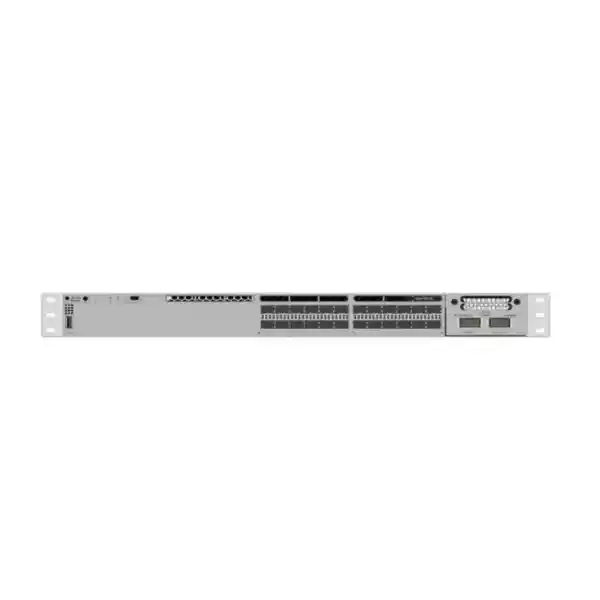
Cisco Catalyst C9300-24S Network Switch
The Cisco Catalyst C9300-24S is a stackable enterprise switch for organizations that need a high density of 1 Gigabit Ethernet fiber connections without PoE on the access ports. Its 24 SFP downlink interfaces make it especially relevant where the network design depends on fiber between buildings, floors, cabinets, industrial zones, security-network aggregation points, or other locations in which copper distance and electrical-isolation limits are undesirable. The platform combines those fiber-facing ports with a modular uplink architecture, StackWise-480 stacking, redundant power-supply capability, and the Cisco IOS XE software environment.
For buyers in Tanzania, the important decision is not simply whether the C9300-24S has enough ports. A complete design should also identify the required SFP optics, fiber type and distance, uplink speed, software license tier, stacking plan, power redundancy, rack depth, management approach, and future bandwidth requirements. FourTeck Tanzania can use these details to help define the correct bill of materials for a new deployment or an upgrade project. Pricing, stock, lead time, transceiver inclusion, warranty coverage, and support entitlement should be confirmed for the exact quotation rather than assumed from the chassis model alone.
What the C9300-24S is designed to do
Cisco positions the Catalyst 9300 family as a stackable enterprise switching platform for campus access and related enterprise networking roles. The C9300-24S is the fiber-oriented 24-port member of that family. Instead of 24 copper RJ-45 user ports, it provides 24 one-gigabit SFP interfaces. That distinction matters because it changes the physical network design: endpoint or downstream-switch connections normally require compatible optical or copper SFP transceivers, and PoE-powered devices such as many access points, IP phones, and cameras cannot receive power from these SFP interfaces.
This makes the model a strong candidate when the design calls for many 1G fiber links, for example between communications rooms, remote cabinets, access switches, security-system aggregation points, process or utility areas, and campus buildings. It can also fit selected aggregation designs where 1G downstream fiber density and modular higher-speed uplinks are more important than multigigabit edge access. Whether it belongs at the access or aggregation layer should be determined by topology, oversubscription, resilience, routing, and growth requirements rather than by the product name alone.
The platform also addresses operational growth. StackWise-480 allows multiple compatible C9300 switches to operate as one logical stack, while the modular uplink slot lets the deployment team choose an uplink module appropriate to current requirements. This combination can simplify a staged rollout: the organization can begin with a practical port count and uplink design, then expand the stack or change the uplink module when the campus or branch grows. Compatibility, software level, licensing, optics, and stacking rules should be checked before expansion.
Verified platform highlights
| Downlink interfaces | 24 × 1 Gigabit Ethernet SFP ports |
|---|---|
| Uplink design | Modular uplink slot for supported Catalyst 9300 network modules |
| Standalone switching capacity | 208 Gbps |
| Standalone forwarding rate | 154.76 Mpps |
| Stacking | StackWise-480, up to eight compatible members |
| Power architecture | Two power-supply slots; Cisco documents a 715W AC supply as the default for this model |
| PoE | No PoE on the C9300-24S SFP downlink ports |
| Software environment | Cisco IOS XE; feature availability depends on software release and license |
| Ordering choices | Network Essentials (-E), Network Advantage (-A), and Meraki-managed (-M) variants are listed by Cisco for the C9300-24S family |
The figures above describe the platform and should not be interpreted as a complete quotation. Uplink modules, transceivers, stacking cables, secondary power supplies, software subscriptions, support, mounting accessories, and other deployment items depend on the exact order configuration.
Why 24 SFP ports can be valuable in a Tanzanian network
Fiber is often selected when network links need to cover distances beyond practical copper Ethernet runs, cross between buildings, pass through electrically noisy environments, or provide a cleaner separation between different electrical zones. A 24-port SFP switch concentrates many such links in a single rack unit and lets the engineer select optics according to distance, fiber plant, and connector requirements. In a business campus, this can mean terminating fiber from several buildings or floors into one managed switching platform. In a security network, it can mean aggregating remote camera-network switches rather than powering cameras directly. In a branch or operations environment, it can support fiber handoffs to remote equipment rooms or service areas.
The value of an SFP-based platform depends on matching the optics correctly. Single-mode and multimode fiber are not interchangeable design decisions, and the optical budget, wavelength, connector type, supported reach, patching method, and installed fiber condition all matter. The safest procurement process starts from the link schedule: identify every destination, required speed, approximate path length, fiber type, number of strands, resilience requirement, and connector format. Then select Cisco-supported or otherwise approved transceivers that match the design and the exact software/hardware compatibility requirements.
This approach is particularly important when upgrading an older network. Existing fiber may be reusable, but that should be verified rather than assumed. The presence of an LC patch panel does not by itself confirm fiber category, loss budget, or suitability for the intended optic. A site survey or validated fiber documentation can prevent a switch purchase from being delayed by incompatible optics or cabling. The C9300-24S gives the network team flexibility at the switch edge, but the complete link is only as reliable as the chosen transceivers and physical fiber plant.
Important: this is not a PoE access switch
The C9300-24S should not be selected merely because a project needs 24 network ports. Its 24 downlinks are SFP interfaces, and Cisco identifies the model as having no PoE output. If the project needs to connect and power desk phones, wireless access points, IP cameras, door controllers, or other powered Ethernet devices directly from the switch, a PoE-capable Catalyst model may be a better fit.
The C9300-24S can still participate in networks that contain PoE devices. A common design is to use fiber from the C9300-24S to remote PoE access switches, which then provide copper Ethernet and power near the endpoints. This can be useful in multi-building campuses, warehouses, compounds, educational facilities, industrial sites, and large office environments. The correct design depends on port density, power budget, redundancy, fiber routes, cabinet locations, and the failure domain the network team wants to create.
Modular uplinks: size the northbound capacity for the real traffic
One of the practical advantages of the modular-uplink C9300 platform is that the uplink interface is not fixed to one speed combination at the factory. Cisco documents several Catalyst 9300 network modules, including a four-port 1G SFP module, an eight-port 1G/10G SFP+ module, a two-port 40G QSFP+ module, a two-port 25G SFP28 module, and a four-port multigigabit copper module. Exact module support, transceiver compatibility, and software requirements should be checked for the intended configuration before purchase.
Choosing the uplink is a traffic-engineering exercise. If many 1G fiber downlinks can be active at the same time, a low-capacity uplink can create a bottleneck long before the switch itself reaches its forwarding capability. The network designer should estimate normal and peak traffic, account for east-west traffic that may remain local to the stack, and identify northbound traffic toward the core, firewall, servers, internet edge, storage, or data centre. Redundant uplinks may also be required, which affects the number and type of interfaces needed.
Future growth deserves equal attention. A project that begins with ten lightly used 1G fiber links may later carry video, backups, cloud traffic, voice, business applications, or additional downstream switches. Selecting a modular uplink path creates room to adapt, but the initial bill of materials should still be coherent. Confirm the network module, required transceivers, fiber patching, port-channel design, upstream-switch compatibility, and whether the proposed uplink speed is supported end to end.
StackWise-480 for expansion and operational simplicity
Cisco documents StackWise-480 on the modular-uplink C9300 models, including support for stacks of up to eight compatible switches. In a properly designed stack, multiple physical units operate as one logical switching system with a common management and control framework. For an organization that expects port growth, this can be more operationally convenient than treating every switch as an unrelated standalone device.
For the C9300-24S, Cisco lists 208 Gbps standalone switching capacity and 154.76 Mpps standalone forwarding rate. Cisco also publishes 688 Gbps switching capacity and 511.90 Mpps forwarding rate figures for this model when stacking is included in the platform calculation. These numbers are useful for platform comparison, but a real deployment should be sized from application traffic, uplink design, oversubscription, routing, security features, packet sizes, and resiliency requirements instead of relying on a single headline performance value.
Stacking also requires discipline. Cisco documents compatibility and license-level rules, and the stack members need compatible software. The project should therefore standardize the intended license level, validate the proposed mix of C9300 models, select the appropriate StackWise cables, and plan software lifecycle management before installation. A stack is not simply a physical pile of switches; it is a shared operational system that should be documented, backed up, monitored, and maintained as a unit.
StackWise can also influence the physical rack layout. Cable length, switch placement, service access, power-feed arrangement, and the position of uplink modules all matter. For a new rack, design the stack and cable path before mounting equipment. For an existing rack, verify available depth, airflow, power capacity, and service clearance. Good physical planning reduces accidental cable stress and makes later switch replacement or maintenance more predictable.
Power resilience and StackPower considerations
The C9300-24S provides two power-supply slots, and Cisco documents a 715W AC power supply as the default supply for the model. The second bay gives designers an option to plan device-level power redundancy where the selected power-supply configuration and installation meet the project requirement. Because the C9300-24S does not deliver PoE on its SFP ports, the power design is primarily about keeping the switch, optics, uplink module, and network functions operating rather than funding an endpoint PoE budget.
Cisco StackPower is also supported on modular-uplink C9300 platforms. It allows power supplies in a power stack to be treated as a shared resource, subject to Cisco’s design rules, cabling, supported member counts, and redundancy configuration. Whether StackPower is worthwhile depends on the rack architecture and maintenance model. Some sites prefer independent dual-feed power to each switch; others benefit from a power stack. The electrical design should consider UPS capacity, generator strategy where applicable, circuit diversity, rack power distribution, and the consequences of losing one supply or one feed.
For deployments in Tanzania, stable power and proper environmental control are practical parts of network availability. A high-availability switch cannot compensate for an undersized UPS, overloaded rack PDU, poor earthing, excessive heat, blocked airflow, or unplanned generator transitions. The network bill of materials should therefore be coordinated with the rack and electrical design, especially at remote sites where physical access for recovery may take time.
Software, licensing, and management choices
The generic name C9300-24S describes the hardware model, but the exact orderable product includes a software choice. Cisco currently lists C9300-24S-E with Network Essentials, C9300-24S-A with Network Advantage, and C9300-24S-M for a Meraki-managed software offer. These are not interchangeable labels that should be ignored during procurement. The correct choice depends on the features, management model, routing requirements, automation strategy, subscription plan, and standards adopted by the organization.
Cisco IOS XE is the software foundation used across the Catalyst 9300 platform, and current Cisco release documentation continues to list C9300-24S variants. Depending on software entitlement and architecture, the Catalyst 9300 family supports enterprise capabilities for Layer 2 and Layer 3 networking, segmentation, policy, automation, telemetry, security, and centralized management. Cisco also documents platform capabilities such as SD-Access integration, Encrypted Traffic Analytics, MACsec, and trusted-system functions. Not every capability should be assumed to be available under every license, software release, or deployment mode, so the required feature list should be checked against Cisco’s current licensing and feature matrices before the order is finalized.
The management decision should be made early because it affects how the switch fits into the wider network operations model. A team that manages infrastructure primarily through CLI has different operational priorities from a team standardizing on Cisco Catalyst Center or a Meraki-managed experience. Configuration backup, software upgrades, identity and access control, monitoring, syslog, SNMP or telemetry, change management, and incident response should all be considered. The switch hardware is only one part of the operating model.
Cisco’s ordering guidance also makes Smart Accounts relevant to Catalyst 9300 software licensing. Procurement teams should therefore align the hardware order with the organization’s Cisco account and entitlement process. This avoids a situation where equipment arrives but licensing ownership, subscription assignment, or software access is unclear. If the organization already operates Cisco Catalyst infrastructure, confirm whether the new switch should match the existing license level, software train, management platform, and support arrangement.
Security and segmentation in an enterprise design
A modern campus switch is often expected to do more than forward Ethernet frames. The Catalyst 9300 platform includes security and segmentation capabilities that can support a broader enterprise architecture, but successful use depends on design and licensing. Features such as access control, secure management, policy enforcement, network segmentation, encrypted links, and telemetry should be mapped to specific risks and operational requirements instead of enabled without a plan.
For a fiber-heavy C9300-24S deployment, segmentation is particularly relevant when one switch aggregates links from different buildings, departments, tenants, systems, or security zones. VLANs, routed boundaries, access-control policies, authentication, and upstream firewall policy can be combined to limit unnecessary lateral access. Cisco IOS XE supports standard enterprise switching constructs, but the exact design should reflect the organization’s addressing plan, routing architecture, identity strategy, and security controls.
Physical separation also matters. Fiber between buildings can help avoid some copper-related distance and electrical issues, yet network security still depends on controlling cabinets, patch panels, console access, management interfaces, credentials, software updates, configuration backups, and logging. A secure switch deployment is therefore a combination of hardware capability, correct software, disciplined configuration, and physical controls. When the C9300-24S is part of a larger Cisco campus architecture, the project should document how those controls are applied consistently across access, distribution, core, wireless, and security systems.
Common deployment scenarios
Campus fiber aggregation
Aggregate multiple 1G fiber links from buildings, floors, remote access switches, or communications rooms, then use a higher-speed modular uplink toward the core. Validate oversubscription and redundancy rather than assuming one uplink size fits every campus.
Remote cabinet connectivity
Use fiber to connect remote cabinets where copper distance, electrical environment, or building separation makes direct twisted-pair Ethernet unsuitable. The remote cabinet can host its own PoE or non-PoE access switch as required.
Security-network backhaul
Aggregate fiber-fed surveillance or access-control network segments. The C9300-24S does not power cameras directly; it is better suited to connecting downstream network equipment or fiber endpoints in the security architecture.
Industrial or utility areas
Fiber can be useful between operational areas where distance or electrical conditions favor optical links. Environmental conditions, enclosure design, transceiver temperature ratings, grounding, and industrial protocol requirements still need separate engineering review.
Network modernization
Replace an older fiber access or aggregation switch while introducing IOS XE, modular uplinks, and StackWise-480. Migration planning should include configuration conversion, maintenance windows, optics compatibility, routing behavior, and rollback procedures.
High-density 1G fiber edge
Serve environments where many devices or downstream systems need individual 1G optical links. Confirm that 1G remains appropriate for the expected lifecycle; workloads likely to require multigigabit access may justify a different platform.
How to decide whether the C9300-24S is the right model
Start with the physical interfaces. If most directly connected devices use copper Ethernet and require PoE, the C9300-24S is probably not the most efficient choice. If the project needs approximately 24 one-gigabit fiber-facing ports, the model becomes much more relevant. Next, confirm whether 24 ports provide enough growth margin. If the project is already close to that limit, a 48-port SFP model or a stacked design may reduce the chance of an early expansion.
Then examine bandwidth. A switch with 24 one-gigabit ports can serve many different traffic patterns, from low-utilization management links to continuously active application or video streams. Determine expected concurrent traffic and select the uplink module accordingly. If the network core supports 10G, 25G, or 40G connectivity, a suitable modular uplink can provide a cleaner growth path than a design limited to 1G northbound links. Redundancy may require two or more uplink interfaces, and link aggregation or routed uplinks may influence the design.
Licensing is the third major decision. Network Essentials and Network Advantage address different feature requirements, while the Meraki-managed ordering option represents a different management experience. Match the purchase to the organization’s standard, not simply the lowest initial hardware price. If the switch will join an existing StackWise environment, confirm the stack’s license level, software compatibility, model-mixing rules, cable type, and desired stack topology.
Finally, verify lifecycle fit. The C9300-24S remains documented in Cisco’s current Catalyst 9300 materials and current IOS XE release documentation, but every long-lived infrastructure purchase should still be checked against the organization’s refresh horizon and Cisco’s current support information at the time of quotation. The best switch is the one that meets today’s interface needs without creating an avoidable management, performance, or lifecycle constraint tomorrow.
C9300-24S compared with nearby Catalyst 9300 choices
| Model type | Best fit | Key buying difference |
|---|---|---|
| C9300-24S | 24-port 1G fiber access or aggregation | 24 SFP downlinks, modular uplinks, no PoE |
| C9300-48S | Higher 1G fiber port density | 48 SFP downlinks where 24 ports are insufficient |
| C9300-24T | 24-port copper data access | Copper data ports rather than SFP fiber downlinks; no PoE |
| C9300-24P | Copper access with PoE+ | Better aligned to phones, cameras, and access points that need power over Ethernet |
| C9300L fixed-uplink models | Access designs that prefer predefined uplink combinations | Fixed uplinks and different stacking architecture; not a direct substitute when modular uplinks or C9300 StackWise compatibility are required |
The comparison should be treated as a starting point. Cisco offers many Catalyst 9300 variants with different copper, fiber, multigigabit, PoE, scale, uplink, and management characteristics. A procurement team should compare the actual port schedule and feature requirements rather than replacing one model number with another based only on port count.
Deployment planning checklist
- Confirm every link. Record the destination, required bandwidth, fiber type, approximate distance, connector format, redundancy requirement, and whether the port connects to an endpoint or another switch.
- Select optics deliberately. Match SFP or uplink transceivers to the installed fiber and supported Cisco compatibility. Avoid ordering optics from the switch model alone.
- Size the uplink. Estimate aggregate traffic and choose the modular uplink configuration that provides suitable capacity and resilience toward the upstream network.
- Choose the software tier. Decide between the applicable Network Essentials, Network Advantage, or Meraki-managed ordering path according to the intended features and operational model.
- Plan stacking before cabling. If StackWise-480 will be used, verify compatible members, license levels, software, stack cables, rack arrangement, and maintenance strategy.
- Design power resilience. Determine whether the project needs a second power supply, dual power feeds, StackPower, UPS capacity, generator support, or other site-level resilience.
- Check the rack. Verify usable rack depth, front and rear clearance, airflow, cable management, fiber bend radius, patch-panel location, power distribution, and service access.
- Define management and security. Prepare addressing, management VRF or VLAN design, AAA, logging, monitoring, software update process, configuration backup, time synchronization, and administrative access controls.
- Prepare migration. For replacement projects, review VLANs, trunks, port channels, routing, spanning tree, access lists, transceivers, monitoring dependencies, maintenance windows, and rollback steps.
- Validate the complete quote. Confirm the exact chassis SKU, license, uplink module, optics, stack accessories, power supplies, support entitlement, and any required subscriptions before purchase.
Operational considerations after installation
A successful deployment continues after the switch is mounted and traffic begins to flow. Establish a baseline configuration and keep a controlled backup. Record serial numbers, installed power supplies, network modules, optics, stack member numbers, software versions, license state, management addresses, and physical patching. Label fiber consistently at both ends. These basic practices shorten troubleshooting time when a link fails months later and the engineer on site was not part of the original installation.
Monitoring should cover both availability and early warning indicators. Interface errors, optical levels where available, link flaps, stack status, CPU and memory utilization, temperature, fan state, power-supply alarms, routing neighbors, spanning-tree changes, and unusual traffic can reveal developing problems before users report an outage. Centralized logging and time synchronization make incident timelines much easier to reconstruct.
Software maintenance should be treated as a routine operational process. Cisco publishes IOS XE releases and security advisories over the product lifecycle. The organization should have a method to review relevant releases, test changes, schedule upgrades, preserve configuration, and verify service after maintenance. In stacked environments, the upgrade method and version compatibility deserve particular attention because multiple physical switches share the logical system.
Spares planning is also useful. The appropriate spare strategy depends on the importance of the site and the time needed to obtain replacement equipment. Some organizations keep spare optics and patch leads because those are common link-level failure points; critical networks may also keep a compatible spare switch, power supply, fan, or uplink module. The goal is not to buy unnecessary inventory but to align recovery capability with the business impact of downtime.
Buying the Cisco Catalyst C9300-24S in Tanzania
When requesting a quotation, provide more than the model name. State how many 1G fiber links are required, the fiber type and distances if known, the desired uplink speed and upstream platform, whether the switch will be standalone or stacked, the preferred Cisco software tier, the need for redundant power, and the management environment. If the switch is joining an existing Catalyst stack, include the current member models, license level, IOS XE version, and stacking topology. This information helps reduce ordering errors and makes the quotation more useful.
Do not assume that every quotation for a C9300-24S includes the same components. The chassis family supports multiple software and uplink choices, while optical transceivers and redundancy items depend on the project. Ask for the bill of materials to identify the exact orderable chassis suffix, network module, transceivers, stack cables, power supplies, licenses or subscriptions, and support items. If a required part is already available in your organization, confirm its compatibility before excluding it from the quote.
FourTeck Tanzania can prepare a configuration around the intended deployment rather than treating the switch as an isolated box. For a new network, share the topology and link requirements. For an upgrade, share the existing switch model, port usage, fiber details, and the reason for replacement. A technically complete request makes it easier to compare alternatives and select the correct Catalyst model without paying for features that are not needed or discovering missing components during installation.
Frequently asked questions
Does the C9300-24S have 24 fiber ports?
Yes. Cisco specifies the C9300-24S with 24 one-gigabit SFP downlink ports. The actual fiber medium, wavelength, distance, and connector requirements depend on the transceivers and cabling selected for each link.
Does it provide PoE?
No. Cisco identifies the C9300-24S as a non-PoE SFP model. If powered Ethernet endpoints must connect directly to the switch, consider an appropriate PoE-capable Catalyst model or place a PoE access switch downstream.
What is the switching capacity?
Cisco lists 208 Gbps switching capacity and 154.76 Mpps forwarding rate for the standalone C9300-24S. Cisco also publishes higher figures when stacking bandwidth is included. Application sizing should still consider the actual traffic profile and uplink architecture.
How many C9300 switches can be stacked?
Cisco documents up to eight compatible modular-uplink C9300 members in a StackWise-480 stack. Software, licensing, model compatibility, and stack-cable requirements should be checked before building or extending a stack.
Can the C9300-24S use 10G uplinks?
Yes, when configured with an appropriate supported modular uplink option such as the C9300-NM-8X, which Cisco documents with 1G/10G SFP+ interfaces. Other modules provide different uplink choices, including 25G and 40G options. Confirm compatibility for the exact design.
Are SFP transceivers included?
Transceiver inclusion depends on the exact quotation and bill of materials, so it should be confirmed rather than assumed. Specify the required link distances, fiber type, and endpoint interfaces so compatible optics can be selected.
What is the difference between C9300-24S-E and C9300-24S-A?
Cisco lists the -E model with Network Essentials and the -A model with Network Advantage. The correct choice depends on the required software features and network design. Review the current Cisco feature and licensing matrix for the functions your organization needs.
Is there a Meraki-managed version?
Cisco currently lists a C9300-24S-M ordering option associated with Meraki Advanced or Enterprise software choices. Management-mode selection should be aligned with the organization’s existing tooling, licensing, and operational standards.
Can I mix the C9300-24S with other Catalyst 9300 models in a stack?
Cisco supports defined mixed-stack combinations within the Catalyst 9300 family, but there are model and license restrictions. Higher-scale C9300 variants have additional limitations, and fixed-uplink C9300L models do not simply join a modular-uplink C9300 stack. Validate the exact proposed members before purchase.
Is the C9300-24S suitable for connecting buildings?
It can be a good fit when the inter-building design calls for supported 1G fiber links and the selected optics match the fiber type and distance. Building-to-building networking should also consider redundancy, surge and electrical-domain separation, pathway diversity, patching, environmental conditions, and upstream bandwidth.
Should I choose the 24-port or 48-port SFP model?
Choose based on current fiber-link count, realistic growth, rack space, stack design, and failure-domain preferences. If 24 ports would be nearly full on day one, a 48-port model or a planned stack may be more practical. If separation and redundancy are priorities, two smaller switches may sometimes be preferable to one larger unit.
What information should I send for a quotation?
Provide the desired quantity, port and fiber requirements, approximate link distances, required uplink speed, upstream switch model, software tier if known, stacking requirement, redundant-power requirement, and any existing Cisco environment the switch must integrate with. This gives the supplier enough context to build a more complete and accurate bill of materials.
Request a C9300-24S configuration and quote
Tell FourTeck Tanzania how the switch will be used: number of fiber links, fiber type and distance, uplink requirement, software preference, stacking plan, and redundancy needs. This allows the quotation to be built around the actual deployment instead of the chassis alone.
Before ordering: confirm the exact C9300-24S SKU suffix, uplink module, optics, stack accessories, power-supply configuration, licensing or subscription, and support coverage required for your network.




Reviews
There are no reviews yet.