
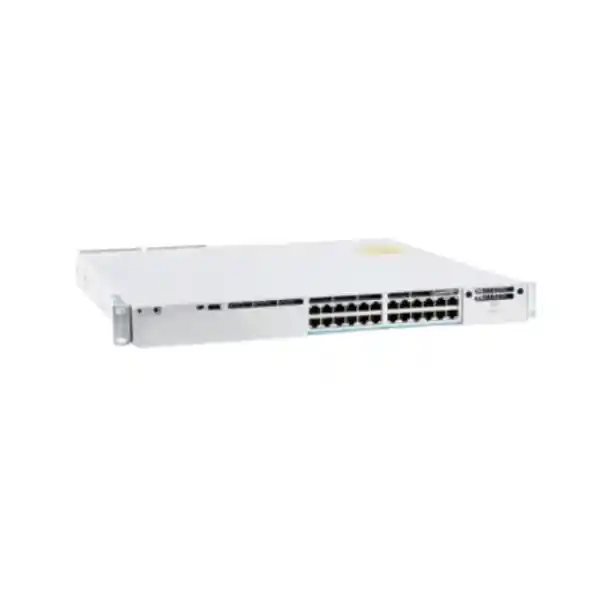
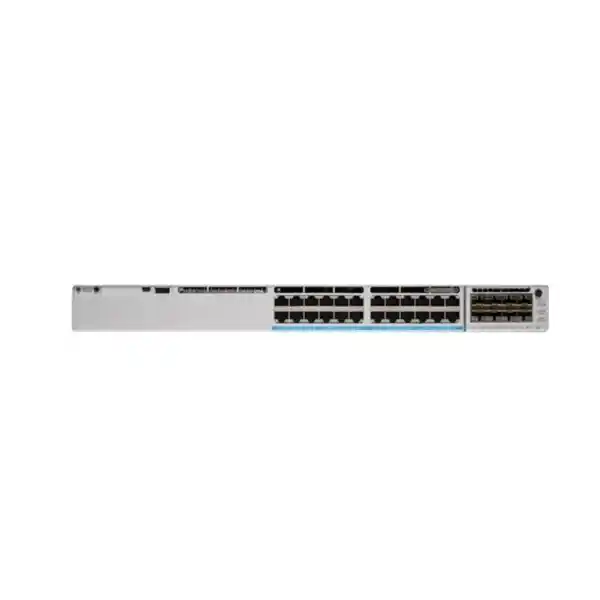
Cisco Catalyst C9300-24UX Network Switch in Tanzania
The Cisco Catalyst C9300-24UX is built for access networks where ordinary 1 Gigabit edge ports can become the bottleneck. It provides 24 multigigabit copper access ports supporting 100 Mbps, 1 Gbps, 2.5 Gbps, 5 Gbps and 10 Gbps, combines those access speeds with Cisco UPOE power delivery, and uses a modular uplink architecture so the upstream design can be matched to the campus or branch network. This makes it a strong fit for organisations planning high-performance wireless, media-rich collaboration, engineering workstations, high-speed local services, powered edge devices and other workloads that need both bandwidth and power at the access layer.
Up to 10 Gbps per access port
Cisco UPOE up to 60 W per port
StackWise-480
Modular uplinks
Buying guidance: the C9300-24UX is not a one-size-fits-all box. The software edition, uplink network module, optics or copper uplink choice, stacking accessories, second power supply and required PoE budget should be specified as part of the solution. FourTeck Tanzania can prepare a configuration and quotation around the intended devices, cabling, uplink speed and resilience target.
C9300-24UX at a glance
| Access ports | 24 × copper multigigabit ports |
|---|---|
| Supported access speeds | 100 Mbps, 1 Gbps, 2.5 Gbps, 5 Gbps and 10 Gbps |
| Power over Ethernet | Cisco UPOE, up to 60 W per port subject to total power budget and endpoint negotiation |
| Default primary power supply | 1100 W AC class supply in Cisco’s current platform table; 560 W available PoE with the listed default configuration |
| Maximum PoE design ceiling | Up to 1440 W when correctly configured with suitable secondary power, matching 24 × 60 W as the port-count limit |
| Switching capacity | 640 Gbps |
| Forwarding rate | 476.19 Mpps |
| Stacking | StackWise-480, up to eight C9300-family members within Cisco’s supported stacking rules |
| Uplinks | Field-replaceable network module; Cisco lists 4 × 1G, 4 × multigigabit, 8 × 10G/1G, 2 × 25G/10G/1G and 2 × 40G module options for C9300 models |
| Chassis size | 1.73 × 17.5 × 17.1 inches chassis-only; depth increases with the power supply installed |
| Weight | Approximately 18.18 lb / 8.25 kg with the default power supply |
These figures describe the C9300-24UX platform, but a finished bill of materials must still identify the exact software and management variant, the network module, transceivers or direct-attach components where applicable, power supplies and cables. Buyers should not assume that an uplink module, second PSU, stacking cable or optics are included unless they appear explicitly on the quotation.
Who should consider the Cisco Catalyst C9300-24UX?
This switch is intended for enterprise access rather than simple unmanaged connectivity. It is most useful where the access layer must support a mix of high-speed data, powered devices, policy enforcement and resilient operations. Typical buyers include organisations refreshing a campus edge, opening a new office floor, increasing wireless capacity, consolidating several edge device types onto one switching platform, or preparing for endpoints that are already moving beyond 1 Gbps.
High-density wireless
Modern access points can require multigigabit Ethernet so their wired connection does not constrain aggregate radio capacity. The C9300-24UX gives every access port the ability to negotiate above 1 Gbps while also supplying UPOE power.
Performance workspaces
Engineering, design, media, data and technical teams can benefit from 2.5G, 5G or 10G copper access to shared storage, local compute or other high-throughput services without moving every desk to fibre.
Converged powered edge
Wireless access points, IP phones, cameras and other compatible powered devices can share the same access platform, provided the total power budget is engineered around actual endpoint requirements.
Resilient campus access
StackWise-480, dual power-supply capability and replaceable fan modules support designs that need more operational resilience than a small fixed-port office switch normally provides.
Why multigigabit access matters
The main reason to choose the C9300-24UX instead of a conventional 24-port Gigabit model is its access-port speed range. Each multigigabit port can negotiate 100 Mbps, 1 Gbps, 2.5 Gbps, 5 Gbps or 10 Gbps. That flexibility allows one switch to support older Ethernet devices and newer endpoints that can use more bandwidth. An organisation can therefore upgrade selected devices first rather than replacing every endpoint and cable at the same time.
Cabling still matters. Cisco documents 100 Mbps, 1 Gbps, 2.5 Gbps and 5 Gbps operation on Category 5e cabling for its multigigabit ports. For 10 Gbps, Cisco states support over Category 6 and Category 6A, with Category 6 limited to shorter distances and Category 6A supporting the full 100-metre channel. The practical implication is that a switch upgrade should be paired with a cabling audit. A port capable of 10 Gbps does not guarantee a 10 Gbps link when the installed cable, patch panels, connectors or endpoint interface cannot sustain that speed.
For Tanzanian offices and campuses, this can be particularly useful in buildings where re-cabling is disruptive. If the existing structured cabling is in good condition, 2.5G or 5G may provide a meaningful step up from 1G for compatible endpoints without immediately moving to fibre at every desk. Where full 10GBASE-T access is required, confirm cable category, installed length, termination quality, patching and endpoint support as part of the design.
Cisco UPOE power: plan the total budget, not just the port rating
The C9300-24UX supports Cisco UPOE with up to 60 W per access port, but the important procurement figure is the total available PoE power for the installed power-supply configuration. Cisco’s current data sheet lists the 1100 W Platinum-rated primary supply as the default for this model and shows 560 W of available PoE with that single primary supply. That is enough for many real deployments, but it is not enough to power 24 endpoints at 60 W each.
Adding a suitable secondary power supply can raise the available budget. Cisco lists 910 W with a 350 W secondary supply, 1275 W with a 715 W secondary, and up to 1440 W with a 1100 W secondary on the C9300-24UX. The 1440 W ceiling corresponds to the physical maximum of 24 ports at 60 W. Those numbers are useful for planning, but the actual bill of materials must account for the chosen supplies, power-source redundancy policy, endpoint classes and any requirement to preserve PoE during a single power-supply failure.
List every powered endpoint, record its expected or maximum draw, add growth headroom, and then decide whether the design must continue powering all critical devices after one PSU or input feed is lost. A quote based only on “24 ports of UPOE” can be underspecified if it does not also show the required total power budget.
For access points, cameras and collaboration devices, also verify the endpoint’s Ethernet speed and power standard together. A device may need multigigabit data but only modest PoE, or it may need high power while using 1 Gbps data. Correct sizing prevents overbuying power while still leaving enough capacity for future additions.
Modular uplinks let the access layer grow with the network
Unlike fixed-uplink access switches, the C9300-24UX uses a field-replaceable network module. Cisco states that the default switch configuration does not include a network module, so the uplink requirement should be chosen deliberately when the switch is quoted. This is an important advantage for networks that may start with a modest uplink and later move to higher capacity, but it is also a procurement detail that should not be overlooked.
Cisco lists C9300 network-module choices including 4 × 1G, 4 × multigigabit, 8 × 10G/1G, 2 × 25G/10G/1G and 2 × 40G. The right option depends on the distribution architecture, expected oversubscription, redundancy design, fibre plant, optics standard and whether the access switch will uplink to one or two upstream switches. A high-speed access edge with many 2.5G, 5G or 10G endpoints can quickly outgrow a small uplink, so upstream capacity should be sized from realistic traffic patterns rather than simply matching the current WAN speed.
When requesting a quotation, specify the target uplink speed, number of uplinks, media type, fibre distance if fibre is used, connector type and the upstream switch model. This helps avoid receiving a chassis that is technically correct but missing the network module or optics needed for installation.
Performance for demanding access-layer traffic
Cisco publishes 640 Gbps of switching capacity and 476.19 million packets per second of forwarding performance for the C9300-24UX. With stacking included in Cisco’s performance table, the figures rise to 1120 Gbps switching capacity and 833.33 Mpps forwarding. These values describe platform capacity, not an application-level guarantee. Actual user experience still depends on endpoint interfaces, cabling, uplinks, network design, software configuration, traffic mix and upstream services.
For buyers, the more useful question is whether the switch gives enough headroom for the planned access layer. If several Wi-Fi access points, servers, workstations or video devices can simultaneously exceed 1 Gbps, a 24-port multigigabit platform reduces the risk that each copper edge port becomes a hard 1G ceiling. It also provides the upstream flexibility needed to aggregate those faster endpoints through 10G, 25G or 40G modular options when the broader network supports them.
Performance planning should therefore be end-to-end. A 10G-capable endpoint connected to the C9300-24UX will not achieve useful 10G throughput to a remote service if the upstream network, storage platform, firewall, WAN path or application server is slower. FourTeck Tanzania can use the expected traffic flows and upstream topology to help define an appropriate uplink and stacking design rather than treating the access switch in isolation.
StackWise-480 for a unified access stack
The C9300-24UX is part of the modular-uplink C9300 family and supports Cisco StackWise-480. Cisco specifies 480 Gbps of stacking bandwidth and support for up to eight members in a stack, subject to the supported model and license combinations. Stacking allows multiple physical switches to operate with a common management and control plane, which can simplify access-layer operations and create a more resilient design than managing each switch as an isolated device.
Do not assume every Catalyst 9300-branded model can be mixed freely. Cisco distinguishes standard C9300, higher-scale C9300 variants, C9300X and fixed-uplink C9300L/LM models. For example, the higher-scale C9300-24UXB has different stacking restrictions from the standard C9300-24UX. The intended stack members should be checked before ordering, particularly when expanding an existing stack.
Dedicated StackWise cables are separate planning items. Cisco lists 0.5 m, 1 m and 3 m options for modular-uplink C9300 and C9300X stacking. Rack layout should determine the cable length and physical topology. If a second switch is being purchased for resilience, include the stack cables, compatible software level, uplink design and power approach in the same bill of materials so the deployment can be completed without missing accessories.
Power and hardware resilience
Cisco Catalyst 9300 switches support dual redundant power supplies. The platform ships with one supply by default and provides a second power-supply bay so another unit can be added at initial purchase or later. The switches also use three field-replaceable fans and support N+1 fan redundancy. These hardware characteristics are valuable in access closets where service continuity matters, but resilience depends on how they are deployed.
Installing two power supplies does not automatically create full site-level protection. If both supplies are connected to the same wall circuit, UPS or distribution unit, that common dependency can still interrupt the switch. For critical installations, consider separate protected power paths where the building infrastructure allows it. The switch can also participate in StackPower designs, but the exact topology and power policy should be engineered rather than assumed.
In Tanzania, power quality and continuity can be an important design consideration for network closets. The correct response is not to make a generic claim about local power conditions, but to assess the actual site: UPS runtime, generator transfer behaviour, rack PDU capacity, grounding, circuit loading, cooling and environmental conditions. The C9300 hardware should be installed within Cisco’s documented electrical and environmental limits and with adequate airflow around the rack.
Security, segmentation and operational visibility
The Catalyst 9300 family is designed as an enterprise policy and automation platform rather than only a collection of Ethernet ports. Cisco IOS XE supports standards-based and programmable management interfaces, including model-driven telemetry and APIs such as NETCONF and RESTCONF. This is useful for organisations that want repeatable provisioning, central visibility and integration with network-management systems.
Cisco also positions the 9300 family for advanced campus security capabilities, including options such as encrypted traffic analytics, MACsec and Software-Defined Access features depending on the software, licensing and deployment architecture. These capabilities should be matched to the chosen software tier and the rest of the Cisco environment. A switch purchase should not assume every advanced feature is available in every license or management mode.
For a typical business deployment, practical security planning includes management-plane access control, AAA integration, secure administration protocols, VLAN and segmentation design, endpoint authentication requirements, logging, time synchronisation, software maintenance and configuration backup. The strongest platform can still be poorly secured if default or inconsistent operational practices are left in place.
A strong fit for Wi-Fi 6, Wi-Fi 6E and high-throughput edge devices
Cisco specifically positions the C9300-24UX for high-speed wired and wireless converged access. The combination of multigigabit Ethernet and UPOE is relevant to newer enterprise access points because the access point may be able to move more than 1 Gbps of aggregate traffic and may also require more power than older PoE classes. A standard 1G PoE switch can therefore constrain either data throughput or power delivery in an upgraded wireless design.
The correct access-point design still depends on the exact AP model. Confirm its Ethernet interface speed, supported PoE standard, maximum draw, recommended power mode and cable requirements. Then size the C9300-24UX PoE budget and uplinks around the total set of APs. If all 24 ports will be used by high-power access points, a second PSU may be required simply to meet the total PoE budget, even before redundancy is considered.
The same logic applies to other edge devices. High-resolution cameras, video endpoints, digital signage, thin clients, specialised terminals and compact compute devices may benefit from combined data and power over one cable, but their actual requirements vary. The C9300-24UX provides a flexible platform; it does not remove the need to validate each endpoint profile.
Choosing the software and management variant
Cisco’s current ordering information identifies multiple C9300-24UX variants. C9300-24UX-E is the Network Essentials ordering option, C9300-24UX-A is the Network Advantage option, and C9300-24UX-M is offered for the Meraki cloud-management experience with the applicable Meraki licensing choices. The base hardware name alone therefore does not fully define the order.
Before requesting a final quote, decide whether the switch will join an existing IOS XE Catalyst environment, an existing Meraki-managed environment, or a new architecture. Also identify which Layer 2, Layer 3, automation, segmentation and management capabilities are required. Licensing terms and feature availability can change over the commercial life of a platform, so the edition and subscription or entitlement requirements should be confirmed against the current Cisco order at the time of purchase.
If this switch is expanding an existing stack, provide the exact models, current software release and license level of the installed members. That information helps verify stacking compatibility and reduces the risk of receiving a new unit that cannot join the intended stack without additional changes.
How C9300-24UX differs from nearby Catalyst 9300 choices
| Model | Access-port profile | Best-fit distinction |
|---|---|---|
| C9300-24UX | 24 × 100M/1G/2.5G/5G/10G, UPOE | Use when all 24 copper access ports may need multigigabit capability up to 10G and modular uplinks are preferred. |
| C9300-24U | 24 × 10M/100M/1G, UPOE | Use when UPOE is needed but 1G access is sufficient. It can be more appropriate when multigigabit edge speed would add cost without solving a requirement. |
| C9300-24UXB | 24 × multigigabit, UPOE, higher-scale hardware | A higher-scale variant using the UADP 2.0 XL architecture; it has different stack-member rules and should not be treated as a drop-in identical substitute for the standard 24UX. |
| C9300L-24UXG | Mixed access profile with a smaller number of multigigabit ports and fixed uplinks | Useful when only selected ports need multigigabit and a fixed-uplink design is acceptable. It is a different platform choice from the modular-uplink 24UX. |
The most important buying question is therefore not “Which Catalyst 9300 is fastest?” but “Which access-port mix, uplink architecture, scale and management model matches the site?” The C9300-24UX is attractive when 24 full multigigabit copper ports are genuinely useful. If most endpoints will remain at 1G, another model may satisfy the requirement more economically.
Tanzania deployment checklist
A reliable installation depends on more than ordering the chassis. Use the following checklist when preparing a Tanzania site for the C9300-24UX. It is designed to make the quote, installation and handover more predictable without assuming unverified stock, delivery or service coverage.
- Count and classify endpoints. Record the number of access points, phones, cameras, workstations, printers, servers and other devices, then note their required Ethernet speeds and whether they need PoE.
- Audit the copper cabling. Identify cable category, approximate run lengths, patch-panel quality and any known fault history. Do not plan 10G access merely because the switch port supports it.
- Calculate the PoE budget. Add expected device draw, growth allowance and the requirement during a PSU failure. Decide whether the default 560 W budget is sufficient or whether additional power is needed.
- Choose the uplink module. Define upstream speed, fibre or copper medium, number of links, redundancy method and compatibility with the distribution switch.
- Confirm optics and fibre. Where fibre uplinks are used, match transceiver type, wavelength, fibre mode, connector, distance and the upstream interface. Optics are not interchangeable simply because they fit the same form factor.
- Define stacking. For a stack, record all existing member models, software versions, licensing level, intended topology and required StackWise cable lengths.
- Plan protected power. Check UPS capacity, available rack power, input circuits, grounding and whether dual PSUs will be fed from independent protected sources.
- Check rack depth and cooling. The C9300-24UX is deeper with its 1100 W power supply installed than the bare chassis. Confirm usable rack depth, rear clearance, airflow and cable-management space.
- Select management and software edition. Decide whether the deployment will use the IOS XE Catalyst model or the Meraki-managed variant and confirm the exact entitlement required for the features in the design.
- Document acceptance criteria. Define what will be tested after installation: link speeds, PoE operation, uplink redundancy, stack status, management access, monitoring, VLANs, routing where required and configuration backup.
Recommended design process before ordering
Define the requirement
State the number of users and devices, expected growth, target access speeds, PoE endpoints, segmentation needs and availability expectations. This prevents a specification from being driven only by a model name.
Validate the physical layer
Check copper categories and lengths, fibre paths, rack space, cooling, earthing, UPS capacity and available protected circuits. Physical constraints often decide whether the planned port speed is achievable.
Build the bill of materials
Select the exact C9300-24UX software variant, uplink module, transceivers, stacking cables and power supplies. Include accessories that are required for day-one operation instead of assuming they ship with the chassis.
Prepare and test
Plan software, configuration, addressing, VLANs, routing, security, management and monitoring. Test uplink and endpoint negotiation, PoE behaviour and redundancy before the production cutover.
Operational considerations after deployment
A high-performance access switch should be treated as part of an operational system, not as a once-off hardware installation. Establish a software-maintenance process, configuration backups, monitoring, alerting and a documented method for replacing failed components. Track port utilisation and negotiated speed so that the network team can see whether multigigabit capacity is being used or whether specific links are unexpectedly falling back to a lower rate.
PoE telemetry is equally important. Monitor total draw, high-consumption endpoints and available budget. A network may work correctly when first installed but run out of power headroom later as more devices are added. Recording the intended power budget during design makes future troubleshooting easier and helps determine whether a second supply is needed for capacity, resilience or both.
For stacked deployments, monitor stack health and verify that all members operate at the expected stack bandwidth with compatible software. Keep spare cables and approved replacement procedures where operational continuity is important. Changes to uplink modules, optics, access-point models or software features should be reviewed for compatibility before they are introduced into production.
Finally, maintain a simple as-built record containing rack location, serial numbers, management addressing, uplink destinations, VLAN or routing role, PSU feeds, stack topology, optics types and current software. Good documentation shortens outage diagnosis and makes later expansion much easier.
Questions to answer before requesting a quote
Providing the information below helps turn a generic switch request into a usable deployment specification. It also reduces the chance of missing modules, optics, power capacity or software requirements.
- How many C9300-24UX switches are required now, and how many are expected within the next two to three years?
- Which devices require 2.5G, 5G or 10G, and which can remain at 1G?
- What cable category and approximate maximum run length are installed to those faster endpoints?
- Which endpoints require PoE, and what is their maximum or expected wattage?
- Must powered endpoints stay online if one switch PSU fails?
- What uplink speed and media are required, and what upstream switch will terminate the link?
- Will the unit operate standalone or join an existing StackWise environment?
- If joining a stack, what are the exact existing switch models, software release and license level?
- Is the intended management model traditional Catalyst IOS XE or Meraki cloud-managed?
- Are Layer 3 routing, segmentation, automation, telemetry or advanced security features part of the requirement?
- What UPS, rack depth, cooling and protected power feeds are available in the network room?
- Are optics, fibre patch leads, copper patch leads, stacking cables and a second PSU expected in the same quotation?
Frequently asked questions
Is the C9300-24UX a 24-port 10 Gigabit switch?
It has 24 multigigabit copper access ports that can negotiate 100 Mbps, 1 Gbps, 2.5 Gbps, 5 Gbps or 10 Gbps. That is different from a switch with fixed 10G fibre ports. The actual negotiated rate depends on the connected endpoint and cabling.
Can it power all 24 ports at 60 W?
The physical port limit is 24 × 60 W, or 1440 W total, but the default single 1100 W power-supply configuration provides 560 W of available PoE according to Cisco’s current data sheet. A suitable secondary power supply is required to raise the total budget, and the design should also consider power redundancy.
Does the switch include uplink ports?
The chassis uses a modular uplink architecture. Cisco states that the default switch configuration does not include the network module. Select the appropriate C9300 network module as part of the bill of materials and add compatible optics or cables where required.
Which uplink speeds are available?
Cisco lists C9300 module options that support 1G, 10G, 25G, 40G and multigigabit copper uplinks in different port combinations. The correct choice depends on the upstream switch, media, distance, redundancy design and required aggregate capacity.
Can the C9300-24UX use existing Cat5e cabling?
Cisco documents multigigabit operation at 100 Mbps, 1G, 2.5G and 5G over Cat5e. For 10G, Category 6 or Category 6A is required, with Cat6 distance more limited than Cat6A. Existing cabling should still be tested because real installations include connectors, patch panels and workmanship that affect performance.
How many switches can be stacked?
Cisco specifies up to eight members for C9300 StackWise-480, subject to supported model and license combinations. If the switch will join an existing stack, verify exact member compatibility instead of relying only on the Catalyst 9300 family name.
What is the difference between C9300-24UX and C9300-24UXB?
Both provide 24 multigigabit UPOE access ports, but the 24UXB is a higher-scale model built on the UADP 2.0 XL architecture. Cisco applies different stack-member rules to higher-scale C9300 models, so the two should not be treated as identical substitutes in an existing stack design.
Is this switch suitable for Wi-Fi 6 or Wi-Fi 6E access points?
Yes, the platform is specifically positioned for high-speed wired and wireless access, and its combination of multigigabit Ethernet and UPOE is well suited to compatible enterprise access points. The exact AP model should still be checked for Ethernet speed, PoE class and total power draw.
What software editions are available?
Cisco’s current ordering guide lists C9300-24UX-E for Network Essentials, C9300-24UX-A for Network Advantage and C9300-24UX-M for Meraki-managed operation with the applicable Meraki licensing choices. Confirm the exact software and entitlement required for the planned features before ordering.
Does the C9300-24UX support redundant power?
Yes. The Catalyst 9300 platform supports two power supplies. A second PSU can be added for additional PoE capacity, redundancy or both. For meaningful resilience, also consider whether the two supplies are fed from independent protected power sources.
What rack space should be planned?
The chassis is 1.73 inches high, corresponding to a 1U rack profile. Cisco lists the chassis at 17.5 inches wide and 17.1 inches deep, while the depth with the 1100 W power supply installed is about 20.2 inches. Allow additional rear clearance for power cords, stack cables and airflow.
What should be included in a complete quotation?
A complete quote should identify the exact C9300-24UX software variant, uplink network module, required optics or copper uplink components, one or two power supplies, stacking cables where applicable, and any other installation accessories. It should also state the assumptions used for PoE load, uplink speed and deployment role.
Procurement notes for IT teams
The C9300-24UX can be an excellent long-term access-layer platform when its multigigabit capability is genuinely needed, but procurement should avoid buying only from the short model description. The model name confirms the 24-port multigigabit UPOE hardware family; it does not by itself define the software edition, management mode, uplink module, optics, stack accessories or redundancy level.
If the deployment is a refresh of an older Gigabit switch, start by identifying why the old platform is being replaced. If the business need is only more ports, the 24UX may be more capability than required. If the need is faster access for wireless, engineering, content, local compute or storage, then the 24UX’s all-port multigigabit design can materially reduce edge bottlenecks. If the need is primarily higher PoE power rather than higher data speed, compare alternative Catalyst 9300 UPOE or UPOE+ models as part of the design.
The same discipline applies to uplinks. A powerful access switch connected through an undersized uplink may shift the bottleneck rather than remove it. Estimate how many endpoints can be active concurrently, how much traffic remains local, how much traverses the distribution layer, and whether redundant uplinks are needed. Then choose the network module and upstream interfaces to match those flows.
For a new campus or major wireless refresh, it can be useful to standardise the access-layer design around repeatable building blocks: one approved switch configuration, one or two uplink patterns, defined optics, a standard PSU policy, a standard stack-cable set and a documented software baseline. This simplifies spare holding, configuration templates, installation, monitoring and future expansion.
Installation planning details that are easy to miss
Rack depth is one of the first practical checks. Cisco lists the bare C9300-24UX chassis at 17.1 inches deep, but the depth grows to approximately 20.2 inches with the 1100 W supply installed. The rack therefore needs enough usable depth for the switch itself plus rear cable bend radius and service access. A shallow wall cabinet that comfortably fits a basic 1G access switch may not be appropriate.
Cooling and airflow should also be assessed. Enterprise switches move heat through a designed airflow path, and cable bundles should not block fan exhaust or intake. Confirm that the room and rack operate inside Cisco’s environmental limits. Cisco’s hardware guide specifies a normal switch operating range down to -5°C and up to 45°C under the stated conditions, with altitude-related limits. In practice, the goal should be a stable, clean network-room environment rather than operating close to the platform’s extremes.
Patch-cord quality matters at multigigabit speeds. A permanent link may test correctly while a poor patch lead introduces errors or causes a link to negotiate lower. Use cabling components appropriate for the target speed and maintain consistent labelling. When troubleshooting, record actual negotiated speed and error counters before assuming the switch hardware is at fault.
Finally, reserve management access before the cutover. Define console access, management addressing, credentials, authentication, logging destinations and configuration backup. Cisco provides RJ-45 and USB console options across the platform family, but the operational process matters more than the connector: administrators should be able to reach and recover the switch without depending on the production path that may be under maintenance.
Troubleshooting, growth and lifecycle planning
A multigigabit access network introduces more possible negotiated speeds than a traditional 1G edge, so troubleshooting should begin with evidence rather than assumptions. If an endpoint expected to run at 5G or 10G links at 1G, confirm the endpoint network interface, switch-port configuration, cable category, patch leads, patch panels and installed distance. Review interface counters for physical errors and test the permanent link if necessary. The fact that both devices advertise a faster speed is not enough when the copper channel between them cannot meet the electrical requirements for that rate.
For PoE issues, separate data connectivity from power delivery. An endpoint may negotiate data correctly but receive insufficient power for full operation, or it may start and later enter a reduced-power mode. Record the endpoint’s required standard and power draw, check what the switch has negotiated, and compare total consumption with the available budget. Where a second power supply is installed, confirm whether the system is configured primarily for extra capacity, redundancy or a combination that preserves critical loads during a failure.
Uplink troubleshooting should likewise consider the entire path. A local access port can be healthy while performance is constrained by an oversubscribed uplink, a mismatched optic, a fibre problem or an upstream configuration. Monitoring utilisation over time is more useful than a single speed test. Peak periods may show whether the access layer needs additional uplink capacity, link aggregation, a different network module or a change to traffic placement.
Stacked systems add another layer of operational checks. Keep the stack topology documented, verify member health, monitor stack links and make sure replacement hardware is compatible with the installed design. Software upgrades should be planned with the stack as a system. When a new member is added, confirm its software and licensing situation before the maintenance window instead of discovering differences during the cutover.
Growth planning should look at ports, power and bandwidth independently. A switch may still have free physical ports while its PoE budget is almost exhausted. It may have adequate PoE headroom while the uplink is approaching saturation. Or it may have ample data capacity but no remaining rack power or UPS runtime. Recording these separate constraints provides a better expansion forecast than simply counting unused switch ports.
For wireless expansion, model the expected number of access points per switch and their future Ethernet and power profiles. A design built around today’s 1G APs may later move to 2.5G, 5G or higher-speed interfaces. The C9300-24UX can accommodate that evolution on the access side, but the uplink and PoE design must also be able to scale. This is one reason the modular uplink slot and secondary PSU bay are important: they allow the same access chassis to be adapted as surrounding requirements change.
Lifecycle planning also means keeping the software and operational toolchain current. Maintain an inventory of switch hardware, software release, management method, license state, critical configuration, uplink type and power configuration. Review Cisco support guidance before major changes and avoid leaving infrastructure on an unsupported software path. The purchasing decision should include not only hardware capability but also the internal process for maintaining the platform over its service life.
Capacity reviews do not need to be complicated. A quarterly check of port occupancy, average and peak utilisation, interface errors, negotiated speeds, PoE draw, uplink load, stack health and environmental alerts can reveal most emerging access-layer constraints. The data also makes future procurement more precise because the next switch or expansion module can be sized from measured behaviour rather than estimates alone.
When replacing an older access switch with the C9300-24UX, prepare a migration map before touching cabling. Record the existing port number, device or wall outlet, VLAN, voice settings, PoE state, special authentication, trunking, link aggregation and any nonstandard configuration. Map those functions to the new switch and pre-stage as much configuration as operational policy allows. This reduces the chance that a physically successful cable move causes a service issue because a hidden port-level dependency was missed.
After the migration, validate more than link lights. Confirm the expected speed on representative multigigabit devices, verify powered endpoints operate in their intended mode, test redundancy where it is part of the design, check management and monitoring visibility, and compare the live configuration with the approved baseline. Save a fresh configuration backup and update the as-built record while the changes are still recent.
The long-term value of the C9300-24UX comes from combining capable hardware with disciplined design and operations. Its 24 multigigabit ports, modular uplinks, substantial switching capacity, StackWise-480 and UPOE support create room for demanding access workloads, but that room is most valuable when cabling, upstream capacity, power, software and management are planned as one system.
When the C9300-24UX may not be the right choice
A technically capable switch is not automatically the best commercial fit. If the site has only standard 1G endpoints and no realistic plan for multigigabit access, a lower-cost Gigabit model may meet the requirement. If only a small subset of ports needs faster Ethernet, a mixed-port platform may be more efficient. If the deployment requires fixed uplinks for a tightly standardised bill of materials, a C9300L or another platform may deserve comparison.
Likewise, the C9300-24UX is not a replacement for good network architecture. If the distribution layer cannot absorb the traffic, the WAN is the true bottleneck, or the building cabling cannot support the desired speeds, purchasing a 10G-capable access switch may not change application performance. A short design review can therefore prevent both under-specification and unnecessary spend.
For organisations already standardised on a particular management ecosystem, compatibility may matter as much as raw hardware. Confirm whether the environment expects Catalyst IOS XE workflows, Meraki cloud management or another operational model, and order the matching variant. Mixing management assumptions after procurement can create avoidable rework.
Request a C9300-24UX configuration and quote for Tanzania
For the most useful quotation, send FourTeck Tanzania your required switch quantity, endpoint count, target access speeds, PoE device list, desired uplink speed, upstream switch model, stacking requirement and preferred software or management mode. If the design is replacing an existing stack, include the exact installed Catalyst models and current software information.
The result should be a complete bill of materials rather than a chassis-only assumption: the correct C9300-24UX variant, network module, uplink components, power configuration and stack accessories where required. Price, stock, delivery time and warranty terms should be confirmed on the current quotation rather than inferred from the platform specification.




Reviews
There are no reviews yet.