
Enterprise access switching for Tanzania
Cisco Catalyst C9300-48H Network Switch
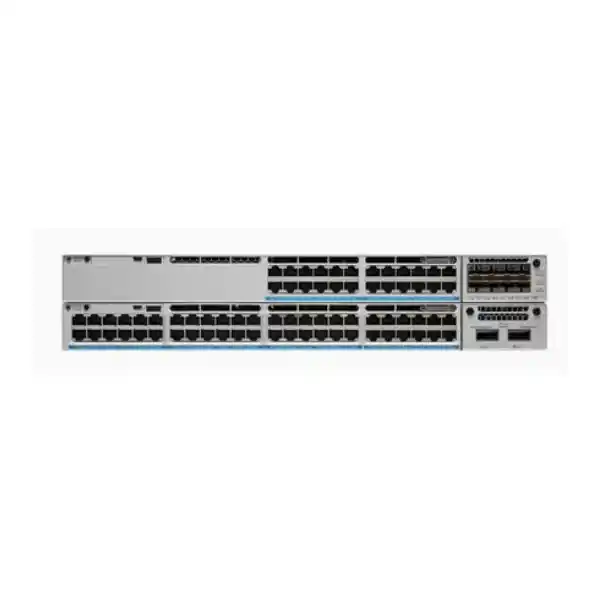
The Cisco Catalyst C9300-48H is designed for organizations that need forty-eight Gigabit access ports, high-power PoE for demanding edge devices, modular uplinks and a stackable enterprise platform. It is a practical fit for campus networks, office floors, institutions, hospitality environments, distributed facilities and other sites where the access layer must deliver both network connectivity and substantial device power.
For buyers in Tanzania, the key question is not simply whether the switch has 48 ports. The more important design checks are how much PoE power your endpoints will require at the same time, which uplink speeds and media are needed, whether switch and power resiliency are required, and which Cisco software license level matches the intended features. FourTeck Tanzania can help translate those requirements into a complete bill of materials rather than treating the chassis as an isolated line item.
What the C9300-48H is built to solve
Modern access networks often have to power much more than IP phones. Wireless access points, surveillance devices, building systems, displays and specialized edge equipment can require considerably more power than traditional PoE endpoints. The C9300-48H addresses that design problem with Cisco UPOE+ on its access ports while remaining part of the Catalyst 9300 modular-uplink family. This allows a network designer to combine dense Gigabit access, high-power delivery, flexible uplinks and stack-based resiliency in one enterprise access platform.
The model should be evaluated as an access-layer building block rather than as a generic 48-port switch. Its strongest value appears where the network needs predictable operations, scalable stacking, uplink choice and a disciplined approach to power. A small office with mostly low-power devices may not need this level of PoE capability. A larger floor, campus block or facility with a mixture of high-power endpoints may benefit substantially, provided the total PoE budget and power-supply configuration are correctly planned.
Fast technical summary
| Access ports | 48 × 10/100/1000 Mbps copper ports |
|---|---|
| Power over Ethernet | Cisco UPOE+, with up to 90 W on a compatible port subject to power availability and endpoint requirements |
| Default power supply | 1100 W AC |
| Available PoE with default PSU | 822 W |
| Switching capacity | 256 Gbps |
| Forwarding rate | 190.48 Mpps |
| Data stacking | StackWise-480; up to eight compatible stack members under Cisco stacking rules |
| Power stacking | Cisco StackPower supported |
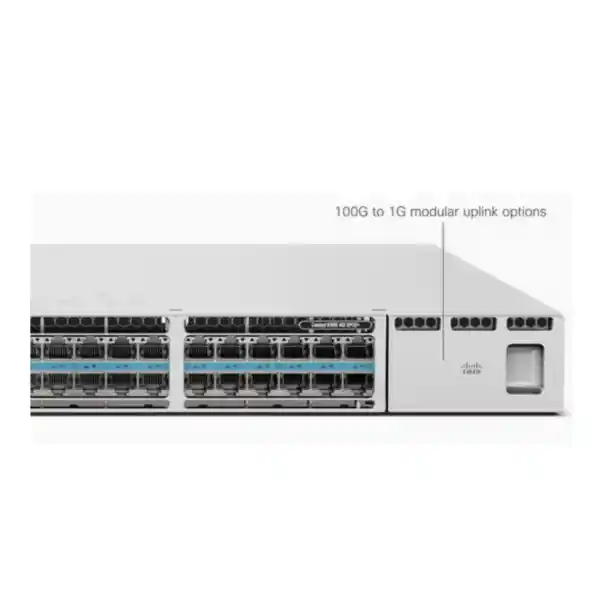
| Uplink architecture | Modular C9300 uplink slot with supported 1G, 10G, 25G, 40G and multigigabit module choices |
| Chassis size with default PSU | 1.73 × 17.5 × 19.2 in. (4.4 × 44.5 × 48.8 cm) |
| Software variants | C9300-48H-E is associated with Network Essentials; C9300-48H-A is associated with Network Advantage. Quote the exact required order code. |
Specification planning should always be tied to the exact Cisco order code, current software release and complete power/uplink configuration. A base hardware model name alone does not define the full license, uplink, optics or redundancy bill of materials.
Why UPOE+ matters on a 48-port access switch
The defining characteristic of the C9300-48H is high-power edge delivery. Cisco identifies this model as a 90 W PoE platform using UPOE+. That makes it different from access switches designed only for conventional PoE or PoE+ loads. The higher per-port ceiling can help when a connected device needs more power than a standard low-power endpoint, reducing the need for separate local power adapters in suitable deployments.
However, per-port capability and total switch power budget are not the same thing. Cisco specifies 822 W of available PoE with the default 1100 W AC power supply. If all 48 endpoints attempted to consume 90 W simultaneously, their theoretical demand would far exceed that default available budget. This is why endpoint-by-endpoint planning is essential. A realistic PoE worksheet should list each powered device, its expected and maximum draw, the quantity, growth allowance and whether any ports must retain guaranteed power during a fault or maintenance event.
In many real networks, devices draw different amounts of power, and only a subset may need the highest UPOE+ level. The C9300-48H can therefore be highly effective when a deployment has a mixed load. The correct design is to size the power system for the actual endpoint portfolio rather than assuming every port requires the maximum possible wattage.
Plan the PoE budget before ordering
This exercise is especially important for Tanzanian projects where replacement logistics, power continuity and deployment timing may make mid-project changes expensive. A complete bill of materials should therefore include the switch, selected power supplies, power cords appropriate to the project, uplink module, optics or copper uplink components, stacking accessories if required, rack/cabling items and the correct software entitlement.
Modular uplinks: choose the network module around the design
Unlike fixed-uplink access switches, the C9300-48H uses a modular uplink architecture. That matters because the same access chassis can be matched to different aggregation designs. Cisco documents several C9300 network modules, including four 1G SFP slots, eight 10G SFP+ slots, two 40G QSFP+ slots, two 25G SFP28 slots and a four-port multigigabit module. The best option depends on the distribution-layer interface, fiber plant, distance, oversubscription target, redundancy design and growth plan.
| Module | Cisco-described interfaces | Typical design question |
|---|---|---|
| C9300-NM-4G | 4 × 1 GE SFP | Is 1G fiber sufficient for the access-to-distribution requirement? |
| C9300-NM-8X | 8 × 10 GE SFP+ | Do you need multiple 10G uplinks, resiliency or higher aggregate capacity? |
| C9300-NM-2Y | 2 × 25 GE SFP28 | Will 25G provide better long-term headroom to the distribution layer? |
| C9300-NM-2Q | 2 × 40 GE QSFP+ | Does the upstream architecture use 40G interfaces? |
| C9300-NM-4M | 4 × multigigabit Ethernet | Is copper multigigabit uplink connectivity required for the design? |
The uplink module should be selected before procurement, not after the switch has arrived. Transceiver type and fiber specifications also need to be aligned with the chosen module and the installed cabling. A 25G-capable uplink module, for example, does not by itself guarantee that an existing optical path, transceiver set or remote interface is suitable. End-to-end compatibility must be checked.
StackWise-480 for scale and operational simplicity
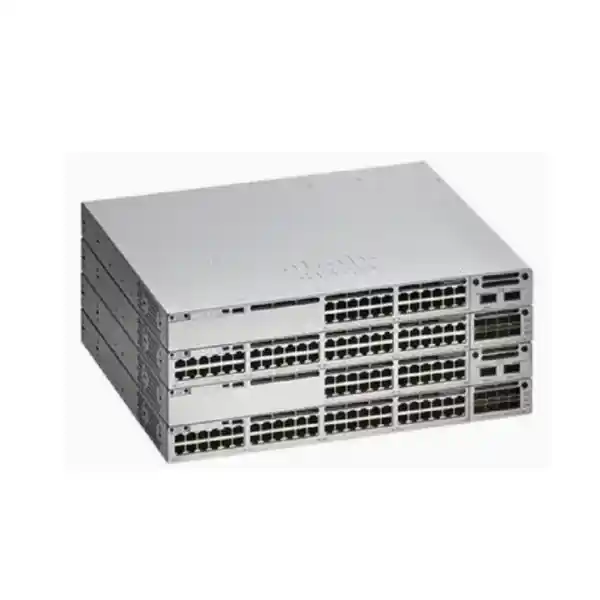
The C9300-48H belongs to the modular-uplink Catalyst 9300 family that supports StackWise-480. Cisco permits up to eight compatible C9300 members in a StackWise-480 design, subject to the documented stacking and license rules. A properly designed stack can simplify operations by presenting multiple physical switches as a coordinated switching system, while also allowing access-port capacity to grow without managing each member as an unrelated standalone device.
Stacking is valuable when several access switches serve the same floor or communications room and the organization wants consistent operations, link resiliency and easier capacity expansion. It is not simply a matter of connecting cables. Stack membership compatibility, software versions, license level, cabling topology and maintenance procedures should all be planned. Cisco also states that C9300 fixed-uplink models and modular-uplink C9300 models do not stack together as a single StackWise system, while C9300X and C9300 interoperability has specific rules and operates at defined stack speeds.
For a new Tanzania deployment, document the intended stack size, cable lengths and physical rack positions in advance. Stack cables are short infrastructure components with real rack-layout consequences, so a clean physical design can prevent awkward cabling and service difficulty later.
StackPower and power resiliency
Cisco StackPower is supported on the C9300 modular-uplink platform. It allows supported switches in a power stack to share power resources, which can improve how power capacity and redundancy are used across a group of switches. For environments with heavy PoE demand, this can be an important part of the overall access-layer design, especially when the objective is to balance endpoint power requirements against redundancy.
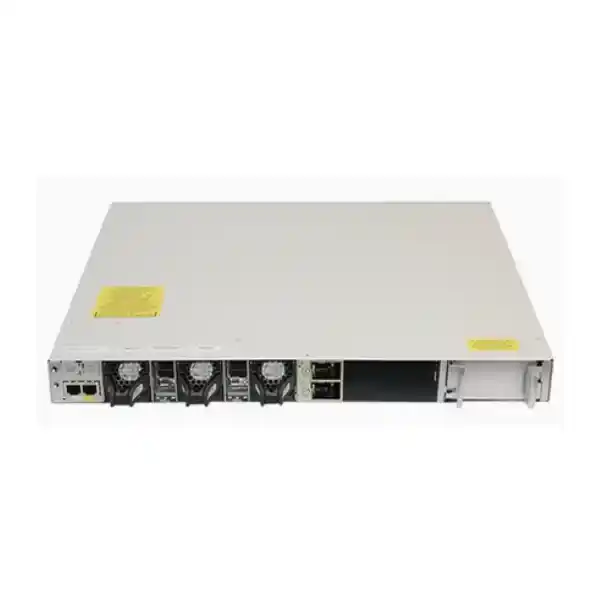
The C9300 platform also supports dual redundant power supplies. The switch normally ships with one supported power supply, while a second can be added according to the required power and redundancy design. Because the C9300-48H is a high-power PoE model, the exact choice of supplies should be driven by the endpoint load and failure scenario, not only the normal operating case.
A robust design should ask: What happens to powered devices if one AC feed fails? Is the objective switch survival only, or must all critical PoE endpoints remain powered? Are there separate protected electrical feeds? Is a UPS sized for the switch and attached PoE load? Answering those questions is more useful than simply adding a second power supply without a defined resiliency objective.
C9300-48H performance at the access layer
Cisco lists 256 Gbps of switching capacity and a forwarding rate of 190.48 million packets per second for the C9300-48H. Those figures position the device as an enterprise access switch rather than a small unmanaged edge device. In practical design work, raw switching capacity should be considered together with uplink selection, traffic patterns, oversubscription, segmentation, policy features and the bandwidth expected from wireless or other high-traffic endpoints.
For example, a switch may have dozens of 1G access connections while only a fraction of attached devices generate heavy traffic at the same moment. The uplink design should therefore reflect the expected aggregate demand and business risk. A site with routine office traffic may be comfortable with a different uplink strategy from a site concentrating video, high-density wireless, large data transfers or critical operational systems. The modular architecture gives designers room to match those requirements more closely.
Security and policy capabilities
The Catalyst 9300 family is built for managed enterprise environments where access switching participates in the security architecture. Cisco documents platform capabilities including MACsec encryption, hardware-anchored Secure Boot, Secure Unique Device Identification and encrypted-traffic analytics functions. Cisco also positions the platform for policy-based automation and software-defined access scenarios.
These capabilities should not be interpreted as meaning every advanced function is automatically available in every order code or software configuration. Feature availability can depend on the IOS XE release, software entitlement, selected license level, surrounding Cisco architecture and specific deployment design. When a security capability is part of the purchasing requirement, list it explicitly in the specification and verify it against the exact C9300-48H-E or C9300-48H-A configuration being quoted.
This matters in regulated, security-sensitive and multi-site environments. A bill of materials should not simply say “Catalyst 9300” if the project depends on a particular routing, segmentation, automation or security capability. The hardware and software order must be matched to the operational requirement.
Network Essentials or Network Advantage?
Cisco identifies two common order-code variants for this hardware: C9300-48H-E with Network Essentials and C9300-48H-A with Network Advantage. The base hardware platform is closely related, but the license level affects the software feature set. Because the user-facing model name “C9300-48H” does not specify the suffix, buyers should confirm the required license before placing an order.
Network Essentials is typically evaluated when the project needs the core enterprise access feature set without the broader capabilities associated with the Advantage tier. Network Advantage is considered when requirements extend into more advanced routing, segmentation or architecture features. The correct choice should come from a feature checklist rather than an assumption that the higher tier is always necessary or that the lower tier will cover every future requirement.
Before quotation, document the protocols and functions the network team intends to use now and during the expected service life. That list should then be checked against Cisco’s current licensing documentation for the exact software release. This avoids procuring hardware first and discovering later that the intended design needs a different entitlement.
Where the C9300-48H can fit in Tanzania
The C9300-48H is relevant to Tanzanian organizations building or refreshing managed access networks where a large number of wired devices and powered endpoints converge in a communications room. Potential environments include corporate offices, educational campuses, healthcare facilities, hotels, government or institutional buildings, logistics sites, large retail facilities and other multi-device locations. Suitability depends on the technical design, not the industry label alone.
Local deployment planning should pay special attention to electrical continuity, rack conditions and cabling pathways. A high-power PoE access switch can concentrate a meaningful electrical load in a rack. The UPS, power distribution, ventilation and circuit design should be assessed for the actual switch configuration and connected PoE load. If the project relies on fiber between floors or buildings, the installed fiber type, connector standard, distance and optical budget must also match the selected Cisco transceivers and uplink module.
For distributed sites outside a central IT location, operational simplicity becomes equally important. Standardizing switch roles, software versions, stack layouts, labeling, spare strategy and monitoring procedures can reduce support complexity. The procurement phase is the right time to define those standards.
Common deployment scenarios
High-density wireless access
A floor or building with many wireless access points may benefit from a switch that provides strong PoE capability and flexible high-speed uplinks. Verify each AP’s Ethernet speed and power needs because the C9300-48H access ports are Gigabit copper rather than multigigabit access ports.
IP surveillance and security systems
Large camera deployments can combine bandwidth, PoE and resiliency requirements. Build the design from the camera power profile and video traffic assumptions, and provide sufficient uplink capacity and power headroom for the required retention and monitoring architecture.
Converged office access
A single access layer may connect phones, computers, printers, access points and building devices. VLAN, policy, QoS and PoE planning should be mapped to each endpoint class so the switch configuration remains predictable and supportable.
Campus or multi-floor stack
Several C9300 modular-uplink switches can be designed into a StackWise-480 system where compatibility rules are met. This can simplify management and provide an organized path to increase access-port density.
Important fit check: Gigabit access versus multigigabit access
The C9300-48H delivers 10/100/1000 Mbps on its forty-eight access ports. Its distinctive strength is high-power UPOE+, not multigigabit access-port speed. That distinction is important for modern wireless designs. Some high-performance access points can use Ethernet rates above 1 Gbps. If the project requires 2.5G, 5G or 10G at the access port, a multigigabit Catalyst model may be a better fit even if the C9300-48H provides enough PoE power.
A good selection process therefore separates two questions: how much power does the endpoint need, and how much wired bandwidth does the endpoint need? Choosing only on PoE wattage can create an unnecessary access-speed bottleneck, while choosing only on Ethernet speed can leave a power shortfall. Review both values for each endpoint class before finalizing the switch model.
How it compares with nearby Catalyst 9300 choices
| Model | Access profile | Best reason to evaluate it |
|---|---|---|
| C9300-48H | 48 × Gigabit copper, UPOE+ up to 90 W | High-power endpoints on dense 1G access ports with modular uplinks |
| C9300-48U | 48 × Gigabit copper, UPOE up to 60 W class | When 90 W endpoint capability is unnecessary but UPOE is still desired |
| C9300-48P | 48 × Gigabit copper, PoE+ | Conventional PoE+ access deployments with lower power requirements |
| C9300-48UXM | Multigigabit-capable access mix with UPOE | When endpoint bandwidth above 1G is a primary requirement |
This comparison is about choosing the access-port profile, not ranking one model as universally better. The correct switch depends on endpoint power, endpoint speed, uplink needs, scale and software features. A network with conventional phones and desktops can have very different requirements from a Wi-Fi-heavy campus or a building with high-power edge systems.
Physical deployment and rack planning
With the default power supply installed, Cisco lists the C9300-48H at approximately 1.73 inches high, 17.5 inches wide and 19.2 inches deep, or 4.4 × 44.5 × 48.8 cm. The chassis is a 1RU-class access switch, but the full rack design must account for power cords, stacking cables, uplink cabling and service clearance at the rear.
High-power switches also deserve deliberate airflow and thermal planning. The communication room should provide suitable ventilation and environmental control for the installed equipment load. Avoid treating an enclosed rack as a simple furniture choice; the combined heat from switching, PoE conversion, UPS equipment and adjacent systems can become significant.
Cable management is equally important with 48 powered access ports. Patch-panel layout, labeling and bend radius should make it possible to replace a switch, power supply, fan or uplink component without disturbing unrelated services. Good physical organization improves troubleshooting speed and reduces the risk of accidental disconnection.
Power continuity considerations for Tanzanian sites
When a switch powers dozens of downstream devices, its electrical role becomes larger than that of a data-only switch. A power interruption can affect the switch and every PoE endpoint attached to it. The UPS and generator strategy should therefore be based on the combined network load rather than only the switch’s base consumption. If cameras, access points, phones or building systems are considered critical, their PoE demand must be included in the autonomy calculation.
Projects should also confirm the available AC feed, power-distribution capacity and protection arrangement at the rack. Where dual supplies are used for redundancy, consider whether they are fed from genuinely independent protected sources or simply connected to the same failure point. A dual-PSU switch does not create electrical-path diversity on its own.
For sites with unstable or constrained power, the network design team may choose to classify powered endpoints by criticality and establish a load-shedding or restoration policy. That operational planning is outside the chassis specification, but it is highly relevant to a high-power access switch and should be agreed before commissioning.
Operational planning with Cisco IOS XE
Catalyst 9300 switches operate with Cisco IOS XE, giving network teams a familiar enterprise operating environment for configuration, monitoring and lifecycle management. The exact supported feature set depends on hardware, license and software release. A deployment standard should define the approved software train, configuration templates, authentication methods, logging, monitoring, backup process and upgrade approach before the first switch enters production.
In a stacked environment, software consistency becomes especially important. New members should be checked for compatibility with the existing stack and maintenance process. Change windows should include a rollback plan, configuration backup and validation of critical uplinks, routing or access policies after the change.
Organizations with multiple Tanzanian sites may also benefit from standard naming, VLAN numbering, port-role templates and monitoring thresholds. Consistency can reduce troubleshooting time and make it easier for support staff to understand a site they did not originally install.
Designing for resiliency
Resiliency should be considered across four layers: the switch stack, the uplinks, the power system and the upstream network. StackWise can improve access-layer availability and management, but a stack with a single uplink path to one upstream device can still have a major single point of failure. Likewise, redundant uplinks will not keep powered endpoints alive if the PoE power system has insufficient protected capacity.
A resilient C9300-48H design may use multiple stack members, redundant supported uplinks, suitable link aggregation or routing design, dual power supplies and protected electrical feeds. The exact architecture depends on the business impact of failure and the budget. The goal is not to add redundancy everywhere without analysis, but to identify the failures that matter and decide how the network should behave when they occur.
This approach also improves procurement accuracy. Once the failure model is documented, the required number of switches, uplink modules, optics, stack cables, power supplies and electrical components becomes much clearer.
What to include in the bill of materials
- Exact switch order code, including the required Network Essentials or Network Advantage variant.
- Selected C9300 uplink network module matched to the required speed and media.
- Compatible transceivers, DACs or copper uplink components for both ends of every uplink.
- Primary and optional secondary power supplies sized around PoE load and redundancy policy.
- StackWise cables in lengths that fit the physical rack layout when data stacking is required.
- StackPower accessories where the power-stacking design calls for them.
- Appropriate rack, patching, cable-management and labeling components.
- Required software subscriptions or entitlements for the intended feature set.
- UPS and electrical capacity sized for the real network and PoE load, not only the switch chassis.
- Any approved spare strategy for critical sites, including parts whose replacement lead time would be operationally important.
The exact contents will differ by project. FourTeck Tanzania should quote against the required design rather than assume that a single switch part number represents a deployable solution.
Questions to answer before requesting a quote
- How many ports are required now and over the next few years? Leave practical spare capacity for growth and moves.
- Which endpoints need PoE, and what is their real power requirement? Create a total-wattage plan rather than counting powered ports only.
- Do any endpoints need more than 1G access speed? If yes, evaluate a multigigabit access model rather than assuming the C9300-48H is the correct fit.
- What uplink speed and media are required? This determines the network module and optical/copper components.
- Will the switches be stacked? Define member count, stack compatibility and cable lengths.
- What happens during a power-supply or AC-feed failure? Size redundancy around the required surviving PoE load.
- Which Cisco software features are mandatory? Use this to choose the correct license variant and validate the intended IOS XE release.
- What support and spare strategy is appropriate? Base it on business criticality and the expected service model.
Buyer guidance: when the C9300-48H is a strong fit
Consider the Cisco Catalyst C9300-48H when the project requires dense Gigabit copper access, some high-power endpoints that may need UPOE+ capability, a substantial but planned PoE budget, modular uplink choice, Cisco StackWise-480 and enterprise operations. It is particularly compelling when power delivery and access-layer resiliency are more important than providing multigigabit speed on every edge port.
Look at alternative models when the endpoint power requirement is modest, when fixed uplinks are preferred for cost or simplicity, or when high-speed multigigabit access is essential. The best outcome comes from matching the switch to the endpoint matrix and upstream architecture instead of choosing from port count alone.
For an upgrade from an older Catalyst platform, also review optics, existing stack assumptions, power infrastructure, software features and rack depth. A new chassis can expose dependencies that were not visible in the old environment, so a structured discovery process reduces surprises during migration.
Migration planning from an existing access switch
Replacing an existing switch is not only a hardware swap. Capture the current port map, VLAN assignments, trunks, voice settings, QoS policy, authentication configuration, spanning-tree role, routing interfaces, monitoring settings and any device-specific exceptions. Then determine which settings should be carried forward and which should be redesigned.
Power migration deserves special attention. Record which endpoints are currently powered by the switch, which use local adapters and which will move to PoE after the upgrade. A migration can unintentionally increase the PoE load if devices that previously had local power are moved onto the switch. Validate that the new power design includes this change.
The cutover plan should also account for uplink media, optics, patching and any change from standalone operation to a stack. Staging configuration and validating the switch, modules and software before the production window can reduce downtime and isolate procurement mistakes earlier.
Frequently asked questions
Does the C9300-48H provide 90 W on every port at the same time?
The access ports support Cisco UPOE+ with a per-port capability up to 90 W, but the total simultaneous PoE load is limited by the available power budget. Cisco specifies 822 W of available PoE with the default 1100 W AC supply. A project that expects many high-power devices must calculate aggregate load and select the power configuration accordingly.
Are the 48 access ports multigigabit?
No. The C9300-48H access ports are 10/100/1000 Mbps copper ports. The platform can use supported multigigabit uplink modules, but that does not make the forty-eight access ports multigigabit. If endpoints need 2.5G, 5G or 10G access speeds, evaluate the appropriate Catalyst multigigabit model.
Which uplink module should I choose?
Choose according to the upstream switch interfaces, required aggregate bandwidth, fiber or copper media, resiliency design and expected growth. Cisco supports multiple C9300 network modules including 1G, 10G, 25G, 40G and multigigabit options. The transceivers and remote interfaces must be validated as part of the same end-to-end design.
Can the C9300-48H be stacked?
Yes. It is part of the modular-uplink C9300 family and supports StackWise-480. Cisco documents stacks of up to eight compatible members, with compatibility and license rules that should be checked for the exact models in the intended stack.
Does it support redundant power supplies?
The Catalyst 9300 platform supports dual power supplies. The required second supply and the resulting power design should be chosen according to the PoE load and resiliency target. Simply installing two supplies does not replace a proper calculation of surviving PoE capacity during a failure.
What is the difference between C9300-48H-E and C9300-48H-A?
Cisco associates the -E variant with Network Essentials and the -A variant with Network Advantage. The appropriate choice depends on the required software features. Verify the project’s routing, segmentation, policy and automation requirements against current Cisco licensing information before ordering.
Is the uplink module included in the model name C9300-48H?
The C9300-48H describes the switch hardware family and access-port profile. The project should explicitly identify the required uplink network module and any transceivers or cables in the bill of materials rather than assume the base product name defines the entire uplink configuration.
What information should I send for a quotation?
Provide the number of switches, required license tier if known, endpoint count and PoE wattage, preferred uplink speed and media, stacking requirement, redundancy objective and any optics already standardized in the network. If those details are not yet known, provide the intended endpoints and upstream topology so the bill of materials can be designed around the actual requirement.
Request a C9300-48H solution quote for Tanzania
For a useful quotation, include more than the switch quantity. Share the expected powered endpoints, PoE demand, uplink speed and media, stacking requirement, resilience objective and software features. FourTeck Tanzania can then help define the switch variant and the supporting modules, power supplies, optics and stacking components required for a complete design.
Next step: request a bill-of-materials review for the Cisco Catalyst C9300-48H deployment.




Reviews
There are no reviews yet.