
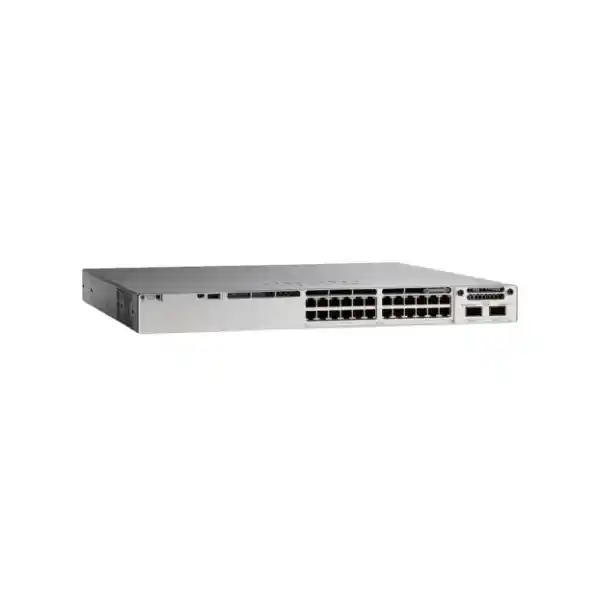
Enterprise access switching for Tanzania
Cisco Catalyst C9300-48T Network Switch
The Cisco Catalyst C9300-48T is designed for organizations that need a resilient 48-port Gigabit Ethernet access layer without PoE on the access ports. It combines 48 copper data ports, modular uplinks, StackWise-480 stacking, enterprise Cisco IOS XE capabilities, and field-replaceable power and cooling components in a 1RU platform.
It is especially relevant when desktops, servers, printers, firewalls, storage appliances, building systems, or other Ethernet devices already have their own power source. If your access points, IP phones, cameras, or other endpoints must receive power from the switch, a PoE-capable Catalyst 9300 model is the better choice.
Quick fit check
- 48 x 10/100/1000 copper data ports
- Data-only access: no PoE output on downlink ports
- Modular uplink slot for flexible 1G, 10G, 25G, 40G, or multigigabit choices
- StackWise-480 with up to eight compatible C9300 members
- 350W default AC power supply and dual internal PSU slots
- Cisco IOS XE with licensing options selected at order time
Who should choose the C9300-48T?
The C9300-48T is a practical choice for medium and large organizations building a structured wired access network and standardizing on Cisco Catalyst switching. It suits office floors with a high density of wired users, branch or campus distribution areas that need many 1G copper connections, server rooms where attached devices use independent power, and operational environments that value stacking, modular uplinks, and enterprise management more than access-port PoE.
Its strongest buying case is simple: you need forty-eight reliable Gigabit Ethernet access ports, you want the flexibility to select the uplink speed and media separately, and you do not want to pay for a PoE access design that the connected devices will not use. The C9300-48T also gives network teams a clear upgrade path from standalone switching to a stacked design, allowing multiple compatible switches to operate as one logical system with a shared management plane.
Before ordering, confirm the exact software package and ordering suffix, the uplink module, optics, stack cables, power redundancy requirements, and rack depth. The base platform name “C9300-48T” describes the 48-port data-only hardware family; actual orderable part numbers distinguish software and management choices such as Network Essentials, Network Advantage, or Meraki-managed variants.
Cisco C9300-48T technical specifications
| Model | Cisco Catalyst C9300-48T |
|---|---|
| Access ports | 48 x 10/100/1000 Mbps copper Ethernet data ports |
| PoE capability | None on access ports; this is a data-only model |
| Uplinks | Modular uplink architecture; supported C9300 network modules provide 1G SFP, 10G SFP+, 25G SFP28, 40G QSFP+, or multigigabit copper options |
| Stacking | Cisco StackWise-480, up to 480 Gbps stack bandwidth; up to 8 compatible C9300 stack members |
| Switching capacity | 256 Gbps standalone; 736 Gbps with stacking |
| Forwarding rate | 190.47 Mpps standalone; 547.62 Mpps with stacking |
| ASIC | Cisco UADP 2.0 |
| Memory | 8 GB DRAM and 16 GB flash |
| Packet buffer | 16 MB for the standard 24/48-port Gigabit Ethernet C9300 models |
| MAC scale | Up to 32,000 MAC addresses for standard C9300 modular-uplink models |
| Default power supply | 350W AC |
| Power input range | 100–240 VAC, 47–63 Hz for the documented 350W AC power supply |
| Power-supply bays | Two internal power-supply slots; a second supply can be added for redundancy where supported and correctly sized |
| Cooling | Three field-replaceable fan modules with N+1 fan redundancy |
| Dimensions with default PSU | Approx. 4.4 x 44.5 x 44.9 cm (H x W x D) |
| Weight with default PSU | Approx. 7.45 kg |
| Software | Cisco IOS XE; features depend on release, license tier, subscription, and configuration |
Specifications can change with software releases and selected accessories. Confirm the final bill of materials against the current Cisco ordering guide for the exact configuration being purchased.
Understanding “data only”: the most important buying decision
The “T” in the C9300-48T family identifies a copper data-only access model. Its forty-eight downlink ports carry Ethernet traffic but do not provide Power over Ethernet. This distinction matters because many modern edge devices—including wireless access points, IP phones, surveillance cameras, badge readers, and IoT gateways—are commonly powered through the Ethernet cable. Those endpoints can still communicate through a C9300-48T, but they need their own local power adapter, injector, or another powered network design.
For desktop computers, printers, servers, storage appliances, firewalls, industrial controllers, and other equipment that already has independent power, the data-only design can be exactly what is required. It avoids treating PoE capacity as a requirement when the endpoints do not use it. This also makes the model straightforward for structured cabling projects where the access layer is intentionally separated from a dedicated PoE switching layer.
Choose C9300-48T when
Your attached devices already have power, 1G copper access is sufficient, and you value modular uplinks, stacking, enterprise software, and redundant power options.
Choose a PoE model when
You want the switch to power IP phones, access points, cameras, or other powered devices. Compare the C9300-48P, C9300-48U, or other PoE/UPOE variants based on required wattage and port mix.
Choose multigigabit when
Endpoints need more than 1 Gbps over copper. The C9300 family includes multigigabit variants, while the C9300-48T remains a 1G copper access model.
Performance for dense Gigabit access
For the C9300-48T, Cisco documents 256 Gbps of switching capacity and a forwarding rate of 190.47 million packets per second in standalone operation. With stacking, the published platform figures rise to 736 Gbps of switching capacity and 547.62 Mpps of forwarding rate. These numbers help describe the hardware’s forwarding headroom, but correct network design still depends on uplink sizing, traffic patterns, oversubscription targets, VLAN architecture, routing requirements, and the number of switches sharing upstream links.
The standard C9300 modular-uplink models use Cisco’s UADP 2.0 ASIC. Cisco documents 8 GB of DRAM, 16 GB of flash, up to 32,000 MAC addresses, 32,000 total IPv4 routes in the relevant platform scale table, 16,000 IPv6 routing entries, and a 16 MB packet buffer for 24- or 48-port Gigabit Ethernet models. These scale figures are useful for enterprise access and many branch or campus roles, but design limits should always be checked against the exact Cisco IOS XE release and feature template used in production.
For buyers, the practical point is that the C9300-48T is not an unmanaged 48-port switch. It is an enterprise switching platform intended for networks that need policy, visibility, resiliency, routing support, structured operations, and lifecycle management. That makes it appropriate when network teams need predictable behavior and centralized standards across multiple wiring closets or locations.
Modular uplinks let you design the upstream connection separately
One of the main differences between the C9300-48T and fixed-uplink access switches is the modular uplink slot. Instead of committing to a single uplink layout built permanently into the chassis, the C9300 can accept supported Cisco network modules. This lets the project team align the uplink with the aggregation switch, fiber plant, distance, optics, and expected growth.
| Network module | Documented interface type | Typical design reason |
|---|---|---|
| C9300-NM-4G | 4 x 1G SFP | Simple 1G fiber uplinks or legacy aggregation compatibility |
| C9300-NM-8X | 8 x 10G SFP+ | Higher-density 10G fiber uplinks and redundant upstream designs |
| C9300-NM-2Y | 2 x 25G SFP28 | Higher-speed aggregation where 25G is available upstream |
| C9300-NM-2Q | 2 x 40G QSFP+ | 40G uplinks to suitable core or distribution infrastructure |
| C9300-NM-4M | 4 x multigigabit copper | Copper uplink scenarios where multigigabit connectivity is required |
The uplink module and transceivers are design items, not details to leave until installation. A 48-port access switch can be bottlenecked by undersized uplinks, while an oversized uplink design can add cost without practical benefit. Check whether the upstream device supports the selected speed, optic type, fiber standard, breakout method, and redundancy design. Also confirm whether the required uplink module, transceivers, and patching are included in the project bill of materials.
In Tanzania deployments that connect buildings or floors over fiber, the link distance and fiber type should be validated before optics are selected. The correct choice depends on the installed cabling and endpoint interfaces, not simply on the maximum speed supported by the switch.
StackWise-480: scale multiple switches as one logical access system
The C9300-48T supports Cisco StackWise-480. Cisco documents up to 480 Gbps of stack bandwidth for C9300 modular-uplink models and up to eight compatible switches in a StackWise-480 stack. Stacking can simplify operations because multiple physical switches can be managed as one logical switching system, reducing the number of independent devices administrators must configure and monitor.
A stack can also improve access-layer resiliency when uplinks, port channels, and member placement are designed correctly. For example, upstream links can be distributed across different stack members rather than terminating everything on one chassis. Cisco also supports cross-stack EtherChannel capabilities on the platform, which can be used to build resilient logical links across members. The exact high-availability behavior depends on software, topology, and configuration, so the stack should be designed deliberately rather than treated as a simple cabling feature.
Stack cables are separate hardware considerations. Confirm the number of switches, physical rack arrangement, cable length, stack topology, licensing compatibility, and whether any mixed-model stack is supported. Cisco documents specific compatibility rules between C9300, C9300X, higher-scale, and fixed-uplink families; do not assume that every Catalyst 9300-branded switch can join the same stack at the same bandwidth.
Power design, redundancy, and StackPower
The C9300-48T ships in the documented standard configuration with a 350W AC power supply and provides two internal power-supply slots. A second compatible supply can be used when the design calls for power redundancy, subject to the supported power configuration. Because this is a data-only switch, its power design is simpler than a PoE model that must also budget power for attached endpoints.
Cisco StackPower allows power supplies in supported C9300 stacks to be pooled as a common resource. This can provide additional redundancy or shared power capacity across members when the stack and cabling are designed correctly. For the standard C9300 family, Cisco documents direct StackPower groups of up to four switches. The value is operational: instead of planning each power supply in isolation, the network design can consider power resilience across the stack.
The documented 350W AC supply accepts 100 to 240 VAC at 47 to 63 Hz. Even with a wide input range, production deployment should include appropriate branch circuits, grounding, surge protection, rack PDUs, and UPS capacity based on the final hardware configuration. In sites where utility power is unstable or generator transfer events are expected, the UPS and power architecture should be sized for the full network rack, not just the nominal switch wattage.
The chassis also uses three field-replaceable fan modules with N+1 fan redundancy. Maintain clear front-to-back airflow according to Cisco installation guidance, avoid blocking intake or exhaust areas, and keep the rack environment within the documented temperature and altitude limits.
Cisco IOS XE, licensing, and management choices
The C9300-48T runs Cisco IOS XE, giving network teams a common software platform for enterprise switching features, programmability, telemetry, routing, security controls, and operations. The exact functions available depend on the base network license, any required subscription or add-on package, the installed Cisco IOS XE release, and the actual configuration.
Current Cisco ordering information distinguishes C9300-48T variants such as Network Essentials, Network Advantage, and Meraki-managed ordering options. The hardware port count may be similar, but the intended management model and feature entitlements are not identical. Do not select the part number only by matching “48T.” Build the order around the features and operational model the network team expects to use.
For organizations using Cisco Catalyst Center, the platform can participate in broader campus automation and assurance workflows when the appropriate licensing and design are in place. For traditional network teams, Cisco IOS XE can also be operated with familiar CLI-based processes and standard network-management practices. The right approach depends on existing tooling, staff workflows, scale, and change-control requirements.
A good procurement process should record the exact hardware PID, base license, add-on license term where required, management mode, software image strategy, support requirement, uplink module, optics, stack cables, spare power supply, and rack accessories. This prevents a common problem in enterprise switching projects: receiving the correct chassis but an incomplete operational bundle.
Security, segmentation, and network visibility
Enterprise access switching is not only about port count. The access layer is where user devices, servers, printers, operational systems, and other endpoints enter the network, so policy and visibility are important. The Catalyst 9300 platform supports enterprise capabilities for access control, segmentation, Quality of Service, IPv6 forwarding, and flow visibility. Cisco documents hardware-based Flexible NetFlow scale on the standard 24- and 48-port Gigabit Ethernet C9300 models, with platform limits that depend on the exact feature and template.
In practice, these capabilities allow network teams to move beyond a flat “every port is the same” design. VLANs and Layer 3 interfaces can separate departments or device types, access-control policies can constrain traffic, QoS can prioritize business-sensitive applications, and telemetry can help teams understand traffic patterns. The exact security architecture should be based on organizational policy and the chosen software license rather than assumed from the chassis alone.
For sensitive environments, confirm the required authentication, encryption, identity, segmentation, logging, and compliance features against current Cisco documentation and your selected license. Security is a system design outcome involving the switch, identity services, management tools, endpoints, upstream firewalls, and operational processes.
Common deployment scenarios
Office floor access
Connect desktop PCs, printers, docking stations, meeting-room systems, and other independently powered devices. Use VLANs and uplink redundancy to integrate the floor into the wider campus network.
Server and appliance connectivity
Provide dense 1G copper connectivity for servers, firewalls, management appliances, storage interfaces, or infrastructure devices that do not require PoE and fit the switch’s access-layer performance profile.
Campus wiring closets
Deploy one or more switches per closet, use StackWise-480 for operational consolidation, and select fiber uplinks according to the building backbone and aggregation layer.
Branch networks
Support dense wired branch connectivity where enterprise policy, management, stacking, and modular uplinks are required, while endpoint power is provided separately.
Dedicated non-PoE access layer
Separate ordinary data devices from PoE endpoints so powered devices are placed on dedicated PoE switches and data-only users are placed on the C9300-48T.
Migration from older Catalyst access
Refresh aging 1G access switching while retaining familiar Cisco enterprise workflows and gaining a current modular-uplink, stackable Catalyst platform.
Planning a C9300-48T deployment in Tanzania
For a Tanzania deployment, start with the same fundamentals that determine success in any enterprise switching project: cabling quality, power continuity, rack environment, upstream capacity, and operational ownership. The switch can support a strong access design, but it cannot compensate for unsuitable copper runs, incorrectly selected optics, congested uplinks, poor rack cooling, or an undersized UPS.
For copper access, verify that horizontal cabling and patching are suitable for Gigabit Ethernet and that cable lengths follow structured-cabling standards. Label ports and patch panels before migration. For inter-floor or inter-building links, document the existing fiber type, connector format, route length, available strands, and upstream interface before ordering optics. Avoid choosing transceivers only by connector appearance; fiber mode and supported reach matter.
Power continuity deserves equal attention. The default 350W AC supply has a wide input range, but stable power architecture still matters for network availability. Size the UPS for the complete rack load and required runtime, account for redundant power supplies if installed, and confirm how generator or alternate-power transitions are handled. Keep management access available during outages where operational policy requires it.
Cooling and physical layout should be checked before installation. With the default power supply, Cisco lists the chassis at approximately 4.4 cm high, 44.5 cm wide, and 44.9 cm deep, with a weight of about 7.45 kg. Leave adequate rear clearance for power, uplink, stack, and StackPower cabling. Dense racks should be planned so cable bundles do not obstruct airflow or service access.
Finally, document the software and management model. Decide whether the site will use local CLI operations, centralized Cisco management, Meraki-managed ordering, or another supported approach. Define software maintenance windows, configuration backup, logging, monitoring, authentication, and incident-response procedures before the switch enters production.
C9300-48T compared with nearby Catalyst 9300 choices
| Model family | Access profile | Best fit | Key buying difference |
|---|---|---|---|
| C9300-48T | 48 x 1G copper, data only | Dense wired access without PoE | Modular uplinks; no endpoint power |
| C9300-48P | 48 x 1G copper with PoE+ | Phones, standard PoE devices, access points within supported budgets | Adds PoE capability and higher default PSU |
| C9300-48U | 48 x 1G copper with Cisco UPOE | Higher-power endpoint designs within supported limits | Higher PoE class and larger default PSU |
| C9300-48S | 48 x 1G SFP fiber | Fiber-dense access or aggregation use cases | Fiber access ports instead of RJ45 copper |
| C9300L-48T variants | 48 x 1G copper, data only | Deployments that prefer fixed uplinks | Fixed uplinks and StackWise-320 rather than C9300 modular uplinks and StackWise-480 |
The most common mistake is comparing these models only by the number of front-panel ports. Power requirements, uplink architecture, stacking bandwidth, endpoint types, and license choice can materially change the correct selection.
Deployment checklist before requesting a quote
Why modular enterprise switching can reduce redesign later
A switch purchase often outlives the first network design in which it is installed. Users move, traffic increases, distribution switches are replaced, buildings are linked with different fiber, and management standards evolve. The modular-uplink architecture of the C9300-48T gives designers room to change the upstream interface without replacing the entire access chassis, provided the new module is supported by the platform and software.
Stacking provides another form of flexibility. A site can start with one switch and later build a compatible StackWise-480 stack when port density or resiliency requirements grow. This can simplify the transition from a small access block to a larger managed system. However, future expansion should still be planned: reserve rack space, choose stack cable lengths intelligently, preserve power and cooling headroom, and keep license levels compatible where Cisco requires matching levels for the intended stack.
The result is a platform that works well when the organization values lifecycle planning. Rather than selecting only for today’s port count, buyers can define a standard access architecture covering uplinks, stacking, software, telemetry, and power redundancy across multiple deployment phases.
Operational considerations after installation
A successful Catalyst deployment includes an operations plan, not just a hardware installation. Establish a standard configuration baseline for hostnames, management interfaces, NTP, DNS where applicable, AAA, logging, SNMP or telemetry, VLANs, spanning-tree settings, routing, port-security policies, and interface descriptions. Store configurations in a controlled backup system and document how replacement hardware will be restored after a failure.
Software maintenance should be treated as a lifecycle process. Cisco IOS XE trains have their own maintenance and end-of-life timelines, so network teams should track Cisco release guidance and security notices rather than leaving the original factory image in place indefinitely. Test planned upgrades against the feature set in use and maintain a rollback process appropriate to the organization’s change-control standards.
Monitoring should cover more than simple ping availability. Track interface errors, discards, utilization, CPU and memory, environmental status, power-supply and fan health, stack member state, uplink status, spanning-tree events, and significant authentication or security logs. Trending these metrics helps distinguish cabling faults and traffic congestion from switch hardware issues.
For stacked deployments, document physical member positions and serial relationships, label stack and power cables, and retain a topology diagram. Good physical documentation shortens recovery time when a switch or cable must be serviced.
Frequently asked questions
Does the Cisco C9300-48T provide PoE?
No. The C9300-48T is a data-only model. Its 48 copper access ports carry Ethernet traffic but do not provide Power over Ethernet. If you need to power devices such as IP phones, Wi-Fi access points, cameras, or other powered endpoints from the switch, compare a PoE-capable Catalyst 9300 model such as the C9300-48P or a higher-power UPOE variant. The right choice depends on the required power class, total PoE budget, and endpoint count.
How many ports does the C9300-48T have?
It provides 48 x 10/100/1000 Mbps copper Ethernet access ports. Uplink interfaces are provided through a separate modular uplink architecture rather than being counted as part of those 48 access ports. The selected uplink module determines the available upstream interface type and speed, so it should be included in the final bill of materials.
What uplink speeds can the C9300-48T use?
The C9300 modular-uplink family supports network modules providing 1G SFP, 10G SFP+, 25G SFP28, 40G QSFP+, and multigigabit copper interfaces. The exact module and optics must be selected for the upstream device, cabling medium, link distance, software support, and design. A fast module does not automatically make every optic or breakout combination compatible, so validate the complete link end to end.
Can C9300-48T switches be stacked?
Yes. Cisco documents StackWise-480 support for C9300 modular-uplink models, with up to eight compatible switches in a stack. A stack can simplify management and support resilient access designs. Stack cables are required, and compatibility rules matter when mixing switch families or variants. Confirm member compatibility, license alignment, cable lengths, and the intended topology before purchase.
What is the switching capacity of the C9300-48T?
Cisco lists 256 Gbps of switching capacity and 190.47 Mpps of forwarding rate for the C9300-48T in standalone operation. The published figures with stacking are 736 Gbps and 547.62 Mpps. These are platform performance figures; actual application performance depends on the complete network design, traffic profile, uplink bandwidth, enabled features, and software configuration.
Which power supply is standard?
Cisco documents a 350W AC default power supply for the C9300-48T. The chassis has two internal power-supply slots, allowing supported redundant power designs with a second supply. The documented 350W AC unit supports 100–240 VAC at 47–63 Hz. Always confirm the final PSU part number, power cord, PDU, UPS, and redundancy design for the exact order.
What is StackPower?
Cisco StackPower is a power-sharing architecture supported on C9300 modular-uplink models. It allows compatible switches in a power stack to treat installed power supplies as a shared resource for redundancy or supplemental power. This can be useful in resilient designs, but it requires the correct StackPower cables, topology, and supported configuration. It is separate from StackWise, which provides the data stacking function.
What is the difference between C9300-48T-E and C9300-48T-A?
Current Cisco ordering information identifies the “-E” option with Network Essentials and the “-A” option with Network Advantage. Both relate to the 48-port 1G copper data-only platform, but the software feature entitlement differs. Select the license according to required routing, policy, automation, and management features rather than choosing only on hardware port count. Cisco also lists Meraki-managed ordering options for the family.
Can I use the C9300-48T for wireless access points?
It can carry Ethernet traffic for an access point, but it will not power the access point because the C9300-48T has no PoE on its access ports. If APs require power from the Ethernet switch, use an appropriate PoE/UPOE model and calculate both the per-port power requirement and total switch power budget. For modern high-throughput APs, also verify whether 1G access is sufficient or whether a multigigabit switch is more appropriate.
Is the C9300-48T suitable for a server room?
It can be suitable for servers and infrastructure appliances that use 1G copper connections and fit the required performance, resiliency, and feature profile. However, many modern server environments require 10G, 25G, or faster access at the server edge. Use the C9300-48T when 1G downlinks are appropriate; do not treat faster uplinks as a substitute for faster server-facing ports.
What rack space does the C9300-48T require?
The platform is a 1RU-class switch. Cisco lists dimensions of approximately 4.4 x 44.5 x 44.9 cm with the default power supply installed, and a weight of about 7.45 kg. Allow additional rear clearance for power cords, the uplink module and optics, StackWise cables, and optional StackPower connections. Always check the actual cabinet depth and cable-management approach before installation.
What should be included in a complete quote?
A complete quote should identify the exact C9300-48T ordering PID, license tier or management mode, required subscription term where applicable, uplink network module, optical or copper transceivers, stack cables, optional StackPower cables, redundant power supply if required, compatible power cords, rack accessories, and any support services requested. The project team should also confirm whether implementation, configuration, migration, and testing are part of the scope rather than assuming they are included with hardware.
Is the C9300-48T still a current platform?
Cisco continues to publish current Catalyst 9300 Series product, ordering, hardware, and software documentation that includes the C9300-48T family. Lifecycle decisions should still be checked at the time of procurement because software trains, licenses, accessories, and hardware products can have separate end-of-sale timelines. For a new design, compare the exact C9300 configuration with newer Cisco alternatives if longer lifecycle or different scale is a priority.
Request the right C9300-48T configuration
To prepare an accurate configuration, define the number of switches, required software tier, uplink speed, fiber or copper medium, stack design, power redundancy, and whether any connected devices need PoE. That information determines whether the C9300-48T is the correct model and which modules and accessories should accompany it.
Ask for a configuration review and quote for the Cisco Catalyst C9300-48T in Tanzania. Pricing, availability, lead time, warranty terms, support coverage, and delivery details should be confirmed for the exact order at the time of quotation.




Reviews
There are no reviews yet.