
Enterprise multigigabit access switching
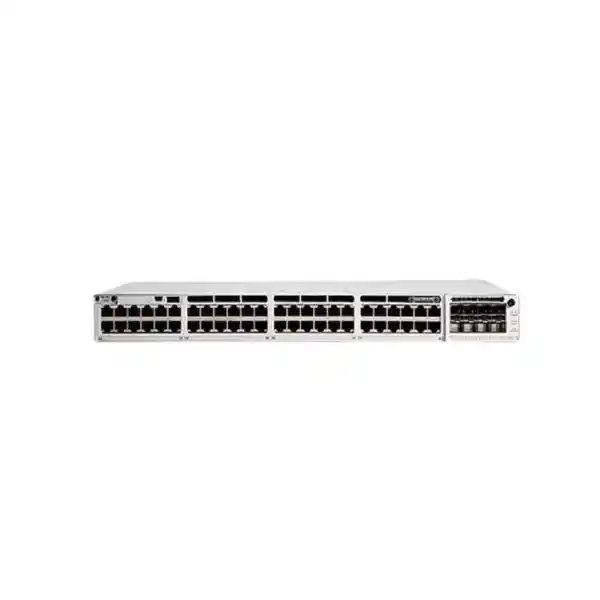
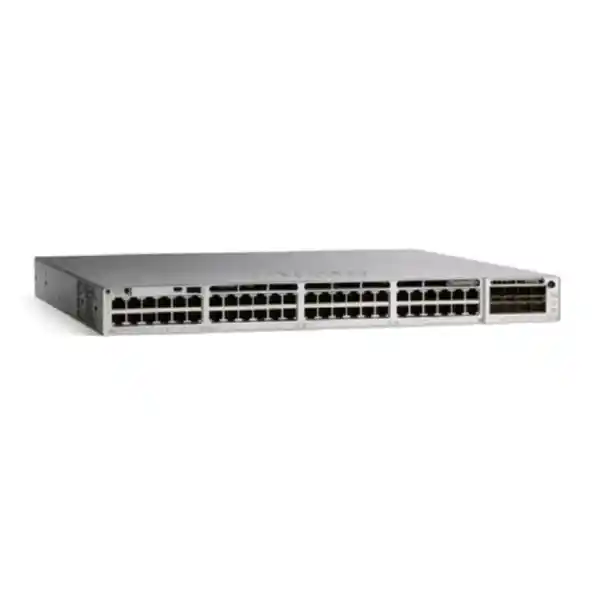
Cisco Catalyst C9300-48UXM Network Switch
The Cisco Catalyst C9300-48UXM is designed for access-layer networks that have outgrown ordinary 1 Gigabit Ethernet but still need the familiarity, density and operational model of an enterprise campus switch. It combines 48 copper UPOE access ports with a deliberate mix of multigigabit speeds: 36 ports support 100 Mbps, 1 Gbps and 2.5 Gbps, while 12 ports extend to 5 Gbps and 10 Gbps as well. That mix is useful when a network has a large population of conventional endpoints but also needs higher-speed connections for wireless access points, engineering workstations, collaboration devices or other demanding edge systems.
For Tanzania projects, the most important purchasing decision is not simply whether the model has 48 ports. Buyers should confirm the required port-speed mix, total PoE demand, uplink design, stacking plan, software and subscription choice, optics, rack depth, power resilience and exact Cisco order code. FourTeck can use those inputs to prepare a project-specific configuration and quotation without assuming that one generic C9300-48UXM hardware description represents every licence, accessory or deployment requirement.
Who is the C9300-48UXM a good fit for?
This model is best considered when an organisation needs a premium access switch rather than a basic port concentrator. A typical fit is a campus, headquarters, education environment, healthcare facility, hospitality property, financial office, public-sector site, large branch, systems-integration project or other network where many users and powered endpoints share the same wiring closets. The value comes from combining dense UPOE access with multigigabit data rates and modular uplink choices, allowing the access layer to serve conventional 1G devices and newer high-throughput endpoints from the same switch.
The 36-port plus 12-port speed split matters. If most endpoints need no more than 1G or 2.5G, but a smaller group needs 5G or 10G over copper, the C9300-48UXM can avoid paying for forty-eight full 10G multigigabit ports that may never be used. At the same time, it provides substantially more edge bandwidth than a conventional 48-port 1G switch. This makes it especially relevant for wireless refreshes in which access points are capable of exceeding a 1G wired uplink, or for mixed environments where a few edge systems generate much heavier traffic than phones, printers and standard office PCs.
It is not automatically the right choice for every 48-port requirement. A network built mainly around standard desktops and IP phones may be better served by a lower-cost 1G Catalyst 9300 model. A design requiring 5G on every access port may point toward the C9300-48UN. A deployment that requires newer high-scale or higher-power capabilities may need a C9300X family model. The correct selection should be based on endpoint speeds, power demand, uplink capacity, software features and growth expectations rather than on port count alone.
Verified technical specification overview
| Model | Cisco Catalyst C9300-48UXM |
|---|---|
| Access ports | 48 copper Cisco UPOE ports |
| Port-speed mix | 36 ports: 100M/1G/2.5G; 12 ports: 100M/1G/2.5G/5G/10G |
| Uplink architecture | Modular; supported C9300 network modules include 4×1G SFP, 4×multigigabit copper, 8×10G/1G SFP+, 2×25G/10G/1G SFP28 and 2×40G QSFP+ |
| Stacking | Cisco StackWise-480; Cisco documents support for stacking up to eight Catalyst 9300 switches in the family design |
| Switching capacity | 580 Gbps standalone; 1,060 Gbps with stacking in Cisco bandwidth specifications |
| Forwarding rate | 431.54 Mpps standalone; 788.69 Mpps with stacking in Cisco bandwidth specifications |
| Default power supply | 1100W AC |
| Available PoE with default primary supply | 490W according to Cisco power-budget documentation |
| Platform architecture | Cisco UADP 2.0-based Catalyst 9300 multigigabit architecture running Cisco IOS XE on applicable Catalyst order variants |
| Dimensions | 1.73 × 17.5 × 22.2 in. (4.4 × 44.5 × 56.4 cm) with installed fan FRUs and default power supply configuration referenced by Cisco |
| Weight | 20.5 lb (9.34 kg) with default power-supply configuration referenced by Cisco |
Configuration-dependent items such as exact licence entitlement, uplink module, transceivers, secondary power supply, stacking cables and support coverage should be confirmed for the final order. The model number alone should not be treated as a complete bill of materials.
Multigigabit access without replacing the entire copper edge
One of the most practical reasons to deploy the C9300-48UXM is that it lets a network increase edge bandwidth while continuing to use familiar RJ-45 copper connectivity. Many organisations reach a point where 1G access is still perfectly adequate for most endpoints, but the access layer begins to constrain high-performance wireless, content creation, imaging, engineering, local backup or other demanding workflows. Replacing every endpoint connection with fibre would usually be unnecessary, and replacing every switch with an all-10G access platform may be financially excessive. A mixed multigigabit design can be a more targeted response.
The thirty-six ports that reach 2.5G provide a useful middle tier for modern access points and capable client systems that benefit from more than 1G but do not require 5G or 10G. The twelve higher-speed ports can then be reserved for the devices that genuinely need additional headroom. Network planners should map those twelve ports deliberately. For example, if a floor has high-capacity wireless access points, specialist workstations and a few high-throughput appliances, those devices can be assigned to the 5G/10G-capable portion while lower-demand endpoints occupy the remaining ports.
Cabling quality remains part of the design. A switch port advertising a higher Ethernet rate does not by itself guarantee that an installed horizontal cable run, patch panel, patch lead and termination will sustain that rate reliably. For a Tanzania office refresh, it is worth testing existing structured cabling and documenting cable category, link length and condition before assuming that every legacy run can be reused at the highest available speed. This is particularly important in older buildings or sites where cabling has been extended, re-terminated or mixed across several installation phases.
The operational advantage is flexibility: the same access switch can negotiate down for ordinary endpoints while preserving faster copper ports for the devices that need them. That helps IT teams stage migrations instead of forcing a single all-or-nothing upgrade. It also gives procurement teams a clearer way to connect switch cost to a known endpoint plan rather than simply buying the highest headline speed available.
UPOE power planning: per-port capability is not the same as total switch budget
Cisco positions the C9300-48UXM with UPOE access ports, making it suitable for powered devices such as wireless access points, IP phones, cameras, building systems and other compatible endpoints. The important planning point is that the power available to all connected devices is governed by the installed power-supply configuration. Cisco lists a default 1100W AC primary supply for this model and 490W of available PoE power with that default primary supply. That aggregate figure matters more in a real bill of materials than simply multiplying a maximum per-port power figure by forty-eight.
A proper design starts with an endpoint power schedule. List every powered device, its expected class or worst-case draw, how many units are connected to each switch and whether future devices are planned. Then add sensible headroom rather than designing exactly to the arithmetic limit. An access point may draw less power during normal operation than its maximum requirement, but power budgeting should follow the supported design values for the exact device and feature set. The same principle applies to cameras with infrared illumination, pan-tilt-zoom motors, USB peripherals or other functions that can raise power demand.
Cisco documents a higher power option using a 1900W primary supply, where the available PoE figure for the C9300-48UXM rises to 1290W. Cisco also publishes combinations with secondary power supplies that can increase the available aggregate budget further. Those numbers do not mean every project should automatically use the largest supply. The right choice depends on endpoint count, resilience goals, electrical capacity, UPS design, heat load and expansion plans. A lightly loaded office may be comfortable with the standard power arrangement, whereas a dense wireless or converged-device deployment may need a different power configuration.
For Tanzania installations, the switch-room power design deserves the same attention as Ethernet capacity. Verify UPS sizing, runtime expectations, power distribution, grounding, surge protection and cooling for the actual rack. If redundant power supplies or StackPower are part of the architecture, confirm the required components and how they interact with the site’s UPS circuits. FourTeck can review the switch power budget alongside the endpoint list so the quotation reflects the actual powered-device requirement instead of a generic PoE label.
Modular uplinks let the access layer match the backbone
Unlike fixed-uplink access switches, the C9300-48UXM uses a modular uplink architecture. Cisco lists several C9300 network modules, including four 1G SFP ports, four multigigabit copper interfaces, eight 10G/1G SFP+ ports, two 25G/10G/1G SFP28 ports and two 40G QSFP+ ports. This flexibility is valuable because the correct uplink for a 48-port multigigabit switch depends heavily on how much traffic is expected to leave the wiring closet, how many upstream paths are required and what the aggregation or core layer supports.
A switch with many 2.5G and 10G access connections can easily be constrained by an undersized upstream design. The solution is not necessarily to size the uplink equal to the theoretical sum of every access port, because enterprise access networks are usually oversubscribed by design. However, the oversubscription ratio should be an explicit engineering decision. A site carrying ordinary office traffic may tolerate a different ratio from a creative studio, research environment, high-density Wi-Fi floor or local data-transfer workload.
Fibre type, optic compatibility and distance are equally important. Before selecting a network module, confirm whether the existing backbone is single-mode or multimode, what connectors are used, the length of each run, the supported transceiver types at both ends and whether the upstream platform has matching interfaces. If the switch is being added to an existing Cisco estate, check the current optic inventory and whether reusing it is technically supported and commercially sensible. A module selected only by port speed can still create a mismatch if the available fibre plant or upstream hardware is different.
Procurement should therefore treat the uplink module and optics as part of the switch decision, not as accessories to be figured out after delivery. A complete quote request should state the preferred uplink speed, number of links, fibre type, approximate distance, upstream switch model and redundancy requirement. That information allows the C9300-48UXM to be quoted as a usable network component rather than an isolated chassis.
StackWise-480 for scalable campus access
Cisco identifies the modular Catalyst 9300 models with StackWise-480 capability, and the Catalyst 9300 family architecture supports physical stacks of up to eight switches. In practical terms, stacking can simplify the operation of a larger access block by allowing multiple physical switches to work as a single logical system. This can reduce the number of separate devices an administrator must treat independently and can support more resilient link designs when upstream and downstream connectivity is planned correctly.
Stacking should still be designed rather than assumed. Confirm the number of switches, physical rack positions, stacking cable lengths, software compatibility, upgrade strategy and how uplinks will be distributed across stack members. If the network requires high availability, place critical uplinks and important powered endpoints so that a single physical failure does not unnecessarily remove both sides of a redundant service. Also account for the fact that a stack can concentrate operational impact: change control, configuration backup and maintenance procedures become especially important when several floors or endpoint groups depend on one logical stack.
Cisco lists 1,060 Gbps switching capacity and 788.69 Mpps forwarding rate for the C9300-48UXM when stacking is included in its bandwidth table, compared with 580 Gbps and 431.54 Mpps standalone. These figures are useful for platform comparison, but they should not replace a traffic design. Application flows, uplink capacity, oversubscription, redundancy and congestion points determine the experience users see. The goal is to use the switch’s stack architecture to support the network design, not to treat a larger aggregate platform number as proof that every topology will perform the same way.
For multi-floor or campus deployments in Tanzania, include the proposed switch count and rack locations in the quote request. FourTeck can then review whether the project needs standalone switches, a stack, redundant power components, specific stacking accessories or a different access architecture altogether.
Performance that supports a high-capacity access layer
Cisco publishes 580 Gbps of switching capacity and 431.54 million packets per second of forwarding for the standalone C9300-48UXM. Those values place the model well above conventional 1G-only access switches because the port mix itself can carry substantially more traffic. The platform is based on Cisco’s UADP 2.0 architecture, and Cisco’s current Catalyst 9300 material describes the multigigabit models as using two UADP 2.0 ASICs. The operating system and hardware architecture are intended for enterprise access switching, where routing, policy, telemetry and automation features can be used alongside basic Layer 2 connectivity.
Performance planning should distinguish three different questions. First, can the switch forward traffic at the required access speeds? Second, are the uplinks large enough for the traffic that must leave the switch or stack? Third, can the upstream network, firewalls, WAN, servers and applications handle the resulting load? It is common to solve the first question by installing a faster access switch while leaving an older 1G or lightly provisioned aggregation path unchanged. That can improve local traffic in some cases but still leave users constrained when their traffic crosses the uplink.
This is especially relevant to modern Wi-Fi. An access point may have a multigigabit Ethernet interface because its aggregate wireless capacity can exceed a 1G wired link under the right client mix and radio conditions. Connecting such an access point to a 2.5G, 5G or 10G-capable switch port removes one possible bottleneck, but actual wireless performance still depends on spectrum, channel width, interference, client capabilities, access-point design, radio configuration and upstream network capacity. The switch enables the wired side of that architecture; it does not by itself guarantee a particular wireless throughput.
For business buyers, the useful conclusion is that the C9300-48UXM provides significant access-layer headroom when the surrounding design can use it. The best quotation therefore starts with expected traffic patterns, uplink topology and growth rather than a single headline throughput number.
Software, licensing and order-code choices need to be explicit
The hardware model name C9300-48UXM does not by itself describe the complete software entitlement. Cisco currently lists C9300-48UXM-E with Network Essentials, C9300-48UXM-A with Network Advantage, and C9300-48UXM-M for a Meraki-managed licensing path. Those suffixes matter because management approach, included features, subscription requirements and operational workflows differ. A procurement request that says only “C9300-48UXM” should therefore be treated as incomplete until the desired software and management model is confirmed.
For Catalyst IOS XE ordering, Cisco describes Network Essentials and Network Advantage as perpetual network licence tiers tied to the hardware, with additional Cisco Catalyst and Cisco DNA subscription licensing ordered according to the selected combination. Cisco’s current data sheet states that a Cisco Catalyst or Cisco DNA subscription is mandatory at initial configuration for Catalyst 9300 models ordered with Network Essentials or Network Advantage. Subscription terms and feature entitlements should be checked against the current Cisco ordering rules at the time of quotation rather than copied from an older installed estate.
Feature selection is another reason to get the tier right. Cisco’s published package table places switching fundamentals, 802.1X, QoS, telemetry basics and MACsec-128 in Network Essentials as well as Network Advantage, while advanced capabilities such as BGP, broader segmentation functions, automation interfaces, higher-end resiliency functions and MACsec-256 are associated with Network Advantage. Cisco Catalyst and Cisco DNA subscription tiers add further management, visibility and security capabilities depending on edition. The exact feature needed by the customer should drive the licence, not the other way around.
The Meraki order path should also be intentional. A customer already operating Meraki Dashboard may value the cloud-managed experience, while an organisation built around IOS XE, Catalyst Center, established CLI automation or a traditional campus operating model may prefer the Catalyst licensing path. Buyers should identify the existing management platform, administrator skill set, desired automation, monitoring requirements and licence ownership before the order is placed.
FourTeck can review the requested features and existing environment so the quote identifies the exact suffix and required subscriptions. This helps prevent a common procurement problem: receiving the correct physical switch but the wrong software or management package for the intended network.
Security, segmentation and operational control
A campus access switch sits close to users and devices, so its security role extends beyond passing frames. Cisco’s Catalyst 9300 platform supports identity and policy functions such as 802.1X and access-control capabilities, with additional segmentation and security features available according to the selected licence tier. This can help an organisation move away from a flat access network where every connected endpoint receives similar treatment and toward a design where users, phones, wireless access points, cameras, building devices and guest systems can be placed into appropriate policy zones.
Cisco also documents MACsec support on the Catalyst 9300 family, but buyers should pay attention to model and licence details. Current package information lists MACsec-128 in the foundational network feature set and MACsec-256 under Network Advantage. Older Cisco configuration guidance for the C9300-48UXM also documents port-specific restrictions, which is a reminder that “supports MACsec” is not the same as “every encryption mode is supported on every port in every topology.” If link-layer encryption is a project requirement, confirm the exact ports, peers, software release and configuration constraints before design sign-off.
The Catalyst 9300 family also includes trusted-platform features such as signed images and secure boot, while advanced telemetry and encrypted-traffic analytics capabilities depend on the relevant software packages. These functions can strengthen an enterprise security architecture, but they are most effective when the surrounding operational processes are mature. Authentication servers, certificate management, logging, change control, patching, role-based administration, configuration backup and incident response all influence the security outcome.
For Tanzania organisations modernising campus security, the switch should therefore be evaluated as part of the access-control architecture. Share whether the network uses Cisco ISE or another RADIUS service, whether VLAN or policy-based segmentation is required, whether MACsec is planned, and how administrators currently monitor the LAN. That information helps determine whether Network Essentials is sufficient or whether Network Advantage and additional software capabilities are justified.
Automation and manageability for enterprise operations
The C9300 family runs Cisco IOS XE on the Catalyst-managed variants, giving network teams a mature enterprise operating environment with programmable interfaces and modern telemetry options. Cisco’s current licence tables show model-driven telemetry in both Network Essentials and Network Advantage, while advanced automation interfaces such as NETCONF, RESTCONF, gRPC, YANG, Plug and Play and on-box Python capabilities are associated with Network Advantage. This distinction matters for organisations that want to move beyond manual switch-by-switch configuration.
Automation is most valuable when the network has repeatable standards. A business with many floors, branches or similar access closets can define common VLANs, authentication policy, port templates, logging, management addressing and monitoring requirements. A supported automation platform can then help reduce configuration drift and make changes more consistent. That does not eliminate the need for review; it shifts effort from typing the same commands repeatedly to designing, validating and controlling standard configurations.
Cisco also positions Catalyst Center for automation and assurance within the Catalyst ecosystem, while Meraki-ordered models follow a cloud-dashboard operating model. The correct choice depends on what the organisation already uses and wants to operate over the life of the switch. A greenfield environment may place a high value on simplified central management. A mature enterprise may already have established IOS XE templates, AAA, monitoring systems, configuration archives and change workflows. Migrating management models simply because a new switch supports them may add complexity without delivering enough operational benefit.
When requesting a quotation, state whether the switch will be managed standalone, through existing Cisco enterprise tooling, through automation scripts or through a Meraki environment. Also identify any requirements for zero-touch deployment, telemetry, configuration compliance or application visibility. Those details help align the hardware order with the software features the operations team will actually use.
Tanzania deployment considerations beyond the switch itself
A reliable access switch deployment depends on the site around it. For Tanzania projects, start by confirming the wiring-closet environment: usable rack space, rack depth, airflow, ambient conditions, power distribution, UPS capacity and physical security. Cisco lists the C9300-48UXM at approximately 4.4 × 44.5 × 56.4 cm with the referenced installed configuration, so rack depth should be checked carefully. A rack that comfortably accommodates shallow access switches may not provide enough space for this chassis, cable bend radius, power cords and rear stacking connections.
Cooling is equally important. Higher-density PoE and multigigabit switching can place more heat into a small communications room than older low-power access hardware. Verify that airflow paths are not blocked, the room can maintain suitable operating conditions and patch cables are dressed so that they do not obstruct ventilation or service access. If the cabinet is in a dusty, hot or lightly conditioned location, improving the room may be a more important reliability investment than selecting a larger switch.
Power quality should be planned at the complete rack level. Size the UPS for the switch configuration, powered endpoints, routers, firewalls and any other equipment that depends on the same system. Define whether the objective is ride-through for brief outages, sufficient runtime for generator start-up, or longer continuity. If the switch uses redundant power supplies, decide whether they connect to separate UPS or power-distribution paths. A redundant supply connected to the same unprotected source does not provide the same resilience as a properly separated power design.
The network backbone should also be validated before purchase. Document fibre type, available strands, patch-panel connectors, link distances and the upstream switch interfaces. If 25G or 40G uplinks are being considered, confirm that both the fibre plant and aggregation platform support the chosen optics and speeds. If the existing backbone remains 1G, it may become the limiting factor long before the C9300-48UXM access ports reach their potential.
Finally, plan implementation and rollback. Record current VLANs, spanning-tree roles, routing, DHCP relay, authentication, voice settings, QoS, monitoring and uplink configuration before replacing an existing switch. A hardware upgrade is easiest when the logical network design is documented first. FourTeck can use that information to help scope the required hardware, licences and accessories for the target Tanzania site.
How the C9300-48UXM compares with nearby Catalyst 9300 choices
| Model family option | Access profile | When to consider it |
|---|---|---|
| C9300-48U | 48 × 1G UPOE | When 1G access is sufficient and UPOE is needed across a high-density 48-port edge. |
| C9300-48UXM | 36 × up to 2.5G plus 12 × up to 10G, UPOE | When most devices need 1G/2.5G but a smaller group needs 5G/10G copper and modular uplinks. |
| C9300-48UN | 48 × up to 5G multigigabit UPOE | When a larger proportion of access ports requires more than 2.5G but full 10G on every port is not the design goal. |
| C9300-24UX | 24 × up to 10G multigigabit UPOE | When fewer ports are required but every access port may need the full multigigabit range through 10G. |
| C9300X family | Higher-scale and higher-performance Catalyst 9300X options, model dependent | When the project needs capabilities beyond the standard C9300 platform, such as higher stacking bandwidth, higher port-speed density or other C9300X-specific features. |
This comparison should be used as a selection guide rather than a substitute for the current Cisco ordering data. Port power, software, uplinks and feature scale vary by exact model and licence. If the project begins with an old switch part number, it is often better to describe the required endpoints, PoE load, uplinks and management model than to insist on a like-for-like replacement. That gives the design room to choose the most appropriate current platform.
What to include in a C9300-48UXM quote request
A useful quote request should make the network requirement clear enough that the switch, licence and accessories can be checked as one configuration. The fastest way to do that is to provide the number of switches required, the project location in Tanzania, current network model if this is an upgrade, endpoint count, expected port speeds, powered-device list, uplink speed, fibre type, desired stack size and preferred management approach. If there is an existing Cisco bill of materials, share the complete part numbers rather than only the family names.
If some of this information is not yet available, provide what is known and identify the uncertainties. A technically useful quote can then separate confirmed items from assumptions and highlight what must be checked before ordering. This is safer than filling the gaps with generic accessories that may not match the final design.
Common deployment scenarios
High-density Wi-Fi access layer
Use 2.5G ports for a broad population of modern access points and reserve 5G/10G-capable ports for the highest-demand radios where the AP, cabling and upstream design can use the additional bandwidth. Validate PoE draw and uplink oversubscription at the same time.
Converged office floor
Support PCs, IP phones, access points, cameras and building devices from one managed access platform while applying VLAN, authentication, QoS and policy controls appropriate to each endpoint type. The mixed port-speed design provides growth without requiring every device to use multigigabit Ethernet.
Campus switch stack
Combine multiple C9300 switches in a StackWise-480 design where operational simplicity and resilient uplinks are important. Plan stack cabling, software, power and maintenance as a complete system instead of treating each member as an isolated switch.
Access-layer modernisation
Replace an ageing 1G access layer while keeping existing copper runs that test correctly, giving selected endpoints immediate 2.5G/5G/10G capacity and allowing other devices to remain at lower negotiated speeds until future refresh cycles.
Frequently asked questions
Does the C9300-48UXM have forty-eight 10G ports?
No. The port mix is intentionally asymmetric. Thirty-six access ports support 100M, 1G and 2.5G, while twelve multigigabit ports support 100M, 1G, 2.5G, 5G and 10G. If a design needs 10G capability on a larger share of ports, compare other Catalyst models rather than assuming all forty-eight ports have identical speed ranges.
Can it power wireless access points and other PoE devices?
Yes, the model uses Cisco UPOE access ports. However, total powered-device capacity depends on the installed power supplies. Cisco lists 490W of available PoE power with the default 1100W primary supply and higher available budgets with supported upgraded or additional supply combinations. Build a device-by-device power schedule before selecting the final configuration.
Is an uplink module included?
Cisco’s current data sheet describes the network module as optional and notes that the default switch configuration does not include the uplink network module. The required module should therefore be selected as part of the bill of materials. Choices include 1G, 10G, 25G, 40G and multigigabit options depending on the module.
Can the C9300-48UXM be stacked?
Yes. Cisco lists StackWise-480 support for the modular Catalyst 9300 models, and the family architecture supports physical stacks of up to eight switches. A stack still requires the correct stacking components, compatible software planning and an intentional power and uplink design.
What is the difference between C9300-48UXM-E and C9300-48UXM-A?
Cisco lists the -E order code with Network Essentials and the -A code with Network Advantage. Network Advantage enables a broader advanced feature set, including capabilities in routing, segmentation, automation and security that are not all present in Essentials. The required subscription package should also be confirmed under Cisco’s current ordering rules.
Is there a Meraki-managed version?
Cisco currently lists a C9300-48UXM-M ordering path for Meraki Advanced or Enterprise management. The licence and operational model differ from a conventional Catalyst IOS XE order, so buyers should choose this path only when it matches the intended management architecture.
Will a multigigabit switch automatically make Wi-Fi faster?
It can remove a 1G wired bottleneck for capable access points, but wireless performance still depends on radio design, clients, interference, channel plan, access-point model, configuration and upstream network capacity. The switch is one part of a complete high-performance wireless design.
Can existing copper cabling be reused?
Possibly, but it should be tested rather than assumed. The sustainable Ethernet rate depends on cable category, length, installation quality, terminations, patching and condition. Reusing cabling is most valuable when the installed links are validated for the required speeds.
What should be checked before replacing an older Catalyst switch?
Document VLANs, routing, spanning tree, QoS, voice settings, authentication, DHCP relay, monitoring, optics, uplinks, port usage and power draw. Also confirm rack depth and power. A model-to-model replacement based only on port count can miss important software or physical dependencies.
Can FourTeck provide a Tanzania quotation?
FourTeck can prepare a project-specific quotation based on the requested model, quantity, destination and configuration details. Current pricing, availability, delivery, warranty entitlement and support terms should be confirmed for the exact order rather than assumed from this product information page.
Request a Cisco Catalyst C9300-48UXM configuration review
Share your required quantity, Tanzania delivery destination, endpoint count, PoE devices, preferred access speeds, uplink and fibre details, stacking requirements, existing Cisco environment and software-management preference. FourTeck can review those details before preparing a quotation so the proposed configuration includes the relevant switch variant, power design, uplink module, optics, stacking accessories and licensing assumptions.
Pricing, stock, delivery timing, warranty and support entitlement are configuration and supply dependent and should be confirmed in the final commercial offer. This page is a technical buying guide for the C9300-48UXM platform and does not represent a guarantee of local inventory or a fixed configuration.




Reviews
There are no reviews yet.