
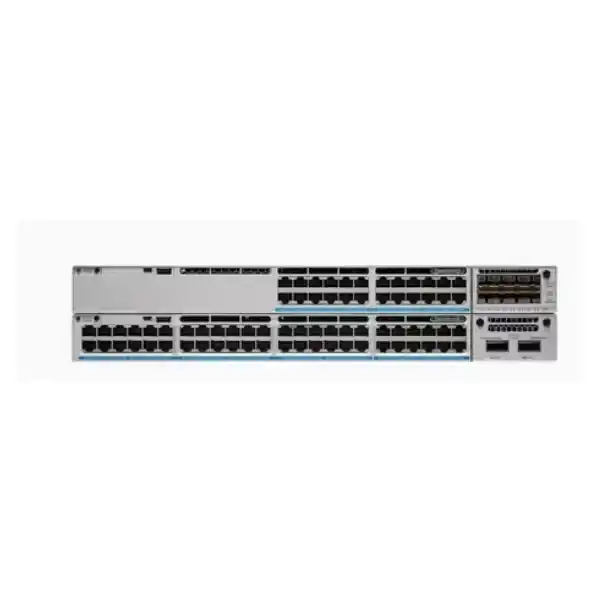
4 × 10G/1G SFP+ Uplinks
890W Default PoE Budget
StackWise-320
Cisco Catalyst C9300L-48PF-4X Network Switch
The Cisco Catalyst C9300L-48PF-4X is a fixed-uplink enterprise access switch for organizations that need a dense 48-port Gigabit Ethernet edge, PoE+ for connected devices, and four high-speed 10G/1G SFP+ uplinks. It is suited to campus and branch access-layer designs where IP phones, wireless access points, surveillance endpoints, workstations, printers, building systems, and other Ethernet devices need to be consolidated onto a managed Cisco IOS XE platform.
For Tanzania deployments, the most important buying questions are not only port count. Buyers should confirm the required licensing tier, total PoE load, uplink optics, stacking plan, secondary power-supply requirement, rack depth, and upstream switching design before ordering. The C9300L-48PF-4X hardware family is available in different software variants, including Network Essentials, Network Advantage, and Meraki-managed options, so the exact suffix and subscription should match the intended network architecture.
Quick fit: who should consider this switch?
Verified core specifications
Why the C9300L-48PF-4X is different from a basic 48-port PoE switch
A basic managed 48-port switch may provide enough ports for users, but enterprise access design often depends on the combination of power, uplink capacity, stacking, software features, resiliency, and operational consistency. The C9300L-48PF-4X combines forty-eight Gigabit Ethernet access ports with PoE+ capability and four dedicated 10G/1G SFP+ uplinks. That layout keeps the access ports available for endpoints while allowing multiple high-speed links toward aggregation, servers, or another switching layer.
The platform is also designed for environments where access switching is part of a broader Cisco architecture rather than an isolated device. Cisco IOS XE, model-driven telemetry, policy controls, 802.1X support, quality-of-service functions, Layer 2 and routed-access features, and optional advanced capabilities allow network teams to apply consistent operating practices across a campus. The exact feature set depends on the selected license tier, which is why the suffix on the orderable product matters.
The “PF” model is especially relevant when PoE demand is higher than on a standard C9300L-48P design. Cisco identifies the C9300L-48PF-4X as a full-PoE+ model and ships it with a higher-capacity 1100W AC power supply. This gives the switch an 890W PoE budget in the default power configuration. Organizations planning many higher-draw access points, IP cameras, video phones, or other powered devices should calculate the real power requirement instead of choosing only by port count.
PoE+ planning: 890W default budget and what it means
The most important sizing figure for this model is the available PoE power. With the default 1100W AC power supply, Cisco documents 890W available for powered devices. PoE+ can deliver up to 30W at the switch port to a compatible powered device, but a 48-port switch with an 890W total budget cannot provide the full 30W simultaneously to all forty-eight ports. Forty-eight ports at 30W would represent 1440W of port power before considering normal design details, so planners should work from the endpoint power profile rather than the maximum port rating.
A practical design starts by listing every intended powered endpoint, its negotiated or worst-case PoE requirement, and a reserve for future additions. For example, a mix of desk phones, cameras, and access points may fit comfortably within 890W even when all 48 ports are occupied, because many devices draw less than the PoE+ ceiling. A deployment dominated by high-draw devices may require a supported secondary power supply. Cisco documents 1240W available PoE power with a 350W secondary supply and up to 1440W with a 715W or 1100W secondary supply on this model, with the final usable figure still subject to port ratings and supported configuration.
This distinction matters for budgeting and resilience. A second supply can be chosen to expand the power pool, improve power design, or both, but the desired failure behavior should be considered. If the switch must continue powering a defined set of critical devices after a power-supply failure, the design should reserve enough surviving capacity for those devices. Do not size a redundant design only against normal operating draw.
For Tanzanian sites where power continuity is a business concern, the switch should also be considered together with the rack UPS, upstream protection, cooling, and generator or backup-power strategy where applicable. Those supporting systems must be sized for the actual network load and installation conditions. The switch itself should not be treated as a substitute for site-level power protection.
Four 10G SFP+ uplinks for aggregation and growth
The “4X” in the model name denotes four fixed 10G/1G SFP+ uplink ports. This is a meaningful advantage over access switches limited to 1G uplinks, especially when many users and powered devices share the same access chassis. Multiple 10G links can be used for higher aggregate bandwidth, resilient uplink design, or connections to separate upstream systems depending on the network topology and software configuration.
Because the uplinks are fixed, this is not the same design as a modular-uplink Catalyst 9300. Buyers should choose the C9300L-48PF-4X when four 10G/1G SFP+ uplinks are a suitable long-term fit. If the project requires different uplink speeds, modular uplink cards, 25G, 40G, or other interface combinations, another Catalyst model may be more appropriate. Fixed uplinks simplify the chassis configuration but reduce later physical-interface flexibility.
Optics and cables should be selected as part of the design, not assumed from the switch name. Fiber type, link distance, connector format, patching, the peer device, and supported Cisco transceiver or cable compatibility all influence the correct choice. A short rack-to-rack connection may have different requirements from a building-to-building fiber link. The four uplink ports also support 1G operation where the selected supported optic and design call for it.
For procurement, document the desired uplink count, link speed, media type, approximate distance, redundancy model, and the exact upstream switch interfaces. This avoids receiving a switch that has the correct access-port density but an incomplete fiber bill of materials.
Performance for a modern enterprise access layer
Cisco lists 176 Gbps of switching capacity and 130.95 million packets per second of forwarding performance for the C9300L-48PF-4X in its standalone configuration. Those figures align with the role of the device as a 48-port Gigabit access switch with four 10G uplinks. When Cisco reports the model with stacking, the corresponding table lists 496 Gbps switching capacity and 369.05 Mpps forwarding rate. These are platform performance specifications, not an assurance that every application will experience a specific throughput.
Actual network performance still depends on design. Uplink oversubscription, traffic patterns, routing, ACLs, QoS policy, endpoint behavior, server capacity, wireless architecture, and upstream congestion can all affect results. A well-designed access layer therefore starts with traffic requirements rather than relying on the headline switch capacity. For example, a floor with office users and voice may have very different east-west and north-south traffic patterns from a video-heavy surveillance environment or a network serving high-density wireless access points.
The fixed-uplink Catalyst 9300L/9300LM platform class supports up to 32,000 MAC addresses, 32,000 total IPv4 route entries under Cisco’s documented scale profile, 16,000 IPv6 routing entries, and 4094 VLAN IDs. These figures make the platform suitable for substantial enterprise access designs, but the correct forwarding template and feature mix should be validated for large or unusual deployments.
For projects with demanding scale requirements, the design should be checked against the current Cisco software release and feature documentation before final configuration. Hardware scale is only one part of the solution; software version, licensing, templates, and enabled features determine how the available resources are used.
StackWise-320: simpler operations across multiple access switches
The C9300L family supports Cisco StackWise-320 using an optional stacking kit. Cisco documents up to eight compatible members in a StackWise-320 stack, providing a single management and control-plane approach for multiple physical switches. This can simplify operations on a building floor or access block because administrators can manage the stack as one logical system rather than maintaining every chassis as an unrelated device.
Stacking is not automatic from the base chassis alone. The required C9300L stacking hardware and cables must be included in the bill of materials when a stack is planned. Cisco lists C9300L-STACK-KIT and the newer C9300L-STACK-KIT2 options, with supported cable choices. The physical rack layout should be planned before choosing cable lengths, particularly when switches are separated across rack units or deployed in adjacent racks.
Compatibility also matters. Cisco states that C9300L and C9300LM fixed-uplink models can participate in the StackWise-320 family under supported combinations and the same license level. Fixed-uplink C9300L models cannot be stacked with modular-uplink C9300 models. They also should not be treated as drop-in stack members for older Catalyst 3650 or 3850 stacks. A migration from an older stack therefore normally requires a planned replacement or staged topology rather than adding one C9300L chassis to the existing legacy stack.
A stack design should also account for failure domains. Stacking can simplify control and increase operational resilience, but it does not remove the need to plan redundant uplinks, power, device placement, and maintenance. Critical endpoints may be distributed across stack members so that one physical chassis failure does not disconnect every device serving the same business function.
Power and hardware resiliency
The C9300L-48PF-4X is designed with replaceable power and cooling components appropriate for enterprise access use. Cisco documents three field-replaceable fans with N+1 fan redundancy across the Catalyst 9300 Series. The power architecture supports a second compatible power supply, which can be used to increase the available PoE budget and can also form part of a more resilient power design depending on the chosen supply and load.
It is important not to confuse this capability with Cisco StackPower. Cisco states that StackPower is supported on the modular-uplink C9300 and C9300X models, not the fixed-uplink C9300L family. Each C9300L switch therefore needs its own correctly planned power arrangement rather than relying on StackPower sharing between chassis. This is particularly important when comparing the 9300L to other members of the broader Catalyst 9300 portfolio.
Power design should be documented around both normal and failure conditions. If two supplies are installed, determine whether the goal is extra PoE capacity, redundancy, or a balance of both. Then calculate what happens if one input feed or one supply is lost. A network can appear adequately sized during normal operation yet shed powered devices during a fault if the remaining supply does not have enough capacity.
Rack power should also be treated as part of the network design. The switch’s 1100W power-supply rating is not the same as constant wall draw; actual consumption depends on system load and PoE delivery. UPS and circuit sizing should use the relevant Cisco power information together with the planned endpoint load and any local electrical engineering requirements.
Licensing: choose the correct -E, -A, or -M variant
The base hardware name C9300L-48PF-4X does not by itself identify the complete software entitlement. Cisco currently lists C9300L-48PF-4X-E for Network Essentials, C9300L-48PF-4X-A for Network Advantage, and C9300L-48PF-4X-M for Meraki Advanced or Enterprise management options. A quote should therefore identify the exact orderable suffix and associated software subscription rather than using only the shortened chassis name.
Network Essentials covers core switching capabilities such as Layer 2 operation, routed access functions within the documented feature set, quality of service, first-hop security functions, 802.1X, telemetry, SPAN/RSPAN, and other access-layer fundamentals. Network Advantage expands the platform with additional routing, segmentation, automation, resiliency, security, and advanced enterprise functions. Cisco’s current feature matrix places items such as BGP, full OSPF capability, VRF/VXLAN/LISP segmentation, NETCONF/RESTCONF/gRPC/YANG automation, and MACsec-256 in the Advantage column. Feature availability can change by software release, so the exact intended configuration should be checked against current Cisco licensing documentation.
The Meraki-managed option is a different operational choice, not merely a cosmetic license label. Organizations standardizing on Meraki cloud management should verify the specific Meraki licensing and management requirements for the chosen -M part number. Teams using traditional Catalyst IOS XE management should instead select the appropriate Catalyst licensing path.
Before ordering in Tanzania, define the required routing protocols, segmentation model, automation interfaces, assurance tools, security capabilities, term length, and management platform. This prevents overbuying advanced software that will not be used or, conversely, selecting an Essentials configuration that cannot support the planned network design.
Security and segmentation at the access layer
Enterprise access switching is increasingly a security control point as well as a connectivity layer. The Catalyst 9300 family supports access technologies that help teams identify endpoints, control admission, separate traffic, and apply policy close to users and devices. On the C9300L platform, capabilities such as 802.1X, first-hop security functions, ACLs, quality of service, telemetry, and MACsec support can form part of a layered campus security design. Some advanced functions require Network Advantage or another appropriate software entitlement.
The right design depends on the organization. A simple office may mainly need VLAN separation for staff, voice, guest systems, and management. A larger campus may need identity-based access, segmentation, redundant gateway services, richer routing, or integration with Cisco network management and policy systems. An operational-technology environment may have additional requirements for deterministic behavior, device profiling, change control, or strict separation between business and equipment networks.
Security features should not be enabled in isolation. Access policies must align with the authentication service, IP addressing plan, DHCP and DNS design, logging, endpoint lifecycle, incident response, and upstream firewall policy. The switch can enforce network controls, but it cannot compensate for incomplete identity governance or poorly defined segmentation.
Buyers should therefore describe the intended security architecture when requesting a configuration. If MACsec-256, advanced segmentation, specific routing protocols, or policy automation are mandatory, make those requirements explicit so that the license tier and software release can be validated before purchase.
Common deployment scenarios in Tanzania
These examples describe technical fit rather than guaranteed compatibility with every endpoint or application. Before deployment, validate the attached device requirements, cabling category, fiber design, local power environment, rack ventilation, software features, and upstream network architecture.
Wireless access-point deployments: check both power and access speed
The C9300L-48PF-4X can be a strong PoE access switch for wireless deployments, but planners should separate two questions: how much power each access point needs and how much wired bandwidth each access point can use. The forty-eight access ports on this model are Gigabit Ethernet. They are not multigigabit access interfaces. A modern access point may operate correctly on a 1G Ethernet connection but be capable of higher wired throughput when connected to 2.5G, 5G, or 10G multigigabit switching.
That means this switch is a good match when 1G access links meet the wireless design requirement and PoE+ is sufficient for the chosen access points. If the project specifically requires multigigabit access or Cisco UPOE rather than PoE+, a C9300L multigigabit model or another Catalyst platform should be evaluated instead. The C9300L-48UXG family, for example, is positioned differently because it includes a subset of multigigabit copper ports and UPOE support.
Uplink planning is equally important. Dozens of wireless access points can create bursty aggregate traffic, especially in conference, education, hospitality, or public-facing environments. The four 10G SFP+ uplinks provide useful headroom, but the final design should consider the number of active clients, application mix, controller or cloud path, redundancy, and how uplinks are distributed across the access layer.
For a wireless refresh, provide the access-point models, quantity, expected PoE class, required Ethernet speed, and the target distribution topology during the switch-selection process. This is more reliable than choosing a PoE switch solely because it has enough physical ports.
IP telephony, video, and surveillance considerations
For IP telephony, the combination of PoE+, VLAN support, QoS, and enterprise management lets the C9300L-48PF-4X serve voice and data from the same access layer. Many desk phones use substantially less than the maximum PoE+ allocation, so a mixed phone-and-PC environment can often support a large number of powered endpoints within the 890W default budget. The exact phone models, expansion modules, video capability, and pass-through design should still be included in the power calculation.
Video surveillance can be more demanding. Camera power varies with infrared illumination, heaters, pan-tilt-zoom motors, analytics, and accessory loads. Network utilization also differs greatly between low-bitrate fixed cameras and high-resolution multi-sensor devices. When a switch is used for surveillance, power and bandwidth should be modeled together, and the recorder or video-management path should be considered when selecting the uplink design.
Quality of service is useful where voice, interactive traffic, business applications, and bulk video share the same infrastructure, but QoS policy should reflect the actual network. Marking every application as high priority defeats the purpose. Define the trusted boundaries, traffic classes, queuing strategy, and upstream policy so that important applications receive appropriate treatment without starving other services.
If the installation combines voice, surveillance, Wi-Fi, user access, and building systems, clear segmentation is equally important. Separate VLANs and access controls can reduce broadcast scope, simplify troubleshooting, and help limit unintended communication between device classes.
Choosing between C9300L-48PF-4X and nearby Catalyst options
| Model type | Best considered when | Main trade-off |
|---|---|---|
| C9300L-48PF-4X | You need 48 × 1G PoE+ ports, a higher PoE budget, and four fixed 10G uplinks. | Fixed uplinks and 1G-only copper access ports. |
| C9300L-48P-4X | You need the same 48-port 1G/4×10G access pattern but a lower PoE requirement. | Lower default PoE budget than the PF model. |
| C9300L-48PF-4G | You need the full-PoE 48-port access design but only 1G fixed fiber uplinks. | Less uplink bandwidth than the 4X model. |
| C9300L multigigabit variants | Some access devices need more than 1G Ethernet or require UPOE. | Different port mix, power characteristics, and cost profile. |
| Modular-uplink C9300 | You need modular uplink flexibility or capabilities specific to the modular family. | Different stacking and chassis design; not stack-compatible with C9300L. |
The most common selection mistake is to compare models only by the first forty-eight access ports. The uplink type, PoE budget, access-port speed, stacking family, power architecture, and license tier can all change the correct answer. The “PF” model is valuable when power density is a priority, but a different model can be better when multigigabit access, modular uplinks, or lower PoE demand is the dominant requirement.
When requesting a quote, provide the existing switch model if this is a replacement. That helps identify whether the project is a simple port-for-port refresh or a change in architecture. An older 48-port switch may use different stacking, uplink modules, licenses, and power supplies, so legacy accessories should not be assumed reusable without compatibility verification.
Migration from Catalyst 3650 or other older access switches
Cisco has identified C9300L-48PF-4X variants as migration choices for several older Catalyst 3650 full-PoE models. That makes the platform relevant to organizations refreshing aging access networks, but migration still requires design work. A replacement should account for the old switch’s uplink modules, stack cables, software features, VLANs, routing, spanning-tree behavior, EtherChannels, power supplies, PoE load, authentication settings, monitoring, and physical cabling.
Do not plan to mix the new C9300L into an existing 3650 or 3850 data stack. Cisco’s stacking guidance keeps the fixed-uplink C9300L in its own supported StackWise-320 family. A common migration approach is therefore to build the new access stack, configure and test it, establish uplinks to the distribution layer, and then move endpoints in controlled groups. The exact cutover sequence depends on the site and business tolerance for interruption.
Configuration should also be reviewed rather than copied blindly. Older syntax may still work in some cases, but a refresh is an opportunity to remove unused VLANs, outdated ACL entries, unsupported commands, weak cryptographic settings, abandoned monitoring destinations, and temporary exceptions that became permanent. Authentication and security policies should be validated against the current environment.
A pre-migration inventory should capture the current port map, endpoint type, PoE draw, trunk and access configuration, uplinks, spanning-tree roles, routing adjacencies, management addresses, SNMP or telemetry setup, syslog, NTP, AAA, and software dependencies. This turns the hardware refresh into a controlled network change instead of an emergency cable swap.
Rack, depth, cooling, and physical installation
The C9300L fixed-uplink chassis is a 1RU-class switch. Cisco lists the C9300L-48PF-4X chassis at approximately 4.4 cm high by 44.5 cm wide by 40.9 cm deep. With a 1100W power supply installed, Cisco’s dimension table lists an overall depth of approximately 48.8 cm. This distinction is important when the switch is going into a shallow wall cabinet or an older rack.
Allow additional working space for power cords, fiber bend radius, copper patching, stacking cables, and service access. The usable depth of a cabinet can be less than the advertised external depth because of front doors, rear power distribution units, vertical cable managers, or internal mounting rails. Confirm the real rack geometry before delivery.
Cooling is also part of reliability. Keep intake and exhaust paths clear, maintain the site’s planned environmental conditions, and avoid packing loose copper or fiber bundles against fan areas. Cisco documents field-replaceable fans with N+1 redundancy, but redundant fans do not eliminate the need for adequate room and rack ventilation.
For installations in areas with dust, heat, unstable utility power, or limited air conditioning, site preparation should be treated as an engineering task. Use appropriate rack protection, power conditioning or UPS capacity, grounding, cable management, and maintenance practices for the environment. The switch’s enterprise design does not override the environmental limits in Cisco’s hardware documentation.
Network design checklist before you order
Procurement details that should appear on the quote
A complete switch quote should identify more than the shortened model name. For this platform, confirm whether the required orderable product is C9300L-48PF-4X-E, C9300L-48PF-4X-A, or an appropriate -M variant. The license and subscription term should be shown clearly. If a second power supply is required, its exact supported part should be listed, along with the reason it is being added: extra PoE capacity, redundancy, or both.
If stacking is required, include the correct C9300L stack kit and suitable cable lengths. If uplink connectivity is required, include or separately identify the supported SFP/SFP+ optics or direct-attach cables, fiber patch leads, and any adapters needed for the peer device. Do not assume optics, stack hardware, or a second power supply are included merely because the chassis supports them.
The project team should also confirm rack mounting accessories, power-cord requirements, software term, support requirements, and any management-platform dependencies. Existing transceivers and accessories should be treated as reusable only after compatibility has been checked for the exact hardware and software combination.
Price, stock, delivery time, warranty terms, and local service scope can vary by quote and supply channel. For that reason, this page does not state an unverified Tanzania price or availability promise. Request a current quotation tied to the exact configuration and intended deployment.
Operational planning after installation
A successful Catalyst deployment continues after the hardware is mounted. Establish a documented management IP scheme, administrator authentication, configuration backup process, NTP, DNS where appropriate, logging, software-management policy, monitoring, alert thresholds, and change-control procedure. If the switch is part of a stack, include stack-member identification and replacement procedures in the operational documentation.
Monitor PoE utilization rather than assuming the original calculation remains accurate. Endpoints are added and replaced over time, and a newer access point or camera may draw more power than the device it replaces. Maintaining a reserve makes later changes easier and reduces the risk that a fault or expansion unexpectedly exhausts the available PoE budget.
Uplink utilization should also be measured. The presence of four 10G uplinks does not mean all designs need all four active on day one, but the ports provide useful flexibility for growth and redundancy. Trending interface utilization, errors, drops, and application behavior gives a better basis for capacity upgrades than anecdotal reports of slowness.
Finally, keep the IOS XE release under active lifecycle management. Review current Cisco advisories, field notices, release notes, and upgrade guidance as part of normal network operations. A stable switch can remain in service for years, but enterprise reliability depends on maintaining both the hardware and software environment.
What this model does not provide
Clear limitations help buyers select the right switch. First, the forty-eight access ports are Gigabit Ethernet, not multigigabit. If endpoints require 2.5G, 5G, or 10G copper access, choose a multigigabit model. Second, PoE+ is not the same as Cisco UPOE or UPOE+. Devices requiring higher per-port power than PoE+ should be matched to another platform or powered by another supported method.
Third, the uplinks are fixed. The four SFP+ interfaces are useful for common 10G/1G designs, but you cannot later replace an uplink module to change the physical uplink architecture as you can on a modular-uplink Catalyst 9300. Fourth, C9300L uses StackWise-320 and is not a member of a modular C9300 StackWise-480 stack. Stack design must remain within Cisco’s supported family and license rules.
Fifth, an 890W default PoE budget is substantial but is still below the 1440W needed to allocate 30W simultaneously to all forty-eight access ports. A supported secondary supply may be required for very high power density. Sixth, advanced network features are license dependent. The presence of capable hardware does not automatically grant every routing, segmentation, security, automation, or assurance feature.
These are not weaknesses when the model is matched to the correct requirement. They are design boundaries that make it easier to decide whether the C9300L-48PF-4X is the right access switch or whether another Catalyst option offers a better technical fit.
Frequently asked questions
Is the C9300L-48PF-4X a 48-port PoE+ switch?
Yes. Cisco specifies forty-eight 10/100/1000 Mbps copper PoE+ access ports. The model is positioned as a full-PoE+ variant, but the total available power still depends on the installed power supplies. With the default 1100W AC supply, Cisco documents an 890W PoE budget.
Can it supply 30W to all 48 ports at the same time?
Not from the default 890W PoE budget. Forty-eight ports at 30W represent 1440W. Cisco documents that the C9300L-48PF-4X can reach a 1440W PoE budget with supported secondary power-supply configurations. The final design must still observe per-port limits and supported power-supply rules.
Does it have 10G uplinks?
Yes. The switch has four fixed SFP+ uplink ports that support 10G or 1G operation with appropriate supported transceivers or cables. Optics and media should be selected according to distance, fiber type, connector, peer interface, and compatibility requirements.
Does it support stacking?
Yes. Catalyst 9300L fixed-uplink switches support StackWise-320 with the appropriate optional stack kit and cables. Cisco documents stacks of up to eight supported members. Stack members must follow Cisco compatibility and license-level requirements.
Can it stack with a modular C9300?
No. Cisco separates the fixed-uplink C9300L StackWise-320 family from modular-uplink C9300 models. If an existing network uses a modular C9300 stack, do not assume a C9300L can be added as another stack member.
Is Network Advantage included?
That depends on the exact orderable part. The -A version is associated with Network Advantage, while the -E version is associated with Network Essentials. Cisco also lists -M Meraki-managed variants. Confirm the suffix and subscription on the quotation.
Can I use this for Wi-Fi access points?
Yes, when the access points are compatible with PoE+ and a 1G wired access interface meets the design requirement. If the APs require multigigabit Ethernet or higher-power UPOE/UPOE+, evaluate a different switch model with those capabilities.
Can I use it for CCTV cameras?
It can power compatible PoE/PoE+ cameras and carry surveillance traffic. Calculate the total worst-case camera power, account for features such as infrared or PTZ operation, and verify uplink bandwidth toward the recorder or video-management system.
Does the switch support Layer 3 routing?
The Catalyst 9300 platform supports routed access and broader Layer 3 functionality, but the available protocols and scale depend on the license tier and software release. Network Advantage provides advanced routing features beyond the Essentials feature set.
Are SFP+ modules included?
Do not assume they are included. The switch provides the SFP+ uplink interfaces, while the appropriate supported transceivers or cables should be specified for the actual link. The final quoted bundle should state what is included.
Is there a published Tanzania price on this page?
No. Pricing can vary with the exact hardware suffix, software subscription, support, optics, stack accessories, secondary power supply, and supply conditions. Request a current Tanzania quotation for the required configuration.
What information should I provide for a quote?
Provide the number and type of endpoints, estimated PoE draw, required uplink media and distance, number of switches, whether stacking is required, desired redundancy, routing and segmentation features, preferred management model, rack constraints, and any existing switch model being replaced. This allows the complete bill of materials to be checked instead of quoting only the chassis.
Request a Cisco C9300L-48PF-4X configuration for Tanzania
Use the C9300L-48PF-4X when your access layer needs forty-eight Gigabit PoE+ ports, four 10G/1G SFP+ uplinks, a high default PoE budget, Cisco IOS XE capabilities, and optional StackWise-320. Before ordering, confirm the exact license suffix, endpoint PoE requirement, secondary power-supply need, uplink optics, stack accessories, and rack design.
Contact FourTeck Tanzania for a configuration-based quotation. Include your endpoint list, PoE requirements, fiber distances, preferred licensing tier, number of switches, and whether the project is a new deployment or a migration from an existing Cisco access platform. A requirements-led quote helps ensure that the switch, software, power, stacking, and uplink components match the intended network.




Reviews
There are no reviews yet.