
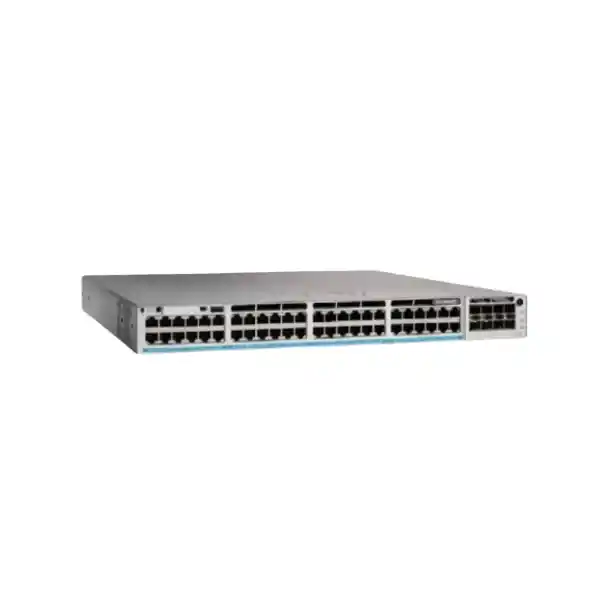
Cisco Catalyst 9300L • Enterprise Access Switching
Cisco Catalyst C9300L-48UXG-4X Network Switch
For Tanzanian organizations refreshing a wired campus, office, school, hotel, healthcare facility, branch network, or other high-density access environment, the Cisco Catalyst C9300L-48UXG-4X combines multigigabit copper, high-power Cisco UPOE, fixed 10 Gigabit fiber uplinks, and optional StackWise-320 in a single 48-port platform. Its strongest fit is where conventional 1 Gigabit access switching is becoming a bottleneck for modern wireless access points and other bandwidth-intensive endpoints, but the network still needs large numbers of standard Gigabit copper connections.
What this switch is designed to solve
Access-layer networks increasingly carry a mix of ordinary desktop traffic, high-throughput wireless traffic, voice, video, building systems, cameras, and other powered devices. A design that treats every edge port as identical can either waste budget on capabilities that are not needed everywhere or create choke points where selected endpoints need more than 1 Gbps. The C9300L-48UXG-4X addresses that problem with a mixed access-port layout: 36 copper ports support 10/100/1000 Mbps, while 12 multigigabit RJ-45 ports can negotiate at 100 Mbps, 1 Gbps, 2.5 Gbps, 5 Gbps, or 10 Gbps.
That split is useful when most users and devices remain comfortably within Gigabit Ethernet, but a smaller group of endpoints needs significantly more bandwidth. Those faster ports can be reserved for capable Wi-Fi access points, high-performance workstations, specialized appliances, or other devices that benefit from multigigabit access. Because the model uses fixed 4 × 10G/1G SFP+ uplinks, the uplink choice is also straightforward: it is intended for networks where 10 Gigabit uplink capacity is appropriate and where a modular uplink bay is not a requirement.
This hardware positioning matters during procurement. The C9300L family is not simply a lower-port-density version of every Catalyst 9300 configuration. It is the fixed-uplink branch of the family and supports StackWise-320 rather than the higher-bandwidth stacking technologies used on some modular-uplink Catalyst 9300 or Catalyst 9300X models. Buyers should therefore choose it because its access speeds, uplink architecture, power design, software option, and stacking model match the intended topology—not merely because the product belongs to the Catalyst 9300 Series.
Key hardware specifications
| Model | Cisco Catalyst C9300L-48UXG-4X |
|---|---|
| Access ports | 48 copper UPOE-capable ports |
| Multigigabit ports | 12 × RJ-45, supporting 100M/1G/2.5G/5G/10G |
| Standard copper ports | 36 × 10M/100M/1G RJ-45 |
| Fixed uplinks | 4 × 10G/1G SFP+ |
| Switching capacity | 392 Gbps standalone; 712 Gbps with stacking |
| Forwarding rate | 291.66 Mpps standalone; 529.76 Mpps with stacking |
| Stacking | Optional StackWise-320, up to 8 compatible members |
| Default power supply | 1100W AC |
| Available PoE power with default PSU | 675W |
| Memory | 8 GB DRAM, 16 GB flash |
| Jumbo frames | Up to 9198 bytes |
| Dimensions | Maximum 1.73 × 17.5 × 19.2 in (4.4 × 44.5 × 48.8 cm) with fan FRUs and default power supply installed |
| Weight | 16.86 lb (7.65 kg) with default power supply |
Multigigabit access where it has the most value
The 12 multigigabit ports are the defining feature of this model. Unlike a standard 48-port Gigabit access switch, these ports can scale beyond 1 Gbps without requiring fiber all the way to the endpoint. This makes the switch attractive for structured-cabling environments where selected devices need 2.5, 5, or 10 Gigabit Ethernet over copper. Cisco specifies 100M, 1G, 2.5G, 5G, and 10G operation on the multigigabit interfaces, while the remaining 36 access ports support conventional 10M, 100M, and 1G Ethernet.
A practical design approach is to map high-throughput devices to the multigigabit group and reserve the Gigabit ports for endpoints that do not benefit from higher link rates. This can improve utilization of the switch without forcing every access port into a premium multigigabit specification. It can also simplify phased upgrades: the access layer can support newer wireless or workstation requirements while existing phones, printers, cameras, desktops, and building systems remain on Gigabit ports where appropriate.
Cabling should be reviewed before promising a specific multigigabit result. Link speed depends not only on the switch and endpoint but also on cable category, channel quality, distance, patching, and installation condition. Cisco specifically notes Category 6A or Category 7 cabling for 10G operation on this platform in its architecture documentation. If an existing building has older copper cabling, a site survey or certification test is a sensible part of the upgrade plan, especially when 5G or 10G access speeds are a core requirement.
UPOE power planning: check the budget, not only the per-port capability
The C9300L-48UXG-4X is a Cisco UPOE model and is designed for devices that may need more power than ordinary PoE+ deployments. Cisco identifies the platform as supporting up to 60W class power on UPOE ports. That capability can be useful for modern wireless access points, cameras with heaters or pan-tilt-zoom functions, collaboration equipment, compact computing devices, and other edge systems with higher power demand. The important purchasing distinction is that maximum power per port and total switch PoE budget are not the same thing.
With the default PWR-C1-1100WAC-P power supply, Cisco specifies 675W of available PoE power for this exact model. Therefore, a design with many high-power endpoints must be calculated from the expected draw of all powered devices rather than from port count alone. For example, forty-eight ports physically exist, but the default power budget cannot supply 60W simultaneously to all of them. If the deployment has a high concentration of power-hungry devices, the power-supply design becomes part of the bill of materials rather than an afterthought.
Cisco documents larger total PoE budgets when supported secondary power supplies are added: 1025W with a 350W secondary supply, 1390W with a 715W secondary supply, and up to 1775W with a 1100W secondary supply for this model. Those figures are valuable for planning, but the final configuration should be checked against the actual endpoint mix, redundancy objective, available electrical circuits, rack power, heat load, and the specific Cisco power-supply parts being ordered.
List every powered endpoint, its expected PoE class or wattage, and which devices require power redundancy. This determines whether the default 675W budget is sufficient and whether a secondary PSU should be included.
Four fixed 10 Gigabit SFP+ uplinks
The “4X” portion of the model name identifies four fixed 10G/1G SFP+ uplinks. For many enterprise access designs, four 10 Gigabit uplink positions offer enough flexibility for redundant fiber connections, link aggregation, or separate paths toward distribution-layer equipment. The fixed design also keeps model selection simple because there is no separate uplink module to choose for this chassis.
The trade-off is equally important: these uplinks are not modular. If the intended architecture requires native 25G, 40G, or 100G uplinks from the access switch, another Catalyst model may be a better fit. Cisco also offers the C9300L-48UXG-2Q hardware with two fixed 40G uplinks, while other Catalyst 9300 and 9300X platforms provide different uplink designs. The correct model should be selected from the distribution/core interface requirement first rather than assuming an uplink can be changed later by replacing a module.
Optics and fiber type are separate design decisions. Confirm the distance, fiber plant, connector type, transceiver compatibility, desired redundancy, and remote switch interface before ordering SFP or SFP+ modules. The base switch description alone does not determine which transceivers are required for a specific site.
StackWise-320 for resilient access-layer growth
Cisco Catalyst 9300L fixed-uplink switches support optional StackWise-320. Cisco specifies a 320 Gbps stacking bandwidth and up to eight stack members for compatible Catalyst 9300L/9300LM configurations at the same license level. A stack can operate as a single logical switching system with a common management and control plane, which can simplify operations compared with managing multiple unrelated standalone switches.
Stacking is especially valuable when an access closet needs more than 48 ports, when links are distributed across multiple physical units, or when the design calls for resilient cross-stack uplinks. The C9300L-48UXG-4X delivers 392 Gbps switching capacity and 291.66 Mpps forwarding on its own; Cisco lists 712 Gbps switching capacity and 529.76 Mpps forwarding with stacking for the model. Those figures describe platform forwarding capability, while actual network performance still depends on traffic patterns, uplink design, oversubscription, endpoint speeds, and configuration.
Stacking hardware is optional rather than built into the purchase merely because the switch supports stacking. Cisco lists dedicated C9300L stack kits and cables for these models. A complete quote should therefore identify the number of switches, required stack kit generation, cable lengths, physical rack layout, license alignment, and spare strategy. Fixed-uplink C9300L switches cannot simply be stacked with modular-uplink C9300 models as though they were the same platform family.
For an installation that starts with one switch but may expand later, planning the stack topology in advance can avoid awkward cable routing and power arrangements. Leave suitable rack space, confirm rear access, and consider whether future units will require the same port mix or whether a different access model would provide better economics.
Performance and scale for enterprise access networks
Cisco specifies wire-speed nonblocking performance for Catalyst 9300 models in the bandwidth table, with forwarding rates measured using 64-byte IPv4 packets. For the C9300L-48UXG-4X, the published figures are 392 Gbps of standalone switching capacity and 291.66 million packets per second of forwarding. In a stacked configuration, Cisco lists 712 Gbps switching capacity and 529.76 Mpps forwarding for the model.
The fixed-uplink Catalyst 9300L/9300LM performance profile also includes 8 GB of DRAM, 16 GB of flash, support for 4094 VLAN IDs, 1000 switched virtual interfaces, jumbo frames up to 9198 bytes, and platform scale values intended for enterprise campus access. These are not reasons to choose the model in isolation, but they help confirm that the switch is designed as a managed enterprise access platform rather than as a simple unmanaged or lightly managed edge device.
When sizing a real network, raw switching capacity should be viewed alongside uplink bandwidth. Forty-eight access ports can theoretically create more aggregate edge traffic than four 10G uplinks can carry toward the rest of the network, especially if several multigigabit devices are active simultaneously. That is normal for access-layer design, but the acceptable oversubscription ratio depends on the workload. Wireless-heavy campuses, media workflows, local servers, storage traffic, or dense east-west traffic may require more detailed utilization modelling than ordinary office access.
Software and licensing: confirm the exact orderable variant
The base hardware name C9300L-48UXG-4X does not by itself identify the complete software entitlement. Cisco currently lists orderable variants including C9300L-48UXG-4X-E with Network Essentials, C9300L-48UXG-4X-A with Network Advantage, and C9300L-48UXG-4X-M with supported Meraki software options. This distinction should be resolved before a quote is approved because feature rights, management model, subscription requirements, and ordering components differ by software path.
For organizations using Cisco IOS XE and Cisco Catalyst Center, the Essentials-versus-Advantage decision should be based on required routing, segmentation, automation, assurance, security, and management features rather than on hardware alone. Some advanced capabilities described across the wider Catalyst 9300 family depend on a specific license level or additional service. They should not be assumed to be included simply because the switch chassis supports the broader technology family.
Cisco also supports Meraki cloud-management software options on selected 10G-uplink Catalyst 9300L models. A buyer evaluating that path should confirm the exact Meraki entitlement, subscription term, migration or operational model, and feature support required for the intended environment. The hardware may be closely related, but the day-to-day management experience and licensing framework can be materially different.
For this reason, a procurement request should specify not only “C9300L-48UXG-4X,” but also the desired software variant, subscription term where applicable, support coverage, optics, power supplies, stacking accessories, and any required licenses. This avoids a common situation where the hardware is correct but the software package or accessory set is incomplete.
Security, automation, and operational visibility
Catalyst 9300 Series switches run Cisco IOS XE in traditional Catalyst software configurations and support modern automation interfaces and telemetry capabilities. Cisco documents API-driven configuration using standards-based interfaces such as NETCONF, RESTCONF, and gNMI with YANG data models, as well as model-driven telemetry. These tools can help network teams move from device-by-device configuration toward repeatable templates, centralized monitoring, and integration with network automation platforms.
The wider Catalyst 9300 security architecture includes capabilities such as MACsec link encryption, secure boot, image signing, and Cisco Trust Anchor technologies. Exact operational use depends on software release, license, topology, and configuration, so project requirements should be checked against the current Cisco feature documentation for the selected software variant. The important procurement point is that this is an enterprise platform designed for policy-driven access, secure operations, and programmable management rather than only port connectivity.
Organizations planning segmentation, advanced routing, identity-based access, encrypted links, telemetry, or integration with centralized Cisco management should document those requirements before choosing the license. Doing so lets the hardware and software bill of materials be validated together and reduces the risk of discovering after deployment that a desired feature requires a different entitlement.
Common deployment scenarios
Wi-Fi access layer
Use the 12 multigigabit ports for access points that can exceed 1 Gbps and require higher PoE, while standard Gigabit ports serve lower-bandwidth endpoints.
High-density office floors
Connect users, IP phones, printers, conferencing devices, cameras, and selected high-speed workstations from one managed 48-port access platform.
Education and campus buildings
Support classrooms, administration, wireless access, surveillance, and building devices while retaining stacking options for larger wiring closets.
Hospitality and public venues
Combine access-point connectivity, phones, cameras, room or facility systems, and standard wired access where endpoint requirements vary by location.
Healthcare and professional facilities
Build a managed access layer for mixed endpoint types while planning segmentation, resiliency, and power requirements according to the organization’s network policy.
Branch or regional infrastructure
Use fixed 10G uplinks and a mix of Gigabit and multigigabit ports when a branch needs enterprise switching without a modular uplink chassis.
How to decide whether this is the right Catalyst 9300L model
Choose the C9300L-48UXG-4X when you specifically need a large 48-port access switch, a subset of 10 Gigabit-capable multigigabit copper ports, UPOE power, and four fixed 10G SFP+ uplinks. It is particularly well matched to mixed-speed edge designs where only part of the endpoint population requires more than 1 Gbps. If all endpoints are ordinary Gigabit devices and only standard PoE+ power is required, a less specialized Catalyst 9300L model may be more economical.
If the network needs more than four 10G uplinks, 25G uplinks, 40G uplinks, or 100G uplinks, compare other Catalyst 9300 or 9300X models before committing to the fixed-uplink chassis. Likewise, if the deployment needs 40G fixed uplinks but still wants the same 48-port mixed Gigabit/multigigabit access concept, the C9300L-48UXG-2Q is a related alternative worth evaluating. The uplink choice should reflect the current distribution layer and the expected growth horizon.
If very high PoE density is the main requirement, calculate the total wattage first. The default 675W budget may be ample for a mixture of phones, access points, and cameras, but it can be insufficient for a dense population of high-power devices. Conversely, adding a secondary power supply solely for theoretical maximum capacity may be unnecessary if the measured endpoint load is modest. A simple endpoint power worksheet is often the fastest way to choose correctly.
Finally, treat the software path as a design requirement. Network Essentials, Network Advantage, and Meraki software options are not interchangeable labels on the same quote. Confirm the desired operating model and feature set with the network team before the purchase order is finalized.
C9300L-48UXG-4X compared with nearby choices
| Model / type | Access emphasis | Uplink emphasis | When to consider it |
|---|---|---|---|
| C9300L-48UXG-4X | 12 × up to 10G mGig + 36 × 1G, UPOE | 4 × 10G/1G SFP+ | Mixed Gigabit/multigigabit edge with 10G fiber uplinks |
| C9300L-48UXG-2Q | 12 × up to 10G mGig + 36 × 1G, UPOE | 2 × 40G QSFP+ | Same access-port concept with higher-speed fixed uplinks |
| C9300L-48P-4X | 48 × 1G PoE+ | 4 × 10G/1G SFP+ | When multigigabit and UPOE are unnecessary |
| Modular-uplink Catalyst 9300 | Varies by model | Modular uplink choices | When uplink flexibility or another access profile is more important than a fixed-uplink design |
This comparison is a design guide rather than a complete ordering matrix. Current Cisco ordering documentation should be checked for the exact software, power, stacking, and support components associated with each chosen product identifier.
Tanzania deployment considerations
For deployment in Tanzania, the most important local planning questions are practical infrastructure questions rather than assumptions about stock or service coverage. Confirm the site’s rack depth, electrical capacity, grounding, cooling, fiber paths, copper-cabling quality, and backup-power strategy before installation. The switch itself is a 1RU-class platform, but the documented maximum chassis depth of 48.8 cm means the rack should be checked for usable clearance, rear cabling, stack connections, and power leads.
Power continuity deserves special attention when the switch supplies phones, wireless access points, surveillance devices, or other critical endpoints. A UPS or generator strategy should be sized for the complete load, including the switch’s own consumption and the PoE load delivered to connected devices. A design based only on the switch nameplate or the nominal PSU wattage can understate the runtime requirements of a heavily powered access layer.
Where high-speed copper is expected, certify existing structured cabling and patching rather than assuming every installed run can carry 5G or 10G. Where fiber uplinks are used, confirm the correct optical transceivers against distance and fiber type. These checks are particularly important when upgrading an existing building because the switch may be capable of significantly more throughput than the installed cabling plant can reliably support.
Availability, final configuration, lead time, support entitlement, and price can vary and should be confirmed on a current quote. This page does not assume local stock, a particular delivery time, or a specific warranty arrangement because those commercial details depend on the exact order and sourcing channel.
Recommended information to include in your quote request
State how many switches are required and whether they will operate standalone or as a StackWise-320 stack.
Specify Network Essentials, Network Advantage, or the intended supported Meraki software path after feature review.
List powered devices, expected wattage, and whether a secondary power supply is needed for capacity or redundancy.
Provide fiber type, distance, remote interface speed, and redundancy design so compatible optics can be selected.
Include stack kits and appropriate cable lengths if multiple compatible switches will be combined into one logical stack.
Identify desired support coverage and operational expectations so the quote can include the correct service components.
Installation and migration planning
A smooth migration starts by documenting the current switch ports rather than replacing hardware port-for-port without analysis. Record each endpoint, VLAN, voice VLAN, PoE requirement, access or trunk mode, security policy, link aggregation, spanning-tree role, monitoring requirement, and any special interface configuration. This exposes legacy settings that may no longer be required and identifies devices that deserve one of the 12 multigigabit ports.
Next, map the uplinks and failure scenarios. Decide whether the four 10G SFP+ ports will be used as independent paths, aggregated links, or cross-stack uplinks. Verify how the distribution switches handle those connections and whether the optics on both ends match. If the new access switches form a stack, define the physical stack order, master/control expectations, cable routing, and how links are spread across members for resiliency.
Power migration should be planned with the same care. A switch can boot successfully while still lacking enough PoE budget for all endpoints under full load. Before cutover, calculate the expected aggregate draw and reserve margin for devices whose power consumption changes during startup or operation. If a secondary PSU is required, include it in the design rather than treating it as a later option.
Finally, validate configuration and monitoring after cutover. Check negotiated link speeds, errors, PoE delivery, uplink utilization, spanning-tree state, VLAN reachability, routing where applicable, redundancy, and application performance. This confirms that the new switch is delivering the intended improvement instead of merely reproducing the old topology on newer hardware.
Capacity planning before purchase
A strong access-switch design starts with expected demand over the next several years, not only the number of devices connected today. Count current endpoints, planned wireless access points, cameras, phones, building systems, printers, workstations, and specialized equipment, then separate them by bandwidth and power requirement. This immediately shows whether twelve multigigabit ports are enough, whether 48 access ports provide suitable headroom, and how much of the 675W default PoE budget is likely to be consumed.
Wireless upgrades deserve particular attention because one new access point can affect both bandwidth and power calculations. An access point capable of multigigabit Ethernet may be constrained if it is connected to a 1G port, while a higher-power radio configuration may also need more PoE than older equipment. Mapping those devices to the mGig interfaces helps preserve the benefit of the wireless investment. At the same time, not every wireless installation automatically needs a 10G copper link; the selected access-point model, radio design, expected client density, and real traffic profile should drive the decision.
Uplink capacity should be estimated from actual application behavior. Typical office users rarely drive every access port at line rate at the same moment, so some oversubscription is normal. However, environments moving large files, video streams, backups, software images, medical data, engineering datasets, surveillance footage, or local storage traffic can produce sustained loads that change the calculation. Four 10G SFP+ uplinks provide useful design flexibility, but a network expecting sustained aggregate traffic beyond that profile should evaluate whether a higher-speed uplink architecture is more appropriate.
Growth planning also affects stacking. A single 48-port switch may be sufficient today, but an access closet expected to grow beyond that should reserve space, power, and rear clearance for additional stack members and stack cables. It is usually easier to establish a consistent stacking and license strategy early than to retrofit a mixed environment later. Because Cisco requires compatible 9300L/9300LM stack members at the same license level for supported StackWise-320 combinations, software selection is part of physical growth planning as well as feature planning.
Finally, build margin into the design. Port count, PoE wattage, UPS runtime, rack power, cooling, uplink utilization, and fiber availability should not be sized to an exact theoretical minimum if the network is expected to change. A modest reserve can reduce the cost and disruption of an early refresh, while an excessively oversized design can waste budget. The objective is a balanced configuration that matches known requirements, credible growth, and the organization’s operational standards.
Frequently asked questions
Does the C9300L-48UXG-4X have 48 multigigabit ports?
No. It has 48 copper access ports in total, but 12 are multigigabit ports supporting 100M, 1G, 2.5G, 5G, and 10G. The remaining 36 ports support 10M, 100M, and 1G Ethernet. This mixed design is intended to provide higher speed where it is needed without making every port multigigabit.
How many 10G uplinks are built in?
The model has four fixed 10G/1G SFP+ uplinks. Because they are fixed, they cannot be replaced with a different uplink module. If your design requires native 40G, 25G, or higher uplink speeds, compare another Catalyst 9300 configuration.
What is the PoE budget with the standard power supply?
Cisco specifies 675W of available PoE power with the default 1100W AC supply for the C9300L-48UXG-4X. Supported secondary power-supply combinations can increase the total available PoE budget. Always size the configuration from the actual endpoint load.
Can every port provide 60W at the same time?
Not with the default 675W PoE budget. Cisco UPOE supports higher per-port power capability, but the aggregate power available to all endpoints is limited by the installed power supplies. Forty-eight ports at 60W would exceed the default available budget, so endpoint wattage must be planned.
Does it support stacking?
Yes. Catalyst 9300L fixed-uplink models support optional StackWise-320. Cisco specifies 320 Gbps stacking bandwidth and up to eight compatible Catalyst 9300L/9300LM members at the same license level. The required stack kit and cables are optional accessories.
What is the difference between -E, -A, and -M variants?
Cisco lists C9300L-48UXG-4X-E with Network Essentials, C9300L-48UXG-4X-A with Network Advantage, and C9300L-48UXG-4X-M with supported Meraki software options. The correct choice depends on required features, management approach, and licensing terms. The base hardware description should not be used as a substitute for selecting the software variant.
Is this suitable for Wi-Fi 6 or newer access points?
It is often a strong fit for wireless access because 12 multigigabit ports can exceed 1 Gbps and the platform supports UPOE power. However, compatibility and required power should be checked for the specific access-point model, cabling, software, and intended wireless design.
Do I need Cat 6A cabling for 10G on the multigigabit ports?
Cisco’s architecture documentation calls out Category 6A or Category 7 cabling for 10G operation on this platform. Existing cabling should be assessed and, where necessary, tested before a 10G copper deployment is promised.
Are SFP+ optics included?
The switch provides the SFP+ uplink interfaces, but the required optical modules depend on fiber type, distance, remote equipment, and design. A quote should explicitly include compatible transceivers if they are required.
What should be confirmed before ordering in Tanzania?
Confirm the exact software variant, quantity, PoE endpoint budget, primary and secondary power-supply needs, stack accessories, uplink optics, support requirements, rack and power conditions, and structured-cabling readiness. Current price, stock, lead time, and commercial terms should be confirmed on the quote rather than assumed from a generic model description.
Request a configuration and quote
If you are evaluating the Cisco Catalyst C9300L-48UXG-4X for a Tanzania network, request a quote with your required quantity, software preference, PoE load, uplink distances, optics, stacking plan, and support needs. That information allows the complete configuration to be checked instead of quoting the switch chassis alone.
Recommended next step: submit your project requirements for configuration review and current commercial availability.




Reviews
There are no reviews yet.