
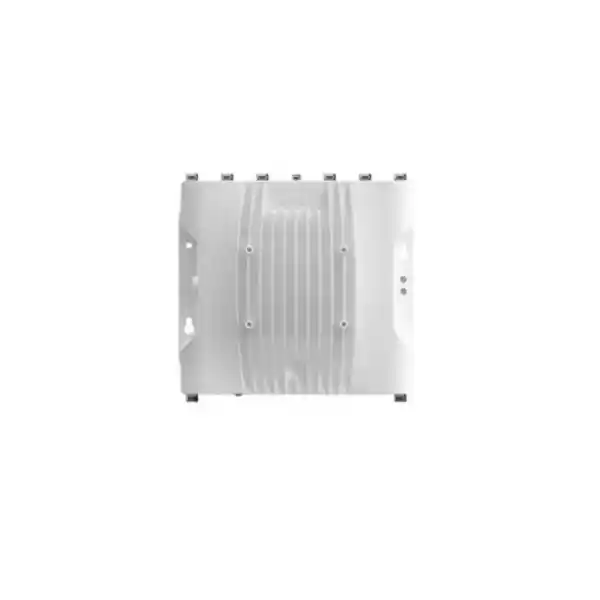
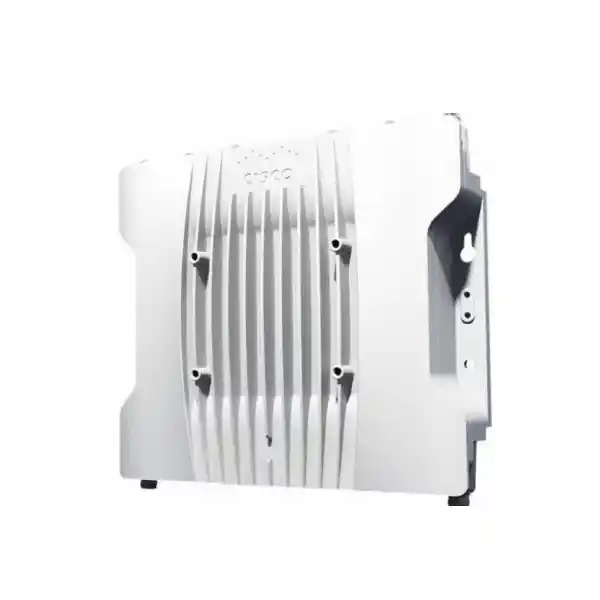
Cisco industrial wireless • Hazardous-location access point
Cisco Catalyst IW9167E-HZ: rugged Wi-Fi 6/6E and industrial wireless backhaul for hazardous locations
The Cisco Catalyst IW9167E-HZ is designed for organizations that need high-performance wireless networking in harsh, outdoor and potentially explosive industrial environments. It combines the IW9167E heavy-duty platform with hazardous-location hardening, permanent M25 ports, an IP66/IP67 enclosure and certifications for Class I, Division 2, ATEX Zone 2/22 and IECEx deployments. The platform supports Wi-Fi 6, Wi-Fi 6E-ready operation where local regulation permits, Workgroup Bridge (WGB) mode and Cisco Ultra-Reliable Wireless Backhaul (URWB), giving engineering teams one rugged hardware platform for client access, industrial asset connectivity and wireless backhaul use cases.
8 × N-type RF ports
IP66 / IP67
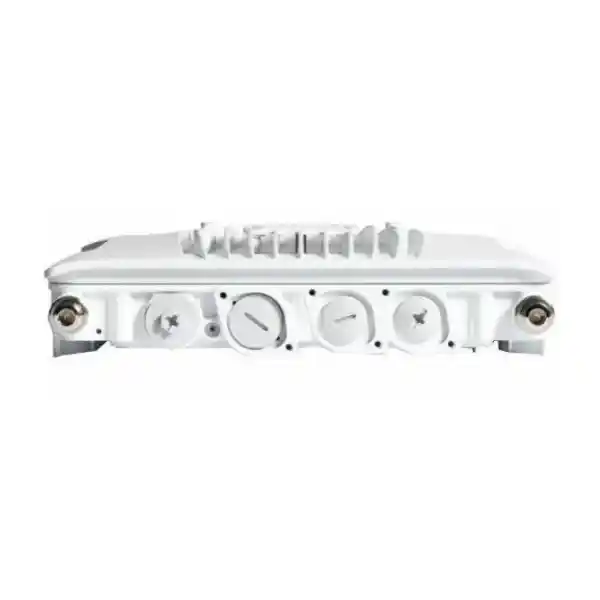
Permanent M25 ports
PoE / UPOE / DC
At a glance
Why choose the IW9167E-HZ instead of a standard enterprise access point?
Industrial wireless projects often fail when the access point is selected only for headline throughput. A factory, process plant, depot, mine support facility, utility compound or energy site may expose networking equipment to heat, dust, moisture, vibration, outdoor weather, metallic obstructions, long cable runs and stringent safety requirements. In hazardous areas, enclosure construction, cable entry, antennas and the exact certification scope become part of the design—not optional accessories. The IW9167E-HZ is intended for those environments. It retains the performance and flexible radio architecture of the IW9167E while adding hazardous-location features specifically for regulated explosive atmospheres.
The platform is especially valuable when a project may need more than conventional client Wi-Fi. Cisco’s IW9167 family can operate in Wi-Fi mode, Workgroup Bridge mode or URWB mode, with the selected software image and license defining how the hardware is used. That flexibility can reduce the need to standardize on completely different radio hardware for every industrial connectivity problem. A team can plan one rugged platform for operator devices and sensors in one area, a workgroup bridge for Ethernet-connected equipment in another, or a wireless backhaul link where trenching fiber is impractical.
The HZ model should still be treated as an engineered component rather than a drop-in replacement. Hazardous-area classification, certified antennas, glands and cable-entry practices, grounding, power source, mounting, separation distances, controller requirements, software mode and local spectrum rules must be confirmed for the actual site. For buyers in Tanzania, this design-first approach is important because Cisco’s global part numbers use regulatory domains and Cisco explicitly requires customers to verify country approval. FourTeck Tanzania can therefore use the product as the starting point for a project-specific bill of materials rather than presenting a single generic configuration as suitable for every site.
Hazardous-location design
The HZ variant adds hardened, permanent M25 ports and hazardous-location certifications including Class I, Division 2, ATEX Zone 2/22 and IECEx. It is intended for projects where a normal outdoor AP may not satisfy the site’s classification and installation requirements.
Flexible industrial wireless
Wi-Fi, WGB and URWB capabilities make the platform relevant to user access, connected machinery, moving assets and backhaul. The correct operating mode, controller architecture and licensing should be selected during design rather than after installation.
External antenna freedom
Eight N-type RF ports let the deployment use antennas matched to coverage, directionality, mounting and hazardous-location requirements. The antenna system is therefore a core part of the RF design, not merely a cosmetic accessory.
Industrial power and uplinks
Multigigabit copper, SFP/SFP+ connectivity and multiple power methods give engineers options for brownfield and greenfield installations. Full radio capability requires an adequate power source; lower-power PoE operation reduces radio stream count and uplink speed.
Hazardous-location suitability must be verified for the actual site
The IW9167E-HZ carries hazardous-location certifications, but a certified access point does not by itself make an entire wireless installation compliant. The facility’s classified zone, gas or dust group, temperature class, cable glands, antenna model, surge protection, grounding, power source, mounting method and maintenance practices all influence the final design. Cisco also notes that local requirements and regulations must be met. The correct approach is to match the exact orderable AP, certified antenna system and accessories to the site engineering documentation.
For a Tanzania project, do not assume that a “ROW” or any other Cisco regulatory-domain part number is automatically the correct order code. Confirm the Cisco country approval matrix and the local spectrum conditions before ordering, especially if the design expects 6 GHz operation. Where 6 GHz is not available or not approved for the intended outdoor use, the platform can still be evaluated around its supported 2.4 GHz and 5 GHz capabilities, subject to the selected regulatory domain and software configuration.
Three-radio architecture for demanding industrial RF environments
The IW9167E-HZ uses three 802.11ax radios: a 2.4 GHz 4×4 radio, a 5 GHz 4×4 radio and a third 5/6 GHz 4×4 radio. Each radio supports up to four spatial streams. In Wi-Fi 6 operation, the design supports technologies such as uplink and downlink OFDMA, uplink and downlink MU-MIMO, BSS coloring, Target Wake Time, beamforming and WPA3. These capabilities matter in industrial environments because airtime efficiency and interference management are often more important than a single maximum-speed figure. A site may contain scanners, tablets, cameras, sensors, handheld terminals, machinery interfaces and engineering laptops sharing the same RF space while metal structures and moving equipment constantly change propagation conditions.
The third 5/6 GHz radio gives the platform flexibility to use 6 GHz when permitted, including channel widths up to 160 MHz on the 5/6 GHz radio. Cisco lists an aggregate PHY capability up to 7.8 Gbps under its specified 802.11ax configuration, but that figure should not be treated as expected application throughput. Real performance depends on regulatory domain, channel plan, client capabilities, antenna system, interference, distance, obstructions, power mode and network design. For industrial buyers, the practical question is not “What is the largest number in the datasheet?” but “Can the AP provide the coverage, capacity, mobility and determinism required by the application at each location?”
The integrated scanning radio supports spectrum-monitoring functions, while Bluetooth Low Energy 5.1 enables location-oriented use cases such as asset tracking, wayfinding and analytics when the wider solution is designed for them. A built-in GNSS receiver can provide the access point’s coordinates, which is relevant to location and to supported 6 GHz standard-power workflows where Automated Frequency Coordination applies. These auxiliary radios should be considered during system architecture because they can add operational value beyond client connectivity, but they do not replace a full asset-location or industrial IoT solution by themselves.
Wi-Fi, Workgroup Bridge and Ultra-Reliable Wireless Backhaul
Wi-Fi mode
Use the IW9167E-HZ as part of a Cisco industrial Wi-Fi design for compatible wireless endpoints. Cisco lists Catalyst 9800 Series Wireless Controllers, physical or virtual, as supported WLAN controllers. Wi-Fi mode is the natural choice when the requirement centers on standard Wi-Fi clients, enterprise authentication, managed RF policy and integration with an existing Catalyst wireless architecture.
Workgroup Bridge mode
WGB mode is useful when one or more Ethernet-connected industrial devices need to reach a wireless infrastructure through the access point acting as a client bridge. Typical candidates can include controllers, machines, cameras or other wired equipment where adding individual Wi-Fi adapters is undesirable. Compatibility and mobility expectations should be validated against the intended WLAN design.
URWB mode
Cisco URWB is intended for highly reliable industrial wireless backhaul and mobility scenarios. Cisco describes point-to-point, point-to-multipoint and mesh architectures, with technology designed for low latency, seamless handoffs and resilient connectivity. It can be considered where fiber is difficult or expensive to deploy, or where moving assets require continuous industrial wireless links.
The ability to support multiple wireless approaches on the same hardware platform does not mean all modes are identical or simultaneously enabled in every software release. Software images, licensing and feature availability must be mapped to the specific application. Cisco lists Industrial Wireless DNA Essentials and Advantage options for Wi-Fi and separate URWB standalone licensing tiers. For procurement, the AP hardware, intended mode and required subscription or network license should be specified together so that the delivered system matches the design.
External antennas make RF engineering part of the product decision
The IW9167E-HZ has eight N-type antenna ports plus a TNC connection for GNSS. This is one of the main differences between an engineered industrial access point and a simple all-in-one indoor AP. External antennas allow the radio system to be adapted to the site: omnidirectional coverage around a process area, sector coverage along a yard, directional links between structures, focused coverage along corridors or transport paths, or specialized hazardous-location antennas where required by the certification and installation design.
Antenna selection should start with the application map. Engineers should identify client heights, expected movement, link distances, line-of-sight conditions, obstructions, metal surfaces, mounting restrictions, cable lengths and hazardous-area boundaries. The antenna gain and pattern must then be considered together with regulatory EIRP limits and the radio domain. More antenna gain is not automatically better: a high-gain pattern can narrow the useful coverage region, create nulls, or violate the intended power calculation if cable loss and transmit power are not configured correctly.
Cisco supports Self-Identifying Antenna capability on the IW9167E family, which can help populate antenna information when compatible antennas are used. Nevertheless, project documentation should still record the installed antenna model, cable type, cable loss, mounting orientation and connector/weatherproofing approach. In hazardous installations, the antenna and cabling system must also be checked against the certification and site requirements. FourTeck Tanzania should therefore quote the access point together with the required antenna system and accessories only after the coverage objective and hazardous classification are known.
Wired uplinks, SFP/SFP+ and power planning
The platform provides a Multigigabit Ethernet interface supporting 100 Mbps, 1 Gbps, 2.5 Gbps and 5 Gbps operation, together with an SFP/SFP+ path that can support copper or fiber options according to Cisco’s interface specification. The unit also provides a management console, DC input, system LED and reset control. On the HZ model, the ports use permanent M25 interfaces; Cisco specifically notes that M12 converters are not compatible with IW9167E-HZ. Cable glands and installation practices must follow the applicable installation guide to preserve the enclosure and certification requirements.
Power is a design decision because it affects available performance. Cisco supports 802.3at PoE+, 802.3bt/UPOE, Cisco UPOE and 24–48 VDC input. With 24–48 VDC or 802.3bt/UPOE, Cisco lists the three radios operating at 4×4 with the 5 Gbps RJ-45 capability and approximately 48 W power draw at the AP. Under 802.3at PoE+, Cisco lists the radios at 2×2, the RJ-45 at 1 Gbps and approximately 25 W. That means a buyer who invests in a 4×4 industrial AP but powers it from a lower-power PoE source may not receive the same radio and uplink capability as a properly powered installation.
Before deployment, confirm the available switch or injector power budget, cable length, surge strategy, grounding and whether copper or fiber is preferred for the upstream network. Fiber can be attractive in industrial environments for distance and electrical isolation, while copper PoE can simplify power delivery. The right choice depends on the site topology, hazardous-area boundary, cabinet locations, lightning exposure and maintenance practice. Do not select the power accessory solely from connector appearance; use the exact Cisco-supported part and installation method for the chosen architecture.
Built for harsh outdoor and industrial conditions
Cisco specifies IP66 and IP67 environmental ratings for the IW9167 family. The IW9167E-HZ shares the rugged physical platform of the IW9167E with hazardous-location modifications. The enclosure measures approximately 29.2 × 26.7 × 7.1 cm and the HZ model weighs about 4.3 kg. These dimensions matter during mounting because the support structure must account for AP weight, antennas, cables, environmental loading and service access rather than only the radio body.
For the IW9167E platform, Cisco lists standard operation from -40°C to +70°C with solar load and still air, and an extended DC-powered range from -50°C to +75°C without solar loading and in still air, with cold-start limitations noted in the datasheet. Cisco also lists 0% to 100% condensing operating humidity, operation up to 4,500 m altitude and wind resistance up to 257 km/h sustained winds for the family. Those figures are valuable for engineering, but site conditions still need to be reviewed because solar loading, enclosure orientation, cable entry, power method and local microclimate can change the real installation envelope.
Rugged does not mean maintenance-free. Outdoor industrial wireless requires inspection of cable glands, connector sealing, grounding, corrosion exposure, antenna mounts, cable strain relief and nearby structural changes. A robust AP can tolerate demanding environments, but a poorly weatherproofed RF connector or incorrect gland can become the weak point in the system. The installation should therefore include a documented inspection and preventive-maintenance plan, especially where equipment is difficult to access or safety permits are needed for maintenance work.
Network integration, controller compatibility and security considerations
In Wi-Fi mode, Cisco lists Catalyst 9800 Series Wireless Controllers, physical or virtual, as supported controllers for the IW9167E platform. This makes the AP a fit for organizations standardizing on Cisco Catalyst wireless operations, but the controller version and the AP software release must be checked as part of the design. Cisco’s datasheet lists IOS XE 17.9.4 or later for IW9167E-AP and Cisco Unified Industrial Wireless Software 17.11.1 or later for URWB and WGB, while later releases may add capabilities. The appropriate current release should be selected based on Cisco’s compatibility guidance, the required feature set and the organization’s change-management policy.
The platform supports WPA3 in its Wi-Fi feature set and includes Cisco Trust Anchor technologies such as image signing, Secure Boot and a hardware trust anchor. These mechanisms are useful building blocks for infrastructure security, but they should sit inside a broader industrial cybersecurity architecture. Access control, authentication, network segmentation, management-plane restrictions, software lifecycle, certificate handling, logging, configuration backup and physical security all remain customer responsibilities. In operational technology environments, wireless policy should also align with the plant’s safety and change-control processes.
For remote or critical sites, operational visibility deserves as much attention as initial connectivity. The design should define how the AP is monitored, how RF health is reviewed, what events are forwarded to the network operations team, how configuration changes are approved and how a failed unit would be replaced. Industrial wireless problems often appear as intermittent application complaints rather than a clean “link down” alarm. A supportable deployment therefore needs baseline measurements for signal strength, channel utilization, roaming behavior, packet loss and application latency so that engineers can compare future performance with the commissioned state.
Tanzania deployment checklist before requesting a quotation
For a Tanzanian industrial project, the most useful quotation request is one that describes the installation rather than only naming the access point. Cisco’s hardware is configurable by regulatory domain, operating mode, software and antenna system, and 6 GHz availability depends on local approval. The following checklist helps reduce incorrect part selection and unexpected installation changes.
- Define the hazardous-area requirement. State whether the AP is inside or outside a classified area and provide the applicable zone or division, gas or dust classification, temperature class and any site engineering standard. If the location is not classified, the standard IW9167E may also be worth evaluating; if it is classified, the HZ variant and certified accessories must be matched carefully.
- Confirm the regulatory domain for Tanzania. Do not select a Cisco “x” or ROW part number by assumption. The current Cisco country-approval information should be checked for the exact mode and radio bands to be used. This is especially important for 6 GHz, which Cisco marks as subject to each country’s regulatory approval.
- Choose Wi-Fi, WGB or URWB based on the application. Describe whether the AP will serve normal Wi-Fi clients, bridge Ethernet devices onto a WLAN, connect moving assets, or provide fixed/moving wireless backhaul. The mode affects software, topology and licensing.
- Provide the RF coverage objective. Include a site drawing or approximate distances, mounting heights, key obstructions, indoor/outdoor boundaries, mobile routes and expected client locations. External antenna selection should be based on this map.
- List client and application requirements. Note important device types, Wi-Fi standards, expected client count, bandwidth demand, roaming behavior and any latency-sensitive applications. This helps determine whether the design is capacity-led, coverage-led or mobility-led.
- Identify the existing Cisco infrastructure. If the project uses Catalyst 9800 controllers, provide the controller model and software version. If it is a new deployment, state whether a physical or virtual controller architecture is preferred and how management will be integrated.
- Confirm power availability. State whether the site can provide 802.3bt/UPOE, 802.3at PoE+ or DC power. If full 4×4 radio capability and 5 Gbps copper uplink are required, verify that the selected power source supports the required operating profile.
- Choose copper or fiber uplink. Record distance to the nearest switch, grounding environment, lightning exposure, available conduit and fiber infrastructure. This may change the SFP/SFP+ accessories, surge approach and cabinet requirements.
- Plan mounting and cable entry. The HZ model uses permanent M25 ports and requires the correct gland approach. Confirm pole, wall, structure or equipment mounting, service clearances and how cables will be supported.
- Document commissioning acceptance criteria. Define expected coverage, roaming, throughput or latency tests before installation starts. This provides a measurable basis for acceptance instead of relying on visual confirmation that the AP is powered and broadcasting.
Where the IW9167E-HZ can make sense
Cisco positions the IW9167E-HZ for hazardous-location industries such as oil and gas, chemical and pharmaceutical environments. The underlying heavy-duty platform is also relevant to broader industrial wireless design. The following scenarios illustrate the kinds of requirements that can lead engineers to evaluate this model; they are not claims that every site is automatically suitable.
Oil, gas and process facilities
Wireless coverage for operator devices, inspection workflows, cameras, sensors or backhaul in areas where the hazardous classification calls for appropriately certified equipment and accessories.
Chemical and pharmaceutical plants
Industrial Wi-Fi or backhaul across production and utility areas where environmental resilience and hazardous-area engineering are required alongside enterprise-managed wireless networking.
Moving industrial assets
URWB or WGB designs for moving equipment, vehicles or machinery where continuous connectivity is more demanding than a conventional static client connection. The exact mobility design should be validated for the application.
Remote structures and yard connectivity
Point-to-point, point-to-multipoint or mesh backhaul concepts where trenching new fiber is difficult, disruptive or costly and an engineered industrial wireless path is appropriate.
Buyer considerations: when this model is a strong fit—and when to evaluate alternatives
The IW9167E-HZ is a strong candidate when the deployment genuinely needs hazardous-location certification, external antenna flexibility, industrial environmental ratings, advanced Cisco Wi-Fi integration, WGB capability or URWB. It also makes sense when a single hardware family across rugged fixed and mobile applications can simplify spares, engineering knowledge and lifecycle planning. The availability of copper, fiber and multiple power methods gives designers flexibility in sites where every installation point has different infrastructure constraints.
It may be more equipment than necessary for a normal office, retail area, hotel, school or other clean indoor environment. In those locations, a standard indoor Cisco access point can be easier to mount, less complex to cable and better aligned with the client-density requirement. Likewise, an outdoor industrial site that does not require hazardous-location certification may be able to use the standard IW9167E rather than the HZ model. Selecting the HZ variant only because it is “more rugged” can add installation complexity without solving a real requirement.
The external-antenna design also means the final solution is incomplete until antennas, cables, glands and mounting accessories are chosen. A buyer comparing prices should therefore compare complete, installable bills of materials rather than base AP prices. Licensing and controller requirements should be included in the same comparison. A low hardware quote that excludes the necessary software, antennas, power components or fiber modules is not equivalent to a fully engineered solution.
Finally, confirm lifecycle and software support at the time of purchase. Cisco updates software requirements, supported features and regulatory approvals over time. The current compatibility information should be reviewed before implementation, particularly where an existing Catalyst 9800 controller or industrial wireless deployment has a fixed software baseline. This prevents an otherwise compatible AP from creating an unexpected controller upgrade or operational change.
Frequently asked questions
Is the Cisco Catalyst IW9167E-HZ a Wi-Fi 6E access point?
The hardware supports Wi-Fi 6 and is 6 GHz capable for Wi-Fi 6E operation, but Cisco states that 6 GHz use is subject to approval by each country’s regulatory authority. For a Tanzania deployment, the correct regulatory domain and permitted frequency use should therefore be confirmed before the design assumes 6 GHz channels. It is safer to treat “Wi-Fi 6E ready” as a hardware capability that depends on local authorization, software and configuration rather than as a guarantee that every band can be used at every site.
What makes the HZ version different from the standard IW9167E?
The IW9167E-HZ shares the core capabilities of the IW9167E but adds hazardous-location design features and certifications. Cisco highlights hardened permanent M25 ports and certifications including Class I, Division 2, ATEX Zone 2/22 and IECEx. The HZ version is therefore intended for installations where the site classification requires appropriately certified equipment. The standard IW9167E may be more appropriate when hazardous-location certification is not required.
Does the IW9167E-HZ include built-in Wi-Fi antennas?
No. The IW9167E-HZ uses external antennas and provides eight N-type RF ports, plus a TNC port for GNSS. This gives RF engineers flexibility but also means antenna selection is mandatory. The correct antenna model depends on frequency band, coverage pattern, gain, mounting, cable loss, hazardous-location certification and local regulatory limits. An order for the AP alone should not be treated as a complete installation bill of materials.
Can it be powered from a normal PoE+ switch?
Cisco supports 802.3at PoE+, but the lower-power mode reduces performance compared with 802.3bt/UPOE or DC power. Cisco lists 2×2 operation on the three radios and 1 Gbps RJ-45 operation when using 802.3at PoE+, versus 4×4 radios and 5 Gbps RJ-45 capability under the higher-power profiles. If the project requires the full radio configuration, verify the switch or injector power budget before procurement.
Can the access point use fiber instead of copper uplink?
The platform includes SFP/SFP+ interface capability for supported copper or fiber modules, in addition to its Multigigabit Ethernet interface. Fiber may be useful for long distances or electrical isolation in industrial environments. The exact transceiver, cable type, power method and hazardous-area cable-entry design should be selected as a coordinated system rather than independently.
What controller does it use in Wi-Fi mode?
Cisco lists Catalyst 9800 Series Wireless Controllers, physical or virtual, for the IW9167E platform. The controller software version must be compatible with the AP and the required feature set. Existing Cisco customers should include their controller model and software release in the quotation request so the proposed AP software and licensing can be checked before deployment.
What is Cisco Ultra-Reliable Wireless Backhaul?
URWB is Cisco’s industrial wireless backhaul technology for demanding fixed and mobile connectivity scenarios. Cisco describes support for point-to-point, point-to-multipoint and mesh architectures, with low-latency, highly reliable behavior and seamless handoffs for moving assets. It is an option when fiber is difficult to deploy or when mobile industrial equipment needs a dedicated wireless backhaul approach. URWB requires the correct software and licensing and should be engineered for the specific topology.
Is the access point suitable for outdoor use?
Yes, the IW9167 family is designed for outdoor and industrial conditions and Cisco specifies IP66 and IP67 environmental ratings. The standard IW9167E platform has an extended DC-powered operating range reaching -50°C to +75°C under the conditions defined in the datasheet. Outdoor suitability still depends on correct mounting, glands, connector sealing, grounding, antenna installation and the environmental limits of every accessory in the system.
Is the IW9167E-HZ automatically approved for use in Tanzania?
Do not assume so from the global product name alone. Cisco uses regulatory-domain part numbers and explicitly tells customers to verify approval for their individual country. The exact orderable domain, allowed bands and any 6 GHz operation should be confirmed for Tanzania at the time of quotation. Hazardous-location certification and radio-spectrum approval are separate considerations, so both need to be checked where applicable.
What information should I send to FourTeck Tanzania for a quotation?
Provide the number of required access points, site type, hazardous-area classification, indoor/outdoor location, approximate coverage dimensions, mounting height, expected client or asset types, intended Wi-Fi/WGB/URWB mode, existing Catalyst 9800 controller details, preferred copper or fiber uplink, available PoE/UPOE/DC power and any existing Cisco antenna standard. A drawing or marked-up site plan is especially helpful. This lets the quotation include the correct regulatory-domain AP, antennas, cabling, glands, mounting, power and software/licensing components rather than only the base hardware.
Specification summary for procurement planning
The following summary is intended to help a buyer structure a request. Final configuration must be checked against the current Cisco datasheet, software compatibility, regulatory domain and project requirements.
| Area | Verified product capability | Buyer action |
|---|---|---|
| Wireless | Three 4×4 802.11ax radios across 2.4 GHz, 5 GHz and 5/6 GHz | Confirm regulatory bands, channel plan and client capability |
| Modes | Wi-Fi, WGB and URWB options | Specify intended mode, software and license |
| Antennas | 8 × N-type RF ports and 1 × TNC GNSS port | Select certified antennas, cables and orientation from RF design |
| Uplinks | Multigigabit Ethernet and SFP/SFP+ connectivity | Choose copper or fiber and required transceivers |
| Power | PoE+, 802.3bt/UPOE, Cisco UPOE or 24–48 VDC | Size source for desired radio/uplink performance |
| Environmental | IP66/IP67; heavy-duty outdoor industrial construction | Verify mounting, sealing, corrosion and temperature conditions |
| Hazardous location | Class I, Division 2; ATEX Zone 2/22; IECEx | Match site classification and certified installation system |
Request a project-specific Cisco IW9167E-HZ quotation
For the best result, request a quotation with the intended deployment mode, Tanzania site location, hazardous-area classification, coverage drawing, antenna needs, uplink type, available power and existing Cisco controller information. This allows the configuration to be checked for regulatory domain, accessories, software and licensing before procurement.
Contact FourTeck Tanzania to review the Cisco Catalyst IW9167E-HZ configuration for your industrial wireless project.




Reviews
There are no reviews yet.