
FOURTECK TANZANIA · BRANCH SECURITY
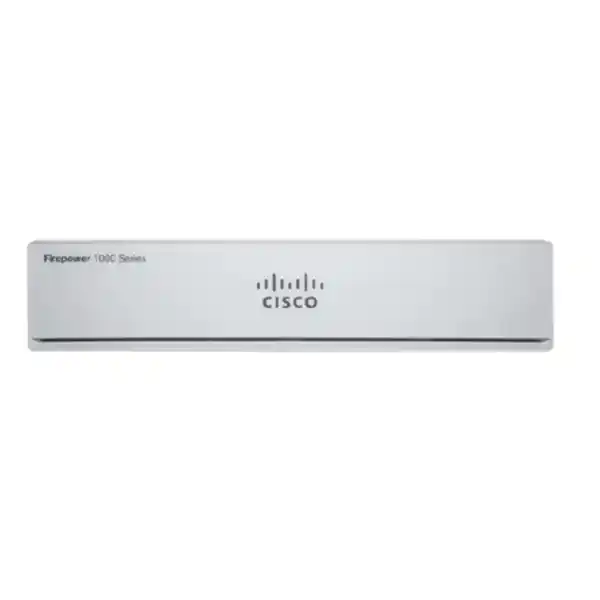
Cisco Firepower 1010E Firewall
Plan a compact office firewall around your traffic, security policy, and management needs. Confirm the software variant and subscriptions before ordering.
Choose a firewall around the office you need to protect
The Cisco Firepower 1010E Firewall is a compact security appliance for buyers who need a managed boundary between a small office or branch network and the internet. For a Tanzania business comparing equipment, the useful starting point is the required security policy, connection workload, and support arrangement. Request a configuration review and quote from FourTeck Tanzania with those requirements so the proposed hardware, software image, subscriptions, and accessories can be checked together.
The key hardware distinction is straightforward: this model does not provide Power over Ethernet. Plan separate power for access points, phones, and other powered devices. Its compact, fanless format can suit an office installation where a full cabinet appliance is unnecessary, but placement still needs suitable ventilation and controlled access. Choose it for a measured workload rather than for a headline broadband speed alone.
A firewall purchase should also identify who will operate it. An appliance with a carefully selected policy and a clear maintenance owner serves a different purpose from a box installed with default settings. Before ordering, agree which networks require separation, which services employees need, and what evidence will demonstrate successful deployment. That preparation makes the quotation easier to compare and the eventual handover easier to manage.
At a glance: the model and the buying decision
Cisco identifies separate 1010E appliance variants for ASA and next-generation firewall deployments. The published product identifiers include FPR1010E-ASA-K9 and FPR1010E-NGFW-K9. These are manufacturer product identifiers, not a verified FourTeck Tanzania SKU, and the exact supplied variant must appear in the quotation.
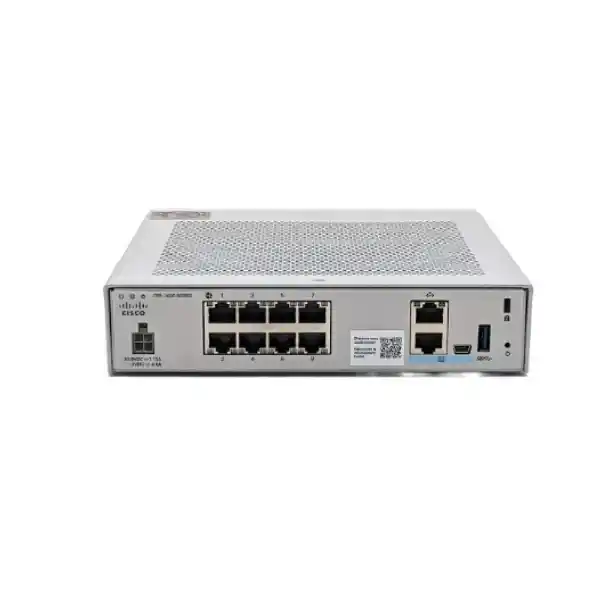
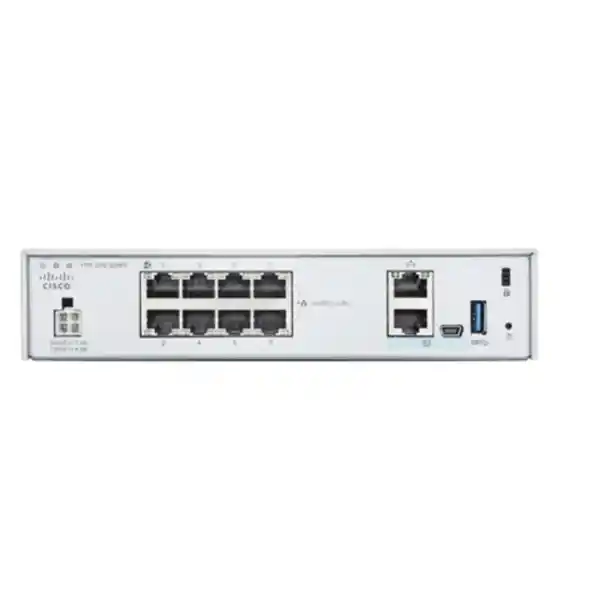
The hardware installation guide specifies eight Gigabit Ethernet data ports, a separate management connection, and an RJ-45 console connection. It describes a compact chassis with desktop, wall, and optional shelf mounting arrangements. Do not interpret a series-level hardware table as evidence that this particular desktop model includes fibre SFP interfaces or an integrated rack chassis.
For a practical purchasing decision, separate four questions. First, does the physical interface layout fit the site? Second, does the inspected traffic workload fit the platform? Third, does the chosen software provide the required functions with the appropriate entitlements? Fourth, can your team maintain and recover the installation? A positive answer to only one or two of these questions is insufficient for a reliable selection.
This page describes the platform and planning considerations. It does not establish a particular bundle, price, delivery commitment, subscription term, or installation service. Ask for those items explicitly in the proposed bill of materials.
Where this compact branch appliance can fit
A small professional office may need to keep staff access separate from visitors while protecting connections to hosted applications. In that situation, begin with a simple map of business traffic: employee devices, guest internet access, printers, and any local server. The firewall design should explain which crossings are allowed and where the relevant controls will be applied.
A branch with a central business system may instead prioritise secure connectivity to headquarters. Document the existing head-office equipment, addressing, and application dependencies before selecting the branch configuration. Confirm the tunnel design and realistic encrypted workload rather than assuming any two products will work together without preparation.
A business replacing an older firewall may value continuity more than adding functions immediately. Record the current internet handoff, public addresses, translation rules, and business-critical connections. Use those records to decide what must be preserved, what can be simplified, and which changes need a separate maintenance window.
The same appliance will not fit every environment. A site expecting large volumes of decrypted traffic, rapid growth, specialised uplinks, or extensive recovery requirements should compare higher-capacity options. The correct decision follows the workload and operating requirements. The number of employees alone cannot establish suitability because devices and applications generate very different connection patterns.
Understand performance before comparing quotations
Cisco’s series datasheet groups the 1010 and 1010E together for performance testing. With Threat Defense, it lists 890 Mbps for firewall plus Application Visibility and Control, and 880 Mbps when intrusion prevention is also included, using the stated 1024-byte test profile. These laboratory figures describe different processing combinations rather than a promise for every internet connection.
The same table lists 195 Mbps for TLS processing and 400 Mbps for IPsec VPN under its specified test conditions. Those figures matter because inspecting encrypted content or carrying tunnel traffic can create a different sizing requirement from ordinary forwarding. A business with a fast circuit should identify how much of that traffic will require each security function.
Avoid combining the most favourable figure from each software table into one imagined operating profile. ASA and Threat Defense are different software choices with different published tests. A quotation describing next-generation inspection should be assessed against the applicable Threat Defense measurements and the intended policy, not an ASA stateful inspection headline.
Treat all published measurements as comparison inputs. Real performance depends on traffic mix, packet sizes, enabled functions, and software release. Ask for sizing headroom and acceptance checks using representative business applications. Where an application is especially sensitive to delay, include its response time in the review rather than judging success from a single bulk download.
Build a workload profile that supports a useful recommendation
Start by recording normal and peak internet utilisation over an appropriate business period. Include busy mornings, backup windows, video meetings, software updates, and any recurring end-of-month activity. A short quiet observation can conceal the workload that matters most. If measurements are unavailable, identify the uncertainty and leave room for validation.
List the services that cannot tolerate interruption. Examples might include a hosted accounting platform, an ordering system, or a remote desktop service. For each service, record the users involved, required destinations, and the expected behaviour during a connection problem. These details help define both access rules and meaningful acceptance tests.
Next, distinguish traffic that stays inside the local network from traffic that must cross a security boundary. A large file transfer between two devices on the same unrestricted segment does not create the same inspection workload as a transfer routed through the firewall. A network diagram should make those paths visible.
Finally, document expected growth. More devices, additional branches, cloud migration, and increased remote access can change the appropriate platform. Ask the reviewer to explain the assumptions behind the recommendation. A clear assumptions list is more useful than an unsupported statement that an appliance is suitable for a fixed number of users.
Choose ASA or Threat Defense deliberately
The platform supports Cisco Secure Firewall ASA and Cisco Secure Firewall Threat Defense, subject to model and release compatibility. This choice affects configuration, management, feature availability, and the deployment process. It should be settled during design rather than discovered after equipment arrives.
For a buyer seeking application-aware inspection and optional intrusion, malware, or category-based web controls, discuss the Threat Defense design and associated licensing. Specify the required outcomes in ordinary language: restrict unnecessary applications, inspect relevant traffic, and make security events available to the responsible administrator. Then map those outcomes to the actual supported configuration.
An organisation maintaining an established ASA environment may have a different priority. Existing operational skills, configuration standards, and integration requirements can influence the software choice. Even then, a previous firewall configuration should be reviewed before migration because copying old exceptions can preserve unnecessary exposure or obsolete dependencies.
Do not assume the two software choices operate simultaneously or that their configuration files are interchangeable. Include image selection, compatibility review, and any migration effort in the scope. The accepted design should name the chosen software family and planned release, along with the management arrangement and a documented path for future maintenance.
Licensing: ask for the functions you will actually use
Cisco’s licensing guidance distinguishes Essentials from optional IPS, Malware Defense, URL Filtering, and Cisco Secure Client entitlements. The supplied appliance description alone does not prove that every security subscription or remote-access entitlement is included. Ask for a line-by-line licence schedule with the proposed quotation.
Express requirements in terms of the business policy. If the office needs intrusion prevention, identify the relevant IPS entitlement. If it needs file malware inspection or web category controls, confirm those capabilities and their prerequisites for the selected release. A bundle name should be translated into understandable functions and a clear subscription period.
Record who owns the Cisco account and where entitlements will be assigned. Account ownership becomes important during renewal, administrator changes, replacement, or a change of service provider. Keep purchasing records and administration responsibilities available to the business rather than relying on a single person’s informal notes.
Compare total operating cost across the intended ownership period. Hardware, management, subscriptions, support, implementation, and future renewal may be separate items. An inexpensive initial quote can be difficult to assess if it omits required components. Ask what is included, what is optional, and what must be renewed, without assuming any particular term or commercial entitlement.
Plan local or central management around the team
For Threat Defense, Cisco documents local Device Manager and central management options. The appropriate approach depends on the number of sites, operational responsibilities, required policy consistency, and the supported software combination. Choose management as part of the architecture rather than treating it as a cosmetic interface preference.
An office with one firewall may prefer a straightforward local workflow if it meets the required functions. The important questions are who approves policy changes, who can reach the management interface, and how configuration records are protected. Administrative convenience should be balanced with a clear recovery process.
A multi-site organisation may prefer central policy oversight. In that case, ask how branch-specific exceptions will be handled, where logs will be reviewed, and which costs or infrastructure are associated with management. Verify compatibility between the appliance software and the selected manager before committing to a deployment plan.
For either approach, define individual administrator access and a controlled handover procedure. Specify a change record format that states the reason, owner, expected effect, and rollback method. These practices make an installation easier to support when staff change or when an urgent incident occurs outside the original implementer’s working hours.
Use the interfaces to create clear network boundaries
Physical connectivity is only the beginning of the design. Decide how the internet handoff, internal switch, and any separately controlled network will connect. Label both ends of each cable and keep an interface schedule with the handover documents. This reduces confusion during troubleshooting and replacement.
Separate network groups according to their required access rather than their physical proximity. Employee workstations, visitors, printers, and business servers may need different permissions. A segmentation proposal should describe allowed traffic between groups and identify where enforcement occurs. Simply assigning different names to networks does not demonstrate separation.
Check the role of the existing access switch. If several network groups will share a switch uplink, verify the VLAN design and supported configuration with the chosen firewall software. Avoid assuming that a familiar feature behaves identically across different software images or releases. Record the validated arrangement in the final diagram.
The management connection should have a defined administrative purpose and a restricted path. Keep ordinary user access and device administration distinct wherever the design permits. Before handover, test that intended administrators can reach the management service and that unauthorised network groups cannot reach it through an overlooked rule or alternate route.
No PoE: account for phones and wireless access points
The absence of Power over Ethernet is a decisive difference between the 1010E and the PoE-capable 1010. A data cable connected to the 1010E will not supply operating power to an attached phone or access point. Include a suitable powered switch, injector, or device power adapter where required.
Review the wider access-layer design before selecting a firewall solely to minimise the number of boxes. Wireless coverage, phone deployment, and desktop connectivity may require switching equipment regardless of the security appliance. A separate switch can also change cabling, power protection, and maintenance arrangements, all of which belong in the overall plan.
Ask for the quotation to identify any accessories that the design depends on. A firewall price without the necessary mounting arrangement, suitable power cord, or complementary switch is not directly comparable with a complete proposal. Confirm the exact supplied items instead of assuming accessories shown in photographs are included.
For a replacement project, photograph and label the existing powered connections before disconnecting equipment. Identify which device supplies power today. This simple preparation helps avoid a cutover where the firewall is functioning but a phone or wireless access point has gone offline because its previous power source was removed.
VPN planning for branch and remote access
A secure connection between sites needs more than a throughput figure. Collect the peer equipment details, addressing on both sides, required business applications, and the identity of the administrator responsible for the other endpoint. Establish whether the existing provider connection permits the intended tunnel arrangement.
Check for overlapping private addresses before deployment. If both locations use the same address range, application routing can become more complicated and may require a design change. Resolve the approach in advance and document the effect on users, name resolution, and existing application references.
Remote-user access is a separate requirement from a site-to-site tunnel. Specify expected simultaneous users, client platforms, authentication arrangements, and permitted resources. Confirm the appropriate Cisco Secure Client licensing and supported implementation. Do not treat a published maximum VPN-peer figure as evidence that all required remote-access licences are included.
Test recovery as well as initial connectivity. A useful acceptance plan checks what happens after a tunnel interruption, address change, or appliance restart within the approved design. Users should know how to report a problem, and administrators should know where to look for evidence. Reliable operation depends on those procedures as well as on encryption settings.
Encrypted traffic inspection requires a focused policy
Encrypted web traffic can hide information that a security policy may need to evaluate. However, deciding to decrypt traffic creates technical, operational, and privacy considerations. Begin with the business objective and a defined scope, then assess what the chosen software can inspect and what the workload will require.
Do not assume every application will tolerate interception. Some applications use certificate validation mechanisms or other behaviours that require specific handling. Identify critical services early, plan representative tests, and document justified exceptions. An exception should have an owner and a reason rather than becoming an unexplained permanent bypass.
Certificate distribution and endpoint management also affect the project. Decide which business-managed devices can receive the required trust configuration and how unmanaged visitor devices will be treated. Separate these questions from a general promise of encrypted-traffic visibility. A workable policy must reflect the devices and applications actually present.
Allow capacity for the chosen inspection scope. The published TLS benchmark differs substantially from ordinary firewall forwarding figures, so an encrypted workload can alter the model recommendation. Ask for an explicit explanation of the sizing assumptions and acceptance measures. If broad decryption is essential, compare alternatives before settling on this compact platform.
Prepare the installation environment in Tanzania
For a Tanzania deployment, assess the actual site rather than assuming that every office has the same power, cabling, or equipment space. Confirm the provider handoff, local network layout, access arrangements, and the person authorised to approve a maintenance window. These details can determine whether installation is straightforward or requires preparation.
The 1010E is fanless, so free airflow around its chassis remains important. Avoid enclosed spaces that trap heat, stacked equipment that blocks ventilation, and locations exposed to accidental cable removal. Choose a secure position that still allows an administrator to inspect connections and status indications when necessary.
Power continuity should cover the network path that keeps the business connected. Assess the firewall, upstream termination equipment, and essential switch together when planning backup power. A protected firewall cannot preserve connectivity if another required device loses power. Select any UPS arrangement from the measured load and desired operating time.
Confirm the appropriate mounting accessories and approved power connection for the exact supplied unit. Do not assume a photograph establishes what is in the box. Ask the quotation to state the appliance variant, power items, and any mounting kit separately. Local availability, delivery timing, and implementation scope require confirmation for the actual order.
Migration: reduce uncertainty before the change window
Begin with an inventory of existing rules, routes, address translations, VPN connections, and administrative access. Include less visible dependencies such as monitoring systems, scheduled transfers, and externally accessed business services. Ask application owners to confirm which connections remain necessary before translating the design to a replacement firewall.
Create a traffic and ownership list rather than simply copying configuration text. For each important connection, record the source, destination, service, and business purpose. This gives reviewers a way to identify stale exceptions and makes it easier to test the replacement. It also helps distinguish essential access from historical convenience.
Prepare a rollback decision before the maintenance window starts. Define the conditions that would trigger it, the person authorised to decide, and the practical steps required to restore the previous arrangement. Keep cabling labels, backups, and contact details available to the team carrying out the change.
During cutover, test the highest-priority business tasks first. Confirm internet access, required application sessions, name resolution, permitted remote connectivity, and administrative access. Then check that restricted traffic remains restricted. A successful migration should preserve required business behaviour while demonstrating that the intended boundaries actually work.
Availability and recovery: agree the required outcome
Business continuity requirements should be stated in terms of acceptable interruption and recovery responsibilities. A single appliance remains a single physical dependency even when its configuration is carefully maintained. Determine what level of interruption the business can tolerate and what resources are available to restore service.
If a paired or failover design is proposed, ask for a specific compatibility and licensing review. The quotation should explain the equipment, addressing, switching, and testing required for that arrangement. Do not infer a complete resilience solution from a general family-level reference to high availability.
Recovery planning should include more than a saved configuration. Record the software release, management arrangement, entitlement ownership, essential credentials process, and any dependencies needed to rebuild the installation. Restrict access to those records while ensuring that authorised staff can retrieve them during an outage.
Practise the agreed recovery procedure within a controlled maintenance plan. Confirm who can obtain replacement equipment, who can restore configuration, and which business tests demonstrate service recovery. A written plan becomes much more useful when the team has checked that the required information and access are available.
Operate the firewall as an ongoing business control
After installation, assign an owner for policy review, updates, and security events. The operating plan should state how urgent findings are escalated and which changes require approval. Without an owner, useful controls can become less effective as applications, staff, and network requirements change.
Keep a current record of permitted inbound services and remote-access arrangements. Review these when an application is retired, a supplier relationship ends, or an employee changes role. The purpose is to maintain a clear relationship between business need and network access rather than allowing exceptions to accumulate indefinitely.
Monitor meaningful indicators. Repeated connection failures, unusual resource utilisation, or a pattern of blocked business traffic can justify investigation. Decide where relevant logs will be retained and who will review them. The appropriate retention period and access controls depend on the organisation’s requirements and should be agreed explicitly.
Schedule software review alongside compatibility and support checks. A release that originally introduced model support is not automatically the right release for a new deployment. Before an upgrade, confirm the supported path, manager compatibility, required backups, and relevant application tests. Keep the maintenance record with the rest of the handover information.
Compare the complete proposal, not just the appliance price
A useful quote begins with the exact model and software choice. It then identifies subscriptions, management components, support, accessories, and any agreed professional work. Ask each supplier to show these items separately so differences in scope are visible before the purchasing decision.
Clarify what implementation includes. Requirement gathering, configuration, migration, business testing, administrator handover, and follow-up assistance are separate activities. Some proposals may include only equipment supply. Obtain an explicit scope rather than inferring a service commitment from a product description or a general statement about expertise.
Consider the renewal and support process over the intended ownership period. Ask how subscription dates will be recorded, who will receive notifications, and which account will hold the entitlements. Confirm warranty and support terms in the actual offer without assuming that hardware ownership alone provides every service.
For commercial approval, record the assumptions that could change the recommendation. These may include traffic growth, a future circuit upgrade, a planned cloud migration, or a new remote-access requirement. A clear assumptions record helps the business decide whether to proceed with the compact model or compare a platform with additional headroom.
Prepare a useful acceptance and handover record
Agree who will sign off the installation and how results will be recorded. A short table of business tasks, expected outcomes, actual outcomes, and outstanding actions can provide clearer evidence than a general statement that the firewall is working. Include a responsible owner for every unresolved item and a decision about whether it prevents acceptance.
Use ordinary business tasks in the checks. An employee should be able to complete the required application workflow, a visitor should receive the intended level of access, and an administrator should be able to reach the approved management path. Include negative checks where appropriate, such as confirming that a network group cannot reach a resource it has no reason to use.
The handover should identify the current configuration baseline and where authorised staff can find it. Include the network diagram, interface labels, relevant purchase records, maintenance responsibilities, and the procedure for requesting a change. Sensitive information should be handled through an agreed secure method rather than embedded in a widely shared report.
Finally, distinguish acceptance from future improvements. A working deployment may still have optional enhancements under consideration, but those should have their own scope and approval. Keeping the accepted baseline clear helps the business understand what was delivered, what remains open, and how later changes will be evaluated.
Buyer questions answered
Does the 1010E provide PoE? No. Plan an independent power source for connected devices that need it. If replacing equipment that currently powers phones or access points, verify the replacement power arrangement before cutover.
Is it a fibre firewall with SFP uplinks? The model-specific installation guide describes eight copper Gigabit Ethernet data ports. Do not assume SFP connectivity from a series table or from another appliance in the same family. Confirm the required physical handoff before ordering.
Are all threat-protection subscriptions included? Inclusion depends on the exact quoted bundle. Ask for the appliance variant, optional security entitlements, subscription periods, and management requirements in writing. The product name alone does not establish those commercial details.
Can it protect a gigabit internet connection at full speed? That depends on the policy and traffic. Inspection and encrypted workloads use different resources. Use the applicable manufacturer benchmarks as planning inputs and validate the proposed workload rather than treating port speed as guaranteed security throughput.
Can it connect a branch to headquarters? A site-to-site design may be appropriate, subject to software, peer compatibility, addressing, and capacity checks. Provide the remote endpoint details and required applications so the tunnel can be assessed as part of the overall network.
Should I use the oldest release that supports the hardware? No. Initial support identifies a historical compatibility milestone. Choose a currently appropriate supported release after checking the exact appliance, manager, upgrade path, and required features. Include that choice in the deployment record.
Is a Tanzania price or stock level confirmed here? No price or stock commitment is established by this description. Request an order-specific quotation covering the required variant, subscriptions, accessories, and any requested implementation work before making a purchasing decision.
Request a configuration review and quote
Send FourTeck Tanzania a short requirements brief covering the internet connection, approximate device population, business-critical applications, network groups, VPN needs, and preferred management approach. Include the existing firewall details if this is a replacement. Do not send administrative passwords or other secrets in a general enquiry.
Ask for the recommendation to identify the exact 1010E variant, selected software, required subscriptions, management components, accessories, and support terms. If the workload suggests a different platform, request an explanation of the capacity or interface requirement driving that recommendation. This makes alternatives easier to compare on their practical merits.
Before accepting the proposal, agree a concise set of success criteria. Those criteria should cover required access, restricted access, administrative control, recovery documentation, and the business tasks used for verification. A clear scope connects the purchasing decision to an installation that your team can understand and maintain.
Request your Cisco firewall quotation with those requirements and ask for availability, delivery, and service scope to be confirmed for the actual order. The right next step is a matched configuration and an explicit commercial offer, supported by a deployment plan that reflects your Tanzania office or branch.




Reviews
There are no reviews yet.