
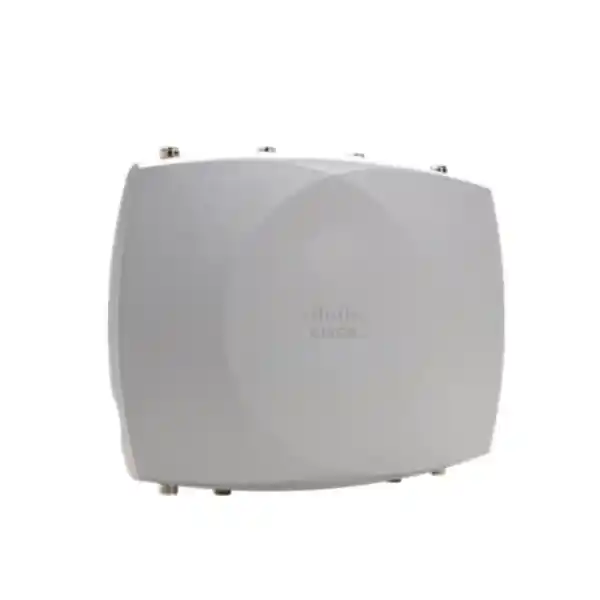
Cisco outdoor enterprise wireless
Cisco Wireless CW9177I: Wi-Fi 7 capacity for demanding outdoor networks
When an outdoor wireless design needs more than basic coverage, the Cisco Wireless CW9177I provides a modern platform for broad-area enterprise connectivity. It combines integrated omnidirectional antennas, tri-radio Wi-Fi 7, multigigabit uplinks, hardened outdoor construction and flexible management choices in one access point. That makes it relevant for campuses, industrial yards, hospitality compounds, logistics facilities, public venues, institutional grounds and other sites where users and operational devices need dependable wireless access beyond indoor walls.
4×4:4 tri-radio
IP67 outdoor design
10G mGig + 1/10G SFP+
Catalyst or Meraki management
For a Tanzania deployment, the best result starts with an RF site survey, a power and uplink check, a mounting plan and confirmation of locally permitted channels and regulatory settings. FourTeck Tanzania can use those inputs to help shape the bill of materials and deployment approach for the intended site.
Why choose the CW9177I?
The CW9177I is the integrated-omnidirectional member of Cisco’s Wireless 9177 Series. Cisco positions it for broad outdoor coverage rather than the focused beam of the CW9177D or the custom external-antenna flexibility of the CW9177E. For buyers, that distinction matters: antenna choice affects coverage shape, mounting strategy, RF planning, installation effort and the number of access points needed to serve a site well.
Broad outdoor coverage
Integrated omnidirectional antennas are designed to distribute service around the access point, making the model suitable when users and devices are spread across an open or semi-open area rather than concentrated in one narrow direction.
High-capacity radio design
Three client-serving radios can operate across 2.4 GHz, 5 GHz and 6 GHz, with 4×4:4 capability and up to 12 spatial streams. The platform can also use a dual-5-GHz operating mode where design requirements call for it.
Flexible wired backhaul
A multigigabit RJ-45 interface supports speeds through 10 Gbps, while the 1/10 Gbps SFP/SFP+ port provides fiber or supported transceiver options for sites where distance, electrical isolation or backbone design favors an optical uplink.
Unified management choice
The same hardware platform can be used with Cisco Catalyst wireless control or Meraki cloud management, subject to the appropriate software, controller and licensing requirements. This can simplify hardware planning where operational preferences may evolve.
Wi-Fi 7 features that matter in real networks
Wi-Fi 7 is not only a headline speed increase. The standard introduces mechanisms intended to improve how airtime and spectrum are used when client density, interference and application demand rise. On the CW9177I, Cisco lists Wi-Fi 7 capabilities including Multi-Link Operation, 4096-QAM, uplink and downlink OFDMA, preamble puncturing, Target Wake Time and BSS coloring. The access point supports channel widths up to 320 MHz in 6 GHz and up to 160 MHz in 5 GHz, subject to client support, deployment design and the frequencies permitted in the country of operation.
Multi-Link Operation can allow compatible Wi-Fi 7 clients to use multiple links in ways that can improve throughput, latency behavior or resilience. Preamble puncturing is especially useful in environments where part of a wide channel is affected by interference, because a compatible network can avoid the affected portion rather than discarding the entire wide channel. 4096-QAM increases modulation density when signal quality is sufficiently high, although real-world performance still depends on distance, interference, client capability, channel width and RF conditions.
For buyers, the practical lesson is to evaluate Wi-Fi 7 as part of the complete network rather than as a standalone access-point specification. High-capacity radios need matching wired uplinks, adequate PoE, suitable switching, sensible channel plans and modern client devices to provide their full value. A site with mostly older clients may still benefit from the CW9177I’s outdoor platform and management features, but it will not automatically see Wi-Fi 7 peak performance.
Radio architecture and capacity
Cisco specifies the 9177 Series with a tri-radio architecture that can provide 4×4 uplink and downlink MU-MIMO with four spatial streams on each of the 2.4 GHz, 5 GHz and 6 GHz client-serving radios, for up to 12 spatial streams in total. In Wi-Fi 7 tri-band mode, Cisco lists aggregate PHY data rates up to 18 Gbps under the defined maximum channel-width conditions. PHY rate is a theoretical radio-layer figure rather than an application throughput guarantee, so network design should never treat 18 Gbps as the expected usable speed of one client or one real deployment.
The 2.4 GHz band remains useful for reach and legacy compatibility, while 5 GHz usually carries a large share of enterprise client traffic. The 6 GHz band can add cleaner spectrum and very wide channels where local regulation and client support allow it. In some designs, the third radio can instead participate in a dual-5-GHz configuration. Choosing between 6 GHz and dual-5-GHz operation should be based on client mix, channel availability, interference, application priorities and local spectrum rules rather than on a default preference.
Because the CW9177I uses internal omnidirectional antennas, RF design still matters. Omnidirectional does not mean unlimited range, perfectly circular coverage or immunity to obstruction. Building materials, vehicles, containers, trees, machinery, elevation, mounting orientation, surrounding metalwork and neighboring transmitters can all change coverage. A professional survey and post-install validation are important when the network supports business-critical mobility, voice, video, scanning, point-of-sale workflows or operational technology.
CW9177I integrated antenna design
The “I” model is designed around integrated internal omnidirectional antennas. Cisco lists peak antenna gain of 4 dBi at 2.4 GHz and 6 dBi at both 5 GHz and 6 GHz for the CW9177I client-serving radios. This integrated design reduces the need to select, cable and weather-seal external RF antennas, which can make the overall installation simpler when the desired service area fits the unit’s broad coverage pattern.
The integrated antenna approach is particularly attractive for courtyards, open campus spaces, outdoor hospitality areas, warehouses with exterior loading zones, logistics yards, institutional grounds and similar environments where devices surround the access point. It can also reduce the risk of selecting an inappropriate external antenna for a new deployment. However, the CW9177I is not automatically the right choice for every outdoor project. A focused seating bowl, narrow corridor, long linear zone or a location where the access point must be physically separated from the intended RF coverage may call for the CW9177D or CW9177E instead.
Before ordering, define the intended mounting height, orientation, target client area and obstacles, then compare those requirements with Cisco’s antenna patterns and a predictive or physical survey. This is a better buying method than selecting a model based only on claimed radio speed.
Outdoor construction and installation planning
Cisco rates the Wireless 9177 Series enclosure to IP67, positioning it for harsh outdoor environments. The platform is designed around weather-resistant installation practices, but the final installation still depends on correct mounting, grounding, cable preparation and sealing. Cisco’s installation guidance specifically requires appropriate cable glands and accessories to preserve the environmental rating around network connections. A weather-rated access point can lose much of its practical protection if connectors, glands or cable entries are installed incorrectly.
Physical scale should also be considered during site planning. Cisco lists the CW9177I enclosure at approximately 352.2 mm by 270 mm by 76.2 mm without mounting brackets, with an access-point weight of about 4.11 kg. That is substantial enough that mounting surfaces, poles and brackets should be selected deliberately rather than treated like lightweight indoor ceiling hardware. Cisco offers compatible mounting options for horizontal, pole, wall or strand-oriented scenarios depending on the chosen kit.
For Tanzania sites, installation planning should account for the actual local environment at the property: sun exposure, rain, dust, coastal air where relevant, lightning risk, cable routing, grounding, power continuity, safe maintenance access and the location of upstream switches or fiber termination. These factors vary by project, so they should be assessed for the exact site rather than assumed from the AP’s environmental rating alone.
Cisco also integrates an accelerometer in the CW9177I. This supports post-deployment awareness of how the unit is installed and can help operational teams verify orientation. It is a useful feature, but it does not replace a correct mounting survey, safe working practice or inspection of the physical installation.
Power: why PoE class changes available capability
Power planning is one of the most important buying checks for the CW9177I. Cisco supports 802.3bt, 802.3at and 802.3af power modes as well as a supported DC input path, but the radio and uplink capabilities are not identical at every power level. Full-feature operation requires an appropriate 802.3bt Class 6 / PoE++ or Cisco UPOE+ power source. Cisco lists maximum PoE consumption of 45.1 W in that mode, with 4×4 operation across the three client-serving radios and a 10 Gbps uplink option.
With 802.3at PoE+, Cisco documents reduced radio configurations. In tri-band PoE+ mode, the radios can operate at 2×2 and the copper uplink is limited to 2.5 Gbps. A dual-band PoE+ mode can provide 2×2 at 2.4 GHz and 4×4 at 5 GHz with the third client band unavailable. This means an existing PoE+ switch may power the AP, but the deployment should not be described as equivalent to full 802.3bt operation.
Cisco’s current documentation also describes 802.3af support for constrained or staging conditions, and the exact feature behavior should be checked against the release and installation guide being used for the project. The practical purchasing question is therefore not simply “Does my switch have PoE?” It is “Can the switch deliver the required PoE class, total power budget and uplink speed to every planned access point under peak deployment conditions?”
For multi-AP projects, calculate the entire switch power budget, reserve appropriate headroom and confirm cable quality. When 10 Gigabit Ethernet is planned over copper, Cisco recommends suitable Cat 6/6A cabling and the real installation should be tested for the intended link rate and distance.
10G multigigabit Ethernet and SFP/SFP+ uplinks
The CW9177I provides two strong backhaul choices. The RJ-45 interface supports 100 Mbps, 1 Gbps, 2.5 Gbps, 5 Gbps and 10 Gbps Ethernet, giving network designers flexibility to match existing switching or plan for a higher-capacity edge. The separate SFP/SFP+ interface supports 1 Gbps and 10 Gbps operation with supported transceivers, which is useful when the AP is installed far from a wiring room or where fiber is preferred because of distance, electrical environment or backbone architecture.
The ports should not be interpreted as two simultaneous active data uplinks for ordinary operation. Cisco’s installation guide states that the Ethernet port and SFP+ port cannot carry data traffic simultaneously; when the SFP/SFP+ module is detected and active, the Ethernet data path is disconnected. Fiber also does not supply PoE, so an access point using fiber for data still needs a supported power method, such as PoE delivered to the Ethernet power interface or an approved DC power arrangement.
Outdoor fiber installation also requires the correct environmental accessories. Cisco specifies an SFP gland kit for outdoor SFP use to maintain the IP67 design. This detail can easily be missed in a bill of materials, so uplink type should be decided before ordering mounts, glands, transceivers, power components and cable protection.
Catalyst or Meraki: one hardware platform, different operating models
A major design advantage of the Cisco Wireless 9177 platform is its converged hardware approach. Cisco supports the hardware with on-premises Cisco Catalyst wireless control as well as Meraki cloud management. For organizations with established Cisco enterprise infrastructure, the Catalyst path can fit controller-based architecture, policy integration, monitoring and operational processes already used by the network team. For organizations standardizing on Meraki, cloud-based administration can provide a different operational experience around configuration, visibility and lifecycle management.
The decision should be made as an architecture choice, not as a cosmetic dashboard preference. Confirm software release support, wireless controller compatibility, licensing, feature requirements, migration expectations, identity services, segmentation, monitoring and internal support skills. Cisco’s data sheet lists support beginning with appropriate Cisco IOS XE 26.1.3 or 26.2.1 releases for this series, or Meraki MR 32.2.x or later, with later supported releases expected to evolve over time.
On the Catalyst side, Cisco lists support for Catalyst 9800 Series Wireless Controllers and relevant embedded wireless-controller options in supported SDA designs. The platform can also integrate into broader Cisco capabilities such as Catalyst Center, Cisco Spaces and Cisco Identity Services Engine where the organization has the required infrastructure and licensing.
For procurement, specify the desired management mode and existing network environment before requesting a quote. The hardware model may be common, but the complete solution can include different subscriptions, software, controller dependencies and operational requirements.
Spectrum intelligence and troubleshooting
Outdoor enterprise Wi-Fi often operates in RF environments that change over time. Nearby networks, temporary equipment, industrial devices, moving vehicles, events and new construction can all alter interference patterns. The CW9177 Series includes a dedicated scanning radio and Cisco CleanAir Pro capabilities intended to improve spectrum visibility and interference awareness across supported bands without relying only on the client-serving radios.
Cisco also lists Intelligent Capture for deeper diagnostic visibility. For network teams, these capabilities can reduce the gap between “users report slow Wi-Fi” and a structured investigation into channel use, interference, packet behavior and client experience. They are most valuable when integrated into a well-managed network with monitoring processes and personnel who can interpret the telemetry.
These features do not eliminate the need for sound RF design. Spectrum tools help reveal conditions and guide troubleshooting, but access-point placement, channel reuse, transmit power, client capabilities and wired-network health still determine much of the user experience. Buyers should plan for both deployment engineering and ongoing operations rather than treating the AP as a self-correcting appliance.
Integrated IoT, Bluetooth and location capabilities
The CW9177I includes more than Wi-Fi client radios. Cisco documents an integrated IoT radio supporting Bluetooth Low Energy and related protocols including Thread, Zigbee and Matter, along with integrated GNSS/GPS capabilities. This gives the platform relevance for networks that may need location-aware services, asset-related use cases, sensor connectivity or broader smart-building and operational workflows, depending on the software platform and solution architecture in use.
Bluetooth Low Energy can support location-oriented applications such as wayfinding, asset visibility and analytics when paired with the appropriate solution. GNSS/GPS can assist location intelligence and regulatory-domain functions used by the platform. In outdoor enterprise environments, these integrated capabilities can reduce the need to treat Wi-Fi and low-power IoT connectivity as completely separate infrastructure layers.
However, the presence of a radio does not by itself provide a complete IoT or location solution. Buyers should identify the target application, compatible devices, management software, licensing, data integrations and privacy or operational requirements before counting on a specific business outcome. A well-defined use case can turn the integrated radios into useful infrastructure; an undefined use case simply adds unused capability.
Security capabilities for enterprise wireless
Cisco lists modern wireless security support for the 9177 Series, including WPA3 functions and stronger cryptographic options supported by the platform. The access point also participates in Cisco enterprise architectures that can integrate identity, segmentation and policy controls through products such as Cisco Identity Services Engine when those systems are part of the network design. On the wired side, the multigigabit Ethernet interface supports enterprise networking functions including MACsec in supported configurations.
Security should still be designed end to end. Access-point capability is one layer among authentication, certificate management, identity policy, VLAN or fabric segmentation, firewalling, device onboarding, software maintenance, administrator access control, logging and incident response. Outdoor access points can also be physically more exposed than indoor units, so mounting security, cable protection and access to console or network paths deserve attention.
For a new Tanzania deployment, document the intended SSIDs, authentication method, guest-access approach, IoT segmentation, administrative roles and software maintenance process before rollout. This avoids configuring every security decision after installation and makes acceptance testing more meaningful.
Where the CW9177I fits best
Campus grounds
Useful where students, staff, visitors or operational devices need connectivity across courtyards, pathways and open shared areas, provided the RF design accounts for buildings, vegetation and changing client density.
Industrial and logistics yards
A candidate for scanners, tablets, rugged handhelds, laptops and operational systems in open working areas where a hardened enclosure and high-capacity backhaul are important.
Hospitality compounds
Can extend managed wireless service into outdoor guest areas, gardens, poolside zones or event spaces when placement, mounting and coverage expectations are confirmed through survey work.
Public and institutional spaces
Suitable for broad enterprise coverage in outdoor facilities where centralized management, modern security, high client capacity and long-term migration toward Wi-Fi 7 are priorities.
Transport and mobility areas
Can form part of a wireless design for outdoor transport, parking or movement zones, subject to careful planning for roaming, obstructions, interference and backhaul availability.
Outdoor event capacity
The radio platform is relevant to higher-density environments, but event deployments require especially careful capacity modelling, antenna selection and channel reuse. Omnidirectional coverage is not automatically the best choice for every crowd layout.
Key verified specifications
| Model | Cisco Wireless CW9177I |
|---|---|
| Primary design | Outdoor Wi-Fi 7 access point with integrated omnidirectional antennas |
| Wireless standard | 802.11be Wi-Fi 7 with backward support for earlier supported Wi-Fi generations |
| Client-serving radios | Tri-radio; 2.4 GHz, 5 GHz and 6 GHz, or supported dual-5-GHz mode |
| Spatial streams | Up to 12 total, with 4×4:4 capability per client-serving radio in full-power configurations |
| Maximum listed PHY rate | Up to 18 Gbps in Cisco’s specified Wi-Fi 7 tri-band configuration; real throughput varies |
| Integrated antenna peak gain | 4 dBi at 2.4 GHz; 6 dBi at 5 GHz; 6 dBi at 6 GHz |
| Copper uplink | 1 × RJ-45 supporting 100M/1G/2.5G/5G/10G Ethernet |
| SFP uplink | 1 × 1/10G SFP/SFP+ interface for supported transceivers |
| Power | 802.3bt / PoE++, 802.3at / PoE+, constrained 802.3af operation, or supported DC input |
| Maximum listed PoE draw | 45.1 W in full 802.3bt Class 6 operation |
| Environmental rating | IP67 when installed with required outdoor practices and accessories |
| Dimensions | 352.2 × 270 × 76.2 mm without mounting brackets |
| Weight | Approximately 4.11 kg for the access point |
| Integrated services | Dedicated scanning radio, CleanAir Pro, Bluetooth/IoT radio and GNSS/GPS |
| Management | Cisco Catalyst wireless controller architecture or Meraki cloud management, with appropriate software and licensing |
Specifications and supported software can change with product updates. Confirm the current Cisco data sheet, release notes, regulatory status and bill of materials for the exact deployment before purchase.
CW9177I vs CW9177D vs CW9177E
The three 9177 models share the same general outdoor Wi-Fi 7 platform, so the most visible buying difference is the antenna arrangement. The CW9177I integrates omnidirectional antennas for broad-area coverage. The CW9177D integrates directional antennas for a more focused coverage pattern. The CW9177E exposes external antenna connectors so the RF design can be tailored with supported external antennas.
| Decision point | CW9177I | CW9177D | CW9177E |
|---|---|---|---|
| Antenna type | Integrated omnidirectional | Integrated directional | External antenna connectors |
| Best starting point | Broad service around the AP | Focused or sector-like service | Custom RF or specialized antenna design |
| Installation complexity | Simpler RF hardware selection | Requires directional aiming and placement | Requires supported antenna and cable choices |
A site survey should decide the model. If users occupy a broad area around the mounting location, the CW9177I is often the natural candidate. If the service area is concentrated in one direction, a directional pattern can reduce wasted RF energy and improve reuse. If the project has unusual mounting restrictions, long-range requirements or a need for a specific antenna pattern, the external-antenna model may be more appropriate.
Migration from older outdoor Cisco wireless
Cisco describes the 9177 Series as a successor platform for older outdoor families including MR86 and Catalyst C9124-class deployments. That does not make every replacement a one-for-one swap. Wi-Fi generations, radio counts, power requirements, uplink speed, mounting, management architecture and licensing can all differ. A migration project should therefore begin with an inventory of current access points, switches, injectors, cabling, fiber paths, controller software, subscriptions and mounting hardware.
The power change is particularly important. A legacy outdoor AP may have operated satisfactorily on lower-power PoE, while the CW9177I needs 802.3bt Class 6 power for its full radio and uplink capability. Reusing an older switch without checking its per-port class and total PoE budget can leave a new AP operating in a reduced mode. Likewise, a 1 Gbps uplink can become a bottleneck if the project expects to benefit from much higher aggregate wireless capacity.
Mounting should be reviewed instead of assumed compatible. Even where a supported migration mount exists, verify mechanical fit, load, orientation, cable gland requirements and maintenance access. RF coverage should also be surveyed again because the new antenna characteristics and radio design may not reproduce the exact cell boundaries of the previous hardware.
A staged migration can reduce risk: validate one representative area, measure client behavior and roaming, confirm power and uplink negotiation, check management visibility, then refine the standard installation before rolling out at scale.
Tanzania deployment considerations
Cisco’s current AP channel lookup includes the CW9177I among outdoor models for Tanzania, but Cisco explicitly distinguishes its channel-lookup guidance from final product-approval validation. Procurement teams should therefore confirm the exact regulatory and country approval status for the intended hardware and software release at the time of deployment. This is especially important for 6 GHz operation because available channels and permitted power can vary by country and regulatory framework.
The network should be designed around the frequencies and transmit settings legally available at the installation location. If 6 GHz is restricted or unavailable for the intended outdoor mode, the AP may need to use an alternate supported radio configuration. A quote should therefore be tied to a technical design rather than assuming every globally advertised feature will be enabled identically in Tanzania.
Local deployment quality also depends on practical infrastructure. Confirm the availability of stable PoE++ switching or a supported power method, suitable surge and grounding arrangements, protected copper or fiber paths, and adequate upstream bandwidth. For sites with unstable utility power, the wireless design should be considered together with the switching, UPS and backup-power strategy because an outdoor AP cannot remain useful if its upstream network loses power.
Finally, define who will manage the network after handover. Decide whether the operational model is Catalyst-controller based or Meraki cloud based, who maintains subscriptions and software, how configuration backups and administrator access are handled, and what monitoring or escalation process is expected. Clear ownership is as important to long-term wireless quality as the access-point specification.
Recommended pre-order checklist
Identify the exact outdoor areas, user types, device types and expected concurrency. Decide whether broad omnidirectional coverage matches the physical layout.
Survey interference, obstructions, mounting height, channel reuse and likely cell boundaries. Validate 2.4, 5 and permitted 6 GHz behavior.
Confirm 802.3bt Class 6 / PoE++ availability where full AP capability is required, including total switch power budget and reserve headroom.
Choose copper multigigabit Ethernet or a supported SFP/SFP+ design. Include fiber transceivers, glands and a separate power plan when fiber carries data.
Confirm Catalyst or Meraki mode, software release, controller or dashboard requirements, licensing and integration with existing enterprise tools.
Select the correct mount, cable glands, grounding components, cable protection and safe service access for the real installation location.
Confirm current Cisco country approval and locally permitted radio operation before final configuration, particularly for outdoor 6 GHz use.
Define coverage, roaming, throughput, latency, application and monitoring checks so the installed network can be validated against agreed objectives.
What not to assume from the specification sheet
A maximum PHY rate is not guaranteed application throughput. A 10 Gbps interface does not guarantee 10 Gbps internet access. IP67 does not mean installation details can be ignored. An omnidirectional antenna does not guarantee equal usable coverage at every distance and elevation. Wi-Fi 7 capability does not make older clients behave like Wi-Fi 7 clients. And support for 6 GHz in the hardware does not mean every 6 GHz channel or outdoor mode is automatically permitted in every country.
It is also important not to treat the AP as the whole solution. The effective user experience depends on DNS, DHCP, authentication, switching, routing, WAN capacity, application servers, client drivers and device power-saving behavior as well as RF conditions. When an outdoor wireless project is intended to support critical workflows, test those workflows rather than relying only on a generic speed test.
A well-designed deployment uses the CW9177I because its capabilities match the requirement, not simply because it is a high-end model. In some locations a smaller or directional AP may be more efficient. In others, the CW9177I’s combination of broad coverage, high radio capacity, outdoor hardening and flexible backhaul can reduce architectural compromises.
Frequently asked questions
Is the Cisco CW9177I an indoor or outdoor access point?
It is an outdoor enterprise access point. Cisco rates the 9177 Series to IP67 and designs it for harsh outdoor conditions when installed with the required mounting, sealing, grounding and cable practices.
What is the difference between CW9177I and CW9177D?
CW9177I uses integrated omnidirectional antennas for broad coverage around the AP. CW9177D uses integrated directional antennas for focused coverage. The best choice depends on the shape of the service area and RF design.
Does the CW9177I support 6 GHz?
The hardware supports tri-band operation across 2.4 GHz, 5 GHz and 6 GHz, with 6 GHz channel widths up to 320 MHz in supported Wi-Fi 7 configurations. Actual 6 GHz availability depends on the local regulatory domain and allowed operating mode.
Does it need PoE++?
For full radio and uplink capability, Cisco specifies 802.3bt Class 6 / PoE++ or UPOE+ operation. Lower PoE levels can power the AP in reduced configurations, so the existing switch should be checked before purchase.
Can I connect it with fiber?
Yes. The AP includes a 1/10 Gbps SFP/SFP+ interface for supported transceivers. Outdoor SFP installation requires the correct gland kit, and fiber does not supply power, so the AP still needs a supported power source.
Can Ethernet and SFP+ be used at the same time for data?
Cisco states that the RJ-45 Ethernet and SFP/SFP+ ports are not used simultaneously for data traffic. When the SFP/SFP+ path is active, the Ethernet data path is disconnected, although the copper interface may still be part of the power design where supported.
Can it be managed with Meraki?
Yes. Cisco designed the 9177 platform for either Meraki cloud management or Cisco Catalyst controller-based operation. Confirm the intended software release, subscription and architecture when ordering.
What is the maximum wireless speed?
Cisco lists an aggregate PHY data rate up to 18 Gbps for a maximum Wi-Fi 7 tri-band configuration. That is a radio-layer specification, not guaranteed user throughput. Actual speeds depend on clients, channel width, signal quality, interference, uplink capacity and application conditions.
Is CW9177I suitable for a large outdoor site?
It can be, but the required number of APs cannot be determined from the model name alone. Site size, obstacles, client density, required data rates, mounting height, roaming and application requirements must be assessed in an RF design.
Is the CW9177I approved for Tanzania?
Cisco’s current AP channel lookup includes CW9177I for outdoor use in Tanzania, but Cisco notes that the lookup is not itself a product-approval database. The exact country approval and permitted channel plan should therefore be verified for the deployment before final procurement and configuration.
How to scope a CW9177I project correctly
Start with requirements rather than quantities. Document where coverage is needed, which applications run outdoors, the client device types, how many concurrent devices are expected, where users move, what minimum service level matters and which areas must not rely on best-effort signal. This turns the discussion from “How many access points should we buy?” into “What wireless service does the operation require?”
Next, map the physical environment. Record buildings, walls, roof lines, trees, fences, metal structures, container stacks, machinery, vehicle movement and safe mounting points. Identify existing cable routes, fiber availability and power locations. A predictive design can then propose access-point positions, but a field survey should validate assumptions wherever the wireless network will support important workflows.
The wired network should be reviewed at the same time. Confirm whether access switches provide the required 802.3bt power class, whether there is enough aggregate PoE budget, whether copper cabling supports the planned multigigabit rate and whether fiber should be used for long or electrically challenging runs. Check upstream switching and routing capacity so the wireless edge is not connected to an undersized backbone.
Then define management, security and operations. Choose Catalyst or Meraki, confirm subscriptions and software, define authentication and segmentation, determine logging and monitoring, and identify who will manage alerts and configuration after installation. Finally, define an acceptance test that reflects the business applications: coverage at critical points, roaming along important paths, throughput where needed, voice or video behavior if relevant, and resilience during normal environmental changes.
This structured process is especially useful for outdoor networks because field conditions can be much less predictable than a controlled indoor office. The CW9177I provides strong technical capability, but good engineering determines how much of that capability reaches users.
Buyer guidance: when to choose this model
Choose the CW9177I when you need a premium outdoor access point with broad integrated antenna coverage, Wi-Fi 7 capability, high-capacity wired uplinks, advanced Cisco wireless management and a platform that can support future client upgrades. It is particularly compelling when the project is already built around Cisco enterprise networking or Meraki operations and the goal is to extend that managed environment into outdoor spaces.
Consider a different 9177 model when the coverage geometry calls for directionality or specialized antennas. Consider a smaller platform when the site has modest client density, lower throughput requirements or limited PoE and switching capacity. High specification is valuable only when it aligns with the deployment need and the rest of the infrastructure can support it.
Before approving a purchase order, request a bill of materials that includes the access point, correct mount, required cable glands, supported transceivers where needed, power method, licensing and any controller or subscription dependencies. That prevents a technically impressive AP from arriving without the accessories or infrastructure needed for a complete outdoor installation.
Request a Cisco CW9177I solution review for Tanzania
Planning an outdoor Wi-Fi 7 deployment? Share the intended coverage area, approximate client count, current switching and PoE capability, preferred Catalyst or Meraki management model, and whether copper or fiber backhaul is available. FourTeck Tanzania can use those project details to help define the right CW9177I deployment scope and supporting bill of materials.
For the most accurate quote, include any existing Cisco wireless platform information and the expected mounting environment. Final product selection, licensing, regulatory validation and radio configuration should be confirmed against the current Cisco documentation and the requirements of the specific Tanzania site.




Reviews
There are no reviews yet.