
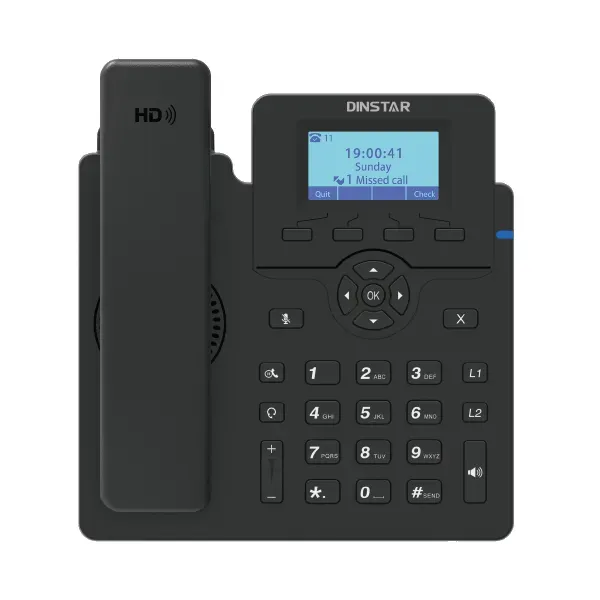
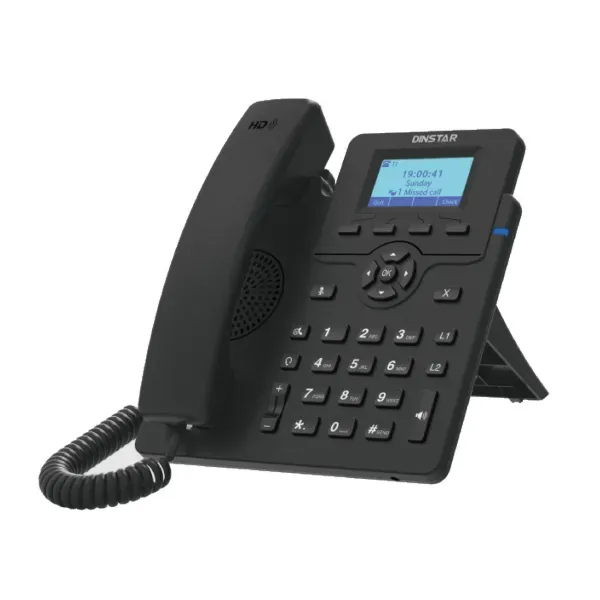
Business Wi-Fi SIP Desk Phone
Dinstar C60U-W Wi-Fi IP Phone
The Dinstar C60U-W Wi-Fi IP Phone is designed for organizations that want a practical SIP desk phone with the flexibility of built-in dual-band wireless networking. It supports both 2.4 GHz and 5 GHz Wi-Fi, two SIP accounts, two line keys, HD voice, a backlit 132×64-pixel graphical display and 5-way audio conferencing. For offices where running a new Ethernet cable to every desk is inconvenient, the C60U-W creates another deployment option while retaining standard IP-phone functions and wired 10/100 Ethernet connectivity.
FourTeck Tanzania can help business buyers evaluate the C60U-W as part of a wider voice deployment that may include SIP extensions, an IP PBX, Wi-Fi coverage, LAN switching, VLAN design, internet connectivity and user provisioning. The objective is not simply to place a phone on a desk, but to make sure the endpoint matches the call flow, network conditions and management approach of the organization.
Quick answer
Choose the C60U-W when you need a straightforward two-account SIP phone that can connect over dual-band Wi-Fi, supports HD audio and multi-party calling, and can be centrally provisioned for managed business deployments.
What makes the Dinstar C60U-W useful?
The most distinctive feature of the C60U-W is its built-in 2.4 GHz and 5 GHz Wi-Fi capability. A traditional desk IP phone normally expects an Ethernet cable at the user position. That is ideal where structured cabling is already available, but it can become restrictive in temporary offices, rearranged workspaces, renovated buildings, hospitality environments or locations where new cabling would be disruptive. The C60U-W allows a business to register the phone to its SIP platform over a suitable wireless network while still providing two 10/100 Mbps Ethernet interfaces for conventional networking scenarios.
Dinstar positions the model as an entry-level Wi-Fi IP phone. That positioning is important: it is intended for everyday business voice rather than users who require a large touch display or a high number of simultaneous line appearances. Its two SIP accounts and two line keys fit general office users, small departments, hotel or service-desk positions, branch staff and similar roles where a clean calling workflow matters more than an extensive button field.
The phone also includes HD voice functions, a full-duplex speakerphone, DSP-based audio processing and wideband codec support that includes G.722 and OPUS-WB. Five-way conferencing allows the organizer to bring up to four other participants into an audio conference. EHS wireless headset support is useful for staff who handle calls while working at a computer or moving within a small work area. These capabilities make the C60U-W more than a basic wireless handset substitute: it remains a desk-oriented SIP endpoint with common business telephony functions.
Dual-band Wi-Fi
Built-in 2.4 GHz and 5 GHz wireless networking gives deployment flexibility where a dedicated desk Ethernet drop is not available or convenient.
Two SIP accounts
Two SIP identities can support ordinary business extension requirements, including organizations using separate registrations or service profiles.
HD voice
Wideband audio, DSP processing, full-duplex speakerphone operation, echo cancellation and jitter handling support clearer business conversations when the network is properly engineered.
5-way conference
Users can create an audio conference with as many as four additional participants for quick team or customer discussions.
EHS headset support
Compatibility with supported EHS wireless headsets from brands such as Plantronics, Jabra and Sennheiser can improve call handling for frequent phone users.
Centralized provisioning
FTP, TFTP, HTTP, HTTPS and PnP provisioning methods, together with web management and Dinstar NMS support, can simplify repeatable deployments.
Verified C60U-W feature summary
| Display | 2.3-inch, 132×64-pixel graphical LCD with backlight |
| SIP accounts | 2 |
| Line keys | 2 |
| Wireless | Built-in 2.4 GHz and 5 GHz Wi-Fi |
| Ethernet | 2 × RJ45 10/100 Mbps ports |
| Conference calling | 5-way audio conference |
| Audio | HD voice, full-duplex speakerphone, DSP, echo cancellation, dynamic jitter handling, wideband codecs including G.722 and OPUS-WB |
| Provisioning | FTP, TFTP, HTTP, HTTPS and PnP; web configuration; Dinstar NMS |
| Headset | EHS wireless headset support for compatible Plantronics, Jabra and Sennheiser models |
Compatibility, provisioning and voice-network planning
The C60U-W uses SIP and is intended to work as an endpoint on an IP telephony platform. Dinstar documentation for the C60 family identifies compatibility with common IP PBX ecosystems including 3CX, Asterisk, Yeastar, Xorcom, VoIP.ms, BroadSoft and FreeSWITCH. A procurement team should still confirm the exact features required from its chosen PBX before a large rollout. Registration, transfer, voicemail indication and basic call functions are normally straightforward, while specialized PBX functions can depend on firmware, templates or vendor-specific provisioning.
Wireless phones should be treated as voice clients on the Wi-Fi network, not merely as another convenient device. The access point must provide reliable coverage at the desk, and channel planning should avoid excessive interference. A phone that has a strong-looking signal can still suffer call-quality problems when the WLAN is congested, roaming is unstable or upstream internet latency is inconsistent. Business deployments should therefore review Wi-Fi capacity, VLAN strategy, QoS policy, DHCP, DNS and firewall behavior together.
For organizations planning broader telephony architecture, FourTeck Tanzania’s business technology overview explains how voice, networking and security fit into one site design. The same infrastructure may carry computers, cameras, Wi-Fi clients and phones, so segmentation, uplink capacity and documentation should be considered before endpoints are deployed at scale.
Where the C60U-W fits in a business
General office desks are an obvious use case. A user who mainly makes and receives calls, transfers calls to colleagues, checks voicemail and occasionally starts a small conference does not always need a high-end executive phone. The C60U-W offers those core functions while adding wireless deployment flexibility. Small reception points can also use the phone when only a small number of active line appearances are required, although a busy receptionist managing many extensions may be better served by a larger multi-line model.
Temporary or frequently rearranged workplaces are another good fit. Project offices, training environments, leased spaces and changing team layouts can make fixed network outlets inconvenient. Wi-Fi does not remove the need for reliable infrastructure, but it can reduce the dependency on a cable at a specific desk position. Hospitality back offices, clinics, schools and branch locations may value the same flexibility when voice service must be added without major building work.
For larger rollouts, centralized configuration matters. Repeating account credentials, time settings, phonebook parameters and feature preferences manually on many phones is inefficient and error-prone. The C60U-W’s provisioning methods can support a more controlled process. Device naming, configuration backups, extension plans and documentation should be standardized so future troubleshooting is simpler.
Dinstar C60U-W Wi-Fi IP Phone Tanzania
For Tanzanian businesses evaluating a Wi-Fi SIP desk phone, the C60U-W is especially relevant where the office layout and the cabling plan do not line up perfectly. An established building may have network points in some rooms but not at every new desk. A growing company may move departments frequently. A project office may need voice service for several months without extensive permanent cabling. In each situation, a dual-band Wi-Fi phone can provide a practical way to place a fixed desk endpoint where the wireless network is strong and dependable.
The purchase decision should begin with the PBX and extension plan. Confirm how many SIP registrations each user needs, what call features are expected, whether a headset will be used and whether the user frequently joins internal conferences. The C60U-W provides two SIP accounts and 5-way conference capability, which is appropriate for everyday staff but may not be enough for a power user who manages many simultaneous lines. Matching user roles to phone types can save money while giving specialist users the controls they actually need.
Wi-Fi readiness is equally important in Tanzania deployments. Offices in multi-tenant buildings, dense commercial areas or older structures can have unpredictable RF conditions. Access-point location, wall materials, neighboring networks and the number of connected devices all influence voice performance. Before deploying many phones wirelessly, test call quality in the actual seating areas during normal business traffic. If the network also carries cameras, guest traffic and cloud applications, use sensible segmentation and QoS so voice is not competing blindly with every other workload.
Power planning is another practical consideration. Wireless data connectivity does not mean the desk phone itself needs no power. Buyers should review the intended power method for the exact unit supplied and make sure adapters, sockets and UPS strategy are considered. In sites where short power interruptions are common, protecting the core network, PBX, internet equipment and selected phone positions can help preserve communication continuity.
Organizations can discuss the C60U-W together with broader voice and LAN requirements through FourTeck Tanzania. A useful quotation request should state the number of phones, PBX platform, current Wi-Fi environment, locations, headset needs and whether configuration or installation assistance is required. That information makes it easier to distinguish a straightforward product supply from a complete voice deployment project.
Dinstar C60U-W Wi-Fi IP Phone Dar es Salaam
Dar es Salaam businesses often operate in offices where floor plans change faster than structured cabling. Service companies, logistics teams, professional firms, retail headquarters and shared offices may add users, shift departments or open temporary work areas. In those situations, the C60U-W can be considered for staff who need a familiar desk-phone experience while connecting over a well-designed Wi-Fi network. The built-in 2.4 GHz and 5 GHz capability gives the network team options when assigning the phone to the most appropriate wireless band and SSID.
Dense urban RF conditions make design discipline important. Many neighboring wireless networks can occupy the same channels, particularly on 2.4 GHz. A business should avoid assuming that a phone will perform well simply because a laptop appears to work. Voice traffic is sensitive to latency variation and packet loss. A short interruption that a web browser hides can be audible during a call. For offices considering multiple C60U-W units, it is sensible to validate access-point coverage and channel utilization at the desks that will use voice.
The phone’s two SIP accounts can suit staff with a standard extension plus a second registration or role-specific line. HD voice and the full-duplex speakerphone support normal office conversations, while EHS headset compatibility can be useful for sales, coordination and service teams that spend more time on calls. For a busy contact center, however, the decision should include ergonomics, headset workflows, queue integration and supervision requirements rather than assuming the same endpoint suits every agent.
Dar es Salaam buyers should also decide whether phones are being added to an existing IP PBX or supplied with a new system. Existing deployments require confirmation of SIP compatibility, provisioning method, extension credentials and firewall rules. New deployments should start with call-flow design: incoming numbers, IVR, ring groups, voicemail, after-hours routing and branch connectivity. The phones become easier to configure once those business decisions are clear.
When requesting a quotation, include user quantity, building floors, preferred connection method, PBX platform, internet setup and whether the organization needs network assessment or configuration support. This gives the supplier enough context to recommend whether the C60U-W should be deployed wirelessly everywhere, mixed with wired phones, or reserved for desks where cabling is genuinely inconvenient.
Dinstar C60U-W Wi-Fi IP Phone Mwanza
In Mwanza, a Wi-Fi desk phone can be useful for branch offices, trading businesses, education environments, healthcare administration, hospitality operations and service organizations that want SIP telephony without running a new cable to every workstation. The C60U-W keeps a conventional desk-phone form factor, which can be easier for staff than relying entirely on softphones or mobile applications. Users still have dedicated call controls, a handset, speakerphone, line keys and a graphical display while the network connection can be wireless.
A successful deployment depends on more than the phone specification. Branch connectivity should be assessed when the PBX is hosted elsewhere or when calls travel over the public internet. Even a well-covered Wi-Fi desk can experience poor voice if the uplink is congested, unstable or heavily shared. Businesses can improve predictability by separating voice traffic where practical, prioritizing latency-sensitive traffic and monitoring internet performance instead of troubleshooting only at the handset.
For small offices, the two SIP accounts may be enough for a standard user profile. The phone’s 5-way conference function can support quick coordination without requiring a separate meeting platform for every internal discussion. Staff who use headsets can evaluate supported EHS models, particularly when they need to answer calls while working at a computer. These details matter because the productivity value of a phone often comes from the complete user workflow, not simply from the number of features listed on the datasheet.
Mwanza buyers planning multiple units should request a consistent provisioning template. Extension numbering, time zone, directory settings, ringtone policy, firmware and security configuration should be documented. Centralized provisioning through supported methods can reduce errors compared with configuring each phone separately. It also makes replacement easier when the organization has a known profile for each user type.
A quotation should specify whether the requirement is product-only, configured supply or a broader IP telephony project. If the organization is also upgrading Wi-Fi, switching or the firewall, planning them together can prevent common problems such as overloaded access points, blocked SIP traffic or undocumented voice VLANs. The C60U-W is most effective when its wireless convenience is supported by a network designed for reliable business voice.
Dinstar C60U-W Wi-Fi IP Phone Arusha
Arusha has a diverse business environment that includes hospitality, tour operations, professional services, education, NGOs and branch offices. These organizations can have very different telephony patterns, but many share the need for dependable desk calling and flexible workspaces. The C60U-W can fit users who need a SIP extension at a desk where wired Ethernet is unavailable or inconvenient, provided the Wi-Fi network has been engineered for continuous voice rather than only casual data access.
Hospitality and tour operations may particularly value the ability to add phones in back-office areas without immediately modifying the cabling structure. The model’s two SIP accounts can support straightforward extension requirements, while HD audio, transfer, hold, DND and conferencing functions cover common office calling scenarios. Businesses should not, however, treat a Wi-Fi handset as a substitute for wireless planning. Kitchens, reinforced walls, busy public areas and mixed indoor-outdoor sites can produce uneven RF conditions that need proper access-point placement.
Organizations with a centralized PBX can use the phone as part of a multi-site extension plan. This can allow users in Arusha to participate in the same internal dialing environment as other offices when the underlying network and PBX support that architecture. The benefit is organizational consistency: extension numbering, voicemail, transfer behavior and call routing can be standardized across locations. The exact experience depends on PBX capabilities, SIP trunking and WAN quality, so those elements should be checked before deployment.
For staff who frequently communicate with customers or suppliers, EHS headset support can reduce the need to hold the handset during long calls. Five-way conferencing can also support ad hoc coordination among teams, drivers, suppliers or branch colleagues. These are modest features, but they can improve everyday efficiency when matched to actual work patterns.
Arusha buyers should prepare a quotation request with phone quantity, user roles, PBX type, intended Wi-Fi SSID, available power, headset needs and any requirement for preconfiguration. If the office Wi-Fi is already unreliable for laptops, adding voice endpoints should be preceded by a wireless assessment rather than expecting the phone to compensate for weak infrastructure.
Dinstar C60U-W Wi-Fi IP Phone Dodoma
Organizations in Dodoma can consider the C60U-W for administrative offices, institutions, service providers, project teams and expanding branches that need SIP telephony with more placement flexibility. The phone’s dual-band Wi-Fi lets a network administrator choose between 2.4 GHz reach and 5 GHz capacity depending on the site design and coverage. The best choice is determined by actual RF conditions, not a universal rule, so testing the intended desk positions remains important.
The C60U-W is suited to ordinary business users rather than complex attendant-console roles. Two SIP accounts, two line keys, HD audio and standard call functions keep the interface manageable. This can be beneficial when an organization wants a consistent endpoint for many staff members and does not need advanced color touchscreens or a large number of programmable keys. Standardization can also simplify user training and spare-unit planning.
For institutional or project environments, provisioning deserves attention. Supported HTTP, HTTPS, FTP, TFTP and PnP methods provide options for building repeatable configuration workflows. Administrators should keep a record of extension assignments, phone names, network settings and any custom PBX templates. Secure management should be part of the rollout: change default administrative credentials where applicable, use appropriate management protocols and avoid exposing phone web interfaces directly to untrusted networks.
Power continuity can be important for critical desks. Because the wireless link still depends on access points, switches, routers, PBX services and internet connectivity, protecting only the phone does not guarantee communication during an outage. Organizations should identify which voice positions are essential, then consider UPS coverage across the relevant network path. A resilient communication design is a chain, and the phone is only one component.
When purchasing for Dodoma, clarify whether the requirement is for a few extensions or a site-wide rollout. Larger quantities justify predeployment testing, a naming convention and centralized configuration. The C60U-W can provide a practical endpoint, but the biggest operational gains come from pairing it with a clean extension plan and a network that has been prepared for voice.
Dinstar C60U-W Wi-Fi IP Phone UAE
Businesses in the UAE frequently operate modern offices, flexible workspaces, retail back offices, warehouses and multi-branch environments where IP telephony is integrated with structured networks. The C60U-W can serve as a simple Wi-Fi-enabled SIP endpoint in situations where a desk location does not have an available network port or where workspace layouts change regularly. Dual-band wireless connectivity provides an alternative to extending copper cabling for every phone position.
In high-density offices, the 5 GHz band can be useful when properly designed because it offers more channel options and can reduce dependence on crowded 2.4 GHz spectrum. That does not make 5 GHz automatically better at every desk; walls, distance and access-point placement still determine signal quality. A voice deployment should use business-grade access points, sensible channel planning, sufficient backhaul and monitoring. Call-quality testing should be performed while the office is busy, because an empty-network test does not reveal peak-time congestion.
The C60U-W’s two SIP accounts and 5-way conference capability suit everyday administrative and operational roles. Where staff use wireless headsets, supported EHS models can improve mobility around the desk. Organizations with hundreds of extensions should evaluate centralized provisioning and PBX interoperability carefully before selecting a single endpoint standard. A controlled pilot group can validate firmware, directory behavior, transfer functions and any vendor-specific PBX integration.
Regional organizations may also want one telephony standard across UAE and African offices. In that case, configuration consistency matters as much as hardware consistency. Numbering plans, codecs, security settings, QoS policy and support procedures should be documented so each branch follows the same operational model while accommodating local connectivity.
For UAE-specific technology requirements, customers can also review FourTeck UAE. For the Tanzania procurement project itself, the Tanzania contact channel remains the appropriate starting point so requirements can be assessed in the context of the target deployment.
Dinstar C60U-W Wi-Fi IP Phone Uganda
Ugandan businesses can use the C60U-W as part of a SIP telephony deployment where desk locations need more flexibility than fixed Ethernet provides. This can be useful for branch offices, hospitality operations, education environments, clinics and service organizations. The phone offers a familiar desktop calling workflow while connecting to 2.4 GHz or 5 GHz Wi-Fi, making it suitable for selected areas where the wireless network is dependable.
Before deciding to deploy phones wirelessly, organizations should review the quality of the WLAN during peak use. Voice depends on steady packet delivery. Guest devices, video streaming, cloud backups and large downloads can all increase contention on an unmanaged network. Segmenting corporate voice traffic and applying QoS policies where appropriate can improve predictability. The PBX path must also be stable, especially when it is hosted in another location or in the cloud.
The C60U-W supports two SIP accounts and common functions such as transfer, hold, call forwarding, waiting, voicemail indication and 5-way conferencing. This is enough for many standard users, but purchasing teams should classify roles before standardizing. A receptionist or supervisor may need more programmable keys, while most staff can benefit from a simpler model. Matching device capability to role prevents both overspending and user frustration.
Central provisioning is useful when phones are distributed across several branches. IT teams can define consistent settings and reduce manual entry. Documentation should capture the relationship between user, extension, device and site. Where remote support is required, secure management access and configuration backups make future troubleshooting easier.
Organizations with operations in both Tanzania and Uganda can coordinate standards across the two markets. FourTeck Uganda provides a regional reference for broader Ugandan requirements, while Tanzania-focused procurement can be handled through the Tanzania site. A shared extension plan and network template can reduce complexity for multi-country IT teams.
Dinstar C60U-W Wi-Fi IP Phone Kampala
Kampala offices often operate in busy commercial buildings with many competing wireless networks. The C60U-W can still be an effective endpoint, but deployment should start with a realistic understanding of RF conditions. Dual-band support lets network teams use 5 GHz where coverage and access-point density make it appropriate while retaining 2.4 GHz as another option. Rather than allowing phones to connect randomly to any available network, businesses should define a managed SSID and consistent security policy.
Professional firms, logistics teams, customer-service departments and growing SMEs can use the model for staff who need basic SIP calling with a desk handset. HD voice and the full-duplex speakerphone help everyday conversations, while two SIP accounts support typical user profiles. Five-way conference calling can be useful when teams need to coordinate quickly without creating a scheduled video meeting.
Because Kampala organizations may rely heavily on cloud applications and shared internet links, bandwidth alone should not be the only metric. Latency, jitter and packet loss matter to real-time voice. A fast connection that is heavily congested can produce worse calls than a slower but well-managed circuit. Monitoring tools and QoS can help identify whether call problems originate in Wi-Fi, the LAN, the internet path or the PBX.
For multi-floor offices, access-point roaming should be evaluated if users are likely to move while on calls. The C60U-W is primarily a desk phone, so roaming is not usually the main use case, but staff may occasionally relocate the unit or work in flexible areas. If mobility throughout the building is a core requirement, a dedicated cordless or mobile voice solution may be more appropriate than expecting a desk phone to act as a portable handset.
Kampala buyers should include PBX platform, number of extensions, Wi-Fi architecture and support expectations in the quotation. A small pilot of several phones can validate call quality and provisioning before larger orders are rolled out across departments.
Dinstar C60U-W Wi-Fi IP Phone Arua
In Arua, the C60U-W can support organizations that need business SIP extensions in branch offices, project locations, institutions or service points where structured cabling is limited. The built-in Wi-Fi capability can reduce the immediate need for an Ethernet outlet at the desk, but the site still requires dependable wireless coverage and a stable route to the PBX. That distinction is important when planning voice for locations that may have variable connectivity.
A practical deployment begins by identifying which users truly need fixed desk phones. Front-office staff, administrators, finance teams and coordinators may prefer a physical handset because it remains available regardless of what happens on their computer. The C60U-W’s two SIP accounts, dedicated call keys and graphical screen support those familiar workflows. Staff who work mainly away from the desk may be better served by other mobility solutions, so endpoint choice should follow job roles.
Where connectivity is a concern, the organization should test both local Wi-Fi and upstream internet behavior. If the PBX sits at headquarters, the branch needs a reliable WAN path with predictable latency. If it is cloud hosted, DNS, firewall and ISP performance become part of the voice chain. A phone cannot correct a weak WAN link. Troubleshooting is easier when administrators can separate local wireless issues from upstream network issues using simple monitoring and documented network diagrams.
The phone’s supported provisioning methods can help when IT staff are not permanently on site. A preconfigured profile can reduce manual setup and provide a repeatable process for adding or replacing users. Secure remote administration should be used cautiously, with management interfaces protected rather than openly exposed to the internet.
For Arua requirements, buyers should state quantity, site connectivity, PBX location, power conditions and whether phones need to arrive preconfigured. That information helps determine whether a C60U-W rollout is a straightforward endpoint project or whether network improvements should be included in the solution scope.
Dinstar C60U-W Wi-Fi IP Phone Mbarara
Mbarara businesses and institutions can consider the C60U-W when they need a simple SIP desk phone that can operate over an existing business Wi-Fi environment. It can suit branch offices, hotels, schools, clinics, professional practices and commercial operations where some desks are difficult to cable or layouts change over time. Wireless deployment is particularly useful when the cost or disruption of installing a new cable is greater than the value of a fixed port, provided the WLAN already delivers suitable coverage.
The model keeps the feature set focused. Two SIP accounts and two line keys are enough for standard office roles, and HD voice supports clearer calls when both endpoints and the network path allow wideband audio. The 5-way conference function can support quick team discussions. For staff who spend long periods on calls, supported EHS headsets can make the workstation more comfortable and let users keep both hands free.
Mbarara deployments should pay attention to power and network continuity. The phone depends on the access point, router, PBX and potentially the internet connection. If business continuity is important, critical network equipment should be protected by properly sized UPS systems, and the organization should understand what happens to calls during internet failure. Some sites may also benefit from secondary connectivity, but failover behavior must be tested rather than assumed.
For deployments of many phones, configuration consistency reduces support time. Extension profiles, date and time settings, directories, firmware and security parameters should follow a standard. Dinstar’s supported provisioning methods can assist with that process, allowing IT teams to avoid configuring every phone independently.
Before ordering, businesses should confirm PBX compatibility and decide which desks will use Wi-Fi versus Ethernet. A mixed approach is often sensible: use wired connections where ports already exist and reserve wireless for places where it solves a real physical constraint. That approach reduces unnecessary RF load while preserving the flexibility that makes the C60U-W attractive.
Dinstar C60U-W Wi-Fi IP Phone Gulu
For Gulu organizations, the C60U-W provides a way to add a business SIP desk endpoint without depending entirely on structured cabling at the user position. Offices, institutions, hospitality properties and project operations can use Wi-Fi connectivity for selected desks while keeping the advantages of a dedicated phone: a handset, call-control buttons, line keys, speakerphone and a display that remains available independently of a user’s laptop.
The most important planning question is whether the local wireless and WAN infrastructure can support voice consistently. Coverage should be tested at the desk, not only in corridors or near the access point. Interference, building materials and user density can create dead spots or unstable performance. If voice traverses a VPN or internet connection to another site, latency and packet loss also need attention. Users will experience the combined effect of every network segment between the phone and the far-end caller.
The C60U-W’s two SIP accounts are suited to general staff. Organizations can use the 5-way conference capability for small coordination calls, and compatible EHS headsets can help frequent callers. A business that requires dozens of monitored extensions or large call-center key layouts should compare other Dinstar or third-party models rather than forcing an entry-level phone into a specialist role.
Remote manageability is another benefit for branch deployments. Supported provisioning protocols and the web interface can make setup more consistent when phones are prepared centrally. IT teams should use secure administrative practices, preserve configuration backups and maintain an asset list that maps each device to its extension and site.
Gulu procurement requests should include the number of users, intended PBX, whether Wi-Fi already exists, any branch connectivity limitations and expected support scope. This enables a solution that accounts for the environment rather than treating every phone order as an isolated hardware purchase.
Dinstar C60U-W Wi-Fi IP Phone Kenya
Kenyan businesses looking for a Wi-Fi SIP phone can evaluate the C60U-W for offices, branches, hospitality environments, education sites and service operations. Its dual-band wireless capability can reduce dependence on an Ethernet drop at every desk, which is helpful in leased spaces, renovated buildings and flexible offices. The phone still includes dual 10/100 Ethernet ports, so it can participate in conventional wired deployments as well.
A Kenyan rollout should be planned around the organization’s PBX rather than around the phone alone. The device supports SIP and Dinstar identifies compatibility with several common telephony platforms, but each organization should validate its own feature set, firmware and provisioning template. Transfer behavior, voicemail indication, directory integration and line-key configuration should be tested in a pilot before large-scale deployment.
Wi-Fi voice works best when the WLAN is managed as business infrastructure. In busy Nairobi offices, for example, neighboring networks can contribute to channel congestion. Outside dense commercial areas, the challenge may be coverage across larger spaces or branch connectivity back to a central PBX. In both cases, access-point design and WAN quality matter more than theoretical Wi-Fi speed. Voice consumes relatively little bandwidth but needs consistent latency and low packet loss.
The phone is well suited to standard users who need two SIP accounts, HD audio, a graphical screen and occasional conferencing. Its EHS headset support can benefit call-heavy roles. Organizations with receptionists, supervisors or executives who need more line appearances should create a small endpoint portfolio rather than forcing every user onto the same model.
For requirements specifically centered on Kenya, businesses can consult FourTeck Kenya. Multi-country companies can use a shared phone and PBX standard where appropriate, while adapting Wi-Fi, internet and procurement choices to each branch location.
Dinstar C60U-W Wi-Fi IP Phone Kuwait
Kuwait offices, retail operations, service companies and hospitality businesses may use the C60U-W where SIP desk phones are needed in locations that do not have convenient Ethernet outlets. The built-in 2.4 GHz and 5 GHz Wi-Fi capability gives deployment teams more flexibility, particularly in renovated spaces and offices that regularly change layouts. As with any wireless voice endpoint, the network should be assessed for signal quality and capacity before large quantities are deployed.
The model’s feature set is designed for everyday business communication: two SIP accounts, two line keys, a backlit graphical display, HD voice and 5-way conferencing. This makes it appropriate for general office users and selected service roles. It is not intended to replace a high-key-count attendant phone for a busy receptionist, so buyers should segment endpoint requirements based on user responsibilities.
In modern office networks, voice should be integrated into LAN and WLAN policy. Dedicated voice VLANs, appropriate SSIDs, secure authentication and QoS can help maintain consistency. Firewall rules should be designed around the PBX or SIP service rather than opened broadly. Where the PBX is cloud based, stable internet and DNS are part of the call path, and redundant connectivity may be worth evaluating for organizations that consider telephony business-critical.
Central provisioning becomes valuable when dozens of phones are deployed. Standard configuration can include extension credentials, time settings, directories, feature keys and firmware. IT teams should keep backups and an asset register so a replacement device can be introduced with minimal disruption.
Companies with projects in Kuwait and Tanzania can standardize core telephony principles while procuring through the appropriate regional channel. For Kuwait-focused requirements, FourTeck Kuwait provides a relevant regional destination. Cross-border standardization works best when it covers configuration and support processes, not just hardware model numbers.
Dinstar C60U-W Wi-Fi IP Phone Ghana
Businesses in Ghana can consider the C60U-W for SIP desk calling where wired network access is unavailable at selected workstations. The phone’s dual-band wireless support is helpful in flexible offices, branch locations and environments where running new cable would be disruptive. It remains a conventional desk phone from the user’s perspective, with a handset, full-duplex speakerphone, line keys and a display, which can make adoption easier for staff accustomed to fixed telephony.
Wireless convenience should be balanced with network discipline. In Accra and other dense environments, 2.4 GHz channels can be crowded. Five-gigahertz service may offer more usable spectrum when coverage is designed properly, but every site should be measured rather than assumed. Voice quality can be affected by interference, retransmissions and access-point overload long before ordinary web browsing appears unusable.
The C60U-W can serve standard employees who need two SIP accounts and normal call functions. Five-way conferencing is useful for small team calls, and supported EHS headsets can help users in sales or service roles. The phone can be centrally provisioned using supported protocols, which helps organizations apply consistent settings across departments or branches.
When a PBX is hosted outside the local site, WAN conditions should be included in testing. A branch can have excellent Wi-Fi but still suffer poor calls because of upstream congestion. Network teams should monitor latency and loss, review firewall and NAT behavior, and ensure SIP-related configuration matches the chosen telephony platform. Troubleshooting becomes more efficient when the organization knows where the call path crosses different systems.
Ghana-focused buyers with regional requirements can visit FourTeck Ghana. For multinational deployments, a common provisioning template and extension policy can help maintain consistency even when internet providers and site conditions differ by country.
Dinstar C60U-W Wi-Fi IP Phone Nigeria
Nigeria’s large and varied business environments create many potential use cases for Wi-Fi IP telephony, from corporate offices and professional services to hospitality, retail, logistics and multi-site operations. The Dinstar C60U-W can suit standard users who need a physical SIP desk phone but whose work area does not have a convenient Ethernet connection. Its support for both 2.4 GHz and 5 GHz Wi-Fi gives deployment teams flexibility when designing the wireless profile.
Large-city RF environments can be demanding, so businesses should test voice under realistic load. A network used by phones, laptops, mobile devices and guests needs adequate access-point capacity and well-managed channels. Putting every device on one flat wireless network can complicate security and troubleshooting. A more deliberate design can separate corporate voice and data, restrict guest access and apply policies that protect latency-sensitive traffic.
The C60U-W provides two SIP accounts, HD voice, two line keys and 5-way conference calling. These capabilities fit general staff, while specialist positions may require larger Dinstar enterprise phones or other endpoint types. Businesses should define several user personas—general employee, manager, receptionist, call handler and meeting-room user—then match each persona with the right endpoint. This avoids selecting a single model simply because it is easy to standardize.
For nationwide or multi-branch operations, centralized provisioning can reduce manual configuration. IT teams should document firmware, extension templates, directory settings and secure management access. Where the PBX is centralized, branch links should be monitored and contingency planning should account for internet outages. A phone remains dependent on the infrastructure that connects it to the call-control platform.
Nigeria-specific projects can also be explored through FourTeck Nigeria. Organizations spanning Tanzania and Nigeria can use consistent telephony standards while tailoring connectivity and support to each site.
Dinstar C60U-W Wi-Fi IP Phone Seychelles
Seychelles businesses, especially hospitality, travel, professional services and administrative offices, may find the C60U-W attractive for locations where a desk extension is needed but additional structured cabling is not desirable. The phone can use 2.4 GHz or 5 GHz Wi-Fi and still presents users with a familiar office-phone interface. This makes it useful for back-office positions, service counters or temporary work areas that need a dedicated SIP endpoint.
Hospitality properties require careful wireless planning because guest Wi-Fi and operational devices can coexist in the same building. Voice phones should not simply join an unrestricted guest network. A business SSID, appropriate segmentation and controlled access to the PBX can create a cleaner security boundary. Access-point placement should be evaluated in staff areas, where coverage may differ from public areas that were originally prioritized for guest internet.
The C60U-W supports two SIP accounts, HD audio, conferencing and EHS headsets, which can fit reservations, administration, purchasing and similar teams. For guest-room telephony, hotels should evaluate the complete hotel PBX workflow and endpoint requirements rather than assuming an office Wi-Fi phone is the best fit. Room phones may need specialized features, labeling and provisioning that differ from staff desk phones.
Island operations can place additional importance on remote manageability. Supported provisioning and web management can help an IT team maintain a consistent configuration when technical staff are not always on site. Secure administrative access, configuration backups and a documented extension list can make remote troubleshooting much more efficient.
For Seychelles procurement, the quotation should include the number of phones, site type, PBX platform, available wireless infrastructure and whether preconfiguration is needed. If the network also supports guest connectivity, cameras and cloud systems, capacity planning should consider the combined traffic so voice remains stable during busy periods.
Buying guidance: when to choose the C60U-W
Choose it when
You need a standard SIP desk phone, two accounts are sufficient, dual-band Wi-Fi solves a real cabling issue, and users value HD voice, speakerphone and occasional conferencing.
Compare alternatives when
Users need many line keys, a color touchscreen, advanced executive features, heavy reception-console workflows or extensive call-center controls.
Validate first when
The Wi-Fi environment is already congested, the PBX requires vendor-specific functions, or voice traffic must cross unstable branch connectivity.
Related FourTeck Tanzania planning resources
A C60U-W project often touches more than one technology category. The FourTeck Tanzania services page is useful when the requirement includes design, installation, configuration, troubleshooting or lifecycle support rather than product supply alone. Buyers can also review the FourTeck Tanzania technology shop when comparing related business technology categories.
For voice-specific deployments, the most important adjacent decisions are the IP PBX, Wi-Fi design and LAN switching. Even a well-selected handset can underperform if the surrounding network is not ready for voice. FourTeck can therefore assess the phone together with the architecture that supports it rather than treating the endpoint as an isolated purchase.
Quotation checklist for Dinstar C60U-W
Frequently asked questions
Does the Dinstar C60U-W support Wi-Fi?
Yes. The C60U-W has built-in 2.4 GHz and 5 GHz Wi-Fi. That allows the phone to connect to a suitable wireless network instead of depending solely on an Ethernet cable at the desk.
How many SIP accounts does the C60U-W support?
It supports two SIP accounts and two line keys. This makes it appropriate for ordinary office users who do not require a large number of simultaneous line appearances.
Can the C60U-W be used with an IP PBX?
Yes. It is a SIP IP phone intended for integration with IP telephony platforms. Dinstar documentation identifies compatibility with several common PBX ecosystems. Buyers should confirm the exact functions required on their specific PBX before a large rollout.
Does it support conference calls?
Yes. The phone supports 5-way audio conferencing, allowing the organizer to include up to four additional participants.
Can it work with a wireless headset?
The C60U-W supports third-party EHS wireless headsets, with Dinstar identifying compatible options from Plantronics, Jabra and Sennheiser. Exact headset compatibility should be checked for the selected headset model.
Is Wi-Fi better than Ethernet for an IP phone?
Not automatically. Ethernet is often preferred where structured cabling already exists because it is simple and predictable. Wi-Fi is valuable where a cable is unavailable or impractical. The right choice depends on coverage, interference, mobility needs, cabling cost and network design.
What information should I provide for a quotation?
Provide quantity, PBX platform, office locations, number of SIP accounts per user, Wi-Fi environment, headset needs and whether you require preconfiguration, installation or network assessment. These details help determine the correct scope and avoid missing supporting infrastructure.
Decision recap
The Dinstar C60U-W is a focused business SIP phone for users who need two SIP accounts, HD voice, a 2.3-inch graphical display, EHS headset support and 5-way conferencing with the added flexibility of 2.4 GHz and 5 GHz Wi-Fi. Its strongest use case is a desk that needs a proper phone but does not have a convenient Ethernet connection.
The purchase should be considered together with PBX compatibility, wireless coverage, QoS, power, provisioning and support. A small pilot is a sensible approach for larger deployments because it validates real call quality and user workflow before standardizing across many desks.
Consult FourTeck Tanzania about your deployment
Share your required quantity, PBX platform, current Wi-Fi environment and intended user roles. FourTeck can help assess whether the C60U-W fits the requirement and whether supporting work such as IP PBX configuration, wireless optimization, switching or provisioning should be included in the project scope.




Reviews
There are no reviews yet.